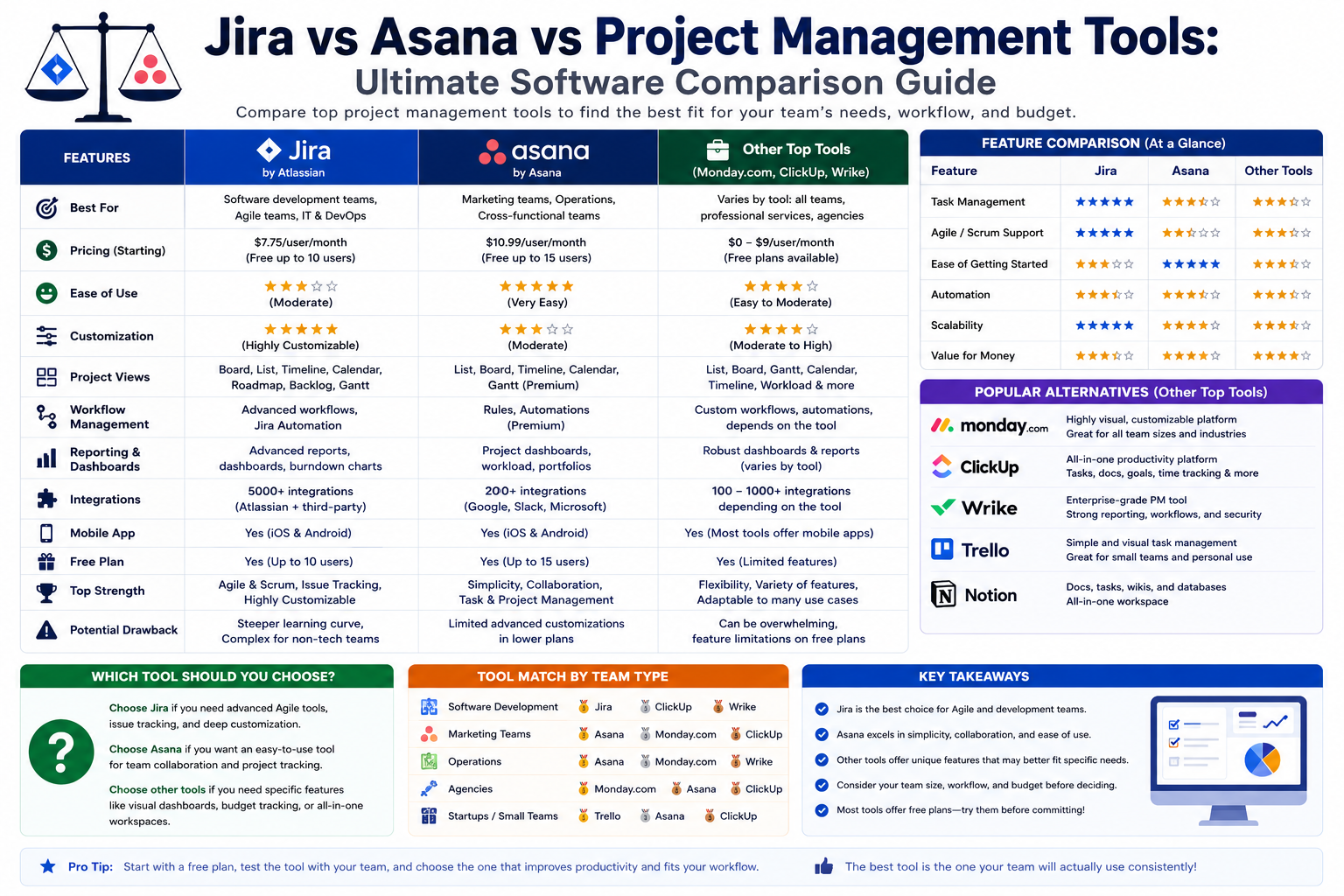
Project management software has become a central part of how modern teams operate, coordinate, and deliver work. Whether it is software development, marketing campaigns, product launches, or enterprise-level planning, organizations rely heavily on structured tools to keep tasks aligned, teams accountable, and progress visible.
Over the years, the market has evolved from simple task lists into highly sophisticated ecosystems that integrate planning, communication, reporting, and resource allocation. Among the most widely discussed platforms in this space are Microsoft Project, JIRA, and Asana. Each of these tools represents a different philosophy of managing work, shaped by its origins and the type of users it was originally built for.
What makes this comparison interesting is not just features or pricing, but the underlying approach each tool takes toward work itself. Some prioritize structure and control, others emphasize flexibility and collaboration, while some attempt to balance both worlds.
To understand which tool performs best in different environments, it is essential to explore their evolution, strengths, limitations, and how they behave in real-world organizational settings. This part focuses primarily on Microsoft Project and JIRA, two platforms that have long influenced how teams plan and execute complex work.
Microsoft Project: A Legacy Tool That Refuses to Fade Away
Microsoft Project has been part of the business software landscape for decades, and its continued relevance often surprises new users. Despite the emergence of modern, cloud-native tools, it remains widely used in large organizations, particularly those that require structured planning, detailed scheduling, and strict resource control.
At its core, Microsoft Project was designed for a traditional project management environment. This typically involves clearly defined phases, predictable timelines, and a strong emphasis on planning before execution. This approach aligns closely with what is commonly known as the Waterfall methodology.
The Waterfall model assumes that projects move in sequential stages. Each phase must be completed before the next begins. While this approach can feel rigid in fast-changing environments, it works extremely well in industries where requirements are stable, such as construction, manufacturing, infrastructure development, and enterprise operations.
Microsoft Project excels in this type of environment because it provides deep control over timelines, dependencies, and resource allocation. Managers can break down complex projects into detailed task hierarchies, assign responsibilities, and monitor progress at a granular level. This level of structure is one of its defining strengths.
One of the key reasons Microsoft Project has survived for so long is its alignment with enterprise needs. Large organizations often require tools that can integrate with existing systems, maintain strict governance, and support long-term planning. Microsoft Project fits neatly into this ecosystem, especially when combined with other Microsoft productivity tools used across corporate environments.
However, its depth and complexity also contribute to its reputation as a challenging tool for beginners. It is not designed for casual task tracking or lightweight collaboration. Instead, it demands a certain level of understanding of project management principles, especially when dealing with dependencies, critical paths, and resource leveling.
This makes Microsoft Project particularly appealing to experienced project managers who need precision rather than simplicity.
JIRA: From Issue Tracking to a Full Project Management Ecosystem
JIRA began its journey as a dedicated issue-tracking tool for software development teams. Its original purpose was simple: help developers log bugs, track issues, and manage technical workflows more efficiently. However, over time, it evolved into a much broader project management platform used across industries.
A significant turning point in JIRA’s evolution came when it expanded beyond its software development roots and began supporting general project management use cases. This transformation was largely driven by the introduction of extensibility through plugins and third-party integrations, which allowed organizations to adapt JIRA to their specific needs.
This shift marked JIRA’s transition from a niche development tool into a flexible work management platform. It became increasingly popular among Agile teams due to its strong support for iterative development, sprint planning, and backlog management.
Unlike traditional tools that emphasize rigid structure, JIRA is built around adaptability. It allows teams to define their own workflows, customize boards, and adjust processes as projects evolve. This flexibility makes it particularly appealing in environments where requirements change frequently and rapid iteration is essential.
Another important factor in JIRA’s growth is its alignment with Agile methodology. Agile emphasizes collaboration, continuous improvement, and incremental delivery. JIRA naturally supports these principles by enabling teams to visualize work in progress, manage tasks in short cycles, and respond quickly to change.
Over time, JIRA has also expanded its capabilities beyond software development. Marketing teams, HR departments, and operational units now use it to manage workflows that require structure but also flexibility. This adaptability has helped JIRA move beyond its original identity and become a general-purpose project management tool.
Despite this expansion, its roots in software development still influence its design. It remains particularly strong in environments where technical teams need visibility into complex workflows, issue tracking, and iterative development cycles.
Contrasting Philosophies: Structure vs Flexibility
When comparing Microsoft Project and JIRA, the most important distinction lies in their underlying philosophy of work management.
Microsoft Project is built around predictability and control. It assumes that projects can be carefully planned, with defined timelines, dependencies, and resource allocations. It encourages detailed upfront planning and structured execution. This makes it ideal for environments where changes are limited and planning accuracy is critical.
JIRA, on the other hand, is built around adaptability and iteration. It assumes that work evolves over time and that plans must be flexible enough to accommodate change. Instead of rigid schedules, it focuses on continuous progress, feedback loops, and incremental delivery.
This fundamental difference affects how teams interact with each tool daily. In Microsoft Project, managers often spend significant time building detailed project plans before execution begins. In JIRA, teams tend to start working quickly and refine their processes as they go.
Neither approach is inherently better. Instead, each reflects a different way of thinking about work. Some organizations thrive on structure and predictability, while others depend on agility and responsiveness.
Understanding this distinction is crucial when evaluating which tool fits a particular environment. It is not just about features, but about mindset and workflow philosophy.
Workflow Management: Control vs Adaptability
Workflow management is one of the key areas where Microsoft Project and JIRA differ significantly.
Microsoft Project provides a highly structured environment for managing workflows. Tasks are typically arranged in a hierarchical format, with clear dependencies and timelines. This allows project managers to visualize the entire lifecycle of a project from start to finish.
One of its strongest features is its ability to manage complex dependencies. When one task depends on another, Microsoft Project ensures that delays or changes are automatically reflected throughout the project timeline. This level of control is particularly useful for large-scale projects where timing and sequencing are critical.
It also provides tools for resource allocation, allowing managers to assign workloads based on availability and capacity. This helps prevent overallocation and ensures that team members are not overloaded.
JIRA approaches workflow management in a very different way. Instead of focusing on rigid timelines, it emphasizes flow and progress. Tasks are represented visually on boards, where they move through different stages of completion.
This Kanban-style approach makes it easy for teams to see what is in progress, what is completed, and what still needs attention. It promotes transparency and encourages continuous movement of work items.
In addition, JIRA supports sprint-based planning, which allows teams to group tasks into short, focused cycles. This is especially useful in Agile environments where priorities can shift frequently.
Unlike Microsoft Project, JIRA does not enforce strict dependencies or timelines by default. Instead, it gives teams the flexibility to define their own workflows and adjust them as needed.
This difference highlights the broader contrast between the two tools: one prioritizes control and predictability, while the other prioritizes flexibility and responsiveness.
Resource Planning and Organizational Visibility in Microsoft Project
One of Microsoft Project’s strongest advantages lies in its ability to manage resources at a detailed level. Resource planning is a critical aspect of large projects, especially when multiple teams, departments, or external stakeholders are involved.
Microsoft Project allows managers to assign resources to specific tasks, track workload distribution, and adjust allocations based on availability. This helps ensure that no single team member is overburdened while others remain underutilized.
The tool also provides visibility into project timelines and overall progress. Managers can see how individual tasks contribute to larger milestones, making it easier to identify bottlenecks or potential delays early in the process.
This level of visibility is particularly valuable in enterprise environments where projects are interconnected, and dependencies extend across multiple departments.
Another important aspect is cost tracking. Microsoft Project allows organizations to estimate and monitor project costs based on resource usage. This makes it easier to align project execution with budget constraints.
However, this level of detail also adds complexity. Managing resources effectively in Microsoft Project requires experience and careful planning. Without proper setup, the system can become overwhelming, especially for new users.
Despite this complexity, organizations that require strict control over resources often find Microsoft Project indispensable.
Collaboration and Agility Strengths in JIRA
JIRA takes a very different approach to collaboration and team interaction. Instead of focusing on detailed planning and resource control, it emphasizes communication, transparency, and adaptability.
One of its most effective features is real-time visibility into work progress. Teams can easily see what tasks are being worked on, who is responsible, and what stage each task is in. This reduces the need for constant status meetings and manual updates.
JIRA also encourages collaboration directly within tasks. Team members can comment, attach files, and provide updates within the same interface where work is tracked. This keeps communication centralized and reduces fragmentation across multiple tools.
The visual nature of JIRA boards also plays an important role in collaboration. Teams can quickly understand project status at a glance, making it easier to coordinate efforts and identify blockers.
Because JIRA is built around Agile principles, it naturally supports iterative work cycles. Teams are encouraged to reflect, adapt, and improve continuously. This creates a dynamic environment where collaboration is ongoing rather than static.
While it may not offer the same level of resource control as Microsoft Project, JIRA excels in environments where speed, flexibility, and communication are more important than rigid planning.
Early Observations in the Comparison
At this stage of comparison, a clear pattern begins to emerge between Microsoft Project and JIRA. Microsoft Project leans heavily toward structured planning, resource management, and long-term predictability. JIRA, in contrast, focuses on adaptability, collaboration, and iterative progress.
These differences are not just technical but philosophical. They reflect two fundamentally different ways of organizing work. One is rooted in traditional project management principles, while the other is shaped by modern Agile practices.
As we move further into this comparison, these differences will continue to influence how each tool performs in various scenarios, including task management, usability, scalability, and real-world applications across different industries.
Project Management at Scale: How Microsoft Project and JIRA Perform in Complex Environments
As organizations grow, project management stops being a simple exercise in task tracking and becomes a discipline of coordination, forecasting, and control across multiple teams, departments, and sometimes entire business units. At this scale, the differences between Microsoft Project and JIRA become much more visible, especially in how each tool handles complexity, structure, and organizational alignment.
Microsoft Project is designed with large-scale planning in mind. It thrives in environments where projects are interconnected, timelines are long, and dependencies stretch across multiple layers of execution. In contrast, JIRA scales by distributing control, allowing teams to operate semi-independently while still maintaining visibility at a higher level.
This fundamental difference shapes how each tool behaves in enterprise environments. Microsoft Project centralizes control, while JIRA decentralizes execution.
In practical terms, this means Microsoft Project is often favored in organizations where top-down planning is essential. Executives and project managers define the roadmap, allocate resources, and maintain strict oversight. Teams then execute within those predefined constraints.
JIRA, on the other hand, is commonly used in environments where teams need autonomy. Instead of waiting for centralized instructions, teams can plan, adjust, and deliver work within their own workflows. Leadership maintains visibility, but execution is distributed.
Both approaches have advantages depending on organizational culture, but they lead to very different experiences when managing large-scale initiatives.
Microsoft Project and Enterprise-Level Planning Precision
One of Microsoft Project’s strongest advantages in large organizations is its ability to handle deeply structured project plans. When dealing with enterprise-scale initiatives, such as infrastructure deployment, corporate restructuring, or multi-year product development cycles, precision becomes essential.
Microsoft Project allows managers to break down complex initiatives into detailed task hierarchies. These hierarchies can include multiple layers of subtasks, dependencies, milestones, and constraints. Each element can be carefully mapped to reflect real-world execution conditions.
This structured approach ensures that every component of a project is accounted for before execution begins. It reduces ambiguity and creates a predictable roadmap that stakeholders can rely on.
Another key strength is its critical path analysis capability. This allows managers to identify which tasks directly impact project completion timelines. By understanding these dependencies, organizations can prioritize resources more effectively and reduce delays caused by bottlenecks.
In large-scale environments, even small delays can cascade into significant disruptions. Microsoft Project helps mitigate this risk by providing a clear visualization of how each task contributes to overall project success.
Resource allocation becomes even more critical at this level. Microsoft Project allows detailed assignment of human resources, equipment, and budget components to specific tasks. This ensures that project execution is aligned with organizational capacity.
However, this level of detail comes with complexity. Managing enterprise-scale projects in Microsoft Project requires experienced planners who understand both the tool and the underlying principles of project management. Without proper configuration, the system can become overwhelming.
Despite this, organizations that prioritize control and predictability often find Microsoft Project indispensable for large-scale coordination.
JIRA’s Distributed Model for Scaling Agile Teams
JIRA approaches scalability in a fundamentally different way. Instead of centralizing control, it distributes responsibility across teams. This makes it particularly effective in organizations that adopt Agile frameworks at scale.
In large Agile environments, multiple teams often work on different components of a product simultaneously. These teams need autonomy to make decisions quickly while remaining aligned with broader organizational goals.
JIRA supports this structure through features like boards, epics, and cross-project visibility. Teams can manage their own workflows while still contributing to larger initiatives.
One of the most powerful aspects of JIRA in scaled environments is its ability to maintain transparency across multiple teams. Leadership can view progress across projects without interfering with day-to-day execution. This balance between autonomy and visibility is one of the reasons JIRA is widely used in software development organizations.
At scale, JIRA also supports portfolio-level tracking. This allows organizations to group multiple projects under broader initiatives and monitor progress at a higher level. While it does not enforce strict project hierarchies like Microsoft Project, it provides enough structure for alignment without limiting flexibility.
Another important aspect is adaptability. In large Agile organizations, priorities can shift rapidly. JIRA’s flexible workflow system allows teams to adjust without disrupting overall progress.
However, scaling JIRA is not without challenges. As the number of projects and teams increases, maintaining consistency in workflows and configurations can become complex. Without proper governance, organizations may face fragmentation across teams.
Despite this, JIRA remains highly effective in environments where adaptability and speed are more important than rigid structure.
Governance and Control: Centralized vs Decentralized Models
Governance plays a crucial role in large-scale project management, and Microsoft Project and JIRA represent two very different approaches to it.
Microsoft Project follows a centralized governance model. Decision-making authority typically resides with project managers or PMO (Project Management Office) teams. These roles are responsible for defining timelines, allocating resources, and ensuring compliance with project plans.
This centralized model ensures consistency across projects. It reduces variability and ensures that all teams follow standardized processes. In industries where compliance, documentation, and predictability are critical, this approach is highly effective.
However, centralized governance can also slow down decision-making. Teams often need approval before making changes, which can reduce agility in fast-moving environments.
JIRA, in contrast, follows a decentralized governance model. Teams are given more autonomy to manage their own workflows and make decisions independently. Governance is enforced through guidelines and configuration rather than strict control.
This allows teams to move faster and respond to changes without waiting for centralized approval. However, it also requires strong coordination mechanisms to ensure alignment across teams.
At scale, this difference becomes significant. Organizations must decide whether they prioritize control or speed. Microsoft Project supports control-driven governance, while JIRA supports autonomy-driven governance.
Neither model is universally better; they simply reflect different organizational philosophies.
Workflow Complexity and Customization at Scale
As organizations grow, workflows become more complex. Different teams may follow different processes, even within the same organization. This creates challenges in maintaining consistency and visibility.
Microsoft Project handles workflow complexity through structured planning. Workflows are typically defined in advance and follow a predictable sequence. This makes it easier to maintain consistency, but it can also limit flexibility.
Changes to workflows often require adjustments to the overall project plan, which can be time-consuming. This is why Microsoft Project is often better suited for environments where processes are stable and predictable.
JIRA takes a different approach by allowing extensive workflow customization. Teams can define their own workflows, modify stages, and adjust processes as needed. This flexibility is particularly useful in Agile environments where processes evolve.
At scale, however, this flexibility can lead to inconsistencies if not properly managed. Different teams may develop slightly different workflows, which can make cross-team coordination more difficult.
To address this, many organizations implement governance frameworks within JIRA to standardize key elements while still allowing flexibility at the team level.
This balance between standardization and adaptability is one of the defining challenges of using JIRA at scale.
Data Visibility and Reporting Across Large Organizations
Visibility is a critical requirement in large-scale project management. Leaders need accurate, real-time insights into project status, resource utilization, and potential risks.
Microsoft Project provides highly structured reporting capabilities. It generates detailed reports on timelines, resource allocation, costs, and progress. These reports are often used in executive decision-making and long-term planning.
The structured nature of Microsoft Project data makes it easier to aggregate and analyze at a high level. This is particularly valuable in industries where reporting accuracy is essential.
JIRA also offers strong reporting capabilities, but in a more flexible format. It provides dashboards, burndown charts, velocity tracking, and other Agile-specific metrics.
These tools are designed to give teams and leaders visibility into workflow efficiency and progress over time. However, because JIRA is more flexible, reporting structures may vary across teams unless standardized.
At scale, organizations often integrate JIRA with additional reporting tools to create unified dashboards across teams.
The difference here is not capability but structure. Microsoft Project emphasizes standardized reporting, while JIRA emphasizes customizable insights.
Integration Ecosystems and Enterprise Alignment
Integration plays a major role in how effectively a project management tool operates at scale. Large organizations rarely rely on a single system; instead, they use multiple tools for communication, documentation, development, and reporting.
Microsoft Project integrates deeply with the Microsoft ecosystem. This includes tools such as Excel, Outlook, Teams, and SharePoint. This integration allows organizations to maintain a unified workflow across multiple business functions.
For example, project timelines can be linked with Excel-based reporting, while communication can be managed through Microsoft Teams. This creates a tightly connected ecosystem that supports enterprise workflows.
This integration strength is one of Microsoft Project’s biggest advantages in large organizations that already rely heavily on Microsoft infrastructure.
JIRA, on the other hand, integrates with a wide range of third-party tools. This includes development platforms, CI/CD pipelines, communication tools, and cloud services.
This flexibility makes JIRA highly adaptable to different technical environments, especially in software development ecosystems. However, it also means that integration complexity can increase depending on the number of tools involved.
At scale, organizations must carefully manage these integrations to avoid fragmentation and ensure smooth data flow across systems.
Organizational Fit and Cultural Alignment
One of the most overlooked aspects of project management tool selection is organizational culture. Tools are not just software systems; they shape how teams think, communicate, and execute work.
Microsoft Project aligns well with structured, hierarchical organizations. It supports top-down planning, detailed documentation, and controlled execution. This makes it ideal for traditional enterprises with clearly defined roles and responsibilities.
JIRA aligns better with collaborative, Agile-driven cultures. It encourages transparency, adaptability, and continuous improvement. This makes it ideal for organizations that prioritize speed and flexibility.
When scaled across large organizations, these cultural differences become even more important. A mismatch between tool philosophy and organizational culture can lead to inefficiencies, resistance, and misalignment.
Understanding this alignment is critical when evaluating long-term adoption of either platform.
Emerging Patterns in Enterprise Adoption
As organizations continue to evolve, patterns in tool adoption become clearer. Microsoft Project tends to dominate in industries such as construction, engineering, and enterprise operations where planning precision is critical.
JIRA tends to dominate in software development, technology companies, and Agile-driven organizations where flexibility and iteration are essential.
However, many large organizations now use both tools in parallel. Microsoft Project is often used for high-level planning, while JIRA is used for execution at the team level.
This hybrid approach reflects the reality that no single tool fully satisfies all organizational needs at scale.
Asana in Focus: The Rise of Simplicity in Modern Project Management
While Microsoft Project and JIRA represent two powerful but structurally heavy approaches to managing work, Asana occupies a very different space in the project management ecosystem. It is built around simplicity, clarity, and ease of collaboration, making it especially appealing to teams that want productivity without operational complexity.
Asana’s design philosophy is rooted in the idea that work should be easy to understand at a glance. Instead of overwhelming users with deeply technical configurations or rigid planning structures, it emphasizes visual organization, intuitive task flow, and seamless communication.
This approach has made Asana particularly popular among marketing teams, startups, creative agencies, and cross-functional business units that prioritize agility and clarity over strict governance or advanced scheduling mechanics.
Unlike Microsoft Project, which leans heavily into structured planning, or JIRA, which emphasizes workflow engineering, Asana focuses on human-centered productivity. It reduces friction between planning and execution by making task management feel natural and conversational.
Asana’s Design Philosophy: Work as a Visual Experience
One of the defining characteristics of Asana is its visual-first approach to task management. Instead of presenting users with complex tables or dense configuration panels, it organizes work into clean, interactive layouts that are easy to interpret.
Tasks are displayed in list form, board form, or timeline form, allowing users to choose the view that best suits their working style. This flexibility is important because different teams think about work differently. Some prefer linear task lists, while others prefer Kanban-style visual boards.
The board view, in particular, is where Asana shines. It allows tasks to be dragged and dropped between stages, creating a fluid representation of workflow progress. This makes it easy for teams to understand what is in progress, what is pending, and what has been completed.
Unlike more complex systems, Asana does not require users to understand technical project management concepts before getting started. This lowers the barrier to entry significantly and allows teams to become productive quickly.
The interface is intentionally designed to reduce cognitive load. Colors, spacing, and layout are used to guide attention rather than overwhelm the user. This creates a sense of clarity that is often missing in more advanced project management platforms.
Task Management in Asana: Simplicity Meets Structure
At the heart of Asana is its task management system. Every piece of work is represented as a task, which can include descriptions, due dates, attachments, comments, and subtasks.
Tasks are designed to be self-contained units of work. This means that teams can focus on individual responsibilities without needing to navigate complex hierarchies or dependencies unless necessary.
This simplicity makes Asana highly effective for teams that need to move quickly. Instead of spending time configuring project structures, teams can immediately begin organizing their work and collaborating.
Subtasks allow for light structuring when needed, but they do not enforce rigid planning. This ensures that teams can maintain flexibility while still breaking down larger work items into manageable components.
Asana also supports task assignments, making it easy to clarify ownership. Each task clearly shows who is responsible, which reduces confusion and improves accountability.
Unlike Microsoft Project, which emphasizes planning depth, or JIRA, which emphasizes workflow stages, Asana focuses on clarity of ownership and communication.
Collaboration as the Core Engine of Asana
Collaboration is one of Asana’s strongest features, and it is deeply embedded in how the platform operates.
Instead of relying on external communication tools, Asana allows teams to communicate directly within tasks. Comments can be added, questions can be asked, and updates can be shared in real time.
This keeps conversations contextual. Instead of searching through emails or chat threads, team members can find all relevant discussions directly within the task itself.
This design significantly reduces communication fragmentation, which is a common problem in many organizations. When communication is scattered across multiple platforms, it becomes difficult to track decisions and maintain alignment.
Asana solves this by anchoring communication to work items. This ensures that context is preserved and easily accessible.
Additionally, team members can mention each other within tasks, triggering notifications and ensuring that important updates are not missed. This creates a dynamic and responsive collaboration environment.
Unlike more rigid systems, Asana encourages ongoing dialogue rather than formal status reporting.
Ease of Use and Onboarding Experience
One of the most widely recognized strengths of Asana is its ease of use. New users can typically begin using the platform within minutes, without needing extensive training or technical knowledge.
This is in stark contrast to Microsoft Project, which often requires structured onboarding due to its complexity, or JIRA, which demands an understanding of workflow configuration and Agile principles.
Asana’s onboarding experience is intentionally simple. Users are guided through creating projects, adding tasks, and assigning responsibilities in a way that feels intuitive rather than technical.
This makes it especially attractive for teams that do not have dedicated project managers or technical administrators.
Because of its simplicity, Asana is often adopted organically within organizations. Teams begin using it for small projects and gradually expand their use as they become more comfortable with the platform.
This bottom-up adoption model contributes to its popularity in fast-moving environments where speed of implementation is important.
Workflow Management in Asana: Flexible but Lightweight
Asana supports workflow management through boards, lists, and timelines, but it does not enforce strict process structures by default.
Instead, it allows teams to define their own workflows based on how they prefer to operate. This flexibility makes it suitable for a wide range of use cases, from content planning to product launches.
However, unlike JIRA, Asana does not focus heavily on workflow engineering. It provides enough structure to organize work but avoids the complexity of deeply customizable workflow systems.
This makes it easier to use but less powerful for highly technical or process-heavy environments.
Workflows in Asana are typically visual and intuitive. Tasks move between stages such as “To Do,” “In Progress,” and “Completed,” but these stages can be customized based on team needs.
This approach strikes a balance between structure and flexibility, making Asana suitable for teams that need organization without rigid constraints.
Project Visibility and Team Transparency
Visibility is a key strength of Asana, particularly for teams that value transparency in their workflows.
Every project provides a clear overview of tasks, progress, and deadlines. This allows team members and stakeholders to quickly understand the status of work without needing detailed reports.
Unlike Microsoft Project, which relies heavily on structured reporting, or JIRA, which provides Agile-specific metrics, Asana focuses on real-time visibility.
Dashboards and overview screens provide summaries of project health, upcoming deadlines, and task distribution. This makes it easier for teams to stay aligned without constant check-ins.
Transparency in Asana is not limited to managers or administrators. Every team member has access to the same information, which encourages shared accountability.
This openness helps reduce bottlenecks caused by information silos, a common issue in larger organizations.
Asana and Creative Workflows
Asana is particularly well-suited for creative and collaborative workflows. Marketing campaigns, content production, design projects, and event planning are all areas where Asana performs strongly.
These types of work benefit from flexibility, iteration, and collaboration rather than rigid planning structures.
In creative environments, requirements often evolve. Asana accommodates this by allowing tasks and projects to be easily adjusted without disrupting overall workflow.
Teams can quickly reorganize tasks, update priorities, and reassign responsibilities as needed.
This adaptability makes Asana a preferred choice for teams that operate in dynamic environments where creativity and responsiveness are essential.
Unlike tools that prioritize strict scheduling or technical workflows, Asana focuses on enabling teams to move quickly while maintaining clarity.
Asana’s Limitations in Complex Enterprise Environments
Despite its strengths, Asana does have limitations, especially in large-scale enterprise environments or highly technical industries.
One of its primary limitations is the lack of deep resource management features. Unlike Microsoft Project, Asana does not provide advanced tools for capacity planning, cost tracking, or resource leveling.
This makes it less suitable for industries where resource optimization is critical.
Another limitation is workflow complexity. While Asana supports basic workflow customization, it does not offer the same level of advanced configuration as JIRA. This can be a drawback for software development teams or organizations with highly structured processes.
Asana also lacks detailed dependency management compared to Microsoft Project. While it allows task dependencies, they are not as deeply integrated into planning and scheduling systems.
These limitations do not reduce Asana’s value, but they do define its ideal use cases more clearly.
Organizational Fit: Where Asana Excels
Asana performs best in environments where collaboration, speed, and simplicity are prioritized over technical depth.
Startups, small to mid-sized businesses, and cross-functional teams often benefit the most from its design. These organizations typically need a tool that is easy to adopt, flexible enough to support different types of work, and simple enough to avoid administrative overhead.
Asana also works well in hybrid environments where teams from different departments need to collaborate without adopting complex project management methodologies.
Its strength lies in its ability to unify communication and task management in a single platform without overwhelming users.
However, in highly structured or technical environments, organizations may find its simplicity limiting.
Emerging Role of Asana in the Project Management Landscape
As the project management landscape continues to evolve, Asana has carved out a distinct role as the simplicity-first alternative.
While Microsoft Project represents structure and control, and JIRA represents agility and workflow engineering, Asana represents accessibility and collaboration.
This positioning has allowed it to grow rapidly in popularity among non-technical teams and organizations seeking a lightweight but effective project management solution.
Its success reflects a broader trend in modern workplaces: not all teams need complex systems to be productive. Many teams benefit more from clarity, speed, and ease of communication than from advanced planning features.
As organizations continue to diversify in structure and workflow complexity, tools like Asana play an increasingly important role in bridging the gap between informal task management and structured project planning.
Hybrid Work Environments and the Blending of Project Management Approaches
Modern organizations rarely rely on a single project management philosophy. Instead, they operate in hybrid environments where structured planning, Agile execution, and lightweight collaboration often coexist within the same company. This shift has changed how tools like Microsoft Project, JIRA, and Asana are used in practice, pushing them beyond their original design boundaries.
In many enterprises, Microsoft Project is still used for high-level strategic planning, especially where timelines span months or even years. It provides leadership teams with a stable framework for forecasting outcomes, allocating budgets, and ensuring long-term alignment across departments. Its strength in structured planning makes it valuable for initiatives that cannot afford ambiguity or rapid scope changes.
At the same time, execution-level work is often handled in JIRA, particularly within engineering and product development teams. These teams operate in fast cycles, requiring frequent updates, iterative releases, and continuous feedback. JIRA supports this rhythm by allowing teams to manage work in small, adaptable increments while still maintaining visibility across broader initiatives.
Meanwhile, Asana often fills the gap between technical and non-technical teams. It becomes the communication bridge for departments like marketing, HR, operations, and design, where work is collaborative but not deeply technical. Its simplicity allows these teams to stay aligned without needing to adopt complex frameworks or methodologies.
This layered approach reflects a broader evolution in how organizations think about productivity. Instead of forcing all teams into a single system, companies increasingly adopt multiple tools that serve different layers of work. Strategy, execution, and collaboration are separated but interconnected.
However, this hybrid structure introduces new challenges. One of the most significant is synchronization. When multiple tools are used simultaneously, maintaining consistency across timelines, priorities, and reporting becomes more difficult. Information can become fragmented if integrations are not carefully managed.
Another challenge is cultural alignment. Teams working in Microsoft Project may operate with a structured mindset, while teams in JIRA or Asana may adopt more flexible approaches. Without clear communication, these differences can create friction in cross-functional collaboration.
Despite these challenges, hybrid project management ecosystems are becoming the norm rather than the exception. Organizations are recognizing that no single tool can fully support every aspect of modern work. Instead, success depends on choosing the right combination of tools that align with different levels of complexity and team behavior.
As a result, the future of project management is less about choosing one platform over another and more about building interconnected systems that support diverse working styles while maintaining organizational coherence.
Conclusion
The comparison between Microsoft Project, JIRA, and Asana highlights a fundamental truth about modern work management: there is no universal solution that fits every organization, team, or project type. Each tool reflects a different philosophy of how work should be planned, executed, and communicated, and their effectiveness depends heavily on the environment in which they are used.
Microsoft Project represents structure, precision, and long-term control. It is built for organizations that require detailed planning, strict scheduling, and strong oversight of resources and timelines. Its strength lies in its ability to model complex projects with high accuracy, making it particularly valuable in industries where predictability and accountability are essential. However, this strength also comes with complexity, requiring users to have a solid understanding of project management principles to fully leverage its capabilities.
JIRA, in contrast, represents adaptability and iterative progress. It is deeply rooted in Agile thinking, making it ideal for environments where change is constant and rapid delivery is a priority. Its flexibility allows teams to design workflows that match their actual working behavior rather than forcing them into predefined structures. This makes it especially powerful for software development and technical teams that thrive on continuous improvement and fast feedback cycles. However, as organizations scale, maintaining consistency across teams can become a challenge without proper governance.
Asana sits between these two extremes, offering a simplified and highly intuitive approach to managing work. It focuses on clarity, collaboration, and ease of use, making it accessible to a wide range of users without requiring extensive training or technical expertise. Its strength lies in reducing friction in day-to-day task management, enabling teams to stay organized and aligned with minimal effort. While it may lack the deep planning and advanced workflow capabilities of the other two platforms, it excels in environments where speed, communication, and simplicity are more important than technical depth.
When viewed together, these tools are not competitors in a traditional sense but rather different responses to the same challenge: how to organize human effort efficiently in increasingly complex environments. Organizations that understand this distinction are better equipped to build workflows that match their operational reality rather than forcing a single system onto every team.
Ultimately, the right choice depends on context. Structured industries benefit from Microsoft Project’s rigor, Agile-driven teams thrive with JIRA’s flexibility, and collaborative, fast-moving teams often find Asana’s simplicity most effective. In many cases, the most successful organizations are those that strategically combine these tools, using each where it adds the most value.
The future of project management is not about selecting one perfect platform, but about understanding how different tools complement each other to support strategy, execution, and collaboration at every level of work.