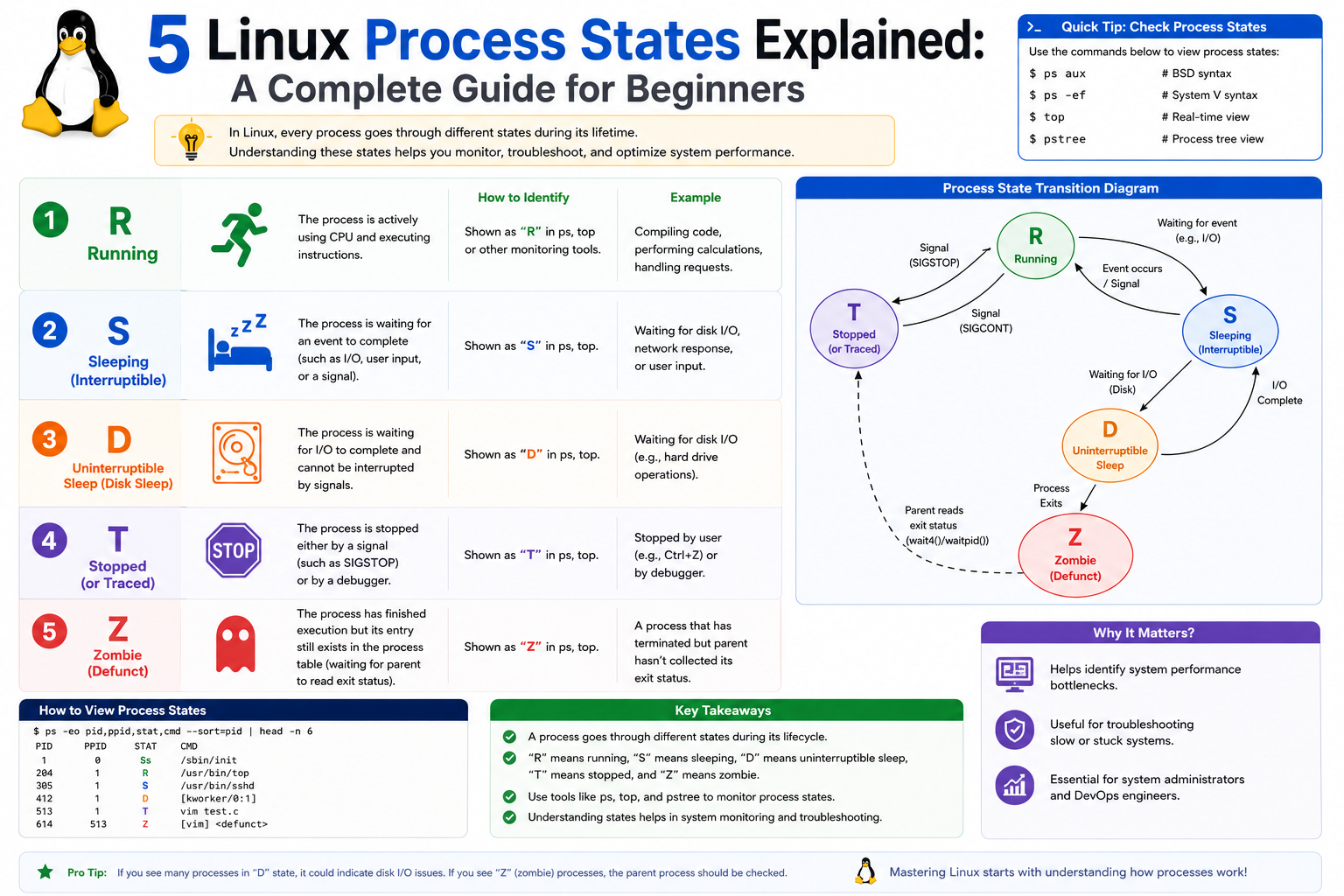
In every Linux operating system, processes are at the core of how the system functions. A process is simply a running instance of a program, and almost everything that happens inside Linux is driven by processes. Whether you are opening a terminal, running a background service, or executing a simple command, the system creates and manages processes continuously.
Modern Linux systems are designed to handle hundreds or even thousands of processes at the same time. These processes are not isolated; instead, they are organized in a structured hierarchy where some processes create others. This structure allows the operating system to maintain order, manage resources efficiently, and ensure stability even under heavy workloads.
For example, when a user logs into a Linux system, a shell process is created. That shell becomes the starting point for most user activity. Any command executed from that shell may create additional processes, which are considered child processes. These child processes remain linked to the original parent shell process, forming a process tree that represents the execution flow of system activity.
Understanding this hierarchy is important because it explains how Linux manages lifecycle events such as termination, cleanup, and resource allocation. When a user logs out, the system ensures that all child processes tied to that session are properly handled, preventing orphaned processes from consuming system resources unnecessarily.
However, processes do not simply run continuously at full CPU usage. If that were the case, the system would quickly become overloaded, making multitasking nearly impossible. Instead, Linux introduces different process states that allow the operating system to intelligently manage CPU usage and system responsiveness.
These states define whether a process is actively executing, waiting for input, paused, or terminated but not yet cleaned up. Each state serves a specific purpose in balancing performance and efficiency.
Why Linux Process States Exist
To understand process states, it is important to first understand the limitations of system resources, especially CPU time. A CPU can only execute a limited number of instructions at any given moment. In a system with multiple active processes, it becomes impossible for all processes to run simultaneously at full capacity.
Without a structured system for managing execution, processes would compete aggressively for CPU time, resulting in instability and performance degradation. Linux solves this problem by introducing process states, which allow the operating system to control when and how a process uses CPU resources.
Some processes need to run continuously, such as system services, while others only need CPU time intermittently, such as user commands or background tasks. Many processes spend most of their lifetime waiting for external events like disk input, network responses, or user interaction. Keeping such processes constantly active would waste CPU cycles.
By categorizing processes into different states, Linux ensures that CPU resources are allocated efficiently. Active processes receive CPU time when needed, while waiting processes are temporarily paused without consuming unnecessary resources. This design allows Linux to support high levels of multitasking while maintaining system stability.
Another important reason for process states is system control. Administrators often need to monitor, pause, resume, or terminate processes depending on system conditions. Process states provide visibility into what each process is doing at any given moment, making troubleshooting and performance tuning possible.
Understanding the Linux Process Hierarchy
Before exploring individual process states, it is helpful to understand how processes are structured within Linux. Every process in the system originates from another process, forming a parent-child relationship. This creates a tree-like structure known as the process hierarchy.
At the top of this hierarchy is the init system or system manager, which is responsible for starting all system services during boot. From there, system processes and user processes branch out into multiple layers.
When a user logs in, the shell process becomes the parent for any commands executed in that session. If a command launches a program, that program becomes a child process of the shell. If that program creates additional subprocesses, they become grandchildren in the process tree.
This hierarchy is essential for system organization. It ensures that processes remain traceable and manageable. When a parent process terminates, Linux handles its child processes in a controlled manner to prevent resource leaks or orphaned tasks.
The hierarchy also plays a key role in process termination. If a parent process ends unexpectedly, its child processes may be reassigned to another system process that takes responsibility for cleanup. This prevents uncontrolled process growth and ensures system stability.
Understanding this structure helps explain why process states such as “zombie” exist, and how Linux maintains order even when processes end unexpectedly or fail to behave correctly.
Running and Runnable Process State
One of the most important process states in Linux is the running and runnable state. Although these terms are often grouped, they represent slightly different conditions in a process lifecycle.
A running process is currently executing instructions on a CPU core. It is actively using system resources and performing tasks such as calculations, data processing, or system operations. In this state, the process directly contributes to CPU utilization.
A runnable process, on the other hand, is ready to execute but is waiting for CPU availability. It has all the required resources to run, but is placed in a queue by the scheduler. When the CPU becomes available, the process is selected and transitions into the running state.
This distinction is important in systems where multiple processes compete for limited CPU time. In environments such as virtual machines or heavily loaded servers, many processes may be runnable but not immediately executed due to scheduling constraints.
The Linux scheduler plays a critical role here. It determines which processes receive CPU time based on priority, fairness, and system load. Runnable processes may wait in the queue for a short time or longer periods, depending on system demand.
From a performance perspective, a high number of runnable processes may indicate CPU congestion. This does not necessarily mean the system is broken, but it suggests that demand for CPU resources is higher than availability.
Understanding this state helps system administrators diagnose performance bottlenecks and optimize workload distribution.
Interruptible Sleep State
Another major process state is interruptible sleep. This state occurs when a process is waiting for an external event to complete. Instead of consuming CPU resources while waiting, the process voluntarily pauses execution and allows other processes to use the CPU.
Common examples include waiting for user input, reading data from a file, or receiving a response from a network request. During this time, the process is inactive but still considered alive.
The key characteristic of interruptible sleep is that the process can be resumed or terminated easily. If the expected event occurs, the process immediately returns to the runnable state and continues execution. If necessary, it can also be interrupted by system signals, allowing administrators to stop it without complications.
This state is essential for efficiency. Without it, processes would continuously check for events using CPU cycles, leading to unnecessary resource consumption. Instead, Linux allows them to “sleep” until they are needed again.
Many common applications spend a significant portion of their lifetime in interruptible sleep. For example, web servers often wait in this state for incoming requests. Similarly, interactive programs wait for user input most of the time.
This state ensures that system resources are used only when necessary, improving overall performance and responsiveness.
Uninterruptible Sleep State
The uninterruptible sleep state is similar to interruptible sleep but with a critical difference: processes in this state cannot be interrupted by standard signals. They are typically waiting for low-level system operations to complete, such as disk input/output or kernel-level operations.
In this state, the process is effectively blocked until the required operation finishes. Because these operations are often essential for system stability, interrupting them could lead to data corruption or system instability.
A common example involves file system operations or network file systems. If a process is reading or writing data and the underlying storage becomes temporarily unavailable, the process may enter uninterruptible sleep until the issue is resolved.
This state is generally short-lived, but in certain cases, it may persist longer due to hardware issues, driver problems, or network failures. When this happens, the process appears to be stuck, but it is actually waiting for a system-level event to complete.
Unlike interruptible sleep, processes in this state cannot be forcefully terminated using standard methods. They must either complete their operation or wait for the system condition causing the block to resolve.
Because of this behavior, uninterruptible sleep is often associated with troubleshooting complex system issues. It can indicate underlying hardware or kernel-level problems that require deeper investigation.
Stopped Process State
A stopped process has been temporarily suspended from execution. Unlike sleep states, a stopped process is not waiting for an event; instead, it has been explicitly paused, either by user action or system control.
This state is commonly triggered when a user suspends a process from the terminal. Once stopped, the process retains its state in memory but does not consume CPU resources.
Stopped processes can later be resumed, allowing execution to continue from where they left off. This makes the state useful for task management in interactive environments, where users may need to temporarily pause a process and return to it later.
From a system perspective, stopped processes are still part of the process table, but they are inactive. They do not perform any operations until explicitly resumed.
This state is particularly useful in development and debugging environments, where processes may need to be paused for inspection or controlled execution.
Zombie Process State
The zombie process state represents a unique condition in Linux process management. A zombie process has completed execution but remains in the process table because its parent has not yet collected its exit status.
When a process finishes execution, it sends a signal to its parent indicating that it has terminated. The parent is responsible for performing cleanup operations, which include removing the process entry from the system.
If the parent does not perform this cleanup, the terminated process remains in a zombie state. It no longer consumes CPU resources or performs any tasks, but it still occupies an entry in the process table.
Zombie processes are not active processes, but they are visible to the system until properly reaped. They typically do not cause performance issues unless they accumulate in large numbers.
The existence of zombie processes highlights the importance of proper process management in Linux. It ensures that system resources are fully released only when both child execution and parent acknowledgment are complete.
Linux Scheduler and CPU Time Management
At the heart of process behavior in Linux lies the scheduler, which is responsible for deciding which process gets access to the CPU at any given moment. Since multiple processes often compete for limited processing power, the scheduler acts as a control system that distributes CPU time fairly and efficiently.
The scheduler does not treat all processes equally at all times. Instead, it evaluates various factors such as process priority, system load, and process state before assigning CPU time. Processes that are actively running or ready to run are prioritized differently from those waiting for external events.
In a modern Linux system, scheduling happens extremely quickly and repeatedly, often many thousands of times per second. This rapid switching creates the illusion that many processes are running simultaneously, even though a single CPU core can execute only one instruction stream at a time.
Processes in the runnable state are placed in scheduling queues, waiting for execution slots. The scheduler continuously cycles through these queues, selecting processes based on fairness algorithms and priority levels. This ensures that no single process monopolizes the CPU unless explicitly designed to do so.
CPU time allocation is also influenced by process niceness values, which allow certain processes to have higher or lower priority. A process with a higher priority receives more frequent CPU access, while lower-priority processes may experience delays.
Understanding scheduling behavior is essential because many performance issues in Linux systems are not caused by failing processes but by CPU contention and scheduling delays.
Context Switching and Process Execution Flow
When the CPU switches from executing one process to another, a mechanism called context switching occurs. This is a fundamental part of multitasking in Linux.
During a context switch, the current state of a running process is saved so that it can be resumed later. This includes CPU registers, memory pointers, and execution state. Once saved, the scheduler loads the state of another process, and execution continues from where it left off.
Although context switching happens very quickly, it is not free in terms of performance. Each switch introduces overhead because the CPU must save and restore process states. When too many context switches occur in a short period, system performance can degrade.
Processes in different states influence how often context switching happens. For example, a system with many runnable processes may experience frequent switches as the scheduler tries to balance CPU time. Similarly, processes frequently entering and leaving sleep states can increase scheduling activity.
Efficient systems aim to minimize unnecessary context switching while still maintaining responsiveness. This balance is one of the key design challenges in operating system engineering.
Understanding context switching also helps explain why processes do not appear to run continuously even when they are active. Instead, they are executed in small time slices, giving each process a fair opportunity to use CPU resources.
Process Creation and Lifecycle Flow
Every process in Linux has a lifecycle that begins when it is created and ends when it terminates. The creation of processes follows a structured mechanism that ensures stability and traceability.
A new process is typically created using a system-level operation that duplicates an existing process. The original process becomes the parent, while the newly created one becomes the child. This relationship forms the basis of the process hierarchy.
Once created, the child process inherits many attributes from its parent, including environment variables, file descriptors, and execution context. This inheritance allows processes to function consistently within the system environment.
After creation, a process transitions through various states depending on its execution requirements. It may run immediately, wait for resources, or remain idle until triggered.
The lifecycle continues until the process completes its task or is terminated. At termination, the process releases its resources and signals its parent for cleanup. If properly handled, the process is fully removed from the system.
However, if cleanup does not occur correctly, remnants such as zombie entries may remain, highlighting the importance of proper lifecycle management.
This lifecycle model ensures that processes remain organized and traceable from creation to termination, reducing the risk of system instability.
The Role of the Process Table and Identifiers
Linux maintains a structured record of all active processes in a system-managed data structure commonly referred to as the process table. Each entry in this table represents a process and contains important metadata such as process ID, state, priority, and resource usage.
Every process is assigned a unique identifier known as a PID. This identifier allows the system to track and manage processes individually. Parent-child relationships are also tracked using parent process identifiers, which link related processes together.
The process table is essential for system monitoring and control. Tools that display running processes rely on this structure to present real-time system activity. Without it, administrators would have no visibility into what is happening inside the system.
Processes enter and leave the process table throughout their lifecycle. When a process terminates properly, its entry is removed. However, in certain cases, such as zombie processes, entries remain temporarily until cleanup is completed.
The process table also plays a role in resource allocation. By tracking memory usage, CPU time, and process state, the system can make informed scheduling decisions.
Because the process table is constantly updated, it provides an accurate snapshot of system activity at any given moment.
Signals and Process Control Mechanisms
Linux uses signals as a primary method of controlling processes. A signal is a notification sent to a process to inform it of an event or request a specific action.
Signals can be used for a variety of purposes, including termination requests, process interruption, suspension, or custom behavior defined by applications. They provide a flexible way to interact with processes without directly modifying their execution flow.
When a signal is sent to a process, the process may choose to handle it, ignore it, or take default action depending on how it is designed. Some signals are non-negotiable and force immediate termination, while others allow graceful handling.
Signals are closely tied to process states. For example, a process in interruptible sleep may respond quickly to a signal, while a process in uninterruptible sleep may not respond until it exits that state.
This interaction between signals and process states is important for system control. It allows administrators to manage processes even when they are not actively running.
Signals also play a role in inter-process communication, enabling processes to coordinate actions or notify each other of state changes.
Understanding signals provides deeper insight into how Linux maintains control over complex and dynamic process environments.
Advanced State Transitions in Linux Processes
Process states in Linux are not static. Instead, processes transition between different states continuously based on system conditions and execution requirements.
A process may start in a runnable state, transition into running when scheduled, and then move into a sleep state while waiting for input. Once the required event occurs, it returns to runnable and eventually runs again.
These transitions are managed by the kernel, which monitors process behavior and determines when state changes should occur. The transitions are designed to be efficient and transparent to the user.
State transitions are influenced by both internal and external factors. Internal factors include process logic and resource requirements, while external factors include system load, hardware performance, and user input.
Some transitions occur rapidly, while others may take longer depending on system conditions. For example, a process waiting for disk input may remain in a sleep state until the hardware responds.
Understanding these transitions helps explain why processes appear to change behavior over time. A process is not fixed in one state but moves dynamically depending on its needs and system availability.
Kernel Involvement in Process Management
The Linux kernel is responsible for managing all process-related activities, including state transitions, scheduling, and resource allocation. It acts as the central authority that ensures processes operate correctly and efficiently.
The kernel maintains detailed information about each process and continuously monitors system activity. When conditions change, it updates process states accordingly.
For example, when a process requests input from a disk, the kernel places it into a sleep state and schedules other processes in its place. Once the input is ready, the kernel wakes the process and returns it to the runnable queue.
The kernel also enforces system rules such as memory protection and CPU scheduling policies. This ensures that no single process can interfere with others or destabilize the system.
Because the kernel operates at a low level, it has full control over process execution. This allows it to manage even complex scenarios such as deadlocks, resource contention, and hardware delays.
Understanding kernel involvement is essential for understanding how Linux maintains stability even under heavy system load.
Process Monitoring and System Observation
Monitoring processes is an essential part of system administration. Linux provides several tools that allow users to observe process states, resource usage, and system performance in real time.
These tools display information such as process identifiers, CPU usage, memory consumption, and current state. By analyzing this data, administrators can identify performance issues or abnormal behavior.
Process monitoring also helps in diagnosing system slowdowns. For example, a high number of processes in the runnable state may indicate CPU overload, while many processes in the sleep state may suggest I/O bottlenecks.
Observing process behavior over time provides insight into system health and efficiency. It also helps in identifying processes that consume excessive resources or behave unexpectedly.
Effective monitoring is crucial for maintaining system performance in both small and large-scale environments.
Performance Challenges Related to Process States
Although Linux is designed to manage processes efficiently, certain conditions can still lead to performance challenges. These challenges often arise from improper resource usage, excessive process creation, or system bottlenecks.
For example, too many runnable processes can overwhelm the scheduler, leading to delays in CPU allocation. Similarly, processes stuck in uninterruptible sleep may indicate hardware or driver issues that require attention.
High context switching rates can also negatively impact performance by increasing CPU overhead. This usually occurs when the system is overloaded with short-lived processes.
Sleep states can also contribute to performance issues if processes remain blocked for long periods due to slow I/O operations or network latency.
Understanding how process states contribute to these challenges allows administrators to diagnose and resolve performance problems more effectively.
By analyzing system behavior through process states, it becomes possible to identify root causes rather than just symptoms.
Deep Dive into Interrupt Handling and Process Wake-Up Mechanisms
One of the most important yet less visible aspects of Linux process management is how sleeping processes are brought back into execution. This mechanism is tightly connected with interrupts, kernel events, and scheduling decisions that determine when a process should resume work.
When a process enters a sleep state—especially interruptible sleep—it is essentially removed from the active scheduling queue. It is no longer considered for CPU time until the condition it is waiting for is satisfied. That condition might be user input, disk I/O completion, network response, or any kernel-managed event.
The moment that the event occurs, the kernel generates an internal notification that tells the system the process can be awakened. This wake-up event is not random; it is carefully coordinated by the kernel subsystem responsible for the resource being waited on. For example, disk operations are handled by storage drivers, while network operations are handled by networking stacks.
Once the event is completed, the process is moved from the sleep queue back into the runnable queue. This transition is crucial because it ensures that processes resume execution only when their required data is ready.
In interruptible sleep, this wake-up mechanism is flexible. The process can be awakened either by the completion of its task or by an external signal. This is why interruptible sleep is commonly used for user-facing applications and network services, where responsiveness is important.
In contrast, uninterruptible sleep behaves differently. Even if a signal is sent to the process, it cannot wake up until the underlying kernel operation is completed. This ensures data consistency but can sometimes make the process appear “stuck” from a system monitoring perspective.
Understanding wake-up mechanisms is essential because they explain why processes may suddenly reappear as active after being idle for long periods. This is not accidental behavior but a structured response to system events managed by the kernel.
The Relationship Between I/O Operations and Process States
Input/output (I/O) operations are one of the most common reasons why processes change states in Linux. Almost every meaningful application relies on I/O in some form, whether it is reading from disk, writing logs, communicating over a network, or interacting with user input devices.
When a process requests I/O, it typically cannot continue execution until the operation completes. Instead of wasting CPU cycles waiting, the process is placed into a sleep state. This allows the system to allocate CPU resources to other active processes.
Disk I/O is particularly influential in process behavior. If a process needs to read a large file or write data to storage, it may remain in a sleep state for a noticeable duration. On fast storage systems, this duration is minimal, but on slower or overloaded systems, it can be significantly longer.
Network I/O introduces additional variability. A process waiting for a server response may enter a sleep state until the network packet arrives. If there is network congestion or latency, the process remains inactive for longer periods.
Because of these dependencies, I/O performance has a direct impact on overall system responsiveness. A system with slow I/O will show many processes in sleep state, even if CPU usage appears low.
This relationship is important because it highlights that CPU usage alone is not enough to evaluate system performance. A system can appear idle while actually being blocked on I/O operations.
Linux manages this by ensuring that processes return to a runnable state immediately after I/O completion, allowing them to resume execution without delay.
How Process Priorities Influence State Behavior
In Linux, not all processes are treated equally when it comes to CPU scheduling. Each process is assigned a priority level that influences how much CPU time it receives and how quickly it is selected for execution.
Priority is not directly a process state, but it strongly affects how processes move between states, especially between runnable and running states. Higher-priority processes are more likely to be selected by the scheduler, while lower-priority processes may spend more time waiting in the runnable queue.
This system ensures that critical system tasks receive more attention than less important background tasks. For example, system services may be assigned a higher priority than user applications.
Priority also affects responsiveness. A high-priority process that enters the runnable state will be scheduled more quickly than a low-priority one, reducing latency in time-sensitive applications.
However, Linux uses a balanced approach to avoid starvation, which is when low-priority processes never get CPU time. The scheduler ensures that all processes eventually receive execution time, even if they are lower in priority.
This balancing act is essential for system fairness and stability. Without it, high-priority processes could monopolize CPU resources and prevent other tasks from executing.
Understanding priority behavior helps explain why some processes appear to respond faster than others, even when they are in the same state.
The Hidden Complexity of Zombie Processes in System Memory
Zombie processes are often misunderstood because they appear in process listings even though they are no longer actively running. However, their existence is an important part of the Linux process lifecycle management.
When a process completes execution, it does not immediately disappear from the system. Instead, it leaves behind an entry that contains its exit status. This information is essential for the parent process, which may need to determine whether the child process completed successfully or encountered errors.
The zombie state exists during this brief period between process termination and parent acknowledgment. It ensures that important exit information is not lost.
From a system perspective, zombie processes do not consume CPU or memory resources in the traditional sense. However, they still occupy a slot in the process table, which is a limited system resource.
If a system accumulates too many zombie processes, it may eventually reach the limit of available process identifiers, leading to issues when creating new processes.
Zombie processes are usually harmless in small numbers, but a growing number of them often indicates that the parent process is not properly handling child termination.
This can happen due to programming errors, system bugs, or misconfigured applications. In such cases, system administrators may need to identify and restart the parent process to clear the zombie entries.
Understanding zombies is important because they represent a communication checkpoint between child and parent processes, ensuring that execution results are properly recorded.
Orphan Processes and Reassignment Behavior
Closely related to zombies are orphan processes, which occur when a parent process terminates before its child processes. Unlike zombies, orphan processes are still actively running and consuming system resources.
When a process becomes orphaned, Linux does not leave it unmanaged. Instead, it reassigns the orphan process to a special system process responsible for adoption and cleanup.
This reassignment ensures that every process remains under supervision, even if its original parent disappears unexpectedly.
Once adopted, orphan processes continue execution normally. They are not interrupted or affected by the change in parentage. Instead, the new parent takes responsibility for managing their lifecycle.
This mechanism prevents process loss and ensures that system resources are properly managed even in unexpected scenarios.
Orphan handling is a key example of Linux resilience. It ensures that the system remains stable even when individual processes behave unpredictably or terminate incorrectly.
Real-World Scenarios of Process State Transitions
In practical environments, process states constantly change based on system activity. For example, when a user opens a web browser, the browser process starts in a runnable state before being scheduled to run.
Once active, it may enter a sleep state while waiting for network requests or user interactions. As the user navigates different pages, the process transitions repeatedly between running, runnable, and sleep states.
Similarly, system services such as logging or scheduling tools operate in cycles of activity and inactivity. They remain in a sleep state most of the time and only wake up when specific events occur.
Background tasks like cron jobs follow predictable patterns. They remain idle until scheduled execution time, then transition into the running state, and return to sleep afterward.
These real-world patterns highlight how dynamic process states are in Linux systems. A single process can move through multiple states within seconds, depending on workload and system conditions.
Understanding these transitions helps in diagnosing system behavior and identifying performance bottlenecks.
Process Table Limits and System Stability
Every Linux system has a finite limit on how many processes it can manage at once. This limit is defined by system configuration and hardware resources.
The process table stores information about all active, sleeping, and zombie processes. If this table becomes too large, the system may run into resource constraints.
High process counts can occur due to poorly designed applications, runaway scripts, or excessive background task creation. When this happens, system stability may be affected.
Symptoms of process table exhaustion include inability to create new processes, system slowdowns, and failure of user commands.
To prevent this, Linux enforces limits on process creation per user and system-wide. These limits ensure that no single user or application can overload the system with excessive process creation.
Monitoring process count is an important part of system administration, especially in multi-user or server environments.
Memory Interaction with Process States
Although process states are primarily related to CPU scheduling, they also have a close relationship with memory management.
When a process enters a sleep state, its memory remains allocated but is not actively used for execution. This allows the process to resume quickly when needed.
In systems with memory pressure, the kernel may take additional steps, such as swapping inactive process memory to disk. This can affect wake-up performance when processes transition back to the runnable state.
Running processes require active memory access, while sleeping processes are more passive. However, they still occupy memory resources unless explicitly released.
Memory efficiency depends on how well the system balances active and inactive processes. Linux uses advanced memory management techniques to ensure that sleeping processes do not unnecessarily consume critical resources.
Understanding this relationship is important for diagnosing performance issues related to both CPU and memory usage.
Long-Term Behavior of System Processes
Over time, system processes follow predictable patterns based on their roles. Some processes run continuously, while others activate periodically or conditionally.
System services often alternate between running and sleep states, depending on workload demand. User processes tend to be more dynamic, frequently changing states based on interaction.
Background maintenance tasks may remain idle for long periods before briefly executing and returning to sleep.
This long-term behavior ensures that system resources are used efficiently. Instead of continuously running all processes, Linux activates them only when necessary.
This design is one of the reasons Linux systems are known for stability and efficiency in both desktop and server environments.
Subtle Indicators of System Health Through Process States
Process states provide valuable insights into system health. By observing the distribution of states, administrators can understand how the system is performing.
A system with many running processes may indicate high computational demand. A system with many sleeping processes may indicate heavy I/O activity. A system with increasing zombie processes may indicate application-level issues.
Even subtle changes in process state distribution can signal performance problems before they become critical.
Monitoring these patterns helps in proactive system management and prevents failures before they occur.
Process states, therefore, are not just technical classifications but also diagnostic tools that reflect the internal condition of the operating system.
Process Scheduling Efficiency and System Responsiveness
One of the less obvious but very important aspects of Linux process management is how scheduling efficiency directly affects system responsiveness. Even when a system has powerful hardware, poor scheduling conditions can make it feel slow or unresponsive.
The scheduler constantly makes micro-decisions about which process should execute next, and these decisions depend heavily on current process states. When too many processes remain in the runnable state, the scheduler must divide CPU time into smaller slices. This increases switching frequency and can introduce slight delays in execution.
On the other hand, when most processes are in sleep states, the system appears idle even though many tasks are queued for future execution. This balance between active execution and waiting directly determines how smooth the user experience feels.
Responsiveness is especially noticeable in interactive systems. For example, when a user types a command, the shell process must quickly transition from waiting to running. If the system is overloaded with high-priority runnable processes, even simple interactions may experience delay.
Linux handles this through dynamic scheduling adjustments that continuously evaluate system load. Processes that frequently consume CPU may have their priority adjusted, while those that remain inactive are deprioritized until needed again.
This adaptive behavior ensures that no single process permanently disrupts system responsiveness. It also allows Linux to maintain stability even under unpredictable workloads, such as sudden spikes in user activity or background service execution.
Understanding scheduling efficiency helps explain why two systems with identical hardware can perform very differently depending on process behavior and workload distribution.
Kernel Threads and Internal System Processes
In addition to user-created processes, Linux also runs internal system processes known as kernel threads. These are specialized processes managed entirely by the kernel and are responsible for handling low-level system functions.
Kernel threads operate in the background and support essential tasks such as memory management, hardware communication, and system timing. Unlike regular user processes, they are tightly integrated with kernel operations and often do not appear in standard user-level process interactions.
These internal processes follow the same state model as other processes, but behave differently due to their privileged nature. For example, they may remain in a sleep state while waiting for hardware events or transition quickly between running and idle states depending on system demands.
Kernel threads ensure that core system functionality remains stable and responsive. Without them, tasks such as disk scheduling, network packet handling, and interrupt processing would not function efficiently.
Because they are part of the system’s core architecture, kernel threads are rarely terminated or manually controlled. Instead, they are managed automatically by the operating system.
Their behavior contributes significantly to overall system stability and helps maintain consistent performance across all process states.
Conclusion
Linux process states form the foundation of how the operating system manages execution, performance, and resource allocation. Every action that takes place within the system—whether it is a simple command in the terminal or a complex background service—depends on how processes move between different states. These states ensure that CPU time is distributed efficiently, system resources are not wasted, and multiple tasks can run smoothly at the same time.
The distinction between running, runnable, and various sleep states highlights how Linux balances active computation with waiting periods. Processes are not forced to consume CPU continuously; instead, they are paused intelligently when waiting for input, system events, or hardware responses. This design significantly improves system efficiency and prevents unnecessary load on the processor.
Special states, such as stopped and zombie, further demonstrate how Linux handles process control and lifecycle management. Stopped processes allow users to pause execution intentionally, while zombie processes ensure that termination information is properly communicated between child and parent processes. Even though these states may seem minor, they play a crucial role in maintaining system order and reliability.
By understanding process states, users and administrators gain deeper insight into system behavior, performance issues, and resource usage patterns. It becomes easier to diagnose slowdowns, identify bottlenecks, and manage system workloads effectively.
Ultimately, Linux process states are not just technical classifications but an intelligent framework that enables multitasking, stability, and scalability. They reflect the operating system’s ability to manage complexity while maintaining consistent performance across a wide range of computing environments.