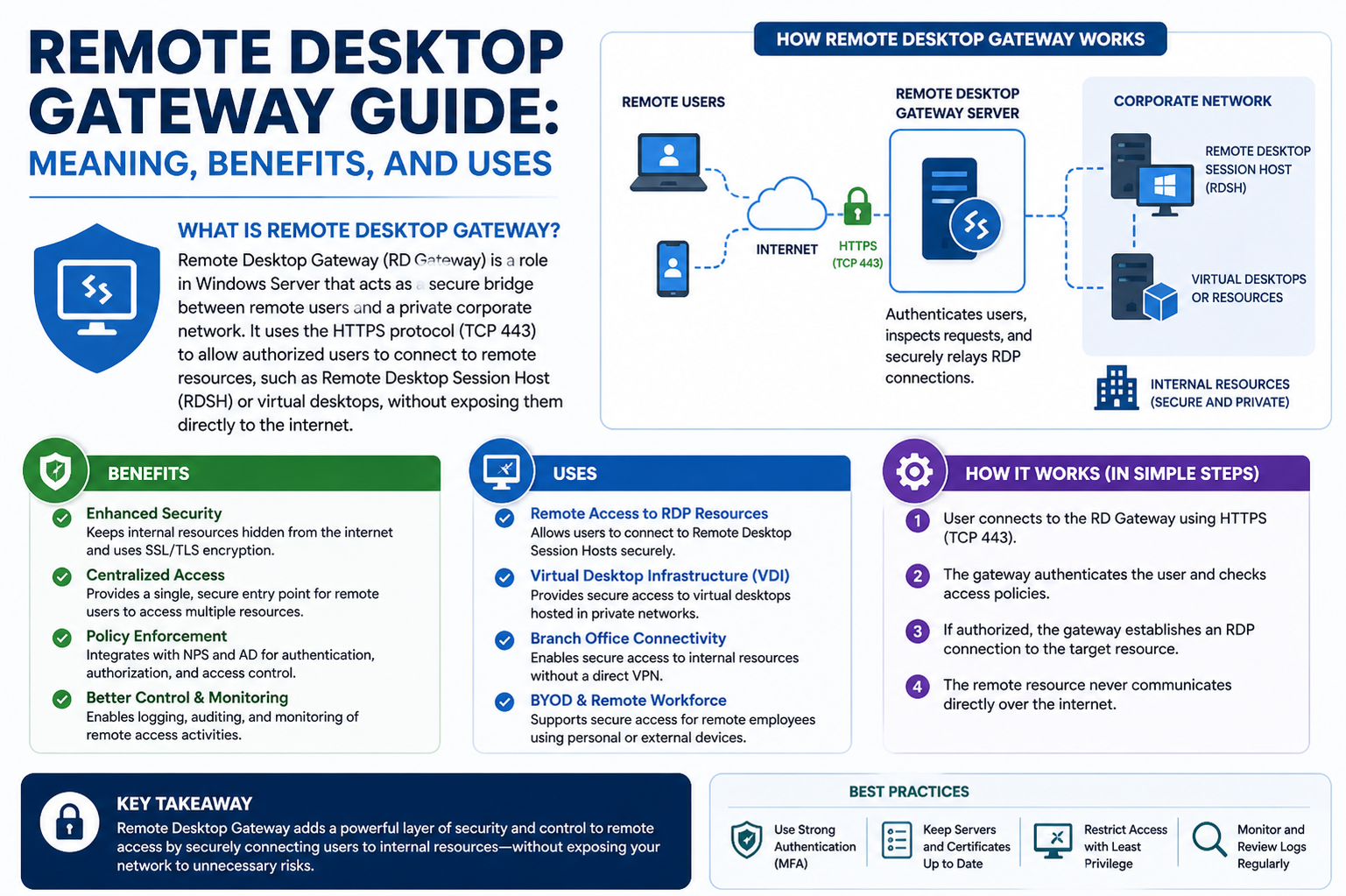
Modern organizations rely heavily on distributed work environments where employees, administrators, and technical teams need access to internal systems from outside the physical office. This shift has made secure remote connectivity a critical requirement rather than a convenience. The challenge lies in enabling smooth access to internal resources without exposing sensitive infrastructure to the open internet. Every connection that leaves a secure network boundary introduces potential risks such as unauthorized entry, data interception, or system exploitation. Because of these concerns, companies invest in controlled access mechanisms that balance usability with strong protection. Remote access solutions are designed to create a safe pathway between external users and internal systems, ensuring that productivity is maintained while security remains intact. Within this landscape, secure gateways and encrypted tunnels play a central role in controlling how users authenticate, connect, and interact with corporate environments from any location.
What Remote Desktop Gateway Is
A Remote Desktop Gateway is a security-focused connection service that enables users to access internal computers and applications over the internet without directly exposing those systems. It works as an intermediary layer between remote users and the organization’s internal network. Instead of allowing direct connections to remote desktop services, it routes traffic through a protected channel using encrypted communication protocols. This ensures that sensitive infrastructure is never openly visible to external networks. The gateway verifies user identity, enforces access rules, and establishes a secure session only after authentication is successfully completed. By acting as a controlled entry point, it reduces the attack surface and helps organizations maintain tighter control over who can access internal resources. This structure allows employees to connect to their work environments safely while keeping core systems protected behind multiple layers of security enforcement.
Core Purpose of RD Gateway
The primary purpose of a Remote Desktop Gateway is to simplify secure remote connectivity while strengthening network protection. It eliminates the need for exposing remote desktop ports directly to the internet, which significantly reduces vulnerability to attacks. Instead, it encapsulates remote desktop communication within encrypted web-based traffic, making it much harder for malicious actors to intercept or exploit. It also ensures that only authorized users are granted access based on predefined security policies. These policies can include identity verification, device compliance checks, and location-based restrictions. Another important role of the gateway is to centralize remote access management, allowing administrators to control all inbound connections through a single secure point. This not only improves monitoring and auditing but also enhances overall network governance by ensuring consistent enforcement of security standards across all remote sessions.
Why Organizations Use Remote Access Solutions
Organizations adopt remote access technologies to support flexible working environments, improve operational efficiency, and ensure business continuity. Employees often need to connect to office systems from home, travel locations, or external offices, making direct physical access impractical. Remote access solutions provide the ability to perform tasks such as file management, application usage, system administration, and troubleshooting without being physically present. However, convenience alone is not sufficient, as security risks increase when systems are accessed from outside controlled networks. This is why structured remote access frameworks are implemented, ensuring that every connection passes through authentication checks and encryption layers. These systems help organizations maintain productivity while safeguarding sensitive data, internal applications, and infrastructure components from unauthorized exposure or cyber threats.
Overview of Remote Access Methods
There are multiple approaches used to enable remote connectivity, each designed with different levels of security, flexibility, and complexity. Some methods prioritize full network access, while others focus on restricted or application-specific connections. The selection of a method depends on organizational requirements, security policies, and infrastructure design. Common remote access techniques include virtual private networks, direct remote desktop connections, cloud-hosted virtual environments, and secure gateway-based solutions. Each method has distinct advantages and limitations in terms of scalability, ease of management, and protection levels. While some approaches expose broader network resources, others restrict access to specific systems only. Understanding these differences helps organizations choose the most appropriate solution for balancing accessibility and security needs in a controlled manner.
Virtual Private Network (VPN) Overview
A virtual private network creates an encrypted tunnel between a user’s device and a private network, allowing remote users to access internal resources as if they were physically connected. This method is widely used because it provides secure communication over public networks. Once connected, users may gain access to multiple systems within the internal network depending on configuration. While VPNs offer strong encryption, they often grant broader network visibility, which can increase risk if compromised. Additionally, performance can sometimes be affected due to routing overhead and encryption processing. Despite these limitations, VPNs remain a popular choice for organizations that require general remote access across multiple systems. However, many enterprises are shifting toward more controlled solutions that restrict access more precisely and reduce unnecessary exposure.
Direct Remote Access Technologies
Direct remote access methods involve connecting users straight to internal systems using remote desktop protocols or similar technologies. While this approach can be efficient, it often requires exposing specific ports or services to external networks, which increases security risk if not properly protected. Attackers frequently target open remote desktop ports, making direct exposure a potential vulnerability. To mitigate this, organizations must implement additional security layers such as firewalls, authentication systems, and encryption mechanisms. Even with these protections, managing direct access across multiple systems can become complex and difficult to scale. This is why many enterprises prefer using intermediary solutions that add a secure buffer between users and internal resources rather than allowing direct exposure to critical infrastructure components.
Cloud-Based Remote Work Platforms
Cloud-based remote access solutions provide virtual desktop environments hosted in external data centers. These platforms allow users to access fully managed desktops or applications through the internet without relying on local infrastructure. One of the key advantages is scalability, as resources can be adjusted based on demand. They also reduce the need for maintaining physical servers within the organization. Security is typically handled through centralized cloud policies, encryption, and identity management systems. However, these solutions often come with licensing costs and dependency on third-party providers. While they offer flexibility and convenience, organizations must carefully evaluate data control, compliance requirements, and long-term cost implications before adopting cloud-based remote environments as their primary access method.
Where RD Gateway Fits Among These Methods
A Remote Desktop Gateway stands between broad-access solutions like VPNs and more exposed direct connections. It provides a more controlled and secure approach by limiting access strictly to authorized remote desktop sessions rather than granting full network entry. Unlike VPNs, which may expose multiple internal resources, RD Gateway focuses on specific remote desktop traffic and enforces strict authentication before any connection is established. Compared to direct remote access, it eliminates the need to expose internal systems to the public internet. It also integrates with existing authentication services, allowing organizations to apply detailed access policies. This positioning makes it particularly useful for environments where security requirements are high and access must be tightly regulated without sacrificing remote usability.
Key Benefits of Using RD Gateway (Introduction)
One of the most important aspects of RD Gateway is its ability to strengthen security while maintaining seamless user access. It achieves this by acting as a controlled intermediary that verifies and filters all incoming connection requests. Users do not connect directly to internal systems; instead, their sessions are securely routed through an encrypted channel. This approach significantly reduces exposure to external threats and minimizes the risk of unauthorized access. It also simplifies remote connectivity by eliminating the need for complex network configurations on the user side. At the same time, administrators gain centralized control over all remote sessions, making it easier to enforce security policies and monitor activity across the organization.
Security Advantages in Detail
RD Gateway provides multiple layers of security that enhance protection for remote environments. It uses encrypted communication channels to ensure that data transmitted between users and internal systems remains secure. Authentication mechanisms verify user identity before allowing any connection, reducing the likelihood of unauthorized access. In addition, security policies can be applied to enforce restrictions based on user roles, device types, or network conditions. This layered approach ensures that even if one security measure is bypassed, additional protections remain in place. By isolating remote desktop traffic from direct exposure, RD Gateway significantly reduces the attack surface and helps organizations defend against common cyber threats targeting remote access systems.
Access Control and Flexibility
One of the strengths of RD Gateway is its ability to provide granular access control without limiting usability. Administrators can define detailed rules that determine which users can access specific resources, under what conditions, and from which devices. This level of control ensures that employees only receive access necessary for their roles, reducing unnecessary exposure of sensitive systems. At the same time, users benefit from flexible remote connectivity that allows them to work from different locations without complex setup requirements. The system balances security enforcement with operational convenience, making it suitable for organizations that require both strict control and efficient remote access capabilities.
User Experience Considerations
From a user perspective, RD Gateway simplifies remote connectivity by reducing the need for additional software or complicated network configurations. Users typically connect through standard remote desktop tools, with the gateway handling authentication and routing in the background. This creates a smoother experience while maintaining strong security controls. Sessions are stable, encrypted, and optimized for performance depending on network conditions. Although security checks occur before connection establishment, they are designed to minimize disruption to the user workflow. This ensures that employees can access their work environments efficiently while still benefiting from strong protective measures enforced at the gateway level.
Initial Limitations and Trade-offs
While RD Gateway offers strong security and controlled access, it does come with certain limitations that organizations must consider. The setup process can be complex, requiring proper configuration of servers, certificates, and security policies. Performance may also be influenced by network conditions and server load, especially in large environments with many concurrent users. Additionally, it is primarily designed for Windows-based infrastructure, which may limit flexibility in mixed operating system environments. Licensing requirements and infrastructure dependencies can also add to implementation costs. Despite these trade-offs, many organizations consider it a valuable solution due to its ability to significantly enhance remote access security without exposing internal systems directly to external networks.
How Remote Desktop Gateway Establishes Secure Connections
A Remote Desktop Gateway operates as a controlled entry point that carefully manages how external users reach internal systems. Instead of allowing a direct connection to remote desktop services, it first receives the request through an encrypted web-based channel. This design ensures that no internal system is exposed directly to the internet. When a user attempts to connect, the request is intercepted by the gateway, which acts as a protective intermediary. It verifies whether the connection attempt should proceed based on predefined security rules and authentication checks. Only after these checks are successfully passed does the gateway allow communication between the user’s device and the internal network. This structured flow significantly reduces exposure to external threats while maintaining a seamless experience for authorized users who need access to internal resources from remote locations.
Authentication Process Inside RD Gateway
Authentication is one of the most critical functions of a Remote Desktop Gateway. When a user initiates a connection, the system first requires identity verification before granting access to any internal resource. This verification process typically relies on centralized identity systems that confirm whether the user is legitimate. In many environments, additional security layers are added to strengthen this step, such as multi-factor authentication or certificate-based validation. The purpose of this stage is to ensure that stolen credentials alone are not enough to gain access. Even if login details are compromised, additional verification barriers prevent unauthorized entry. This layered authentication process helps reduce the risk of identity-based attacks and ensures that only trusted users are allowed to proceed further into the connection process.
Role of Authorization in Access Control
After authentication confirms the identity of a user, the next step is authorization. This determines what resources the user is allowed to access once inside the system. Authorization policies are carefully defined by administrators to control access at a granular level. These rules may depend on user roles, job responsibilities, or organizational hierarchy. For example, an employee in one department may only be granted access to specific applications or virtual desktops, while administrators may have broader permissions. This structured approach ensures that users do not gain unnecessary access to sensitive systems. It also helps enforce the principle of least privilege, which reduces the potential impact of security breaches by limiting what each user can interact with inside the network environment.
Secure Session Establishment Process
Once both authentication and authorization are completed successfully, RD Gateway establishes a secure session between the user and the internal system. This process involves creating an encrypted communication tunnel that protects all data transmitted between both ends. The session is designed to ensure that sensitive information such as credentials, application data, and system commands cannot be intercepted or altered during transmission. The encryption layer wraps the entire connection, making it extremely difficult for external attackers to analyze or manipulate the traffic. At this stage, the user is able to interact with internal desktops or applications as if they were physically present within the organization, even though the connection is being securely routed through an external network environment.
Understanding the Role of RD Gateway Server
The RD Gateway Server is the core component responsible for handling all incoming and outgoing remote desktop traffic. It acts as the primary checkpoint that evaluates connection requests and enforces security policies before allowing access. This server is positioned in a way that it becomes the only externally visible entry point for remote desktop communication. By doing so, it prevents direct exposure of internal systems to the internet. The server continuously monitors connection requests, applies authentication rules, and ensures that only validated sessions are established. It also plays a role in logging and tracking user activity, which is essential for auditing and security monitoring. This centralization of control makes it easier for organizations to manage remote access in a structured and secure manner.
Function of RD Gateway Manager
RD Gateway Manager is the administrative interface used to configure and control the gateway environment. It provides a centralized console where IT administrators can define access policies, manage security settings, and monitor active sessions. Through this management tool, administrators can control how users connect, what authentication methods are required, and which resources are accessible. It simplifies the process of enforcing security rules across the entire remote access infrastructure. Instead of managing multiple systems individually, administrators can apply consistent policies from a single location. This improves efficiency, reduces configuration errors, and ensures that security standards are maintained uniformly across all remote connections.
Network Policy Server and Its Importance
The Network Policy Server plays a key role in enforcing authentication and access rules within the RD Gateway environment. It acts as a decision-making component that evaluates whether a connection request should be allowed or denied. When a user attempts to connect, the request is checked against predefined policies that determine access eligibility. These policies may include user credentials, group membership, device compliance status, and security requirements. The Network Policy Server ensures that only authorized users who meet all defined conditions are granted access. This adds an additional layer of protection, making it more difficult for unauthorized users to bypass security controls. It strengthens the overall security framework by enforcing consistent access rules across all remote connections.
Importance of SSL and TLS Encryption
Encryption is a fundamental part of secure remote access, and RD Gateway relies heavily on SSL and TLS protocols to protect communication. These encryption technologies ensure that all data transmitted between users and internal systems is securely encoded. This prevents attackers from reading or modifying the information during transmission. SSL and TLS create a secure tunnel over standard internet connections, allowing remote desktop traffic to travel safely across public networks. The encryption process also helps verify the authenticity of the server, ensuring that users are connecting to a legitimate gateway rather than a malicious impersonator. By securing both data integrity and confidentiality, encryption forms the backbone of safe remote access operations.
How Encrypted Traffic is Routed Through RD Gateway
When a user connects through RD Gateway, their remote desktop traffic is encapsulated within encrypted web-based communication. This means that instead of sending raw remote desktop signals directly across the internet, the data is wrapped inside a secure HTTPS connection. The gateway then decrypts and forwards the traffic internally to the appropriate system. This process ensures that external networks only see encrypted data, making it extremely difficult for attackers to identify or exploit the communication. Once the internal system responds, the data is again encrypted and sent back through the same secure channel. This continuous encryption and decryption cycle ensures that all interactions remain protected throughout the entire session lifecycle.
Role of Certificates in Secure Connections
Digital certificates play a vital role in establishing trust between users and the RD Gateway. These certificates are used to verify the identity of the gateway server and ensure that users are connecting to a legitimate and trusted source. Without proper certificate validation, users could be exposed to impersonation attacks where malicious servers attempt to intercept sensitive data. Certificates also help establish encrypted sessions by enabling secure key exchange between the client and server. This ensures that communication remains confidential and protected from interception. Proper certificate management is essential for maintaining trust, security, and integrity within the remote access environment.
Connection Flow Inside RD Gateway Architecture
The connection flow in RD Gateway follows a structured and secure sequence designed to protect internal systems. First, a user initiates a remote connection request from their device. This request is sent over an encrypted channel to the gateway server. The gateway then performs authentication checks to verify identity. Once confirmed, authorization policies are evaluated to determine access rights. If all conditions are met, a secure session is established between the user and the internal system. The communication is continuously encrypted throughout the session to ensure data protection. When the session ends, the connection is terminated, and no direct link remains between the external device and internal infrastructure. This controlled flow ensures maximum security at every stage of the connection process.
Why RD Gateway Avoids Direct Network Exposure
One of the key security advantages of RD Gateway is that it eliminates the need for direct exposure of internal systems to the internet. In traditional remote access setups, systems often need open ports that can be scanned and targeted by attackers. RD Gateway avoids this risk by acting as a protective intermediary. All external communication is routed through the gateway, which serves as the only visible entry point. Internal systems remain hidden behind this layer, significantly reducing the attack surface. This design makes it much harder for cyber threats to identify vulnerabilities or launch direct attacks against internal infrastructure. By removing direct exposure, organizations significantly improve their overall security posture.
How RD Gateway Enhances Remote Work Security
In remote work environments, employees frequently connect from different locations and networks, which increases security risks. RD Gateway addresses these challenges by ensuring that every connection is authenticated, encrypted, and controlled. It provides a secure method for employees to access their work environments without compromising network integrity. Even when users connect from unsecured networks, the gateway ensures that all communication remains protected. This makes it suitable for organizations that require secure remote access while maintaining flexibility for employees. It allows businesses to support remote operations without weakening their security framework, ensuring that productivity and protection work together effectively.
Security Risks Associated with Remote Desktop Gateway
Even though a Remote Desktop Gateway is designed to improve security, it can still become a weak point if it is not properly configured or maintained. One of the most common risks is improper configuration, where security policies are either too relaxed or incorrectly applied. This can allow unauthorized users to bypass controls or gain access to sensitive systems. Another major concern is exposure to credential-based attacks, where attackers attempt to steal login details through phishing, brute force attempts, or credential stuffing. If weak passwords are used or authentication policies are not strict enough, the gateway can become an entry point for intrusion. In some cases, outdated systems or unpatched servers may also introduce vulnerabilities that attackers can exploit. These risks highlight that while the gateway itself is secure by design, its effectiveness depends heavily on correct implementation and ongoing maintenance.
Misconfiguration Risks in RD Gateway Environments
Misconfiguration is one of the most serious issues affecting remote access security. When administrators fail to properly configure policies, it can unintentionally open access pathways that should remain restricted. For example, overly broad user permissions may allow employees to access systems beyond their job requirements. Incorrect firewall settings may expose the gateway to unnecessary network traffic, increasing the chance of attacks. Weak or missing encryption configurations can also reduce the level of protection applied to remote sessions. Another common issue is improper certificate management, which may result in trust validation failures or insecure connections. These configuration mistakes often occur due to complexity in setup or lack of ongoing monitoring. Over time, even small misconfigurations can create significant security gaps that compromise the integrity of the entire remote access environment.
Credential-Based Attacks and User Authentication Weaknesses
Remote Desktop Gateway systems are often targeted through credential-based attacks because user authentication is a critical entry point. Attackers may attempt brute force attacks, where they repeatedly try different password combinations to gain access. In other cases, stolen credentials obtained from external data breaches may be reused to access internal systems. This is known as credential stuffing and can be highly effective if users reuse passwords across multiple platforms. Weak authentication policies further increase this risk, especially when multi-factor authentication is not enforced. Without additional verification layers, compromised credentials alone may be enough to grant access. Strengthening authentication mechanisms is therefore essential to reducing the risk of unauthorized entry and protecting internal systems from identity-based attacks.
Threat of Unauthorized Access and Lateral Movement
If an attacker successfully gains access through a Remote Desktop Gateway, the threat does not end there. One of the most dangerous outcomes is lateral movement within the internal network. This occurs when an attacker uses an initial point of access to explore and compromise additional systems. Once inside, they may attempt to escalate privileges, access sensitive data, or disable security controls. This risk becomes even greater if network segmentation is weak or if internal systems are not properly isolated. Without strict access boundaries, a single compromised account can lead to widespread system exposure. This is why limiting access rights and enforcing strict internal segmentation is crucial for reducing the potential impact of a security breach.
Encryption Protocols Used in RD Gateway Security
Encryption plays a central role in protecting Remote Desktop Gateway communication. The system relies heavily on secure protocols such as SSL and TLS to ensure that all data transmitted between the user and internal network remains confidential. These protocols encrypt remote desktop traffic so that it cannot be easily intercepted or read by attackers. Modern implementations typically support advanced versions of TLS, which offer stronger protection against known vulnerabilities and interception techniques. Encryption also ensures data integrity, meaning that transmitted information cannot be altered without detection. This is especially important in remote sessions where sensitive commands, credentials, and application data are continuously exchanged. Strong encryption protocols form the backbone of secure remote access and are essential for maintaining trust in the connection process.
TLS 1.2 and TLS 1.3 Security Improvements
TLS protocols are continuously updated to address evolving security threats. TLS 1.2 and TLS 1.3 are widely used in secure remote access environments because they provide strong encryption and improved resistance against cyberattacks. TLS 1.3, in particular, reduces the number of steps required to establish a secure connection, making it faster while also improving security. It eliminates outdated cryptographic algorithms that may be vulnerable to exploitation. These improvements help protect against man-in-the-middle attacks, where attackers attempt to intercept or manipulate communication between two parties. By using modern TLS versions, Remote Desktop Gateway ensures that data remains protected even when transmitted over unsecured public networks. This strengthens the overall security posture of remote access systems.
Perfect Forward Secrecy in Secure Sessions
Perfect Forward Secrecy is an important security feature that enhances encryption by generating unique session keys for each connection. This means that even if a long-term encryption key is compromised, past communication sessions remain secure and cannot be decrypted. In Remote Desktop Gateway environments, this provides an additional layer of protection for sensitive data exchanges. Each session is independently encrypted, reducing the risk of historical data exposure. This is especially important in environments where long-term security and data confidentiality are critical. By isolating session keys, Perfect Forward Secrecy ensures that attackers cannot retroactively access previously captured encrypted traffic, significantly improving resilience against advanced cyber threats.
IPsec Integration and Network Layer Protection
In addition to transport layer encryption, some Remote Desktop Gateway environments use IPsec to provide security at the network layer. IPsec encrypts data packets before they are transmitted across the network, adding another layer of protection beyond SSL or TLS. This dual-layer encryption approach ensures that data remains secure both at the application level and the network level. IPsec also helps authenticate communication between devices, ensuring that data is only exchanged between trusted endpoints. This reduces the risk of packet interception or manipulation during transmission. By combining multiple encryption layers, organizations can significantly strengthen their defense against sophisticated network-based attacks targeting remote access traffic.
Firewall Configuration and Traffic Control
Firewalls play a crucial role in protecting Remote Desktop Gateway environments by controlling incoming and outgoing network traffic. Proper firewall configuration ensures that only necessary ports and protocols are allowed, while all other traffic is blocked. This reduces the exposure of the gateway to external threats and limits potential attack vectors. Firewalls can also be configured to restrict access based on IP addresses, geographic locations, or predefined security rules. This ensures that only trusted sources are allowed to initiate connections. Incorrect firewall settings, however, can weaken security by either blocking legitimate traffic or allowing unnecessary exposure. Continuous monitoring and regular updates are essential for maintaining effective firewall protection in remote access environments.
Network Segmentation for Improved Security
Network segmentation is a security strategy that divides a network into smaller, isolated sections to limit access between systems. In a Remote Desktop Gateway setup, segmentation ensures that even if one part of the network is compromised, the attacker cannot easily move to other systems. The gateway is typically placed in a controlled segment that acts as a buffer between external users and internal infrastructure. Sensitive systems are kept in separate segments with restricted access rules. This design reduces the potential impact of a breach by containing threats within a limited area. Proper segmentation is essential for minimizing risk and maintaining control over internal network communication paths.
Intrusion Detection and Prevention Systems
Intrusion Detection and Prevention Systems are used to monitor network activity for suspicious behavior and potential security threats. These systems analyze traffic patterns, identify anomalies, and respond to malicious activity in real time. In the context of Remote Desktop Gateway, they help detect unauthorized login attempts, unusual connection patterns, or potential exploitation attempts. When a threat is identified, the system can either alert administrators or automatically block the activity. This proactive defense mechanism enhances overall security by providing continuous monitoring of network behavior. It ensures that threats are identified early before they can cause significant damage to internal systems or data.
Security Monitoring and Logging Practices
Monitoring and logging are essential for maintaining visibility into Remote Desktop Gateway activity. Every connection attempt, authentication event, and session activity can be recorded for analysis. These logs provide valuable insights into user behavior and system performance. They are also critical for detecting suspicious activity and investigating security incidents. By reviewing logs, administrators can identify failed login attempts, unusual access patterns, or unauthorized connection attempts. This information helps improve security policies and strengthens future defenses. Centralized logging systems are often used to aggregate data from multiple sources, making it easier to analyze and respond to potential threats across the entire remote access environment.
Importance of Secure Configuration Maintenance
Maintaining a secure Remote Desktop Gateway environment requires ongoing attention and regular updates. Security is not a one-time setup but a continuous process that involves monitoring, patching, and refining configurations. Over time, new vulnerabilities may be discovered, making it necessary to apply updates and security patches. User access policies may also need adjustments based on organizational changes. Regular audits help ensure that security settings remain aligned with best practices. Without continuous maintenance, even a well-configured system can become vulnerable over time. Consistent review and improvement of security configurations are essential for sustaining a strong and resilient remote access infrastructure.
Best Practices for Securing Remote Desktop Gateway Deployments
Securing a Remote Desktop Gateway requires consistent application of best practices that strengthen authentication, reduce exposure, and maintain system integrity. One of the most important practices is enforcing strong authentication policies that go beyond simple passwords. Organizations often implement multi-factor authentication to ensure that even if credentials are compromised, unauthorized access is still blocked. Another critical practice is restricting access based on the principle of least privilege, ensuring that users only receive permissions necessary for their specific roles. Regular patching and updates are also essential because outdated systems are common targets for exploitation. Security configurations should be reviewed frequently to ensure they remain aligned with current threats. In addition, administrators should avoid using default settings, as these can be easily identified and exploited by attackers. A carefully hardened configuration significantly reduces the likelihood of unauthorized access or system compromise.
Role of Multi-Factor Authentication in Strengthening RD Gateway
Multi-factor authentication adds an essential layer of protection to Remote Desktop Gateway environments by requiring users to verify their identity through more than one method. Instead of relying solely on passwords, users must provide an additional factor such as a mobile authentication code, biometric verification, or hardware-based token. This significantly reduces the effectiveness of stolen credentials, as attackers would still need access to the second authentication factor. In remote access systems, where login attempts may occur from untrusted networks, this extra verification step is especially important. It ensures that even if one layer of security is breached, another protective barrier remains in place. Multi-factor authentication also enhances compliance with security standards, as many regulatory frameworks require stronger identity verification methods for remote access to sensitive systems.
Zero Trust Security Model and RD Gateway Integration
The zero trust security model is increasingly used in modern remote access environments, and RD Gateway aligns well with this approach. Zero trust is based on the principle that no user or device should be automatically trusted, regardless of whether they are inside or outside the network perimeter. Every access request must be continuously verified before permission is granted. In the context of RD Gateway, this means that each connection attempt is authenticated, authorized, and encrypted before access is allowed. Continuous verification ensures that trust is never assumed at any stage of the session. Device health checks, identity validation, and contextual access rules are often used together to enforce zero trust principles. This integration significantly reduces the risk of insider threats and unauthorized lateral movement within internal systems.
Endpoint Security Integration with Remote Desktop Gateway
Endpoint security plays a crucial role in strengthening RD Gateway environments by ensuring that devices connecting to internal systems are secure and compliant. Before a connection is established, endpoint protection tools can verify whether the device meets security requirements such as updated antivirus definitions, operating system patches, and firewall configurations. If a device is found to be non-compliant, access can be denied automatically. Endpoint Detection and Response systems continuously monitor device behavior for suspicious activity, helping to detect malware or unauthorized actions in real time. This ensures that compromised devices do not become entry points into the internal network. By combining endpoint security with RD Gateway, organizations create a more comprehensive defense system that protects both the connection layer and the devices involved in remote access.
Integration with Security Information and Event Management Systems
Security Information and Event Management systems are essential for monitoring and analyzing activity within Remote Desktop Gateway environments. These systems collect logs from multiple sources, including authentication events, connection attempts, and session activity. By aggregating this data, administrators gain a centralized view of security events across the entire infrastructure. This helps in detecting unusual patterns, such as repeated failed login attempts or access from unexpected locations. Real-time alerts can be configured to notify security teams of potential threats immediately. SIEM systems also support forensic analysis, allowing organizations to investigate incidents after they occur. This level of visibility is critical for maintaining strong security posture and ensuring that any suspicious activity is quickly identified and addressed.
Role of Logging and Audit Trails in Security Management
Logging and audit trails are fundamental components of RD Gateway security management. Every connection attempt, successful login, and session activity is recorded for future analysis. These logs provide valuable insight into how the system is being used and help identify potential security issues. Audit trails allow administrators to trace user actions, making it easier to investigate incidents or unauthorized access attempts. They also support compliance requirements by providing documented evidence of security controls and access management. Proper log management involves storing logs securely, protecting them from tampering, and ensuring they are retained for appropriate durations. Without detailed logging, it becomes difficult to detect or respond to security incidents effectively.
Performance Optimization in RD Gateway Environments
While security is the primary focus of RD Gateway, performance optimization is also essential for maintaining a smooth user experience. High latency or overloaded servers can negatively impact remote sessions, leading to delays or connection instability. To improve performance, organizations often deploy multiple gateway servers to distribute traffic evenly. Load balancing techniques help ensure that no single server becomes a bottleneck. Network optimization strategies, such as reducing unnecessary encryption overhead or improving bandwidth allocation, can also enhance performance. Proper hardware configuration and resource allocation are important for supporting large numbers of concurrent users. Balancing security with performance ensures that remote access remains both safe and efficient for end users.
Scaling Remote Desktop Gateway for Large Environments
As organizations grow, their remote access requirements also increase, requiring scalable RD Gateway deployments. Scalability involves designing the infrastructure to handle increasing numbers of users without degrading performance or security. This is often achieved by deploying multiple gateway servers in a clustered environment. Load balancers distribute incoming traffic across these servers, ensuring consistent performance. Scaling also involves optimizing authentication systems and backend resources to handle higher demand. In larger environments, centralized management tools are used to maintain consistent policies across all gateway instances. Proper planning ensures that the system can grow alongside organizational needs without introducing security gaps or performance issues.
Hybrid Cloud Integration with Remote Desktop Gateway
Many organizations operate in hybrid environments that combine on-premises infrastructure with cloud-based services. RD Gateway can be integrated into these environments to provide secure access across both platforms. In hybrid setups, users may need to access resources hosted in private data centers as well as cloud environments. The gateway helps unify access by providing a consistent security layer regardless of where resources are located. Cloud integration also allows for improved scalability and flexibility, enabling organizations to adjust resources based on demand. Secure connectivity between cloud and on-premises systems is maintained through encrypted channels and identity-based authentication. This hybrid approach supports modern IT infrastructures that require both flexibility and strong security controls.
Device Management and Compliance Enforcement
Device management is an important aspect of securing RD Gateway environments. Organizations often enforce compliance policies that determine whether a device is allowed to connect to internal systems. These policies may include requirements such as operating system version, security patch level, encryption status, and antivirus protection. Devices that do not meet these standards are blocked from accessing the network. This ensures that only secure and trusted devices are allowed to establish remote sessions. Device compliance checks help reduce the risk of malware infections or unauthorized access originating from compromised endpoints. This layer of control strengthens overall network security by ensuring that both users and their devices meet required security standards before access is granted.
Common Troubleshooting Scenarios in RD Gateway Systems
Troubleshooting Remote Desktop Gateway issues often involves diagnosing authentication failures, connection interruptions, or performance degradation. One common issue is incorrect certificate configuration, which can prevent users from establishing secure connections. Another frequent problem is misconfigured firewall rules that block necessary traffic. Authentication failures may also occur due to expired credentials or incorrect policy settings. Performance issues are often linked to high server load or insufficient bandwidth. Troubleshooting typically involves reviewing logs, verifying configuration settings, and testing connectivity at different points in the network path. A structured troubleshooting approach helps quickly identify and resolve issues, minimizing downtime and maintaining reliable remote access for users.
Network Latency and Its Impact on Remote Sessions
Network latency can significantly affect the quality of remote desktop sessions. High latency leads to delays in screen updates, input lag, and reduced responsiveness, which can negatively impact user productivity. RD Gateway relies on stable network conditions to deliver smooth remote experiences. Factors such as distance between user and server, network congestion, and bandwidth limitations can contribute to latency issues. Optimizing routing paths and improving network infrastructure can help reduce these delays. In some cases, deploying gateway servers closer to end users can also improve performance. Managing latency is essential for ensuring that remote access remains practical and efficient, especially in environments with geographically distributed users.
Future Trends in Secure Remote Access Technologies
Remote access technologies continue to evolve as security threats become more advanced and work environments become more distributed. One emerging trend is deeper integration with zero trust architectures, where every access request is continuously verified. Artificial intelligence is also being used to detect unusual behavior patterns and automatically respond to potential threats. Cloud-native remote access solutions are becoming more common, offering greater scalability and flexibility. There is also increasing emphasis on identity-based security, where user behavior and device context play a key role in access decisions. These advancements are shaping the future of secure remote connectivity, making systems more adaptive, intelligent, and resilient against evolving cyber threats.
Evolving Role of RD Gateway in Modern IT Environments
Remote Desktop Gateway continues to play an important role in modern IT infrastructures, especially as organizations adopt hybrid and remote work models. Its ability to provide secure, controlled access to internal systems makes it a valuable component in enterprise security strategies. As threats become more sophisticated, RD Gateway environments are evolving to include stronger authentication methods, advanced encryption, and tighter integration with security ecosystems. It remains a critical bridge between remote users and internal resources, ensuring that access is both secure and manageable. The continued development of remote access technologies ensures that RD Gateway remains relevant in increasingly complex digital environments.
Conclusion
Remote Desktop Gateway serves as a secure and controlled entry point for accessing internal systems from remote locations, ensuring that organizations do not need to expose their infrastructure directly to the internet. By combining strong authentication, encryption, and policy-based access control, it creates a protective layer that significantly reduces security risks while still enabling flexible remote work. Its ability to centralize remote access management makes it easier for IT teams to monitor activity, enforce security rules, and maintain compliance across the entire environment.
At the same time, RD Gateway is not just a connectivity tool but a key part of a broader security strategy. When integrated with multi-factor authentication, endpoint protection, network segmentation, and monitoring systems, it becomes a powerful defense mechanism against modern cyber threats. However, its effectiveness depends heavily on proper configuration, regular updates, and continuous monitoring. Mismanagement or weak security practices can still introduce vulnerabilities despite its built-in protections.
As remote and hybrid work environments continue to grow, secure access solutions like RD Gateway play an increasingly important role in maintaining both productivity and safety. It helps organizations strike the right balance between accessibility and security, ensuring that users can work efficiently from anywhere without compromising sensitive data or internal systems.