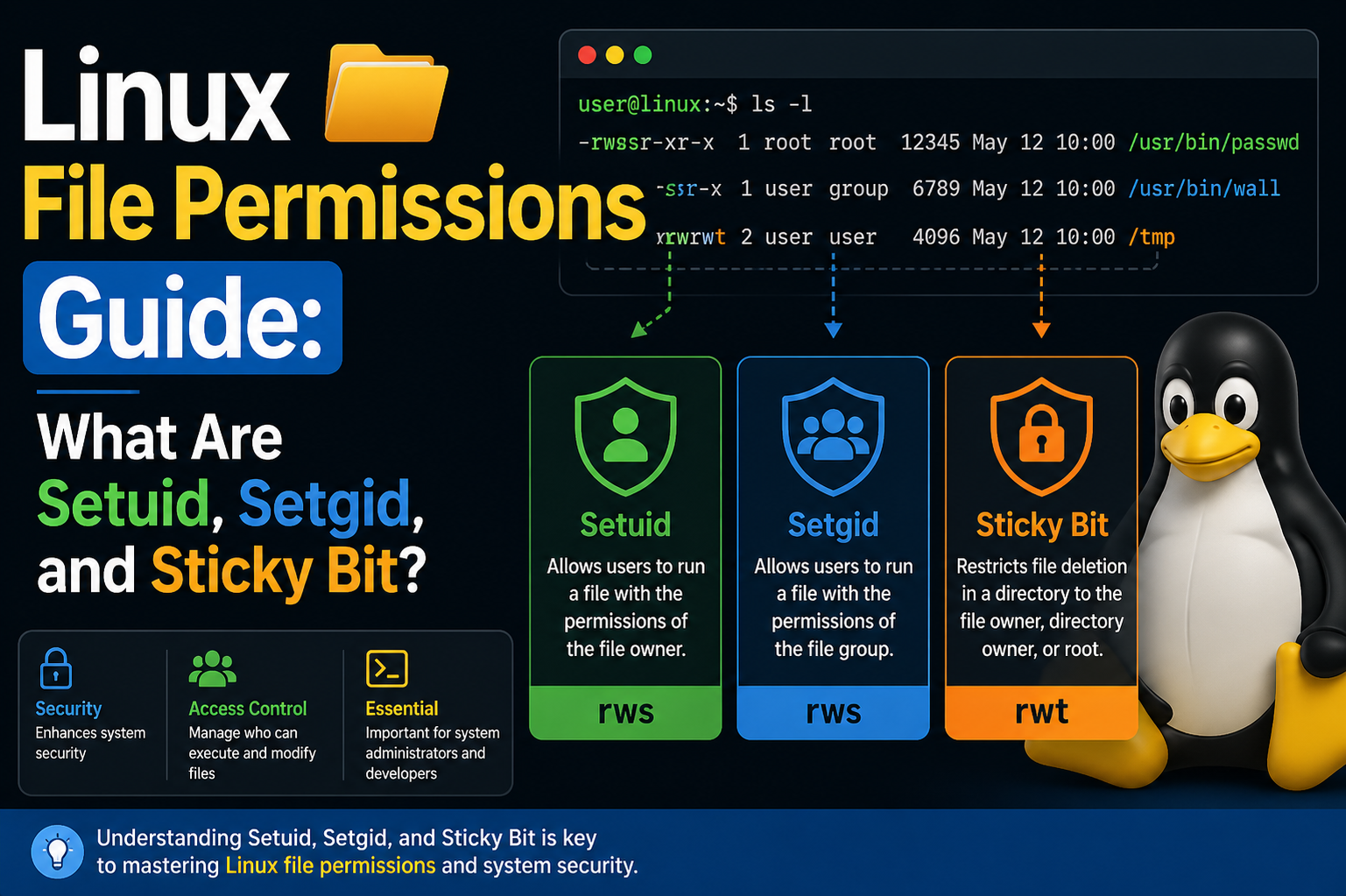
Linux file permissions form the backbone of system security and access control, shaping how users interact with files and directories across a system. Among these permissions, special bits such as setuid, setgid, and the sticky bit often create confusion for learners because their behavior extends beyond standard read, write, and execute rules. While brief definitions may give a surface-level understanding, mastering these concepts requires a deeper look at how they function in real scenarios. These permission mechanisms are not just theoretical constructs; they directly influence how commands execute, how users interact with sensitive resources, and how administrators maintain system integrity. A clear grasp of these ideas helps bridge the gap between basic Linux usage and advanced system administration, making them essential for anyone aiming to manage or secure Linux environments effectively.
Why Special Permission Bits Exist in Linux Systems
Standard file permissions are designed to ensure that users can only access resources they are authorized to use. However, certain operations require temporary privilege elevation without granting full administrative access. This is where special permission bits come into play. They allow controlled privilege escalation, ensuring that users can perform specific tasks that would otherwise be restricted. Without these mechanisms, administrators would be forced to assign broader privileges, increasing the risk of accidental misuse or security breaches. By enabling precise control over how programs run and who can modify shared resources, these bits act as a balance between usability and security. Understanding their purpose helps explain why Linux systems rely on them to handle sensitive operations safely.
How Processes Operate Without Special Permissions
When a command or program is executed in Linux, it typically runs under the identity of the user who initiated it. This means the process inherits the user’s permissions and cannot exceed them. If a user does not have access to a file or directory, any program they run will also be restricted in the same way. This behavior ensures consistency and prevents unauthorized access. For example, if a directory is owned by another user and does not grant access permissions, attempts to view or modify its contents will fail. This model reinforces security by ensuring that privileges are not unintentionally expanded during execution. It also highlights the limitation that special permission bits are designed to overcome when specific tasks require higher privileges.
Practical Example of Permission Restrictions in Action
Consider a scenario where a user attempts to access two directories with different permission levels. One directory allows read and execute access to all users, while the other restricts access entirely. When the user runs a command to list the contents of the accessible directory, the system permits the action because the user’s permissions align with the directory’s settings. However, when attempting the same command on the restricted directory, the system denies access. This outcome demonstrates how Linux strictly enforces permission rules based on user identity. It also illustrates why certain operations cannot be performed without elevated privileges, reinforcing the importance of mechanisms like setuid and setgid in controlled privilege escalation.
Introduction to Setuid and Setgid Mechanisms
Setuid and setgid are specialized permission bits that modify how executables run. Instead of operating under the permissions of the user who launches them, these programs run with the permissions of the file’s owner or group. This capability allows users to perform tasks that would otherwise require higher privileges, without granting them unrestricted access. The distinction between the two lies in their scope: setuid applies to user ownership, while setgid applies to group ownership. Both mechanisms are designed to provide limited privilege elevation, ensuring that users can complete specific tasks while maintaining overall system security.
How Setuid Enables Controlled Privilege Escalation
Setuid is commonly used in situations where a program needs to perform actions that require elevated permissions. When the setuid bit is applied to an executable, the system temporarily assigns the file owner’s privileges to the process during execution. This means that even if a regular user runs the program, it operates with the authority of the file owner. This approach is particularly useful for tasks that involve modifying protected system files. By embedding the necessary privileges within the executable, Linux allows users to perform these tasks without exposing the system to broader security risks.
Real-World Use Case of Setuid in Action
A well-known example of setuid in practice is the password-changing utility. Updating a user’s password involves modifying a system file that is typically restricted to administrative access. Despite this restriction, regular users can change their own passwords without needing elevated privileges. This is possible because the executable responsible for password changes is configured with the setuid bit. When executed, it temporarily operates with the permissions required to update the protected file. This design ensures both usability and security, allowing users to manage their credentials without compromising the integrity of sensitive system data.
Understanding Setgid and Its Role in Group Permissions
Setgid functions similarly to setuid but focuses on group-level permissions. When applied to an executable, it ensures that the program runs with the privileges of the group that owns the file. This is particularly useful in collaborative environments where multiple users belong to the same group and need consistent access to shared resources. By leveraging setgid, administrators can streamline access control, ensuring that group members can perform necessary actions without individually adjusting permissions. This mechanism enhances efficiency while maintaining a structured approach to permission management.
How Special Bits Appear in File Permissions
When examining file permissions, the presence of setuid or setgid is indicated by a modification in the execute field. Instead of the usual execute symbol, a different character appears, signaling that the special bit is active. This visual cue helps administrators quickly identify files with elevated execution behavior. Recognizing these indicators is essential for auditing and troubleshooting, as it allows for the detection of unexpected or potentially risky configurations. Regularly reviewing these permissions ensures that only intended files have special bits enabled, reducing the likelihood of security vulnerabilities.
Introduction to the Sticky Bit Concept
The sticky bit is another special permission that serves a different purpose from setuid and setgid. Rather than affecting how programs execute, it controls how files within a directory can be deleted. When the sticky bit is set on a directory, it restricts deletion rights so that only the file owner, directory owner, or administrative user can remove files. This behavior is particularly important in shared environments, where multiple users create and manage files within the same directory. By enforcing this restriction, the sticky bit prevents users from interfering with each other’s data.
Evolution of the Sticky Bit in Modern Systems
Historically, the sticky bit had a different function related to memory management, where it helped improve performance by retaining program data in memory. However, this usage is no longer relevant in modern Linux systems. Today, its role is focused entirely on directory-level access control. This shift reflects the evolving priorities of operating systems, where security and multi-user collaboration have become more critical than the performance optimizations it once provided. Understanding this evolution helps clarify why the sticky bit behaves differently from other permission bits.
Practical Application of the Sticky Bit in Shared Directories
A common example of the sticky bit in action is a shared temporary directory used by multiple users. In such a directory, users need the ability to create files freely, but they should not be able to delete files created by others. Without the sticky bit, any user with write permissions could remove files belonging to others, leading to potential disruptions. By enabling the sticky bit, the system enforces ownership-based deletion rules, ensuring that each user’s data remains protected even in a shared environment. This approach balances accessibility with security, making it a crucial feature for multi-user systems.
Deeper Exploration of Setuid Behavior in System Operations
Setuid continues to play a crucial role once you move beyond introductory examples and begin analyzing how Linux systems handle privilege boundaries internally. When a setuid-enabled binary is executed, the system temporarily switches the effective user ID of the running process to match the owner of the file, rather than the user who launched it. This distinction between real user ID and effective user ID is essential to understanding how Linux maintains accountability while still allowing controlled privilege elevation. The real user ID represents the person who initiated the process, ensuring traceability, while the effective user ID determines what the process is allowed to do. This dual-identity model allows administrators to grant narrowly scoped elevated actions without permanently changing a user’s overall permissions.
This mechanism is particularly important in system-level operations that require access to protected resources. For instance, certain utilities must interact with configuration files or authentication databases that are restricted for security reasons. Without setuid, these utilities would either fail to function for regular users or require those users to be granted broader administrative rights, which would significantly increase risk. By embedding privilege elevation directly into the executable, Linux ensures that only the intended functionality is exposed, reducing the attack surface while preserving usability.
Security Implications of Setuid Misconfiguration
While setuid provides powerful capabilities, it also introduces potential security risks if not managed carefully. Any executable with elevated privileges becomes a potential entry point for exploitation, especially if it contains vulnerabilities such as buffer overflows or improper input validation. Attackers often target setuid binaries because successfully exploiting one can grant them access to higher-level privileges, potentially leading to full system compromise. This makes it essential for administrators to thoroughly vet any application that requires setuid permissions and to ensure that only trusted, well-maintained binaries are granted this capability.
Another critical aspect is minimizing the number of setuid files present on a system. Most environments require only a small set of such binaries to function correctly. If an audit reveals an unusually large number of setuid-enabled files, it may indicate misconfiguration or even malicious activity. Regular monitoring and auditing help maintain a secure environment by identifying and addressing these anomalies before they can be exploited. In addition, keeping software updated ensures that known vulnerabilities in setuid binaries are patched promptly, reducing the likelihood of successful attacks.
Understanding Setgid Beyond Executables
Setgid extends beyond executable files and can also be applied to directories, where it serves a slightly different but equally important purpose. When setgid is set on a directory, any new files or subdirectories created within it inherit the group ownership of the parent directory rather than the primary group of the user who created them. This behavior is particularly useful in collaborative environments where multiple users need to share access to a common set of files. By enforcing consistent group ownership, setgid simplifies permission management and ensures that all collaborators can access and modify shared resources without manual intervention.
This feature is widely used in team-based workflows, such as development environments or shared project directories. Without setgid, files created by different users might have inconsistent group ownership, leading to access issues and requiring frequent permission adjustments. By enabling setgid on the directory, administrators can maintain a uniform access structure, improving efficiency and reducing the risk of accidental permission conflicts. This approach demonstrates how Linux permissions can be tailored to support both security and collaboration simultaneously.
Practical Behavior of Setgid in Group Collaboration
In a shared directory with setgid enabled, the system automatically assigns the directory’s group ownership to all new files, regardless of the creator’s default group. This ensures that all members of the group retain access to newly created content. For example, in a project directory used by a team, each member can create files that are immediately accessible to others without additional configuration. This seamless sharing capability is one of the key advantages of setgid in directory contexts.
However, it is important to ensure that the directory’s permissions are configured correctly to complement setgid behavior. Simply enabling setgid is not enough; the directory must also grant appropriate read and write permissions to the group. Without these permissions, the benefits of setgid cannot be fully realized. Proper configuration ensures that the directory functions as intended, supporting collaborative workflows while maintaining control over access rights.
Detailed Examination of the Sticky Bit in Multi-User Systems
The sticky bit becomes particularly significant in environments where multiple users interact with shared directories. Its primary function is to prevent users from deleting or renaming files that they do not own, even if they have write access to the directory. This restriction is crucial in maintaining stability and preventing accidental or intentional interference between users. In directories without the sticky bit, any user with write permissions can remove or modify files, potentially disrupting workflows or causing data loss.
In practice, the sticky bit is most commonly associated with temporary storage directories that are accessible to all users. These directories often serve as a workspace for applications and processes that require shared access. By applying the sticky bit, administrators ensure that each user’s files remain protected, even in a highly dynamic environment where files are frequently created and deleted. This safeguard is essential for maintaining order and reliability in multi-user systems.
How the Sticky Bit Influences File Deletion Rules
When the sticky bit is set on a directory, the system enforces stricter rules for file deletion. Only the file’s owner, the directory’s owner, or a privileged user can remove or rename files within that directory. This behavior overrides the standard rule that write access to a directory allows file deletion. As a result, users can still create and modify their own files but cannot interfere with others’ data.
This mechanism is particularly important in preventing misuse of shared directories. Without it, a single user could disrupt the work of others by deleting critical files. By enforcing ownership-based restrictions, the sticky bit ensures that shared spaces remain functional and secure. This approach highlights how Linux permissions can be fine-tuned to address specific challenges in multi-user environments.
Administrative Strategies for Managing Special Permission Bits
Effective management of setuid, setgid, and the sticky bit requires a proactive approach. Administrators must regularly review system configurations to ensure that these permissions are applied მხოლოდ where necessary. This involves conducting periodic audits to identify files and directories with special bits enabled and verifying that each one serves a legitimate purpose. Any unnecessary or suspicious entries should be investigated and corrected promptly.
In addition to auditing, administrators should implement policies that limit the use of special permission bits. For example, developers should avoid requesting elevated privileges for applications unless absolutely necessary. By enforcing strict guidelines, organizations can reduce the risk of misconfiguration and maintain a more secure environment. Training and awareness also play a key role, as users who understand the implications of these permissions are less likely to misuse them.
Balancing Usability and Security in Permission Design
One of the central challenges in managing Linux permissions is finding the right balance between usability and security. Special permission bits are designed to address this challenge by enabling controlled privilege escalation and protecting shared resources. However, their effectiveness depends on careful implementation and ongoing oversight. Overuse or misconfiguration can undermine security, while underuse can hinder productivity.
By understanding the underlying principles of setuid, setgid, and the sticky bit, administrators can make informed decisions about when and how to use them. This knowledge allows for the creation of permission structures that support both operational efficiency and robust security. Ultimately, mastering these concepts is not just about memorizing commands or definitions but about developing a deeper understanding of how Linux systems manage access and protect resources in complex, real-world scenarios.
Command-Level Interaction with Special Permission Bits
Working with special permission bits in Linux becomes more practical when you understand how to interact with them directly through commands. While conceptual knowledge explains what setuid, setgid, and the sticky bit do, real-world administration depends on being able to identify, modify, and verify these permissions efficiently. The command-line environment provides several tools that allow administrators to inspect file attributes and make precise changes. Among these, permission-related commands are essential for both troubleshooting and system configuration. By consistently using these tools, administrators can maintain visibility into how permissions are structured across the system and ensure that special bits are applied correctly.
The most commonly used command for inspecting permissions is the long listing format of directory contents. This output reveals not only ownership and standard permissions but also whether any special bits are present. Recognizing these indicators is a key skill, as it allows quick identification of files that operate with elevated privileges or directories that enforce restricted deletion. Developing familiarity with these visual cues helps streamline administrative workflows and reduces the likelihood of overlooking critical security configurations.
Identifying Setuid Permissions on Executables
Detecting whether a file has the setuid bit enabled is a straightforward process once you know what to look for. In the permission string, the execute position for the file owner is replaced with a distinct character when setuid is active. This visual change acts as a signal that the executable will run with the privileges of its owner rather than the invoking user. Regularly scanning for such files is an important part of system auditing, as it ensures that only intended binaries have elevated execution behavior.
Administrators often rely on systematic searches to locate all files with setuid permissions across the system. This approach is particularly useful in large environments where manually inspecting each file would be impractical. By performing periodic scans, it becomes easier to detect unexpected changes or newly introduced binaries that may pose a risk. This proactive monitoring contributes to a more secure and well-managed system.
Recognizing Setgid Permissions in Files and Directories
Setgid permissions can also be identified through the permission string, where the group execute position reflects the presence of the special bit. This indicator helps distinguish files and directories that enforce group-based privilege behavior. In executables, it signals that the program will run with the group privileges of the file owner. In directories, it indicates that new files will inherit the directory’s group ownership.
Understanding how to interpret these indicators is essential for maintaining consistent group access across shared resources. When reviewing permissions, administrators should pay close attention to directories with setgid enabled, as they play a significant role in collaborative environments. Ensuring that these directories are configured correctly helps prevent access issues and maintains a smooth workflow for users الذين rely on shared resources.
Applying Setuid Permissions Using Symbolic and Numeric Methods
Setting the setuid bit can be accomplished through different approaches, each offering flexibility depending on the situation. The symbolic method provides a readable way to modify permissions by specifying the user category and the desired change. This approach is often preferred for its clarity, especially when making targeted adjustments. On the other hand, numeric representation allows administrators to apply permissions using a concise format that combines multiple settings into a single value.
Both methods achieve the same result, and the choice between them often depends on personal preference or scripting requirements. Regardless of the method used, it is important to verify the changes afterward to ensure that the setuid bit has been applied correctly. This verification step helps prevent configuration errors and ensures that the intended behavior is achieved.
Configuring Setgid Permissions for Group-Based Access Control
Setting the setgid bit follows a similar process to setuid, with adjustments made to target group permissions instead of user permissions. This can be done using symbolic notation or numeric values, depending on the administrator’s preference. Once applied, the setgid bit influences how files and directories behave in relation to group ownership and execution privileges.
In collaborative environments, configuring setgid on directories is particularly beneficial. It ensures that all newly created files align with the group structure, eliminating the need for manual adjustments. This consistency simplifies permission management and reduces the risk of access conflicts. However, as with any permission change, it is important to review the overall configuration to ensure that it aligns with security policies and operational requirements.
Using System-Wide Searches to Audit Special Permissions
Auditing is a critical component of maintaining a secure Linux system, and special permission bits should be a focal point of these efforts. System-wide searches allow administrators to identify all files and directories with setuid, setgid, or sticky bit permissions. These searches can reveal unexpected configurations that may require further investigation.
By incorporating regular audits into system maintenance routines, administrators can detect anomalies վաղ and take corrective action before they become serious issues. This proactive approach is especially important in environments where multiple users or applications interact with the system, as the risk of misconfiguration increases with complexity. Consistent auditing helps maintain a clear understanding of how permissions are distributed and ensures that security standards are upheld.
Applying and Verifying the Sticky Bit on Directories
Setting the sticky bit on a directory is a common practice in shared environments, and it can be done using straightforward command-line operations. Once applied, the directory’s permission string reflects the presence of the sticky bit through a distinct indicator. Verifying this change is an important step, as it confirms that the directory now enforces restricted deletion rules.
In practice, administrators often apply the sticky bit to directories that serve as shared workspaces. After setting the bit, it is useful to test its behavior by attempting file operations from different user accounts. This hands-on verification ensures that the intended restrictions are functioning correctly and provides confidence that the directory is properly secured.
Removing Special Permission Bits Safely
Just as important as setting special permission bits is knowing how to remove them when they are no longer needed. Removing these bits can be done using similar methods to those used for applying them, with adjustments made to clear the specific permission. This process should be carried out carefully, as removing a required permission can disrupt system functionality.
Before making changes, administrators should evaluate the purpose of the existing configuration and ensure that its removal will not negatively impact users or applications. Documenting these changes is also a good practice, as it provides a record of modifications and helps maintain accountability. By approaching permission removal with caution, administrators can avoid unintended consequences and maintain system stability.
Differences Between Built-In Privilege Mechanisms and Temporary Elevation Tools
Understanding the distinction between embedded privilege mechanisms and temporary elevation tools is essential for effective system management. Special permission bits provide a persistent way to grant elevated capabilities to specific executables, ensuring that they always run with the required privileges. In contrast, temporary elevation tools allow users to execute commands with higher privileges on a case-by-case basis.
Each approach has its advantages and limitations. Embedded mechanisms offer consistency and simplicity for specific tasks but require careful management to avoid security risks. Temporary tools provide flexibility and control but depend on proper configuration and monitoring to prevent misuse. By understanding these differences, administrators can choose the most appropriate method for each scenario, balancing convenience with security.
Limitations of Special Permission Bits in Modern Systems
Modern Linux systems impose certain restrictions on the use of special permission bits, particularly in relation to scripts and non-compiled programs. These limitations are designed to enhance security by preventing misuse of privilege escalation mechanisms. As a result, administrators must often rely on alternative approaches when working with scripts that require elevated privileges.
These restrictions highlight the importance of understanding not only how special permission bits work but also their boundaries. By recognizing these limitations, administrators can design solutions that align with system policies and security best practices. This awareness ensures that permission configurations remain effective and compliant with modern standards, reducing the risk of vulnerabilities while maintaining operational efficiency.
Advanced Security Practices for Managing Special Permission Bits
As Linux environments grow in complexity, managing special permission bits becomes less about basic configuration and more about maintaining a strong security posture over time. Setuid, setgid, and the sticky bit must be treated as sensitive controls that require continuous oversight rather than one-time setup. Administrators should adopt a mindset where every elevated permission is considered a potential risk unless proven necessary. This means evaluating not only why a permission is set but also whether it remains relevant as systems evolve. Applications change, workflows shift, and what was once required may become obsolete, leaving behind unnecessary exposure. By regularly reassessing these permissions, administrators can ensure that only essential privileges remain active, reducing the attack surface and strengthening overall system integrity.
Another important aspect of advanced security management is maintaining a clear inventory of all files and directories that use special permission bits. This inventory acts as a baseline for comparison during audits, helping detect unauthorized changes or unexpected additions. When combined with logging and monitoring tools, it becomes possible to track how these files are used and identify unusual activity patterns. Such visibility is critical in environments where multiple users or automated processes interact with the system, as it allows for early detection of potential security incidents.
Auditing Strategies for Setuid and Setgid Files
Regular auditing is one of the most effective ways to maintain control over setuid and setgid permissions. This process involves scanning the system to identify all files with these bits enabled and reviewing each one to confirm its legitimacy. During an audit, administrators should verify the ownership, purpose, and necessity of each file. Any discrepancies, such as unknown binaries or unexpected permission changes, should be investigated तुरंत to determine whether they pose a threat.
Auditing should not be treated as an occasional task but as a routine part of system maintenance. Scheduling periodic checks ensures that changes are detected promptly, even in dynamic environments where new software is frequently installed. Automated tools can assist in this process by generating reports and highlighting anomalies, but human oversight remains essential for interpreting the results and making informed decisions. By combining automation with manual review, administrators can achieve a comprehensive approach to permission management.
Minimizing Privilege Exposure in Linux Systems
A fundamental principle of system security is the concept of least privilege, which emphasizes granting only the permissions necessary to perform a specific task. This principle is especially relevant when dealing with setuid and setgid, as these bits inherently involve elevated privileges. Administrators should carefully evaluate whether an application truly requires such permissions or if alternative approaches can achieve the same goal with lower risk.
In many cases, reducing privilege exposure involves redesigning workflows or using more granular access controls. For example, instead of granting broad elevated access through a setuid binary, it may be possible to delegate specific actions through controlled interfaces or restricted commands. This approach limits the potential impact of a vulnerability, as the scope of elevated access is tightly constrained. By prioritizing minimal privilege, administrators can create a more resilient system that is less susceptible to exploitation.
Managing Sticky Bit Directories in Shared Environments
Shared directories are a common feature in multi-user systems, and the sticky bit plays a critical role in maintaining order within them. However, simply enabling the sticky bit is not enough; administrators must also ensure that these directories are configured with appropriate permissions and ownership settings. This includes verifying that users have the necessary access to create and manage their own files while still being restricted from interfering with others.
Monitoring these directories is equally important, as they often serve as temporary storage for applications and processes. Over time, they can accumulate large numbers of files, some of which may no longer be needed. नियमित cleanup practices help maintain system performance and prevent potential issues الناتجة عن resource exhaustion. At the same time, administrators should remain vigilant for unusual activity, such as attempts to bypass deletion restrictions or manipulate file ownership. By combining proper configuration with ongoing monitoring, shared directories can remain both functional and secure.
Role of Special Permissions in Containerized Environments
The rise of containerization has introduced new considerations for Linux file permissions, but the underlying principles remain the same. Containers rely on the host system’s kernel to enforce permissions, meaning that setuid, setgid, and the sticky bit still influence how processes interact with files and directories. However, the isolation provided by containers adds an additional layer of complexity, as user identities within a container may map differently to those on the host system.
This mapping can create unexpected scenarios where permissions behave differently than anticipated. For example, a process running inside a container may appear to have limited privileges but could correspond to a more privileged user on the host. Understanding these relationships is essential for maintaining security in containerized environments. Administrators must carefully configure user mappings and file permissions to ensure that containers do not inadvertently gain access to sensitive resources.
Best Practices for Secure Container Deployments
When deploying containers, it is important to follow practices that minimize risk while maintaining functionality. Running containers as non-privileged users is one of the most effective ways to reduce the impact of potential vulnerabilities. Many container images default to running with elevated privileges, which can expose the host system to unnecessary خطر. Adjusting these defaults ensures that processes operate with the least amount of access required.
Another key practice is controlling how storage is shared between containers and the host system. Mounting directories with carefully defined permissions prevents containers from accessing files they should not see. Additionally, using orchestration tools to enforce security policies at scale helps maintain consistency across multiple deployments. These measures collectively create a more secure environment, where the influence of special permission bits is properly managed ضمن the broader context of container security.
Understanding the Risks of Corrupted or Vulnerable Binaries
Setuid and setgid binaries must be treated with განსაკუთრებული caution because any flaw in their implementation can have serious consequences. If such a binary becomes corrupted or contains a vulnerability, it may still execute with elevated privileges, providing an opportunity for attackers to exploit the system. This risk underscores the importance of verifying the integrity of critical binaries and ensuring that they originate from trusted sources.
Regular integrity checks, such as comparing file hashes or using verification tools, help detect unauthorized modifications. When a discrepancy is found, immediate action is required to remove the affected permissions and investigate the cause. This proactive approach prevents compromised binaries from being used as a gateway to higher privileges. Maintaining up-to-date software further reduces risk by ensuring that known vulnerabilities are addressed promptly.
Differences Between Persistent and Temporary Privilege Elevation
Linux provides multiple ways to handle privilege escalation, each with its own use cases and implications. Special permission bits represent a persistent approach, where elevated privileges are embedded directly into the executable. This ensures consistent behavior but requires careful oversight to prevent misuse. In contrast, temporary elevation methods allow users to perform specific actions with higher privileges on demand, without permanently altering file permissions.
Choosing between these approaches depends on the context and security requirements. Persistent mechanisms are well-suited for tightly controlled operations that must always run with specific privileges. Temporary methods offer greater flexibility and can be restricted through policies and authentication mechanisms. Understanding the strengths and limitations of each approach enables administrators to design systems that balance convenience with सुरक्षा, ensuring that privilege escalation is handled in a controlled and predictable manner.
Final Thoughts
Developing a strong understanding of setuid, setgid, and the sticky bit is essential for anyone working with Linux systems at a professional level. These mechanisms go beyond basic permission models, introducing nuanced ways to manage access and execution behavior. Mastery of these concepts allows administrators to design secure systems, troubleshoot complex issues, and implement solutions that align with both operational needs and security best practices.
As you continue to work with Linux, these permission bits will appear in many different contexts, from system utilities to collaborative environments and modern containerized deployments. Recognizing their behavior and understanding their implications will make it easier to navigate challenges and maintain control over system resources. By combining theoretical knowledge with practical experience, you can develop the confidence needed to manage permissions effectively and ensure that your systems remain both functional and secure.