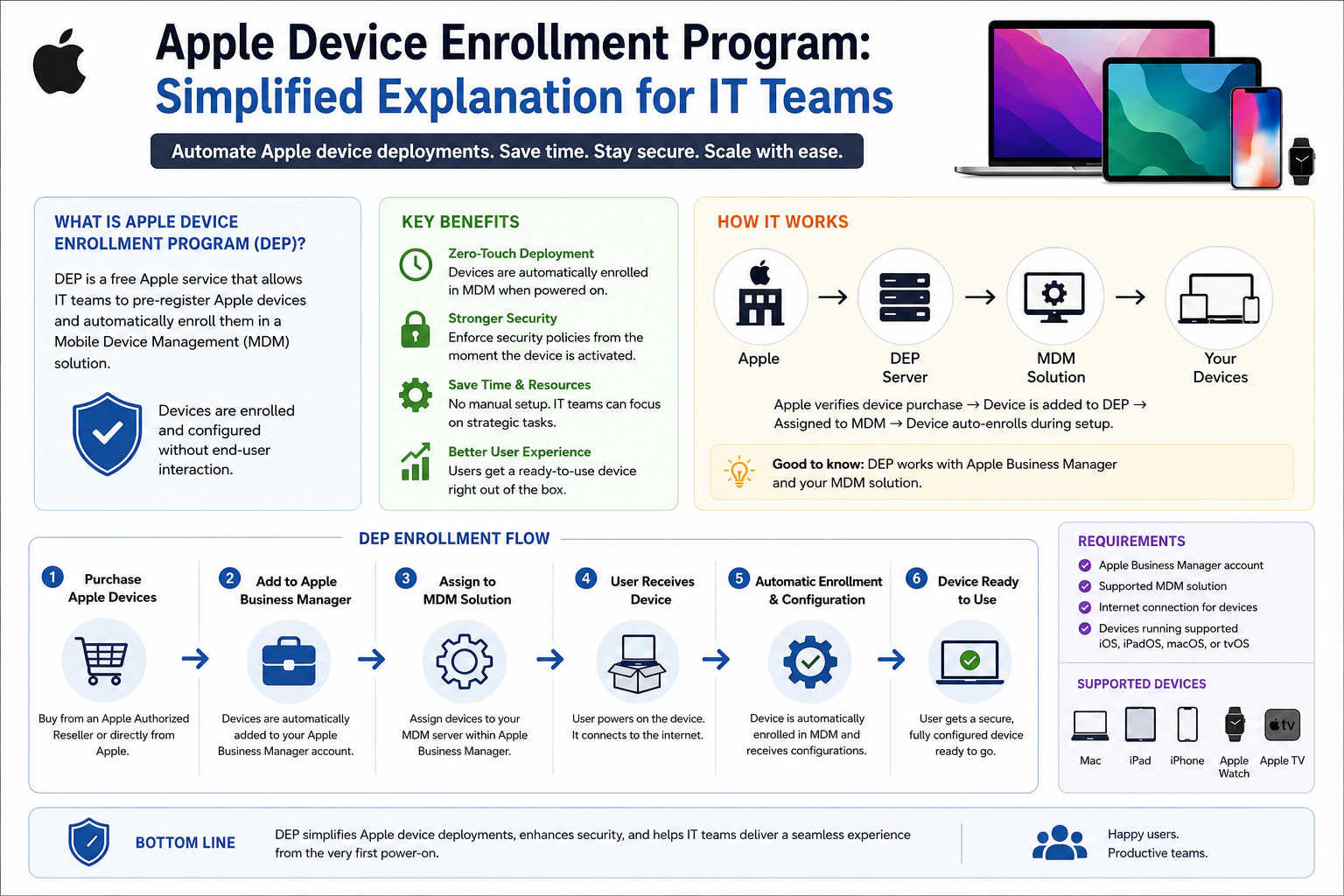
Automated Device Enrollment (ADE), previously known as the Device Enrollment Program (DEP), is Apple’s streamlined solution for deploying and managing Apple devices at scale. It is designed to eliminate the need for manual configuration by allowing IT teams to automatically enroll, configure, and secure devices such as iPhones, iPads, and Macs right out of the box. ADE operates within Apple Business Manager and Apple School Manager, providing a centralized environment where organizations can control device setup and enforce policies without physically handling each unit. This approach transforms traditional device provisioning into a seamless, zero-touch experience that prioritizes efficiency, security, and scalability.
The Evolution from DEP to ADE
The transition from DEP to ADE reflects Apple’s broader shift toward automation and cloud-based device management. While DEP introduced the concept of automated enrollment, ADE expands on it with deeper integration into modern management ecosystems and improved flexibility. The retirement of legacy deployment portals marked a turning point, consolidating all management tasks into unified platforms. This evolution ensures that organizations benefit from a more cohesive and intuitive workflow, where device enrollment, configuration, and policy enforcement are tightly interconnected.
The Core Purpose of ADE in Modern IT Environments
At its core, ADE exists to simplify the complexities of managing large numbers of devices. In dynamic environments where employees, students, or staff require immediate access to technology, manual setup becomes a bottleneck. ADE removes this friction by automating the entire lifecycle of device deployment. From the moment a device is powered on, it connects to Apple’s servers, identifies its assigned organization, and begins configuring itself according to predefined settings. This ensures that users receive devices that are ready for use within minutes, while IT teams maintain full control over security and compliance.
How ADE Transforms Device Deployment
Traditional deployment methods often rely on imaging, manual configuration, or physical interaction with each device. ADE replaces these outdated practices with a cloud-driven process that requires minimal intervention. Devices are pre-associated with an organization during purchase, and this association remains intact regardless of resets or ownership changes. When activated, the device automatically enrolls into a Mobile Device Management (MDM) system, which applies configurations, installs applications, and enforces policies. This transformation reduces deployment time, minimizes errors, and ensures consistency across all devices.
The Role of Apple Business Manager and Apple School Manager
ADE is not a standalone tool but a feature within Apple Business Manager and Apple School Manager. These platforms act as centralized hubs for managing devices, users, and services. They allow organizations to assign devices to MDM servers, create deployment profiles, and monitor device status. By integrating ADE into these platforms, Apple provides a unified management experience that simplifies administrative tasks and enhances visibility. This integration also supports role-based access, enabling different team members to manage specific aspects of device deployment.
Zero-Touch Deployment Explained
Zero-touch deployment is one of the most significant advantages of ADE. It allows devices to be shipped directly to end users without prior configuration. Once the user powers on the device, it automatically enrolls in the organization’s management system and applies all necessary settings. This includes email accounts, applications, security policies, and network configurations. The result is a fully functional device that requires little to no input from the user. This capability is particularly valuable for remote work environments, where centralized setup is not feasible.
Integration with Mobile Device Management (MDM)
MDM solutions play a crucial role in the ADE ecosystem. They act as the control center for managing enrolled devices, enabling IT teams to push configurations, enforce security policies, and monitor device activity. ADE works seamlessly with leading MDM platforms, ensuring that devices are configured according to organizational requirements from the moment they are activated. This integration allows for continuous management, meaning devices can be updated, reconfigured, or wiped remotely as needed.
Security and Compliance Advantages
Security is a fundamental aspect of ADE. By ensuring that devices are automatically enrolled and supervised, organizations can enforce strict security policies that cannot be removed by end users. This includes restrictions on features such as AirDrop, iCloud backups, and app installations. ADE also supports compliance with industry regulations by enabling consistent policy enforcement across all devices. Even if a device is reset, it will re-enroll and reapply all security settings, preventing unauthorized use.
Enhancing the User Experience
While ADE is designed with IT administrators in mind, it also significantly improves the end-user experience. Users no longer need to wait for devices to be configured or navigate complex setup processes. Instead, they receive devices that are ready to use almost immediately. Applications are pre-installed, accounts are configured, and settings are optimized for their role. This streamlined experience increases productivity and reduces frustration, particularly in fast-paced environments.
Scalability for Growing Organizations
As organizations grow, managing devices becomes increasingly complex. ADE addresses this challenge by providing a scalable solution that maintains efficiency regardless of the number of devices. Whether managing a small team or a large enterprise, the deployment process remains consistent. This scalability ensures that organizations can expand their operations without being hindered by device management limitations.
Comparing ADE with Other Enrollment Methods
ADE stands out when compared to other enrollment methods due to its level of automation and control. Manual enrollment requires users or administrators to configure devices individually, which can be time-consuming and prone to errors. Apple Configurator provides supervised mode but requires physical access to devices, limiting its practicality for large deployments. User enrollment, often used in bring-your-own-device scenarios, offers limited control and security. ADE combines the strengths of these methods while eliminating their drawbacks, making it the preferred choice for organizations seeking efficiency and reliability.
Common Use Cases Across Industries
ADE is widely used across various industries, each benefiting from its automation and security features. In corporate environments, it enables rapid onboarding by allowing new employees to receive pre-configured devices. Educational institutions use ADE to manage large fleets of devices, ensuring that students and teachers have access to the tools they need while maintaining restrictions المناسبة. Retail and hospitality sectors rely on ADE to configure point-of-sale systems and customer service devices, ensuring consistency across locations. In healthcare, ADE supports strict security requirements by enforcing policies that protect sensitive data and ensure compliance with regulations.
The Device Lifecycle with ADE
ADE is not limited to initial deployment; it supports the entire lifecycle of a device. From procurement to retirement, devices remain تحت الإدارة through the MDM system. This allows organizations to update configurations, deploy new applications, and respond to security threats in real time. When a device is no longer needed, it can be wiped and reassigned without losing its association with the organization. This lifecycle management ensures that devices remain secure and functional طوال فترة استخدامها.
Steps to Implement ADE Successfully
Implementing ADE requires a structured approach. Organizations must first enroll in Apple Business Manager or Apple School Manager, providing necessary credentials and verification. Devices should be purchased through authorized channels to ensure they are automatically linked to the organization’s account. შემდეგ, an MDM solution must be integrated to manage enrolled devices. Deployment profiles should be configured to define settings, applications, and restrictions. Once these steps are completed, devices can be distributed to users without manual setup, allowing the automated process to take over.
Customizing Deployment Profiles
Deployment profiles are a key component of ADE, allowing organizations to tailor device configurations to specific needs. Different profiles can be ստեղծված for various user groups, ensuring that each group receives the appropriate settings and applications. For example, executives may require access to additional features, while frontline کارکنان may need restricted environments focused on specific tasks. This level of customization ensures that devices align with organizational roles and responsibilities.
Remote Management and Control
One of the most powerful aspects of ADE is the ability to manage devices remotely. IT teams can push updates, install applications, and enforce policies without physical access to devices. This capability is essential for distributed workforces and organizations with multiple locations. Remote management also enables quick responses to security incidents, such as remotely wiping a lost or stolen device to protect sensitive information.
Reducing IT Workload and Operational Costs
By automating device deployment and management, ADE significantly reduces the workload on IT teams. Tasks that previously required manual effort are now handled automatically, freeing up time for more strategic initiatives. This reduction in manual work ასევე leads to cost savings, as fewer resources are needed for device setup and maintenance. Over time, these efficiencies contribute to improved operational performance and بہتر resource allocation.
Ensuring Consistency Across Devices
Consistency is critical in device management, particularly in large organizations. ADE ensures that all devices are configured وفقًا to the same standards, reducing variability and संभाव errors. This consistency improves security, simplifies troubleshooting, and enhances the overall user experience. By maintaining uniform configurations, organizations can ensure that all users have access to the tools and settings they need to perform their roles effectively.
Future-Proofing Device Management Strategies
As technology continues to evolve, organizations must adopt solutions that can adapt to changing requirements. ADE provides a future-proof approach to device management by leveraging cloud-based infrastructure and automation. This ensures that organizations can بسهولة integrate new technologies and تحديث policies without disrupting existing workflows. By adopting ADE, organizations position themselves to handle future challenges with greater flexibility and confidence.
Final Thought
Automated Device Enrollment represents a fundamental shift in how organizations approach Apple device management, moving away from manual, time-intensive processes toward a streamlined, automated model that prioritizes efficiency and control. By enabling zero-touch deployment, enforcing consistent security policies, and integrating seamlessly with management platforms, it empowers IT teams to handle device fleets of any size with confidence. At the same time, it delivers a smooth and immediate experience for end users, ensuring that devices are ready to perform from the moment they are powered on. In an environment where speed, security, and scalability are essential, Automated Device Enrollment stands out as a practical and forward-looking solution that aligns technology deployment with modern organizational needs.