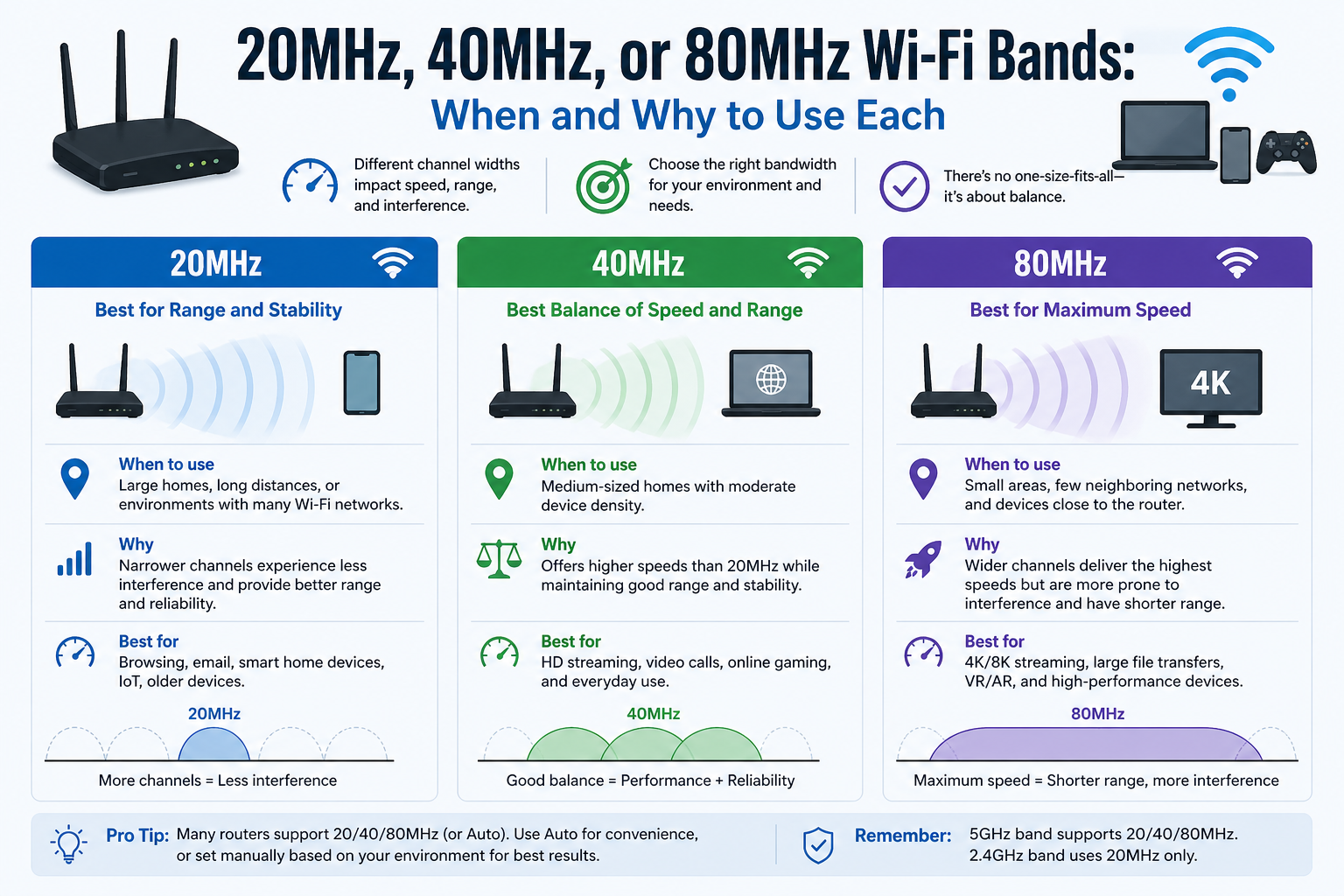
When it comes to Wi-Fi performance, channel width plays a much bigger role than most people realize. It directly affects how much data your network can carry, how stable your connection feels, and how well your devices perform in different environments. Choosing between 20 MHz, 40 MHz, or 80 MHz isn’t just about picking the widest option—it’s about balancing speed, interference, compatibility, and range based on your specific situation.
Understanding Wi-Fi Frequency Bands
Before diving into channel widths, it’s important to understand the frequency bands where these channels operate. Modern Wi-Fi primarily uses three bands: 2.4 GHz, 5 GHz, and 6 GHz. Each band behaves differently in terms of speed, coverage, and interference, which directly influences which channel width works best.
The 2.4 GHz band operates over a smaller frequency range and is divided into tightly packed channels that often overlap. This makes it more prone to interference but excellent for long-range coverage. The 5 GHz band offers more spectrum and less interference, allowing for higher speeds and more flexibility with wider channels. The 6 GHz band, introduced with newer technologies, provides a large amount of clean spectrum, making it ideal for very wide channels and high-performance applications.
Why Channel Width Matters in Wi-Fi Performance
Channel width refers to how much frequency space a Wi-Fi channel occupies. A 20 MHz channel is narrow, while 40 MHz and 80 MHz channels are progressively wider. You can think of it like traffic lanes on a highway: a narrow road carries fewer cars but is less congested, while a wider highway can carry more traffic but becomes problematic if too many users share it.
Wider channels allow more data to pass through at once, which increases throughput and can significantly boost speeds. However, this comes with tradeoffs. As channel width increases, the number of available non-overlapping channels decreases. This raises the chances of interference, especially in crowded environments like apartment buildings, offices, or urban areas.
How Wi-Fi Standards Influence Channel Width
Wi-Fi technology has evolved over time, and with it, support for wider channels has improved. Early standards like IEEE 802.11g and IEEE 802.11a were limited to 20 MHz channels. Later, IEEE 802.11n introduced channel bonding, allowing 40 MHz channels by combining two 20 MHz channels.
With IEEE 802.11ac, support expanded to 80 MHz and even 160 MHz channels, significantly increasing potential speeds. The latest standards, such as IEEE 802.11ax and IEEE 802.11be, take this even further by improving efficiency and enabling ultra-wide channels, particularly in the 6 GHz band.
These advancements mean that modern devices can take advantage of wider channels, but only if both the router and the client device support them. Compatibility remains a key factor when choosing channel width.
20 MHz Channels: Stability and Compatibility First
Using a 20 MHz channel is often the safest and most reliable choice, especially in congested environments. Because it occupies less spectrum, it leaves more room for additional non-overlapping channels. This reduces interference and improves connection stability.
In the 2.4 GHz band, 20 MHz is almost always the best option. The limited spectrum and overlapping nature of channels make wider configurations inefficient and prone to interference. Sticking to 20 MHz ensures better reliability, particularly when multiple networks are nearby.
Another advantage of 20 MHz channels is compatibility. Older devices, including those based on legacy standards, may not support wider channels. If your network includes a mix of older and newer devices, 20 MHz ensures everything can connect without issues.
This channel width is especially useful in high-density environments such as apartment complexes, offices, or public spaces. In these scenarios, maintaining a stable connection is often more important than achieving maximum speed.
40 MHz Channels: A Balanced Approach
40 MHz channels offer a middle ground between speed and stability. By combining two 20 MHz channels, they double the available bandwidth and improve throughput. This makes them a good choice for users who want better performance without significantly increasing interference.
In the 5 GHz band, 40 MHz is often considered the sweet spot. It provides noticeable speed improvements over 20 MHz while still leaving enough non-overlapping channels to minimize interference. This balance makes it suitable for most home networks and small offices.
40 MHz channels work well for everyday activities like streaming, video calls, and online gaming. They also tend to deliver better latency compared to narrower channels, which enhances responsiveness.
However, interference can still become an issue in crowded areas. If many networks are using wide channels, performance may degrade. In such cases, switching back to 20 MHz can sometimes yield better real-world results despite the lower theoretical speed.
80 MHz Channels: Maximum Speed with Tradeoffs
80 MHz channels are designed for high-performance scenarios where speed is the top priority. By using four bonded 20 MHz channels, they allow significantly higher data rates, making them ideal for bandwidth-intensive tasks.
In the 5 GHz band, 80 MHz channels can deliver excellent performance when conditions are right. They are particularly useful when devices are close to the router and there is minimal interference. Situations like streaming high-resolution video, transferring large files, or using wireless backhaul connections benefit greatly from this wider bandwidth.
However, the downsides are important to consider. Wider channels reduce the number of available non-overlapping options, increasing the likelihood of interference. They also require stronger signal strength, meaning performance drops quickly as distance from the router increases.
Because of these limitations, 80 MHz is best suited for low-density environments where few competing networks exist. It works well in standalone homes or controlled setups where interference is minimal and devices are relatively close to the access point.
Choosing the Right Channel Width Based on Environment
The ideal channel width depends heavily on your surroundings. In crowded urban environments, narrower channels often perform better because they reduce interference. In contrast, rural or low-density areas can take advantage of wider channels without significant drawbacks.
For 2.4 GHz networks, 20 MHz remains the most practical choice in almost all situations. The limited spectrum and high interference levels make wider channels inefficient.
For 5 GHz networks, the decision is more flexible. If stability is your priority, 20 MHz is a safe option. If you want a balance between speed and reliability, 40 MHz is usually the best choice. If you need maximum performance and your environment supports it, 80 MHz can provide significant speed gains.
Distance also plays a role. Wider channels perform best at shorter ranges, while narrower channels maintain more consistent performance over longer distances. Obstacles like walls and furniture further reduce the effectiveness of wider channels.
Device Support and Real-World Performance
Even if your router supports wide channels, your devices must also be compatible to benefit from them. Smartphones, laptops, and smart home devices vary widely in their capabilities. Some may only support 20 MHz or 40 MHz channels, limiting the advantages of wider configurations.
Real-world performance is also influenced by factors such as interference, signal strength, and network congestion. While wider channels offer higher theoretical speeds, these speeds are rarely achieved in practice. In many cases, a narrower channel with less interference can deliver better overall performance.
Modern routers often include automatic settings that adjust channel width based on current conditions. These features can help optimize performance without requiring manual configuration, although fine-tuning settings can still provide better results in specific scenarios.
Balancing Speed, Stability, and Efficiency
Selecting the right channel width is ultimately about balance. Wider channels increase speed but also raise the risk of interference and signal degradation. Narrower channels offer stability and compatibility but limit maximum throughput.
Understanding your environment, the capabilities of your devices, and your usage needs is key to making the right choice. There is no universal answer, and what works best in one situation may not be ideal in another.
By carefully choosing between 20 MHz, 40 MHz, and 80 MHz, you can optimize your Wi-Fi network for better performance, smoother connectivity, and a more reliable experience overall.
Practical Scenarios for Choosing the Right Channel Width
Once you understand the basics of channel width, the next step is applying that knowledge to real-world situations. Different environments, usage patterns, and device types all influence whether 20 MHz, 40 MHz, or 80 MHz will perform best. Instead of relying on a single rule, it’s more effective to match your channel width to how your network is actually used.
In a small apartment with dozens of nearby networks, using 20 MHz often produces better results because it minimizes interference. In a larger home with fewer competing signals, 40 MHz or 80 MHz can unlock higher speeds. Offices, cafes, and shared workspaces typically benefit from narrower channels due to the number of active users competing for bandwidth.
Channel Width and Interference Behavior
Interference is one of the biggest factors affecting Wi-Fi performance, and channel width directly influences how much interference your network experiences. Narrow channels occupy less spectrum, so they are less likely to overlap with neighboring networks. This results in more stable connections, even if peak speeds are lower.
Wider channels, on the other hand, increase the chance of overlapping with other networks. When overlap occurs, devices must wait their turn to transmit data, which introduces delays and reduces effective throughput. This is why a theoretically faster 80 MHz channel can sometimes feel slower than a 20 MHz channel in crowded environments.
Interference doesn’t just come from other Wi-Fi networks. Household electronics, neighboring routers, and even building materials can impact signal quality. Managing channel width is one of the most effective ways to reduce these issues without changing hardware.
Impact of Distance and Obstacles on Channel Width
Distance plays a critical role in determining how well different channel widths perform. Wider channels require stronger signals to maintain high speeds. As you move farther away from the router, signal strength decreases, and the benefits of wider channels diminish quickly.
Walls, floors, and furniture further weaken signals, especially at higher frequencies. This means that while 80 MHz channels may deliver excellent performance in the same room as the router, they can struggle in other parts of the house.
In contrast, 20 MHz channels are more resilient over longer distances. They maintain stable connections even when signal strength drops, making them more suitable for covering larger areas or multi-room setups.
When to Use 20 MHz in Real-World Networks
20 MHz is the go-to choice when stability and reliability matter most. It works particularly well in crowded environments where many networks are competing for limited spectrum. By using a narrower channel, you reduce the likelihood of interference and improve overall connection consistency.
This width is also ideal for IoT devices, smart home systems, and older hardware that may not support wider channels. Devices like smart bulbs, security cameras, and basic streaming devices often prioritize stability over speed, making 20 MHz a practical option.
Another situation where 20 MHz shines is in enterprise environments with many access points. Network administrators often prefer narrower channels to ensure better distribution of connections and reduced interference across the network.
When to Use 40 MHz for Balanced Performance
40 MHz channels are well-suited for users who want a balance between speed and reliability. In typical home networks, this width provides enough throughput for activities like HD streaming, video conferencing, and online gaming without introducing excessive interference.
This option works especially well in the 5 GHz band, where more spectrum is available. It allows you to take advantage of higher speeds while still maintaining a reasonable number of non-overlapping channels.
For households with multiple users and devices, 40 MHz often delivers the best overall experience. It supports higher data rates than 20 MHz while avoiding many of the pitfalls associated with wider channels.
When to Use 80 MHz for High-Speed Applications
80 MHz channels are designed for performance-intensive tasks. If your primary goal is maximum speed and your environment supports it, this width can significantly improve data transfer rates.
This makes it ideal for activities such as 4K or 8K streaming, large file transfers, and high-performance gaming. It is also commonly used in mesh systems for wireless backhaul, where nodes communicate with each other at high speeds.
However, 80 MHz should only be used when interference is minimal and devices are close to the router. In dense environments, the increased overlap can lead to inconsistent performance. It’s also important to ensure that your devices support 80 MHz; otherwise, you won’t see the expected benefits.
Understanding DFS and Its Impact on Wider Channels
When using wider channels in the 5 GHz band, you may encounter something called Dynamic Frequency Selection. DFS channels share spectrum with radar systems, such as weather and military radar. Routers using these channels must monitor for radar signals and switch channels if one is detected.
This can cause temporary interruptions in your Wi-Fi connection, which may be noticeable during activities like gaming or video calls. While DFS expands the number of available channels, it also introduces this potential instability.
Newer frequency ranges, particularly in the 6 GHz band, avoid this issue entirely. Because this spectrum was allocated specifically for modern wireless use, it does not require DFS, making it more reliable for wide-channel operation.
The Role of the 6 GHz Band in Channel Width Expansion
The introduction of the 6 GHz band has changed how channel width can be used. With a much larger block of available spectrum, it becomes possible to use wider channels without the same level of interference found in older bands.
Technologies like Wi-Fi 6E and Wi-Fi 7 take advantage of this by supporting extremely wide channels, including 160 MHz and even 320 MHz. These widths allow for very high data rates and low latency, making them ideal for demanding applications.
However, the tradeoff is reduced range. Signals in the 6 GHz band do not travel as far as those in lower frequencies, so more access points may be needed to achieve full coverage. Despite this limitation, the cleaner spectrum makes it highly attractive for modern high-speed networks.
Automatic Channel Width Selection and Smart Optimization
Many modern routers include automatic settings that adjust channel width based on current network conditions. These systems analyze interference levels, device capabilities, and signal quality to choose the most appropriate configuration.
While automatic settings are convenient, they may not always produce optimal results in every environment. Manual tuning can sometimes yield better performance, especially in complex setups with multiple access points or unique interference patterns.
For most users, starting with automatic settings and then making adjustments as needed is a practical approach. Monitoring performance and experimenting with different widths can help you find the ideal configuration for your specific setup.
Common Mistakes When Choosing Channel Width
One of the most common mistakes is assuming that wider channels always mean better performance. While this is true in ideal conditions, real-world environments often introduce interference that negates these benefits.
Another mistake is ignoring device compatibility. Using an 80 MHz channel won’t improve performance if your devices only support 20 MHz or 40 MHz. It’s important to consider the capabilities of all devices on your network, not just the router.
Overlooking environmental factors is also a frequent issue. Walls, neighboring networks, and electronic interference all impact performance, and these factors should guide your choice of channel width.
Optimizing Your Network for Long-Term Performance
Choosing the right channel width is not a one-time decision. As new devices are added and network conditions change, your optimal settings may shift. Periodically reviewing and adjusting your configuration can help maintain peak performance.
Upgrading to newer technologies can also improve your options. Devices that support advanced standards like IEEE 802.11ax or IEEE 802.11be are better equipped to handle wider channels efficiently, especially in less congested spectrum.
Ultimately, the goal is to create a network that delivers consistent, reliable performance for your specific needs. By understanding how channel width interacts with your environment and devices, you can make informed decisions that improve both speed and stability.
Advanced Optimization Strategies for Wi-Fi Channel Width
As networks become more complex and the number of connected devices continues to grow, fine-tuning channel width becomes an essential part of achieving consistent performance. Beyond simply choosing between 20 MHz, 40 MHz, or 80 MHz, advanced optimization involves understanding how your network behaves over time and adapting settings accordingly.
Modern environments are dynamic. New networks appear, devices move around, and interference levels change throughout the day. Because of this, the “best” channel width is not always fixed. A configuration that works perfectly at night might struggle during peak hours when surrounding networks are more active. Recognizing this variability is key to maintaining a stable and efficient Wi-Fi experience.
How Network Density Shapes Channel Width Decisions
Network density refers to how many wireless networks and devices are operating in the same area. In high-density environments, such as apartment buildings or office complexes, the available spectrum is heavily shared. This makes narrower channels more effective because they reduce overlap and allow more networks to coexist.
In low-density environments, such as rural homes or isolated offices, wider channels become much more practical. With fewer competing signals, you can take advantage of 40 MHz or 80 MHz widths without suffering from interference. This allows you to maximize throughput and achieve higher speeds.
Understanding your network density helps you make smarter decisions. If you notice frequent slowdowns or inconsistent performance, congestion may be the cause, and reducing channel width can often resolve the issue.
Load Distribution and Multi-Device Performance
In modern households and workplaces, multiple devices are connected at the same time. Smartphones, laptops, smart TVs, and IoT devices all compete for bandwidth. Channel width plays a role in how efficiently this bandwidth is distributed.
Wider channels can handle more data at once, which is beneficial when a few devices require high speeds. However, when many devices are active simultaneously, narrower channels can sometimes provide better fairness and stability. This is because they reduce contention and allow the network to manage traffic more effectively.
Technologies introduced in IEEE 802.11ax improve this balance by enabling more efficient communication between devices. Features like better scheduling and resource allocation help maintain performance even when many devices are connected.
Channel Width in Mesh Wi-Fi Systems
Mesh Wi-Fi systems have become increasingly popular for extending coverage across larger areas. These systems use multiple nodes that communicate with each other, often relying on wireless backhaul connections.
Channel width is particularly important in this context. Many mesh systems use wider channels, such as 80 MHz, for communication between nodes to ensure fast data transfer. This helps maintain strong performance across the network.
However, using wide channels for backhaul can reduce the spectrum available for client devices. Some advanced systems address this by dedicating a separate band for backhaul, ensuring that user devices do not compete with node-to-node communication.
Choosing the right channel width in a mesh setup requires balancing backhaul performance with client connectivity. In some cases, slightly reducing channel width can improve overall stability without significantly impacting speed.
Latency Sensitivity and Real-Time Applications
Certain applications are more sensitive to latency than raw speed. Online gaming, video conferencing, and voice communication require consistent, low-latency connections. In these cases, stability is more important than maximum throughput.
Using a narrower channel, such as 20 MHz or 40 MHz, can help reduce interference and improve consistency. This leads to smoother performance and fewer disruptions during real-time activities.
While 80 MHz channels can deliver higher speeds, they may introduce variability in congested environments. This can result in lag spikes or dropped connections, which negatively impact user experience. Selecting the appropriate channel width based on application needs is crucial for maintaining quality.
Energy Efficiency and Device Behavior
Channel width also affects how devices consume power. Wider channels require more processing and can lead to increased energy usage, particularly on mobile devices. While this difference may not be noticeable in short sessions, it can impact battery life over extended periods.
Devices often adapt their behavior based on signal conditions and channel width. When signal strength drops, they may reduce data rates or switch to narrower channels to maintain connectivity. This dynamic adjustment helps preserve stability but also highlights the importance of choosing an appropriate baseline configuration.
Optimizing channel width can contribute to more efficient device operation, especially in environments where battery-powered devices are heavily used.
Future Trends in Channel Width and Wireless Technology
Wireless technology continues to evolve, with newer standards pushing the limits of channel width and performance. Wi-Fi 6E introduced access to the 6 GHz band, enabling wider channels with less interference. Building on this, Wi-Fi 7 expands channel width even further and introduces advanced features designed to improve efficiency and reliability.
One of the key innovations is the ability to use multiple frequency bands simultaneously. This allows devices to combine bandwidth from different channels, improving both speed and stability. As these technologies become more widespread, the way channel width is managed will continue to evolve.
Despite these advancements, the fundamental tradeoffs remain the same. Wider channels provide higher throughput, while narrower channels offer better resistance to interference. Understanding these principles ensures that you can adapt to new technologies without losing sight of practical performance considerations.
Fine-Tuning for Specific Use Cases
Different use cases benefit from different channel width strategies. For example, a home office setup focused on video conferencing and productivity may prioritize stability and low latency, making 20 MHz or 40 MHz ideal.
A media-focused environment with high-resolution streaming and large downloads may benefit from 80 MHz channels, provided interference is minimal. Gaming setups often fall somewhere in between, requiring both speed and consistency.
In mixed-use environments, it may be beneficial to use different settings across multiple bands. For instance, a router can use 20 MHz on 2.4 GHz for stability and compatibility, while using 40 MHz or 80 MHz on 5 GHz for higher performance devices. This approach allows you to tailor the network to different needs without compromising overall functionality.
Monitoring and Continuous Improvement
Optimizing Wi-Fi is an ongoing process. Tools built into modern routers can provide insights into channel usage, interference levels, and device performance. Monitoring these metrics helps identify when adjustments are needed.
If you notice frequent drops in speed or connectivity, experimenting with different channel widths can often resolve the issue. Small changes can have a significant impact, especially in environments with fluctuating interference.
Regularly updating your router firmware and ensuring that devices support the latest standards can also improve performance. As technology evolves, staying up to date ensures that you can take advantage of new features and optimizations.
Building a Reliable and High-Performance Network
Achieving the best Wi-Fi performance requires a combination of knowledge, experimentation, and adaptability. Channel width is just one piece of the puzzle, but it has a significant impact on how your network behaves.
By understanding when to use 20 MHz, 40 MHz, or 80 MHz, you can create a network that meets your specific needs. Whether you prioritize speed, stability, or a balance of both, making informed decisions about channel width helps you get the most out of your wireless setup.
As wireless technology continues to advance, the principles behind channel width selection remain relevant. With the right approach, you can maintain a fast, reliable connection that adapts to changing conditions and supports the growing demands of modern devices.
Troubleshooting Wi-Fi Issues Related to Channel Width
Even with a solid understanding of channel width, real-world performance can sometimes fall short of expectations. Slow speeds, unstable connections, and sudden drops are often linked to how your channel width interacts with interference and signal conditions. Identifying these issues and adjusting accordingly can significantly improve your network experience.
One common symptom of poor channel width selection is inconsistent speed. If your connection fluctuates throughout the day, interference from nearby networks is likely affecting wider channels. In such cases, reducing the channel width can stabilize performance. Another sign is frequent disconnections, which may occur when devices struggle to maintain a strong signal on wider channels. Narrowing the channel can help maintain a more reliable link.
How to Test and Adjust Channel Width Effectively
Optimizing your Wi-Fi requires a bit of experimentation. Start by observing your current performance under normal usage. Pay attention to download speeds, latency, and connection stability. Then, adjust your channel width settings and compare the results.
Switching from 80 MHz to 40 MHz or even 20 MHz can sometimes produce better real-world performance, especially in congested areas. The key is to test changes one at a time and monitor how they affect your network.
Many routers provide built-in tools or simple dashboards that display signal strength and channel usage. These insights can guide your decisions and help you identify less crowded channels. While automatic settings are convenient, manual adjustments often yield better results when fine-tuning is needed.
Separating Frequency Bands for Better Control
Modern routers often combine multiple frequency bands under a single network name. While this simplifies connectivity, it can limit your ability to control channel width effectively. Separating bands into different network names allows you to assign specific settings to each one.
For example, you can configure the 2.4 GHz band to use 20 MHz for maximum compatibility and coverage, while setting the 5 GHz band to 40 MHz or 80 MHz for higher performance. This approach ensures that different types of devices connect to the most suitable band without interfering with each other.
It also gives you more flexibility in managing network behavior. Devices that require stable connections can use narrower channels, while high-performance devices can take advantage of wider ones.
Understanding Client Device Behavior
Not all devices interact with channel width in the same way. Some devices automatically adjust their connection parameters based on signal strength and network conditions. Others may have limitations that prevent them from using wider channels effectively.
For instance, older smartphones or budget devices may only support 20 MHz or 40 MHz channels. Even if your router is configured for 80 MHz, these devices will not benefit from the wider bandwidth. In some cases, they may even experience compatibility issues if the network is not configured properly.
Modern devices designed for newer standards like Wi-Fi 6 and Wi-Fi 7 are better equipped to handle wider channels and adapt dynamically. Understanding the capabilities of your devices helps you choose settings that maximize overall performance rather than favoring a single device.
Environmental Factors That Influence Performance
Your physical environment has a major impact on how channel width performs. Building materials such as concrete, metal, and glass can weaken signals, especially at higher frequencies. This makes wider channels less effective over longer distances or through multiple walls.
Interference from other electronics can also degrade performance. Devices operating in similar frequency ranges can introduce noise that affects signal quality. In such cases, narrower channels provide a more stable connection by reducing exposure to interference.
Even the placement of your router matters. Positioning it in a central, elevated location can improve coverage and allow wider channels to perform more effectively. Poor placement can negate the benefits of increased bandwidth, regardless of channel width.
Balancing Coverage and Speed Across Your Network
One of the biggest challenges in Wi-Fi optimization is balancing coverage and speed. Wider channels excel at delivering high speeds but struggle with range, while narrower channels provide consistent coverage at lower speeds.
In larger homes or offices, it may be necessary to prioritize coverage in certain areas and speed in others. Using multiple access points or a mesh system can help distribute coverage more evenly. In these setups, channel width decisions should consider both the connection between nodes and the experience of client devices.
Adjusting channel width based on location within your network can lead to better overall performance. For example, areas close to the router can benefit from wider channels, while distant areas may perform better with narrower settings.
Security and Stability Considerations
While channel width primarily affects performance, it can also influence network stability, which indirectly impacts security. A stable connection reduces the likelihood of dropped sessions and connectivity issues, which can be disruptive in both personal and professional environments.
Ensuring that your network operates reliably is especially important for activities that require continuous connectivity, such as remote work or online transactions. Choosing the appropriate channel width contributes to a smoother and more dependable experience.
Combining proper channel width selection with strong encryption and updated firmware creates a secure and efficient network environment. Stability and security often go hand in hand, and optimizing one can benefit the other.
Adapting to Changing Network Conditions
Wi-Fi environments are constantly evolving. New devices, neighboring networks, and changes in usage patterns can all affect performance. What works well today may not be ideal tomorrow.
Regularly reviewing your network settings and making adjustments as needed helps maintain optimal performance. If you notice changes in speed or reliability, revisiting your channel width configuration is a good place to start.
Flexibility is key. Being willing to experiment with different settings and adapt to new conditions ensures that your network continues to meet your needs over time.
Combining Channel Width with Other Optimization Techniques
Channel width is just one aspect of Wi-Fi optimization. Other factors, such as channel selection, transmit power, and quality of service settings, also play important roles.
Selecting less congested channels can enhance the effectiveness of your chosen width. Adjusting transmit power can improve coverage and reduce interference with neighboring networks. Quality of service settings can prioritize important traffic, ensuring that critical applications receive the bandwidth they need.
When combined with the right channel width, these techniques create a well-rounded approach to network optimization. Each element contributes to a more efficient and reliable wireless experience.
Creating a Future-Ready Wi-Fi Setup
As technology continues to advance, preparing your network for future demands becomes increasingly important. Investing in modern hardware that supports newer standards allows you to take advantage of improved efficiency and wider channels when needed.
Devices compatible with Wi-Fi 6E and Wi-Fi 7 are designed to operate in less congested spectrum and handle higher data rates. These capabilities make it easier to scale your network as your needs grow.
However, even with the latest technology, the principles of channel width selection remain relevant. Balancing speed, stability, and coverage will always be essential for achieving the best performance.
By combining careful planning with ongoing adjustments, you can build a Wi-Fi network that delivers consistent results and adapts to the ever-changing demands of modern connectivity.
Final Thoughts
Choosing between 20 MHz, 40 MHz, and 80 MHz comes down to balance rather than just picking the fastest option. Each channel width serves a different purpose depending on your environment, number of devices, and performance needs.
20 MHz is the most stable and reliable choice, especially in crowded areas. It reduces interference and works well with all types of devices, making it ideal for 2.4 GHz networks and places with many nearby Wi-Fi signals.
40 MHz provides a good middle ground. It offers better speed than 20 MHz while still maintaining decent stability. For most home networks on 5 GHz, this is often the best overall setting.
80 MHz is focused on speed. It works best when devices are close to the router and there is little interference. In the right conditions, it can deliver excellent performance, but it may become unstable in busy environments.
Newer technologies like Wi-Fi 6, Wi-Fi 6E, and Wi-Fi 7 make better use of wider channels, but the basic rule still applies: wider isn’t always better.
The best approach is to match your channel width to your surroundings. Use narrower channels for stability in crowded areas and wider channels for speed when interference is low. Making small adjustments based on your setup can greatly improve your Wi-Fi performance.