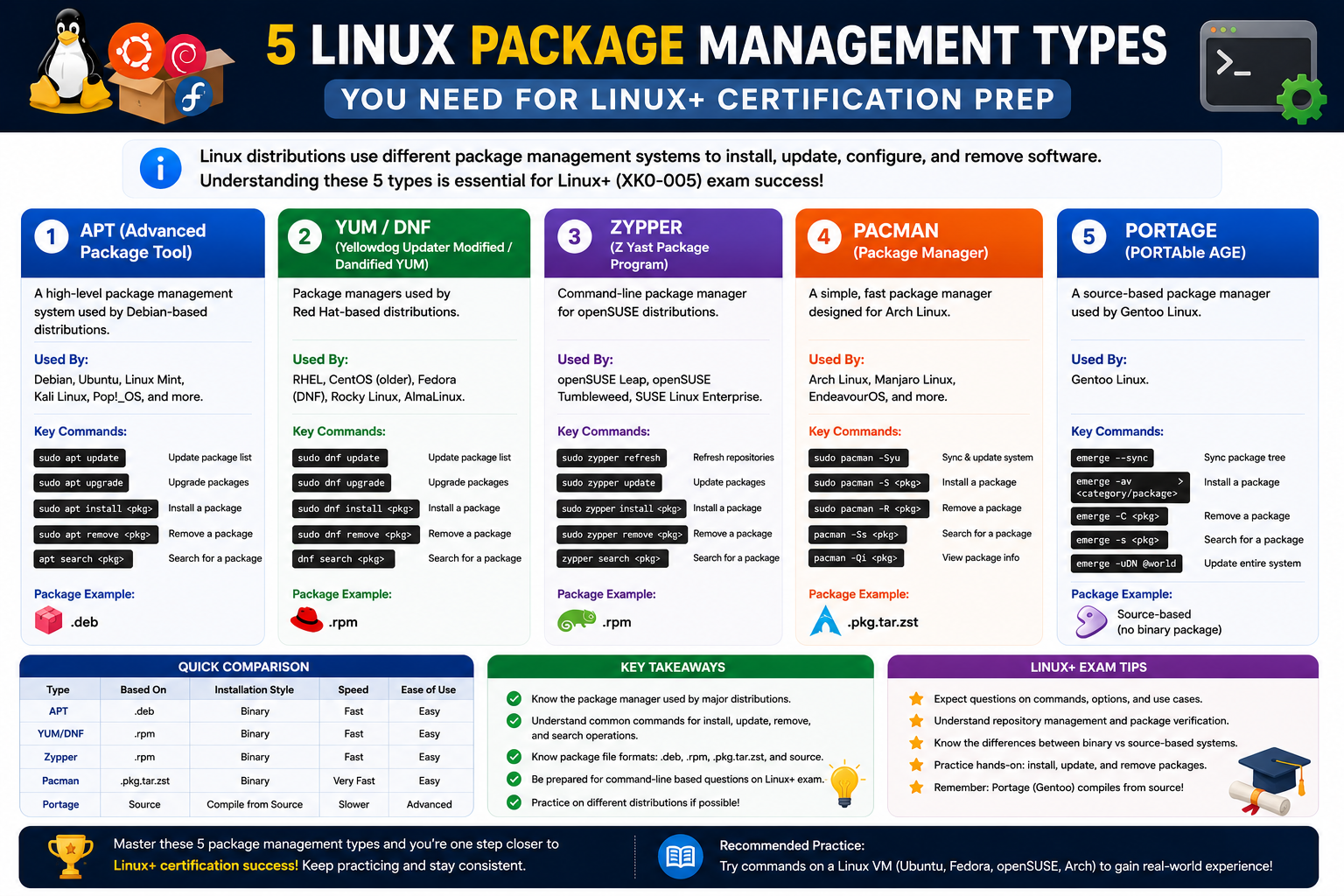
Software packaging sits at the heart of how modern operating systems manage applications, updates, and system integrity. Although users often interact only with icons, commands, or application menus, a large amount of structured organization happens behind the scenes every time software is installed or removed. This structure is what allows systems to remain stable even when thousands of software components are installed, updated, or replaced over time.
At its core, software packaging exists to solve a fundamental problem: applications are not single, isolated files. Even the simplest program depends on multiple supporting components such as libraries, configuration files, shared modules, and documentation. Without a structured method of bundling these components, system administration would quickly become chaotic. Files would be scattered across directories, dependencies would conflict, and updates would risk breaking unrelated parts of the system.
Packaging introduces order into this complexity. It ensures that software is delivered as a controlled unit, where all required elements are grouped and installed predictably. This predictability is especially important in environments where stability is critical, such as servers, enterprise systems, cloud infrastructure, and development environments.
Another important aspect of packaging is consistency. When software is distributed in a standardized format, it behaves the same way across different systems that support that format. This consistency reduces uncertainty for administrators and developers, allowing them to focus on configuration and optimization rather than installation issues.
In Linux environments, packaging is not just a convenience feature; it is a foundational design principle. Every major distribution relies on a packaging strategy that defines how software is installed, updated, tracked, and removed. This is why understanding packaging is considered essential knowledge for anyone working with Linux systems, particularly those preparing for professional certifications that assess system administration skills.
Beyond technical efficiency, packaging also supports security. By controlling how software is installed and verified, systems can ensure that only trusted and properly structured packages are allowed to modify system files. This reduces the risk of corrupted installations or unauthorized modifications, which could otherwise compromise system stability or security.
In practical terms, software packaging allows administrators to manage systems at scale. Instead of manually copying files and configuring applications, they can rely on standardized package operations. This becomes especially important in environments with hundreds or thousands of machines, where manual installation would be impossible to maintain consistently.
As computing systems have evolved, packaging has also adapted. Early systems relied on simple archives, but modern environments use advanced formats with built-in dependency tracking, version control, and automated installation logic. Despite these advancements, the core idea remains the same: bundle everything an application needs into a single manageable unit.
Understanding this foundation is essential before exploring specific packaging formats. Each format builds upon these principles while introducing its own structure and tools.
How Package Formats Organize Software
A package format defines how software components are structured inside a distributable file. While the exact implementation varies across systems, the underlying goal is consistent: to organize software into a single unit that can be reliably installed and managed.
Inside a package, files are arranged in a structured hierarchy. This typically includes executable binaries, configuration files, libraries, and documentation. However, the visible files are only part of the package. Equally important is the internal structure that governs how these files are interpreted by the system during installation.
When a package is processed, the system does not simply extract files randomly. Instead, it follows a predefined structure that dictates where each file should be placed. For example, executable files may be placed in system directories, configuration files in dedicated configuration paths, and documentation in separate informational directories. This structured placement ensures that applications integrate cleanly with the operating system.
Another key feature of package formats is versioning. Every package typically includes a version identifier that helps the system determine whether it represents a newer or older release of the software. This allows administrators to upgrade applications safely without losing track of installed versions. It also makes it possible to roll back updates in some systems if a newer version causes issues.
Package formats also include control information, which acts as a set of instructions for the system. This information defines how the package should be installed, what dependencies must be present, and what actions should be taken before or after installation. Without this control layer, package installation would be far less reliable and more prone to errors.
Another important structural element is the dependency definition. Most modern software relies on external libraries or components to function correctly. Instead of bundling everything into a single large file, packages often declare which external components they require. The system then ensures those dependencies are installed before or alongside the package itself.
This modular approach prevents duplication and reduces system bloat. Multiple applications can share the same libraries instead of each including its own copy. This improves efficiency and reduces storage usage while maintaining compatibility across applications.
In addition to the installation structure, package formats also define how software should be removed. A properly structured package knows exactly which files were installed and where they were placed. This allows the system to cleanly remove all components without leaving behind unnecessary files or broken configurations.
This level of organization is what distinguishes package-based systems from manual software installation. Instead of relying on user memory or manual tracking, the system itself maintains a complete record of installed software components.
Metadata and Dependency Management
One of the most powerful features of modern package formats is the inclusion of metadata. Metadata refers to structured information that describes the package rather than forming part of the application itself. This information is essential for managing software efficiently and ensuring compatibility across systems.
Typical metadata includes the software name, version number, author or maintainer details, a short description of the application, and licensing information. While this may seem simple, it plays a crucial role in system organization. When administrators query installed software, this metadata allows them to quickly identify what is present on the system and what purpose it serves.
Beyond basic identification, metadata also governs how packages interact with each other. One of the most important aspects of this is dependency management. Dependencies are external components that a package requires to function correctly. Without these components, the software may fail to run or behave unpredictably.
Package systems use metadata to define these dependencies explicitly. When a package is installed, the system reads this information and checks whether the required components are already available. If they are not, the system can automatically retrieve and install them before continuing with the installation process.
This automatic resolution of dependencies significantly reduces the complexity of software management. Without it, administrators would need to manually track and install every required component, which would be time-consuming and error-prone.
Dependency management also helps prevent conflicts between different software packages. In some cases, two applications may require different versions of the same library. Package systems use metadata rules to determine whether these versions can coexist or whether one must be replaced. This helps maintain system stability and avoids situations where installing one application breaks another.
Another important aspect of metadata is conflict detection. Packages can declare whether they conflict with other software components. If a conflict is detected during installation, the system can stop the process or prompt for resolution. This ensures that incompatible software does not end up installed on the same system.
Metadata also supports automation. Because package information is structured and machine-readable, system tools can use it to perform bulk operations such as updates, upgrades, and system audits. This is especially useful in large environments where manual tracking would be impractical.
In addition, metadata contributes to system security. By verifying package information before installation, systems can ensure that software originates from trusted sources and has not been tampered with. Some systems include integrity checks that validate package contents against expected values, further reducing the risk of corrupted or malicious software.
Overall, metadata transforms packages from simple file bundles into intelligent, self-describing units that the system can manage automatically and reliably.
Relationship Between Package Formats and Package Managers
Package formats and package managers work together as two parts of a unified system. While the package format defines how software is structured, the package manager is responsible for interpreting that structure and executing installation, update, and removal operations.
A package manager acts as an intermediary between the user and the underlying system. Instead of manually handling files, administrators interact with the package manager, which then performs all necessary operations based on the rules defined in the package format.
When a package is installed, the package manager reads its metadata, resolves dependencies, verifies integrity, and places files in their correct locations. It also updates internal records to track what has been installed. This tracking is essential for future operations such as upgrades or removals.
Different operating systems and Linux distributions use different package managers, but the core functions remain similar. Some are designed for simplicity, while others are built for advanced control and automation. Regardless of their design, they all rely on the underlying structure of package formats to function correctly.
Package managers also handle repository management. A repository is a centralized location where packages are stored and distributed. The package manager communicates with these repositories to download software, check for updates, and retrieve dependency information. This centralized approach ensures that software remains consistent and up to date across multiple systems.
Another important role of package managers is version control. They keep track of which versions of software are installed and available for upgrade. This allows administrators to maintain systems at a desired level of stability, whether that means staying on the latest release or maintaining a tested, stable version.
Package managers also provide rollback capabilities in some cases. If an update causes issues, it may be possible to revert to a previous version using stored package information. This adds a layer of reliability to system management.
Security is another key responsibility. Package managers often verify digital signatures or checksums associated with packages to ensure they have not been altered. This helps prevent unauthorized modifications and ensures that software comes from trusted sources.
Together, package formats and package managers form the backbone of software distribution in Linux and other Unix-like systems. One defines structure, while the other enforces and manages that structure in practice.
Evolution from Early Unix to Modern Linux Systems
The concept of software packaging has evolved significantly over time. In early Unix systems, software distribution was relatively simple and often manual. Applications were commonly distributed as collections of files that users would extract and place in appropriate directories themselves. This approach worked in small environments but quickly became inefficient as systems grew more complex.
As Unix systems expanded, the need for more structured software management became apparent. Administrators required a way to track installed software, manage updates, and ensure consistency across systems. This led to the development of early packaging tools that could bundle files into archives and provide basic installation scripts.
These early tools introduced the concept of grouping files, but they lacked advanced features such as dependency tracking or version management. As computing environments became more interconnected, these limitations became more noticeable.
The rise of Linux distributions accelerated the evolution of packaging systems. Each distribution began developing its own approach to software management, tailored to its design philosophy. Some focused on stability and strict control, while others prioritized flexibility and ease of use.
Over time, packaging systems became more sophisticated. They began incorporating metadata, automated dependency resolution, and centralized repositories. This transformation turned package management into a core component of the operating system rather than an optional tool.
Modern Linux systems now rely heavily on advanced packaging ecosystems. These systems are capable of managing thousands of packages simultaneously, ensuring compatibility, and automating updates across entire networks. What began as simple file bundling has become a complex and highly efficient system for software distribution and maintenance.
The evolution of packaging reflects the broader evolution of computing itself. As systems have grown more complex, the tools used to manage them have also become more intelligent and automated.
Why Sysadmins Must Understand Packaging
For system administrators, understanding software packaging is not optional. It is a fundamental skill required for maintaining system stability, performance, and security. Every installation, update, or removal of software depends on a clear understanding of how packages function.
In real-world environments, sysadmins frequently work with multiple package formats and systems. They must be able to identify which format is used, understand its structure, and apply the correct tools to manage it. This becomes especially important in heterogeneous environments where multiple Linux distributions coexist.
Packaging knowledge also plays a critical role in troubleshooting. When software fails to install or behave correctly, the issue often lies in missing dependencies, version conflicts, or incorrect package structures. Without an understanding of packaging principles, diagnosing these problems becomes significantly more difficult.
Another important aspect is system automation. Many administrative tasks are automated using scripts that rely on package management commands. A deep understanding of packaging allows sysadmins to build more reliable automation workflows that can scale across multiple systems.
Security is another key reason why packaging knowledge is essential. Improperly managed packages can introduce vulnerabilities or unstable software into a system. By understanding how packages are structured and verified, administrators can reduce these risks and maintain system integrity.
In modern IT environments, where systems are constantly evolving and scaling, packaging knowledge ensures that administrators can maintain control and consistency. It is one of the foundational skills that support nearly every other aspect of system administration.
Understanding Binary and Source-Based Software Packages
Before diving into specific packaging systems, it is important to understand a fundamental distinction that shapes how software is distributed across Linux environments: the difference between binary packages and source-based packages. This distinction influences performance, installation speed, system compatibility, and even how administrators troubleshoot issues.
Binary packages are precompiled software units. This means the application has already been translated from human-readable source code into machine-executable instructions. When a binary package is installed, the system does not need to compile anything. It simply extracts and places the prebuilt components into the correct locations. This makes binary packages fast and efficient to install, which is why they are widely used in enterprise and production environments.
Source-based packages, on the other hand, contain the original source code of the application. Instead of installing precompiled binaries, the system compiles the software locally. This approach provides flexibility, allowing administrators to optimize software for specific hardware or system configurations. However, it also requires more time and system resources during installation.
In many Linux ecosystems, both formats coexist. Some distributions favor binary packages for simplicity, while others provide source packages for customization and optimization. Understanding when and why each format is used is essential for effective system management.
Another important consideration is portability. Binary packages are generally tied to specific system architectures and library versions. A binary compiled on one system may not work on another if the environments differ. Source packages avoid this limitation by being compiled locally, ensuring compatibility with the target system.
However, source-based installation introduces complexity. It requires build tools, dependency resolution before compilation, and sometimes manual configuration. For this reason, modern systems tend to rely heavily on binary packages, reserving source-based installation for specialized use cases.
This foundational distinction sets the stage for understanding how different packaging ecosystems are designed and why they behave differently in real-world environments.
Deep Structure of the RPM Packaging Ecosystem
The RPM ecosystem represents one of the most widely used packaging systems in Linux environments, particularly in enterprise distributions. At its core, RPM is not just a file format but a complete system for managing software installation, updates, and verification.
An RPM package is structured with multiple layers of information. At the highest level, it contains metadata describing the software, followed by payload data that includes the actual application files. This structure allows the system to understand both what the software is and how it should be installed.
One of the defining features of RPM-based systems is strict dependency tracking. Each package explicitly declares what other components it requires. When an installation is initiated, the system checks these requirements and ensures that all dependencies are satisfied before proceeding. This prevents incomplete installations and reduces runtime errors.
RPM systems also emphasize integrity verification. Every package includes cryptographic signatures or checksums that allow the system to verify authenticity. This ensures that packages have not been altered or corrupted during distribution. In enterprise environments, this feature is especially important for maintaining security compliance.
Another key aspect of RPM systems is database tracking. Every installed package is recorded in a local database maintained by the system. This database allows administrators to query installed software, verify versions, and manage updates efficiently. It also enables the clean removal of software by tracking exactly which files belong to each package.
RPM ecosystems also support scripting during installation and removal. These scripts allow packages to perform configuration tasks automatically, such as creating users, setting permissions, or initializing services. While powerful, these scripts must be carefully designed to avoid system conflicts.
In addition, RPM systems often rely on repository-based distribution. Software is stored in centralized repositories that the system queries during installation or updates. This ensures consistency across systems and simplifies maintenance.
The combination of structure, verification, and automation makes RPM a robust system for managing software in large-scale environments.
The Debian Packaging Architecture and Its Internal Logic
The Debian packaging system represents another major approach to Linux software management. It is widely used in Debian-based distributions and emphasizes simplicity, consistency, and strong dependency management.
At the core of this system is a structured archive format that separates control information from application data. This separation allows the system to process installation instructions independently from the actual software files. As a result, installations can be more predictable and easier to manage.
Debian packages rely heavily on a layered toolchain. At the lowest level is a core package handling system responsible for installing and removing packages. Above this layer are higher-level tools that provide dependency resolution, repository management, and user-friendly interfaces.
One of the strengths of this ecosystem is its advanced dependency resolution system. Unlike simpler systems, Debian-based environments can resolve complex dependency chains automatically. If a package depends on multiple layers of libraries, the system ensures all required components are installed in the correct order.
This system also includes conflict detection mechanisms. If two packages attempt to install incompatible versions of the same component, the system identifies the conflict and prevents installation errors. This reduces the likelihood of system instability caused by conflicting software.
Another important aspect is package configuration management. Debian systems often prompt for configuration choices during installation. These configurations are stored and reused during updates, ensuring consistent behavior across versions.
Debian packaging also supports pre-installation and post-installation scripts. These scripts allow software to configure itself automatically after being installed, such as setting up services or initializing databases. This automation reduces the need for manual setup steps.
Repositories play a central role in Debian-based systems. They serve as trusted sources of software and updates. By maintaining centralized repositories, Debian systems ensure that all users receive consistent and tested versions of software.
This structured and predictable design makes Debian packaging highly suitable for both desktop and server environments.
The Role of TAR Archives in System-Level Software Handling
TAR archives occupy a unique position in Linux software management. Unlike RPM or DEB packages, TAR is not a full package management system. Instead, it is a method of bundling files into a single archive.
The primary purpose of TAR is to preserve file structure. When multiple files and directories are combined into a TAR archive, their hierarchical relationships are maintained. This makes TAR especially useful for transferring directory structures between systems without losing organization.
In system administration, TAR archives are often used for software distribution in cases where no formal package system is required. They provide a lightweight way to group files without introducing dependency management or installation logic.
One of the key advantages of TAR is its simplicity. It does not modify system behavior or require a package manager. It simply creates or extracts file bundles. This makes it highly portable and widely supported across different operating systems.
TAR archives are often used as the foundation for more complex packaging systems. For example, many modern packages internally use TAR structures to store their file payloads. This layered approach allows systems to combine simple archiving with advanced package management features.
Another important use case for TAR is backup and restoration. System administrators frequently use TAR to create snapshots of directories or entire system components. Because TAR preserves file metadata such as permissions and timestamps, it is well-suited for this purpose.
Despite its simplicity, TAR remains relevant in modern systems due to its flexibility and reliability. It serves as a universal building block for file grouping across many environments.
Compression Layers and Their Impact on Package Efficiency
While TAR handles file grouping, compression technologies are used to reduce file size and improve distribution efficiency. Compression plays a crucial role in modern software packaging by reducing bandwidth usage and storage requirements.
One of the most common compression methods is Gzip, which is often combined with TAR to create compressed archives. These archives significantly reduce file size while maintaining fast compression and decompression speeds.
Another widely used compression method is Bzip2. This format provides higher compression ratios than Gzip but requires more processing power. It is often used when storage efficiency is more important than speed.
A more modern compression method is XZ, which offers even better compression ratios while maintaining reasonable performance. XZ is commonly used in environments where large software distributions need to be minimized in size.
Each compression method has trade-offs between speed and efficiency. Gzip is fast and widely supported, Bzip2 offers better compression at the cost of speed, and XZ provides maximum compression with higher computational requirements.
When combined with TAR, these compression methods create layered archive formats. For example, a TAR archive can be compressed using Gzip, resulting in a compact file that retains full directory structure.
These compressed archives are not just about saving space. They also improve distribution efficiency in networked environments. Smaller files transfer faster, reducing download times and server load.
Compression also plays a role in system updates. When software updates are distributed as compressed packages, they minimize bandwidth usage and improve update speed across large networks.
Understanding compression layers is essential for system administrators because it directly impacts performance, storage planning, and deployment strategies.
Cross-System Compatibility and Package Conversion Approaches
In environments where multiple Linux distributions coexist, compatibility between package formats becomes an important consideration. Since RPM and DEB systems are fundamentally different, direct interoperability is not always possible.
To address this challenge, conversion tools exist that attempt to translate packages from one format to another. These tools analyze package structure, extract files, and reconstruct them in a different format. While useful, such conversions are not always perfect and may require manual adjustments.
The need for conversion typically arises in mixed environments where software is only available in one packaging format. Instead of rebuilding the software from source, administrators may convert existing packages to match their system requirements.
However, conversion introduces risks. Differences in dependency systems, file placement conventions, and configuration scripts can lead to unexpected behavior. For this reason, conversion is generally considered a last-resort solution rather than a standard practice.
A more reliable approach in cross-system environments is to use source-based packages or universal packaging systems. These approaches reduce dependency on specific formats and improve portability across distributions.
Despite these challenges, package conversion remains a useful tool in certain scenarios, particularly in testing environments or legacy systems.
Dependency Resolution Mechanisms Across Packaging Systems
Dependency resolution is one of the most complex aspects of software packaging. It ensures that all required components are available before a package is installed or executed.
Different packaging systems handle dependency resolution in different ways. Some systems resolve dependencies automatically, while others require manual intervention. The sophistication of dependency management often determines how easy a system is to maintain.
In advanced systems, dependency resolution involves constructing a complete graph of required components. The system analyzes relationships between packages and determines the correct installation order. This ensures that no component is installed before its dependencies are satisfied.
Dependency conflicts can arise when multiple packages require different versions of the same component. In such cases, the system must determine whether both versions can coexist or whether one must be replaced.
Some systems use strict version constraints to prevent conflicts. Others allow multiple versions of the same library to exist simultaneously, isolating them to prevent interference.
Effective dependency management reduces system instability and ensures that applications function as expected. It also simplifies updates, as the system can automatically adjust dependencies when new versions are installed.
Repository-Based Software Distribution Models
Modern packaging systems rely heavily on repositories for software distribution. A repository is a centralized location where software packages are stored, organized, and maintained.
Repositories serve several important functions. They provide a trusted source of software, ensure consistency across systems, and simplify the process of installing and updating applications.
When a system requests a package, it communicates with a repository to retrieve the necessary files. The repository may also provide metadata, dependency information, and version history.
Centralized repositories improve security by allowing maintainers to verify and control software distribution. This reduces the risk of malicious or corrupted packages entering the system.
Repositories also support version control. Multiple versions of the same software can be stored simultaneously, allowing administrators to choose which version to install or maintain.
In large environments, repositories can be mirrored across multiple locations to improve availability and reduce network latency. This ensures that software can be accessed efficiently regardless of system location.
The repository model is a key reason why modern package management systems are scalable and reliable.
Practical System Administration Workflows with Packaging Systems
In real-world system administration, packaging systems are used continuously for installation, maintenance, and troubleshooting. These workflows form the backbone of system operations.
One common workflow involves initial system setup, where administrators install core applications and dependencies using package managers. This ensures that systems are configured consistently from the start.
Another workflow involves regular updates. Packages are periodically updated to include security patches, performance improvements, and new features. Package managers automate this process, reducing manual effort.
Troubleshooting is another critical workflow. When applications fail, administrators often inspect package versions, verify dependencies, and check installation integrity. Packaging systems provide the tools needed to perform these checks efficiently.
System migration is also heavily dependent on packaging. When moving applications between systems, packages ensure that software can be transferred and installed with minimal configuration changes.
Automation plays a major role in modern workflows. Scripts and configuration management tools often rely on package systems to install and configure software across multiple machines simultaneously.
These workflows demonstrate how deeply integrated packaging systems are into everyday system administration tasks, forming a foundational layer of operational control.
Security and Integrity in Software Packaging Systems
Security is one of the most critical reasons modern operating systems rely on structured software packaging. Without controlled packaging systems, software installation would become a weak point where malicious or corrupted files could easily enter a system. Package formats and managers work together to create multiple layers of protection that help ensure software integrity from distribution to execution.
One of the primary security mechanisms in packaging systems is verification through digital signatures or checksums. When a package is created by a maintainer, it is often signed using a cryptographic key. This signature acts as a proof of authenticity, confirming that the package has not been altered since it was created. When the package is downloaded and installed, the system checks this signature before allowing installation to proceed.
Checksums serve a similar purpose by validating file integrity. A checksum is a computed value based on the contents of a file. If even a single byte is changed, the checksum changes. By comparing expected and actual checksum values, the system can detect corruption or tampering during download or storage.
These verification steps are especially important in environments where software is distributed over networks. Without them, attackers could intercept packages and inject malicious code. Package systems reduce this risk by enforcing validation before installation.
Another important security feature is controlled installation paths. Package managers do not randomly place files on the system. Instead, they follow strict directory structures that are predefined by the operating system. This prevents applications from overwriting critical system files or placing executables in unauthorized locations.
Permissions also play a major role in packaging security. Installed files are assigned specific ownership and access rights. This ensures that only authorized users or processes can modify or execute certain components. By enforcing consistent permission rules, package systems reduce the likelihood of privilege escalation attacks.
Some packaging systems also include sandboxing or isolation features. These mechanisms limit how installed software interacts with the rest of the system. Even if a package contains vulnerabilities, isolation can prevent it from affecting core system components.
Dependency verification further strengthens security. Since packages declare their dependencies explicitly, the system can ensure that only approved components are installed. This reduces the risk of untrusted or outdated libraries being introduced into the environment.
Security updates are another important aspect. Package systems allow administrators to quickly distribute patches across multiple systems. Instead of manually updating software, a single update can propagate through repositories and be applied consistently across all connected machines.
This centralized update model helps reduce exposure to known vulnerabilities. Systems that remain unpatched are often vulnerable to exploitation, but package-managed updates significantly reduce this risk.
Overall, packaging systems act as a controlled gateway between external software sources and internal system environments, ensuring that only verified, structured, and compatible software is allowed to operate.
Performance Considerations in Package Management Systems
While security and structure are essential, performance is also a key factor in software packaging design. Efficient package systems must handle installation, updates, and dependency resolution without introducing unnecessary delays or system overhead.
One of the main performance challenges in packaging systems is dependency resolution. As software ecosystems grow more complex, packages may depend on multiple layers of other packages. Resolving these relationships requires analyzing dependency graphs and determining the correct installation order. Efficient systems optimize this process to minimize delays.
Caching is another important performance feature. Package managers often store metadata and downloaded files locally to avoid repeated network requests. This improves speed when reinstalling or updating software, especially in environments with limited bandwidth.
Compression also plays a direct role in performance. Smaller package sizes reduce download times and storage requirements. However, compression must be balanced with decompression speed. Highly compressed packages save space but require more processing power to unpack.
Parallel processing is increasingly used in modern package systems. Instead of installing packages one by one, some systems can process multiple installations simultaneously, provided dependencies are satisfied. This significantly reduces installation time in large-scale environments.
Another performance consideration is repository mirroring. By distributing package repositories across multiple geographic locations, systems reduce latency and improve access speed. Users can download packages from the nearest mirror, resulting in faster installation and update cycles.
System resource usage during installation is also carefully managed. Package managers are designed to minimize CPU and memory consumption so that installations do not interfere with running applications. This is particularly important in server environments where uptime and responsiveness are critical.
Efficient rollback mechanisms also contribute to performance stability. If an update fails, systems can revert changes without requiring a full reinstallation. This reduces downtime and ensures that systems remain operational even when updates encounter issues.
Performance optimization in packaging systems is not just about speed; it is about maintaining a balance between reliability, resource usage, and system responsiveness.
Real-World Use Cases of Packaging in Enterprise Environments
In enterprise environments, software packaging plays a central role in maintaining large-scale infrastructure. Organizations often manage thousands of systems, each requiring consistent software configurations. Packaging systems make this possible by providing standardized installation and update mechanisms.
One common use case is automated deployment. Enterprises use configuration tools that rely on package managers to install required software across multiple machines simultaneously. This ensures that all systems are configured identically, reducing inconsistencies and configuration drift.
Another important use case is patch management. Security updates must be applied quickly across entire networks to prevent vulnerabilities from being exploited. Package systems allow administrators to distribute patches efficiently through centralized repositories.
Software lifecycle management is also heavily dependent on packaging. Applications go through stages of installation, updates, version upgrades, and eventual removal. Package systems track each of these stages, ensuring that transitions between versions are smooth and controlled.
In cloud environments, packaging is even more critical. Virtual machines and containers often rely on package systems to install runtime dependencies. This allows applications to be deployed quickly and consistently across different cloud instances.
Development environments also benefit from packaging systems. Developers can replicate production environments by installing identical packages, ensuring that applications behave consistently across development, testing, and production stages.
Large organizations also use packaging systems for compliance management. By maintaining records of installed software, administrators can ensure that systems meet regulatory requirements and security standards.
Disaster recovery is another important application. In the event of system failure, packages can be used to quickly restore software environments to a known state. This reduces downtime and ensures business continuity.
These real-world applications highlight how packaging systems extend beyond simple software installation and become a foundational part of enterprise IT operations.
Advanced Packaging Concepts and Modern Innovations
As computing environments continue to evolve, packaging systems are also adapting to new requirements. One of the most significant developments is the rise of universal packaging formats. These formats are designed to work across multiple Linux distributions, reducing fragmentation and improving portability.
Universal packaging systems aim to solve the long-standing challenge of distribution compatibility. Instead of creating separate packages for each system type, developers can distribute a single package that works across different environments.
Another innovation is container-based packaging. In this model, applications are packaged with all their dependencies into isolated environments. This ensures that applications run consistently regardless of the underlying system configuration.
Containerization has become especially important in cloud computing and DevOps workflows. It allows applications to be deployed rapidly and scaled efficiently without worrying about system-specific dependencies.
Immutable packaging is another emerging concept. In this approach, installed software is not modified after deployment. Instead, updates are applied by replacing entire package versions. This reduces configuration drift and improves system reliability.
Modern packaging systems are also integrating stronger automation capabilities. Machine learning and predictive algorithms are being explored to optimize dependency resolution, update scheduling, and system maintenance tasks.
Security innovations continue to evolve as well. Enhanced signature verification methods, stronger encryption standards, and real-time vulnerability scanning are becoming more common in advanced packaging systems.
Another trend is minimal base systems. Instead of installing full operating environments, modern systems often start with minimal installations and build functionality through modular packages. This improves efficiency and reduces attack surfaces.
These innovations demonstrate that packaging systems are not static; they are continuously evolving to meet the demands of modern computing environments.
Conclusion
Software packaging plays a fundamental role in how modern operating systems manage applications, dependencies, and system stability. Although it often works behind the scenes, it is one of the most important mechanisms that keeps computing environments organized and reliable. From simple file archives to advanced package management ecosystems, packaging ensures that software can be installed, updated, and removed in a controlled and predictable manner.
Across Linux distributions, packaging systems such as RPM and Debian-based formats demonstrate different approaches to solving the same core problem: how to efficiently manage complex software in a scalable way. Each system brings its own structure, tools, and philosophy, but all share common goals of consistency, automation, and security. Compression formats like TAR, GZ, and related archives further support this ecosystem by enabling efficient distribution and storage of software components.
Beyond technical structure, packaging systems are essential for security and system integrity. They help verify software authenticity, manage dependencies, and prevent conflicts that could destabilize systems. In enterprise environments, these capabilities become even more critical, enabling large-scale automation, patch management, and consistent software deployment across thousands of machines.
For system administrators and IT professionals, understanding packaging is not just a theoretical requirement but a practical necessity. It directly impacts daily operations, troubleshooting, performance management, and long-term system maintenance. As computing continues to evolve toward cloud infrastructure, containerization, and automated deployment, packaging knowledge remains a core skill that underpins modern system administration and ensures reliable software delivery in increasingly complex environments.