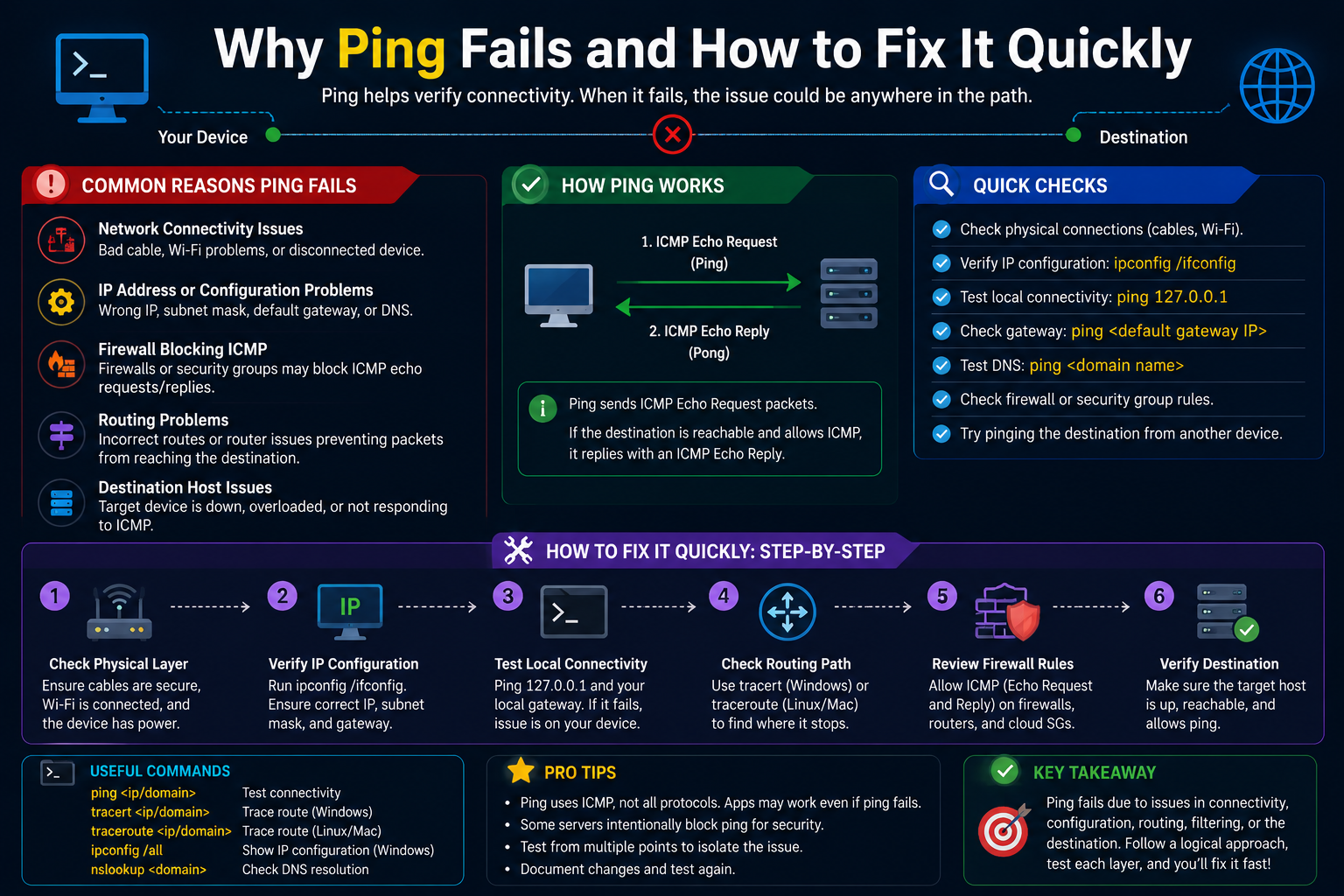
Network connectivity forms the foundation of every modern IT environment, and when a simple ping request fails, it often signals a deeper issue that can disrupt services, applications, and user productivity. Despite its simplicity, ping remains one of the most effective and widely used tools for quickly identifying where communication breaks down between devices. It provides immediate feedback about reachability and latency, making it a critical first step in troubleshooting.
However, a failed ping does not always point to a straightforward problem. The root cause can range from something as basic as a disconnected cable to more complex issues like firewall restrictions, routing misconfigurations, or intentional blocking of ICMP traffic. In many environments, especially those using advanced firewall systems, ping responses may be deliberately disabled for security reasons. Understanding how to systematically approach a failed ping request allows you to eliminate guesswork and resolve issues efficiently.
A structured troubleshooting methodology is essential. Instead of jumping to conclusions, you should move step by step through different layers of the network, verifying each component before proceeding to the next. This disciplined approach not only saves time but also ensures that no critical detail is overlooked.
Understanding the Role of Ping in Network Troubleshooting
Ping operates using the Internet Control Message Protocol and is designed to test whether a destination host is reachable. When you send a ping request, the source device transmits an echo request packet to the target. If the target is reachable and configured to respond, it sends back an echo reply. This simple exchange helps confirm connectivity and provides insight into round-trip time.
Although ping is straightforward, its effectiveness depends on how network devices handle ICMP traffic. Some systems are configured to ignore ping requests entirely, which can create confusion during troubleshooting. A failed ping does not always mean the destination is offline; it may simply be configured not to respond.
Because of this, ping should never be used in isolation. It is most effective when combined with other tools and techniques that provide additional context about network behavior.
Start with the Physical Layer
The first step in troubleshooting any network issue is to verify the physical components. Many connectivity problems originate from simple hardware issues that are often overlooked. A loose cable, a faulty port, or a powered-off device can easily cause a ping to fail.
Check that all cables are securely connected and that network interfaces are active. Look for link lights on switches and network interface cards, as these indicators confirm that a physical connection is established. If a device is not showing any activity, try using a different cable or port to rule out hardware failure.
Power cycling equipment can also resolve temporary issues. Restarting devices clears transient faults and resets network interfaces, which may restore connectivity without further intervention.
Verify IP Configuration
Once the physical layer is confirmed to be functioning, the next step is to examine IP addressing. Incorrect or incomplete network configurations are a common cause of failed ping requests.
Ensure that the device has a valid IP address, subnet mask, and default gateway. If the device is using dynamic addressing, verify that it has successfully obtained an address from the DHCP server. Expired leases or address conflicts can lead to unpredictable connectivity issues.
It is also important to confirm that the destination IP address is correct. A simple typo can lead to a failed ping, even if the network itself is functioning perfectly. Double-checking addresses helps eliminate this possibility early in the process.
Check Name Resolution
In many cases, users attempt to ping a hostname rather than an IP address. If name resolution fails, the ping request will not reach the intended destination.
Verify that DNS settings are correctly configured and that the system can resolve hostnames to IP addresses. Testing with both a hostname and its corresponding IP address can help determine whether the issue lies with DNS or network connectivity.
If the ping works with an IP address but not with a hostname, the problem is likely related to DNS configuration rather than network reachability.
Use Additional Connectivity Tools
Ping provides a basic indication of reachability, but it does not reveal the full path that packets take through the network. When a ping fails, tools like traceroute can help identify where the failure occurs.
Traceroute shows each hop along the path to the destination, allowing you to pinpoint where packets are being dropped. If the trace stops at a specific device, that device may be the source of the issue.
Examining routing tables is another valuable step. Incorrect routes can cause traffic to be sent to the wrong destination or dropped entirely. Reviewing the routing configuration helps ensure that packets are following the intended path.
Network utilities that display active connections and listening ports can also provide insight into how a system is handling traffic. These tools help determine whether the issue is localized to a specific device or affects the broader network.
Analyze Firewall Behavior
Firewalls play a critical role in controlling network traffic, but they can also block legitimate communication if not configured correctly. Many firewalls are designed to restrict ICMP traffic by default, which can result in failed ping requests even when connectivity is otherwise intact.
When troubleshooting, check whether the firewall allows ICMP echo requests and replies. If ICMP is blocked, the device will not respond to ping, even though it may still be accessible through other protocols.
Security policies should be reviewed carefully to ensure that they align with operational requirements. Allowing ICMP selectively can provide visibility into network health without exposing the system to unnecessary risk.
Understand Interface Behavior
In some network environments, interfaces are configured with specific management settings that control which services they accept. If an interface is not configured to respond to ping, it will ignore ICMP requests regardless of other settings.
Review the configuration of the interface you are testing. Ensure that it is assigned the correct network parameters and that any required management settings are enabled. If the interface is intended to respond to ping, verify that this capability is explicitly configured.
Applying changes to interface settings often requires committing or saving the configuration. Without this step, modifications may not take effect, leading to continued connectivity issues.
Consider Security Profiles and Traffic Policies
Beyond basic firewall rules, advanced security features can also impact ping behavior. Protection profiles designed to prevent network attacks may block or limit ICMP traffic under certain conditions.
If a ping fails despite correct configuration, examine any security profiles that may be applied to the interface or zone. These profiles can include protections against denial-of-service attacks, which may inadvertently block legitimate traffic.
Adjusting these settings requires careful consideration, as disabling protections can expose the network to risk. Instead, refine the configuration to allow necessary traffic while maintaining security controls.
Test from Multiple Points
Testing connectivity from different devices can help isolate the source of the problem. If one device cannot ping the target but another can, the issue is likely specific to the original device.
Testing from various points in the network also helps identify whether the problem is localized or widespread. This information is crucial for determining the scope of the issue and prioritizing troubleshooting efforts.
Using multiple test methods, such as pinging both the interface and other devices on the same network, provides a clearer picture of how traffic is flowing.
Evaluate Routing and Path Selection
Routing issues are a common cause of failed ping requests, especially in complex networks with multiple paths. If traffic is not being routed correctly, it may never reach the destination.
Check the routing table on both the source and destination devices. Ensure that there is a valid route for the target network and that the correct gateway is being used.
Asymmetric routing can also cause problems, where the path to the destination differs from the return path. This can lead to dropped packets if intermediate devices do not recognize the traffic as part of an established session.
Inspect Packet Flow
When basic troubleshooting steps do not resolve the issue, analyzing packet flow can provide deeper insight. Packet capture tools allow you to observe traffic as it moves through the network, revealing whether packets are being sent, received, or dropped.
By examining packet headers and responses, you can identify where communication is failing. This level of analysis is particularly useful for diagnosing complex issues that are not immediately apparent.
Packet analysis requires a solid understanding of network protocols, but it is one of the most powerful techniques for troubleshooting persistent problems.
Account for Intentional Restrictions
In many environments, especially those with strict security requirements, ping responses are intentionally disabled. This practice reduces the visibility of network devices and helps prevent reconnaissance by unauthorized users.
When troubleshooting in such environments, it is important to confirm whether the lack of response is expected behavior. If ping is disabled by design, alternative methods must be used to verify connectivity.
Understanding the security posture of the network helps avoid unnecessary configuration changes and ensures that troubleshooting efforts align with organizational policies.
Maintain a Methodical Approach
Effective troubleshooting relies on a logical and systematic process. Jumping between potential causes without a clear plan can lead to confusion and wasted effort.
Start with the simplest explanations and gradually move to more complex possibilities. Document each step and its outcome, as this information can be valuable for future reference.
Consistency in troubleshooting practices not only improves efficiency but also enhances your ability to diagnose issues accurately.
Conclusion
A failed ping request may seem like a minor issue, but it often serves as an early indicator of deeper network problems. By approaching troubleshooting with a structured methodology, you can quickly identify the root cause and restore connectivity.
From verifying physical connections to analyzing firewall policies and routing behavior, each step plays a critical role in the diagnostic process. Understanding how different components interact allows you to pinpoint where communication is breaking down and take appropriate action.
While ping is a simple tool, its value lies in how it is used within a broader troubleshooting framework. Combining it with other diagnostic techniques provides a comprehensive view of network health and ensures that issues are resolved effectively.
With practice and a disciplined approach, troubleshooting becomes a systematic and manageable task rather than a frustrating guessing game. This not only improves network reliability but also builds confidence in your ability to handle complex connectivity challenges.