In today’s enterprise networks, security infrastructure is no longer confined to a single location or a small number of devices. Organizations operate across multiple offices, data centers, cloud environments, and remote locations, all of which require consistent and reliable protection. At the center of this protection are firewalls, which act as the first line of defense against unauthorized access, malicious traffic, and evolving cyber threats.
As networks expand, the number of firewalls increases significantly. What begins as a manageable setup of a few devices can quickly grow into dozens or even hundreds of firewalls distributed across different regions. Each device must be configured correctly, kept up to date, and aligned with organizational security policies. Without proper coordination, this complexity can lead to inconsistencies, misconfigurations, and security gaps.
One of the biggest challenges in such environments is maintaining uniformity. When administrators manage devices individually, even small differences in configuration can create vulnerabilities. Over time, these inconsistencies accumulate, making the network harder to control and more difficult to secure. This is where centralized management becomes not just useful, but essential.
What Fortinet FortiManager Is Designed to Do
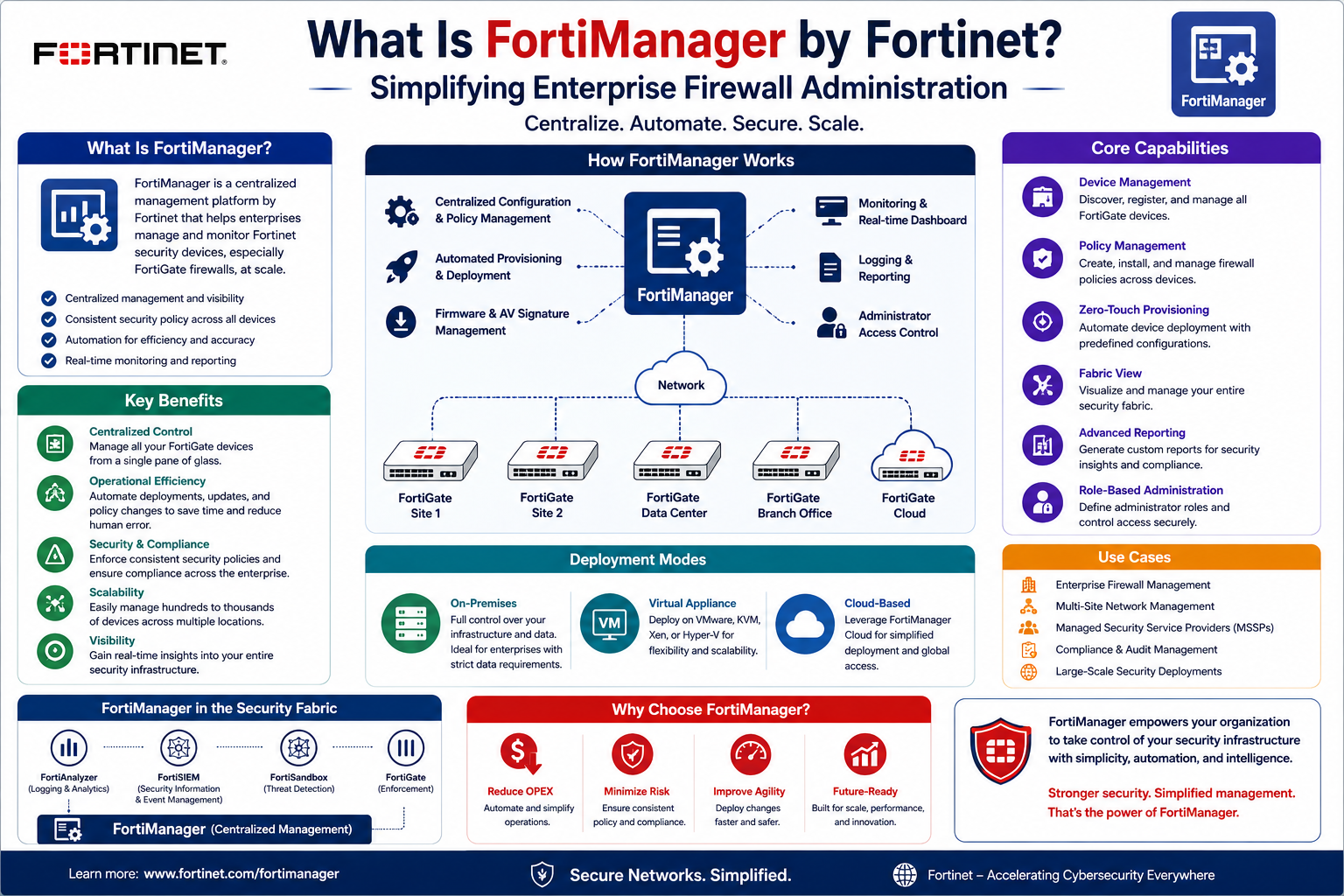
Fortinet FortiManager is a centralized management platform designed to simplify the administration of multiple FortiGate firewalls across an organization. Instead of logging into each firewall separately, administrators can manage the entire security infrastructure from a single interface.
At its core, FortiManager acts as a control hub for firewall operations. It enables teams to configure security policies, deploy updates, monitor device status, and maintain consistency across all managed devices. This centralized approach significantly reduces manual workload and helps ensure that every firewall follows the same security standards.
The platform is particularly valuable in environments where FortiGate firewalls are deployed at scale. Whether an organization operates across multiple branch offices or manages large data center deployments, FortiManager provides a structured way to oversee all devices without losing visibility or control.
By shifting from device-by-device management to centralized control, organizations reduce operational complexity and improve their ability to respond to security requirements quickly and efficiently.
The Concept of Centralized Firewall Management
Centralized firewall management is the idea of controlling multiple security devices from a single point of administration. Instead of configuring each firewall individually, administrators define policies and configurations once and apply them across the entire network.
This approach brings several important advantages. First, it reduces the risk of human error. When configurations are repeated manually across multiple devices, mistakes are more likely to occur. A centralized system eliminates much of this repetition.
Second, it improves consistency. Security policies remain uniform across all locations, ensuring that every part of the network is protected in the same way. This consistency is critical in preventing security gaps that could be exploited by attackers.
Third, centralized management improves efficiency. Tasks that once required hours of repetitive work can be completed in a fraction of the time. Instead of accessing each device individually, administrators can apply changes globally.
FortiManager is built specifically around this concept. It provides a structured environment where policies, configurations, and updates can be managed centrally and distributed to all connected FortiGate devices.
How FortiManager Organizes Large-Scale Environments
Managing hundreds of devices requires more than just a central dashboard. It requires structure. FortiManager introduces organizational mechanisms that allow administrators to group devices logically based on business needs, geographic locations, or operational roles.
One of the key ideas in this structure is segmentation. Devices can be organized into separate administrative domains, allowing different teams or business units to manage their own environments independently while still using the same centralized platform. This is especially useful for large enterprises or service providers that handle multiple clients or divisions.
This structured approach ensures that changes are applied only where intended. It reduces the risk of accidental misconfiguration and provides clearer visibility into how each segment of the network is operating.
Another important aspect is device inventory management. FortiManager keeps track of all connected firewalls, their configurations, firmware versions, and operational status. This makes it easier to identify outdated devices, inconsistencies, or systems that require attention.
Deployment Models and Flexibility of FortiManager
Organizations differ in how they deploy their infrastructure, and FortiManager is designed to accommodate this flexibility. It can be deployed in several different ways depending on operational requirements.
In traditional environments, FortiManager can be installed as a dedicated hardware appliance. This approach is often used in data center environments where performance, reliability, and dedicated resources are important.
For virtualized environments, FortiManager can be deployed as a virtual machine. This option provides flexibility for organizations that rely heavily on virtualization platforms. It allows them to integrate firewall management into existing virtual infrastructure without requiring additional physical hardware.
Cloud-based deployment is another option, enabling organizations to manage their firewall infrastructure through cloud-hosted resources. This model is particularly useful for distributed environments or businesses that prefer scalable, remote management capabilities.
Each deployment method provides the same core functionality, allowing organizations to choose the model that best fits their operational needs without sacrificing management capabilities.
Integration Within the Fortinet Security Ecosystem
FortiManager does not operate in isolation. It is part of a broader security architecture developed by Fortinet, often referred to as the Fortinet Security Fabric. This ecosystem connects multiple security products to provide a unified defense system across the entire network.
At the center of this ecosystem are FortiGate firewalls, which handle traffic inspection, policy enforcement, and threat prevention. FortiManager works alongside these devices to ensure they are consistently configured and updated.
Beyond firewalls, the ecosystem includes a wide range of security tools that extend protection across different layers of the network. These include wireless access points, switching infrastructure, endpoint protection systems, and cloud security services. Each component plays a role in maintaining overall network security.
FortiManager acts as the coordination layer within this ecosystem. It ensures that policies applied at the firewall level are aligned with broader security strategies. When updates or changes are required, they can be distributed across all connected systems in a controlled and consistent manner.
This level of integration allows organizations to manage their entire security environment as a unified system rather than a collection of isolated tools.
Policy Management at Scale
One of the most important functions of FortiManager is centralized policy management. Security policies define how traffic is handled, what is allowed, and what is blocked across the network. In large environments, managing these policies individually on each firewall becomes inefficient and risky.
With FortiManager, policies can be created once and applied across multiple devices. This ensures that all firewalls enforce the same rules, reducing inconsistencies and improving overall security posture.
Policies can be grouped, modified, and deployed based on organizational needs. For example, a policy change required for security compliance can be implemented centrally and distributed across all relevant devices at once.
This approach also simplifies updates. Instead of modifying configurations on each firewall separately, administrators adjust the central policy and push it out to all connected systems. This reduces the likelihood of errors and ensures that changes are applied uniformly.
Standardization Through Configuration Templates
Consistency is a critical factor in managing large networks. Configuration templates play a key role in achieving this consistency. FortiManager allows administrators to define standardized configuration settings that can be applied to multiple devices.
These templates ensure that new devices are configured correctly from the moment they are deployed. Instead of manually setting up each firewall, administrators can apply predefined templates that include network settings, security rules, and operational parameters.
This approach is especially useful when deploying devices across multiple locations. It ensures that every site follows the same configuration standards, reducing variation and simplifying ongoing management.
When updates are required, templates can be modified and redistributed, ensuring that all connected devices remain aligned with current policies.
Early Automation and Operational Efficiency
Even in its foundational use, FortiManager introduces a level of automation that significantly improves operational efficiency. Repetitive tasks such as configuration updates, policy deployment, and device synchronization can be automated through centralized workflows.
This reduces the manual effort required from network administrators and allows them to focus on higher-level security tasks. It also minimizes the risk of human error, which is common when performing repetitive configuration work across multiple devices.
Automation within FortiManager is not limited to deployment tasks. It also extends to monitoring and maintenance activities, ensuring that devices remain up to date and properly configured throughout their lifecycle.
Addressing Configuration Drift in Distributed Networks
One of the most persistent challenges in distributed firewall environments is configuration drift. This occurs when devices that were originally configured in the same way gradually develop differences over time due to manual changes, updates, or inconsistencies in administration.
Configuration drift can lead to security vulnerabilities, operational issues, and unpredictable behavior across the network. Identifying and correcting these inconsistencies manually is time-consuming and error-prone.
FortiManager helps address this issue by maintaining a centralized view of all device configurations. It allows administrators to compare configurations across devices and ensure that they remain aligned with defined standards.
By enforcing consistency through centralized control, FortiManager reduces the likelihood of drift and helps maintain a stable and predictable security environment.
Establishing Control in Expanding Networks
As organizations continue to expand, the need for structured and scalable firewall management becomes increasingly important. Without centralized control, managing security across multiple locations becomes inefficient and difficult to maintain.
FortiManager provides a foundation for this control by bringing all firewall operations under a single management system. It allows organizations to scale their infrastructure without sacrificing visibility or control over security policies.
This structured approach ensures that as the network grows, management complexity does not grow at the same rate. Instead, administrators gain tools that help them maintain order, consistency, and security across increasingly complex environments.
The Internal Architecture of FortiManager in Enterprise Environments
To understand how FortiManager operates in real-world deployments, it is important to look beyond its interface and examine how it is structured internally. At its core, FortiManager is built to act as a centralized control system that separates management logic from individual firewall execution. This separation is what enables large-scale coordination without overwhelming individual devices.
Instead of each FortiGate firewall maintaining its own isolated configuration logic independently, FortiManager stores, organizes, and distributes configuration data from a centralized repository. This repository becomes the authoritative source of truth for network policies and device settings.
Within enterprise environments, this architecture allows administrators to work at scale. Changes are not applied directly to individual firewalls first; instead, they are made within FortiManager, validated, and then deployed outward. This indirect approach ensures that configuration consistency is maintained and reduces the risk of unintended changes affecting live systems.
The system is also designed to support hierarchical management. This means that global policies can be defined at a higher level, while more specific rules can be applied at lower levels for individual sites or departments. This hierarchy is what makes FortiManager adaptable to both small branch networks and large multinational infrastructures.
Administrative Domains and Multi-Tenant Isolation
One of the most powerful structural features within FortiManager is its use of Administrative Domains, often referred to as ADOMs. These domains allow the platform to be divided into isolated management environments.
Each ADOM functions as a separate administrative space where devices, policies, and configurations are managed independently. This isolation is particularly important in environments where multiple teams, business units, or clients share the same FortiManager instance.
For example, a service provider managing multiple customers can assign each customer their own ADOM. This ensures that configurations intended for one environment cannot accidentally affect another. It also simplifies administration by allowing each domain to operate independently while still benefiting from centralized infrastructure.
From an operational standpoint, ADOMs help reduce complexity. Instead of navigating a single large and cluttered environment, administrators work within clearly defined boundaries. This improves focus, reduces the chance of errors, and makes large-scale management more structured.
Device Registration and Lifecycle Management
Before a firewall can be managed through FortiManager, it must be registered in the system. This process establishes a trusted relationship between the management platform and the managed device.
Once registered, devices are added to the centralized inventory, where they become part of the managed infrastructure. From this point onward, FortiManager can monitor their status, apply configurations, and track changes over time.
Device lifecycle management is an important aspect of this process. Devices are not static entities; they evolve through firmware updates, configuration changes, and operational adjustments. FortiManager tracks these changes and maintains a historical record of device states.
This historical tracking is useful for troubleshooting and auditing. If an issue arises, administrators can review previous configurations to identify when and how changes occurred. This visibility helps reduce downtime and improve response time during incidents.
Policy Package Design and Deployment Strategy
In FortiManager, security policies are not applied individually to each device. Instead, they are organized into policy packages. A policy package is a structured collection of rules that define how traffic is handled within a specific segment of the network.
These packages can be reused across multiple devices, which significantly reduces duplication of effort. For example, a standard internet access policy can be defined once and applied to all branch firewalls that require the same rules.
This approach also supports scalability. As networks grow, new devices can simply inherit existing policy packages rather than requiring manual configuration from scratch.
Policy packages also support layering, where base policies provide foundational security rules, and additional policies add more specific controls. This layered approach allows organizations to maintain both consistency and flexibility.
Change Management and Controlled Deployment Processes
In large network environments, uncontrolled changes are one of the most common causes of outages and security incidents. FortiManager addresses this issue through structured change management workflows.
Instead of applying changes directly, administrators typically create a revision within FortiManager. This revision represents a proposed set of modifications that must go through validation before being deployed.
Approval workflows can be configured to require review from senior administrators or security teams. This ensures that changes are evaluated before they affect production systems. It also creates accountability, as every change is tracked and attributed to a specific user.
Once approved, changes are deployed in a controlled manner. FortiManager can push updates to multiple devices simultaneously, ensuring consistency across the network. If issues are detected after deployment, previous configurations can be restored using built-in version control.
This structured process reduces operational risk and ensures that changes are implemented safely and predictably.
Integration with FortiAnalyzer for Enhanced Visibility
While FortiManager focuses on configuration and control, deeper visibility into network activity is often handled through integration with additional tools such as FortiAnalyzer.
FortiAnalyzer is responsible for collecting, analyzing, and visualizing security logs generated by FortiGate devices. When integrated with FortiManager, it provides a comprehensive view of both configuration and activity data.
This combination allows administrators to correlate configuration changes with network behavior. For example, if a security event occurs, administrators can trace whether a recent policy update may have contributed to the issue.
The integration also enhances compliance reporting. Organizations often need to demonstrate how security policies are applied and enforced across their infrastructure. With combined data from FortiManager and FortiAnalyzer, these reports become more accurate and easier to produce.
Automation and Scripting Capabilities
As networks grow, repetitive tasks become a significant operational burden. FortiManager addresses this through automation capabilities that allow administrators to streamline routine operations.
Automation can be applied to tasks such as policy deployment, device configuration updates, and system monitoring. Instead of manually performing these actions on each device, administrators can define automated workflows that execute them consistently across the network.
Scripting support further enhances this capability. Scripts can be used to perform bulk configuration changes, extract system data, or enforce specific operational standards. This is particularly useful in large environments where manual intervention would be too slow or error-prone.
Automation within FortiManager is designed to reduce human workload while increasing operational consistency. It ensures that repetitive tasks are executed in a controlled and repeatable manner.
Firmware Management and System Updates at Scale
Maintaining up-to-date firmware across multiple firewall devices is a critical aspect of network security. However, manually updating each device individually can be time-consuming and risky.
FortiManager simplifies this process by centralizing firmware management. Administrators can view firmware versions across all devices and identify those that require updates.
Updates can be staged, scheduled, and deployed in a controlled manner. This allows organizations to test updates in smaller groups before rolling them out across the entire infrastructure.
Rollback mechanisms are also available in case an update causes unexpected issues. This ensures that systems can be quickly restored to a stable state without extended downtime.
By managing firmware centrally, organizations reduce the risk of inconsistencies and ensure that all devices operate on approved and secure versions.
Zero-Touch Provisioning in Distributed Environments
Deploying new firewall devices across multiple locations can be a complex process, especially when manual configuration is required at each site. FortiManager simplifies this through zero-touch provisioning.
With this approach, new devices can be automatically configured as soon as they are connected to the network. Predefined templates and policies are applied without requiring manual intervention at the installation site.
This significantly reduces deployment time and minimizes the need for technical expertise at remote locations. It also ensures that all new devices are configured consistently from the moment they are activated.
Zero-touch provisioning is particularly useful for organizations that frequently expand their infrastructure or deploy devices across geographically distributed environments.
SD-WAN Orchestration and Network Optimization
Modern enterprise networks often rely on SD-WAN technology to optimize traffic routing across multiple connections. FortiManager plays an important role in managing SD-WAN configurations across FortiGate devices.
Instead of configuring SD-WAN settings individually on each device, administrators can define centralized policies that control traffic behavior across the entire network.
This allows organizations to prioritize critical applications, optimize bandwidth usage, and improve overall network performance. It also ensures that routing policies remain consistent across all locations.
By centralizing SD-WAN orchestration, FortiManager simplifies what would otherwise be a highly complex configuration process spread across multiple devices.
Logging, Auditing, and Operational Transparency
In any security-focused environment, visibility is essential. FortiManager provides detailed logging of administrative actions, configuration changes, and system events.
Every modification made within the system is recorded, including information about who made the change and when it was applied. This creates a clear audit trail that can be used for compliance, troubleshooting, and operational review.
These logs are critical in environments where regulatory requirements demand strict accountability. They ensure that all actions can be traced back to specific users and events.
Operational transparency also improves internal security practices. Teams can review changes over time and identify patterns or recurring issues that may need attention.
Centralized Backup and Disaster Recovery Support
Network reliability depends heavily on the ability to recover quickly from failures. FortiManager supports centralized backup of device configurations, ensuring that critical settings are preserved.
If a firewall fails or needs to be replaced, its configuration can be restored from the most recent backup. This eliminates the need to manually rebuild settings from scratch and significantly reduces downtime.
Backups are stored centrally, which ensures that they are secure and easily accessible when needed. This centralized approach also simplifies recovery procedures across large networks.
By maintaining consistent backups, organizations improve their resilience against hardware failures and configuration errors.
Scaling Operational Control Across Expanding Networks
As organizations grow, their network infrastructure becomes increasingly distributed and complex. FortiManager is designed to scale alongside this growth by maintaining centralized control over all managed devices.
Instead of allowing complexity to spread across individual firewalls, FortiManager consolidates control into a single management system. This ensures that even as the number of devices increases, operational visibility and control remain intact.
Scalability is not just about handling more devices; it is about maintaining efficiency and consistency as complexity increases. FortiManager achieves this by structuring management processes in a way that remains manageable regardless of network size.
Scaling Security Operations in Complex Enterprise Environments
As organizations grow beyond small or medium-sized infrastructures, firewall management evolves from a technical task into a strategic operational discipline. At this stage, the challenge is no longer just configuring devices correctly, but maintaining security consistency across highly distributed, dynamic environments.
FortiManager becomes especially valuable in this context because it introduces a structured operational model for managing security at scale. Instead of treating each firewall as an independent system, it treats the entire environment as a unified security domain.
In large enterprises, network changes happen frequently. New branches are added, cloud resources are integrated, remote users increase, and applications evolve rapidly. Each of these changes can impact firewall configurations. Without centralized control, keeping up with these changes becomes extremely difficult.
FortiManager addresses this by providing a centralized operational layer where all changes are coordinated. This ensures that security policies evolve in sync with business growth rather than lagging behind it. The result is a more stable and predictable security posture even in highly dynamic environments.
Deep Integration with the Fortinet Security Fabric
Modern cybersecurity is no longer about isolated tools. It is about interconnected systems working together to detect, prevent, and respond to threats. Within the ecosystem developed by Fortinet, this concept is known as the Security Fabric.
FortiManager plays a central role in this architecture by acting as the configuration and orchestration layer for security enforcement devices. While firewalls handle traffic inspection and enforcement, FortiManager ensures that these devices are aligned with global security policies.
The Security Fabric extends beyond firewalls to include endpoint security, email protection, web application security, and network access control systems. FortiManager ensures that all of these components follow consistent policy frameworks.
This integration allows organizations to respond to threats in a coordinated manner. For example, if a new threat signature is identified, updates can be distributed across all connected security devices through FortiManager. This eliminates delays and ensures consistent protection across the entire infrastructure.
The value of this integration lies in its ability to unify what would otherwise be fragmented security systems into a cohesive defense architecture.
Advanced Change Control and Governance Structures
In mature IT environments, change management is not just a technical process but a governance requirement. Every modification to firewall configurations can potentially impact business operations, making structured oversight essential.
FortiManager supports advanced governance models through layered approval workflows. These workflows ensure that changes are not only technically correct but also aligned with organizational policies and compliance requirements.
In practice, this means that a proposed configuration change must pass through multiple stages of review before deployment. Each stage adds a level of validation, reducing the risk of human error or unauthorized modifications.
This structured approach is particularly important in regulated industries such as finance, healthcare, and government sectors, where security policies must adhere to strict compliance standards.
By enforcing governance through the management platform itself, FortiManager reduces reliance on manual oversight and ensures that policy enforcement is embedded directly into operational workflows.
Operational Efficiency in Managed Service Provider Environments
Managed Service Providers (MSPs) often face some of the most complex firewall management challenges. They are responsible for multiple clients, each with their own security requirements, infrastructure layouts, and compliance needs.
FortiManager is well-suited to this environment because of its multi-tenant architecture. Through administrative domains, MSPs can isolate each client’s environment while still managing everything from a single centralized platform.
This separation ensures that configurations for one client do not interfere with another. It also simplifies operational workflows by allowing administrators to switch between environments without losing context.
In addition to isolation, FortiManager improves efficiency by allowing MSPs to reuse templates and policies across similar client environments. This reduces setup time and ensures consistency in service delivery.
For MSPs, the ability to scale operations without proportionally increasing administrative workload is a key advantage. FortiManager provides the foundation for that scalability by centralizing control while maintaining strict separation between managed environments.
Reducing Operational Risk Through Configuration Consistency
One of the most significant risks in distributed firewall environments is inconsistency. When devices are configured manually, even small variations can introduce vulnerabilities.
These inconsistencies may not be immediately visible but can accumulate over time, creating security gaps that are difficult to detect. For example, a missing rule on one firewall or a slightly different policy on another can expose parts of the network to risk.
FortiManager mitigates this risk by enforcing centralized configuration standards. Instead of relying on individual administrators to maintain consistency, the system itself ensures that all devices adhere to defined policies.
This centralized model reduces variability and ensures that security enforcement is uniform across all locations. It also simplifies auditing and compliance verification, as administrators can easily verify that all devices conform to approved standards.
By eliminating configuration drift, FortiManager strengthens the overall security posture of the organization.
Performance Optimization and Large-Scale Device Handling
Managing a large number of firewalls is not only a matter of policy control but also a question of performance. As the number of devices increases, management systems must be capable of handling large volumes of configuration data, logs, and updates efficiently.
FortiManager is designed to operate effectively in high-scale environments. It organizes device data in a structured way that allows administrators to retrieve and modify configurations without performance degradation.
Batch operations are particularly important in this context. Instead of applying changes to devices one at a time, FortiManager allows bulk operations that significantly reduce processing time.
This capability becomes critical during large-scale updates, such as policy changes or firmware upgrades, where hundreds of devices may need to be updated simultaneously.
By optimizing how data is processed and distributed, FortiManager ensures that scalability does not come at the cost of performance.
Troubleshooting and Diagnostic Visibility Across Networks
When issues arise in a distributed firewall environment, identifying the root cause can be challenging. Problems may originate from configuration errors, policy conflicts, or device-specific issues.
FortiManager improves troubleshooting efficiency by providing centralized visibility into device configurations and status. Administrators can compare configurations across devices to identify inconsistencies or deviations from expected states.
This comparative analysis is especially useful when diagnosing complex issues that affect multiple locations. Instead of investigating each device individually, administrators can quickly identify patterns or discrepancies across the network.
Integration with logging systems such as FortiAnalyzer further enhances troubleshooting capabilities by correlating configuration changes with network events.
This combined visibility significantly reduces the time required to diagnose and resolve issues, improving overall operational efficiency.
Supporting Hybrid and Cloud-Integrated Network Architectures
Modern enterprise networks are increasingly hybrid in nature, combining on-premises infrastructure with cloud-based services. This introduces additional complexity in firewall management, as security policies must extend across both environments.
FortiManager supports this hybrid model by providing centralized control over both physical and virtual firewall deployments. This ensures that security policies remain consistent regardless of where workloads are hosted.
In cloud-integrated environments, firewall instances may be dynamically created and removed based on demand. FortiManager helps manage this dynamic behavior by maintaining centralized policy definitions that can be applied automatically to new instances.
This ensures that even rapidly changing cloud environments remain aligned with organizational security standards.
By bridging the gap between traditional infrastructure and cloud environments, FortiManager supports modern hybrid network architectures effectively.
Security Policy Lifecycle Management
Security policies are not static; they evolve as threats change, business requirements shift, and infrastructure expands. Managing this lifecycle effectively is critical for maintaining a strong security posture.
FortiManager provides tools for tracking, updating, and retiring policies throughout their lifecycle. This ensures that outdated or unnecessary rules do not remain active indefinitely.
Over time, unused or redundant policies can accumulate, increasing complexity and potentially introducing security risks. By providing visibility into policy usage, FortiManager helps administrators identify and remove obsolete configurations.
This lifecycle management approach ensures that security policies remain relevant, efficient, and aligned with current operational needs.
Strategic Value in Long-Term Network Evolution
Beyond day-to-day operations, FortiManager plays a strategic role in long-term network planning. As organizations expand, their security infrastructure must evolve in a controlled and predictable manner.
FortiManager provides the framework for this evolution by enabling standardized deployment practices, consistent policy enforcement, and centralized visibility across all devices.
This structured approach allows organizations to scale without losing control over security architecture. Instead of rebuilding configurations for each expansion phase, they can extend existing frameworks to new environments.
This continuity reduces operational overhead and ensures that security remains aligned with business growth.
In long-term planning scenarios, FortiManager becomes more than just a management tool. It becomes an operational foundation that supports sustainable network expansion and security maturity over time.
Refining Security Policies Through Continuous Optimization
In large-scale firewall environments, security policies tend to accumulate over time as new applications, services, and business requirements emerge. While this evolution is necessary, it often leads to policy sprawl, where rules become redundant, overlapping, or no longer relevant to current operations. FortiManager provides mechanisms that help organizations continuously refine and optimize their policy structures to avoid unnecessary complexity.
Rather than treating policies as static configurations, FortiManager enables administrators to view them as living components of the network. Over time, usage patterns can be analyzed to determine which rules are actively contributing to traffic decisions and which remain unused. This insight allows teams to safely remove or consolidate rules without disrupting operational flow.
Another important aspect of policy optimization is reducing duplication. In distributed environments, similar policies are often recreated across different device groups, leading to inconsistencies and unnecessary administrative overhead. By centralizing policy definitions, FortiManager encourages reuse and alignment, ensuring that identical security objectives are achieved through shared configurations rather than fragmented rule sets.
This continuous optimization process improves both security clarity and operational efficiency. A smaller, cleaner policy set is easier to audit, easier to troubleshoot, and less prone to misconfiguration. Over time, this contributes to a more stable and predictable security environment.
Role-Based Access Control for Secure Administrative Delegation
As network environments grow, it becomes impractical for a single team or individual to manage all aspects of firewall administration. Different teams may be responsible for specific regions, departments, or security functions. To support this distributed responsibility model, FortiManager implements Role-Based Access Control (RBAC).
RBAC allows administrators to define precise permissions for different users based on their responsibilities. Instead of granting full access to the entire system, access can be limited to specific devices, administrative domains, or operational functions.
This granular control is essential in maintaining security within the management platform itself. For example, a junior network engineer may be allowed to modify policies within a test environment but restricted from deploying changes to production systems. Similarly, regional administrators may manage only the devices assigned to their geographic location.
By enforcing these boundaries, FortiManager reduces the risk of unauthorized changes and ensures that operational responsibilities are clearly defined. It also supports accountability, as every action performed within the system can be traced back to a specific role and user identity.
RBAC not only enhances security but also improves operational structure. Teams can work independently within their assigned scope without interfering with other parts of the network. This separation of duties is especially important in large enterprises where multiple teams collaborate on shared infrastructure.
API-Driven Automation and Integration with External Systems
Modern network management increasingly relies on automation and integration with external platforms. Manual configuration, even when centralized, can still become a bottleneck in fast-moving environments. To address this, FortiManager provides API-driven capabilities that allow external systems to interact with its management functions.
Through these interfaces, organizations can automate a wide range of tasks, including policy deployment, device onboarding, configuration updates, and status retrieval. This enables FortiManager to integrate seamlessly into broader IT automation ecosystems.
For example, when a new branch office is deployed, external provisioning systems can trigger FortiManager to automatically assign configurations, apply security policies, and register new devices. This eliminates the need for manual intervention and significantly accelerates deployment timelines.
Automation also extends to operational monitoring. External systems can query FortiManager for configuration states, compliance status, or device health information. This data can then be used to trigger alerts, initiate workflows, or update dashboards in real time.
By enabling API-driven integration, FortiManager becomes part of a larger automation ecosystem rather than a standalone management tool. This aligns with modern infrastructure practices where orchestration and automation are central to operational efficiency.
Enhancing Incident Response Through Centralized Control
When security incidents occur, response time is critical. The ability to quickly identify affected systems, apply mitigation measures, and restore normal operations can significantly reduce the impact of an attack or failure.
FortiManager enhances incident response by providing centralized control over firewall configurations and policies. Instead of accessing individual devices during an incident, administrators can apply changes globally from a single interface.
For example, if a new threat is detected, blocking rules can be deployed across all affected devices simultaneously. This ensures consistent enforcement and reduces the time required to contain the issue.
Centralized visibility also plays an important role in incident response. Administrators can quickly identify which devices are impacted, what configurations are in place, and how traffic is being handled across the network.
This level of coordination is especially important in distributed environments where incidents may affect multiple locations simultaneously. By consolidating control and visibility, FortiManager allows response teams to act quickly and decisively.
Supporting Continuous Security Alignment in Dynamic Environments
Network environments today are rarely static. Applications are updated frequently, cloud resources scale dynamically, and user access patterns change continuously. In such environments, maintaining security alignment becomes an ongoing challenge.
FortiManager supports continuous alignment by ensuring that security policies evolve in step with infrastructure changes. When new devices are added or configurations are modified, centralized policies can be updated and redistributed without disrupting existing operations.
This adaptability is critical in preventing security drift, where infrastructure gradually diverges from its intended security posture. By maintaining a centralized source of truth, FortiManager ensures that all changes remain aligned with organizational security objectives.
This continuous alignment process helps organizations maintain strong security without requiring constant manual intervention. It also reduces the risk of outdated configurations persisting in parts of the network.
Operational Intelligence Through Centralized Data Visibility
Beyond configuration management, FortiManager provides valuable operational intelligence by aggregating data across the entire firewall infrastructure. This includes configuration states, device status, policy usage, and deployment history.
By analyzing this data, administrators can gain insights into how the network is operating at a macro level. For example, they can identify which policies are most frequently used, which devices experience the highest configuration changes, or where inconsistencies are emerging.
This visibility supports more informed decision-making. Instead of relying on isolated device-level observations, administrators can base decisions on comprehensive network-wide data.
Operational intelligence also supports long-term planning. Trends in policy usage, device growth, and configuration changes can help organizations anticipate future requirements and adjust their infrastructure accordingly.
Conclusion
Fortinet FortiManager represents a significant step forward in how modern organizations approach firewall and network security management. As enterprise environments expand across multiple locations, cloud platforms, and hybrid infrastructures, the complexity of maintaining consistent security policies increases rapidly. Managing each FortiGate firewall individually becomes inefficient, error-prone, and difficult to scale. FortiManager addresses this challenge by introducing a centralized framework that unifies configuration, policy control, monitoring, and deployment under a single system.
Its strength lies in bringing structure to large and distributed environments. By enabling centralized policy creation and deployment, it ensures that security rules remain consistent across all devices, reducing configuration drift and minimizing human error. Features such as administrative domains, automated workflows, and role-based access control further enhance operational governance, allowing organizations to manage complex environments with clarity and precision.
Beyond efficiency, FortiManager also improves security resilience. Centralized visibility allows faster detection of inconsistencies, quicker response to incidents, and better alignment between security policies and evolving business needs. Integration with broader Fortinet ecosystem tools strengthens its role as a coordination hub within modern cybersecurity architectures.
Ultimately, FortiManager is not just a management tool but a strategic platform that supports scalability, operational discipline, and long-term network stability. For organizations operating multiple FortiGate devices, it transforms firewall administration from a fragmented task into a streamlined, controlled, and highly efficient process that supports both security and growth.