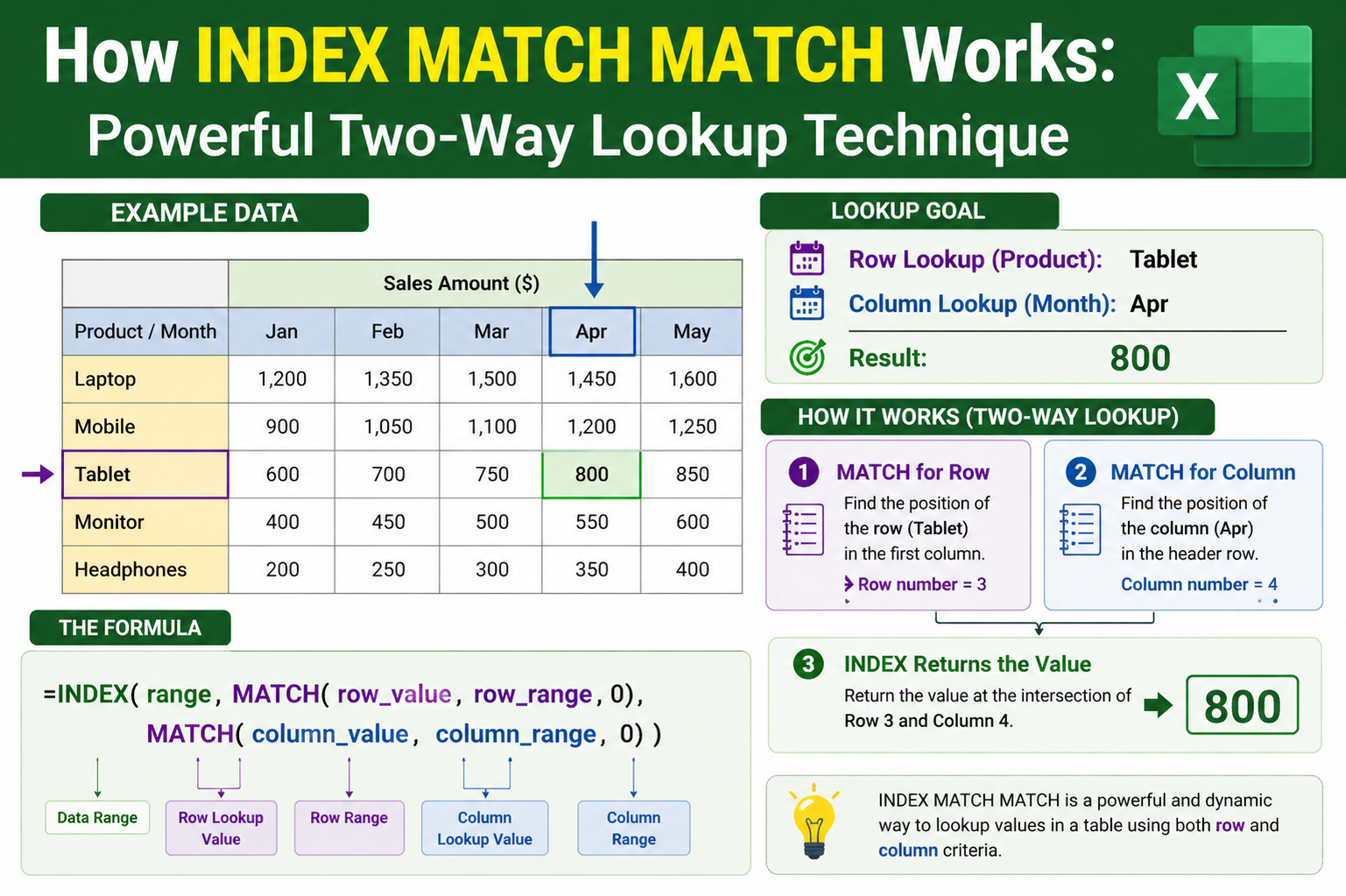
Working with data in spreadsheets often requires more than just storing information—it involves retrieving, aligning, and merging data efficiently. One of the most powerful techniques for accomplishing this is the INDEX-MATCH-MATCH formula. This approach expands on the traditional INDEX-MATCH method by introducing an additional MATCH function, allowing you to locate values across both rows and columns with precision. Instead of being limited to a single direction, this method enables flexible lookups in multiple directions, making it highly adaptable for complex datasets.
At its core, INDEX-MATCH-MATCH is designed to solve a common problem: how to find a specific value when both the row and column positions are not fixed. In many datasets, information is arranged in a grid where rows represent one type of data and columns represent another. A simple lookup may work when only one dimension is involved, but when both dimensions vary, a more advanced solution becomes necessary. This is where the combination of INDEX with two MATCH functions proves invaluable.
The idea behind this method is straightforward. The INDEX function is responsible for returning a value from a specified position within a range. However, instead of manually providing the row and column numbers, the MATCH functions dynamically determine those positions. One MATCH identifies the correct row, while the other identifies the correct column. Together, they guide INDEX to the exact cell that contains the desired value.
This approach is especially useful when dealing with large datasets where manual searching would be inefficient. It allows you to automate the process of locating data, ensuring accuracy and saving time. By understanding how these functions interact, you can build formulas that adapt to changing data structures without requiring constant adjustments.
How Data Lookup and Merging Work in Spreadsheets
To fully appreciate the value of INDEX-MATCH-MATCH, it helps to understand the general concept of data lookup and merging. In many scenarios, you have separate datasets that share a common identifier. This identifier acts as a bridge, allowing you to connect related pieces of information. For example, one dataset might contain names, while another contains corresponding codes or values. The goal is to bring these pieces together in a meaningful way.
Data lookup functions simulate the process of searching through a structured list. Imagine scanning through rows until you find a match, then moving across the row to retrieve the associated value. This is essentially what lookup formulas do, but at a much faster and more reliable scale. Instead of manually navigating through data, the formula performs the search instantly.
The process begins with a known value, often referred to as the lookup value. This value is used to search within a specified range, known as the lookup array. Once the value is found, the formula retrieves the corresponding data from another part of the dataset. This relationship between the lookup value and the returned value is the foundation of data merging.
While basic lookup methods can handle simple tasks, they often fall short when the dataset becomes more complex. For instance, if the required value is not located in a fixed column or if the structure of the data changes, traditional methods may fail. INDEX-MATCH-MATCH addresses these limitations by offering greater flexibility and control over how data is retrieved.
Key Differences Between Basic Lookup Methods and INDEX-MATCH
Understanding the limitations of simpler lookup techniques highlights why INDEX-MATCH and its extended version are so valuable. One major difference lies in the direction of data retrieval. Basic lookup methods often restrict you to searching in a single direction, typically from left to right. This limitation can be problematic when the data you need is located to the left of the lookup column or in a different arrangement.
In contrast, INDEX-MATCH allows you to search in any direction. This flexibility is achieved by separating the lookup process from the return process. Instead of relying on a fixed column index, the MATCH function determines the position of the lookup value, and INDEX retrieves the corresponding data from any specified range. This separation makes the formula more adaptable and less prone to errors when the dataset changes.
Another important difference is how these methods handle column references. Basic lookup functions often require you to manually count the number of columns between the lookup column and the return column. This can be tedious and error-prone, especially in large datasets. INDEX-MATCH eliminates this requirement by directly referencing the desired column, making the formula easier to read and maintain.
Additionally, INDEX-MATCH supports the retrieval of data from multiple columns without needing separate formulas for each one. By adjusting the column reference, you can quickly extend the formula across a range of columns. This capability becomes even more powerful when combined with a second MATCH function, enabling dynamic column selection based on header values.
When and Why to Use INDEX-MATCH-MATCH
The INDEX-MATCH-MATCH method is particularly useful when working with datasets that have both row and column identifiers. It is ideal for situations where you need to retrieve values based on two criteria—one for the row and one for the column. This dual-lookup capability makes it suitable for tasks such as analyzing reports, extracting specific metrics, or reorganizing large datasets into a more usable format.
A key requirement for using this method effectively is the presence of unique identifiers. These identifiers ensure that each lookup value corresponds to a single, unambiguous result. Examples include product codes, customer IDs, or region names. When these identifiers are unique, the MATCH function can accurately locate the correct position within the dataset.
If duplicates exist, the formula may return the first matching result, which might not always be the desired outcome. Therefore, it is important to structure your data in a way that minimizes ambiguity. This often involves cleaning and organizing the dataset before applying the formula.
Another advantage of INDEX-MATCH-MATCH is its ability to handle large and complex datasets. Instead of manually navigating through rows and columns, you can use the formula to extract only the information you need. This not only improves efficiency but also reduces the risk of errors that can occur during manual data handling.
Breaking Down the Components of INDEX-MATCH-MATCH
To build a strong understanding of this method, it is essential to examine its individual components. Each part of the formula plays a specific role, and together they create a powerful tool for data retrieval.
The INDEX function serves as the foundation. It defines the range of data from which a value will be returned. This range can include one or more columns, depending on the structure of your dataset. The function requires two main inputs: the row number and the column number. These inputs determine the exact position of the value within the range.
The first MATCH function is responsible for identifying the row number. It searches for the lookup value within a specified column and returns its position. This position corresponds to the row in the INDEX range. By using a MATCH function instead of a fixed number, the formula becomes dynamic and adjusts automatically as the data changes.
The second MATCH function identifies the column number. It works similarly to the first MATCH but searches within a row, typically the header row of the dataset. This allows the formula to locate the correct column based on a header value, making it possible to retrieve data from different columns without modifying the formula structure.
Together, these components create a system where both the row and column positions are determined dynamically. This eliminates the need for manual adjustments and ensures that the formula remains accurate նույնիսկ when the dataset is updated or expanded.
The Importance of Cell Referencing in Complex Formulas
One of the most critical aspects of building an effective INDEX-MATCH-MATCH formula is understanding how cell referencing works. Proper referencing ensures that the formula behaves as expected when copied or filled across multiple cells.
Absolute references are used to lock specific cells or ranges. This means that the reference does not change when the formula is copied. Absolute referencing is typically applied to the lookup arrays, ensuring that the formula ہمیشہ refers to the same dataset.
Relative references, on the other hand, adjust based on the position of the formula. These are useful when you want the lookup value to change as you move down rows or across columns. By carefully combining absolute and relative references, you can create formulas that are both flexible and reliable.
For example, when identifying the row, you might lock the column but allow the row to change. This ensures that the formula ہمیشہ looks in the correct column while adapting to different rows. Similarly, when identifying the column, you might lock the row but allow the column to change, enabling the formula to adjust as it moves horizontally.
Mastering these referencing techniques is essential for making the most of INDEX-MATCH-MATCH. Without proper referencing, the formula may produce incorrect results or fail to function as intended.
Building Toward a Dynamic and Scalable Solution
As you begin to combine these elements, the true power of INDEX-MATCH-MATCH becomes evident. What starts as a simple lookup evolves into a dynamic system capable of handling complex data relationships. By leveraging the strengths of INDEX and MATCH, you can create formulas that adapt to your needs rather than forcing you to adapt to the limitations of the tool.
This method is particularly valuable in professional environments যেখানে large datasets are common. Whether you are analyzing financial data, managing inventory, or working with customer information, the ability to quickly and accurately retrieve data is crucial. INDEX-MATCH-MATCH provides a reliable solution that scales સાથે your data.
By understanding the underlying principles and practicing their application, you can develop a deeper level of proficiency. This not only improves your efficiency but also enhances your ability to solve complex data challenges with confidence.
Creating the Output Structure for a Two-Way Lookup
Before building the full INDEX-MATCH-MATCH formula, it is essential to prepare the worksheet in a way that supports a two-dimensional lookup. A well-structured layout makes the formula easier to write, understand, and replicate across multiple cells. The goal is to create a space where the retrieved data will appear, aligned with both row identifiers and column headers.
Start by identifying the dataset that will serve as your source of truth. This dataset typically contains row labels on one side and column headers across the top, with values filling the grid. Next, create a separate section or column where the output will be displayed. This output area should mirror the structure of the data you want to extract, including matching column headers where necessary.
Matching headers is more important than it may seem. When using the second MATCH function, the formula relies on column header names to identify the correct column position. If there are inconsistencies in naming, even small differences such as extra spaces or capitalization, the formula may fail to return accurate results. Ensuring consistency at this stage prevents errors later.
Once the output structure is ready, you can begin placing your lookup values. These values act as the reference points for the formula. Typically, they are positioned in a column for row matching and in a row for column matching. This arrangement allows the formula to work dynamically when filled across and down.
Initiating the INDEX Function for Controlled Data Retrieval
With the structure in place, the next step is to begin constructing the formula. The INDEX function forms the backbone of the entire operation. It defines the range from which the final value will be extracted. This range should include all possible values that might be returned by the formula.
When selecting this range, it is crucial to apply absolute referencing. Locking the range ensures that it remains ثابت even when the formula is copied to other cells. Without this, the reference would shift, leading to incorrect results as the formula moves.
The INDEX function requires two key inputs: the row number and the column number. At this stage, these inputs are not yet defined. Instead of entering static numbers, placeholders are created using MATCH functions. This is what transforms the formula from a fixed lookup into a dynamic one.
By setting up the INDEX function first, you establish the destination from which data will be pulled. Everything that follows will focus on determining the exact position within this range.
Constructing the First MATCH for Row Identification
The first MATCH function is responsible for locating the correct row within the dataset. It searches for a specific value within a designated column and returns its position. This position corresponds directly to the row number required by the INDEX function.
To build this part, you begin with the lookup value. This is typically a cell reference that contains the value you want to find. In most cases, this reference should use a mixed format—locking the column while allowing the row to change. This approach ensures that when the formula is copied downward, it continues to reference the correct lookup values.
Next, define the lookup array. This is the column where the MATCH function will search for the lookup value. Like the INDEX range, this array should be locked using absolute referencing. This prevents it from shifting as the formula is copied.
The final component of the MATCH function is the match type. For most data retrieval tasks, an exact match is required. This is specified by using a value that instructs the function to look for an exact correspondence between the lookup value and the values in the array. This ensures accuracy and avoids unintended matches.
Once completed, the first MATCH function provides the row position needed by INDEX. It effectively answers the question: “Which row contains the data I am looking for?”
Refining the Lookup Logic for Accurate Matching
At this stage, the formula is partially functional. It can identify the correct row based on the lookup value, but it still lacks the ability to determine the correct column. Before moving on, it is important to verify that the row matching logic is working correctly.
One way to ensure accuracy is to check the uniqueness of the lookup values. If the dataset contains duplicate entries, the MATCH function will return the position of the first occurrence. This behavior is গুরুত্বপূর্ণ to understand क्योंकि it may lead to unexpected results if duplicates are present.
Another factor to consider is data formatting. The lookup value and the values in the lookup array must be consistent in format. For example, text values should not contain hidden spaces, and numeric values should not be stored as text. Even small inconsistencies can cause the MATCH function to fail.
By carefully validating these elements, you create a solid foundation for the rest of the formula. A reliable row match ensures that the final result will ہمیشہ come from the correct row, regardless of how the dataset evolves.
Introducing the Second MATCH for Column Identification
The addition of the second MATCH function is what transforms a standard lookup into a two-way lookup. This function determines the column position within the dataset, allowing the formula to retrieve values from different columns dynamically.
The structure of the second MATCH is similar to the first, but its orientation is different. Instead of searching within a column, it searches within a row—typically the header row of the dataset. This row contains the column names that identify each field of data.
The lookup value for this MATCH function is usually a header reference. This could be a cell in the output area that contains the name of the column you want to retrieve. Unlike the first MATCH, this reference often locks the row while allowing the column to change. This enables the formula to adjust as it is copied across multiple columns.
The lookup array is the row containing the dataset’s headers. This array should be locked to ensure consistency. As with the first MATCH, the match type is set to exact to guarantee precise results.
Once implemented, the second MATCH function provides the column number required by INDEX. It answers the question: “Which column contains the data I need?”
Aligning Row and Column Matches Within the INDEX Framework
With both MATCH functions in place, the formula now has all the information needed to locate a specific cell within the dataset. The first MATCH identifies the row, and the second MATCH identifies the column. These two values are passed into the INDEX function, which retrieves the corresponding data.
This alignment is what makes the formula so powerful. Instead of relying on fixed positions, it adapts to the structure of the dataset. If the order of rows or columns changes, the formula continues to work because it is based on values rather than positions.
Another advantage of this approach is its scalability. Once the formula is correctly configured, it can be copied across a large range of cells. Each copy adjusts automatically, using the appropriate lookup values and headers to retrieve the correct data.
This dynamic behavior is particularly useful in reporting scenarios جہاں data needs to be updated frequently. Instead of rewriting formulas, you can simply update the dataset, and the results will adjust accordingly.
Preparing the Formula for Expansion Across the Worksheet
After confirming that the formula works for a single cell, the next step is to extend it across the desired range. This involves copying the formula both downward and across columns. Proper referencing ensures that each instance of the formula behaves correctly.
When copying downward, the row lookup value changes while the column header remains ثابت. When copying across, the column header changes while the row lookup value remains consistent. This dual adaptability is what allows the formula to populate an entire table of results with minimal effort.
There are several methods for copying formulas, including dragging the fill handle, using keyboard shortcuts, or copying and pasting. Regardless of the method, the key is to ensure that the references are set up correctly بحيث the formula adjusts as intended.
As the formula expands, it creates a fully populated dataset based on the original source. This process eliminates the need for manual data entry and reduces the risk of errors. It also makes it easier to update the data, as changes in the source are automatically reflected in the output.
Strengthening the Formula for Real-World Data Scenarios
In practical applications, datasets can be large and complex. To ensure that the INDEX-MATCH-MATCH formula performs reliably, it is important to consider potential challenges. These may include missing values, inconsistent formatting, or changes in the dataset structure.
One way to enhance the formula is by incorporating error handling. This prevents the display of error messages when a lookup value is not found. Instead, the formula can return a blank cell or a custom message, improving the overall usability of the worksheet.
Another consideration is performance. While INDEX-MATCH-MATCH is efficient, extremely large datasets may still impact calculation speed. Optimizing the dataset, such as removing unnecessary columns or using structured references, can help maintain performance.
By addressing these factors, you ensure that the formula remains robust and effective in a variety of situations. This preparation sets the stage for more advanced applications, where the formula can be used to analyze and transform data on a larger scale.
Applying INDEX-MATCH-MATCH to Large and Complex Datasets
As datasets grow in size and complexity, the limitations of manual lookup methods become increasingly obvious. This is where INDEX-MATCH-MATCH truly proves its value. Instead of navigating آلاف rows and columns by hand, this formula allows you to extract precise information instantly, regardless of how large the dataset becomes. The ability to perform a two-way lookup means you are no longer restricted by the structure or order of the data.
In real-world scenarios, datasets often contain dozens or even hundreds of columns, each representing different variables or metrics. Similarly, rows may represent thousands of records such as customers, products, or transactions. In such environments, finding a single value manually can be time-consuming and error-prone. INDEX-MATCH-MATCH eliminates this challenge by automating the lookup process.
What makes this method especially powerful is its independence from data arrangement. The lookup values and headers do not need to be in the same order as the source dataset. As long as the identifiers match, the formula will locate the correct intersection point and return the desired value. This flexibility allows you to reorganize your output in a way that makes sense for analysis without altering the original data.
Transforming Raw Data into Structured Insights
One of the most practical uses of INDEX-MATCH-MATCH is transforming raw, unstructured data into a clean and organized format. Large datasets often contain more information than you need at any given moment. Instead of working directly within the raw data, you can create a separate, simplified view that highlights only the relevant fields.
This process begins by selecting specific row identifiers and column headers that represent the data you want to extract. These selections form the framework of your output. Once the INDEX-MATCH-MATCH formula is applied, it pulls the corresponding values from the source dataset, effectively creating a customized report.
This approach is particularly useful when dealing with non-adjacent columns. In many datasets, the information you need may be scattered across different parts of the table. Traditional methods might require rearranging the data or creating multiple formulas. With INDEX-MATCH-MATCH, you can retrieve data from any column simply by referencing its header, regardless of its position.
By structuring your output in this way, you make the data easier to read, analyze, and share. It also allows you to focus on specific insights without being distracted by irrelevant information.
Handling Non-Consecutive Columns and Dynamic Layouts
A common challenge in spreadsheet analysis is working with columns that are not arranged sequentially. For example, you might need data from the first, fifth, and tenth columns of a dataset. Manually extracting this information can be cumbersome, especially if the dataset is large.
INDEX-MATCH-MATCH simplifies this process by allowing you to reference columns dynamically באמצעות their headers. Instead of relying on fixed column numbers, the second MATCH function identifies the position of each header within the dataset. This means you can rearrange your output columns in any order without modifying the core formula.
This capability becomes even more valuable when dealing with dynamic layouts. In many cases, datasets are updated регулярно, with new columns added or existing ones rearranged. Traditional formulas that تعتمد on fixed positions may break under these conditions. INDEX-MATCH-MATCH, however, continues to function correctly because it is based on header names rather than positions.
This adaptability ensures that your formulas remain stable even as the dataset evolves. It also reduces the need for constant maintenance, allowing you to focus on analysis rather than troubleshooting.
Scaling the Formula Across Rows and Columns Efficiently
Once the INDEX-MATCH-MATCH formula is correctly configured, it can be scaled across an entire worksheet with minimal effort. This scalability is one of its greatest strengths. By using the correct combination of absolute and relative references, the formula adjusts automatically as it is copied to new cells.
When extending the formula downward, the row lookup values change to match each record. At the same time, the column headers remain ثابت, ensuring that the correct columns are referenced. Conversely, when extending the formula across columns, the headers change while the row references remain consistent.
This dual-direction scalability allows you to populate large sections of your worksheet بسرعة and accurately. Instead of writing separate formulas for each cell, you create one formula and replicate it across the desired range. This not only saves time but also ensures consistency in your calculations.
Another advantage of this approach is that it reduces the likelihood of human error. Since the formula is written once and reused, there is less chance of introducing inconsistencies that can occur with manual data entry.
Using INDEX-MATCH-MATCH for Data Analysis and Reporting
Beyond simple data retrieval, INDEX-MATCH-MATCH plays a crucial role in data analysis and reporting. It enables you to build dynamic reports that update automatically as new data is added. This is particularly useful in business environments where timely and accurate information is essential.
For example, you might have a dataset containing performance metrics across different regions and time periods. باستخدام INDEX-MATCH-MATCH, you can create a report that extracts specific metrics for selected regions and periods. As the underlying data changes, the report updates instantly without requiring manual تدخل.
This capability makes it easier to track trends, compare performance, and make informed decisions. It also allows you to present data in a way that is tailored to your audience, سواء they require a high-level overview or detailed analysis.
By integrating this method into your workflow, you can significantly improve the efficiency and accuracy of your reporting processes.
Avoiding Common Pitfalls in Advanced Lookup Formulas
While INDEX-MATCH-MATCH is a powerful tool, it is not without its challenges. Understanding common pitfalls can help you avoid errors and ensure that your formulas produce reliable results.
One of the most frequent issues is incorrect referencing. If the lookup arrays are not properly locked, the formula may shift as it is copied, leading to inaccurate results. Ensuring that absolute references are used where necessary is critical for maintaining consistency.
Another common problem is mismatched data types. If the lookup value is stored as text but the lookup array contains numeric values, the MATCH function may fail to find a match. পরিষ্কার and consistent data formatting is essential for accurate lookups.
Duplicate values can also pose a challenge. As mentioned earlier, the MATCH function returns the first occurrence of a value. If duplicates exist, the result may not همیشه reflect the intended data. In such cases, additional steps may be required to refine the dataset or use more advanced techniques.
Finally, missing values can cause errors in the formula. Incorporating error-handling mechanisms can help manage these situations gracefully, ensuring that the output remains clean and user-friendly.
Enhancing Flexibility Through Thoughtful Formula Design
The true strength of INDEX-MATCH-MATCH lies in its flexibility. By carefully designing your formula and structuring your data, you can create a solution that adapts to a wide range of scenarios. This involves not only understanding the technical aspects of the formula but also التفكير strategically about how your data is organized.
For instance, using clear and consistent naming conventions for headers makes it easier to reference them in the formula. Organizing data into logical groups can also simplify the lookup process and improve performance.
Another important consideration is documentation. Keeping track of how your formula works and what each component does can save time in the future, especially عندما revisiting the worksheet after some time. Clear documentation ensures that the logic behind the formula remains understandable.
By taking a thoughtful approach to formula design, you can maximize the benefits of INDEX-MATCH-MATCH and create solutions that are both powerful and maintainable.
Building Confidence with Repeated Application
Like any advanced technique, mastering INDEX-MATCH-MATCH requires practice. The more you use it, the more intuitive it becomes. Over time, you will develop a deeper understanding of how the components interact and how to adapt the formula to different situations.
Experimenting with different datasets and scenarios can help reinforce your understanding. Try applying the formula to various types of data, adjusting the references, and observing how the results change. This hands-on experience is invaluable for building confidence and দক্ষতা.
As you become more comfortable with the method, you will start to recognize opportunities to use it in your daily work. Tasks that once seemed complex or time-consuming will become straightforward, allowing you to focus on higher-level analysis and decision-making.
Extending INDEX-MATCH-MATCH Across Wide Data Ranges
When working with broader datasets, one of the most valuable capabilities of INDEX-MATCH-MATCH is how easily it expands across both rows and columns. Once the formula is correctly structured, it can be replicated across an entire grid without needing to rewrite or adjust it manually. This is where the true efficiency of the method becomes clear.
In a typical scenario, you may start with a single cell containing the completed formula. From there, you can copy it downward to apply it to multiple rows. As the formula moves down, the row lookup value updates automatically because of the relative row reference. At the same time, the column lookup remains ثابت, ensuring consistency across that vertical expansion.
When copying the formula horizontally, the behavior shifts. The column lookup value begins to change while the row reference remains consistent. This dual adaptability allows the formula to populate an entire matrix of results using just one original formula. It eliminates redundancy and ensures that every cell follows the same logical structure.
This approach is particularly beneficial when building dashboards or structured reports. Instead of creating individual formulas for each data point, you rely on a single, scalable formula that adjusts based on its position in the worksheet.
Working with Multi-Dimensional Data Models
As data environments become more sophisticated, it is common to encounter multi-dimensional datasets. These datasets may include multiple categories, time periods, or performance metrics, all organized within a single structure. INDEX-MATCH-MATCH is ideally suited for navigating such complexity.
In these cases, each dimension of the dataset corresponds to a different part of the formula. The row MATCH function might represent one dimension, such as a product or region, while the column MATCH function represents another, such as time or category. Together, they pinpoint a specific value within a multi-layered dataset.
This capability allows you to interact with data in a more intuitive way. Instead of thinking in terms of cell coordinates, you think in terms of meaningful labels. This not only improves readability but also makes the formula easier to maintain and adapt.
Another advantage of this method is that it supports dynamic exploration. By changing the lookup values or headers, you can instantly retrieve different subsets of data. This makes it a powerful tool for analysis, enabling you to test scenarios and compare results without restructuring the dataset.
Customizing Output Without Altering Source Data
One of the key strengths of INDEX-MATCH-MATCH is its ability to separate the output from the source data. This means you can design your output layout independently, without needing to modify the original dataset. This is especially important כאשר working with shared or protected data स्रोत.
By creating a separate output area, you can organize the results in a way that best suits your needs. You might choose to reorder columns, filter specific rows, or highlight particular metrics. The formula handles the data retrieval, while you focus on presentation and analysis.
This separation also improves data integrity. Since the source data remains unchanged, there is أقل risk of accidental modifications. All transformations occur within the output area, ensuring that the original dataset remains intact.
Additionally, this approach makes it easier to update your analysis. If the source data changes, the output updates automatically through the formula. There is no need to manually refresh or recalculate values, which saves time and reduces errors.
Adapting to Changes in Dataset Structure
In many real-world applications, datasets are not static. New columns may be added, existing ones may be rearranged, or certain fields may be removed altogether. Traditional lookup methods often struggle تحت these conditions, as they rely on fixed positions within the dataset.
INDEX-MATCH-MATCH, however, is designed to handle such changes gracefully. Because it uses MATCH functions to identify positions dynamically, it is not affected by shifts in the dataset structure. As long as the lookup values and headers remain consistent, the formula continues to work correctly.
This adaptability is particularly valuable in environments where data is updated regularly. For example, in reporting systems where new metrics are added over time, the formula can automatically incorporate these changes without requiring adjustments.
To maintain this flexibility, it is important to use clear and consistent naming conventions for your headers and identifiers. This ensures that the MATCH functions can ہمیشہ locate the correct positions, even as the dataset evolves.
Improving Performance in High-Volume Data Scenarios
While INDEX-MATCH-MATCH is highly efficient, performance can become a consideration when working with extremely large datasets. As the number of rows and columns increases, the calculation time may also increase. However, there are strategies to optimize performance and maintain سرعة.
One effective approach is to limit the size of the lookup ranges. Instead of referencing entire columns, define specific ranges that contain only the necessary data. This reduces the number of calculations the formula must perform and improves overall efficiency.
Another strategy is to avoid unnecessary duplication of formulas. By using a single formula and expanding it across the worksheet, you minimize the computational load مقارنةً writing separate formulas for each cell.
Organizing your data efficiently can also have a significant impact. Keeping related data grouped together and removing unused columns or rows helps streamline calculations. In addition, ensuring that your data is clean and properly formatted reduces the likelihood of errors that can slow down processing.
By applying these optimization techniques, you can maintain high performance even عندما working with large-scale datasets.
Leveraging INDEX-MATCH-MATCH for Scenario Analysis
Beyond static reporting, INDEX-MATCH-MATCH can be used for dynamic scenario analysis. This involves changing input values to explore different outcomes and understand how various factors تأثير the results.
For example, you might use the formula to retrieve sales data for different regions and time periods. By adjusting the lookup values, you can بسرعة switch between scenarios and compare النتائج. This makes it easier to identify trends, patterns, and potential opportunities.
This type of analysis is particularly useful in decision-making processes. It allows you to evaluate multiple الخيارات without modifying the underlying data. The formula acts as a bridge between the data and your analysis, providing instant access to the information you need.
By integrating this method into your workflow, you can enhance your ability to interpret data and make informed decisions.
Maintaining Accuracy Through Consistent Data Practices
Accuracy is critical عندما working with advanced lookup formulas. Even small inconsistencies in the data can lead to incorrect results. To ensure reliability, it is important to follow consistent data practices.
Start by standardizing your data formats. Ensure that text values are consistent and free from اضافی spaces. Numeric values should be stored in the correct format, and dates should follow a uniform structure. This consistency allows the MATCH functions to operate accurately.
It is also important to validate your data regularly. Checking for duplicates, missing values, or गलत entries helps maintain the integrity of your dataset. When issues are identified early, they can be corrected before they affect the results.
Another best practice is to test your formula with known values. By comparing the output with expected results, you can verify that the formula is working correctly. This step is especially important when first implementing the formula or making changes to the dataset.
Strengthening Reliability with Error Handling Techniques
In practical applications, it is inevitable that some lookup values may not be found in the dataset. Without proper handling, this can result in errors that disrupt the appearance and usability of your worksheet.
To address this, error-handling techniques can be incorporated into the formula. These techniques allow you to control what happens when a match is not found. Instead of displaying an error, the formula can return a blank cell, a default value, or a custom message.
This improves the overall user experience and makes the output more professional. It also ensures that the presence of missing data does not interfere with your analysis.
By combining strong data practices with effective error handling, you create a robust solution that performs reliably across a wide range of scenarios.
Refining INDEX-MATCH-MATCH for Maximum Efficiency and Clarity
As you move toward mastering INDEX-MATCH-MATCH, the focus shifts from simply making the formula work to making it efficient, readable, and maintainable. In real-world environments, formulas are rarely used once and forgotten. They are revisited, modified, and often shared with others. A well-refined formula not only performs correctly but is also easy to understand and adapt.
One of the most effective ways to improve clarity is by organizing your worksheet logically before writing the formula. Clear separation between input values, lookup arrays, and output areas reduces confusion and makes troubleshooting easier. When someone else opens the worksheet, they should be able to understand the structure without needing extensive explanation.
Naming conventions also play a significant role. Consistent and descriptive headers ensure that the second MATCH function can reliably locate the correct columns. When headers are meaningful and standardized, the formula becomes more intuitive. This reduces the likelihood of errors and improves long-term usability.
Another refinement involves simplifying references wherever possible. While absolute and mixed references are necessary, overcomplicating them can make the formula harder to read. The goal is to strike a balance between flexibility and simplicity, ensuring that each reference serves a clear purpose.
Optimizing Formula Performance in Large Workbooks
When working with large datasets, performance becomes a critical consideration. Even a well-constructed INDEX-MATCH-MATCH formula can slow down if it references excessively large ranges or is repeated unnecessarily across thousands of cells.
One practical optimization is to limit the size of your lookup ranges. Instead of referencing entire columns, define specific ranges that include only the relevant data. This reduces the number of calculations required and improves overall speed. It also minimizes the risk of including unintended data that could affect the results.
Another strategy is to reduce duplication. Rather than creating multiple similar formulas, use one formula and extend it across the required range. This not only improves performance but also ensures consistency. If a change is needed, it can be made in one place and applied everywhere.
Efficient workbook design also contributes to performance. Keeping datasets organized, removing unused data, and avoiding unnecessary calculations all help maintain responsiveness. When combined with a well-structured INDEX-MATCH-MATCH formula, these practices create a smooth and reliable workflow.
Enhancing Flexibility with Dynamic References
A powerful aspect of INDEX-MATCH-MATCH is its ability to adapt to changing conditions. By using dynamic references, you can create formulas that respond to user input or evolving datasets without requiring manual updates.
For example, lookup values can be linked to input cells where users select criteria. This transforms the formula into an interactive tool, allowing different results to be displayed based on user choices. Such flexibility is particularly useful in dashboards and reporting systems.
Dynamic column selection is another advantage. By referencing headers instead of fixed positions, the formula automatically adjusts when columns are added, removed, or rearranged. This ensures that your analysis remains accurate even as the dataset evolves.
To maintain this flexibility, it is important to keep your data structured and consistent. Clear labeling and standardized formats allow the MATCH functions to operate effectively, ensuring that the formula continues to deliver reliable results.
Integrating Error Handling for Professional Outputs
In practical applications, not every lookup will produce a valid result. Missing data, incorrect inputs, or تغييرات in the dataset can lead to errors. Without proper handling, these errors can clutter the worksheet and make it difficult to interpret the results.
Incorporating error handling into your formula allows you to control how such situations are managed. Instead of displaying error messages, the formula can return a blank value or a custom message. This keeps the output clean and professional.
Error handling also improves user experience. When others interact with your worksheet, they are less likely to be confused by unexpected error codes. Instead, they see clear and meaningful results, even when data is incomplete.
By anticipating potential issues and addressing them within the formula, you create a more robust solution that performs reliably across different scenarios.
Applying INDEX-MATCH-MATCH in Real-World Workflows
The true value of INDEX-MATCH-MATCH becomes evident when applied to real-world tasks. In business environments, data is constantly being updated and analyzed. Whether you are working with sales figures, inventory records, or performance metrics, the ability to retrieve specific information quickly is essential.
For instance, in a sales dataset, you might need to extract revenue figures for specific products across different regions and time periods. INDEX-MATCH-MATCH allows you to do this efficiently by combining row and column criteria. Instead of manually searching through the dataset, you can rely on the formula to deliver accurate results instantly.
In inventory management, the formula can be used to track stock levels across multiple warehouses and product categories. By adjusting the lookup values, you can quickly access the information you need बिना navigating through complex spreadsheets.
This versatility makes INDEX-MATCH-MATCH a valuable tool across مختلف industries. It adapts to different types of data and supports a wide range of analytical tasks.
Improving Collaboration Through Structured Formulas
In collaborative environments, spreadsheets are often shared بين multiple users. A well-structured INDEX-MATCH-MATCH formula can significantly improve collaboration by making the worksheet easier to understand and use.
Clear labeling, consistent formatting, and logical organization help others navigate the data with confidence. When formulas are written in a transparent and consistent manner, टीम members can بسهولة interpret and modify them as needed.
Documentation is another important aspect. Adding notes or explanations within the worksheet provides context for how the formula works and what each part does. This is especially helpful for complex formulas that may not be immediately intuitive.
By designing your formulas with collaboration in mind, you create a resource that can be used effectively by others, reducing confusion and improving overall productivity.
Adapting the Technique for Advanced Analytical Needs
As your experience grows, you can extend the use of INDEX-MATCH-MATCH to more advanced analytical scenarios. This may include combining it with other functions to perform calculations, filtering results, or creating dynamic summaries.
For example, you might use the formula as part of a larger system that aggregates data from multiple sources. By integrating it with conditional logic, you can create customized outputs that respond to specific criteria.
Another advanced application involves using the formula to support data validation and quality checks. By comparing values across different datasets, you can identify discrepancies and ensure data accuracy.
These advanced uses demonstrate the flexibility of INDEX-MATCH-MATCH. It is not limited to simple lookups بلکہ can be integrated into complex workflows that دعم deeper analysis and decision-making.
Building Long-Term Reliability and Maintainability
A key goal in any data-driven environment is to create solutions that remain reliable over time. INDEX-MATCH-MATCH supports this goal by providing a stable and adaptable framework for data retrieval.
To maintain reliability, it is important to регулярно review and update your formulas. As datasets change, small adjustments may be needed to ensure continued accuracy. Keeping your formulas organized and well-documented makes this process easier.
Consistency is also essential. Using standardized approaches across your worksheets ensures that formulas behave predictably. This reduces the learning curve for new users and makes it easier to maintain the system over time.
By focusing on long-term maintainability, you ensure that your INDEX-MATCH-MATCH solutions continue to deliver value well into the future.
Strengthening Analytical Confidence Through Mastery
Mastering INDEX-MATCH-MATCH is not just about learning a formula—it is about developing a deeper understanding of how data can be manipulated and analyzed effectively. As you become more comfortable with the technique, you gain confidence in your ability to handle complex data challenges.
This confidence allows you to approach new problems with a structured mindset. Instead of being overwhelmed by large datasets, you can break them down into manageable components and apply the appropriate tools.
Over time, this skill becomes an integral part of your workflow. Tasks that once required significant effort become routine, freeing up time for more strategic analysis.
By continuing to practice and refine your approach, you build a strong foundation for advanced data analysis and decision-making.
Final Though
INDEX-MATCH-MATCH represents a powerful evolution in spreadsheet data handling. By combining the strengths of INDEX and MATCH, it provides a flexible and reliable method for retrieving data across both rows and columns. Its ability to adapt to changing datasets, handle complex structures, and scale across large workbooks makes it an essential tool for modern data analysis.
From initial setup to advanced optimization, each stage of the process contributes to a deeper understanding of how data can be managed effectively. By focusing on clarity, efficiency, and adaptability, you can create formulas that not only solve immediate problems but also support long-term analytical needs.
Ultimately, the value of INDEX-MATCH-MATCH lies in its ability to transform how you interact with data. It replaces manual searching with precise automation, reduces errors, and empowers you to work with confidence. As you continue to apply and refine this technique, it becomes more than just a formula—it becomes a fundamental skill that enhances your overall approach to data analysis and problem-solving.