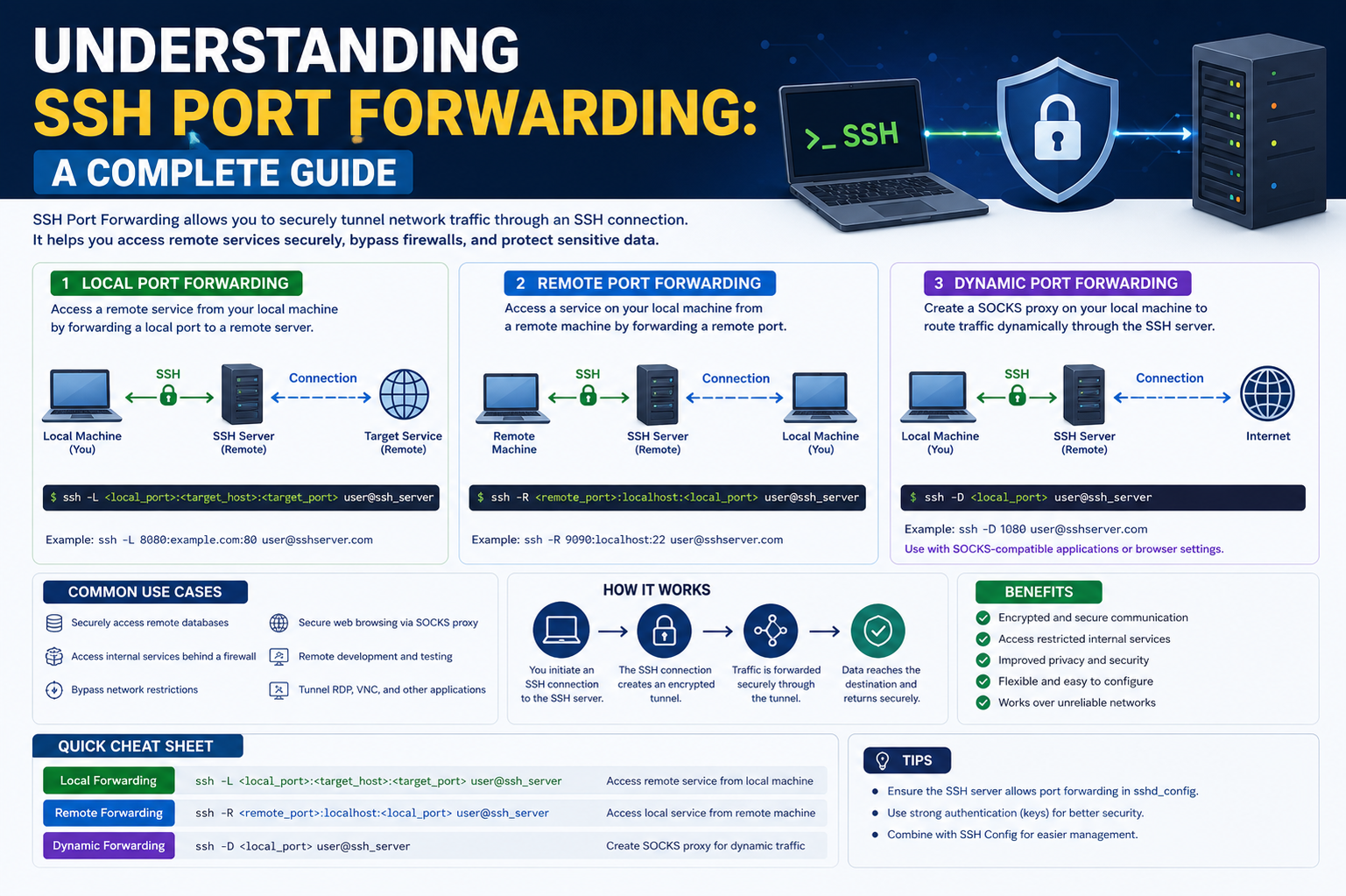
SSH port forwarding is a secure networking method that allows data to travel between a local device and a remote system through an encrypted SSH connection. It works like a protected tunnel that carries information safely, preventing outsiders from seeing or interfering with the communication. Instead of sending data directly across the internet in an open way, it is wrapped inside a secure SSH layer, which keeps it private and protected during transmission. This method is widely used in environments where security and controlled access are essential, especially when working with remote systems or sensitive services.
The Core Idea Behind Secure SSH Tunneling
At its core, SSH port forwarding is based on the idea of tunneling. A tunnel in networking means that data from one point is wrapped and sent through a secure pathway to another point. In this case, the SSH protocol creates that secure pathway. When data enters the tunnel, it is encrypted and cannot be easily read by anyone outside the connection. Once it reaches the destination, it is decrypted and delivered to the intended service or application. This ensures both privacy and integrity of the data, making it highly reliable for secure communication between systems.
A Simple Real-Life Analogy to Understand the Concept
To better understand SSH port forwarding, imagine a private underground tunnel connecting your home to a secure building like a bank vault. Your home represents your local computer, and the bank vault represents a remote server. Instead of walking through public streets where anyone can see you, you use this hidden tunnel to move items safely. Anything you send through this tunnel remains hidden from outsiders. Similarly, SSH creates a hidden digital tunnel between two systems so that information can travel securely without being exposed to the public internet.
Why SSH Port Forwarding Became Important in Modern Computing
With the rise of remote work and cloud-based systems, secure access to remote services has become extremely important. Many applications and databases are hosted on servers that are not directly exposed to the internet for safety reasons. SSH port forwarding allows users to securely access these internal services without making them publicly available. This reduces the risk of cyberattacks while still allowing authorized users to connect from anywhere. It is especially useful for system administrators, developers, and IT professionals who frequently manage remote infrastructure.
How SSH Protects the Communication Channel
SSH uses encryption techniques to secure the communication between two devices. When a connection is established, the data is encrypted before leaving the source system. It remains encrypted while traveling through networks and is only decrypted when it reaches the destination. This prevents attackers from reading or modifying the data in transit. Even if someone intercepts the traffic, they will only see unreadable encrypted information. This strong level of protection is what makes SSH a trusted method for secure remote communication and port forwarding activities.
Understanding the Role of Ports in Network Communication
In networking, a port is like a communication endpoint that allows different services on a computer to send and receive data. Each service uses a specific port number to organize traffic efficiently. For example, web services, file transfers, and remote access tools all operate on different ports. SSH port forwarding uses this concept by redirecting traffic from one port to another through a secure connection. This allows a user to access services that may not be directly exposed or reachable from their local network environment.
Default SSH Port and Its Importance in Connections
Most SSH connections use a standard communication port that is commonly associated with secure shell access. This default port acts as the entry point for establishing secure sessions between devices. When a connection is made, the SSH service listens on this port and authenticates the user before allowing access. Once authenticated, the secure tunnel is created, and port forwarding rules can be applied. This structured approach ensures that only authorized users can establish secure connections and forward traffic through the SSH channel.
Local Perspective of SSH Port Forwarding
Local port forwarding is one of the most common forms of SSH tunneling. It allows a user to access a remote service through their own computer as if the service were running locally. In this setup, traffic from a specific port on the local machine is securely forwarded to a remote server. This is useful when a service is not directly accessible due to firewall restrictions or network limitations. Instead of exposing the service publicly, SSH acts as a bridge that safely connects the local system to the remote resource.
Remote Perspective of SSH Port Forwarding
Remote port forwarding works in the opposite direction. It allows a remote system to access services running on a local machine. This is useful when someone wants to make a local service available to a remote environment without exposing it to the public internet. The SSH connection acts as a secure gateway that forwards requests from the remote side back to the local system. This method is often used in development environments, testing setups, and controlled access scenarios where direct exposure is not safe or practical.
The Importance of Secure Access in Remote Work Environments
In modern digital environments, many users work from different locations and need secure access to centralized systems. SSH port forwarding plays a key role in enabling this access without compromising security. Instead of opening multiple network ports to the internet, organizations can rely on SSH tunnels to provide controlled access. This reduces the attack surface and ensures that sensitive systems remain protected. It also allows employees to securely interact with internal tools, databases, and applications from remote locations.
How SSH Port Forwarding Supports Secure Remote Administration
System administrators often need to manage servers located in different geographic regions. SSH port forwarding allows them to securely connect to these systems and perform administrative tasks without direct exposure. Through a secure tunnel, they can access dashboards, control panels, or internal services that are not publicly available. This ensures that management activities remain secure while still being accessible from remote locations. It also simplifies troubleshooting and system maintenance tasks.
Basic Understanding of Traffic Redirection Through SSH
When SSH port forwarding is active, network traffic does not follow its usual direct path. Instead, it is redirected through an encrypted SSH tunnel. This redirection ensures that data travels safely between endpoints without being exposed to external networks. The process involves capturing traffic from a specific port, encrypting it, sending it through the SSH connection, and delivering it to the intended destination. This structured flow of data helps maintain both security and reliability during communication.
Role of Authentication in SSH Connections
Before any port forwarding can occur, SSH requires proper authentication. This usually involves verifying credentials such as passwords or cryptographic keys. Once authentication is successful, the secure session is established. This step is crucial because it ensures that only authorized users can access the system and create tunnels. Without proper authentication, the connection is denied, preventing unauthorized access and protecting the system from potential threats.
How SSH Creates a Secure Communication Layer
SSH builds a secure layer over traditional network communication. Instead of sending data in plain text, it wraps everything inside encrypted packets. These packets are then transmitted through the network and decrypted only at the destination. This layered approach ensures that even if data is intercepted during transmission, it cannot be understood or modified. The secure layer acts as a protective shield for all forwarded traffic, making SSH port forwarding a reliable method for secure communication.
Early Understanding of Practical Usage Scenarios
SSH port forwarding is commonly used in situations where direct access to a service is restricted or unsafe. It allows users to securely connect to internal applications, manage remote servers, or bypass certain network limitations without exposing sensitive ports to the public. This flexibility makes it an essential tool in secure networking practices. Whether used for development, administration, or secure communication, it provides a controlled way to interact with remote systems without compromising safety.
Understanding the Architecture of SSH Port Forwarding
SSH port forwarding works through a structured architecture that connects a local system, an SSH client, and a remote server in a secure relationship. The SSH client initiates a connection to the SSH server, and once the connection is established, a secure encrypted channel is formed between both ends. Inside this secure channel, data from specific ports is redirected based on predefined rules. The architecture ensures that traffic is not exposed directly to the internet but instead flows through a protected tunnel where it is encrypted, transported, and then decrypted at the destination.
How an SSH Tunnel Is Established Step by Step
When an SSH connection is created, the first step involves a handshake between the client and the server. During this handshake, both systems agree on encryption methods and exchange cryptographic keys. After this agreement, a secure session is created. Once the session is active, port forwarding rules can be applied. These rules define which local or remote ports will be linked through the tunnel. After configuration, any data sent to the specified port is automatically captured, encrypted, and transmitted through the SSH connection to its destination.
Local Port Forwarding in Practical Detail
Local port forwarding is used when a user wants to access a remote service through their own system. In this setup, a local port is bound to a remote service port through the SSH tunnel. When the user sends data to the local port, SSH securely forwards it to the remote server. This method is often used when services are blocked by firewalls or not directly accessible. It allows users to interact with remote applications as if they were running locally, without exposing the service publicly to the internet.
Remote Port Forwarding and Its Functional Use
Remote port forwarding works in the opposite direction of local forwarding. In this method, a port on the remote server is forwarded back to a service running on the local machine. This means external users connected to the remote server can access local services securely through the SSH tunnel. It is commonly used when developers want to expose a local application for testing or demonstration without making it publicly available. The remote server acts as a bridge that forwards requests back to the local system through the encrypted channel.
Dynamic Port Forwarding and SOCKS Proxy Concept
Dynamic port forwarding is a more flexible form of SSH tunneling that creates a SOCKS proxy. Instead of forwarding a single port, it allows multiple types of traffic to pass through a single SSH connection. The client application can route traffic dynamically based on request type and destination. This makes it useful for browsing securely or bypassing network restrictions. All traffic is encrypted and sent through the SSH tunnel, providing both flexibility and security for different types of network communication.
Role of Encryption in Secure SSH Communication
Encryption is the foundation of SSH port forwarding. Before any data is transmitted, it is converted into a secure format using cryptographic algorithms. This ensures that even if the data is intercepted during transmission, it cannot be understood. The encryption process happens in real time and is reversed only at the destination. This continuous encryption-decryption cycle ensures that sensitive information remains protected throughout its journey across networks.
Key Exchange and Secure Session Formation
When an SSH connection begins, both the client and server perform a key exchange process. This process allows both systems to generate shared encryption keys without transmitting them directly over the network. Instead, mathematical algorithms are used to create matching keys on both sides. Once these keys are established, they are used to encrypt all future communication. This ensures that the session remains secure from external interference or unauthorized access.
Authentication Methods Used in SSH Connections
SSH supports multiple authentication methods to verify user identity before allowing access. The most common method is password authentication, where users enter a username and password combination. A more secure method is key-based authentication, which uses a pair of cryptographic keys: a private key stored on the client and a public key stored on the server. When both keys match, access is granted. This method is widely preferred because it reduces the risk of password-based attacks.
How SSH Port Forwarding Works Behind Firewalls
Firewalls are designed to block unauthorized network traffic, but SSH port forwarding can operate within allowed rules to bypass certain restrictions. Since SSH typically uses a standard secure port, it is often permitted through firewalls. Once a connection is established, traffic inside the SSH tunnel is encrypted, making it invisible to firewall inspection systems. This allows users to securely access restricted services without directly exposing those services to external networks.
Understanding NAT and Its Role in SSH Connectivity
Network Address Translation (NAT) is commonly used in routers to allow multiple devices to share a single public IP address. SSH port forwarding works effectively even in NAT environments because the SSH connection is initiated from inside the network. Once the connection is established, the tunnel allows bidirectional communication through the NAT system. This makes SSH port forwarding highly useful in home and corporate networks where direct external access is not available.
Basic Structure of SSH Commands for Port Forwarding
SSH port forwarding is configured using command-line instructions that define how traffic should be routed. These commands specify the type of forwarding, local or remote port numbers, and the destination address. Once executed, the SSH client establishes a connection and applies the forwarding rules automatically. This structured approach allows users to create secure tunnels quickly without requiring complex network configuration changes.
How Data Travels Inside an SSH Tunnel
When data is sent through an SSH tunnel, it follows a specific path. First, the data is generated by an application and sent to a local port. The SSH client captures this data and encrypts it immediately. The encrypted data is then transmitted through the secure tunnel to the SSH server. Once it reaches the server, it is decrypted and forwarded to the final destination service. This entire process happens almost instantly, ensuring smooth and secure communication.
Difference Between Direct Connection and SSH Tunneling
A direct connection sends data openly across the network, making it vulnerable to interception and monitoring. In contrast, SSH tunneling wraps the data inside an encrypted layer before transmission. This ensures that even if someone intercepts the traffic, they cannot read or modify it. The difference lies in security and privacy, as SSH tunneling provides a protected pathway while direct connections rely on open network channels.
Importance of Port Numbers in Forwarding Configuration
Port numbers play a crucial role in SSH port forwarding because they define where data should enter and exit the system. Each service runs on a specific port, and forwarding rules map one port to another through the SSH tunnel. This mapping ensures that traffic is directed correctly between local and remote systems. Proper configuration of port numbers is essential for ensuring that services communicate effectively without conflicts or misrouting.
How SSH Maintains Connection Stability During Forwarding
SSH maintains connection stability by continuously monitoring the tunnel and ensuring that encryption remains active. If temporary network interruptions occur, SSH attempts to preserve the session or re-establish the connection automatically. This reliability ensures that forwarded traffic is not disrupted easily. The protocol is designed to handle unstable networks while maintaining secure communication between systems.
Understanding the Layered Security Model of SSH Tunnels
SSH port forwarding operates on a layered security model where multiple protections work together. The first layer is authentication, which verifies the user. The second layer is encryption, which protects data during transmission. The third layer is tunneling, which isolates traffic from the public network. These layers combine to create a secure environment where sensitive data can be transmitted safely without exposure to external threats.
Advanced Use Cases of SSH Port Forwarding in Real Environments
SSH port forwarding is not limited to simple remote access; it is widely used in advanced network environments where security, flexibility, and controlled access are essential. In enterprise systems, it allows administrators to securely connect to internal databases, application servers, and monitoring tools without exposing them to the public internet. Developers also use it to test applications running on remote servers as if they were running locally. This makes it easier to debug issues, verify configurations, and interact with services that are intentionally isolated for security reasons.
Using SSH Port Forwarding for Secure Database Access
One of the most common real-world applications of SSH port forwarding is secure database access. Many organizations restrict direct access to databases for security purposes. Instead of opening database ports to the internet, administrators create an SSH tunnel that forwards a local port to the database server. This allows authorized users to connect to the database using standard tools while ensuring that the database itself remains hidden from external networks. The encrypted tunnel protects sensitive data such as queries, results, and authentication credentials during transmission.
Application Testing Through Secure Tunneling
Developers often use SSH port forwarding when testing applications in staging or production-like environments. Instead of deploying code locally, they connect their development tools to remote services through a secure tunnel. This allows them to simulate real-world behavior without exposing internal systems. It also helps in identifying issues that only appear in live environments. By using SSH tunneling, developers can interact with APIs, backend services, and internal endpoints securely and efficiently.
Accessing Internal Services Behind Firewalls
Many organizations use strict firewall rules to protect internal services from unauthorized access. While this improves security, it can make it difficult for remote users to access necessary tools. SSH port forwarding solves this issue by creating a secure bridge through the firewall. Once the SSH connection is established, users can access internal applications as if they were part of the local network. This method ensures that services remain protected while still being accessible to authorized personnel.
Remote Administration of Servers and Systems
System administrators rely heavily on SSH port forwarding for managing remote infrastructure. It allows them to securely access system dashboards, monitoring tools, and administrative interfaces that are not publicly exposed. Instead of opening multiple ports for different services, administrators use a single SSH connection to forward all required traffic. This reduces complexity and minimizes security risks. It also simplifies maintenance tasks such as configuration updates, performance monitoring, and troubleshooting.
Using SSH Port Forwarding for Web Application Development
Web developers frequently use SSH tunnels to access remote web servers during development. For example, a developer may run a web application on a remote server but access it locally through a forwarded port. This allows them to test features, inspect behavior, and debug issues without making the application publicly accessible. It also ensures that sensitive development environments remain protected from unauthorized access or accidental exposure.
Understanding Performance Considerations in SSH Tunnels
Although SSH port forwarding is highly secure, it can introduce a small amount of performance overhead due to encryption and decryption processes. Every piece of data passing through the tunnel is encrypted before transmission and decrypted at the destination. This process requires computational resources, which may slightly affect speed in high-traffic environments. However, modern systems and optimized encryption algorithms minimize this impact, making SSH tunneling efficient even for continuous usage.
Common Tools Used for SSH Port Forwarding
Different tools are available for establishing SSH connections depending on the operating system. On Linux and macOS, OpenSSH is commonly used and provides built-in support for port forwarding through command-line operations. On Windows systems, tools like PuTTY offer a graphical interface for configuring SSH tunnels. These tools allow users to define local, remote, and dynamic forwarding settings easily. Regardless of the tool used, the underlying principle of secure encrypted tunneling remains the same.
Local vs Remote vs Dynamic Forwarding Behavior Differences
Each type of SSH port forwarding serves a different purpose based on direction and usage. Local forwarding allows access from the local machine to a remote service. Remote forwarding exposes a local service to a remote system. Dynamic forwarding creates a flexible proxy-like connection that can route multiple types of traffic. Understanding these differences helps users choose the correct method for their specific networking needs. Each type provides a unique way to securely manage data flow between systems.
Security Benefits of Using Encrypted Tunnels
The primary advantage of SSH port forwarding is enhanced security. Since all data is encrypted, it cannot be intercepted or read by unauthorized parties. This is especially important when using public or untrusted networks such as public Wi-Fi. Even if attackers attempt to capture network traffic, the encrypted data remains unreadable. This ensures confidentiality, integrity, and authenticity of the communication between systems.
Risks of Improper SSH Configuration
Although SSH is secure by design, improper configuration can introduce risks. Weak passwords, outdated encryption settings, or exposed private keys can compromise the security of the connection. Additionally, allowing unrestricted port forwarding without proper access controls may create unintended entry points into internal systems. Careful configuration and regular security audits are essential to maintain a safe SSH environment and prevent misuse.
Man-in-the-Middle Threat Awareness in SSH Connections
One of the theoretical risks associated with SSH communication is the man-in-the-middle attack. This occurs when an attacker intercepts the connection between two systems and attempts to impersonate one of the endpoints. SSH reduces this risk through host key verification and encryption. However, users must still verify server fingerprints during the initial connection to ensure they are communicating with the correct system. Proper key management significantly reduces the chances of such attacks succeeding.
Authentication Key Management and Security Practices
Key-based authentication is considered more secure than password-based login because it relies on cryptographic keys instead of easily guessable credentials. However, managing these keys properly is essential. Private keys should always be stored securely and never shared. If a private key is compromised, it should be immediately revoked and replaced. Proper key rotation and secure storage practices help maintain a strong security posture in SSH-based systems.
Firewall Interaction with SSH Traffic
Firewalls play a critical role in controlling network traffic, and SSH port forwarding often interacts with them. Since SSH typically uses a standard allowed port, it can pass through firewalls without issue. Once inside the secure tunnel, traffic is no longer visible to firewall inspection tools. This allows users to bypass restrictive rules while still maintaining a secure connection. However, organizations may implement strict policies to monitor or limit SSH usage for security compliance.
Logging and Monitoring SSH Activity
Monitoring SSH activity is an important part of maintaining system security. Logs can provide information about connection attempts, successful logins, and forwarded sessions. This helps administrators detect unusual behavior or unauthorized access attempts. Regular monitoring ensures that SSH tunnels are being used appropriately and helps identify potential security threats early. Logging also plays a key role in troubleshooting connection issues.
Troubleshooting Common SSH Port Forwarding Issues
Users may sometimes encounter issues when setting up SSH port forwarding. Common problems include incorrect port configuration, firewall restrictions, authentication failures, or network connectivity issues. Diagnosing these problems involves checking SSH logs, verifying port mappings, and ensuring that both client and server configurations are correct. Understanding how data flows through the tunnel helps in identifying where the issue is occurring and resolving it effectively.
Network Dependency and Stability Considerations
SSH port forwarding depends heavily on network stability. Since it operates over an active connection, any interruption in the network can affect the tunnel. Temporary disconnections may cause forwarded sessions to pause or terminate. However, SSH is designed to handle unstable networks to some extent by attempting reconnections or maintaining session states. Reliable network infrastructure improves the overall performance and stability of SSH tunnels.
Real-Time Data Transmission Through SSH Tunnels
SSH port forwarding supports real-time data transmission, making it suitable for applications that require instant communication. Whether accessing a remote dashboard or interacting with a live service, data is transmitted quickly through the encrypted tunnel. The efficiency of SSH ensures that delays are minimal, even though encryption is applied. This makes it suitable for both interactive sessions and continuous data exchange between systems.
Integration of SSH with Modern Network Systems
Modern network systems often integrate SSH port forwarding as part of their security architecture. Cloud platforms, virtual private networks, and containerized environments frequently use SSH tunnels to secure internal communication. This integration allows systems to maintain strict security boundaries while still enabling controlled access. SSH continues to remain a foundational tool in secure network design due to its reliability and versatility.
How SSH Port Forwarding Works in Large Network Environments
In large-scale network environments, SSH port forwarding is often used as a controlled access method for internal infrastructure. Instead of exposing multiple services directly to the internet, organizations rely on centralized SSH gateways. These gateways act as secure entry points, allowing authorized users to create tunnels into specific internal systems. This reduces the number of publicly exposed services and simplifies security management. It also ensures that access is consistently logged, monitored, and regulated through a single controlled channel.
Role of SSH Gateways in Enterprise Security
An SSH gateway is a dedicated system that acts as an intermediary between external users and internal networks. Users first connect to the gateway using SSH, and then from there, they are allowed to forward ports to internal services. This approach adds an extra layer of protection because internal systems are never directly exposed. Even if an attacker tries to reach internal resources, they must first pass through the gateway’s authentication and security controls. This centralized model strengthens overall network security.
Using SSH Port Forwarding in Cloud Infrastructure
Cloud environments heavily rely on SSH port forwarding to manage virtual machines and internal services securely. Since cloud resources are often isolated in private networks, direct access is restricted. SSH tunnels allow administrators and developers to securely connect to these resources without making them publicly accessible. This is especially useful for managing databases, microservices, and internal APIs hosted within cloud-based virtual networks. It ensures secure communication while maintaining isolation from external threats.
Security Hardening Techniques for SSH Connections
To improve SSH security, organizations apply multiple hardening techniques. These include disabling password authentication and enforcing key-based login, restricting root access, limiting allowed users, and changing default configurations. Additionally, access control rules are applied to ensure only specific IP addresses or systems can initiate SSH connections. These measures reduce the risk of unauthorized access and strengthen the overall security of port forwarding operations.
Importance of Limiting Port Forwarding Permissions
Not all users should have unrestricted access to port forwarding features. Limiting permissions helps prevent misuse or accidental exposure of internal services. Administrators often configure SSH settings to allow forwarding only for specific users or restrict certain ports. This ensures that sensitive services remain protected and only authorized workflows are allowed. Proper permission management is a critical part of maintaining a secure SSH environment.
Monitoring and Auditing SSH Tunnel Usage
Continuous monitoring of SSH port forwarding activity is essential in secure environments. System logs record details such as connection times, user identities, forwarded ports, and session durations. These logs help administrators detect unusual behavior, such as unexpected connections or repeated access attempts. Regular audits ensure that SSH tunnels are being used appropriately and help identify potential security weaknesses before they can be exploited.
Performance Optimization in SSH Port Forwarding
While SSH encryption introduces some processing overhead, performance can be optimized through proper configuration. Using efficient encryption algorithms, reducing unnecessary traffic, and optimizing network routes can improve speed. In high-performance environments, hardware acceleration may also be used to handle encryption tasks more efficiently. Proper tuning ensures that SSH tunnels remain fast and responsive even under heavy usage.
How SSH Handles Multiple Simultaneous Connections
SSH is capable of handling multiple simultaneous connections through a single server. Each session operates independently, allowing different users or processes to establish separate tunnels at the same time. This makes it highly scalable for environments where multiple administrators or applications require secure access simultaneously. The server manages these connections efficiently without interfering with individual data streams.
Common Misconfigurations in SSH Port Forwarding
Misconfigurations are one of the most common causes of SSH forwarding issues. Incorrect port mapping, wrong destination addresses, or missing permissions can prevent tunnels from working properly. Another common issue is binding a port to the wrong interface, which can either expose services unintentionally or restrict access completely. Careful configuration and validation are necessary to ensure that forwarding rules behave as intended.
Debugging SSH Port Forwarding Problems
When SSH tunnels do not work as expected, debugging tools and logs become essential. SSH clients often provide verbose output modes that show detailed connection steps. These logs help identify whether the issue lies in authentication, network connectivity, or port configuration. By analyzing these details, administrators can quickly locate and fix problems affecting the tunnel’s operation.
SSH Port Forwarding in Development and Testing Workflows
In software development, SSH port forwarding plays a key role in testing applications in secure environments. Developers often use it to connect local tools to remote staging servers without deploying changes publicly. This allows real-time testing of features, APIs, and database interactions in a controlled setting. It also helps simulate production-like environments while maintaining strict security boundaries.
Using SSH for Secure API Access
Many APIs are hosted in private networks for security reasons. SSH port forwarding allows developers to access these APIs without exposing them publicly. By forwarding a local port to the API server, developers can send requests and receive responses securely. This method ensures that sensitive API endpoints remain protected while still being accessible for development and integration purposes.
Combining SSH with Other Security Technologies
SSH port forwarding is often used alongside other security technologies such as VPNs, firewalls, and intrusion detection systems. While VPNs provide full network access, SSH tunnels offer more granular control over specific services. Combining these technologies creates a layered security model where different tools handle different aspects of protection. This improves overall resilience against cyber threats.
Network Isolation and Secure Access Control
SSH port forwarding supports network isolation by allowing access to specific services without exposing entire systems. This means internal networks can remain hidden from external users while still providing controlled access through SSH tunnels. Access control policies further ensure that only authorized users can reach specific services, maintaining strict separation between public and private resources.
Impact of Latency on SSH Tunnel Performance
Network latency can affect the performance of SSH port forwarding, especially in long-distance connections. Since all traffic passes through an encrypted tunnel, delays in transmission can become noticeable in high-latency environments. However, SSH is designed to handle such conditions reasonably well, and performance can be improved by optimizing network routes or using closer server locations.
Encryption Strength and Algorithm Selection
SSH supports multiple encryption algorithms, and selecting the right one can impact both security and performance. Strong encryption provides better protection but may require more processing power. Weaker encryption may perform faster but offer less security. Modern systems typically use a balanced approach that ensures strong protection without significantly affecting performance.
SSH Port Forwarding in Multi-Cloud Environments
In multi-cloud setups, SSH port forwarding is used to connect services across different cloud providers securely. Since each cloud environment may have its own network restrictions, SSH tunnels provide a universal method for secure communication. This allows systems hosted in different locations to interact safely without exposing them to the public internet.
End-to-End Security Provided by SSH Tunnels
SSH port forwarding ensures end-to-end security by encrypting data from the source to the destination. This means that data remains protected throughout its entire journey. Even intermediate network devices cannot read or modify the information. This strong level of protection makes SSH one of the most trusted methods for secure remote communication.
Final Conclusion
SSH port forwarding is a powerful and flexible technique that creates secure pathways for network communication. It allows users to access remote services, manage systems, and transfer data without exposing sensitive ports to the public internet. By combining encryption, authentication, and tunneling, it ensures that communication remains private, secure, and reliable across different environments.