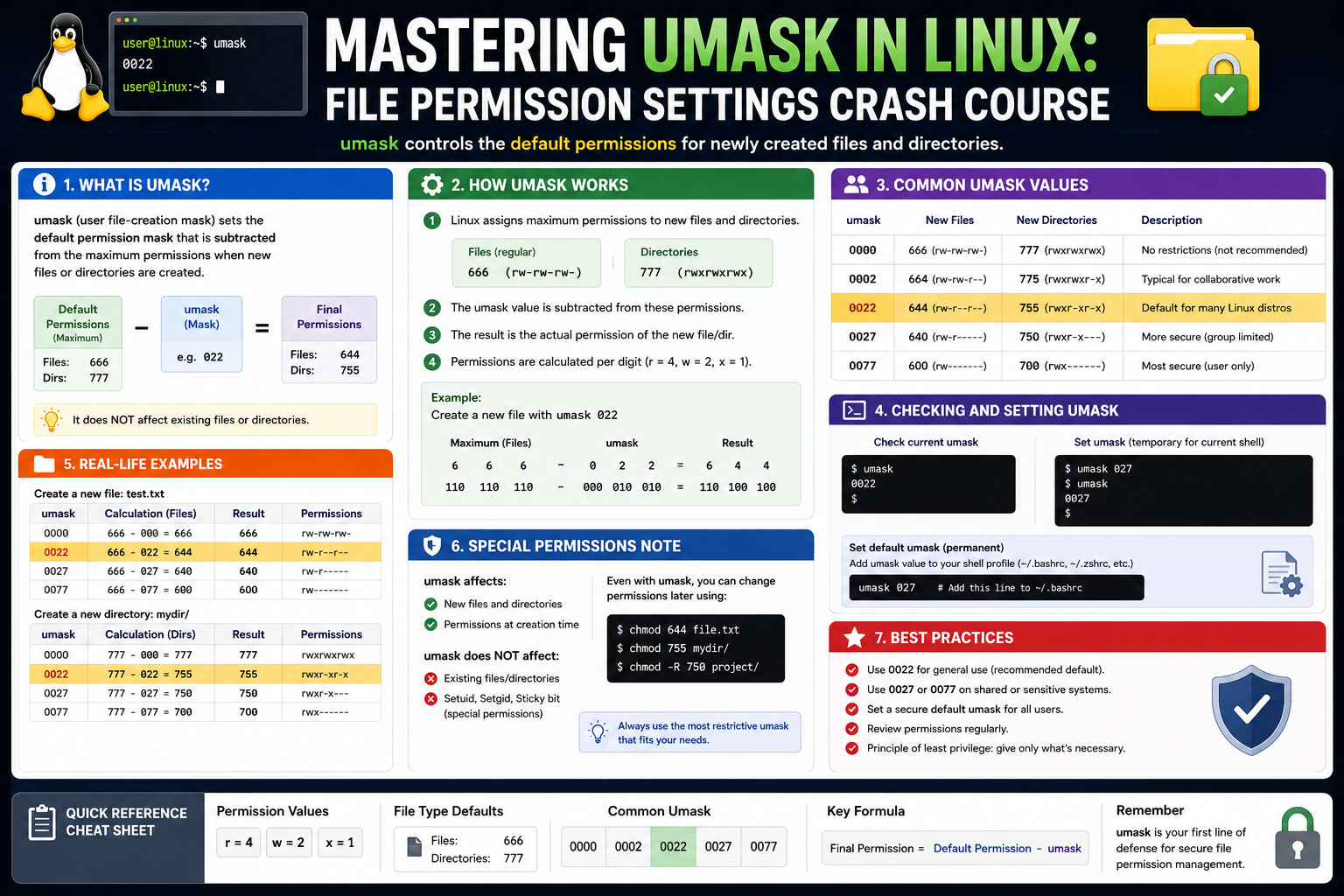
Understanding umask and default file permissions is a foundational skill in Linux system administration, especially for anyone working toward certifications or managing real-world systems. While the concept may initially seem technical or abstract, it plays a direct role in how secure, organized, and predictable a Linux environment behaves. Every time a file or directory is created, Linux applies a set of rules that determine who can read, write, or execute it. These rules are influenced heavily by umask, which quietly shapes the security posture of the entire system.
This first part explores the concept deeply, building a strong conceptual foundation of how Linux handles permissions and why umask exists in the first place. The goal is to understand not just what it does, but why it matters in everyday system behavior.
The Importance of Default Permissions in Linux Systems
Every Linux system operates in a multi-user environment, even when it appears to be used by a single person. Background services, system processes, and applications all interact with the file system simultaneously. Because of this, Linux must have a consistent way of controlling who can access newly created files and directories.
Default permissions define this baseline behavior. Without them, every file would need manual configuration after creation, which would be inefficient and error-prone. Instead, Linux assigns initial permissions automatically whenever a file or directory is created.
However, these defaults are intentionally broad before restrictions are applied. This is where the concept of a permission mask becomes essential. The system does not simply assign final permissions directly; instead, it starts from a maximum allowed level and then restricts access based on defined rules.
This approach ensures flexibility while maintaining control. It allows users, services, and applications to create files freely while still enforcing a consistent security model underneath.
Understanding the Linux Permission Model
Linux permissions are built around a simple but powerful structure involving three categories of users: the owner of the file, the group associated with the file, and everyone else on the system.
Each category can have three types of access: the ability to read data, modify or write data, and execute a file or enter a directory. These permissions combine to define how a file behaves in different contexts.
For example, a file might allow its owner full control, allow group members to read only, and deny all access to others. This structure creates a layered security system that is both flexible and precise.
What makes Linux permissions particularly interesting is that they are not stored as plain text descriptions internally. Instead, they are represented in a compact numerical system that reflects combinations of these permissions. This representation allows the system to process and evaluate permissions efficiently at a low level.
This underlying structure becomes especially important when understanding how umask modifies permissions during file creation.
The Concept Behind Umask
Umask can be thought of as a filtering mechanism that operates during the creation of files and directories. Instead of directly assigning permissions, Linux starts with a default maximum set of permissions and then removes certain permissions based on the umask value.
This means umask does not grant permissions; it restricts them. It acts like a safety filter that ensures newly created files are not too open by default.
In practical terms, when a process creates a file, Linux first considers the maximum possible permissions that could be assigned. Then it applies the umask rules to remove specific permissions from that starting point.
This behavior is why umask is so important in system administration. It defines the baseline security level for every file created by users and services.
Without a properly configured umask, systems could unintentionally expose sensitive data or allow unintended access to files.
How Linux Determines Initial File and Directory Permissions
When a new file is created, Linux does not start from zero permissions. Instead, it begins with a predefined maximum permission set and then applies restrictions.
Files typically start from a more restricted baseline compared to directories. This is because files generally should not be executable unless explicitly required. Directories, on the other hand, require execute permission to be accessed and traversed.
Once these starting values are established, the system applies the umask. The umask removes permissions rather than adding them. This ensures that even if an application requests broad access, the system can still enforce security boundaries.
This layered approach provides a balance between usability and protection. Applications can function normally, while the operating system maintains control over the final permission state.
Conceptual Understanding of Permission Masking
To understand how umask works internally, it helps to think in terms of permission blocking rather than permission setting.
Each permission—read, write, and execute—can be thought of as a switch. When a file is created, all switches are initially in a default state depending on whether it is a file or a directory. The umask then determines which of these switches should be turned off.
If a specific permission is masked, it means that permission is removed from the final result, regardless of what the creating process requested.
This mechanism is powerful because it centralizes control over file security. Instead of relying on every application to behave correctly, the system enforces a consistent ruleset at creation time.
This is especially important in environments where multiple users and services operate simultaneously, as it prevents accidental exposure of sensitive data.
Why Umask Exists in the First Place
Umask exists to solve a fundamental problem in multi-user operating systems: uncontrolled file access at creation time.
Without a masking system, every application would be responsible for setting secure permissions manually. This would lead to inconsistency, as different programs might apply different rules. Some files might become too open, while others might become too restrictive, breaking workflows.
By introducing umask, Linux ensures a consistent baseline security policy across all file creation operations. It acts as a global safety net that applies regardless of which application creates the file.
This design is especially important in server environments where many services operate automatically. Web servers, database systems, and background services constantly generate files, logs, and temporary data. Umask ensures these files follow predictable security rules without requiring manual intervention.
The Role of Umask in Multi-User Security
In systems with multiple users, file permissions become a critical security boundary. Users must be prevented from accessing or modifying each other’s files unless explicitly allowed.
Umask plays a direct role in enforcing this separation. By controlling default permissions, it ensures that newly created files are not overly accessible.
For example, if a user creates a file that is meant to be private, a properly configured umask ensures that other users cannot read or modify it by default. Without umask, the file might unintentionally become accessible, leading to potential privacy or security issues.
This is especially important in shared environments such as educational institutions, enterprise servers, or development systems where many users operate on the same machine.
Umask and System Services
Beyond regular user activity, system services also rely heavily on umask behavior. Services such as web servers, database engines, and logging systems continuously create and modify files.
Each of these services runs under its own user identity, and each can have its own umask setting. This allows administrators to control how restrictive or open service-generated files should be.
For example, a web server might need to generate files that are readable by multiple system components, while a database system might require more restrictive access to protect sensitive information.
By adjusting umask values appropriately, administrators can fine-tune how each service interacts with the file system without modifying application code.
Relationship Between Umask and Security Hardening
Security hardening involves reducing the attack surface of a system by limiting unnecessary access. Umask is one of the simplest yet most effective tools in this process.
A stricter umask reduces the default permissions on new files, making it harder for unauthorized users or processes to access them. This is particularly useful for sensitive systems where data protection is a priority.
On the other hand, overly restrictive umask settings can interfere with normal system operations. Some applications expect certain permissions to function correctly, and if these are blocked, it can lead to unexpected behavior.
This balance between security and usability is a recurring theme in Linux administration, and umask sits directly at the center of it.
Common Misunderstandings About Umask Behavior
One of the most common misunderstandings about umask is that it directly subtracts permissions from default values. While this may appear to work in simple cases, it is not how the system actually behaves internally.
Umask operates through a masking process that removes specific permission bits rather than performing arithmetic subtraction. This distinction becomes important in more complex scenarios where simple subtraction does not produce accurate results.
Another misconception is that umask sets final permissions permanently. In reality, it only affects newly created files and directories. Existing files are not modified when umask changes.
Understanding these nuances is important for avoiding confusion when troubleshooting permission-related issues.
How Umask Interacts with Other Permission Tools
Umask works alongside other permission management tools, such as file ownership controls and manual permission adjustments.
While umask defines default behavior at creation time, other tools allow administrators to modify permissions after the fact. This layered system provides flexibility.
However, umask is unique because it operates automatically and consistently across all file creation events. This makes it one of the most important foundational settings in Linux permission management.
Without understanding umask, it becomes difficult to fully predict how files will behave in a system, especially in complex environments with multiple users and services.
Variability Across Different System Environments
Different Linux distributions and system configurations may apply different default umask values depending on their intended use case.
For example, a desktop system might use a more permissive default to improve usability, while a server environment might use a stricter configuration to prioritize security.
Additionally, different system components may override or modify umask behavior depending on context. Login sessions, background services, and administrative processes may all operate under different assumptions.
This variability is one reason why understanding the umask conceptually is more important than memorizing specific values. It allows administrators to adapt to different environments without confusion.
Building a Mental Model of Umask Behavior
A helpful way to understand umask is to imagine it as a filter placed between file creation requests and the final permissions assigned by the system.
Every time a file is created, it passes through this filter. The filter removes certain permissions based on predefined rules, ensuring that the final result aligns with system security expectations.
This mental model helps simplify what is otherwise a complex process involving binary operations and permission structures. By focusing on the idea of restriction rather than calculation, it becomes easier to understand how umask shapes system behavior.
Why Understanding Umask Matters in Practice
In real-world system administration, many issues related to file access, security, and service behavior can be traced back to incorrect or misunderstood umask settings.
Whether dealing with user files, system logs, or application-generated data, umask plays a silent but constant role in defining access rules.
A strong understanding of how it works allows administrators to predict file behavior, troubleshoot permission issues more effectively, and design more secure systems from the ground up.
Even though it operates quietly in the background, its impact is present in nearly every file operation performed on a Linux system.
How Linux Applies Umask During File Creation
When a process in Linux creates a file or directory, the operating system does not simply assign permissions based on user preference. Instead, the system follows a structured internal workflow that ensures consistency across all applications and services.
At the moment of creation, the system first assigns a theoretical maximum set of permissions. These are the broadest permissions a file or directory is allowed to have before restrictions are applied. This initial stage is not visible to the user but is essential for understanding how permissions are ultimately determined.
Once this baseline is set, the system immediately evaluates the umask value associated with the process that is creating the file. This umask acts as a filtering layer. It determines which permission bits should be removed from the initial set.
The important idea here is that Linux does not “build” permissions from scratch. Instead, it starts with a full set of possibilities and removes restrictions based on policy. This approach ensures that even if a program requests overly permissive settings, the system can still enforce security boundaries.
This process happens every time a file or directory is created, regardless of whether the action is performed by a user, a system service, or a background process. Because of this, umask becomes a silent but consistent security mechanism across the entire system.
The Relationship Between Processes and Umask Values
Every running process in Linux carries its own environment, and that environment includes a specific umask setting. This means that different programs can operate with different default permission rules even on the same system.
For example, a terminal session opened by a user may have one umask value, while a background service like a logging daemon or web server may have a completely different one. These values are inherited or explicitly defined when the process starts.
This distinction is important because it explains why files created by different services often have different permissions even if they are created on the same machine. The umask is not global in the strictest sense; it is tied to the process context.
When a new process is launched, it typically inherits its umask from its parent process. However, system administrators or service configurations can override this behavior. This flexibility allows different parts of the system to follow different security policies while still operating under the same operating system.
Understanding this relationship is key to diagnosing permission inconsistencies in complex environments.
Why Default File and Directory Permissions Differ
Linux intentionally uses different default permission baselines for files and directories. This distinction exists because files and directories serve fundamentally different purposes in the system.
Files are primarily used to store data, and most files do not require execution rights. Because of this, the system uses a more restrictive default baseline for files, ensuring that executable permissions are not granted unnecessarily.
Directories, on the other hand, require traversal. Without execute permission, a directory cannot be accessed or entered, even if it is visible. This makes execute permission essential for directories in a way that is not required for regular files.
By assigning different starting points for files and directories, Linux ensures that each object type behaves correctly from a security standpoint before umask is even applied.
Once these base values are established, umask further refines the final permissions. This layered approach ensures both functionality and security are preserved.
The Silent Role of Umask in System Security
One of the most important aspects of umask is that it operates silently in the background. Users and applications rarely interact with it directly during everyday operations, yet it influences almost every file on the system.
This silent operation makes it both powerful and potentially dangerous if misunderstood. A poorly configured umask can unintentionally expose sensitive data, while a well-configured one can significantly reduce security risks without affecting usability.
In many systems, security incidents are not caused by malicious actions alone but by misconfigurations that allow unintended access. Umask plays a central role in preventing such situations by enforcing baseline restrictions.
Because it applies automatically at the moment of file creation, it ensures that even temporary or automatically generated files follow consistent security rules.
Umask in Multi-User Environments
In environments where multiple users share the same system, file isolation becomes a critical requirement. Each user must be able to create and manage files without interfering with others.
Umask helps enforce this separation by controlling the default visibility and accessibility of newly created files. If the umask is too permissive, users may unintentionally create files that others can read or modify. If it is too restrictive, collaboration between users can become unnecessarily difficult.
System administrators often adjust umask values based on the type of environment they are managing. For example, a development server might use more permissive settings to encourage collaboration, while a production environment might use stricter settings to protect sensitive data.
This flexibility allows Linux systems to adapt to a wide range of operational needs without changing the underlying permission model.
Umask and Application Behavior
Applications running on Linux do not directly control final file permissions. Instead, they request certain permissions when creating files, but the operating system ultimately determines what is allowed based on umask.
This means that two applications with identical behavior may still produce files with different permissions depending on the environment in which they run.
For example, a text editor might attempt to create a file with broad permissions, but if the system’s umask is restrictive, those permissions will be reduced automatically. Similarly, system services that generate logs or temporary files will also be affected by umask rules.
This behavior ensures consistency across applications and prevents any single program from bypassing system-wide security policies.
It also means that administrators can influence application behavior indirectly by adjusting umask values without modifying the applications themselves.
System-Wide vs User-Level Umask Behavior
Umask can be defined at different levels within a Linux system, and understanding these layers is important for managing complex environments.
At the user level, umask applies to individual login sessions. When a user logs in, the system assigns a default umask that governs all file creation activities for that session.
At the system level, umask may be defined for services, background processes, and system-wide defaults. These settings ensure that system-generated files follow appropriate security rules even when no user is directly involved.
Because multiple layers of configuration can exist simultaneously, determining the effective umask for a specific process sometimes requires understanding its entire execution chain.
This layered structure provides flexibility but can also introduce complexity when troubleshooting permission-related issues.
How Umask Affects File Sharing and Collaboration
File sharing between users is a common requirement in Linux environments, especially in development and enterprise systems. However, without proper control, shared files can easily become security risks.
Umask helps manage this balance by defining how open or restricted newly created files should be by default. A more restrictive umask ensures that files are private unless explicitly shared, while a more permissive umask allows easier collaboration.
This becomes particularly important in shared directories where multiple users contribute files. Without consistent umask settings, file permissions can become unpredictable, leading to access issues or security gaps.
By controlling umask at the appropriate level, administrators can ensure that collaboration remains smooth without compromising system integrity.
The Impact of Umask on Temporary Files and System Logs
Temporary files and system logs are continuously created by applications and services. These files often contain sensitive information such as system activity, user actions, or application states.
Because these files are created automatically, their security depends heavily on umask settings. If the umask is too permissive, temporary files or logs may become accessible to unauthorized users, potentially exposing sensitive data.
On the other hand, overly restrictive settings may prevent legitimate system processes from reading or writing necessary information, leading to operational issues.
This balance is especially important in server environments where logging and temporary storage are critical for debugging, monitoring, and auditing.
Understanding Umask Inheritance Across Sessions
When a new session or process is created in Linux, it does not start with a completely independent environment. Instead, it inherits many settings from its parent process, including umask.
This inheritance ensures consistency across related processes. For example, when a user opens a terminal, the shell inherits the umask from the login session. Any programs launched from that shell will also inherit the same settings unless explicitly changed.
This chain of inheritance ensures predictable behavior but also means that changes in one part of the system can affect many downstream processes.
Understanding this inheritance model is important for diagnosing unexpected permission behavior, especially in complex environments with multiple layers of process creation.
How Umask Interacts with Automated System Tasks
Modern Linux systems rely heavily on automation. Scheduled tasks, background services, and system daemons all operate continuously without user intervention.
These automated processes frequently create or modify files, making umask a critical factor in their behavior. Since these tasks often run with elevated privileges or dedicated system accounts, their umask settings must be carefully configured.
A misconfigured umask in an automated process can lead to widespread permission issues, especially if the process generates files used by multiple system components.
For this reason, system administrators often pay close attention to umask settings in service configurations and initialization scripts.
The Security Implications of Misconfigured Umask
Incorrect umask settings can have serious security consequences. If a system uses overly permissive defaults, newly created files may become accessible to unintended users.
This can lead to data leaks, unauthorized modifications, or exposure of sensitive system information. In shared environments, such misconfigurations can affect multiple users simultaneously.
On the other hand, overly restrictive umask settings can disrupt system functionality. Applications may fail to write necessary files, services may malfunction, and logs may not be generated correctly.
This dual risk highlights the importance of carefully selecting and maintaining appropriate umask values based on system requirements and security policies.
Why Umask Is Still Relevant in Modern Linux Systems
Despite the evolution of Linux systems and the introduction of more advanced security mechanisms, umask remains a fundamental part of file permission management.
It continues to serve as the first line of control for file creation, ensuring that no file is created with unintended permissions before higher-level security systems are even involved.
Modern Linux distributions still rely on umask because it is simple, efficient, and deeply integrated into the core permission model. It operates at a low level, making it highly reliable and consistent across different environments.
Even as new security technologies are introduced, umask remains a foundational concept that influences how those systems behave in practice.
Umask Behavior in Enterprise Linux Environments
In large-scale environments, Linux systems rarely operate as isolated machines. Instead, they function as part of interconnected infrastructures where multiple services, users, and automated systems interact continuously. In these environments, umask becomes more than just a local user setting; it becomes a part of system-wide security policy enforcement.
Enterprise systems often run dozens or even hundreds of services simultaneously. Each service may generate files, logs, temporary data, or configuration outputs. Without carefully defined umask behavior, these files could end up with inconsistent permissions, leading to unpredictable access patterns.
For example, one service might create log files that are readable by multiple system components, while another might generate sensitive configuration files that should remain strictly private. If both services use inappropriate or inconsistent umask values, the result can be a security gap that is difficult to detect.
This is why enterprise administrators treat umask as part of their baseline system configuration strategy rather than an optional setting. It helps ensure that all file creation activities follow a predictable security pattern regardless of which service generates them.
Umask in System Initialization and Boot Processes
When a Linux system boots, it launches a series of initialization processes that set the foundation for all system activity. These early processes establish environment variables, service configurations, and security parameters, including default umask behavior.
At this stage, umask plays a subtle but important role. It influences how system files, runtime directories, and service-related resources are created during startup.
Because many critical system files are generated during boot, an incorrect umask configuration at this level can have cascading effects throughout the entire system session. For instance, if system logs or runtime directories are created with overly permissive access, sensitive system information may become exposed to unintended users.
Conversely, overly restrictive settings can prevent services from starting correctly if they are unable to write required files. This is particularly problematic for system components that depend on shared directories or runtime state files.
For this reason, system initialization frameworks carefully control how umask is inherited and applied during early boot stages.
The Role of Umask in Service Management Systems
Modern Linux distributions rely heavily on service management frameworks that control how background processes are started, stopped, and monitored. These systems define execution environments for services, including their permission behavior.
Each service typically runs under a dedicated user account with a specific security context. Within this context, umask determines how any files created by the service will behave.
This becomes especially important for services that handle sensitive data or interact with multiple users. For example, a database service may generate temporary files containing cached data, while a web service may create session files or logs.
If these files are not properly restricted by umask, they may become accessible to unauthorized processes or users on the system.
Because services often restart automatically or scale dynamically, administrators must ensure that umask settings remain consistent across all instances of a service. Inconsistent configurations can lead to unpredictable permission behavior, which can be difficult to diagnose in large environments.
Umask and File Ownership Interactions
While umask controls default permissions, file ownership determines which user and group are associated with a file. These two mechanisms work together to define access control in Linux systems.
When a file is created, it is automatically assigned an owner and a group based on the process that created it. Umask then determines what permissions are available to that owner, group, and others.
This relationship is important because even if a file is owned by a specific user, incorrect umask settings can still expose it to other users or processes.
For example, a file created by a privileged service may be owned by the root user, but if the umask is too permissive, other system users may still be able to read or modify it depending on group and other permission settings.
Understanding the interaction between ownership and umask is essential for building secure systems where access boundaries are clearly defined.
Umask in Scheduled Tasks and Background Automation
Linux systems frequently rely on scheduled tasks to perform routine maintenance, backups, updates, and monitoring activities. These tasks often run automatically without user interaction, making their security behavior dependent on predefined system settings.
Umask plays a key role in determining how files created by scheduled tasks are handled. For example, backup processes may generate archive files, log rotation tasks may create new log files, and monitoring systems may write status reports.
If the umask for these tasks is not properly configured, sensitive data may be stored with overly permissive access. This can expose system information to unintended users or processes.
On the other hand, overly restrictive settings can prevent scheduled tasks from completing successfully, especially if they need to share files across services or users.
Because scheduled tasks often run with elevated privileges or system-level permissions, their umask configuration is particularly important for maintaining system integrity.
Understanding Umask in Network-Connected Services
Network-facing services introduce additional complexity to file permission management. These services often handle data from external sources, process user requests, and generate output files based on incoming traffic.
In such environments, umask helps control how newly created files are exposed within the system. For example, a web server may generate temporary files for uploaded content, session tracking, or caching.
If these files are created with incorrect permissions, they may become accessible through unintended pathways, potentially exposing sensitive user data.
Similarly, network services that log incoming requests or store transaction data must ensure that log files are protected from unauthorized access.
Because network traffic can be unpredictable, consistent umask behavior is essential for maintaining a secure baseline regardless of external input.
Umask and Containerized Environments
Containerization has become a major part of modern Linux infrastructure. Containers isolate applications and their dependencies, allowing multiple workloads to run on the same host system.
Within containers, umask still plays an important role in determining file permissions. However, its behavior is influenced by both the container runtime and the underlying host system.
Each container typically runs with its own isolated environment, including its own process space and file system view. Within this environment, umask determines how files created inside the container are secured.
If container images or runtime configurations do not properly define umask behavior, files created inside containers may have inconsistent permissions. This can lead to security issues when containers share volumes or interact with host-mounted directories.
In multi-container deployments, inconsistent umask settings between containers can also lead to unexpected behavior when services exchange data through shared storage.
Because of these complexities, containerized systems often require careful alignment of umask settings across both container images and orchestration configurations.
Umask and Shared Storage Systems
Many Linux environments rely on shared storage systems such as network file systems or centralized storage clusters. These systems allow multiple machines or services to access the same files.
In such environments, umask becomes particularly important because it determines how files are initially exposed when created on shared storage.
If a file is created with overly permissive settings, it may become accessible across multiple systems, potentially violating security boundaries. Conversely, overly restrictive settings may prevent legitimate access from other nodes in the system.
Shared storage environments also introduce additional complexity because file permissions must remain consistent across different systems that may interpret access rules in slightly different ways.
This makes careful umask configuration essential for maintaining predictable behavior in distributed systems.
Umask and Permission Conflicts with Advanced Security Layers
Modern Linux systems often use additional security frameworks that operate alongside traditional file permissions. These may include access control mechanisms that provide more granular control over file access.
While these systems add additional layers of protection, umask still plays a foundational role. It determines the initial permission state before any advanced rules are applied.
If umask is too permissive, higher-level security systems must compensate by restricting access after the fact. If umask is too restrictive, legitimate processes may be blocked before higher-level systems even evaluate access rules.
This interaction between basic permissions and advanced security layers highlights the importance of aligning umask with broader security policies.
Troubleshooting Permission Issues Related to Umask
Many permission-related issues in Linux systems can be traced back to umask misconfigurations. These issues often appear as unexpected access restrictions or unintended file visibility.
For example, a user may create a file that they expect to be shared with a group, but the file remains inaccessible due to restrictive umask settings. In other cases, files may become unexpectedly visible to other users due to overly permissive defaults.
Troubleshooting these issues typically involves analyzing the process environment where the file was created, identifying the effective umask at that time, and comparing it with expected system policies.
Because umask is applied at creation time, changing it after the fact does not affect existing files. This makes diagnosis more challenging, as administrators must reconstruct the conditions under which the file was created.
Umask in Mixed-Privilege Environments
Some Linux environments include a mix of privileged and non-privileged processes operating simultaneously. In such environments, umask behavior must be carefully managed to prevent privilege escalation risks.
Privileged processes often have the ability to create files across multiple system locations. If these processes use overly permissive umask settings, they may unintentionally expose sensitive system data.
Non-privileged processes, on the other hand, may require more restrictive settings to ensure user isolation.
Balancing these requirements requires careful segmentation of umask configurations based on process roles and responsibilities within the system.
Common Edge Cases in Umask Behavior
Although umask behaves consistently in most situations, certain edge cases can produce unexpected results. These often occur in complex environments involving multiple layers of process inheritance or custom application behavior.
For example, some applications explicitly override system defaults when creating files, temporarily bypassing standard umask behavior. Others may reset umask within their execution flow, leading to inconsistent permissions across different parts of the same application.
In distributed systems, differences in operating system configurations can also lead to variations in how umask is interpreted, especially when files are shared across different machines.
Understanding these edge cases is important for diagnosing subtle permission inconsistencies that may not be immediately obvious.
The Role of Umask in Long-Term System Maintenance
Over time, Linux systems accumulate large numbers of files generated by users, services, and automated processes. The consistency of these files depends heavily on how umask has been configured throughout the system’s lifecycle.
If umask settings change frequently or are inconsistently applied, the system may develop fragmented permission structures where similar files have different access rules.
This can complicate system maintenance, backups, migrations, and audits. Consistent umask configuration helps ensure that file permissions remain predictable over long periods of system operation.
Administrators often treat umask as part of their long-term configuration baseline, ensuring that it remains stable unless there is a specific reason to modify it.
Umask as a Foundation of Predictable Security Behavior
At its core, umask provides a foundation for predictable security behavior in Linux systems. It ensures that every file created follows a consistent set of rules, regardless of which application or service generated it.
This predictability is essential in complex environments where multiple systems, users, and processes interact continuously. Without it, file permissions would become inconsistent and difficult to manage at scale.
By controlling the initial state of file permissions, umask ensures that higher-level security policies can operate on a stable and predictable foundation.
Umask Behavior in Remote and Distributed File Operations
In distributed Linux environments, file creation is no longer limited to a single machine. Systems often interact with remote servers, shared networks, and synchronized storage layers where files are created, transferred, or replicated across multiple nodes. In these situations, umask continues to play a critical role at the moment a file is created, even though the file may later move across different systems.
When a file is generated on a local machine and then transmitted to a remote system, the original permissions shaped by umask often remain part of its metadata. This means that the initial security decisions made at creation time can influence how the file behaves throughout its lifecycle across the network. If the umask was too permissive, sensitive information might unintentionally retain broad access rights when copied or synchronized elsewhere.
In clustered environments, multiple servers may contribute to a shared dataset. Each server could have its own umask configuration, leading to variation in file permissions depending on where a file originated. This can create inconsistencies in access control unless carefully standardized across the infrastructure.
Administrators working with distributed systems must therefore consider umask not just as a local setting, but as part of a broader security architecture. Ensuring uniform umask configurations across nodes helps maintain predictable permission behavior and reduces the risk of accidental exposure during file replication or remote operations.
Conclusion
Umask plays a quiet but essential role in shaping how Linux systems handle security at the most fundamental level. Every file and directory created on a Linux machine begins its life influenced by this mechanism, even if users or administrators are not directly interacting with it. By controlling which permissions are removed at the moment of creation, umask ensures that no file is accidentally left too open or too accessible in a multi-user environment.
What makes umask particularly important is its consistency. Whether a file is created by a user, a background service, a scheduled task, or a network-facing application, the same underlying logic applies. This uniform behavior helps maintain predictable security standards across the entire system, reducing the risk of unintended data exposure. It also provides administrators with a simple yet powerful way to enforce baseline security policies without modifying every application individually.
In real-world Linux administration, understanding umask is not just about passing certification exams or memorizing commands. It is about recognizing how everyday system behavior is shaped at the lowest level. Many permission issues, security misconfigurations, and access inconsistencies can often be traced back to how umask was defined in a given environment.
Ultimately, umask represents a balance between usability and security. It allows systems to remain functional and flexible while still enforcing necessary restrictions. A well-chosen umask configuration contributes to a safer, more stable environment where file access behaves predictably across users and services. For anyone working with Linux systems, mastering this concept is a key step toward building a reliable and secure infrastructure.