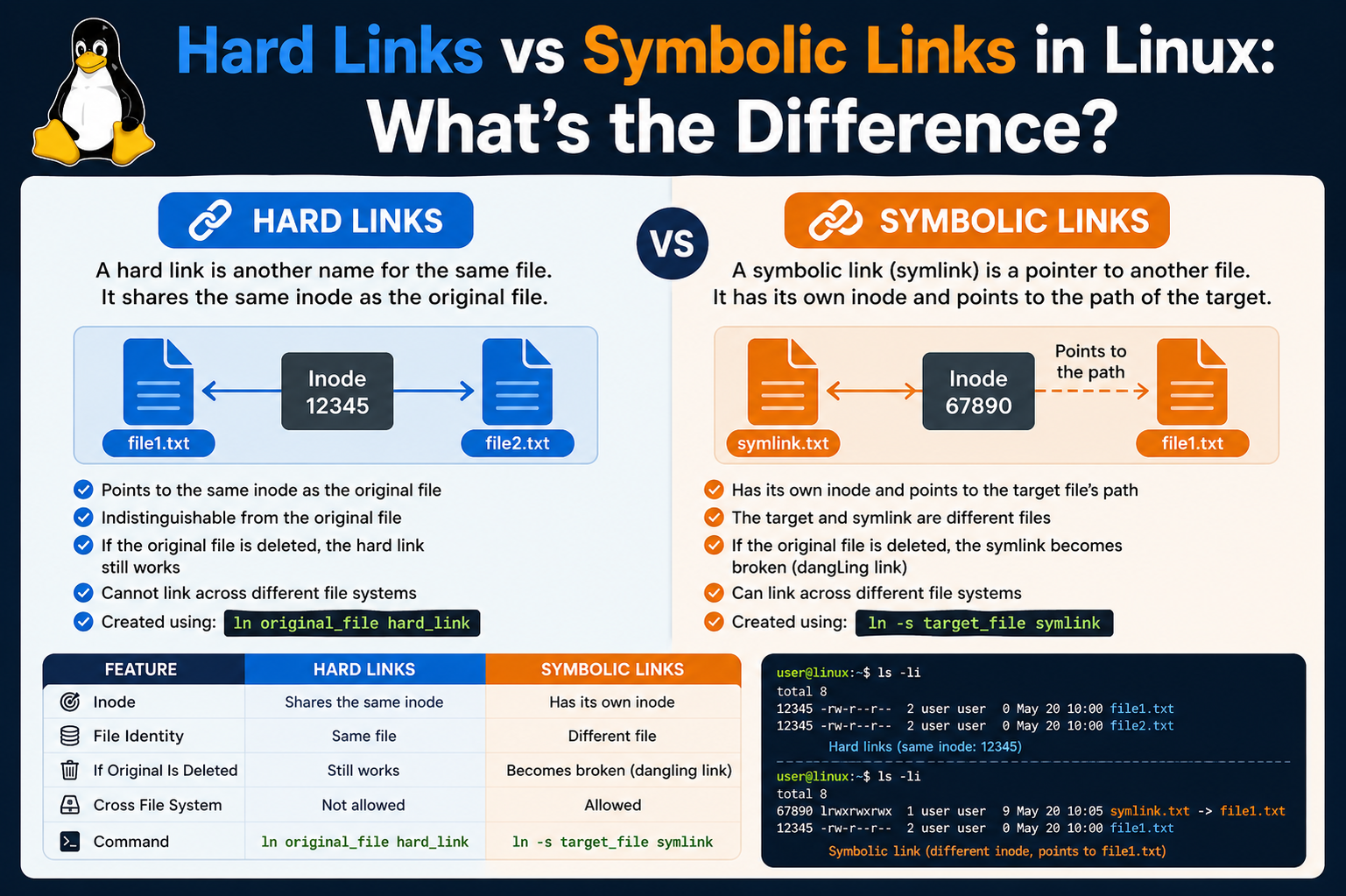
When working within a Linux environment, one of the most important concepts to grasp is how the system organizes and references files. Unlike some operating systems that abstract these details away, Linux gives users a deeper level of interaction with the filesystem. At the core of this system lies the idea that files are not simply named pieces of data sitting in folders. Instead, what users see as filenames are actually references to underlying data stored on disk. This distinction becomes especially important when discussing links, which are essentially different ways of pointing to that data.
In Linux, links provide flexibility in how files are accessed and managed. They allow multiple references to the same data without necessarily duplicating it, which can save space and improve efficiency. For someone new to Linux, this idea can feel unusual because it challenges the assumption that one file equals one unique piece of data. Instead, Linux separates the concept of a file’s name from the actual data it represents. This separation is what makes hard links and soft links possible, and understanding it is key to using the filesystem effectively.
The terminology itself can be confusing at first. Words like “inode,” “symbolic,” and “link” may seem technical or abstract. However, once these ideas are broken down into simpler terms, they become much easier to understand. A link, in the simplest sense, is just a reference. The difference between types of links comes down to what exactly is being referenced. This is where hard links and soft links begin to diverge in behavior and purpose.
Why Linux Uses Links Instead of Simple File Copies
One might wonder why Linux even needs links in the first place. Why not just copy files whenever multiple references are needed? The answer lies in efficiency and flexibility. Copying a file creates a completely separate duplicate of the data, which consumes additional storage space. In contrast, links allow multiple filenames to refer to the same data without duplicating it. This is especially useful when dealing with large files or when maintaining consistency across different parts of a system.
For example, imagine a large configuration file that needs to be accessed from multiple directories. Creating multiple copies would not only waste space but also introduce the risk of inconsistency if one copy is updated while others are not. Links solve this problem by ensuring that all references point to the same underlying data. Any change made through one reference is immediately visible through all others.
This design also reflects the philosophy of Linux and Unix-like systems, which emphasize simplicity, modularity, and efficiency. By separating filenames from data and allowing multiple references, the system becomes more flexible and powerful. Users can organize their files in ways that suit their needs without worrying about unnecessary duplication.
Introduction to Hard Links and Their Role
Hard links are one of the two primary types of links in Linux, and they operate at a very fundamental level within the filesystem. A hard link is essentially another name for the same data on disk. When a hard link is created, it does not create a new file in the traditional sense. Instead, it creates an additional directory entry that points to the same underlying data structure.
This means that from the system’s perspective, all hard-linked files are equal. There is no concept of an “original” file and a “copy.” Each name is simply another reference to the same data. If one of these names is removed, the data remains accessible through the other names. The data is only deleted when all references to it are removed.
This behavior can be surprising to those who are used to thinking of files as independent entities. In Linux, the data itself is separate from the names that refer to it. Hard links take advantage of this separation by allowing multiple names to coexist for the same data. This can be incredibly useful in scenarios where redundancy and reliability are important.
How Hard Links Interact with File Data
To understand how hard links work, it is necessary to look at how Linux stores file information. Each file is associated with a data structure that contains metadata and pointers to the actual data blocks on disk. When a hard link is created, it simply adds another reference to this structure. As a result, both the original filename and the hard link point to the same data blocks.
This has several important implications. First, any changes made to the file through one name are immediately reflected when accessing it through another name. This is because there is only one set of data, and all references point to it. Second, deleting one of the names does not remove the data, as long as at least one reference remains.
Another important aspect is that hard links do not require additional storage for the data itself. Since they point to the same data blocks, they only use a small amount of space for the additional directory entry. This makes them an efficient way to manage files, especially when dealing with large amounts of data.
Limitations and Characteristics of Hard Links
While hard links are powerful, they are not without limitations. One key restriction is that they cannot span across different filesystems. This means that a hard link can only be created within the same filesystem as the original file. This limitation exists because the underlying data structures are specific to a particular filesystem, and references cannot cross those boundaries.
Another limitation is that hard links typically cannot be created for directories. This restriction helps prevent potential issues such as circular references, which could complicate the structure of the filesystem and make it difficult to navigate. By limiting hard links to regular files, the system maintains a more predictable and manageable structure.
Despite these limitations, hard links remain a valuable tool for managing files. They provide a reliable way to maintain multiple references to the same data, ensuring that it remains accessible even if one reference is removed. This reliability is one of their most significant advantages.
Introduction to Soft Links and Their Purpose
Soft links, also known as symbolic links, offer a different approach to referencing files. Unlike hard links, which point directly to the data, soft links point to the name of another file. This makes them more similar to shortcuts in other operating systems. A soft link contains a path that directs the system to another file or directory.
Because soft links rely on filenames rather than direct data references, they behave differently in several important ways. For example, they can point to directories as well as files, and they can span across different filesystems. This makes them more flexible than hard links in certain situations.
However, this flexibility comes with a trade-off. Since a soft link depends on the existence of the target file, it becomes invalid if that file is removed. When this happens, the soft link is said to be “broken,” as it no longer points to a valid location. This is a key difference between soft links and hard links, and it is something that users must keep in mind when working with them.
How Soft Links Function in Practice
When a soft link is created, the system stores a reference to the path of the target file. This path can be either absolute or relative, depending on how the link is created. When the soft link is accessed, the system follows this path to locate the target file and retrieve its data.
This process introduces an additional layer of indirection compared to hard links. Instead of directly accessing the data, the system must first resolve the path stored in the soft link. While this usually happens quickly and transparently, it does mean that soft links rely on the continued existence and correct location of the target file.
One advantage of this approach is that soft links can be used to create flexible and dynamic file structures. For example, they can be used to point to files in different directories or even on different filesystems. This makes them useful for organizing files and creating shortcuts to frequently accessed resources.
Storage and Efficiency Considerations for Soft Links
Soft links are generally very small in size because they only store a path to another file. This makes them an efficient way to create references without consuming significant storage space. Even if the target file is very large, the soft link itself remains small because it does not contain the data.
However, this efficiency comes with certain considerations. Since soft links do not store the data, they are entirely dependent on the target file. If the target is moved or deleted, the link may no longer function correctly. This can lead to situations where links need to be updated or recreated to reflect changes in the filesystem.
Despite this, soft links are widely used because of their flexibility and ease of use. They provide a convenient way to create references without worrying about the limitations associated with hard links. For many use cases, this makes them the preferred choice.
Comparing the Fundamental Nature of Both Link Types
At their core, the difference between hard links and soft links comes down to what they reference. Hard links point directly to the data, making them robust and reliable. Soft links, on the other hand, point to filenames, making them more flexible but also more fragile.
This distinction influences how each type of link behaves in different situations. Hard links remain valid as long as the data exists, regardless of which name is used to access it. Soft links, however, depend entirely on the existence and location of the target file. If that file is removed or relocated, the link may no longer work.
Understanding this fundamental difference is essential for using links effectively in Linux. By choosing the appropriate type of link for a given situation, users can take advantage of the strengths of each approach while avoiding potential pitfalls.
Deeper Insight into Inodes and File Identity in Linux
To fully understand the distinction between hard links and soft links, it is essential to explore the concept of inodes in greater depth. In Linux filesystems, an inode is a data structure that stores critical information about a file, excluding its name. This includes details such as file size, permissions, ownership, timestamps, and pointers to the actual data blocks on disk. What makes inodes particularly important is that they serve as the true identity of a file within the system.
When users interact with files through commands or graphical interfaces, they typically refer to filenames. However, the system itself operates using inode numbers. Each file is assigned a unique inode number within a filesystem, and this number is what the operating system uses to locate and manage the file’s data. The filename is simply a human-readable label that maps to this inode.
This separation between filenames and inodes is the foundation that makes hard links possible. When a hard link is created, the system does not duplicate the file’s data or create a new inode. Instead, it creates another directory entry that points to the same inode. As a result, multiple filenames can reference the same inode, and therefore the same data. This concept can feel abstract at first, but it becomes clearer when considering how the system tracks and manages these references internally.
Link Counts and Their Importance in Hard Links
One of the most important attributes associated with inodes is the link count. This value represents the number of directory entries that point to a particular inode. In simpler terms, it tells the system how many filenames are associated with a given piece of data. Every time a hard link is created, the link count increases by one. Conversely, when a filename is removed, the link count decreases.
The link count plays a crucial role in determining when the system can safely delete a file’s data. As long as the link count is greater than zero, the data remains on disk because there is still at least one reference to it. Only when the link count reaches zero does the system consider the data to be unreferenced and eligible for deletion.
This mechanism ensures that data is not accidentally lost when one of several references is removed. For example, if a file has multiple hard links and one of them is deleted, the data remains intact because other links still exist. This behavior highlights the resilience of hard links and explains why they are often used in situations where data integrity is critical.
Practical Behavior of Hard Links in Everyday Use
When working with hard links in a real-world environment, their behavior can sometimes be surprising. Since all hard-linked files point to the same inode, any modification made through one filename is immediately reflected in all others. This includes changes to the file’s content, permissions, and metadata. From the system’s perspective, there is only one file, regardless of how many names it has.
This can be particularly useful in collaborative environments where multiple users or applications need access to the same data. Instead of maintaining separate copies, which could become inconsistent over time, hard links ensure that everyone is working with the same underlying file. This eliminates duplication and reduces the risk of errors.
However, this behavior also requires careful consideration. Because all references share the same data, unintended changes can affect all linked instances. Users must be aware that modifying one hard link is effectively modifying the entire file. This is not always intuitive, especially for those who are accustomed to working with independent file copies.
Deleting Files and the Persistence of Data with Hard Links
One of the most distinctive features of hard links is how they handle file deletion. In many systems, deleting a file removes it entirely. In Linux, however, the process is more nuanced when hard links are involved. Deleting a file simply removes one directory entry, reducing the link count of the associated inode.
As long as the link count remains above zero, the data continues to exist on disk. This means that even if the original filename is removed, the file can still be accessed through other hard links. This behavior provides a level of fault tolerance, as it prevents accidental data loss when multiple references are present.
This concept also explains why there is no true “original” file in the context of hard links. All filenames are equal references to the same data. The idea of an original file is more of a user perception than a system reality. From the system’s point of view, there is only an inode with a certain number of links pointing to it.
Exploring Soft Links and Path Resolution in Detail
Soft links operate on a different principle, relying on path resolution rather than direct references to inodes. When a soft link is created, it stores the path to the target file. This path can be absolute, starting from the root directory, or relative, based on the location of the link itself.
When a user attempts to access a soft link, the system reads the stored path and attempts to locate the target file. This process involves resolving each component of the path until the final destination is reached. If the target exists, the system retrieves and presents its data as if the user had accessed it directly.
This mechanism introduces flexibility, as soft links can point to files and directories across different parts of the filesystem. They can even reference locations on mounted drives or network filesystems. This makes them a powerful tool for organizing and navigating complex directory structures.
The Concept of Broken Links and Their Implications
One of the defining characteristics of soft links is their susceptibility to becoming broken. A soft link is considered broken when the path it references no longer leads to a valid file or directory. This can happen if the target is deleted, moved, or renamed without updating the link.
When a soft link is broken, attempts to access it result in an error because the system cannot resolve the path to a valid destination. This behavior highlights the dependency of soft links on the existence and stability of their targets. Unlike hard links, which remain valid as long as the data exists, soft links rely entirely on the correctness of their stored paths.
Despite this limitation, broken links are not necessarily harmful. They can serve as indicators that something has changed in the filesystem. In some cases, they can even be useful for identifying missing resources or outdated references. However, managing and maintaining soft links requires attention to ensure that they continue to function as intended.
Flexibility of Soft Links Across Filesystems and Directories
One of the major advantages of soft links is their ability to span across different filesystems. Unlike hard links, which are restricted to a single filesystem, soft links can point to targets located anywhere that the system can access. This includes other partitions, external drives, and network-mounted locations.
This capability makes soft links particularly useful in environments where data is distributed across multiple storage devices. They can be used to create unified directory structures that provide seamless access to files, regardless of their physical location. For example, a soft link can be used to place a frequently accessed file in a convenient directory, even if the actual file resides elsewhere.
Additionally, soft links can point to directories, allowing users to create shortcuts to entire folder structures. This can simplify navigation and improve workflow efficiency, especially in systems with complex hierarchies.
Performance Considerations Between Hard and Soft Links
When comparing hard links and soft links, performance is another factor to consider. Hard links generally offer slightly faster access because they point directly to the inode and data blocks. There is no need for additional path resolution, which means the system can retrieve the data more directly.
Soft links, on the other hand, require an extra step of resolving the stored path before accessing the target file. While this process is usually very fast and often negligible in practice, it can introduce a small amount of overhead. In most cases, the difference is not significant enough to impact everyday use, but it can become noticeable in performance-critical applications.
Despite this, the choice between hard links and soft links is rarely based solely on performance. Instead, it depends on the specific requirements of the task, such as flexibility, reliability, and ease of management. Understanding these trade-offs allows users to make informed decisions when working with links in Linux.
Command Line Techniques for Creating and Managing Hard Links
Working with hard links in Linux becomes much clearer when explored through command line operations. The primary tool used for creating links is the ln command, which is simple in syntax but powerful in functionality. When creating a hard link, the command takes two arguments: the source file and the new link name. This action creates another directory entry that points to the same inode as the original file.
Once a hard link is created, both the original filename and the new link behave identically. You can open, edit, move, or delete either one, and the changes will apply to the same underlying data. From a user perspective, it may look like two separate files exist, but internally they are simply two references to the same data structure.
Managing hard links also involves understanding how to identify them. Using commands like ls -l reveals useful information, including the link count associated with a file. When this number is greater than one, it indicates that multiple directory entries are pointing to the same inode. This is often the easiest way to confirm that a file has one or more hard links associated with it.
Observing Inode Numbers to Verify Hard Links
Another practical method for identifying hard links is by examining inode numbers directly. The command ls -i displays the inode number for each file in a directory. When two or more files share the same inode number, it confirms that they are hard links referencing the same data.
This technique provides a deeper insight into how the filesystem operates. Instead of relying solely on filenames, it allows users to see the underlying structure that connects different references. It also reinforces the idea that filenames are مجرد labels, while the inode represents the actual file identity.
By comparing inode numbers, users can verify whether two files are truly linked or simply copies of each other. Copies will have different inode numbers because they occupy separate data blocks, whereas hard links will always share the same inode. This distinction is crucial when managing storage and ensuring data consistency.
Editing and Synchronization Behavior of Hard Links
One of the defining features of hard links is their synchronized behavior when it comes to file modifications. Since all hard-linked names point to the same inode, any change made through one reference is immediately visible through all others. This includes edits to the file’s content, changes in permissions, and updates to metadata such as timestamps.
This synchronization can be highly beneficial in scenarios where consistency is required. For example, system administrators may use hard links to maintain identical versions of configuration files across different directories. Instead of manually updating each copy, they can rely on the shared data structure to ensure uniformity.
However, this behavior also requires caution. Because all references are interconnected, unintended changes can propagate across all linked instances. Users must be mindful of this when editing files that have multiple hard links, as there is no isolation between them. Understanding this characteristic is essential for avoiding unexpected outcomes.
Removing Hard Links and Understanding Data Lifespan
Deleting a hard link is a straightforward process, but its implications are often misunderstood. When a user removes a file that has multiple hard links, the system simply decreases the link count associated with the inode. The data itself remains intact as long as at least one link still exists.
This means that the act of deletion does not necessarily remove the file’s content. Instead, it removes one reference to that content. The data is only truly deleted when the final link is removed and the link count reaches zero. At that point, the system can reclaim the storage space occupied by the file.
This behavior provides a level of protection against accidental data loss. Even if one link is removed, the data can still be accessed through other links. However, it also means that users need to be aware of all existing links to a file, as removing one may not have the intended effect if others still exist.
Creating and Managing Soft Links with Command Line Tools
Soft links are also created using the ln command, but with the addition of the -s option. This flag indicates that a symbolic link should be created instead of a hard link. The syntax remains similar, with the source file specified first and the link name second.
Once created, a soft link appears as a separate file that points to the target path. Commands like ls -l display this relationship clearly, showing the link name followed by an arrow pointing to the target. This visual representation helps users quickly identify symbolic links and understand where they lead.
Managing soft links involves ensuring that their target paths remain valid. If the target file is moved or renamed, the link may need to be updated. This can be done by removing the old link and creating a new one with the correct path. While this adds a layer of maintenance, it also provides flexibility in how files are organized.
Understanding Relative and Absolute Paths in Soft Links
When creating soft links, users have the option to use either absolute or relative paths. An absolute path specifies the full location of the target file, starting from the root directory. This ensures that the link will always point to the correct location, regardless of where it is accessed from.
Relative paths, on the other hand, are based on the location of the link itself. They specify the target file in relation to the link’s directory. This approach can be more flexible, especially when moving directories as a whole, since the relative relationship between files remains intact.
Choosing between absolute and relative paths depends on the specific use case. Absolute paths are generally more robust, as they are not affected by changes in the current working directory. Relative paths, however, can be more portable and easier to manage in certain scenarios. Understanding these options allows users to create links that best suit their needs.
Behavior of Soft Links When Targets Are Modified or Removed
Soft links behave differently from hard links when it comes to changes in the target file. If the content of the target file is modified, accessing the soft link will reflect those changes, as it simply redirects to the target. However, if the target file is deleted or moved, the link becomes invalid.
This invalid state is often referred to as a broken link. When a user attempts to access a broken link, the system returns an error indicating that the file or directory does not exist. This can be confusing at first, as the link itself still appears in the directory, but it no longer functions as expected.
Despite this limitation, soft links remain useful because of their flexibility. They allow users to create references that can span across directories and filesystems, making them ideal for organizing complex environments. The key is to manage them carefully to ensure that their targets remain accessible.
Comparative Use Cases for Hard Links and Soft Links
Choosing between hard links and soft links depends on the specific requirements of a task. Hard links are best suited for situations where reliability and data persistence are critical. They ensure that data remains accessible even if one reference is removed, making them ideal for backup systems or environments where redundancy is important.
Soft links, on the other hand, are better suited for scenarios that require flexibility and ease of navigation. They can be used to create shortcuts to frequently accessed files or directories, simplifying the user experience. Their ability to span across filesystems also makes them valuable in distributed storage environments.
Understanding these use cases helps users make informed decisions about which type of link to use. By leveraging the strengths of each approach, they can create efficient and organized file structures that meet their needs.
Security and Permission Considerations for Links in Linux
When dealing with links in Linux, security and permissions play a crucial role in how they behave and how they can be used safely. Hard links and soft links interact with permissions in different ways, and understanding these differences is essential for maintaining a secure system.
For hard links, since they point directly to the same inode, they share the exact same permissions as the original file. There is no distinction between the permissions of the original filename and the hard-linked name because both are simply references to the same data structure. If the permissions of the file are changed, those changes apply universally to all hard links. This ensures consistency but also means that access control must be managed carefully at the inode level.
Soft links behave differently. A symbolic link has its own set of permissions, but in most cases, these permissions are ignored when accessing the target file. Instead, the system checks the permissions of the actual file or directory that the link points to. This means that even if a soft link appears to have open permissions, access can still be restricted based on the target’s settings. This layered approach can sometimes be confusing, but it reinforces the importance of securing the target rather than relying on the link itself.
Ownership and Access Control Differences Between Link Types
Ownership is another area where hard links and soft links differ significantly. With hard links, all references share the same ownership because they point to the same inode. Changing the owner of the file affects all hard-linked names simultaneously. This unified ownership model simplifies management but requires careful planning in multi-user environments.
Soft links, however, can have different ownership from their target files. The link itself is a separate filesystem object, even though it points to another location. This means that the owner of the link may differ from the owner of the target. Despite this, access to the target still depends on the target’s permissions, not the link’s ownership.
This distinction becomes important when managing shared resources. Administrators need to ensure that the underlying files have appropriate permissions, as controlling access through soft links alone is not sufficient. Understanding how ownership and permissions interact with links helps prevent unintended access and maintains system integrity.
Backup and Restoration Implications of Hard and Soft Links
Links can have a significant impact on how backups are created and restored in Linux systems. Hard links, in particular, can complicate backup processes because multiple filenames may refer to the same data. Backup tools need to recognize these relationships to avoid duplicating data unnecessarily.
When handled correctly, hard links can actually make backups more efficient. Instead of storing multiple copies of the same file, the backup system can preserve the link structure, saving both time and storage space. However, if the tool does not account for hard links, it may treat each reference as a separate file, leading to redundancy.
Soft links introduce a different set of considerations. Since they point to paths rather than data, backup tools must decide whether to preserve the link itself or follow it to back up the target. Preserving the link maintains the original structure, while following it ensures that the target data is included in the backup. Each approach has its advantages, and the choice depends on the goals of the backup strategy.
Common Mistakes When Working with Links
Many users encounter issues when first working with hard and soft links, often بسبب misunderstandings about how they function. One common mistake is assuming that deleting a file referenced by a hard link will remove the data entirely. As discussed earlier, the data persists until all hard links are removed, which can lead to confusion if users expect immediate deletion.
Another frequent error involves soft links becoming broken بسبب changes to the target file. Moving or renaming a file without updating its associated symbolic links can leave behind references that no longer work. This can clutter the filesystem and create confusion when attempting to access resources.
Users may also mistakenly treat hard links as independent copies, leading to unintended modifications. Since all hard links share the same data, changes made through one link affect all others. Recognizing this behavior is essential for avoiding unexpected results and maintaining control over file content.
Advanced Use Cases for Hard Links in System Management
Hard links are often used in advanced system management scenarios where efficiency and reliability are priorities. One common use case is in incremental backup systems. By using hard links, these systems can create snapshots of files without duplicating data. Each snapshot appears as a complete copy, but unchanged files are actually shared through hard links, saving significant storage space.
Another use case involves package management and system updates. Some systems use hard links to manage different versions of files, allowing them to switch between versions quickly without duplicating data. This approach ensures consistency and reduces the overhead associated with maintaining multiple copies.
Hard links can also be used to maintain redundancy within a filesystem. By creating multiple references to critical files, administrators can ensure that data remains accessible حتی if one reference is accidentally removed. This adds an extra layer of protection against data loss.
Advanced Use Cases for Soft Links in Flexible File Organization
Soft links excel in scenarios that require flexibility and adaptability. One common use case is creating shortcuts to frequently accessed files or directories. Instead of navigating through complex directory structures, users can create symbolic links in convenient locations, improving efficiency and workflow.
Another important application is in software development and deployment. Developers often use soft links to manage different versions of applications or libraries. By updating a symbolic link to point to a new version, they can switch between versions without modifying the underlying directory structure. This approach simplifies updates and reduces the risk of errors.
Soft links are also widely used in system configuration. For example, configuration files may be linked to different locations depending on the environment. This allows administrators to maintain a consistent structure while adapting to different setups. The ability to point to directories further enhances their usefulness in organizing large and complex systems.
Choosing the Right Link Type for Different Scenarios
Selecting between hard links and soft links requires careful consideration of the specific needs of a task. If the goal is to ensure data persistence and avoid broken references, hard links are often the better choice. They provide a direct connection to the data and remain valid as long as the data exists.
On the other hand, if flexibility and cross-filesystem compatibility are important, soft links are more suitable. They allow for dynamic file organization and can point to a wide range of targets, including directories and remote locations. However, this flexibility comes with the responsibility of maintaining the validity of the links.
Understanding the strengths and limitations of each type enables users to make informed decisions. By applying the appropriate link type in each scenario, they can create efficient, reliable, and well-organized filesystems.
Final Thoughts
The distinction between hard links and soft links is a fundamental aspect of working with Linux filesystems. While both serve the purpose of referencing files, they do so in fundamentally different ways. Hard links provide a direct and resilient connection to data, ensuring that it remains accessible even when individual references are removed. Soft links, in contrast, offer flexibility and convenience by pointing to file paths, لكنها depend on the continued existence of their targets.
By understanding how these link types function, users gain greater control over their files and directories. They can optimize storage, improve organization, and enhance system reliability. Whether managing a personal system or administering a complex environment, mastering the use of links is an essential skill that unlocks the full potential of the Linux filesystem.