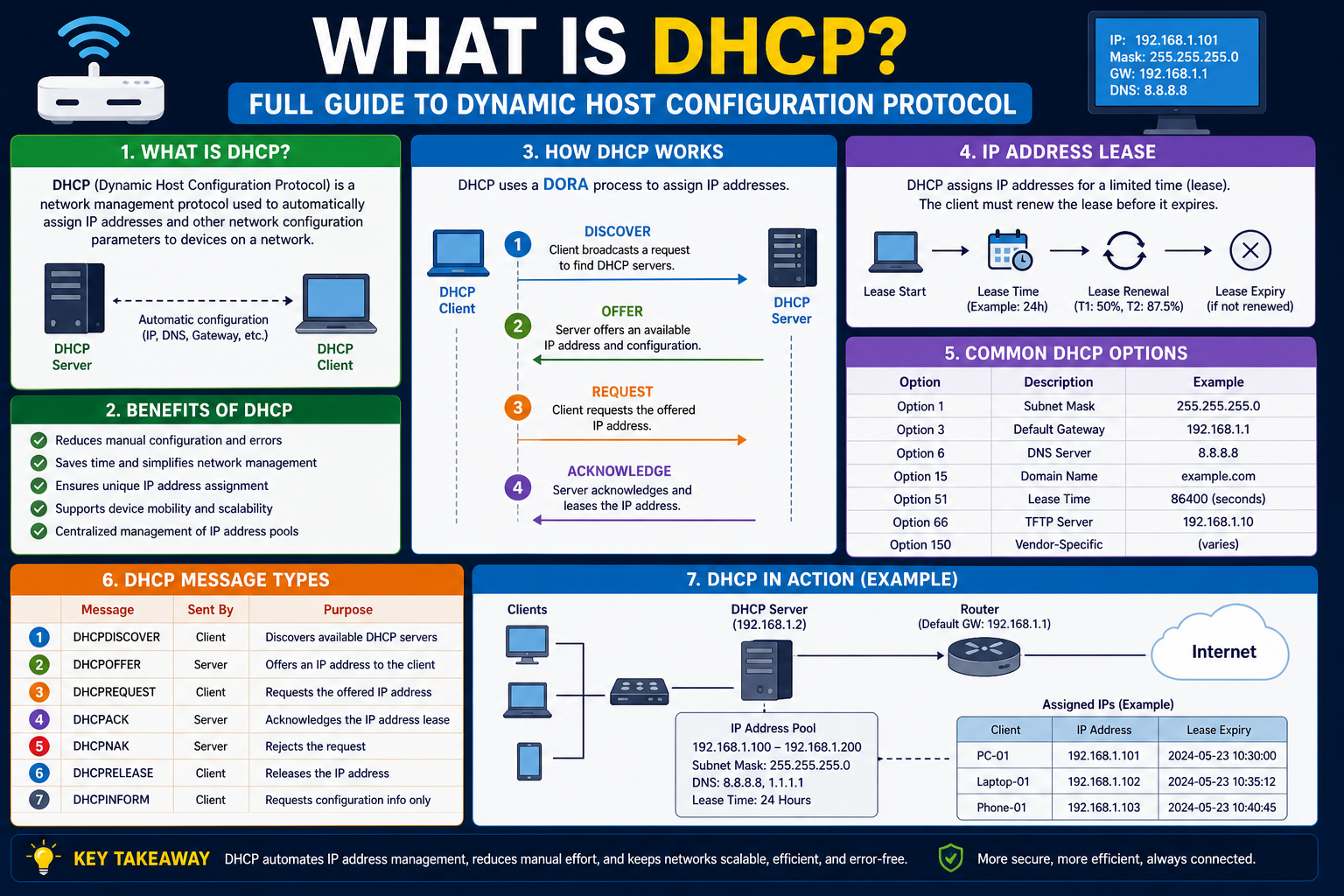
Dynamic Host Configuration Protocol is a fundamental network management system used to automatically assign IP addresses and other essential network settings to devices connected to a network. Instead of requiring manual configuration for every device, DHCP allows systems to receive the required network identity instantly upon connection. This automation is what makes modern networks efficient, scalable, and easy to manage, especially when dealing with large numbers of devices such as computers, printers, mobile phones, and servers. At its core, DHCP acts like an intelligent manager that ensures every device gets the correct network configuration without conflict or duplication.
Understanding the Concept of an IP Address
An IP address is a unique numerical label assigned to every device connected to a network. It works as an identification system that helps devices communicate with each other. When data is sent over a network, the IP address ensures that the information reaches the correct destination. Without IP addresses, communication between devices would not be possible because there would be no structured way to identify senders and receivers.
An IP address does not represent a physical location in a strict sense, but it behaves like a digital identity for a device within a network. It allows routers, switches, and other networking equipment to direct traffic properly. Each time a device connects to a network, it must have a valid IP address to send and receive data effectively.
How Devices Use IP Addresses in Communication
When devices communicate over a network, they rely heavily on IP addresses to guide data packets to the correct destination. Every message sent over a network is broken into small pieces called packets, and each packet contains the destination IP address. Networking equipment reads this address and forwards the packet through the correct path until it reaches the intended device.
Without IP addresses, data would not know where to go, and network communication would collapse. This makes IP addressing one of the most important foundations of modern networking. Every connected device, whether it is a smartphone, laptop, or smart device, depends on this system to function properly within a network environment.
Manual Assignment of IP Addresses in Early Networks
In early networking systems, IP addresses were assigned manually by network administrators. Each device had to be configured individually with a unique IP address before it could connect to the network. This process was time-consuming and required careful planning to avoid conflicts where two devices might accidentally be assigned the same address.
As networks expanded and more devices were introduced, manual configuration became increasingly difficult to manage. Administrators had to maintain detailed records of assigned addresses, which increased the chances of errors. Even a small mistake in configuration could lead to communication issues within the network. This complexity created the need for an automated system that could handle IP assignment more efficiently.
Introduction to Dynamic Host Configuration Protocol
Dynamic Host Configuration Protocol was developed to solve the challenges of manual IP assignment. It is a standardized network protocol that automatically provides IP addresses and related configuration settings to devices when they connect to a network. DHCP ensures that each device receives a unique IP address without requiring manual intervention from a network administrator.
The protocol operates through a centralized system known as a DHCP server. This server is responsible for managing a pool of available IP addresses and distributing them to devices as needed. When a device joins a network, it communicates with the DHCP server to request network configuration details, including an IP address, subnet mask, gateway, and other necessary settings.
Role of the DHCP Server in a Network
The DHCP server plays a central role in managing network connectivity. It maintains a list of available IP addresses and assigns them to devices based on demand. When a device connects to the network, the DHCP server responds by providing the required configuration information so that the device can communicate properly.
This server also tracks which IP addresses are currently in use. By doing so, it prevents duplicate assignments and ensures that each device has a unique identity on the network. Without this tracking mechanism, network conflicts would frequently occur, leading to communication failures and system instability.
How Devices Discover a DHCP Server
When a device is connected to a network and configured to use DHCP, it begins the process by sending a broadcast message across the network. This message is essentially a request asking for a DHCP server to respond. Since the device does not yet have an IP address, it uses a special method to communicate with all available systems at once.
The DHCP server that receives this request responds by offering network configuration details. This initial communication is the first step in establishing a connection between the device and the network. It ensures that even newly connected devices can quickly become part of the network without manual setup.
Interaction Between Device and DHCP Server
Once the DHCP server responds to a device’s request, a communication process begins between the two. The device identifies itself using a unique hardware identifier known as a MAC address. This address is permanently assigned to the network interface of the device and helps the DHCP server recognize it.
After receiving the MAC address, the DHCP server checks whether the device has been assigned an IP address before. If it is a new device, the server selects an available IP address from its pool and assigns it. If the device has connected previously, the server may attempt to assign the same IP address again to maintain consistency.
Understanding MAC Address and Its Importance
A MAC address is a unique identifier assigned to the network interface card of a device. Unlike IP addresses, which can change over time, MAC addresses remain permanent. They play an important role in helping the DHCP server identify devices accurately.
Since a single device can have multiple network interfaces, it may also have multiple MAC addresses. Each interface is treated independently by the DHCP system. This allows the server to manage network configurations with precision, ensuring that every connection point is properly identified.
IP Address Leasing Mechanism in DHCP
One of the key features of DHCP is the concept of leasing IP addresses. Instead of permanently assigning an IP address to a device, DHCP assigns it for a limited period of time known as a lease. This lease system ensures that IP addresses are reused efficiently across the network.
When a device receives an IP address, it is allowed to use it for the duration of the lease period. During this time, the DHCP server may check whether the device is still active on the network. If the device continues to require the IP address, the lease is renewed. If the device disconnects or becomes inactive, the IP address is returned to the available pool for reassignment.
Why Lease Time is Important in Networks
Lease time plays a crucial role in maintaining efficient IP address distribution. Since the number of available IP addresses in a network is limited, leasing ensures that unused addresses are not wasted. Devices that are no longer connected automatically release their IP addresses back to the system.
This process allows networks to support a large number of devices without running out of addresses. It also reduces administrative effort, as there is no need to manually reclaim unused IP addresses. The lease system keeps the network organized and ensures smooth operation even in dynamic environments where devices frequently connect and disconnect.
Why DHCP Became Essential in Modern Networking
DHCP became essential because it eliminated the need for manual IP configuration. In large networks, manually assigning and tracking IP addresses was inefficient and prone to errors. DHCP automated this process, allowing network administrators to focus on more important tasks instead of repetitive configuration work.
It also improved scalability. As networks grew and more devices were added, DHCP allowed them to join seamlessly without requiring manual setup. This made it possible to manage complex networks such as corporate systems, educational institutions, and home environments with ease.
Basic Idea of Static IP Versus DHCP Assigned IP
In some cases, devices require a permanent IP address that does not change over time. These are known as static IP addresses. They are often used for critical systems such as servers that must remain consistently reachable on the network.
However, manually assigning static IP addresses can create conflicts if not managed properly. DHCP offers a solution by allowing administrators to reserve specific IP addresses for certain devices while still managing them centrally. This hybrid approach combines stability with automation, reducing the risk of errors while maintaining consistent connectivity.
How DHCP Communication Process Begins in a Network
When a device first connects to a network, it does not already have an IP address configured. Because of this, it must rely on a discovery process to locate a DHCP server and request network configuration. The process begins with the device sending out a broadcast message across the network. This message is not directed to any specific system; instead, it is sent to all devices in the network range in hopes of finding a DHCP server that can respond.
This initial broadcast is important because the device has no prior knowledge of the network structure. It is essentially asking, in a general way, for any available DHCP server to provide assistance. Once this request is sent, the device waits for a response from a server that is capable of assigning an IP address.
DHCP Discovery Stage Explained in Detail
The first step in the DHCP communication process is known as the discovery stage. During this stage, the device attempts to find any DHCP server available on the network. Since the device does not yet have an IP address, it uses a special form of communication that allows it to interact with all devices on the local network segment.
This discovery message is critical because it ensures that the device can connect without needing prior configuration. In large networks, there may be multiple DHCP servers, and the discovery process helps identify all available servers so that one can respond appropriately. This stage lays the foundation for all further communication between the device and the network infrastructure.
DHCP Offer Stage and Server Response
Once a DHCP server receives the discovery message, it responds with what is known as a DHCP offer. This offer contains important network configuration details, including an available IP address that the device can use. The offer also includes additional settings such as subnet mask, default gateway, and DNS information that help the device communicate within the network and beyond.
The DHCP server selects the offered IP address from its pool of available addresses. It temporarily reserves this address for the requesting device so that no other device is assigned the same IP during the negotiation process. This ensures that conflicts are avoided even before the assignment is finalized.
Role of IP Address Pool in DHCP Servers
Every DHCP server maintains a collection of available IP addresses known as an IP address pool. This pool represents the range of addresses that the server can assign to devices. When a device requests an IP address, the server selects one from this pool and temporarily assigns it during the offer stage.
The size of the IP address pool depends on the network configuration. Small home networks may have a limited range of addresses, while large enterprise networks may manage thousands of IP addresses. Proper management of this pool is essential to ensure that all devices can connect without running out of available addresses.
DHCP Request Stage and Device Selection
After receiving one or more DHCP offers, the device selects a preferred offer and sends a DHCP request message back to the server. This message indicates that the device has accepted the offered IP address and wishes to use it. Even if multiple DHCP servers respond with offers, the device typically chooses the first valid response or the most suitable one based on network conditions.
This request is also broadcast across the network so that all DHCP servers are aware of the device’s choice. The selected server then prepares to finalize the assignment, while other servers release their temporary reservations for the offered IP addresses.
DHCP Acknowledgment Stage and Final Assignment
Once the DHCP server receives the request from the device, it sends a final confirmation message known as a DHCP acknowledgment. This message officially assigns the IP address to the device for a specific lease period. The acknowledgment includes all necessary network configuration details that the device needs to operate correctly within the network.
At this point, the device configures its network interface using the provided information. It can now communicate with other devices, access resources, and send data across the network. The DHCP acknowledgment marks the completion of the IP assignment process.
Understanding the Lease Renewal Process
IP addresses assigned by DHCP are not permanent. Instead, they are given for a limited time known as a lease period. As the lease period approaches expiration, the device must renew its IP address to continue using it. This renewal process ensures that the device remains connected without interruption.
The device communicates with the DHCP server before the lease expires and requests an extension. If the device is still active on the network, the server renews the lease and allows continued use of the same IP address. This process helps maintain stability in network communication while efficiently managing IP resources.
What Happens When Lease is Not Renewed
If a device does not renew its lease before it expires, the DHCP server assumes that the device is no longer active on the network. As a result, the IP address is returned to the available pool and can be assigned to another device.
This mechanism ensures that IP addresses are not wasted and remain available for new devices. It also prevents outdated network configurations from remaining active indefinitely. The automatic release of unused IP addresses is one of the key advantages of DHCP in maintaining efficient network management.
Importance of DHCP in Large Network Environments
In large networks, DHCP becomes essential for maintaining order and efficiency. Without DHCP, administrators would need to manually configure each device, which would be extremely time-consuming and prone to errors. DHCP simplifies this process by automatically handling IP assignment and configuration.
It also reduces the risk of IP conflicts, which can occur when two devices are accidentally assigned the same address. In environments with hundreds or thousands of devices, DHCP ensures that each device receives a unique and valid configuration without manual intervention.
DHCP and Network Scalability
One of the most important benefits of DHCP is its ability to support network growth. As new devices are added to a network, they can immediately obtain an IP address without requiring manual setup. This makes it easy to scale networks without increasing administrative workload.
Whether a network is small or large, DHCP adjusts dynamically to accommodate new devices. This flexibility is crucial in modern environments where devices frequently join and leave networks, such as offices, schools, and public WiFi systems.
Role of DHCP in Reducing Configuration Errors
Manual IP configuration often leads to errors such as duplicate addresses, incorrect subnet masks, or invalid gateway settings. These mistakes can disrupt network communication and require troubleshooting to resolve. DHCP eliminates these risks by standardizing the configuration process.
Since all settings are defined centrally on the DHCP server, devices receive consistent and accurate configurations. This reduces the likelihood of human error and ensures that all devices operate smoothly within the network environment.
How DHCP Maintains Network Organization
DHCP contributes significantly to maintaining structured and organized networks. By keeping track of all assigned IP addresses and managing leases, it ensures that no two devices conflict with each other. The server continuously monitors active devices and updates its records accordingly.
This level of organization is especially important in environments with frequent device movement, such as offices where employees connect laptops, smartphones, and other devices regularly. DHCP ensures that the network remains stable despite constant changes in connected devices.
Relationship Between DHCP and Network Efficiency
Network efficiency is greatly improved through the use of DHCP because it reduces the need for manual intervention. Devices can connect and begin communication almost instantly without waiting for administrative configuration. This rapid setup process improves productivity and reduces downtime.
Additionally, DHCP allows network resources to be used more effectively by recycling IP addresses that are no longer in use. This ensures that the network operates at optimal capacity without unnecessary waste of addressing resources.
Basic Understanding of DHCP in Everyday Networks
In everyday use, DHCP operates silently in the background without requiring user interaction. When a user connects a device to a WiFi network or plugs into an Ethernet connection, DHCP automatically assigns the necessary network settings. This seamless process allows users to access the internet and network resources without technical configuration.
Most users are unaware of DHCP’s role, but it is essential for ensuring that devices can connect instantly and communicate effectively within any network environment.
Why DHCP is Essential for Modern Network Environments
Dynamic Host Configuration Protocol plays a critical role in modern networking by simplifying how devices connect and communicate. In environments where multiple devices are constantly joining and leaving the network, manual IP configuration becomes impractical. DHCP eliminates this complexity by automatically assigning network settings, allowing devices to become functional almost instantly after connection.
This automation is especially important in workplaces, schools, and public networks where hundreds or even thousands of devices may connect at different times. Without DHCP, managing such environments would require constant administrative effort, increasing the likelihood of errors and delays in network access.
How DHCP Reduces Administrative Workload
One of the most significant advantages of DHCP is the reduction in workload for network administrators. Instead of manually configuring each device, administrators can rely on a centralized system to handle IP assignment automatically. This centralization means that changes to network configuration only need to be made once on the DHCP server rather than on every individual device.
This approach not only saves time but also reduces operational complexity. Administrators can focus on maintaining network performance, security, and monitoring rather than spending time on repetitive configuration tasks. As networks grow, this efficiency becomes even more valuable.
Centralized Network Management Through DHCP
DHCP acts as a centralized control system for IP address distribution. All configuration settings are managed from a single server, which ensures consistency across the entire network. This centralized approach prevents discrepancies that may arise when multiple administrators manually configure devices.
By controlling IP allocation from one location, DHCP ensures that every device receives accurate and standardized settings. This consistency improves network stability and reduces the chances of misconfiguration, which can lead to connectivity issues or service disruptions.
Understanding DHCP Scope and Configuration Range
Within a DHCP server, the scope defines the range of IP addresses that can be assigned to devices. This scope is carefully planned by network administrators based on the size and requirements of the network. It ensures that there are enough IP addresses available for all devices while avoiding overlap with reserved or static addresses.
The scope also includes additional configuration details such as subnet masks, default gateways, and DNS settings. These settings are automatically provided to devices along with the IP address, ensuring that each device has complete network configuration without manual setup.
Importance of DHCP Options in Network Configuration
DHCP does not only assign IP addresses; it also provides important network options that help devices communicate effectively. These options include gateway addresses that allow devices to communicate outside their local network, and DNS settings that help translate domain names into IP addresses.
By providing these settings automatically, DHCP ensures that devices are fully configured for both local and external communication. Without these options, devices would require manual configuration to access network resources or the internet, increasing complexity and setup time.
How DHCP Handles Multiple Devices Simultaneously
In busy network environments, multiple devices may request IP addresses at the same time. DHCP is designed to handle these simultaneous requests efficiently. The server processes each request in sequence, assigning available IP addresses from its pool without conflict.
This ability to manage multiple requests simultaneously ensures that network performance remains stable even during peak usage times. Whether dozens or hundreds of devices connect at once, DHCP maintains order and prevents address duplication.
DHCP Conflict Prevention Mechanism
One of the most important functions of DHCP is preventing IP address conflicts. Since each device must have a unique IP address, DHCP carefully tracks which addresses are currently in use. Before assigning an address, the server checks its database to ensure that it is not already allocated to another device.
If a conflict is detected or an address is already in use, the server selects another available address. This automatic verification process ensures that no two devices share the same IP, which could otherwise cause communication failures and network instability.
Dynamic Allocation Versus Static Assignment in Networks
DHCP provides dynamic allocation of IP addresses, meaning that addresses can change over time depending on device activity. This is different from static assignment, where a device is permanently assigned a fixed IP address. Dynamic allocation is more flexible and better suited for general-purpose devices such as laptops and mobile phones.
Static assignment is still used in certain cases where consistency is required, such as servers or network printers. However, even in these cases, DHCP can be configured to reserve specific IP addresses for particular devices, combining flexibility with stability.
How DHCP Improves Network Flexibility
DHCP significantly improves network flexibility by allowing devices to connect and disconnect without manual intervention. This is particularly useful in environments where users frequently move between networks or use multiple devices.
As devices change locations or connect to different networks, DHCP automatically assigns new configurations without requiring user input. This adaptability ensures that users can maintain connectivity regardless of where or how they connect to the network.
Role of DHCP in Wireless Networks
Wireless networks rely heavily on DHCP to manage device connections. When a device connects to a WiFi network, it immediately requests an IP address through DHCP. This process allows the device to access the internet and other network resources without any manual setup.
In environments such as homes, offices, and public hotspots, DHCP ensures that users can connect quickly and easily. Without it, each wireless device would need manual configuration, making wireless networking far less convenient and efficient.
DHCP and Network Security Considerations
Although DHCP is primarily designed for convenience, it also plays a role in network security. By controlling IP address distribution, DHCP helps prevent unauthorized devices from easily joining the network. Some networks use additional security measures that work alongside DHCP to verify device identity before assigning an IP address.
This combination of DHCP and security protocols helps ensure that only trusted devices are allowed to connect. While DHCP itself does not provide full security, it supports the overall structure of secure network management.
How DHCP Supports Large-Scale Network Infrastructure
In large-scale infrastructures such as corporate networks or educational institutions, DHCP becomes an essential component of network design. It allows centralized management of thousands of devices without requiring individual configuration.
As the number of connected devices increases, DHCP ensures that IP addresses are distributed efficiently and without conflict. This scalability makes it possible to expand networks without redesigning the entire addressing system.
Impact of DHCP on Network Performance
DHCP improves overall network performance by reducing setup time and minimizing configuration errors. Devices can join the network quickly and begin communication without delay. This immediate connectivity enhances productivity in environments where fast access is essential.
By automating IP assignment, DHCP also reduces the chance of network downtime caused by incorrect settings. A well-configured DHCP system ensures smooth and continuous communication across all connected devices.
DHCP Role in Home and Enterprise Networks
In home networks, DHCP is typically built into routers, allowing devices like smartphones, laptops, and smart TVs to connect automatically. In enterprise environments, dedicated DHCP servers manage much larger pools of IP addresses and more complex configurations.
Regardless of scale, the fundamental role of DHCP remains the same: to simplify network access and ensure efficient distribution of IP addresses. This consistency across environments makes DHCP a universal networking standard.
How DHCP Adapts to Network Changes
Networks are constantly changing as devices are added, removed, or moved between locations. DHCP adapts to these changes dynamically by updating its records and reallocating IP addresses as needed.
This adaptability ensures that the network remains stable even when device activity is unpredictable. It allows administrators to maintain control over the network without needing to manually adjust configurations every time a change occurs.
Importance of DHCP in Everyday Connectivity
Every time a device connects to the internet, DHCP is likely involved in the background process. Whether browsing websites, streaming content, or accessing online services, DHCP ensures that the device has the necessary network configuration to function properly.
This seamless operation makes DHCP an invisible but essential part of modern digital life. Users benefit from instant connectivity without needing to understand the complex processes happening behind the scenes.
Understanding DHCP Server Failover and Redundancy
In modern networks, reliability is a critical requirement, and DHCP systems are often designed with redundancy to prevent service interruptions. DHCP server failover is a mechanism that allows multiple DHCP servers to share the responsibility of assigning IP addresses. If one server becomes unavailable due to failure or maintenance, another server automatically takes over its role.
This ensures that devices can continue receiving IP addresses without disruption. In large organizations, this redundancy is essential because even a short downtime in DHCP services can prevent new devices from joining the network or renewing their IP leases. By distributing the workload across multiple servers, networks achieve higher availability and stability.
How DHCP Failover Maintains Continuous Connectivity
When DHCP failover is implemented, servers continuously synchronize their lease information with each other. This means that each server has an updated record of assigned IP addresses and active leases. If one server goes offline, the other server already knows which IP addresses are in use and can continue managing requests without conflict.
This synchronization prevents duplicate IP assignments and ensures seamless continuity. Devices connected to the network do not experience interruptions because the backup server continues handling lease renewals and new requests without requiring manual intervention.
Role of DHCP Relay Agents in Large Networks
In large network environments, devices may not always be located on the same subnet as the DHCP server. In such cases, DHCP relay agents are used to forward DHCP requests between different network segments. These relay agents act as intermediaries that pass client requests to the appropriate DHCP server.
Without relay agents, DHCP communication would be limited to local network segments only. By using relay agents, organizations can centralize DHCP management while still supporting distributed network architectures. This is especially useful in large campuses, enterprise environments, and multi-building networks.
How DHCP Relay Improves Network Communication
DHCP relay agents ensure that devices in different subnets can still receive IP configurations from a central server. When a device sends a DHCP request, the relay agent captures it and forwards it to the DHCP server on behalf of the device. The server then responds through the relay agent, which delivers the response back to the device.
This process allows DHCP to function efficiently across complex network infrastructures without requiring separate DHCP servers for every subnet. It simplifies network management and reduces administrative overhead while maintaining consistent configuration policies.
DHCP and Domain Name System Integration
DHCP often works closely with the Domain Name System to ensure that devices can translate domain names into IP addresses. When a DHCP server assigns network settings to a device, it typically also provides DNS server information. This allows the device to resolve website names into numerical IP addresses required for communication.
Without DNS information provided by DHCP, users would need to manually configure DNS settings, which would complicate connectivity. By integrating both systems, DHCP ensures that devices are fully prepared for internet access immediately after joining a network.
Automatic Configuration of Network Parameters
Beyond IP addresses, DHCP automatically configures several important network parameters that are essential for communication. These include subnet masks, which define the network boundaries, and default gateways, which direct traffic outside the local network.
By automatically assigning these values, DHCP ensures that devices are correctly configured for both local and external communication. This eliminates the need for manual setup and reduces the risk of incorrect configuration that could disrupt connectivity.
How DHCP Handles Address Exhaustion Issues
In some cases, a DHCP server may run out of available IP addresses in its pool. This situation is known as address exhaustion. When this occurs, new devices may not be able to obtain an IP address, preventing them from joining the network.
To prevent this issue, administrators carefully plan IP address ranges and lease durations. Shorter lease times allow addresses to be reused more quickly, while larger address pools ensure sufficient availability. Proper management of DHCP resources is essential to avoid network access problems.
Importance of Lease Time Optimization
Lease time configuration plays an important role in network efficiency. If lease times are too long, unused IP addresses may remain reserved unnecessarily, reducing availability for new devices. If lease times are too short, devices may need to frequently renew their leases, increasing network traffic.
Finding the right balance ensures optimal performance. Networks with stable devices may use longer lease times, while dynamic environments with frequently changing devices benefit from shorter leases. This flexibility allows DHCP to adapt to different network requirements.
Security Risks and DHCP Protection Measures
Although DHCP simplifies network management, it can also be vulnerable to certain security risks if not properly protected. One common risk is the presence of unauthorized DHCP servers, which can provide incorrect network settings to devices. This can lead to traffic being redirected or network communication being disrupted.
To prevent such issues, network administrators implement security measures such as DHCP snooping. This technique allows only trusted DHCP servers to respond to client requests, protecting the network from malicious or accidental misconfigurations.
How DHCP Snooping Enhances Network Security
DHCP snooping works by filtering DHCP messages and allowing only verified servers to interact with client devices. It monitors DHCP traffic and blocks unauthorized responses that could compromise network integrity.
By controlling which devices are allowed to provide IP configurations, DHCP snooping helps maintain a secure and stable network environment. This is especially important in large organizations where multiple users and devices are connected simultaneously.
Role of DHCP in Virtualized Environments
In virtualized environments, DHCP plays a key role in managing network configurations for virtual machines. Each virtual machine requires its own IP address to communicate within the network, and DHCP provides this automatically.
This automation is essential in environments where virtual machines are frequently created, modified, or deleted. DHCP ensures that each virtual instance receives proper network settings without requiring manual configuration for every change.
How DHCP Supports Cloud-Based Systems
Cloud environments rely heavily on dynamic resource allocation, and DHCP fits naturally into this model. As virtual resources are created or scaled, DHCP provides automatic network configuration, allowing seamless communication between cloud services and users.
This flexibility supports rapid deployment and scaling of applications in cloud infrastructure. DHCP ensures that network configuration keeps pace with the dynamic nature of cloud computing environments.
Importance of DHCP in Internet of Things Devices
The rise of Internet of Things devices has increased the demand for automatic network configuration. These devices often need to connect to networks without human intervention. DHCP enables this by automatically assigning IP addresses and network settings as soon as the device connects.
From smart home devices to industrial sensors, DHCP ensures that IoT devices can communicate efficiently without manual setup. This capability is essential for supporting large-scale IoT ecosystems.
How DHCP Contributes to Network Automation
DHCP is a key component of network automation. By eliminating manual configuration tasks, it allows networks to operate with minimal human intervention. Devices can join, communicate, and leave the network seamlessly, while DHCP manages IP allocation in the background.
This automation reduces administrative effort and increases operational efficiency. It also supports modern networking trends where systems are expected to be self-managing and adaptive to changing conditions.
Limitations of DHCP in Certain Scenarios
Despite its advantages, DHCP is not suitable for every situation. In cases where a device must always maintain the same IP address, static configuration may still be required. Additionally, DHCP depends on the availability of a server, meaning that if all DHCP servers fail, new devices may not be able to connect.
However, these limitations are typically addressed through redundancy, failover systems, and careful network planning. In most environments, DHCP remains the preferred method for IP address management.
Final Conclusion
Dynamic Host Configuration Protocol serves as the backbone of modern network configuration by automating the assignment of IP addresses and related settings. It simplifies connectivity, reduces administrative workload, and ensures efficient use of network resources.
By managing IP distribution dynamically, DHCP supports everything from small home networks to large enterprise systems and cloud infrastructures. Its ability to adapt, scale, and automate makes it an essential protocol in today’s interconnected digital world.