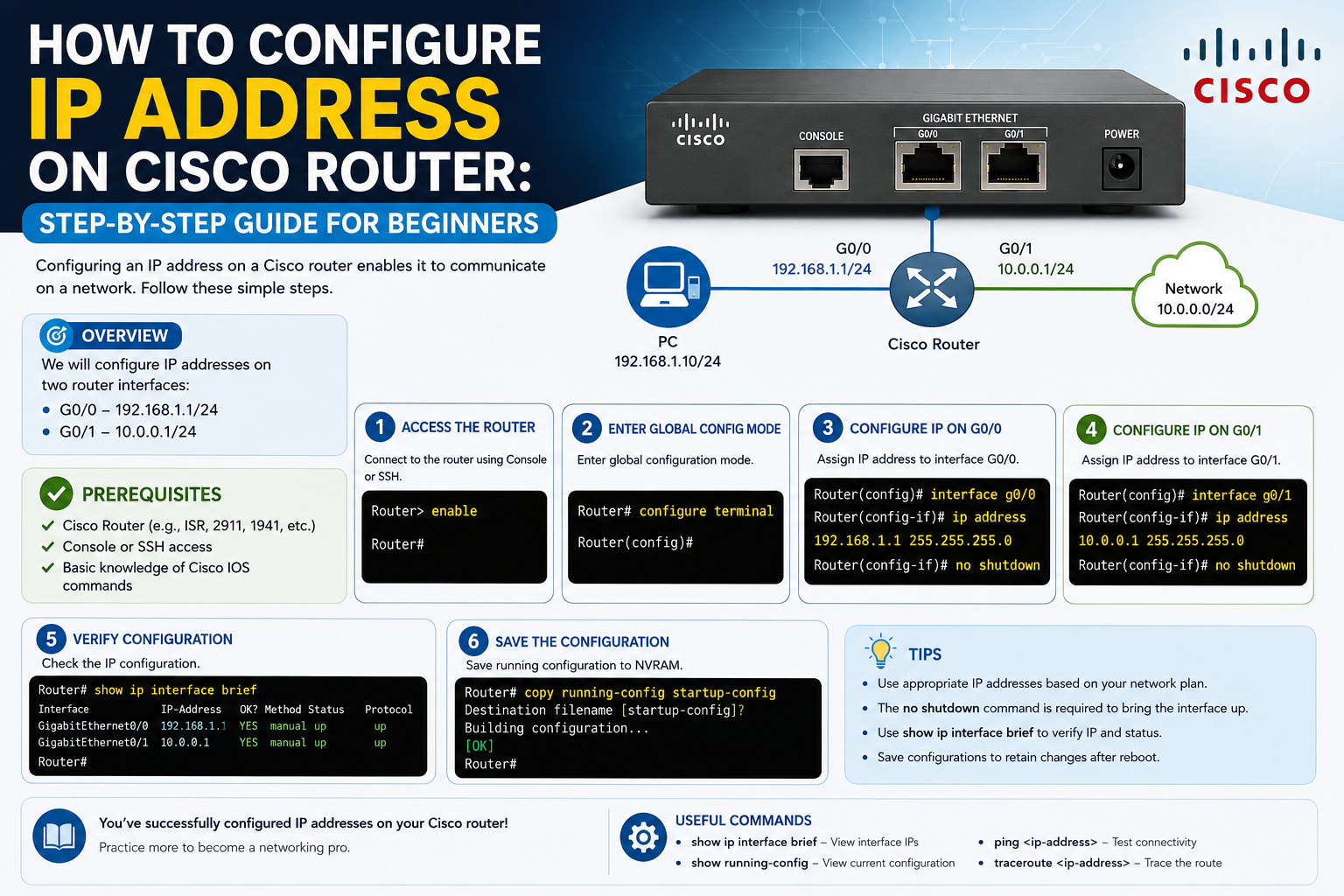
In modern networking environments, routers play a central role in connecting different networks and ensuring that data reaches its intended destination. Unlike simple home networking devices that often work with minimal setup, enterprise-grade routers require deliberate configuration before they can participate effectively in a network. One of the most fundamental tasks in this setup process is assigning IP addresses to router interfaces.
A Cisco router does not function like a plug-and-play consumer device. Instead, it behaves more like a programmable network appliance that must be instructed on how to handle traffic, where to send it, and how to identify itself within a network. Without an IP address, a router interface is essentially inactive from a networking perspective, even if the hardware is physically connected.
IP addressing on Cisco routers is not just about connectivity; it is about structure, control, and segmentation. Each interface on a router acts as a boundary between different network segments, and each of those interfaces must have a unique IP identity to function properly. This identity allows devices on different networks to communicate through the router in a controlled and predictable manner.
Understanding how IP configuration works on Cisco routers requires a combination of theoretical knowledge and practical steps. Before diving into commands and configuration modes, it is important to understand how Cisco devices interpret interfaces and why proper setup is essential for network stability.
The Role of Interfaces in Cisco Router Architecture
A Cisco router is built around interfaces, which act as physical or logical connection points to different networks. Each interface is responsible for sending and receiving traffic on a specific network segment. These interfaces can represent Ethernet ports, fiber connections, or even virtual connections, depending on the router model and configuration.
When a router is first powered on, its interfaces are typically in a disabled state. This is intentional and serves as a safety mechanism. It prevents the router from accidentally forwarding traffic into a network before it has been properly configured. In this default state, the interfaces exist but are not operational.
Each interface must be configured individually. This means that if a router has multiple connections to different networks, each one must be assigned its own IP address and activated separately. The router does not automatically assign addresses or enable interfaces on its own, which is why manual configuration is such a critical part of network administration.
Interfaces also define the logical boundaries of a router. For example, one interface may connect to an internal office network, while another connects to an external ISP network. These interfaces must be clearly defined with IP addresses that match their respective network ranges to ensure proper routing behavior.
Why IP Address Assignment is Necessary
An IP address is essentially the identity of a network interface. Without it, the router cannot participate in IP-based communication. In a Cisco environment, assigning an IP address is what transforms a physical interface into a functional network endpoint.
Routers rely on IP addresses to make forwarding decisions. When data enters a router, it examines the destination IP address and determines where to send the packet next. If the router’s interfaces are not properly configured with IP addresses, it cannot make these decisions correctly.
In enterprise networks, IP addressing also plays a role in segmentation and security. Different departments or network zones are assigned specific IP ranges, and routers enforce communication rules between them. Without proper IP configuration, these boundaries break down, leading to routing issues and potential security risks.
Another important reason for IP assignment is communication with management systems. Network administrators often access routers remotely using protocols that depend on IP connectivity. Without a properly configured IP address on at least one interface, remote management becomes impossible.
Initial State of Cisco Router Interfaces
When a Cisco router is newly installed or reset, all interfaces are typically in an administrative shutdown state. This means that while the hardware is detected by the system, it is intentionally disabled at the software level.
This default behavior ensures that no unintended traffic flows through the router before it has been properly configured. It also prevents network loops, misrouting, or accidental exposure of internal networks.
In this state, interfaces do not transmit or receive traffic, even if cables are physically connected. From a network perspective, the interface is present but inactive.
Understanding this initial state is important because many new administrators assume that simply connecting a cable will activate the interface. In reality, Cisco routers require explicit commands to bring an interface into an operational state.
Understanding Interface Status Indicators
When working with Cisco routers, interface status information provides valuable insight into how the device is functioning. Each interface typically has two key indicators: operational status and protocol status.
The operational status reflects the physical condition of the interface. It indicates whether the hardware connection is active. If a cable is disconnected or the port is disabled, this status will reflect that condition.
The protocol status, on the other hand, represents the logical connectivity of the interface. It shows whether the interface is successfully communicating at the data link layer. Even if a cable is physically connected, this status may remain inactive if the configuration is incomplete or incorrect.
These two indicators work together to give a complete picture of interface health. A properly functioning interface will show both physical and protocol statuses as active, indicating that both hardware and logical communication are working correctly.
Importance of Verifying Interface Information Before Configuration
Before making any changes to a Cisco router, it is essential to review the current state of its interfaces. This step is often overlooked by beginners, but it is critical for avoiding configuration errors.
By checking interface information first, administrators can identify which ports are active, which are disabled, and which may already have existing configurations. This prevents accidental overwriting of important settings.
It also helps in understanding how the router is currently being used within the network. In environments where routers are reused or repurposed, previous configurations may still be present, and verifying interface status ensures that new settings do not conflict with existing ones.
Additionally, reviewing interface information helps in troubleshooting. If a network connection is not working, checking interface status is often the first step in identifying whether the issue is physical, logical, or configuration-related.
Entering Cisco Router Configuration Environment
Cisco routers operate using a command-driven interface that allows administrators to configure every aspect of the device. Before making changes to IP settings, it is necessary to enter the appropriate configuration environment.
The router operates in different modes, each with its own level of access. The initial mode provides basic monitoring capabilities, while higher-level modes allow configuration changes.
To modify IP settings, administrators must enter global configuration mode. This mode enables system-wide changes and provides access to interface configuration settings.
Once in global configuration mode, individual interfaces can be selected and modified. This layered approach ensures that changes are intentional and controlled, reducing the risk of accidental misconfiguration.
Understanding these operational modes is essential because Cisco routers do not allow configuration changes from the basic monitoring interface. Each level of access is designed to maintain system integrity and security.
Selecting the Correct Interface for Configuration
One of the most important steps in IP configuration is selecting the correct interface. Cisco routers may have multiple interfaces, and choosing the wrong one can lead to network issues or misrouted traffic.
Each interface is identified by a specific naming convention. These names indicate both the type of connection and its physical location on the device. For example, interfaces may represent gigabit Ethernet ports or other connection types depending on the router model.
Before assigning an IP address, it is important to match the physical port with its logical name in the system. This ensures that the correct network segment is being configured.
Selecting an interface in configuration mode isolates it for modification. This means that any changes made will only apply to that specific interface, preventing unintended modifications to other parts of the router.
How Cisco Routers Interpret IP Address Assignment
When an IP address is assigned to a Cisco router interface, the device stores this information as part of its running configuration. This configuration is active immediately, meaning changes take effect without requiring a reboot.
The IP address serves as the network identity of that interface. It allows the router to send and receive packets within a defined network range.
Along with the IP address, a subnet mask is also required. The subnet mask defines the boundaries of the network and helps the router determine which devices are part of the same local network segment.
Without a proper subnet mask, the router would not be able to correctly interpret which devices are local and which require routing through other interfaces.
Once assigned, the IP configuration becomes part of the router’s operational state and directly influences how traffic is handled.
Understanding Why Interfaces Must Be Manually Enabled
Even after assigning an IP address, a Cisco router interface remains inactive until it is explicitly enabled. This is another safety feature built into Cisco devices.
The disabled state prevents accidental exposure of network segments and ensures that configuration is fully completed before the interface begins handling traffic.
Enabling an interface is a deliberate action that signals the router to begin processing traffic on that port. Once enabled, the interface transitions into an active state and begins participating in network communication.
This step is especially important in enterprise environments where multiple networks are interconnected. Activating an interface too early or without proper configuration can lead to routing issues or traffic loss.
The manual enable process ensures that administrators have full control over when and how each interface becomes operational.
Relationship Between IP Configuration and Network Stability
Proper IP configuration on Cisco routers is directly tied to overall network stability. Since routers act as intermediaries between different networks, any misconfiguration can have wide-reaching effects.
Incorrect IP addresses can prevent devices from communicating, while mismatched subnet masks can cause routing confusion. Similarly, leaving interfaces disabled can isolate entire network segments.
On the other hand, correctly configured interfaces ensure smooth communication between networks, efficient traffic flow, and predictable routing behavior.
In enterprise environments, even small configuration errors can lead to significant downtime. This is why understanding the fundamentals of IP assignment on Cisco routers is essential for anyone involved in network administration.
Foundational Importance of Cisco Router IP Configuration
Configuring IP addresses on Cisco routers is one of the foundational skills in networking. It serves as the building block for more advanced topics such as routing protocols, network segmentation, and security policies.
Without proper IP configuration, advanced networking features cannot function correctly. Every routing decision depends on accurate interface addressing, making this step essential for all further configuration work.
As networks continue to grow in complexity, the importance of precise and well-structured IP configuration becomes even more significant. Cisco routers rely on clear and deliberate setup procedures to maintain reliable communication across interconnected systems.
Navigating Cisco IOS Modes and Configuration Structure
Configuring IP addresses on a Cisco router is not just about entering a command and applying settings. It involves understanding how the Cisco IOS environment is structured. The operating system is designed with multiple hierarchical modes, each serving a specific purpose and controlling the level of access a network administrator has.
At the most basic level, when you first connect to a Cisco router, you are placed in a monitoring or user mode. This mode allows you to view limited information about the device, but does not permit configuration changes. It is intentionally restricted to prevent unauthorized or accidental modifications.
From this starting point, administrators must move into a privileged mode to access deeper system information. This mode provides the ability to inspect configuration details, run diagnostic commands, and prepare the device for changes. However, even in this mode, modifications are not yet allowed.
To make configuration changes, the administrator must enter global configuration mode. This is where system-wide settings are adjusted, including interface configurations, routing behavior, and protocol settings. Once inside this mode, the router essentially becomes fully programmable.
Understanding this layered structure is essential because Cisco devices are designed to enforce controlled configuration changes. Each step ensures that modifications are intentional and properly executed, reducing the risk of network disruption.
Understanding Interface Configuration Lifecycle
Every interface on a Cisco router goes through a lifecycle from initialization to full operational status. This lifecycle begins when the device is powered on and continues as configuration changes are applied.
Initially, interfaces exist in a disabled state. They are recognized by the system but are not actively participating in network communication. This state is intentional and ensures that no traffic flows before proper configuration is completed.
Once an administrator selects an interface in configuration mode, the lifecycle enters the configuration phase. During this stage, IP addressing and other parameters such as subnet masks are assigned. However, even after configuration, the interface remains inactive until explicitly enabled.
After enabling the interface, it transitions into an operational state. At this point, the interface begins sending and receiving network traffic based on its configuration. This lifecycle ensures that each interface is properly prepared before becoming active in a production environment.
Understanding this lifecycle helps administrators troubleshoot issues more effectively because they can identify exactly which stage an interface is in.
Assigning IP Addresses: Static Configuration Method
The most common method of assigning IP addresses on Cisco routers is static configuration. In this method, the network administrator manually defines the IP address and subnet mask for each interface.
Static configuration is widely used in enterprise environments because it provides full control over network addressing. Each interface is assigned a fixed identity, ensuring predictable communication between devices.
When using static configuration, the administrator must ensure that the IP address chosen belongs to the correct network segment. This requires an understanding of subnetting and network planning.
Incorrect static assignment can lead to IP conflicts or routing issues. For this reason, network administrators often maintain detailed documentation of IP assignments across the entire network infrastructure.
Static IP configuration is particularly important for router interfaces that connect different network segments. These interfaces act as gateways between networks, and their addresses must remain consistent to ensure stable routing behavior.
DHCP-Based IP Assignment on Router Interfaces
Although static configuration is common, Cisco routers can also obtain IP addresses dynamically using DHCP. In this method, the router requests an IP address from a DHCP server instead of being manually configured.
This approach is less common for core routing interfaces but can be useful in certain environments where flexibility is required. For example, in temporary setups or lab environments, DHCP can simplify configuration.
When a router interface is configured to use DHCP, it sends a broadcast request to locate a DHCP server. The server then assigns an available IP address from its pool along with additional network configuration details.
This method reduces manual configuration effort but introduces dependency on the DHCP server. If the server becomes unavailable, the router may lose its assigned address or fail to obtain a new one.
For this reason, DHCP-based assignment is typically used in non-critical or edge scenarios rather than core routing infrastructure.
Understanding Subnet Masks in Router Configuration
An IP address alone is not sufficient for network communication. It must be paired with a subnet mask, which defines how the network is structured.
The subnet mask determines which portion of the IP address represents the network and which portion represents the host. This distinction is critical for routing decisions.
When a Cisco router receives a packet, it uses the subnet mask to determine whether the destination device is on the same network or a different one. If the device is local, the packet is delivered directly. If not, the router forwards it to another network.
Incorrect subnet masks can lead to communication failures even if the IP address is correctly assigned. This is because the router may misinterpret network boundaries.
Subnet masks also play a role in network segmentation. By dividing a large network into smaller subnetworks, administrators can improve performance and security.
Verifying Interface Configuration After Changes
Once an IP address has been assigned, it is important to verify that the configuration has been applied correctly. Cisco routers provide several commands that allow administrators to inspect interface settings.
One of the most commonly used verification tools displays a summary of all interfaces along with their IP addresses and status indicators. This overview allows administrators to quickly identify whether an interface is properly configured.
Another useful verification method involves viewing the full running configuration of the router. This provides detailed information about every configured interface and parameter.
Verification is a critical step because configuration errors are common, especially in complex environments. Even a small typo in an IP address or subnet mask can prevent communication between devices.
By regularly verifying configurations, administrators can ensure that the router is operating as expected and that all interfaces are correctly assigned.
Understanding Interface Status Combinations
Cisco routers display interface status using combinations of physical and logical indicators. These combinations provide insight into the health of each interface.
One common state indicates that both physical and logical connections are active. This means the interface is fully operational and ready to handle traffic.
Another state indicates that the interface is physically connected but not logically active. This often occurs when the configuration is incomplete or incorrect.
A third state indicates that the interface is administratively disabled. In this case, the hardware is functional, but the interface has been intentionally shut down through configuration.
Understanding these combinations is essential for troubleshooting network issues. Each status provides a clue about where the problem may be occurring.
Common Interface Issues and Troubleshooting Approaches
When working with Cisco routers, interface issues are common, especially during initial configuration. These issues can arise from physical, logical, or configuration-related problems.
Physical issues often involve cables, connectors, or hardware ports. If a cable is disconnected or damaged, the interface will not function correctly.
Logical issues typically involve configuration errors such as incorrect IP addresses or subnet masks. These issues prevent proper communication even if the physical connection is active.
Administrative issues occur when an interface is intentionally disabled. In this case, the interface must be manually enabled before it can function.
Troubleshooting begins with checking the interface status information. This helps determine whether the issue is physical, logical, or administrative in nature.
From there, administrators can isolate the problem and apply appropriate corrections.
Duplex and Speed Mismatch Considerations
Another important aspect of interface configuration involves speed and duplex settings. These settings determine how data is transmitted over a network connection.
If both ends of a connection are not configured consistently, performance issues can occur. For example, one side may operate in full duplex while the other operates in half duplex, leading to collisions and packet loss.
Similarly, mismatched speed settings can cause connectivity problems or reduced performance.
Modern Cisco devices often support auto-negotiation, which helps prevent these issues. However, in manually configured environments, administrators must ensure consistency across connected devices.
Proper duplex and speed configuration is essential for maintaining stable and efficient network communication.
Saving Configuration Changes on Cisco Routers
One of the most important steps in router configuration is saving changes to persistent memory. By default, Cisco routers store changes in running memory, which is temporary.
If the device is restarted without saving, all configuration changes are lost. This can lead to significant disruptions in network environments.
To prevent this, administrators must explicitly save the running configuration to startup memory. This ensures that all settings are retained after a reboot.
Saving configuration is a critical habit in network administration. It ensures that changes are preserved and that the router returns to its configured state after maintenance or power loss.
Security Considerations During IP Configuration
While IP configuration is primarily a technical task, it also has security implications. Incorrect configuration can expose networks to unauthorized access or disrupt security boundaries.
Routers often serve as the first line of defense between internal and external networks. Proper IP assignment ensures that traffic flows through controlled paths.
Administrators must also ensure that unused interfaces remain disabled to prevent unauthorized access. Leaving unnecessary interfaces active can create security vulnerabilities.
In addition, consistent IP planning helps enforce security policies by clearly separating network segments.
Importance of Structured IP Address Planning
Before configuring a Cisco router, it is important to have a structured IP addressing plan. This plan defines how IP addresses are distributed across the network.
A well-designed IP scheme prevents conflicts and ensures scalability. It also simplifies troubleshooting by making it easier to identify where devices are located within the network.
Without proper planning, networks can become disorganized, leading to overlapping addresses and routing confusion.
Structured planning is especially important in large enterprise environments where multiple routers and subnets are involved.
Introduction to IPv6 in Cisco Router Configuration
Although IPv4 remains widely used, IPv6 is increasingly important in modern networking. Cisco routers support both protocols, allowing dual-stack configurations.
IPv6 introduces a larger address space and simplifies certain aspects of routing. However, it also requires a different approach to configuration and planning.
When configuring IPv6 on Cisco routers, interfaces must be assigned IPv6 addresses in addition to or instead of IPv4 addresses.
This dual capability ensures compatibility with both legacy and modern network systems.
Understanding IPv6 is becoming increasingly important for network administrators as global adoption continues to grow.
Maintaining Consistency in Router Configuration Practices
Consistency is one of the most important principles in network configuration. When working with Cisco routers, maintaining consistent naming conventions, IP schemes, and configuration practices helps reduce errors.
Consistent configuration makes it easier for multiple administrators to work on the same network infrastructure without confusion.
It also simplifies documentation and long-term maintenance, ensuring that network changes can be tracked and understood over time.
Without consistency, networks can become difficult to manage and troubleshoot, especially as they grow in complexity.
Role of Cisco Routers in Network Communication Flow
Cisco routers are responsible for directing traffic between different networks. Each configured interface acts as a pathway for data entering or leaving a network segment.
When properly configured, routers ensure that data flows efficiently between devices, regardless of their location within the network structure.
IP configuration is what enables this routing behavior. Without it, routers cannot determine where traffic should be sent.
This makes IP assignment one of the most critical steps in network setup and maintenance.
Advanced Role of IP Addressing in Real Enterprise Routing Design
As network environments grow beyond simple connectivity needs, IP address configuration on Cisco routers becomes far more than a basic setup task. In enterprise-scale networks, IP addressing is directly tied to architecture, scalability, redundancy, and performance. Each address is not just an identifier for an interface but part of a structured design that influences how data flows across entire organizations.
In large infrastructures, routers rarely operate in isolation. They function as part of interconnected systems where multiple routing devices communicate with each other across different segments. In this environment, IP addressing decisions made at the interface level can affect routing efficiency across dozens or even hundreds of networks.
Enterprise administrators must think beyond individual interfaces and instead view IP configuration as part of a larger topology. Each interface represents a boundary between routing domains, and each domain must be carefully planned to avoid overlap, inefficiency, or routing confusion.
A poorly designed IP structure can lead to routing loops, inefficient paths, or even complete communication breakdowns between departments or services. This is why enterprise IP configuration is always tied to network design principles rather than isolated device setup.
Multi-Interface Routing and Traffic Segmentation Strategy
Cisco routers often operate with multiple active interfaces, each serving a different purpose within the network. One interface may connect to internal corporate systems, another to data center resources, and another to external providers or cloud environments.
This multi-interface design allows routers to segment traffic logically and physically. Each interface becomes a controlled gateway into a specific part of the network, ensuring that traffic flows according to predefined rules rather than random distribution.
When IP addresses are assigned to multiple interfaces, they must belong to different network ranges. This separation is what allows the router to distinguish between traffic destinations and make appropriate forwarding decisions.
Without proper segmentation, a router cannot effectively determine where traffic should be directed. This can lead to misrouting or unintended exposure of internal systems.
Multi-interface routing also enables policy enforcement. Administrators can define which types of traffic are allowed between interfaces based on business requirements. This makes IP configuration not just a technical necessity but a foundational element of network governance.
Subinterfaces and Logical Segmentation Over Single Physical Interfaces
In many enterprise environments, a single physical interface on a Cisco router is not enough to handle multiple network segments. To solve this, administrators use logical subdivisions known as subinterfaces.
Subinterfaces allow a single physical connection to behave as multiple virtual interfaces. Each subinterface can be assigned its own IP address and treated as a separate routing endpoint.
This approach is commonly used in environments where router-on-a-stick configurations are implemented. In such setups, one physical interface handles multiple VLANs, each representing a different network segment.
Each VLAN is mapped to a subinterface, and each subinterface is assigned a unique IP address within its VLAN range. This allows the router to route traffic between VLANs without requiring multiple physical connections.
Subinterfaces provide flexibility and reduce hardware requirements, but they also increase configuration complexity. Proper planning is essential to ensure that each logical segment is correctly mapped and does not overlap with others.
VLAN Integration and Its Impact on Router IP Configuration
Virtual LANs, commonly known as VLANs, play a significant role in modern network design. While VLANs are typically configured on switches, routers are responsible for enabling communication between them.
When a Cisco router is connected to a switch carrying multiple VLANs, the router must be configured to recognize and handle VLAN-tagged traffic. This is where IP addressing becomes closely tied to VLAN architecture.
Each VLAN represents a separate broadcast domain. To enable communication between these domains, the router assigns IP addresses to corresponding subinterfaces or physical interfaces, depending on the design.
The IP address assigned to each VLAN interface acts as the default gateway for devices within that VLAN. This means all traffic leaving the VLAN must pass through the router interface associated with that subnet.
Incorrect IP configuration in VLAN environments can result in isolated network segments that cannot communicate with each other, even if physical connectivity exists.
Proper alignment between VLAN structure and IP addressing is essential for maintaining efficient and predictable network behavior.
Routing Table Behavior and Interface IP Dependency
Once IP addresses are configured on router interfaces, they directly influence the router’s internal routing table. The routing table is the mechanism the router uses to decide where to send incoming packets.
Each interface IP address automatically contributes a directly connected route to the routing table. These routes inform the router about which networks are reachable through which interfaces.
This means that interface-level IP configuration is not isolated; it becomes part of the router’s decision-making system. If an interface IP is incorrectly configured, the routing table will reflect incorrect network paths.
Routing decisions are always based on the best available path, and interface IP assignments define those paths at the most fundamental level.
In complex networks, routing tables can contain hundreds of entries. However, directly connected routes derived from interface IPs remain the most trusted and immediate paths available to the router.
Understanding this relationship helps administrators troubleshoot routing issues more effectively by tracing problems back to interface configuration.
Impact of IP Configuration on Network Redundancy Systems
Enterprise networks often rely on redundancy to ensure continuous availability. Multiple routers may be deployed to provide backup paths in case one device fails.
In such environments, IP configuration plays a critical role in ensuring seamless failover. Each router interface must be correctly addressed so that redundant systems can recognize and communicate with each other.
If IP addresses are misconfigured or inconsistent across redundant routers, failover mechanisms may fail or behave unpredictably.
Redundancy protocols depend on consistent interface identification. This includes not only IP addresses but also subnet alignment and network segmentation consistency.
Proper IP configuration ensures that backup routers can immediately take over traffic handling without requiring reconfiguration or manual intervention.
Gateway Functionality and Default Route Dependency
A Cisco router often serves as a gateway between local networks and external systems. The IP address assigned to an interface frequently becomes the default gateway for devices within that network segment.
This gateway role means that all outbound traffic from a network must pass through the router interface configured with the appropriate IP address.
If this IP address is incorrect or misaligned with the network design, devices may lose external connectivity even if internal communication remains functional.
Default routing behavior also depends on interface configuration. The router uses interface IPs as reference points for forwarding decisions when no specific route exists in the routing table.
This makes interface IP configuration essential not only for internal communication but also for external connectivity.
Troubleshooting Complex Interface-Level IP Issues
In real-world environments, interface-related IP issues can become complex, especially when multiple routing devices are involved. Troubleshooting begins with identifying whether the problem originates from physical connectivity, configuration errors, or routing misalignment.
If an interface appears inactive, administrators must determine whether the issue is due to a disabled state, incorrect IP assignment, or external connectivity failure.
One common issue is IP overlap, where two interfaces or devices share the same IP address within a network. This leads to communication conflicts and unpredictable routing behavior.
Another common issue is subnet mismatch, where devices are assigned IP addresses that do not align with the router’s configured network range.
Troubleshooting requires a systematic approach, starting from interface status verification and moving toward routing table analysis and connectivity testing.
Understanding how IP configuration influences every layer of router operation is key to resolving these issues efficiently.
Role of IP Addressing in Network Security Architecture
IP configuration is closely tied to network security design. Each interface on a Cisco router represents a potential entry or exit point for network traffic, making it a critical security boundary.
By assigning IP addresses strategically, administrators can enforce segmentation between secure and untrusted networks. For example, internal networks may be isolated from external-facing interfaces through controlled IP design.
Access control mechanisms often rely on interface IP identification to filter traffic. If the IP configuration is inconsistent, security policies may fail to apply correctly.
In addition, improper IP assignment can unintentionally expose internal systems to external access if routing boundaries are not properly defined.
Security-conscious IP design ensures that traffic flows only through intended paths, reducing the attack surface of the network.
Scaling IP Configuration in Large Network Environments
As organizations grow, the number of router interfaces and associated IP addresses increases significantly. Managing this scale requires structured IP planning and consistent configuration practices.
Large-scale networks often use hierarchical addressing schemes to group related networks together. This simplifies routing and reduces complexity in configuration management.
Without structured scaling, IP addresses can become fragmented, leading to inefficient routing and administrative difficulty.
Scalable IP configuration also supports future expansion. Proper planning ensures that new networks can be added without redesigning existing structures.
In large environments, IP configuration is not a one-time task but an ongoing process that evolves with the network.
Interaction Between IP Configuration and Dynamic Routing Protocols
Dynamic routing protocols rely heavily on interface IP configuration to exchange routing information between devices. These protocols use interface addresses to establish neighbor relationships and exchange network updates.
If interface IP settings are incorrect, routing protocol adjacency may fail, preventing routers from sharing routing information.
Even when protocols are successfully established, inconsistent IP configuration can lead to suboptimal routing decisions or unstable network behavior.
Correct interface addressing ensures that routing protocols operate reliably and maintain accurate network topology awareness.
This relationship highlights how foundational IP configuration is to advanced routing functionality.
Interface IP Address Consistency Across Network Infrastructure
Consistency in IP configuration across multiple routers is essential for maintaining a stable network environment. When different routers within the same network follow inconsistent addressing patterns, communication issues can arise.
Consistency ensures that network segments behave predictably and that routing paths remain stable across the infrastructure.
It also simplifies operational tasks such as monitoring, troubleshooting, and expansion planning.
Without consistent IP practices, network administrators may struggle to identify patterns or diagnose issues effectively.
Maintaining uniformity in IP assignment is, therefore, a key principle in professional network management.
Long-Term Maintenance and Evolution of Router IP Configuration
IP configuration on Cisco routers is not static. Over time, networks evolve, and interface configurations must adapt to new requirements.
Changes in organizational structure, expansion of services, or introduction of new technologies often require updates to existing IP assignments.
Maintaining flexibility in IP design allows networks to evolve without requiring complete redesigns.
However, changes must be carefully managed to avoid disruption. Even small modifications to interface IPs can have widespread effects on routing and connectivity.
Long-term maintenance involves continuous review of IP structure, ensuring that it remains aligned with current network demands while preserving stability.
Relationship Between Physical Infrastructure and Logical IP Design
Although IP configuration is a logical process, it is closely tied to physical infrastructure. Each interface corresponds to a physical port or connection point on the router.
The physical layout of a network influences how IP addresses are assigned. For example, geographically separated networks may require distinct addressing schemes to reflect physical distribution.
Understanding this relationship helps administrators design more efficient networks that align logical structure with physical reality.
Misalignment between physical and logical design can lead to inefficiencies, routing confusion, and increased troubleshooting complexity.
Effective network design ensures that both layers work together harmoniously.
Conclusion
Configuring IP addresses on Cisco routers is one of the most essential skills in network administration, forming the foundation of nearly every enterprise networking environment. While the process may initially appear straightforward—assigning an IP address, selecting an interface, and enabling it—the underlying concepts reveal a much deeper structure that directly impacts how modern networks function, communicate, and scale.
At its core, IP configuration defines how a router identifies itself within a network and how it participates in data forwarding decisions. Every interface on a Cisco router represents a distinct network boundary, and assigning an IP address transforms that boundary into an active communication point. Without proper configuration, even the most advanced router becomes incapable of directing traffic effectively, which can lead to network isolation or complete communication failure between systems.
Throughout the configuration process, each step plays a critical role in ensuring stability. Verifying interface status helps administrators understand the initial state of the device and prevents assumptions about connectivity. Selecting the correct interface ensures that configurations are applied precisely where intended, avoiding costly mistakes in complex environments. Assigning IP addresses establishes logical identity, while enabling interfaces activates communication pathways that allow data to flow between networks.
Beyond the basic steps, IP configuration also integrates deeply with broader networking principles such as routing behavior, subnetting, VLAN segmentation, and security architecture. Each IP address contributes to the router’s routing table, influencing how traffic is directed across internal and external networks. Misconfiguration at this level can disrupt entire communication pathways, highlighting the importance of accuracy and planning.
In enterprise environments, IP addressing is not an isolated task but part of a larger design strategy. Structured IP planning ensures scalability, consistency, and efficient management across growing infrastructures. It also supports redundancy systems, dynamic routing protocols, and secure segmentation, all of which depend on correctly configured interfaces to function reliably.
Cisco routers reinforce disciplined configuration practices by requiring explicit actions for enabling interfaces and applying changes. This intentional design reduces the risk of accidental misconfiguration and encourages administrators to follow structured workflows. As a result, network stability is maintained even in highly complex and evolving environments.
Ultimately, mastering IP configuration on Cisco routers is not just about learning commands—it is about understanding how those commands influence the behavior of an entire network. Each interface configuration contributes to a larger ecosystem where reliability, performance, and security depend on precision and consistency. As networks continue to grow in complexity, the importance of strong foundational knowledge in IP addressing becomes even more critical for ensuring seamless connectivity and long-term infrastructure success.