A file system is the method an operating system uses to organize, store, and retrieve data on storage devices such as hard drives, SSDs, USB drives, and memory cards. It acts like a structured framework that divides storage space into manageable sections so files can be saved and accessed efficiently.
Instead of treating a storage device as one large block of memory, the file system creates a logical structure where data is placed into organized units. These units help the system track where each file is stored, how much space it uses, and how it can be retrieved when needed.
Every file system also maintains metadata, which includes information such as file names, permissions, timestamps, and locations. This metadata is essential for the operating system to manage files properly and ensure smooth data access.
Different file systems are designed for different purposes. Some focus on compatibility, some on performance, and others on security and large file support. This is why FAT32, ExFAT, and NTFS all exist and are still widely used today.
Introduction to FAT32 File System
FAT32 is one of the oldest and most widely supported file systems used in storage devices. It is commonly found in USB flash drives, SD cards, and older external storage devices due to its simplicity and universal compatibility.
FAT32 organizes data using a structure known as the File Allocation Table. This table keeps track of where each part of a file is stored on the disk. Files are divided into small units called blocks or clusters, and each cluster is recorded in the table.
The system works like a chain where each file block points to the next block, forming a continuous link until the file ends. This makes it easy for the system to follow the sequence and retrieve the complete file even if it is scattered across the disk.
One of the key characteristics of FAT32 is its simplicity. It does not include advanced features like encryption or complex permissions, which makes it lightweight and compatible with almost all operating systems and devices.
However, FAT32 has limitations. It cannot store individual files larger than 4GB, and it becomes inefficient when handling large modern storage devices due to fragmentation issues.
How FAT32 Organizes and Stores Data
FAT32 stores data in a structured chain-like system where each file is split into multiple clusters. These clusters are spread across the storage device depending on available free space.
The File Allocation Table acts as a map that tells the system where each piece of a file is located. When a file is created, the system searches for free clusters and assigns them to the file. Each cluster then points to the next one in sequence.
This process continues until the entire file is stored. The final cluster is marked to indicate the end of the file. This linking system allows the operating system to reconstruct the file whenever it is accessed.
Think of it as a row of numbered boxes where each box contains part of a file and a note pointing to the next box. By following these notes, the system can rebuild the file in the correct order.
Although this method is simple, it can lead to fragmentation over time. As files are added and deleted, free space becomes scattered, causing files to be stored in non-contiguous locations, which can slow down access speeds.
Performance Characteristics of FAT32
FAT32 performs well when storage devices are relatively empty and files are not heavily fragmented. In such conditions, file access is fast and efficient because data is stored in nearby clusters.
However, as the drive fills up and files are frequently modified, fragmentation increases. This forces the system to search multiple locations to retrieve a single file, which slows down performance.
On mechanical hard drives, this issue becomes more noticeable because the read/write head has to move across different parts of the disk to collect file fragments. This increases access time and reduces overall speed.
To improve performance, defragmentation tools are often used. These tools reorganize file fragments so that they are stored in continuous blocks, reducing the time needed to access data.
Despite its limitations, FAT32 remains popular because of its reliability and compatibility with almost all devices, including cameras, gaming consoles, and embedded systems.
Usage and Importance of FAT32 in Modern Devices
FAT32 is widely used in removable storage devices due to its high compatibility. It works across different operating systems such as Windows, macOS, Linux, and even many multimedia devices.
It is especially useful for devices that require simple storage without advanced security features. This includes digital cameras, audio players, and older hardware systems.
Manufacturers often choose FAT32 because it ensures that storage devices can be used without compatibility issues. Even though it has limitations in file size and performance, its universal support keeps it relevant.
It is also commonly used when users need a quick and simple format for transferring files between different systems without worrying about software restrictions.
Introduction to NTFS File System
NTFS, or New Technology File System, is a modern file system developed to overcome the limitations of FAT32. It is primarily used in Windows operating systems and is designed for performance, security, and reliability.
Unlike FAT32, NTFS includes advanced features such as file permissions, encryption, and journaling. These features make it suitable for both personal computers and enterprise-level systems.
NTFS keeps detailed records of all file activities, which helps protect data integrity and allows recovery in case of system crashes or power failures.
It also supports large file sizes and large storage drives, making it ideal for modern computing environments.
How NTFS Manages Data Storage
NTFS uses a more advanced structure to manage data compared to FAT32. It stores information in units called clusters and organizes them using a system known as the Master File Table.
The Master File Table acts as a central database that keeps records of every file stored on the system. It includes details such as file location, size, permissions, and timestamps.
When a file is saved, NTFS divides it into clusters and records their locations in the Master File Table. This allows the system to quickly locate and retrieve files without scanning the entire disk.
NTFS also uses journaling, which records all changes before they are fully committed. This helps prevent data corruption in case of unexpected shutdowns or system failures.
Performance and Security of NTFS
NTFS is designed for high performance and efficiency, especially on large storage devices. It handles file fragmentation better than FAT32 and can process multiple file operations simultaneously.
One of its key advantages is support for file permissions and security controls. Users and administrators can define who can access or modify specific files, making it ideal for business environments.
It also supports encryption, which helps protect sensitive data from unauthorized access. This makes NTFS a preferred choice for operating systems that require strong security measures.
Overall, NTFS offers better stability, faster performance on large drives, and advanced data protection features compared to older file systems.
Usage and Importance of NTFS in Computing
NTFS is the default file system for modern Windows operating systems. It is used in laptops, desktops, and servers where security and performance are important.
It is especially useful in business environments where multiple users access the same system and require controlled file permissions.
Although other operating systems like Linux and macOS can read NTFS drives, full compatibility is often limited without additional tools.
NTFS is ideal for internal system drives, large storage devices, and environments where data security and reliability are critical requirements.
Introduction to ExFAT File System
ExFAT, or Extended File Allocation Table, is a modern file system designed specifically for flash storage devices. It combines the simplicity of FAT32 with support for large files similar to NTFS.
It is commonly used in USB drives, SD cards, and external storage devices that require compatibility across multiple platforms while handling large files.
ExFAT was created to overcome FAT32 limitations, especially the 4GB file size restriction, making it suitable for high-definition videos and large data transfers.
How ExFAT Works and Stores Data
ExFAT operates in a similar way to FAT32 but with improvements that allow it to handle larger files and storage capacities.
It organizes data into clusters and uses a simplified structure to track file locations. Unlike NTFS, it does not include advanced features like journaling or encryption, which keeps it lightweight and fast.
Because of its simpler design, ExFAT offers better performance on flash-based storage devices where speed and compatibility are important.
Continuing Overview of ExFAT Structure and Design
ExFAT is designed to balance simplicity and modern storage needs, especially for flash memory devices. It avoids the heavy overhead of NTFS while removing the key limitations found in FAT32. This makes it highly suitable for portable storage where speed, compatibility, and large file handling are essential.
Unlike older file systems, ExFAT does not rely on complex indexing structures or heavy metadata tracking. Instead, it uses a streamlined allocation system that reduces processing requirements. This allows storage devices like USB drives and SD cards to read and write data more efficiently.
The design of ExFAT focuses on reducing wear on flash memory by minimizing unnecessary write operations. Since flash storage has a limited number of write cycles, this optimization helps extend the lifespan of devices.
Because of its lightweight structure, ExFAT performs especially well when transferring large media files such as videos, high-resolution images, and backups between devices.
How ExFAT Handles Large Files and Storage
One of the biggest improvements ExFAT offers over FAT32 is its ability to support extremely large file sizes. While FAT32 is limited to 4GB per file, ExFAT allows files that can reach sizes far beyond typical consumer needs.
ExFAT achieves this by using a more flexible addressing system that can handle larger cluster references. This means files are not restricted by the same structural limitations that exist in older FAT-based systems.
Storage devices formatted with ExFAT can also support large partition sizes, making it suitable for modern high-capacity drives. This is particularly important for external hard drives and flash drives used for media production and data backup.
The system is designed to maintain compatibility across multiple platforms while still supporting modern storage demands. This balance is one of the key reasons ExFAT has become widely adopted in portable storage technology.
Performance Behavior of ExFAT
ExFAT provides faster performance than FAT32 in most scenarios, especially when dealing with large files or high-capacity storage devices. Its simplified structure reduces the overhead required for file management.
Because it does not include journaling like NTFS, ExFAT reduces the number of background write operations. This leads to quicker file transfers and lower system load during read and write operations.
However, the absence of journaling also means ExFAT is less resilient in case of sudden power loss or system crashes. File corruption risks can be higher compared to NTFS, especially during active data transfers.
Despite this limitation, ExFAT is optimized for removable storage where devices are safely ejected and not constantly running critical system processes.
Its performance is particularly noticeable in devices like digital cameras and external SSDs where large sequential file transfers are common.
Where ExFAT is Commonly Used
ExFAT is widely used in portable storage devices that require cross-platform compatibility. It is commonly found in modern USB flash drives and SDXC memory cards.
It is especially popular in digital cameras and video recording devices because it supports large video files that exceed FAT32 limitations. This makes it a preferred choice for high-definition and 4K video recording.
ExFAT is also used when transferring data between different operating systems, such as Windows and macOS, because both systems support it without additional configuration.
Manufacturers choose ExFAT for devices where users need a simple plug-and-play experience without worrying about file size restrictions or compatibility issues.
Its flexibility makes it ideal for external storage used in photography, videography, and general data transfer tasks.
Comparing FAT32, NTFS, and ExFAT at a Conceptual Level
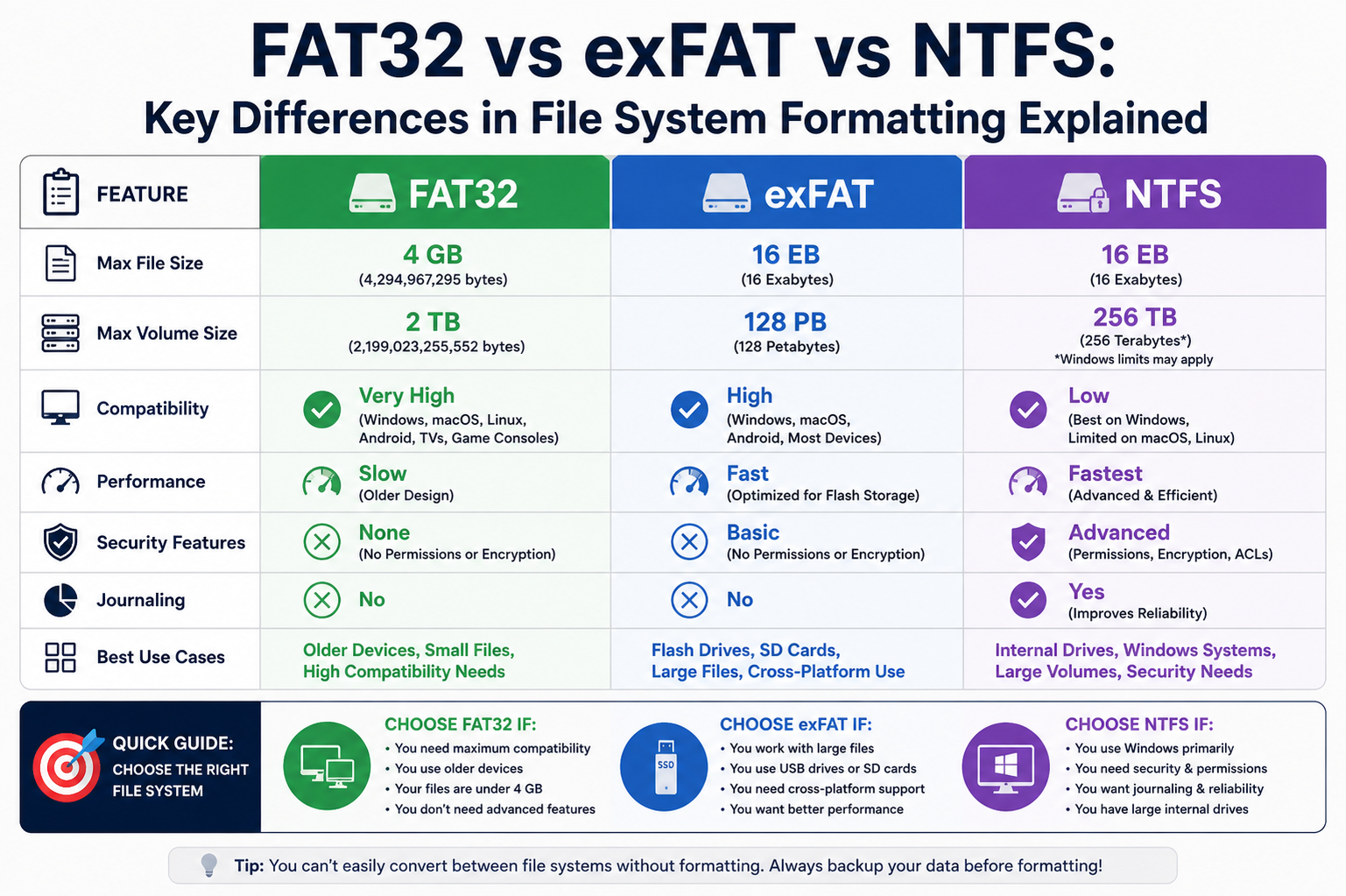
Each file system serves a different purpose based on design priorities. FAT32 focuses on simplicity and maximum compatibility. NTFS focuses on security, performance, and advanced features. ExFAT sits in the middle, balancing compatibility and large file support.
FAT32 is best suited for older devices and simple storage tasks. It works almost everywhere but has strict limitations on file size and performance.
NTFS is built for modern computing environments where security, permissions, and data integrity are important. It is ideal for internal drives and operating system installations.
ExFAT is optimized for portable storage where large files need to be transferred between different systems without compatibility issues.
This separation of roles is why all three file systems still exist today instead of one replacing the others completely.
File Allocation Differences Between FAT32 and ExFAT
Both FAT32 and ExFAT use allocation tables to track file storage locations, but ExFAT improves how these tables are structured and accessed.
In FAT32, the File Allocation Table becomes larger and slower to manage as storage size increases. This can lead to delays in file retrieval and increased fragmentation.
ExFAT improves this by using a more efficient allocation method that reduces overhead and improves lookup speed. This allows faster access to stored data, especially on large-capacity drives.
ExFAT also reduces the number of steps required to locate file clusters, making it more efficient when handling large files.
These improvements make ExFAT more suitable for modern storage devices compared to traditional FAT32 systems.
Reliability and Data Integrity in ExFAT
ExFAT provides basic reliability features but does not offer advanced protection mechanisms like NTFS. It does not include built-in journaling, which means it cannot always recover gracefully from unexpected shutdowns.
However, ExFAT is still reliable in controlled environments where devices are safely removed after use. This makes it suitable for external storage devices that are not constantly active.
Data integrity in ExFAT depends heavily on proper device handling rather than built-in recovery systems. As long as users safely eject devices, the risk of corruption remains low.
This design choice helps keep the system lightweight while still offering practical reliability for everyday use.
Why ExFAT is Preferred for Modern Portable Devices
Modern portable devices require a file system that can handle large files, fast transfers, and cross-platform compatibility. ExFAT meets these requirements more effectively than FAT32.
It is widely used in SDXC cards that store high-resolution photos and videos. These files often exceed the limits of FAT32, making ExFAT the only practical choice.
ExFAT also supports modern storage capacities that go beyond the older limitations of FAT-based systems. This ensures that users can fully utilize the space available on their devices.
Its simple structure allows for quick formatting and easy integration into consumer electronics without requiring complex system configurations.
This combination of flexibility and efficiency makes ExFAT a standard choice for portable digital storage.
Understanding NTFS Architecture in Depth
NTFS is a highly structured and advanced file system designed for modern computing environments. Unlike FAT32 and ExFAT, which rely on simpler allocation tables, NTFS uses a metadata-driven architecture that stores detailed information about every file and directory on the system.
At the core of NTFS is the Master File Table, which acts as a centralized database for all file records. Each file, folder, and system element has an entry in this table, containing information such as location, size, permissions, timestamps, and attributes.
This structured approach allows NTFS to efficiently manage large volumes of data while maintaining strong control over file organization and access. Instead of scanning the entire disk, the system can directly reference the Master File Table to locate files quickly.
NTFS is designed not just for storage but also for reliability, security, and performance, making it suitable for complex operating systems and enterprise-level environments.
How NTFS Stores and Organizes Data
NTFS divides storage into clusters, similar to FAT-based systems, but it manages these clusters in a far more advanced way. Each cluster is mapped through metadata entries rather than simple chain links.
When a file is saved, NTFS assigns clusters dynamically and records their locations in the Master File Table. This allows the system to rebuild the file instantly without searching through sequential chains.
NTFS also supports file attributes that define how data is stored and accessed. These attributes can include compression settings, encryption flags, and security permissions, which are applied at the file level.
Because of this structured metadata system, NTFS can handle large files and complex directory structures without significant performance loss.
Journaling and Data Protection in NTFS
One of the most important features of NTFS is journaling, which enhances data integrity and system stability. Journaling keeps a log of changes before they are permanently written to disk.
If a system crashes or loses power during a write operation, NTFS can use the journal to recover incomplete transactions. This reduces the risk of file corruption and ensures consistency across the file system.
The journaling system tracks metadata changes, directory updates, and file modifications. This makes NTFS highly reliable for critical systems where data loss is not acceptable.
This feature is one of the main reasons NTFS is widely used in operating systems and servers, where stability and recovery are essential.
Security Features and Access Control in NTFS
NTFS introduces advanced security features that are not available in FAT32 or ExFAT. One of the most important features is Access Control Lists, which define permissions for users and groups.
These permissions allow administrators to control who can read, write, modify, or delete specific files. This makes NTFS highly suitable for multi-user environments and enterprise systems.
In addition to permissions, NTFS supports file-level encryption, which protects sensitive data from unauthorized access. This ensures that even if a storage device is physically accessed, the data remains secure.
These security features make NTFS a preferred choice for systems that require strict data protection and user management.
Performance Behavior of NTFS
NTFS is optimized for performance on large storage devices. It handles file fragmentation more efficiently than FAT32 and maintains faster access times for large datasets.
One of its performance advantages is support for parallel file processing. Multiple file streams can be accessed at the same time, improving throughput in multi-user environments.
NTFS also uses advanced caching techniques that reduce the number of physical disk reads and writes. This improves speed and reduces wear on storage devices.
On modern systems with SSDs and large hard drives, NTFS performs consistently well due to its optimized structure and indexing system.
Where NTFS is Used in Modern Systems
NTFS is the default file system for most Windows operating systems and is widely used in personal computers, laptops, and servers.
It is especially important in environments where data security, user permissions, and system stability are required. This includes corporate networks, enterprise servers, and professional workstations.
While other operating systems can read NTFS drives, full support is often limited without additional tools or drivers.
NTFS is also used for internal system drives where the operating system is installed, as it provides the reliability and structure needed for complex computing tasks.
Comparing NTFS Structure with FAT32 and ExFAT
When compared to FAT32 and ExFAT, NTFS is significantly more advanced in terms of structure and capabilities. FAT32 uses a simple allocation table, while NTFS uses a full database-like system.
ExFAT improves upon FAT32 by increasing file size limits and simplifying structure, but it still lacks advanced features such as journaling and permissions.
NTFS goes further by introducing metadata-rich file tracking, security controls, and recovery mechanisms.
This makes NTFS the most feature-rich file system among the three, though it also comes with higher complexity and system overhead.
Efficiency and Scalability of NTFS
NTFS is designed to scale efficiently with increasing storage sizes. It can handle very large drives and large numbers of files without significant performance degradation.
Its indexing system allows fast file lookup even in directories containing thousands of files. This is particularly useful in business and server environments.
The file system also optimizes storage allocation by reducing fragmentation through intelligent cluster management.
As storage technology continues to evolve, NTFS remains capable of adapting to larger capacities and more complex workloads.
Reliability Advantages of NTFS
NTFS is considered one of the most reliable file systems due to its built-in recovery and logging features. These systems ensure that data remains consistent even during unexpected interruptions.
In case of system failure, NTFS can restore file system integrity using its transaction logs. This reduces the risk of corruption and data loss.
It also supports shadow copies and backup features, allowing users to restore previous versions of files when needed.
These reliability features make NTFS highly suitable for critical systems where data safety is a priority.
Real-World Comparison of FAT32, ExFAT, and NTFS
When comparing FAT32, ExFAT, and NTFS in real-world usage, it becomes clear that each file system is designed for a specific purpose rather than direct competition. Their differences are based on how modern or legacy the use case is, and what kind of device they are optimized for.
FAT32 is widely used in older systems and small storage devices where compatibility matters more than performance. It works almost everywhere, including older computers, gaming consoles, and basic multimedia devices. However, its limitations in file size and efficiency make it less suitable for modern large-scale data storage.
ExFAT is designed for portable storage devices that need to handle large files without complex system overhead. It is commonly used in modern USB drives, SD cards, and external storage devices where users frequently transfer large media files between different operating systems.
NTFS is built for internal system drives and professional environments where security, performance, and reliability are critical. It is primarily used in Windows operating systems and supports advanced features such as permissions, encryption, and journaling.
Each file system therefore plays a specific role depending on the environment in which it is used.
File Size and Storage Limitations Comparison
One of the most important differences between these file systems is how they handle file size limitations.
FAT32 has a strict maximum file size limit of 4GB, which makes it unsuitable for modern video files, large software packages, and backups. It also has limitations on partition sizes, which restricts its use on modern high-capacity drives.
ExFAT removes this restriction and supports extremely large files, making it ideal for high-resolution video recording and large data transfers. It is designed to work efficiently with modern storage capacities.
NTFS also supports very large files and partitions, but it goes further by managing them with better structure, security, and recovery features.
These differences make ExFAT and NTFS far more suitable for modern computing compared to FAT32.
Performance Differences in Practical Use
In terms of performance, each file system behaves differently depending on the workload and storage type.
FAT32 performs well on small drives with simple file structures, but its performance decreases as fragmentation increases. Over time, file access becomes slower due to scattered data blocks.
ExFAT offers improved performance over FAT32, especially for large file transfers. Its simplified structure reduces overhead, making it faster for external storage devices that handle sequential data.
NTFS delivers the best overall performance for complex systems. It handles large directories efficiently, supports simultaneous file access, and uses advanced caching techniques to improve speed.
On SSDs and modern hard drives, NTFS typically provides the most stable and consistent performance.
Security and Data Protection Differences
Security is another major factor that separates these file systems.
FAT32 does not support file permissions or encryption, which makes it unsuitable for sensitive or multi-user environments. It is purely designed for basic storage functionality.
ExFAT also lacks advanced security features. It does not include built-in encryption or detailed access control, making it more suitable for personal or portable use rather than secure environments.
NTFS provides strong security features, including file permissions, encryption, and access control lists. These allow administrators to control who can access or modify files.
This makes NTFS the preferred choice for business environments, operating systems, and systems that require data protection.
Compatibility Across Devices and Operating Systems
Compatibility plays a major role in choosing a file system, especially for removable storage.
FAT32 is the most universally compatible file system. Almost every device supports it, including older hardware, gaming consoles, and multimedia systems. This is why it is still widely used despite its limitations.
ExFAT also offers broad compatibility and is supported by most modern operating systems, including Windows, macOS, and Linux with additional support. It is commonly used for transferring files between different platforms.
NTFS is mainly optimized for Windows systems. While other operating systems can read NTFS drives, full compatibility and write support may require additional drivers or software.
This makes FAT32 and ExFAT more suitable for portable storage, while NTFS is best for internal system drives.
Choosing the Right File System for Different Needs
Selecting the right file system depends entirely on how the storage device will be used.
FAT32 is ideal for small storage devices and compatibility-focused tasks. It is commonly used in devices that require simple storage without large files.
ExFAT is best for portable storage that handles large files, such as external drives used for videos, photography, and cross-platform data transfer.
NTFS is the best choice for internal drives, operating systems, and environments where security, performance, and reliability are important.
Understanding these use cases helps in selecting the most efficient file system for each situation.
Why File Systems Evolved Over Time
File systems did not remain the same because storage technology itself kept changing. Early computers used small storage drives and simple data needs, so basic systems like FAT32 were enough to manage files efficiently.
As file sizes increased and users started working with high-resolution media, software applications, and large databases, older file systems started showing clear limitations. This created the need for more advanced systems that could handle larger storage capacities and more complex data structures.
ExFAT was introduced as a response to the growing demand for portable storage that could support large files without the heavy complexity of enterprise-level systems. At the same time, NTFS was developed to meet the requirements of modern operating systems, where security, reliability, and performance became essential.
This evolution shows that file systems are not just technical formats but solutions designed to match the changing demands of computing environments.
How Fragmentation Impacts Storage Performance
Fragmentation plays an important role in how efficiently a file system performs over time. It occurs when files are split into pieces and stored in different locations on a storage device.
In FAT32, fragmentation becomes a common issue because the system stores files in the first available free space. Over time, as files are deleted and new ones are added, free space becomes scattered across the disk.
This scattered storage forces the system to search multiple locations when opening a file, which slows down performance. On mechanical hard drives, this also increases physical movement of the read/write head, making file access even slower.
ExFAT reduces fragmentation issues compared to FAT32 due to its improved allocation method, but it still does not eliminate the problem completely.
NTFS handles fragmentation more efficiently by using advanced allocation strategies and indexing. It reduces performance loss even when files are spread across different disk areas.
Understanding fragmentation helps explain why modern systems prefer NTFS for internal drives where performance consistency is important.
Role of Cluster Size in File System Efficiency
Cluster size is another important factor that affects storage efficiency and performance. A cluster is the smallest unit of disk space that a file system uses to store data.
In FAT32, cluster sizes can become large on bigger drives, which can lead to wasted space. For example, even small files may occupy a full cluster, leaving unused space inside it. This is known as slack space.
ExFAT improves flexibility by supporting larger storage capacities while managing clusters more efficiently than FAT32. It reduces wasted space while still maintaining simplicity.
NTFS uses dynamic cluster management, which allows it to optimize storage based on file size and system requirements. This makes it more efficient in handling both small and large files without significant space wastage.
Cluster management plays a key role in determining how efficiently a file system uses available storage capacity.
Metadata Management Differences Across File Systems
Metadata is information about files rather than the file content itself. It includes details such as file names, sizes, permissions, timestamps, and locations.
FAT32 stores minimal metadata, which keeps the system simple but limits advanced functionality. It does not support complex file attributes or security-related information.
ExFAT improves metadata handling compared to FAT32 but still keeps it lightweight. It supports basic file information without adding heavy system overhead.
NTFS uses a highly detailed metadata system stored in the Master File Table. This allows it to manage advanced features such as file permissions, encryption, compression, and auditing.
This rich metadata structure is one of the reasons NTFS is preferred in professional and enterprise environments where detailed file management is required.
Cross-Platform Usage in Modern Computing
Modern computing often involves transferring data between different operating systems. This makes cross-platform compatibility an important factor when choosing a file system.
FAT32 remains the most universally compatible option. It works with almost all devices, regardless of operating system or hardware type. This makes it ideal for simple file sharing between different systems.
ExFAT is also widely supported across modern operating systems, making it suitable for external drives and memory cards used across Windows, macOS, and Linux systems.
NTFS is primarily designed for Windows environments. While other systems can access NTFS drives, full compatibility may require additional drivers or software support.
This difference explains why users often format external drives as ExFAT while keeping internal system drives as NTFS.
Long-Term Reliability and Maintenance Considerations
Over time, file systems require maintenance to ensure smooth performance and data integrity.
FAT32 requires occasional defragmentation to maintain performance, especially on heavily used drives. Without maintenance, fragmentation can significantly slow down file access.
ExFAT requires less maintenance than FAT32 but still depends on safe removal practices to avoid corruption. Since it does not include journaling, improper disconnection can lead to data loss.
NTFS requires minimal manual maintenance because it includes built-in journaling and self-recovery features. This makes it more reliable for long-term use in systems that run continuously.
Reliability and maintenance requirements are important factors when selecting a file system for specific workloads.
Final Conclusion
Each file system—FAT32, ExFAT, and NTFS—serves a unique role in modern computing. None of them is universally superior because each is optimized for different requirements.
FAT32 remains valuable for compatibility and simple storage needs, especially in older or low-capacity devices.
ExFAT bridges the gap between compatibility and modern file handling, making it ideal for portable storage and large media files.
NTFS stands as the most advanced option, offering strong security, high performance, and reliable data management for modern operating systems.
In practical terms, the best file system depends entirely on the device and purpose. Understanding their differences ensures better storage performance, compatibility, and data safety across all computing environments.