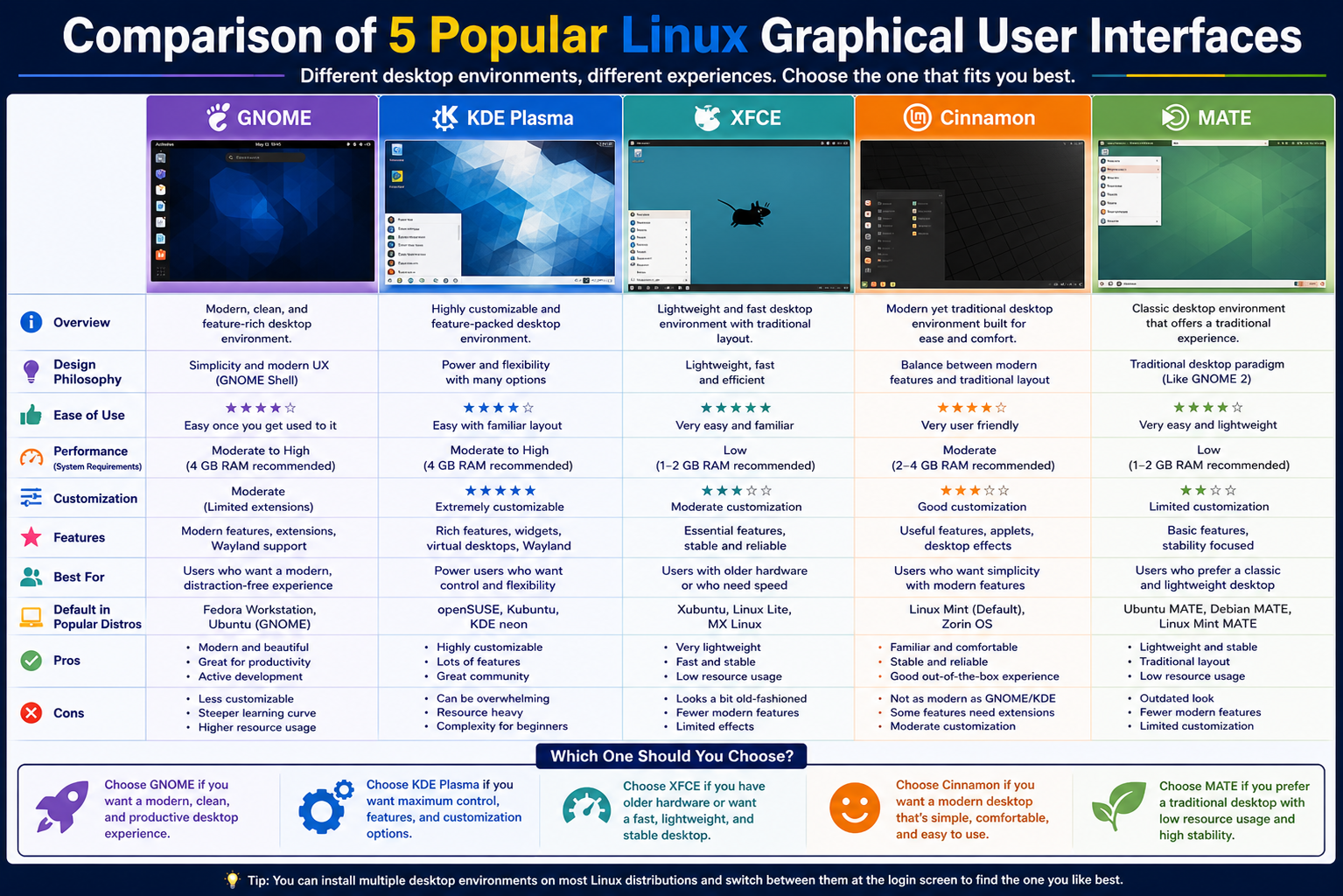
Linux is far more than a command-line operating system. While many users still appreciate the power and precision of terminal commands, the real day-to-day experience for most people happens in the graphical desktop environment. This is the visual layer where you interact with windows, icons, menus, and applications. Linux stands out from many other operating systems because it does not force users into a single fixed desktop style. Instead, it offers a wide range of graphical user interfaces that can completely change the look, feel, and behavior of the system depending on personal preference and hardware capability.
Understanding the Role of Linux Desktop Environments
A Linux graphical user interface, often referred to as a desktop environment, is the complete visual system that sits on top of the Linux kernel and system tools. It is what transforms a plain operating system into something usable through a mouse, touchpad, or touchscreen. This environment includes everything you see on screen such as panels, desktop icons, application launchers, file managers, system notifications, and window controls.
Instead of interacting only through text commands, users can open applications with a click, drag files between folders, resize windows, and manage settings through graphical menus. Each icon on the desktop represents a program, file, or system function. This makes computing more accessible, especially for users who prefer visual interaction over command-line input.
Why Linux Offers So Many Graphical Interfaces
One of the most unique strengths of Linux is choice. Unlike many proprietary operating systems that come with a single default interface, Linux offers multiple desktop environments that serve different needs and preferences. This diversity exists for several important reasons.
The first reason is flexibility. Linux is built on an open-source philosophy, which allows developers and communities to create entirely different desktop experiences without restrictions. This means anyone can design a lightweight, minimal interface or a highly advanced and visually rich environment depending on what users need.
Another reason is hardware diversity. Linux runs on everything from high-end gaming machines to old laptops and small embedded devices. A single interface cannot efficiently serve all these systems. Lightweight environments are needed for older hardware, while feature-rich environments are better suited for modern computers with powerful processors and large memory capacity.
User preference also plays a major role. Some users prefer a simple and distraction-free workspace, while others enjoy deep customization and visual effects. Linux allows both approaches to exist side by side.
Finally, innovation drives variety. Different communities experiment with new design ideas, workflows, and performance improvements. When a new feature proves useful, it often inspires other environments or leads to entirely new desktop projects.
The Growing Evolution of Linux Desktop Environments in 2025
Linux desktop environments have continued to evolve rapidly, especially in recent years. One of the biggest shifts has been the widespread adoption of Wayland, a modern display protocol designed to replace older systems. Wayland improves performance, enhances security, and provides smoother graphics handling compared to traditional display systems.
Another major improvement is better support for high-resolution displays. As modern laptops and monitors increasingly use higher pixel densities, Linux desktop environments have adapted to ensure that text, icons, and interface elements appear sharp and properly scaled.
Gaming on Linux has also improved significantly. This progress has been influenced by the growth of Linux gaming communities and devices like handheld gaming systems that run Linux-based operating systems. Compatibility layers and graphics improvements have made it easier for users to run modern games smoothly.
At the same time, desktop environments continue to explore different design philosophies. Some focus on minimalism and simplicity, while others emphasize customization, productivity, and modern visual effects. This constant innovation ensures that Linux remains flexible and adaptable across different use cases.
Understanding the Comparison of Linux Desktop Environments
When comparing Linux graphical user interfaces, it is important to understand that each one is built with a different purpose in mind. Some prioritize speed and efficiency, others focus on visual design and usability, and some aim to balance both performance and customization.
In this comparison, five widely used desktop environments stand out due to their popularity, stability, and community support. These include KDE Plasma, GNOME, XFCE, LXQt, and MATE. Each of these environments has its own strengths and weaknesses, and each is better suited for specific types of users and hardware setups.
The goal is not to declare a single best option, but rather to understand how each environment fits into different computing needs.
KDE Plasma Desktop Environment
KDE Plasma is widely recognized as one of the most feature-rich and customizable desktop environments available in the Linux ecosystem. It is designed to give users complete control over how their desktop looks and behaves, making it especially appealing to users who enjoy personalization and flexibility.
One of the key strengths of KDE Plasma is its balance between performance and visual design. Despite offering advanced visual effects and customization options, it remains relatively lightweight compared to many other feature-heavy desktop environments. This makes it suitable for both modern systems and moderately powered hardware.
KDE Plasma integrates a wide range of built-in tools and features that extend beyond basic desktop functionality. One of its most powerful features is device connectivity through KDE Connect. This allows seamless communication between a Linux computer and a smartphone. Users can receive notifications from their phone directly on their desktop, transfer files wirelessly, control media playback, and even use their phone as a remote control for their computer.
The desktop layout in KDE Plasma is highly flexible. Users can move panels anywhere on the screen, change their size, and modify their appearance. Widgets can be added to the desktop or panels to display useful information such as system performance, weather updates, calendars, or clocks. This modular approach allows users to design a workspace that matches their workflow.
Visual customization is another major strength. KDE Plasma allows users to change themes, icons, fonts, animations, and window behavior. This level of control makes it possible to create a completely unique desktop environment tailored to individual taste.
KDE Plasma is commonly available in several Linux distributions that focus on user choice and performance. It is often selected by users who want a modern desktop experience with advanced features and strong customization capabilities.
However, this flexibility can also make KDE Plasma slightly overwhelming for new users. The large number of settings and options may take time to explore fully. Despite this, it remains one of the most powerful and versatile desktop environments in the Linux world.
GNOME Desktop Environment
GNOME is one of the most widely used desktop environments in Linux distributions. It is known for its clean design, simplicity, and focus on productivity. Instead of offering extensive customization options by default, GNOME emphasizes a streamlined experience that helps users focus on their work without unnecessary distractions.
The design philosophy of GNOME is centered around minimalism. The interface avoids clutter by hiding advanced options in organized menus. Applications are accessed through a simple overview screen where users can search and launch programs quickly. This approach makes GNOME particularly easy to learn for new users.
GNOME is often chosen as the default desktop environment in many major Linux distributions because of its stability and user-friendly design. It provides a consistent experience across different systems, which helps maintain simplicity and reliability.
Although GNOME is designed to be efficient and smooth, it can be more demanding on system resources compared to lighter desktop environments. On older hardware with limited memory or processing power, performance may feel slower, especially when multiple applications are open.
Despite this, GNOME remains popular because of its polished interface and focus on usability. It is especially suitable for users who prefer a clean workspace without extensive configuration requirements.
XFCE Desktop Environment
XFCE is a lightweight desktop environment designed for speed and efficiency. It is widely used on older computers and systems with limited hardware resources. Despite its lightweight nature, XFCE still offers a complete and functional desktop experience.
The interface of XFCE is straightforward and familiar, especially for users coming from traditional desktop layouts. It typically includes a panel with application menus, system tray, and window controls. This simplicity makes it easy to navigate and use without a steep learning curve.
One of XFCE’s main advantages is its performance. It consumes significantly fewer system resources compared to more modern and visually complex environments. This makes it ideal for older machines or systems where performance is a priority.
While XFCE does support customization, its options are more limited compared to environments like KDE Plasma. However, this trade-off helps maintain its speed and stability.
XFCE is often chosen by users who want a reliable desktop that performs well without requiring powerful hardware. It offers a balanced experience between usability and efficiency.
LXQt Desktop Environment
LXQt is another lightweight desktop environment designed with performance and simplicity in mind. It is built to use minimal system resources while still providing a functional graphical interface.
This environment is particularly suitable for very old computers or low-powered devices where even lightweight systems need to be efficient. LXQt focuses on speed and responsiveness rather than visual effects or advanced features.
The interface is simple and traditional, typically including a basic panel, application menu, and system tray. It does not include many built-in advanced tools, which helps keep the system fast and responsive.
While it may not offer extensive customization or modern visual design, LXQt excels in situations where performance is more important than appearance.
MATE Desktop Environment
MATE is a continuation of the older GNOME 2 desktop design. It was created for users who preferred the traditional desktop layout and did not want to adapt to newer interface changes introduced in GNOME 3.
MATE provides a familiar and stable desktop experience with classic menus, panels, and window management. It is designed to be easy to use and comfortable for users who prefer a traditional computing environment.
It is also relatively lightweight, making it suitable for older hardware while still offering more features than extremely minimal environments.
MATE focuses on stability and consistency rather than innovation or modern visual effects, making it ideal for users who value reliability and familiarity.
Deep Comparison of Linux Desktop Environments in Real Use
Linux desktop environments are not just visual themes layered on top of an operating system. They define how users interact with their machine every day, how quickly tasks are completed, and how comfortable the experience feels over long periods of use. While KDE Plasma, GNOME, XFCE, LXQt, and MATE all provide a graphical interface, the real differences appear when you go deeper into workflow design, system performance, customization philosophy, and hardware behavior.
How Design Philosophy Shapes Each Linux Desktop Experience
Every Linux desktop environment is built around a specific philosophy, and this philosophy affects everything from layout to performance. Some environments aim to simplify computing, while others focus on giving users maximum control.
GNOME follows a strict minimalism approach where the system tries to reduce distractions and guide users toward a focused workflow. Instead of exposing every feature on the surface, GNOME organizes functionality into structured views that emphasize simplicity and consistency.
KDE Plasma takes almost the opposite approach. It prioritizes freedom of customization, allowing users to reshape nearly every part of the interface. This makes KDE feel like a highly adaptable workspace rather than a fixed environment.
XFCE and LXQt are built with efficiency in mind. Their philosophy revolves around doing more with less. Instead of adding visual complexity or advanced animations, they focus on responsiveness and stability.
MATE follows a traditional philosophy, preserving the older desktop layout that many users still find comfortable. It avoids modern experimentation and instead prioritizes familiarity and predictability.
These differences in philosophy explain why users often develop strong preferences for one environment over another.
Performance Behavior Across Different Hardware Systems
One of the most important factors when choosing a Linux desktop environment is how it performs on different hardware configurations. Linux is widely used across both modern machines and older systems, so performance scalability is essential.
LXQt and XFCE are designed for systems with limited memory and weaker processors. They are extremely lightweight and consume minimal system resources even during regular use. This makes them ideal for older laptops, budget systems, and devices that cannot handle heavy graphical processing.
MATE sits in a middle position. It is not as light as LXQt or XFCE, but it still performs efficiently on older hardware while offering a more traditional desktop experience. It is often chosen for refurbished systems where stability is more important than modern visual effects.
GNOME and KDE Plasma are more resource-intensive. GNOME tends to use more memory due to its background services and modern interface design. KDE Plasma, although feature-rich, is more optimized in recent versions and can perform surprisingly well even on mid-range hardware.
On modern systems with sufficient RAM and processing power, the performance differences between GNOME and KDE Plasma become less noticeable. However, on lower-end machines, lightweight environments maintain a clear advantage.
Customization Depth and User Control
Customization is one of the most defining characteristics of Linux desktop environments. The ability to modify nearly every aspect of the system is one of the reasons users choose Linux in the first place.
KDE Plasma stands at the top in terms of customization depth. Users can modify window behavior, panel placement, system themes, icon packs, fonts, animations, and even advanced behavior rules for applications. This level of control allows users to build highly personalized workflows tailored to specific tasks such as development, design, or general productivity.
XFCE also supports customization, but in a more limited and straightforward way. Users can adjust panels, themes, and basic behavior settings, but it avoids overwhelming complexity. This balance makes it appealing to users who want some flexibility without deep configuration work.
GNOME takes a different approach by limiting built-in customization. While it can be extended through external tools and extensions, the default system is intentionally restrictive. This design helps maintain consistency and stability across different systems but reduces flexibility.
LXQt and MATE offer moderate customization options. LXQt focuses more on simplicity, while MATE provides traditional configuration settings that resemble older desktop systems. Neither is designed for deep visual transformation, but both allow enough flexibility for practical adjustments.
User Experience and Workflow Efficiency
User experience in Linux desktop environments depends heavily on how efficiently users can complete tasks. This includes launching applications, switching between windows, managing files, and accessing system settings.
GNOME is designed to streamline workflows by reducing visual clutter. Its activity overview allows users to quickly search for applications and switch between tasks. This design is particularly useful for users who prefer keyboard-driven workflows and minimal distractions.
KDE Plasma offers a more traditional desktop experience with enhanced productivity features. Users can organize panels, widgets, and shortcuts in ways that match their personal workflow. This makes KDE especially effective for multitasking environments where multiple applications are used simultaneously.
XFCE maintains a simple and direct workflow structure. It avoids unnecessary complexity, allowing users to access applications and system tools quickly without navigating multiple layers of menus.
LXQt focuses on speed above all else. Its workflow is extremely lightweight and direct, making it suitable for users who prioritize responsiveness over advanced features.
MATE delivers a classic workflow experience. It is familiar to users who have worked with older operating systems and prefer a traditional start menu and panel-based navigation system.
Hardware Compatibility and System Efficiency
Linux desktop environments are widely used across a range of devices, from modern high-performance machines to aging computers that struggle with modern operating systems. Because of this, hardware compatibility plays a critical role in choosing the right desktop environment.
LXQt is one of the most efficient environments available. It is designed to run smoothly on systems with very limited memory and processing power. Even on older hardware, it provides a usable and responsive interface.
XFCE also performs well on low-end systems while offering slightly more features than LXQt. It strikes a balance between usability and resource consumption.
MATE is slightly heavier but still suitable for older machines. It is often used in environments where stability and familiarity are more important than minimal resource usage.
GNOME and KDE Plasma are better suited for modern hardware. GNOME requires more system resources due to its design structure, while KDE Plasma offers better optimization but still benefits from higher RAM and stronger processors.
Despite these differences, modern Linux distributions have improved performance optimization across all environments, making even heavier desktops usable on mid-range systems.
Software Integration and Ecosystem Compatibility
Desktop environments also influence how software integrates with the system. This includes file managers, system settings tools, notification systems, and application frameworks.
KDE Plasma uses a fully integrated ecosystem where applications are designed to work seamlessly together. This creates a unified experience across file management, system settings, and multimedia tools.
GNOME also offers a tightly integrated ecosystem but focuses more on simplicity and consistency rather than extensive feature depth. Its applications are designed to be minimal and efficient.
XFCE and LXQt rely on lightweight tools that prioritize speed over integration. While they may not feel as unified as KDE or GNOME, they offer flexibility by allowing users to mix and match applications.
MATE maintains compatibility with older application frameworks while providing a stable and consistent environment. It is often preferred in systems where long-term reliability is important.
Multitasking and Productivity Behavior
Multitasking performance varies significantly across desktop environments. KDE Plasma excels in this area due to its flexible window management system and support for virtual desktops. Users can organize multiple workflows efficiently and switch between them seamlessly.
GNOME also supports multitasking but in a more structured way. Its overview system allows users to manage windows and workspaces in a simplified visual layout.
XFCE and MATE offer traditional multitasking with straightforward window switching and basic workspace support. They are effective but less dynamic compared to modern environments.
LXQt provides basic multitasking functionality without advanced features, focusing instead on speed and responsiveness.
System Stability and Long-Term Usage
Stability is an important factor for users who rely on Linux for daily work or long-term deployments. MATE and XFCE are known for their stability due to their mature codebase and minimal complexity. They rarely introduce major structural changes, which makes them predictable and reliable.
GNOME and KDE Plasma receive more frequent updates and feature changes, which can sometimes introduce temporary instability but also bring continuous improvements.
LXQt remains stable due to its lightweight design, though it is still evolving compared to more established environments.
Display Systems and Modern Technology Transition
Modern Linux desktop environments are gradually transitioning from older display systems to newer ones designed for better performance and security. This transition improves rendering speed, reduces screen tearing, and enhances compatibility with modern hardware.
Wayland is becoming increasingly important in this shift, replacing older systems that have been in use for many years. This transition affects how desktop environments handle graphics, input devices, and multi-monitor setups.
GNOME has been one of the early adopters of this modern display system, while KDE Plasma has also made significant progress in supporting it. XFCE, LXQt, and MATE are gradually adapting while maintaining compatibility with older systems.
Real-World Usage Scenarios and Practical Suitability
Different desktop environments are better suited for different real-world use cases.
KDE Plasma is often preferred by power users who need customization and multitasking flexibility. It is commonly used in development environments and productivity-focused workflows.
GNOME is widely used in professional environments where simplicity and consistency are important. It is often chosen by users who want a clean and distraction-free workspace.
XFCE and LXQt are frequently used in educational systems, older computers, and lightweight installations where performance is the primary concern.
MATE is often used in stable production environments where users prefer a traditional and predictable interface.
Each environment serves a specific role in the broader Linux ecosystem, making them complementary rather than competitive in a strict sense.
KDE Plasma In Depth Experience and Practical Usage
KDE Plasma is often considered one of the most advanced and flexible desktop environments in the Linux ecosystem, and its strength becomes especially clear when used in real-world productivity scenarios. It is not simply a visual interface but a highly configurable workspace where almost every element can be adjusted to match user preference. This includes panel positioning, window behavior, shortcuts, themes, animations, and even how applications respond to system events.
One of the most powerful aspects of KDE Plasma is its modular design. Users can build their desktop like a toolkit, adding widgets that display system performance, weather updates, calendars, or even live system statistics. This allows the desktop to function as both a workspace and an information dashboard. Unlike more rigid environments, KDE does not enforce a single way of working, which makes it highly adaptable to different types of users.
In professional use, KDE Plasma is especially useful for multitasking. Virtual desktops can be configured for different workflows such as coding, browsing, communication, and media editing. Each workspace can maintain its own set of open applications, helping users stay organized even when handling complex tasks.
File management in KDE is also highly efficient. The integrated file manager provides advanced features such as tabbed browsing, split views, and network file access. This makes it suitable for users who frequently move between local and remote systems.
Performance-wise, KDE Plasma has improved significantly over time. Earlier versions were known for being heavier, but modern releases are optimized to run smoothly even on mid-range hardware. However, users with older systems may still notice increased resource usage compared to lightweight environments.
Overall, KDE Plasma is best suited for users who value control, customization, and productivity in a visually rich environment.
GNOME Desktop Experience and Workflow Design
GNOME is built around a philosophy of simplicity and focus, and this philosophy strongly influences how users interact with the system. Instead of exposing all features directly on the desktop, GNOME organizes functionality into a unified activity overview where applications and workspaces are managed through a single interface.
This design encourages users to focus on tasks rather than system configuration. Applications are typically full-screen or windowed without excessive interface elements, which reduces distractions and creates a clean working environment.
The workflow in GNOME is heavily centered around search functionality. Instead of navigating through multiple menus, users can quickly access applications, files, and settings by typing in the search bar. This makes GNOME highly efficient for keyboard-oriented users.
GNOME also introduces a structured workspace system that helps organize tasks. Each workspace can contain different applications, allowing users to separate work activities logically. This is particularly useful for users who handle multiple projects simultaneously.
However, GNOME’s simplicity comes with trade-offs. It offers limited built-in customization compared to other desktop environments. While extensions can expand functionality, the base system is intentionally minimal. This design decision helps maintain consistency but may feel restrictive to users who prefer deep personalization.
In terms of performance, GNOME is moderately resource-intensive. It runs smoothly on modern hardware but may feel slower on older systems, especially when multiple applications are open. Despite this, it remains one of the most widely used desktop environments due to its stability and clean user experience.
GNOME is particularly well-suited for users who prefer a structured, distraction-free workflow with minimal configuration requirements.
XFCE Lightweight Efficiency and Real-World Performance
XFCE is one of the most respected lightweight desktop environments in the Linux world, and its reputation is built on stability, speed, and simplicity. It is designed to provide a full desktop experience without consuming unnecessary system resources, making it ideal for older hardware or systems with limited capabilities.
The interface of XFCE is straightforward and traditional. It typically includes a top or bottom panel with application menus, system tray icons, and quick access shortcuts. This familiar layout makes it easy for users transitioning from other operating systems to adapt quickly.
One of the key strengths of XFCE is its responsiveness. Applications open quickly, window switching is smooth, and system load remains low even under moderate multitasking. This makes it a reliable choice for users who prioritize efficiency over visual effects.
XFCE also supports customization, although not at the same depth as KDE Plasma. Users can adjust themes, icons, panel layouts, and basic system behavior. This allows for a degree of personalization while maintaining system stability.
In practical use, XFCE performs extremely well on older laptops and desktop computers. It can extend the life of aging hardware by providing a modern interface without heavy resource demands. This is one of the main reasons it remains popular in lightweight Linux distributions.
While XFCE does not offer advanced animations or modern visual enhancements, its focus on performance and reliability makes it highly effective for everyday tasks such as browsing, office work, and system administration.
LXQt Minimal Design and Ultra Lightweight Focus
LXQt is designed with a very specific goal: to deliver the lightest possible graphical desktop experience while maintaining basic usability. It is especially useful for extremely low-powered systems, embedded devices, and older computers that struggle with modern operating systems.
The interface is simple and minimal, typically consisting of a basic panel, application menu, and system tray. There are no unnecessary visual effects or background processes that could slow down performance. This allows LXQt to operate with very low memory usage and fast responsiveness.
One of the defining characteristics of LXQt is its efficiency. It is designed to use minimal CPU and RAM resources, making it ideal for systems where every bit of performance matters. Even under low hardware conditions, LXQt remains stable and functional.
However, this minimalism also means fewer built-in features. Users who require advanced customization or modern interface elements may find LXQt too basic. Instead, it focuses strictly on providing a functional desktop without additional complexity.
Despite its simplicity, LXQt is fully capable of handling everyday computing tasks such as web browsing, document editing, and file management. It is often used in environments where performance is more important than appearance.
LXQt is best suited for users who need maximum efficiency from minimal hardware resources and are comfortable with a simple desktop experience.
MATE Traditional Desktop Stability and Familiarity
MATE is a desktop environment designed to preserve the traditional Linux desktop experience. It originated as a continuation of the older GNOME 2 interface and was developed for users who preferred a classic layout over modern design changes.
The interface is structured around a familiar layout that includes a main menu, taskbar, and system tray. This design is intuitive for users who have experience with older operating systems and prefer a predictable workflow.
MATE is known for its stability. It does not frequently introduce major interface changes, which makes it reliable for long-term use. This consistency is particularly important in environments where users require a stable and unchanging desktop experience.
In terms of performance, MATE is relatively lightweight compared to modern desktop environments. It runs efficiently on older hardware while still providing a more complete feature set than ultra-minimal environments like LXQt.
MATE also includes a set of traditional applications such as file managers, text editors, and document viewers that integrate smoothly with the desktop environment. This creates a cohesive experience without requiring external tools.
While MATE does not offer advanced visual effects or deep customization like KDE Plasma, its strength lies in familiarity and reliability. It is often chosen for systems where ease of use and long-term stability are more important than modern design trends.
Comparing Workflow Behavior Across Environments
Workflow behavior varies significantly across desktop environments, shaping how users interact with their systems on a daily basis. KDE Plasma encourages a highly customizable workflow where users design their own environment. GNOME promotes a structured workflow with minimal distractions and strong search-based navigation.
XFCE and LXQt follow simpler workflows that focus on direct access to applications and system tools without unnecessary complexity. MATE maintains a traditional workflow that feels familiar and consistent, especially for users accustomed to older operating systems.
These differences affect productivity depending on user preference. Some users prefer structured environments that guide their workflow, while others prefer flexible systems that allow complete control over layout and behavior.
System Resource Usage in Real Scenarios
When multiple applications are running simultaneously, differences in resource usage become more noticeable. LXQt remains the most efficient in terms of memory and CPU consumption. XFCE follows closely behind, offering a balance between usability and performance.
MATE uses slightly more resources but remains efficient enough for older systems. GNOME and KDE Plasma require more memory, especially when running multiple applications or using visual effects.
However, on modern hardware, these differences become less significant, and performance is generally smooth across all environments.
User Adaptation and Learning Curve
The ease of learning a desktop environment is an important factor, especially for new Linux users. GNOME is easy to learn due to its simplified interface, but it may require adjustment for users coming from traditional desktops.
KDE Plasma has a steeper learning curve due to its large number of settings, but it becomes highly efficient once users become familiar with it.
XFCE and MATE are relatively easy to learn because of their traditional layouts, making them suitable for users transitioning from other operating systems.
LXQt is simple but may feel limited to users expecting more features or customization options.
Long-Term Usability and Stability Considerations
For long-term use, stability and consistency become more important than visual design. MATE and XFCE are often preferred in environments where long-term reliability is essential. GNOME and KDE Plasma offer more frequent updates and improvements, which can enhance functionality but may introduce occasional changes in workflow.
LXQt remains stable due to its minimal structure but continues to evolve as a lightweight solution.
Each desktop environment offers a different balance between innovation, stability, and performance, allowing users to choose based on their specific needs and priorities.
LXQt Practical Use and Real System Behavior
LXQt is designed with one primary goal in mind: maximum efficiency on minimal hardware. In real-world use, this philosophy becomes very noticeable the moment the system boots and reaches the desktop. The interface loads quickly, background processes remain extremely light, and memory consumption stays low even when multiple basic applications are open.
Unlike heavier desktop environments that focus on animations, transparency effects, and advanced compositing, LXQt avoids unnecessary graphical overhead. This allows it to remain responsive even on very old processors or systems with limited RAM. It is particularly effective on machines that might struggle to run modern operating systems smoothly.
The layout is intentionally simple. A standard panel typically holds the application menu, quick launch shortcuts, system tray, and clock. This predictable structure makes navigation easy, especially for users who want a straightforward computing experience without exploring complex settings menus.
In practical usage scenarios such as browsing, document editing, or file management, LXQt performs reliably. However, it is not designed for users who expect advanced desktop features or deep visual customization. Instead, it focuses on delivering a stable environment where system resources are preserved for applications rather than the desktop itself.
This makes LXQt especially useful in situations where performance is more important than appearance, such as older office computers, educational systems, or lightweight virtual machines.
MATE Desktop Real World Experience and Stability Focus
MATE is widely appreciated for its stability and its commitment to preserving a traditional desktop workflow. In everyday use, it feels familiar and predictable, especially for users who have experience with older desktop systems.
The interface follows a classic structure with a main menu, panel, and taskbar layout. This design makes it easy to navigate without needing to learn new interaction methods. Applications are accessible through a traditional menu system, and system tools are arranged in a way that feels logical and consistent.
One of MATE’s strongest qualities is its reliability. It does not change rapidly or introduce experimental features that disrupt user workflows. This makes it a strong choice for environments where consistency is more important than innovation.
In terms of performance, MATE runs efficiently on older hardware while still offering a more complete feature set than ultra-lightweight environments. It strikes a balance between usability and resource usage, making it suitable for users who want a stable system that does not feel overly minimal.
MATE also includes a set of integrated tools such as file management, text editing, and system configuration utilities that blend naturally into the desktop experience. This helps maintain a cohesive environment where users do not need to rely heavily on external applications for basic tasks.
It is particularly useful in long-term installations where users prefer a consistent interface that does not change frequently over time.
Comparative Performance Under Real Workloads
When different desktop environments are tested under real workloads, their design philosophies become more apparent. KDE Plasma and GNOME tend to use more system resources, especially when running multiple applications or handling graphical tasks. However, they also provide more advanced features and a richer user experience.
XFCE and MATE sit in the middle range, offering balanced performance with reasonable feature sets. They are capable of handling multitasking and everyday computing without excessive resource consumption.
LXQt remains the most lightweight option, consistently using the least amount of memory and CPU power. This makes it ideal for systems where hardware limitations are a major concern.
Under heavy multitasking conditions, KDE Plasma performs efficiently due to its optimized modern architecture, but it still requires more resources than lightweight environments. GNOME remains stable but can feel heavier during intensive use, especially on older systems.
XFCE and MATE maintain steady performance even under load, making them dependable choices for long-term usage. LXQt continues to prioritize responsiveness over feature complexity, ensuring that system performance remains smooth even in constrained environments.
Visual Design and User Interaction Differences
Each desktop environment also differs significantly in visual design and interaction style. KDE Plasma offers a highly polished and modern appearance with support for animations, transparency effects, and detailed customization options. This creates a visually rich experience that can be tailored extensively.
GNOME takes a more minimal approach, focusing on simplicity and consistency. Its design removes unnecessary visual elements, resulting in a clean and distraction-free interface.
XFCE and MATE follow traditional desktop aesthetics. XFCE leans slightly toward modern simplicity, while MATE retains a more classic visual style reminiscent of older operating systems.
LXQt is the most minimal visually, prioritizing function over appearance. It avoids modern graphical enhancements in favor of performance and simplicity.
These differences affect how users perceive and interact with their systems. Some prefer visually rich environments that feel modern and dynamic, while others prefer simple and predictable interfaces that reduce cognitive load.
Software Compatibility and Application Ecosystem Behavior
Linux desktop environments generally support the same applications, but their integration and behavior can vary. KDE Plasma provides the most tightly integrated ecosystem, where applications are designed to work seamlessly with the desktop environment itself. This creates a unified experience across file management, system settings, and multimedia tools.
GNOME also offers strong integration but focuses more on simplicity and consistency rather than feature density. Its applications are streamlined and designed to work within its minimalistic framework.
XFCE and MATE rely more on external applications for advanced functionality. They do not enforce a strict ecosystem, which gives users flexibility in choosing their preferred tools.
LXQt remains neutral and lightweight, allowing users to build their own environment with minimal constraints. This flexibility is useful for advanced users who prefer custom setups.
Despite these differences, most Linux applications run across all environments without major compatibility issues, since they rely on shared system libraries rather than desktop-specific frameworks.
Suitability for Different User Types
Each desktop environment aligns with different user needs and skill levels. KDE Plasma is ideal for users who want full control over their desktop and enjoy customizing their workflow extensively. It suits power users, developers, and users with modern hardware.
GNOME is suitable for users who prefer a structured, simple, and distraction-free environment. It is often chosen by professionals who value consistency and ease of use.
XFCE is best for users who want a lightweight yet functional desktop. It is widely used in educational environments and older systems where performance matters.
LXQt is ideal for extremely low-end systems or users who prioritize speed and minimal resource usage above all else.
MATE is well suited for users who prefer traditional desktop layouts and long-term stability without frequent interface changes.
Long-Term Evolution of Linux Desktop Environments
Linux desktop environments continue to evolve based on user needs, hardware advancements, and software innovation. Modern trends show a shift toward better performance optimization, improved graphical systems, and enhanced compatibility with new display technologies.
Wayland adoption is gradually increasing, replacing older display systems and improving performance and security. This transition is being integrated differently across desktop environments, with some adopting it earlier than others.
There is also a growing focus on improving user experience across devices, including support for high-resolution displays and better scaling systems. This ensures that Linux remains usable across modern laptops, desktops, and hybrid devices.
Gaming support and multimedia performance have also improved significantly, making Linux a more viable option for a wider range of users.
Final Conclusion
Each Linux desktop environment offers a unique balance between performance, design, and usability. KDE Plasma provides maximum flexibility and modern features, while GNOME focuses on simplicity and structured workflows. XFCE and MATE offer stable, traditional, and efficient environments suitable for long-term use, especially on older hardware. LXQt delivers the lightest and fastest experience for systems with very limited resources.
There is no single best choice across all scenarios. Instead, each environment is optimized for specific needs, making Linux one of the most flexible operating system ecosystems available. Users can select the desktop environment that best matches their hardware capabilities, workflow preferences, and personal style, ensuring a tailored computing experience for virtually any situation.