VMware ESXi is widely recognized as one of the most established and powerful hypervisors in the virtualization industry. It plays a central role in modern data centers by allowing multiple virtual machines to operate on a single physical server. This capability has transformed how organizations deploy, manage, and scale their IT infrastructure. Instead of dedicating one physical machine to a single operating system and workload, ESXi enables efficient consolidation, where resources such as CPU, memory, and storage are shared intelligently across many isolated virtual environments.
At its core, ESXi is designed for stability, performance, and enterprise-level reliability. It is commonly used in environments ranging from small development labs to large-scale enterprise data centers. Over the years, it has become deeply integrated into VMware’s broader virtualization ecosystem, which includes tools for management, automation, monitoring, and advanced workload orchestration. Understanding ESXi is essential for IT professionals working with cloud infrastructure, server management, or virtualization technologies.
Understanding the Concept of a Hypervisor in ESXi
A hypervisor is the foundational software layer that enables virtualization. In the case of VMware ESXi, the hypervisor is responsible for directly managing physical hardware resources and distributing them among virtual machines. Each virtual machine behaves like an independent computer with its own operating system and applications, even though they all share the same underlying hardware.
What makes ESXi particularly powerful is its classification as a bare-metal hypervisor. This means it does not require a traditional operating system like Windows or Linux to run on top of. Instead, ESXi is installed directly onto the physical server hardware. This architecture reduces overhead, improves performance, and enhances security by minimizing the number of software layers between the hardware and virtual machines.
Because of this design, ESXi is often preferred in enterprise environments where efficiency and reliability are critical. It eliminates unnecessary complexity and provides direct control over hardware resources, which allows administrators to fine-tune performance and ensure stability across workloads.
Architecture and Core Design of VMware ESXi
The architecture of VMware ESXi is built around simplicity and efficiency. Unlike traditional server setups that rely on full operating systems, ESXi is a lightweight operating system specifically engineered for virtualization. Its small footprint reduces system overhead and allows more hardware resources to be allocated directly to virtual machines.
ESXi includes a kernel that handles CPU scheduling, memory management, and hardware interaction. It also integrates drivers for storage devices, network interfaces, and other hardware components. This tight integration ensures that virtual machines can operate with minimal latency and maximum performance.
Another key aspect of ESXi’s architecture is its isolation model. Each virtual machine runs in a fully isolated environment, preventing interference from other virtual machines on the same host. This isolation enhances security and stability, ensuring that issues in one virtual machine do not affect others.
The design also supports scalability. ESXi can run on a wide range of hardware configurations, from small servers to large enterprise-grade systems with multiple processors and large memory capacities. This flexibility is one of the reasons it has become a standard in virtualization deployments.
Role of VMware vSphere Ecosystem in ESXi Deployment
ESXi does not operate in isolation when used in enterprise environments. It is a core component of VMware’s vSphere suite, which provides a comprehensive virtualization and cloud infrastructure platform. While ESXi handles the execution of virtual machines on individual servers, vSphere adds centralized management and advanced features that extend across multiple hosts.
Within this ecosystem, tools such as vCenter Server play a critical role. vCenter Server allows administrators to manage multiple ESXi hosts from a single interface. This centralized approach simplifies operations such as provisioning virtual machines, monitoring performance, applying updates, and balancing workloads across clusters.
The integration of ESXi with vSphere transforms standalone hypervisors into a fully managed virtualization environment. This combination is especially important in enterprise settings where scalability, automation, and high availability are essential requirements.
Without vSphere, ESXi functions as an individual host system with limited management capabilities. With vSphere, it becomes part of a larger, coordinated infrastructure capable of supporting complex workloads and large-scale deployments.
Historical Availability of Free and Paid ESXi Versions
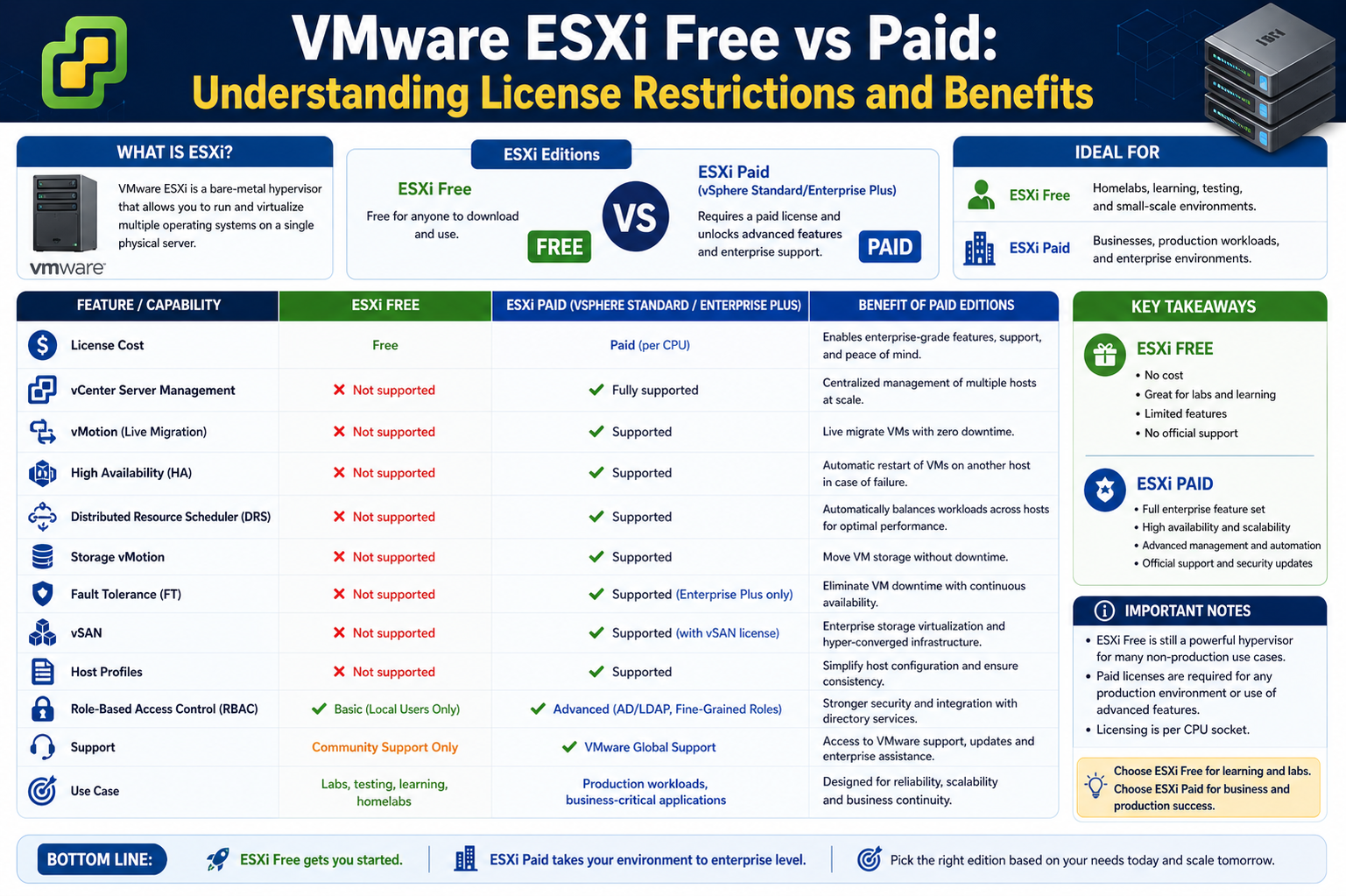
For many years, VMware offered ESXi in two main forms: a free version and multiple paid editions. The free version was widely used by students, developers, and small businesses who wanted to explore virtualization without investing in licenses. It provided access to core hypervisor functionality but came with significant limitations.
The paid versions, on the other hand, were designed for enterprise use. They included advanced features such as centralized management, high availability, live migration, and performance optimization tools. These capabilities made the paid editions suitable for production environments where uptime and scalability are critical.
The free version used the same installation process and underlying technology as the paid versions. This meant users could experience enterprise-grade virtualization technology without cost, but only within restricted boundaries. Over time, VMware gradually reduced the availability and usefulness of the free edition, eventually discontinuing it in 2024 as part of a broader shift toward subscription-based and cloud-oriented licensing models.
This transition marked a significant change in how virtualization technology is accessed and deployed, especially for small-scale users and independent professionals.
Key Limitations of the Free ESXi Edition
The free version of ESXi, while functional, came with several important limitations that restricted its use in production environments. One of the most significant limitations was the lack of centralized management. Without vCenter Server integration, users had to manage each ESXi host individually, which became inefficient as environments grew.
Another major limitation was the absence of enterprise features such as live migration of virtual machines, automated load balancing, and high availability. These features are essential for maintaining uptime and ensuring smooth workload distribution across multiple servers.
Resource limitations also played a role in restricting the free edition. It supported fewer physical CPUs and lacked scalability compared to paid versions. Additionally, support options were extremely limited, meaning users had to rely on community forums rather than official VMware assistance.
These restrictions made the free version suitable mainly for learning, testing, and small experimental setups rather than serious production workloads. While it provided valuable exposure to virtualization concepts, it was not designed for enterprise-grade reliability or scalability.
Differences in Support and Management Capabilities
One of the most important distinctions between free and paid ESXi versions was the level of support and management functionality available. The free version did not include official technical support from VMware, leaving users dependent on community-driven assistance. This created challenges in environments where reliability and rapid issue resolution were critical.
In contrast, paid versions offered structured support through service-level agreements, ensuring that organizations could receive timely assistance when issues occurred. This level of support is particularly important in enterprise environments where downtime can result in significant operational and financial impact.
Management capabilities also differed significantly. Paid ESXi versions integrate with vCenter Server, enabling centralized control over multiple hosts. This allows administrators to manage virtual machines, apply updates, monitor performance, and configure clusters from a single interface. The free version lacked this capability entirely, requiring manual configuration on each host.
This difference in management approach highlights the gap between individual experimentation and enterprise-scale infrastructure management.
Use Cases of Free ESXi in Learning and Testing Environments
Despite its limitations, the free version of ESXi served an important role in education and experimentation. It allowed users to gain hands-on experience with virtualization technology without financial investment. Many IT professionals began their learning journey by installing ESXi in home labs or small test environments.
It was particularly useful for testing software compatibility, experimenting with virtual machine configurations, and understanding how virtualization works at a technical level. Developers also used it to simulate multi-server environments on a single physical machine, which helped in application testing and deployment planning.
In addition, the free version supported lab environments where users could explore VMware-related technologies and gain practical experience with server management concepts. This made it a valuable tool for training and certification preparation, even though it lacked production-grade features.
While not suitable for enterprise deployment, its educational value was significant, especially for individuals entering the field of IT infrastructure and virtualization.
Limitations of the Free ESXi in Real-World Environments
The free edition of VMware ESXi, while useful for learning and basic experimentation, shows its limitations very quickly when placed in real-world IT environments. One of the most noticeable constraints is the lack of scalability. In small test setups, running a few virtual machines on a single host is manageable, but as soon as workload diversity increases, the absence of centralized control becomes a major operational challenge. Administrators must log into each host individually, which significantly increases management overhead.
Another important limitation is the restricted access to enterprise-grade features. The free version does not support advanced virtualization capabilities that are essential in production systems. Features such as automated workload balancing, cluster-wide resource optimization, and seamless virtual machine mobility are not available. This makes it unsuitable for environments where uptime, efficiency, and automation are required.
In addition, monitoring capabilities in the free version are minimal. Without integration into centralized monitoring systems, administrators cannot easily track performance trends across multiple hosts. This lack of visibility reduces the ability to proactively manage infrastructure health, which is critical in business environments where downtime must be avoided.
Absence of Centralized Management in Free ESXi
One of the most significant limitations of the free ESXi version is the absence of centralized management through vCenter Server. In enterprise virtualization, centralized management is not just a convenience but a necessity. It allows administrators to control multiple ESXi hosts from a single interface, simplifying tasks such as provisioning, monitoring, and configuration.
Without this capability, each ESXi host operates independently. This means every configuration change, update, or maintenance task must be performed manually on each server. As the number of hosts increases, this approach becomes inefficient and error-prone. It also increases the likelihood of configuration inconsistencies across the environment.
Centralized management also enables advanced automation features. In paid environments, administrators can create clusters, define policies, and automate workload distribution. The free version lacks these capabilities entirely, which limits its use to isolated or very small-scale deployments.
This limitation alone is one of the main reasons why the free version was never recommended for production use, even when it was available.
Lack of High Availability Features in Free ESXi
High availability is a critical requirement in modern IT infrastructure, especially in environments where applications must remain accessible at all times. The free version of ESXi does not support high availability features, which means virtual machines are not automatically restarted or recovered in the event of a host failure.
In paid versions, VMware provides a high availability mechanism that monitors ESXi hosts within a cluster. If one host fails, virtual machines are automatically restarted on another available host. This ensures minimal downtime and improves system resilience.
Without this feature, users of the free version must rely on manual intervention in the event of hardware or host failure. This creates a significant risk for any workload running in a production-like environment. Even short periods of downtime can have serious consequences for businesses, including lost productivity and potential financial impact.
Because of this limitation, the free version is better suited for non-critical environments where downtime is acceptable.
No Support for Live Migration of Virtual Machines
Another major limitation of the free ESXi edition is the absence of live migration capabilities, commonly known as vMotion in VMware environments. Live migration allows virtual machines to be moved from one physical host to another without downtime. This is essential for maintenance, load balancing, and infrastructure upgrades.
In environments where this feature is available, administrators can perform hardware maintenance or updates without interrupting running services. Virtual machines continue operating while being transferred seamlessly between hosts.
The free version does not support this functionality, which means any maintenance activity requiring host downtime directly impacts running virtual machines. This restricts operational flexibility and increases maintenance complexity.
In contrast, paid versions enable continuous availability by allowing virtual machines to move dynamically across hosts. This capability is one of the defining features of enterprise-grade virtualization and highlights the gap between free and paid offerings.
Resource Limitations and Hardware Constraints
The free ESXi version also imposed limitations on hardware utilization. While it could technically run on powerful hardware, its licensing restrictions reduced the number of supported resources, such as physical CPUs and memory usage per virtual machine.
These limitations made it less suitable for environments requiring high-density virtualization. In enterprise setups, servers are often equipped with multiple processors and large memory pools to support dozens or even hundreds of virtual machines. The free version could not fully leverage such hardware capabilities.
Additionally, advanced resource management features such as dynamic allocation and workload prioritization were not available. This meant that resource usage could not be optimized across multiple hosts, leading to potential inefficiencies.
Paid versions remove these restrictions and allow full utilization of enterprise hardware. This enables organizations to maximize return on investment in server infrastructure while maintaining performance and stability.
Security and Operational Limitations of Free ESXi
Security is another area where the free version shows limitations. While ESXi itself is designed with a strong security model, the free edition lacks integration with enterprise security management tools. This includes centralized authentication systems, role-based access control at scale, and advanced auditing capabilities.
In production environments, security policies must be consistently applied across all hosts. Without centralized management, enforcing such policies becomes difficult and time-consuming. Each host must be configured individually, increasing the risk of misconfiguration.
Operationally, the lack of automation features also affects efficiency. Tasks such as patching, updates, and configuration changes must be done manually. This not only increases administrative workload but also introduces human error risks.
Paid versions address these challenges by enabling centralized security management, automated patch deployment, and consistent policy enforcement across all hosts in a cluster.
Introduction to Paid ESXi Editions and Their Structure
Paid versions of VMware ESXi are part of a broader licensing structure designed for enterprise use. These editions are typically bundled with additional tools and services that extend the functionality of the base hypervisor. The goal of paid licensing is to provide a complete virtualization platform capable of supporting large-scale, mission-critical workloads.
Unlike the free version, paid ESXi licenses unlock integration with vCenter Server, enabling centralized management and advanced operational capabilities. They also enable access to features such as high availability, live migration, and distributed resource scheduling.
The licensing structure is designed to scale with organizational needs. Smaller businesses may use basic paid editions, while large enterprises adopt more advanced bundles that include additional automation and management tools.
This flexibility makes paid ESXi suitable for a wide range of use cases, from small production environments to global data centers.
Advantages of Centralized Infrastructure Management
One of the key advantages of paid ESXi versions is centralized infrastructure management. Through vCenter Server, administrators gain full visibility into their entire virtualization environment. This includes performance monitoring, resource allocation, and configuration management across all connected hosts.
Centralized management simplifies many complex tasks. Instead of managing each server individually, administrators can apply changes across multiple hosts simultaneously. This improves efficiency and reduces the risk of configuration inconsistencies.
It also enables better planning and optimization. Administrators can view resource utilization across the entire environment and make informed decisions about scaling, workload distribution, and capacity planning.
This level of control is essential in enterprise environments where infrastructure complexity is high and operational efficiency is critical.
Improved Backup and Disaster Recovery Capabilities
Paid ESXi versions also provide enhanced support for backup and disaster recovery operations. Through integration with VMware’s APIs, backup solutions can perform agentless backups directly at the hypervisor level. This means virtual machines can be backed up without installing software inside each guest operating system.
This approach simplifies backup management and reduces performance overhead. It also ensures consistency across backups, which is important for recovery reliability.
In the free version, these API integrations are not available, which limits backup options and often requires less efficient methods. This can increase complexity and reduce reliability in disaster recovery planning.
Paid environments also support more advanced recovery strategies, including replication and failover mechanisms that ensure business continuity in case of system failures.
Enterprise Scalability and Cluster Management Benefits
Scalability is one of the strongest advantages of paid ESXi environments. With support for clustering technologies, multiple ESXi hosts can be grouped together to form a unified computing resource pool. This allows workloads to be distributed dynamically based on demand.
Cluster management enables better utilization of hardware resources. Instead of overloading a single host, workloads are balanced across multiple systems. This improves performance and reduces the risk of resource contention.
It also allows infrastructure to grow seamlessly. New hosts can be added to the cluster without disrupting existing workloads. This flexibility is essential for organizations experiencing growth or fluctuating resource demands.
The free version lacks any clustering capabilities, making it unsuitable for scalable environments.
Operational Efficiency Through Automation Features
Paid ESXi environments introduce automation capabilities that significantly improve operational efficiency. Tasks such as resource balancing, host maintenance, and workload distribution can be automated based on predefined policies.
Automation reduces the need for manual intervention and helps ensure consistent system behavior. It also allows IT teams to focus on strategic tasks rather than repetitive administrative work.
In large environments, automation becomes essential for maintaining stability and performance. Without it, managing infrastructure manually becomes impractical as complexity increases.
The free version does not provide access to these automation features, limiting its use to small-scale or experimental environments where manual management is acceptable.
Advanced High Availability in Paid ESXi Environments
High availability in paid VMware ESXi environments is one of the most important features for organizations that require continuous uptime. In enterprise setups, system failures are not just technical inconveniences but can directly impact business operations, customer experience, and revenue. Paid ESXi editions address this risk through built-in high availability mechanisms that automatically respond to hardware or host failures.
When ESXi is deployed in a cluster with vCenter Server, the high availability feature continuously monitors the health of all hosts. If one host fails unexpectedly, virtual machines that were running on that host are automatically restarted on other available hosts in the cluster. This process significantly reduces downtime and ensures that critical applications remain accessible.
This automated recovery system eliminates the need for manual intervention during hardware failure scenarios. Without such functionality, administrators would need to manually restart or restore virtual machines, which can take considerable time and increase service disruption. The free version of ESXi does not support this capability, making it unsuitable for workloads that require continuous uptime or service-level guarantees.
High availability also enhances system resilience by distributing workloads across multiple physical servers. This reduces dependency on a single host and ensures that infrastructure remains operational even during unexpected failures.
Load Balancing and Resource Optimization in Paid ESXi
Paid ESXi environments introduce advanced load balancing capabilities that help distribute workloads efficiently across multiple hosts. This is achieved through intelligent resource scheduling, which ensures that no single host becomes overloaded while others remain underutilized.
In a clustered environment, virtual machines are continuously evaluated based on their resource consumption, such as CPU and memory usage. The system automatically adjusts their placement across hosts to maintain optimal performance. This dynamic balancing ensures that infrastructure resources are used efficiently and consistently.
Without this capability, administrators must manually monitor and adjust workloads, which becomes increasingly complex as the environment grows. The free ESXi version lacks this automation entirely, resulting in static resource allocation and potential performance bottlenecks.
Load balancing also improves scalability. As demand increases, additional hosts can be added to the cluster, and workloads are automatically redistributed without disrupting operations. This flexibility is essential for organizations with fluctuating workloads or rapid growth requirements.
Importance of vCenter Server in Paid ESXi Deployments
vCenter Server is a central component of the paid VMware ecosystem and plays a critical role in managing multiple ESXi hosts. It acts as a unified management platform that brings together all virtualization resources under a single interface.
Through vCenter Server, administrators can deploy virtual machines, configure clusters, monitor performance, and manage updates across the entire infrastructure. This centralized approach eliminates the need to manage each ESXi host individually, which significantly reduces administrative complexity.
vCenter Server also enables advanced features such as resource pooling, policy-based management, and automated workload distribution. These capabilities are essential in environments where consistency, scalability, and efficiency are required.
In contrast, the free ESXi version operates without vCenter integration. Each host functions independently, which limits visibility and control. This makes infrastructure management more fragmented and less efficient, especially as the number of hosts increases.
The presence of vCenter Server is one of the defining differences between free and paid ESXi environments, transforming isolated servers into a fully coordinated virtualization platform.
Centralized Patch Management and Update Control
Patch management is a critical aspect of maintaining secure and stable IT infrastructure. In paid ESXi environments, updates and patches can be managed centrally through vCenter Server and associated tools. This allows administrators to apply updates across multiple hosts in a controlled and consistent manner.
Centralized patch management reduces operational risk by ensuring that all hosts remain synchronized in terms of software versions and security updates. It also simplifies maintenance scheduling, allowing updates to be applied during planned maintenance windows without disrupting workloads.
In addition, automated update tools help streamline the patching process by identifying available updates, staging them, and deploying them across the environment. This reduces manual workload and minimizes the chance of human error.
The free version of ESXi does not provide centralized patch management capabilities. Each host must be updated individually, which increases administrative effort and the likelihood of inconsistencies across the environment.
This difference becomes increasingly significant as infrastructure scales, making centralized update control a key advantage of paid environments.
Agentless Backup Capabilities in Paid ESXi
One of the major advantages of paid ESXi licensing is support for hypervisor-level backup through VMware APIs. These APIs allow backup solutions to interact directly with the virtualization layer, enabling agentless backups of virtual machines.
Agentless backups eliminate the need to install backup software inside each virtual machine. Instead, backups are performed at the hypervisor level, capturing the entire virtual machine state efficiently and consistently. This approach reduces overhead, simplifies management, and improves backup reliability.
It also ensures that backups are application-consistent, meaning that data integrity is preserved even when virtual machines are running during the backup process. This is essential for enterprise environments where downtime must be minimized.
In the free version of ESXi, these API integrations are not available. As a result, backup solutions are limited in functionality and often require less efficient methods, such as manual or guest-based backups. This increases complexity and reduces reliability in disaster recovery planning.
Disaster Recovery and Business Continuity in Paid ESXi
Paid ESXi environments provide a strong foundation for disaster recovery and business continuity planning. Through features such as replication and automated failover, organizations can ensure that critical workloads remain available even in the event of major system failures.
Virtual machine replication allows workloads to be duplicated across different hosts or locations. In case of a failure, the replicated virtual machines can be activated quickly, minimizing downtime and data loss.
Combined with high availability and centralized management, these capabilities create a robust disaster recovery framework. This ensures that businesses can maintain operations even during unexpected disruptions such as hardware failures, power outages, or system crashes.
The free version does not support these advanced disaster recovery features, which significantly limits its suitability for mission-critical environments. Without replication or automated failover, recovery processes become manual and time-consuming.
Cluster Architecture and Distributed Computing in ESXi
Paid ESXi environments support cluster-based architectures, where multiple physical hosts work together as a unified computing system. This distributed approach allows workloads to be shared across multiple servers, improving performance, scalability, and reliability.
In a cluster, resources such as CPU, memory, and storage are pooled together and allocated dynamically based on demand. This ensures that workloads receive the resources they need while maintaining overall system balance.
Clusters also enable advanced features such as maintenance mode operations, where individual hosts can be taken offline for updates without affecting running virtual machines. Workloads are automatically migrated to other hosts in the cluster, ensuring uninterrupted service.
The free ESXi version does not support clustering, which limits its ability to scale or provide redundancy. Each host operates independently, which reduces flexibility and increases operational risk in larger environments.
Improved Security and Access Control in Paid ESXi
Security management in paid ESXi environments is significantly more advanced compared to the free version. Through centralized authentication and role-based access control, administrators can define precise permissions for different users and groups.
This ensures that only authorized personnel can perform specific actions within the virtualization environment. For example, some users may only be allowed to monitor systems, while others may have full administrative control.
Centralized identity management also allows integration with enterprise directory services, enabling consistent authentication policies across the entire infrastructure. This improves security and reduces the risk of unauthorized access.
The free version lacks these advanced access control features, making it more difficult to enforce consistent security policies across multiple hosts. Each system must be configured individually, which increases the risk of misconfiguration.
Operational Efficiency Through Infrastructure Visibility
Paid ESXi environments provide enhanced visibility into infrastructure performance and resource usage. Through centralized dashboards and monitoring tools, administrators can track CPU usage, memory consumption, storage performance, and network activity across all hosts.
This level of visibility allows for proactive management of infrastructure resources. Potential issues can be identified early, and corrective actions can be taken before they impact system performance or availability.
Visibility also supports capacity planning, helping organizations understand when additional resources are required. This ensures that infrastructure can scale efficiently without unexpected performance degradation.
In the free version, visibility is limited to individual hosts, which makes it difficult to gain a comprehensive view of the entire environment. This restricts the ability to manage resources effectively at scale.
Performance Optimization in Enterprise ESXi Deployments
Performance optimization is a key advantage of paid ESXi environments. Through advanced scheduling and resource allocation mechanisms, workloads are distributed in a way that maximizes efficiency and minimizes contention.
The hypervisor continuously monitors resource usage and adjusts allocations dynamically. This ensures that virtual machines receive the necessary resources based on demand, while maintaining overall system balance.
Advanced features such as resource prioritization and reservation settings allow administrators to define performance guarantees for critical workloads. This ensures that important applications always receive sufficient resources, even during peak demand periods.
The free version does not provide these advanced optimization tools, which limits its ability to maintain consistent performance under varying workloads.
Scalability Challenges in Free ESXi Environments
Scalability is one of the most significant limitations of the free ESXi version. As infrastructure grows, the lack of centralized management and clustering support becomes increasingly restrictive.
Managing multiple standalone hosts manually becomes inefficient and error-prone. It also makes it difficult to maintain consistency across the environment, especially when applying updates or configuration changes.
Paid ESXi environments solve these challenges through centralized management and clustering, allowing infrastructure to scale smoothly without increasing operational complexity.
Without these capabilities, the free version is effectively limited to small-scale or experimental deployments.
Enterprise Scalability and Growth Limitations of Free ESXi
As infrastructure requirements grow, scalability becomes one of the most important factors in virtualization environments. Paid VMware ESXi deployments are designed with scalability at their core, allowing organizations to expand their infrastructure without disrupting existing workloads. In contrast, the free version faces immediate limitations once systems begin to scale beyond a small experimental setup.
In a growing environment, administrators need the ability to manage multiple hosts efficiently, distribute workloads intelligently, and ensure consistent performance across all systems. Paid ESXi environments achieve this through centralized management and clustering technologies. These tools allow new hosts to be added seamlessly into an existing environment, where workloads are automatically redistributed to maintain balance and performance.
The free version does not support these scaling mechanisms. Each host remains isolated, requiring manual configuration and management. This creates operational inefficiency and increases the risk of inconsistency across systems. As the number of virtual machines and hosts increases, this manual approach becomes increasingly difficult to maintain.
This limitation makes the free version suitable only for small-scale deployments, learning environments, or isolated testing scenarios rather than expanding production infrastructure.
Operational Complexity in Free vs Paid ESXi Environments
Operational complexity is another major difference between free and paid ESXi versions. In a free environment, administrators must handle every task manually, including configuration, monitoring, updates, and troubleshooting. Each ESXi host operates independently, meaning there is no unified control system.
This decentralized approach increases administrative workload significantly. Even simple tasks such as deploying a new virtual machine or applying a configuration change must be repeated on each host individually. Over time, this leads to inefficiencies and increases the likelihood of human error.
Paid ESXi environments simplify operations through centralized management tools. With a unified interface, administrators can perform tasks across multiple hosts simultaneously. This reduces complexity and ensures consistent configurations throughout the environment.
Automation further reduces operational burden by handling routine tasks such as resource balancing, patch deployment, and workload migration. The free version lacks these automation capabilities, making it far less efficient in environments that require ongoing management.
Impact of Discontinued Free ESXi Version on Users
The discontinuation of the free ESXi version in 2024 marked a significant shift in VMware’s virtualization strategy. Many users who previously relied on the free version for learning, testing, or small deployments were forced to reconsider their infrastructure approach.
This change reflects a broader industry trend toward subscription-based and cloud-integrated virtualization models. VMware has increasingly focused on enterprise customers and cloud environments, where advanced features and centralized management are essential.
For users, this discontinuation means that new deployments must now rely on paid licensing models. While this ensures access to advanced features and support, it also introduces cost considerations that were previously avoided by using the free version.
Existing users of the free version may still operate their environments, but without updates or official support, long-term sustainability becomes a concern. This further reinforces the importance of transitioning to supported and actively maintained paid environments for production use cases.
Why Paid ESXi is Essential for Production Environments
Production environments require stability, reliability, and predictable performance. Paid ESXi versions are specifically designed to meet these requirements by providing enterprise-grade features and support structures.
One of the most critical requirements in production systems is uptime. Paid ESXi environments ensure high availability through automated failover mechanisms that minimize downtime during hardware or system failures. This level of resilience is essential for businesses that rely on continuous service availability.
Another key requirement is centralized control. Production environments often involve multiple servers, data centers, and workloads. Managing these systems individually is not practical, which is why vCenter Server integration is essential in paid environments.
Security, scalability, and automation are also critical factors. Paid ESXi environments provide advanced tools for access control, resource management, and system monitoring, ensuring that infrastructure remains secure, efficient, and adaptable to changing demands.
Without these capabilities, the free version is unable to meet the operational requirements of production-grade environments.
Long-Term Cost Efficiency of Paid ESXi Licensing
While paid ESXi licensing involves an upfront financial investment, it often results in long-term cost efficiency for organizations. This is due to improved resource utilization, reduced downtime, and lower administrative overhead.
Centralized management reduces the need for manual intervention, which lowers operational costs associated with IT staffing and maintenance. Automation further enhances efficiency by eliminating repetitive tasks and reducing the likelihood of human error.
High availability and disaster recovery features also contribute to cost savings by minimizing downtime. In business environments, even short outages can result in significant financial losses. Paid ESXi environments reduce this risk by ensuring rapid recovery from system failures.
Additionally, better resource optimization means that hardware is used more efficiently. This reduces the need for excessive infrastructure investment and allows organizations to maximize the value of existing hardware.
Over time, these efficiencies can outweigh the cost of licensing, making paid ESXi a more economical choice for serious deployments.
Role of Virtualization in Modern IT Infrastructure
Virtualization has become a foundational technology in modern IT infrastructure. It enables organizations to maximize hardware utilization, improve scalability, and simplify system management. VMware ESXi plays a central role in this transformation by providing a stable and efficient hypervisor platform.
In modern data centers, virtualization is used to support cloud computing, application hosting, development environments, and disaster recovery systems. ESXi enables these capabilities by allowing multiple virtual machines to run independently on shared physical hardware.
Paid ESXi environments extend these capabilities further by introducing automation, centralized management, and enterprise-grade reliability. This makes them suitable for complex and large-scale IT environments.
The free version, while useful historically for learning and testing, does not provide the level of functionality required for modern infrastructure demands.
Transition from Traditional Licensing to Cloud-Oriented Models
The shift away from free ESXi licensing reflects a broader transformation in the IT industry toward cloud-based and subscription-driven models. Organizations are increasingly adopting cloud infrastructure and hybrid environments that require more dynamic and scalable solutions.
VMware has adapted to this trend by focusing on integrated platforms that combine virtualization, cloud management, and automation. Paid ESXi licensing is now part of a larger ecosystem designed to support these modern workloads.
This transition emphasizes flexibility, scalability, and centralized control. While traditional standalone hypervisor usage is still relevant in certain cases, the future of virtualization is increasingly aligned with cloud-native and hybrid architectures.
The discontinuation of the free version aligns with this strategic shift, encouraging users to adopt more comprehensive and supported solutions.
Learning Value of ESXi Despite Licensing Changes
Even with the discontinuation of the free version, ESXi continues to hold significant educational value. Understanding how virtualization works at the hypervisor level remains essential for IT professionals, system administrators, and cloud engineers.
Learning ESXi concepts helps build foundational knowledge in areas such as resource allocation, virtual machine management, and infrastructure design. These skills are applicable across many modern technologies, including cloud computing and containerization.
Although direct access to a free version is no longer widely available, training environments, trial licenses, and educational resources still allow learners to gain hands-on experience with VMware technologies.
This ensures that ESXi remains an important part of virtualization education, even as licensing models evolve.
Final Conclusion
The comparison between free and paid VMware ESXi versions clearly highlights the difference between basic virtualization access and enterprise-grade infrastructure management. The free version provided an entry point into virtualization, but its limitations restricted its use to non-production environments.
Paid ESXi versions, on the other hand, deliver a complete virtualization platform designed for scalability, reliability, and operational efficiency. Features such as centralized management, high availability, live migration, and automated resource balancing make it suitable for modern IT environments.
As infrastructure demands continue to grow, the importance of advanced virtualization capabilities becomes even more significant. Organizations that rely on virtualization for critical workloads benefit greatly from the stability and performance provided by paid ESXi environments.
Ultimately, while the free version served an important role in accessibility and learning, the paid versions represent the standard for professional and enterprise virtualization deployments.