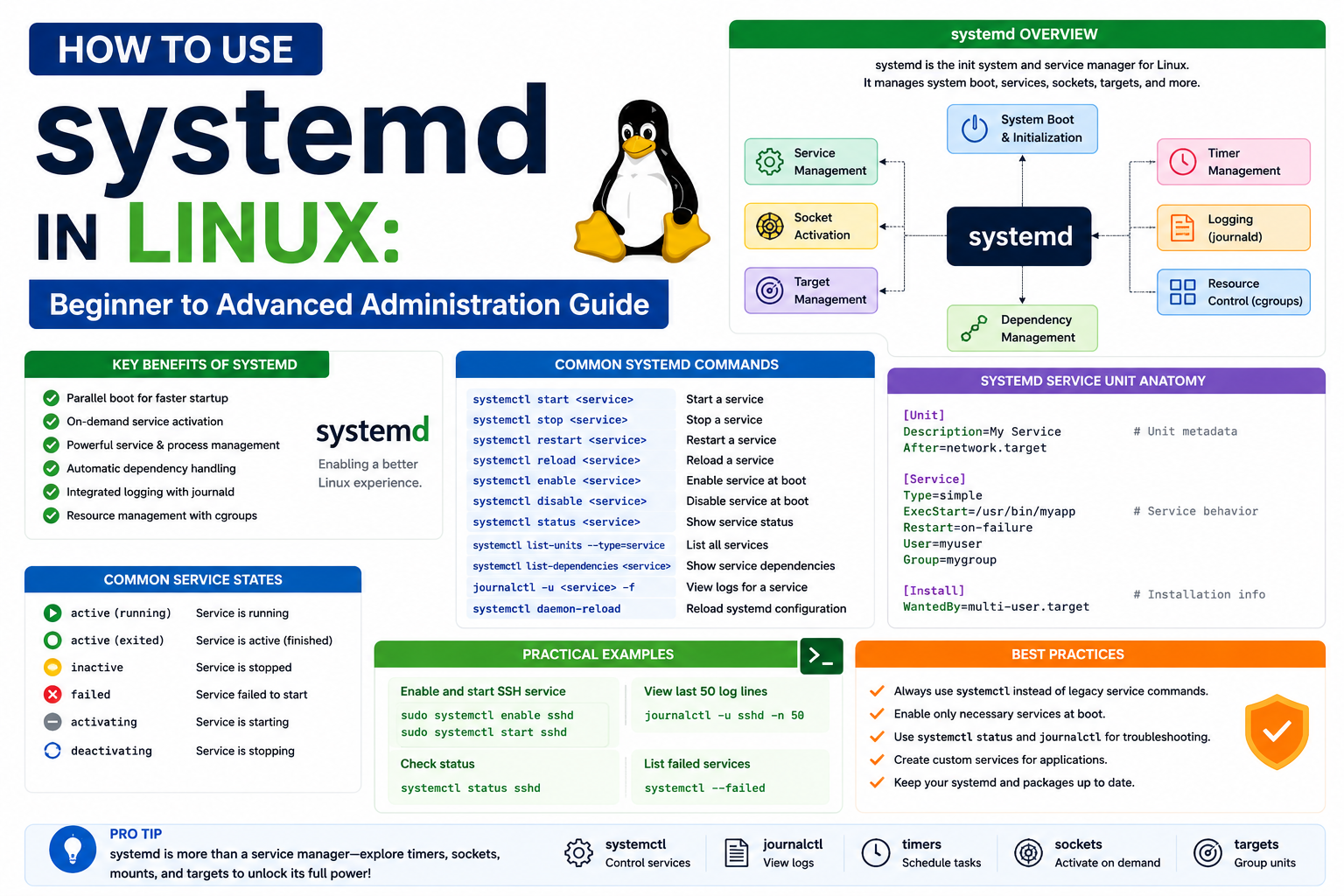
Modern Linux systems are designed to be stable, fast, and capable of handling complex workloads that run continuously for long periods without interruption. At the center of this stability lies a core management component known as systemd. It is not just a background tool but a foundational part of how many Linux distributions manage their startup process, services, and system behavior.
To understand its importance, it helps to first think of a Linux system as a collection of many small components working together. These include background services such as networking, file synchronization, user sessions, hardware management, and application services. Without a centralized system to coordinate all these components, managing a Linux system would be inconsistent and inefficient. systemd solves this challenge by acting as a unified manager that organizes, controls, and monitors nearly every part of the system lifecycle.
One of the key reasons systemd is so widely adopted is its ability to standardize system behavior across different Linux distributions. Before its introduction, each distribution often had its own way of handling startup processes and service management. This created complexity for administrators who had to learn different tools depending on the system they were using. systemd introduced a more consistent and structured approach, making Linux administration more predictable and scalable.
At its core, systemd focuses on three major responsibilities. The first is system initialization, which involves starting the system in a controlled and optimized manner. The second is service management, which ensures that applications and background processes run correctly, restart when needed, and stop when required. The third is system supervision, where systemd continuously monitors system health and resource usage to maintain stability.
Another important aspect of systemd is its focus on parallel processing during startup. Instead of starting services one after another in a strict sequence, systemd evaluates dependencies and starts multiple services simultaneously when possible. This significantly reduces boot time and improves overall system responsiveness.
In addition to performance improvements, systemd also enhances system observability. It provides a centralized view of system activity, making it easier to track what is happening at any given moment. This is especially valuable in server environments where administrators need to quickly diagnose issues or understand system behavior under load.
Overall, systemd represents a shift toward a more integrated and intelligent approach to system management in Linux. It simplifies administration while improving performance, reliability, and consistency across systems. To fully appreciate how it works, it is important to understand how Linux system management evolved and what problems systemd was designed to solve.
Evolution from Traditional Init Systems to systemd
Before systemd became widely adopted, Linux systems relied on older initialization systems commonly referred to as init systems. These earlier systems were responsible for starting the machine and launching essential services in a predefined order. While functional, they were often limited in flexibility and performance, especially as Linux began to evolve into a platform for large-scale servers, cloud computing, and containerized applications.
Traditional init systems followed a sequential startup model. This meant that each service had to wait for the previous one to fully start before it could begin. While this approach was simple and easy to understand, it introduced significant delays during system boot. As Linux systems grew more complex, with dozens or even hundreds of services, this sequential process became inefficient.
Another limitation of older init systems was their lack of dependency awareness. Services were started based on static configuration files rather than dynamic analysis of system needs. If a service depended on another service that had not yet started, failures or delays could occur. Administrators often had to manually adjust startup scripts to ensure proper order, which added complexity and increased the likelihood of errors.
As computing environments evolved, especially with the rise of cloud infrastructure and virtualization, there was a growing need for faster boot times, better resource control, and more reliable service management. This demand led to the development of systemd, which introduced a more modern and integrated approach.
systemd replaced the sequential startup model with a dependency-based system. Instead of following a fixed order, it analyzes relationships between services and starts them in parallel whenever possible. This dramatically improves boot performance and allows systems to become operational much faster.
In addition, systemd introduced a more unified structure for managing system components. Older systems often used separate tools for logging, device management, and service control. systemd brought many of these functions together under one framework, reducing fragmentation and simplifying system administration.
Another key improvement was systemd’s ability to monitor and restart services automatically. In traditional systems, if a service failed, it often required manual intervention to restore it. systemd continuously monitors services and can automatically restart them if they crash, improving system reliability and reducing downtime.
This evolution was not without debate. Some administrators preferred the simplicity of older init systems, arguing that systemd introduced unnecessary complexity. However, as systems grew more demanding, the benefits of systemd in terms of performance, scalability, and control became increasingly clear. Today, it is widely used across many major Linux distributions and is considered a standard component of modern Linux infrastructure.
Core Architecture of systemd and Its Building Blocks
The architecture of systemd is built around a modular and highly organized structure that allows it to manage different aspects of a Linux system efficiently. Instead of treating system components as isolated elements, systemd organizes them into structured units that define how each part of the system behaves, interacts, and depends on others.
At the heart of systemd’s architecture are units. A unit represents any resource that systemd manages. This could be a running service, a device, a file system mount, or even a system state target. Each unit is defined by configuration rules that describe what it does and how it should behave under different conditions.
Units are categorized into different types based on their function. Service units are responsible for managing background processes such as web servers or database services. Mount units handle file system mounting operations. Device units represent hardware components, while socket units manage network communication endpoints. This categorization allows systemd to maintain a clear structure for system management.
One of the key strengths of systemd’s architecture is its dependency management system. Units can depend on other units, meaning that certain services will only start when required components are available. This ensures that the system operates stably and predictably, reducing the risk of failures caused by missing dependencies.
systemd also uses a central management process that oversees all unit activity. This process acts as a control center, coordinating startup, shutdown, and runtime behavior of system components. It ensures that units are started in the correct order and remain in a healthy state during operation.
Another important architectural feature is socket-based activation. Instead of starting all services immediately during boot, systemd can delay the startup of certain services until they are actually needed. This improves performance and reduces resource consumption. For example, a network service may only start when a connection request is received, rather than running continuously from system startup.
In addition, systemd integrates closely with the Linux kernel through mechanisms that allow it to monitor and control processes at a deep level. This tight integration enables advanced features such as process tracking, resource allocation, and automatic recovery from failures.
Overall, systemd’s architecture is designed to bring structure, efficiency, and intelligence to system management. Organizing system components into well-defined units and managing them through a centralized framework, it provides a powerful foundation for modern Linux systems.
How systemd Manages the Linux Boot Process
One of the most important roles of systemd is controlling how a Linux system starts up. The boot process in Linux is not a single action but a carefully coordinated sequence of events that brings the system from a powered-off state to a fully functional environment. systemd takes responsibility for organizing this sequence in a way that is efficient, fast, and reliable.
When a Linux machine is powered on, the hardware first initializes basic components such as memory, processors, and storage devices. After this initial stage, control is passed to the Linux kernel. Once the kernel is loaded, systemd becomes one of the first user-space processes to run. From this point onward, it becomes the central coordinator of system startup.
Instead of following a rigid step-by-step process, systemd uses a dependency-driven model. This means it does not simply start services in a fixed order. Instead, it evaluates which services are required for the system to reach a usable state and starts them in parallel whenever possible. This approach reduces boot time significantly compared to older systems.
systemd organizes the boot process using a concept known as targets. A target represents a specific system state, such as a basic multi-user environment or a fully graphical desktop environment. Each target defines a collection of services and dependencies that must be active for that state to be achieved.
For example, a basic server environment may only require networking, logging, and core system services. A graphical desktop environment, on the other hand, requires additional services such as display management and user session handling. systemd ensures that only the necessary components are started based on the selected target.
Another important feature of systemd during boot is parallel service activation. Instead of waiting for one service to complete before starting another, systemd evaluates dependencies and starts multiple independent services simultaneously. This makes the system feel faster and more responsive during startup.
systemd also handles fallback mechanisms during boot. If a service fails to start, it can retry, skip, or switch to alternative configurations depending on predefined rules. This increases system resilience and ensures that minor failures do not prevent the entire system from becoming operational.
Understanding systemd Units and Their Role in System Control
At the core of systemd’s functionality lies the concept of units. A unit is a standardized object that represents a resource or function managed by systemd. Everything systemd controls is treated as a unit, which allows for a consistent and unified management approach.
Units are defined using configuration files that describe their behavior, dependencies, and lifecycle. These files are interpreted by systemd to determine how each component should be handled. This structure makes system management highly organized and predictable.
There are several different types of units, each serving a specific purpose. Service units are among the most commonly used and represent background processes such as web servers, database engines, or application services. These units define how a service should start, stop, and restart when necessary.
Another important type is socket units. These manage network communication endpoints and allow services to be started only when a connection request is received. This improves efficiency by avoiding unnecessary resource usage when services are idle.
Mount units are responsible for handling file system mounts. They ensure that storage devices and partitions are properly attached to the system during startup. This includes both internal drives and external devices such as USB storage.
Device units represent hardware components detected by the system. systemd monitors these devices and can trigger actions when hardware is added or removed. This dynamic handling of hardware makes Linux systems more adaptable to changing environments.
Timer units provide a scheduling mechanism similar to traditional cron systems. They allow tasks to be executed at specific times or intervals. However, systemd timers offer tighter integration with the system and more precise control over execution conditions.
Each unit can have dependencies that define relationships with other units. For example, a database service may depend on a network service being active. systemd uses these relationships to ensure that services start in the correct order while still allowing parallel execution where possible.
Units also have defined states that indicate their current status. A unit may be active, inactive, failed, or in the process of starting or stopping. systemd continuously monitors these states to maintain system stability and provide real-time status information.
systemd Services and Service Lifecycle Management
Services are one of the most visible and frequently used components managed by systemd. A service represents a long-running process that performs a specific function within the system. Examples include web servers, database engines, and system monitoring tools.
systemd manages the entire lifecycle of services, from startup to shutdown and everything in between. When a service is started, systemd ensures that all required dependencies are satisfied first. Once the service is running, systemd continues to monitor it for failures or abnormal behavior.
If a service crashes or becomes unresponsive, systemd can automatically attempt to restart it based on predefined rules. This self-healing capability is one of the key advantages of systemd in modern Linux environments, especially in production systems where uptime is critical.
Services can also be configured with restart policies that define how systemd should react to failures. Some services may restart immediately after a crash, while others may require manual intervention. This flexibility allows administrators to fine-tune system behavior based on specific requirements.
Another important aspect of service management is resource control. systemd can limit how much CPU, memory, or I/O a service is allowed to use. This prevents individual services from consuming excessive resources and affecting overall system performance.
Services are also tightly integrated with logging and monitoring systems. systemd records detailed information about service activity, including startup times, error messages, and runtime behavior. This makes it easier to diagnose issues and understand system performance patterns.
In addition, services can be started manually, automatically at boot, or triggered on demand. This flexibility allows systems to remain efficient by only running services when they are actually needed.
systemd Targets and System States
Targets are a critical part of systemd’s structure because they define the overall state of the system at different stages of operation. A target is essentially a collection of units grouped to represent a specific operational mode.
Unlike traditional runlevels used in older Linux systems, targets are more flexible and descriptive. They allow administrators to define complex system states that go beyond simple numeric levels. Each target can include services, mounts, and other units that must be active for that state to be considered complete.
For example, a multi-user target represents a system state where multiple users can log in and use the system through a command-line interface. A graphical target includes everything needed to run a desktop environment, including display managers and graphical services.
Targets also play an important role in the boot process. systemd transitions through different targets as the system starts up, gradually moving from a minimal state to a fully operational environment. Each target depends on the successful activation of the previous one.
One of the advantages of targets is their modularity. Administrators can switch between different targets without rebooting the system. This allows for dynamic changes in system behavior, such as switching between a graphical interface and a minimal server mode.
Targets can also be customized to suit specific needs. For example, a server optimized for database performance may use a target that disables unnecessary graphical services and focuses on performance-critical components.
systemd Logging and the Journal System
Logging is an essential part of system administration, and systemd introduces a centralized logging system known as the journal. This system collects and stores log data from various sources in a structured and unified format.
Unlike traditional logging systems that rely on multiple text files scattered across the system, the journal provides a single location for all logs. This makes it easier to search, filter, and analyze system activity.
The journal collects logs from system services, the kernel, applications, and hardware events. Each log entry is stored with metadata that includes timestamps, service identifiers, and priority levels. This structured approach allows for more precise analysis compared to plain text logs.
One of the key advantages of the journal is its ability to handle large volumes of log data efficiently. It is designed to work well in high-performance environments where systems generate continuous streams of log information.
The journal also supports persistent and volatile storage modes. Persistent logs are saved to disk and remain available after system reboots, while volatile logs are stored in memory and are cleared when the system restarts.
Administrators can filter logs based on various criteria such as time range, service name, or severity level. This makes troubleshooting more efficient, especially in complex systems with many active services.
In addition, the journal integrates with systemd’s service management capabilities. This means that logs are automatically associated with specific services, making it easier to trace issues back to their source.
Resource Control and cgroups Integration in systemd
. systemd integrates closely with a Linux kernel feature known as control groups, often referred to as cgroups. This integration allows systemd to manage system resources at a granular level.
Cgroups enable systemd to allocate CPU, memory, and input/output resources to specific processes or groups of processes. This ensures that no single service can overwhelm the system and degrade performance.
For example, a resource-intensive application can be restricted to use only a certain percentage of CPU power. Similarly, memory limits can be set to prevent services from consuming more RAM than is available.
This level of control is particularly important in server environments where multiple services run simultaneously. By isolating resource usage, systemd helps maintain system stability and performance consistency.
Cgroups also allow systemd to track resource usage in real time. Administrators can monitor how much CPU or memory each service is using and make adjustments if necessary.
Another advantage of cgroups integration is process grouping. systemd can treat related processes as a single unit, making it easier to manage complex applications that spawn multiple subprocesses.
This deep integration between systemd and the Linux kernel provides a powerful foundation for modern system management, enabling precise control over how resources are distributed and used across the system.
Advanced Service Management in systemd and Real-World Administration Practices
As Linux systems grow in complexity, managing services effectively becomes one of the most important responsibilities of system administration. systemd plays a central role in this area by providing a unified framework for starting, stopping, monitoring, and controlling services across the entire system. While earlier parts focused on foundational concepts, real-world usage of systemd goes far deeper, involving service tuning, dependency control, failure recovery strategies, and operational optimization.
In practical environments such as cloud servers, enterprise systems, and production workloads, services rarely operate in isolation. Instead, they interact with databases, networking layers, authentication systems, and storage services. systemd ensures that these interdependencies are managed correctly so that the system remains stable even under heavy workloads or partial failures.
One of the most important aspects of service management in systemd is understanding how services transition through different states. A service is not simply “on” or “off.” Instead, it moves through a lifecycle that includes inactive, activating, active, reloading, and failed states. These states allow administrators to understand exactly what is happening behind the scenes at any given moment.
When a service is started, systemd first evaluates whether all required dependencies are satisfied. If a dependent service is not yet active, systemd will delay or queue the startup process until conditions are met. This ensures that services do not fail due to missing prerequisites, which was a common issue in older initialization systems.
In addition to dependency handling, systemd allows precise control over how services behave when they fail. Restart policies can be configured to define whether a service should restart automatically, restart after a delay, or remain stopped until manual intervention occurs. This is particularly important for mission-critical services where uptime is essential.
Another advanced feature is service isolation. systemd can isolate services using kernel-level mechanisms so that each service runs in its own controlled environment. This reduces the risk of one service interfering with another, improving both security and stability.
systemd also supports service templating, which allows administrators to create reusable service definitions. This is especially useful in environments where multiple instances of the same application are required. Instead of creating separate configuration files for each instance, a single template can be reused with different parameters.
In high-performance environments, service optimization becomes essential. systemd allows fine-tuning of startup priorities, CPU scheduling behavior, and memory allocation for individual services. This ensures that critical services receive priority access to system resources while less important services operate in the background.
Logging integration is another key aspect of service management. Every service managed by systemd automatically generates structured logs that are stored in the system journal. These logs provide detailed insights into service behavior, including startup times, error conditions, and runtime performance metrics.
Administrators often rely on this logging system to diagnose issues quickly. Instead of searching through multiple log files scattered across the system, all relevant information is centralized, making troubleshooting significantly more efficient.
Deep Dive into systemd Dependencies and Execution Flow
One of the most powerful features of systemd is its ability to manage dependencies between different system components. In complex Linux environments, services rarely operate independently. Instead, they rely on other services, hardware components, or system states to function correctly. systemd models these relationships explicitly and uses them to determine execution order.
Dependencies in systemd are not just simple “start before” or “start after” rules. They are part of a dynamic graph structure that systemd evaluates during runtime. This allows it to make intelligent decisions about which services can run in parallel and which must wait for others to complete initialization.
There are several types of dependencies in systemd. One of the most common is the requirement dependency, where one service cannot function unless another service is active. For example, a web application may depend on a database service. systemd ensures that the database starts first before launching the application.
Another type is the ordering dependency, which defines the sequence in which services should start without necessarily requiring strict functional dependency. This allows systemd to optimize startup time by running independent services simultaneously.
There are also soft dependencies, which indicate preferred relationships without enforcing strict requirements. These are used when a service can operate without another component, but performs better when it is available.
systemd uses these dependency relationships to build a startup execution graph. This graph is analyzed during system boot to determine the most efficient way to start services. The result is a highly optimized boot process that minimizes delays and maximizes parallel execution.
In addition to startup dependencies, systemd also manages runtime dependencies. This means that even after the system has fully booted, systemd continues to monitor relationships between services and ensures that changes in one service do not negatively impact others.
This dynamic dependency management is one of the key reasons systemd is considered more advanced than older initialization systems. It allows Linux systems to adapt to changing conditions in real time rather than relying on static configurations.
systemd and Process Control with cgroups Integration
A major strength of systemd lies in its deep integration with Linux control groups, commonly known as cgroups. This integration allows systemd to manage processes at a granular level, controlling how system resources are allocated and used.
Cgroups enable systemd to group related processes and apply resource limits to them collectively. This is particularly useful in environments where multiple services are running simultaneously and must share system resources fairly.
For example, a database service might be allocated a fixed amount of memory and CPU usage, while background logging services are restricted to lower priority levels. This ensures that critical services always have the resources they need to function properly.
systemd uses cgroups not only for resource control but also for process tracking. Every service managed by systemd is assigned to a specific cgroup, allowing the system to monitor all associated processes as a single unit. This simplifies process management and makes it easier to identify resource usage patterns.
Another important benefit of cgroup integration is process containment. If a service spawns multiple child processes, systemd can track and manage all of them together. This ensures that when a service is stopped, all associated processes are also terminated cleanly.
systemd also uses cgroups to enforce limits on system resources such as CPU time, memory usage, and disk I/O. These limits prevent any single service from consuming excessive resources and affecting overall system performance.
In cloud and containerized environments, this capability becomes even more important. systemd can isolate workloads and ensure that each service operates within defined boundaries, improving both stability and security.
systemd Socket Activation and On-Demand Service Execution
One of the more advanced features of systemd is socket activation, which allows services to be started on demand rather than running continuously in the background. This approach improves system efficiency by reducing unnecessary resource usage.
In traditional systems, services are often started during boot and remain active even when they are not being used. This can lead to wasted memory and CPU resources. systemd addresses this issue by allowing services to be triggered only when needed.
Socket activation works by creating a listening socket for a service before the service itself is started. When a request arrives at that socket, systemd automatically starts the associated service and passes the connection to it.
This means that services do not need to run continuously in the background. Instead, they are activated only when required, reducing system overhead. Once the service has finished handling requests, it can be stopped again, freeing up resources.
This mechanism is particularly useful for network services such as web servers, email servers, or remote access services. It allows systems to remain lightweight while still being responsive to incoming requests.
Socket activation also improves system startup time. Since services are not started immediately during boot, the system can reach a usable state more quickly. Services are then started dynamically as they are needed.
systemd Timers and Scheduled Task Management
systemd provides a modern alternative to traditional scheduling tools through its timer units. Timers allow administrators to schedule tasks based on time intervals or specific calendar events.
Unlike older scheduling systems that rely on external daemons, systemd timers are fully integrated into the systemd framework. This means they benefit from systemd’s dependency management, logging, and resource control features.
Timers can be configured to run tasks at fixed intervals, such as every hour or every day, or at specific times, such as midnight or system boot. They can also be combined with service units to trigger complex workflows.
One of the advantages of systemd timers is their precision. They are designed to be more accurate and reliable than traditional scheduling tools, especially in systems with heavy workloads or variable performance conditions.
Timers also integrate with systemd’s logging system, allowing administrators to track when tasks were executed and whether they completed successfully. This makes it easier to audit system activity and identify potential issues.
systemd Security Features and Isolation Mechanisms
Security is a critical aspect of modern system administration, and systemd includes several features designed to improve system safety. One of the most important is service isolation, which limits the access that individual services have to system resources.
systemd can restrict services from accessing certain parts of the file system, network interfaces, or hardware devices. This reduces the risk of a compromised service affecting the entire system.
Another important security feature is privilege separation. systemd allows services to run with reduced permissions, ensuring that they only have access to the resources they need to function.
systemd also supports sandboxing mechanisms that isolate services from each other. This prevents services from interfering with one another, even if they are running on the same system.
In addition, systemd can enforce read-only file systems for certain services, preventing them from modifying critical system files. This adds an extra layer of protection against accidental or malicious changes.
These security features make systemd particularly valuable in multi-user environments, cloud infrastructure, and production systems where stability and security are essential.
systemd in Modern Linux Ecosystems and Large-Scale Deployments
In modern computing environments, Linux is widely used in cloud platforms, container systems, and large-scale distributed infrastructures. systemd plays a crucial role in these environments by providing consistent service management across diverse systems.
In cloud environments, systemd ensures that virtual machines and containers start quickly and operate reliably. Its ability to manage dependencies and resources dynamically makes it well-suited for scalable infrastructures.
In containerized systems, systemd can be used to manage container lifecycles, control resource allocation, and monitor container health. This helps maintain stability in environments where hundreds or thousands of containers may be running simultaneously.
Large-scale deployments benefit from systemd’s centralized logging and monitoring capabilities. Administrators can track system behavior across multiple machines and identify issues quickly.
systemd also supports automation and orchestration tools, making it easier to integrate with modern infrastructure management systems. This allows organizations to deploy, manage, and scale Linux systems efficiently.
System Observability and Performance Monitoring with systemd
Understanding system behavior is essential for maintaining performance and reliability. systemd provides several tools for monitoring system activity and analyzing performance.
Through its journal system, administrators can access detailed logs that provide insight into system events. These logs can be filtered, searched, and analyzed to identify performance bottlenecks or service failures.
systemd also tracks resource usage for individual services, allowing administrators to see how much CPU, memory, and disk I/O each service consumes. This information can be used to optimize system performance and allocate resources more effectively.
In addition, systemd provides real-time status reporting for services, allowing administrators to monitor system health continuously. This helps detect issues early before they impact system stability.
systemd Integration with Modern Linux Networking and Service Communication
Beyond service management and boot control, systemd plays a subtle but important role in how Linux systems handle networking and inter-process communication. Modern Linux environments rely heavily on network-aware applications, microservices, and distributed systems, and systemd provides mechanisms that help coordinate these interactions efficiently and securely.
One of the key strengths of systemd in networking environments is its ability to manage socket-based communication at a system level. Instead of allowing each service to independently open and manage network ports, systemd can take responsibility for creating and maintaining sockets. This ensures that network endpoints are consistently available and properly controlled from the moment the system starts.
This approach also improves reliability in service communication. Because sockets are managed independently from the services themselves, incoming requests can be held until the corresponding service is ready. This prevents connection failures during system startup or service restarts, which is especially important for systems that must remain continuously available.
systemd also enhances network service coordination through activation triggers. A service does not need to be running continuously to respond to network requests. Instead, systemd can detect incoming traffic on a socket and activate the required service automatically. This creates a more efficient model where services are only active when needed, reducing unnecessary system load.
In distributed environments, where multiple services communicate across different machines, systemd helps ensure consistency in how services are exposed and managed. By centralizing socket definitions and service activation rules, systemd reduces configuration drift and improves predictability across systems.
Another important aspect of systemd’s networking integration is its support for dependency-aware service startup in networked applications. Many modern services rely on external systems such as authentication servers, caching layers, or APIs. systemd ensures that these dependencies are respected during startup, reducing the likelihood of partial or broken service initialization.
This coordination is particularly valuable in cloud-native environments, where services often scale dynamically and depend on rapidly changing infrastructure. systemd helps maintain stability by ensuring that service dependencies are always resolved before activation.
systemd Resource Prioritization and System Stability Mechanisms
In complex Linux systems, multiple services often compete for limited hardware resources such as CPU cycles, memory, and disk bandwidth. Without proper control, this competition can lead to performance degradation or system instability. systemd addresses this challenge through built-in resource prioritization mechanisms that work in conjunction with the Linux kernel.
Each service managed by systemd can be assigned resource constraints that define how much of the system it is allowed to consume. These constraints are not static but can be adjusted dynamically based on system conditions and administrative policies. This allows critical services to maintain priority access to resources even under heavy load.
One of the most important aspects of this mechanism is process isolation at the resource level. Instead of allowing all services to compete equally, systemd organizes them into controlled groups where resource usage is monitored and enforced. This ensures that no single service can overwhelm the system.
In addition to limiting resource consumption, systemd also supports prioritization of execution. Services that are essential for system functionality can be assigned higher priority levels, ensuring they receive CPU time before less critical processes. This improves responsiveness and reduces the risk of system slowdowns during peak usage.
systemd also contributes to system stability through failure containment. When a service becomes unstable or consumes excessive resources, systemd can isolate it without affecting other parts of the system. This prevents cascading failures, where one malfunctioning service disrupts the entire environment.
Another stability feature is automatic recovery management. systemd can detect abnormal behavior such as memory leaks, repeated crashes, or unresponsive services. Based on predefined rules, it can restart services, limit their execution, or temporarily disable them until manual intervention occurs.
These mechanisms make systemd particularly effective in high-availability environments where system uptime is critical. By combining resource control, prioritization, and failure handling, systemd helps maintain consistent system performance even under unpredictable workloads.
systemd and Hardware Event Management in Dynamic Systems
Modern Linux systems must handle a wide range of hardware events, from USB device insertion to storage configuration changes and peripheral detection. systemd plays an important role in managing these events by reacting dynamically to hardware changes and ensuring that system services respond appropriately.
When a new hardware device is connected, the Linux kernel detects it and notifies user-space processes. systemd listens for these events and can trigger specific actions based on the type of device detected. This allows the system to adapt in real time without requiring manual configuration or system restarts.
For example, when a new storage device is connected, systemd can automatically initiate mounting processes or trigger backup services. Similarly, when network interfaces change, systemd can adjust networking services to accommodate new configurations.
This dynamic behavior is particularly important in environments where hardware changes frequently, such as laptops, virtual machines, or containerized systems. systemd ensures that these changes are handled smoothly and consistently without disrupting system operations.
In addition to reactive behavior, systemd also supports predictive hardware management. By analyzing device patterns and historical usage, it can optimize how services interact with hardware components. This helps improve performance and reduces unnecessary system overhead.
Another important feature is device-based dependency management. Some services depend on specific hardware components to function correctly. systemd ensures that these services only start when the required hardware is available, preventing errors and failed service initialization.
This tight integration between systemd and hardware management contributes to a more responsive and adaptable Linux environment, capable of handling modern computing demands efficiently.
Conclusion
systemd has fundamentally reshaped how modern Linux systems operate by bringing structure, speed, and intelligence to system initialization and service management. Instead of relying on fragmented tools and sequential startup methods, it introduces a unified framework that handles services, processes, resources, logging, and hardware interaction in a coordinated way. This integration is what makes contemporary Linux environments more reliable and scalable than ever before.
One of the most significant contributions of systemd is its ability to streamline system boot and service execution. By understanding dependencies and enabling parallel processing, it reduces startup time while ensuring that services are launched in the correct order. This balance between speed and stability is essential for both desktop and server environments.
Beyond boot management, systemd provides deep control over system resources and service behavior. Through its integration with cgroups, it ensures fair resource distribution and prevents individual processes from overwhelming the system. Its built-in recovery mechanisms further enhance reliability by automatically handling service failures and maintaining system continuity.
systemd also improves observability through its centralized logging system, making troubleshooting and monitoring far more efficient. Administrators can quickly analyze system behavior without navigating multiple log sources, which simplifies maintenance and improves response time during issues.
As Linux continues to evolve in cloud computing, containerization, and large-scale distributed systems, systemd remains a foundational component that supports these advancements. Its modular design, dynamic management capabilities, and tight kernel integration make it an essential tool for modern infrastructure.
Ultimately, understanding systemd is not just about learning a service manager—it is about understanding how modern Linux systems maintain order, efficiency, and resilience in increasingly complex computing environments.