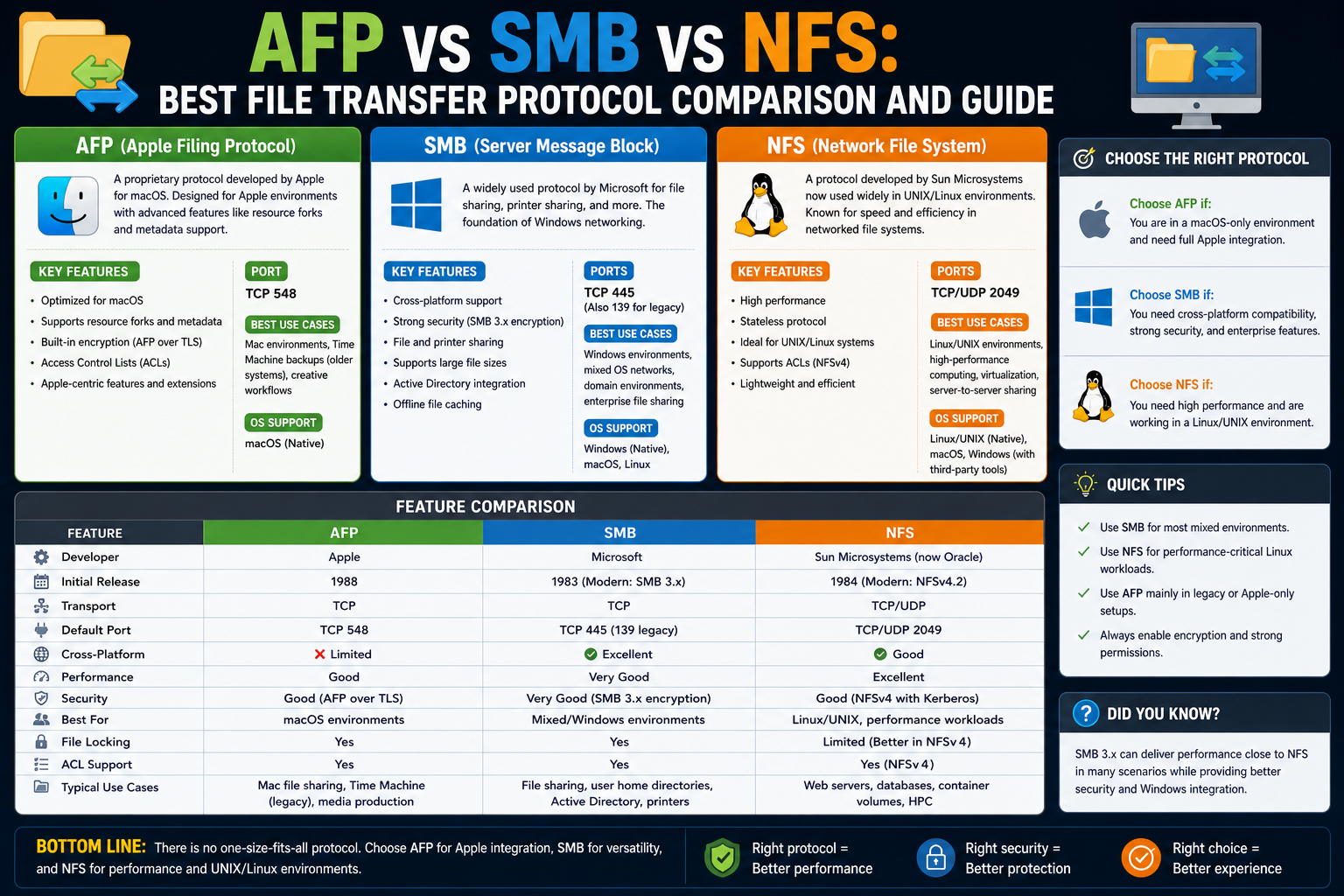
File sharing across networks has become a foundational part of modern computing, especially in business environments where collaboration, centralized storage, and fast access to data are essential. Instead of relying on physical movement of storage devices, organizations now depend on structured communication protocols that allow multiple systems to access, modify, and manage files seamlessly over a network. Among the most widely used approaches are SMB, NFS, and AFP, each developed in different ecosystems with unique priorities and design philosophies.
From Physical Transfers to Network-Based Access
In earlier computing environments, moving data between machines often required physical media. Users would copy files onto removable storage and manually transfer them between systems. This approach was slow, error-prone, and inefficient for growing organizations. As networks became more common in workplaces, the need for direct system-to-system communication led to the development of standardized file sharing methods that could operate over local networks without physical intervention.
Understanding File Transfer Versus File Sharing
File transfer and file sharing are often confused, but they serve different purposes. File transfer typically refers to moving a file from one system to another as a one-time action, such as downloading or uploading. File sharing, on the other hand, allows multiple systems to access the same stored data continuously over a network. In file sharing, the data remains centrally stored while authorized users interact with it in real time, making it more suitable for collaborative environments.
Role of Local Area Networks in File Sharing
Local area networks provide the foundation for modern file sharing protocols. These networks connect computers within a limited geographical area, allowing high-speed communication between devices. File sharing protocols designed for local networks prioritize reliability, low latency, and efficient data access. Over time, different ecosystems developed their own protocols to optimize performance within their preferred operating systems and hardware environments.
Introduction to SMB in Network Communication
SMB, known as Server Message Block, is one of the most widely used file sharing protocols in enterprise environments. It was originally designed to allow computers within a network to access shared files, printers, and other resources hosted on a server. SMB operates by enabling client systems to request access to shared resources, which are then delivered through structured communication sessions over the network.
Evolution of SMB Across Modern Systems
SMB has undergone significant evolution since its early implementations. Modern versions have introduced advanced capabilities such as encryption, secure authentication, and improved data integrity features. These enhancements make SMB suitable for use in secure enterprise environments where sensitive data is frequently exchanged. Its continuous development has allowed it to remain relevant across changing network infrastructures and operating system advancements.
Key Strengths of SMB in Enterprise Environments
One of the major strengths of SMB is its deep integration with widely used operating systems. This integration allows users to access shared network resources without needing additional software or complex configurations. SMB also supports centralized authentication systems, enabling organizations to manage permissions efficiently. Its compatibility with various storage solutions and network devices makes it a flexible choice for large-scale deployments.
SMB and Cross-Platform Accessibility
Although SMB is strongly associated with Windows environments, it is not limited to a single operating system. Modern implementations allow compatibility across multiple platforms, including Linux and macOS systems. This cross-platform support has made SMB a standard choice for organizations with diverse computing environments. It allows seamless communication between different systems without requiring separate protocols for each platform.
Foundations of NFS in Unix-Based Systems
NFS, known as Network File System, was developed within Unix-based environments to enable efficient file sharing across connected systems. It was designed with simplicity and performance in mind, focusing on providing direct and transparent access to remote files. In NFS environments, remote files appear as if they are part of the local file system, making interaction intuitive for users familiar with Unix-style operating systems.
Design Philosophy Behind NFS
The design of NFS emphasizes lightweight communication and efficient resource usage. Unlike more complex protocols, NFS focuses primarily on file access rather than additional services such as printer sharing or device management. This narrow focus allows it to deliver strong performance in environments where file operations are frequent and system overhead needs to remain minimal.
Performance Characteristics of NFS
NFS is known for its efficiency in handling file operations, particularly in environments where multiple read and write requests occur simultaneously. It performs well in scenarios involving large-scale computing, development environments, and server-based workloads. Its streamlined architecture allows it to maintain responsiveness even under heavy network usage, especially in systems optimized for Unix or Linux operations.
Advancements in NFS Development
Over time, NFS has evolved to include improvements in security, reliability, and scalability. Newer implementations introduced better authentication mechanisms and state management features that enhance stability in distributed environments. These improvements have helped NFS remain a preferred choice in technical and research-focused environments where performance and consistency are critical.
Apple’s Approach to Network File Sharing
Apple developed AFP, known as Apple Filing Protocol, to support file sharing within its early ecosystem. It was designed to provide a seamless user experience for Mac systems, focusing on simplicity and ease of use. AFP allowed users to connect to shared resources with minimal configuration, aligning with Apple’s broader philosophy of user-friendly computing.
User Experience Focus of AFP
AFP prioritized ease of access and integration within Apple environments. It enabled users to interact with shared files in a way that felt natural within the operating system interface. This tight integration made AFP particularly appealing in creative industries where Mac systems were widely used for design, media production, and publishing workflows.
Limitations in Modern Network Environments
While AFP was effective within its original ecosystem, its relevance has decreased over time. As network environments became more diverse, the need for cross-platform compatibility grew. AFP’s limited interoperability compared to more universal protocols made it less suitable for modern mixed-operating-system environments, leading to reduced adoption in contemporary networks.
Transition Toward Unified File Sharing Standards
As computing environments evolved, organizations began moving toward unified protocols that could operate across multiple systems without requiring separate configurations. SMB gradually became the dominant choice due to its broad compatibility, while NFS remained strong in Unix-based environments. AFP, however, transitioned into a legacy role as newer standards took precedence.
Interoperability Challenges in Mixed Systems
One of the major challenges in network file sharing is ensuring smooth communication between different operating systems. Each protocol was originally designed with a specific ecosystem in mind, which can create compatibility issues in mixed environments. SMB has addressed many of these challenges by expanding support across platforms, while NFS remains highly optimized for Unix-based systems.
Growing Importance of Unified Network Communication
Modern networks increasingly rely on standardized communication protocols to reduce complexity and improve efficiency. Organizations prefer solutions that minimize configuration overhead while maximizing compatibility. This shift has influenced the adoption patterns of SMB and NFS, while reducing reliance on older, platform-specific protocols like AFP.
Foundations for Understanding Protocol Selection
Choosing between SMB, NFS, and AFP requires understanding how each protocol aligns with specific system environments and operational needs. Factors such as operating system compatibility, performance requirements, and administrative complexity all play a role in determining which protocol is most suitable. This foundational understanding sets the stage for deeper comparison in the next section of the discussion.
SMB in Depth: Architecture and Network Behavior
SMB operates as a client–server communication protocol where a client system requests access to shared resources hosted on a server. The server responds by granting controlled access based on authentication and permissions. This structured approach allows multiple users to interact with shared data simultaneously while maintaining consistency and security. SMB sessions are maintained over a connection-oriented transport, ensuring that file operations remain synchronized and reliable across the network.
How SMB Handles File Operations
SMB manages file access through a request-response mechanism. When a user opens a file, the client sends a request to the server, which verifies permissions before granting access. Once access is granted, the file can be read, written, or modified based on the permissions assigned. SMB also tracks file locks, preventing conflicts when multiple users attempt to modify the same file at the same time, ensuring data integrity in collaborative environments.
Authentication and Security in SMB
Modern SMB implementations include robust authentication mechanisms that integrate with centralized identity systems. This allows organizations to manage user access through domain-based authentication models. SMB also supports encryption, ensuring that data transmitted across the network remains protected from interception. These security enhancements make SMB suitable for enterprise environments where data protection is a high priority.
SMB Performance Considerations
SMB performance depends on several factors, including network latency, server hardware, and workload type. While SMB is highly versatile, it can introduce overhead due to its feature-rich design. However, modern versions have optimized data handling and reduced inefficiencies, making SMB capable of handling large-scale enterprise workloads effectively. Its performance is generally consistent in well-structured networks with proper configuration.
SMB in Mixed Operating System Environments
One of SMB’s strongest advantages is its ability to function across different operating systems. Windows systems natively support SMB, while Linux and macOS systems can connect using compatible implementations. This cross-platform capability makes SMB a practical choice in environments where users operate different systems but need shared access to centralized resources.
Internal Structure of NFS Communication
NFS operates differently from SMB by focusing on simplicity and direct file system integration. Instead of managing complex session states, NFS treats remote files as part of the local file structure. This means users can access remote directories as if they were stored locally, reducing the complexity of file access operations and improving ease of use in Unix-based environments.
Stateless Nature of NFS in Early Versions
Early versions of NFS were stateless, meaning the server did not retain information about client sessions. Each request was treated independently, which simplified server design and improved scalability. However, this also introduced limitations in terms of reliability and recovery, especially in cases of network interruption or system failure.
Evolution Toward Stateful NFS Designs
Newer versions of NFS introduced stateful capabilities to improve reliability and consistency. These enhancements allow the system to maintain session awareness, track file locks, and recover more effectively from interruptions. This evolution has made NFS more suitable for enterprise and distributed computing environments while retaining its original performance advantages.
Security Improvements in NFS
Security in NFS has significantly improved over time. Earlier implementations relied heavily on trusted network environments, which limited their use in broader enterprise settings. Modern versions introduced stronger authentication mechanisms and access control features, allowing NFS to operate more securely in environments where data protection is essential.
NFS Performance in High-Throughput Systems
NFS is particularly well-suited for high-throughput environments such as scientific computing, software development, and large-scale data processing. Its lightweight architecture allows it to handle frequent file operations efficiently. Because it reduces protocol overhead, NFS can achieve high performance in environments where speed and responsiveness are critical.
Integration of NFS with Linux Systems
NFS integrates naturally with Linux and Unix systems due to shared design principles. It works seamlessly with native file permissions, system utilities, and automation tools. This tight integration makes it easier for system administrators to manage file sharing without requiring additional layers of abstraction or compatibility tools.
AFP Communication Model and Design Philosophy
AFP was designed around the idea of simplicity and seamless user experience. It abstracts network complexity from the user, allowing file sharing to feel like a direct extension of the local file system. This design made it particularly appealing in environments where ease of use was prioritized over deep configurability.
AFP File Access Mechanism
AFP handles file access through a structured request system similar in concept to other file sharing protocols but optimized for Apple environments. It manages file metadata, permissions, and access requests in a way that aligns closely with the macOS file system structure, providing a smooth and integrated experience for users.
Limitations of AFP in Cross-Platform Use
AFP’s design is closely tied to Apple ecosystems, which limits its flexibility in heterogeneous environments. While it performs well within its intended system, it does not integrate as efficiently with non-Apple platforms. This limitation became more noticeable as organizations increasingly adopted mixed operating systems.
Transition Away from AFP in Modern Systems
As network environments evolved, Apple gradually shifted away from AFP in favor of more universal protocols. SMB became the default choice due to its broader compatibility and stronger cross-platform support. AFP remains in use primarily for legacy systems and compatibility scenarios rather than as a primary file sharing solution.
Comparing Protocol Overhead and Efficiency
Each protocol handles network overhead differently. SMB carries more complexity due to its wide feature set, including security, authentication, and resource sharing capabilities. NFS minimizes overhead by focusing on direct file access, making it more efficient in certain environments. AFP falls somewhere in between but lacks the modern optimizations found in the other two protocols.
Scalability in Enterprise Environments
Scalability is an important factor when choosing a file sharing protocol. SMB scales well in enterprise environments due to its integration with centralized management systems. NFS scales effectively in distributed computing environments where performance and simplicity are prioritized. AFP, however, is less commonly used in large-scale deployments due to its limited modernization.
Network Dependency and Reliability Factors
All three protocols depend on network stability, but they handle interruptions differently. SMB maintains session continuity and supports recovery mechanisms. NFS has evolved to handle state tracking and improve resilience. AFP relies heavily on its original design assumptions, which makes it less adaptable in modern unstable or highly distributed networks.
Foundation for Practical Deployment Decisions
Understanding how SMB, NFS, and AFP operate internally provides a clearer foundation for making deployment decisions. Each protocol reflects the priorities of the ecosystem in which it was developed. These differences become more apparent when applied to real-world environments, where factors such as scalability, compatibility, and performance determine the most suitable choice.
Performance Differences in Real Network Environments
Performance between SMB, NFS, and AFP is not only defined by protocol design but also by how they behave under real-world network conditions. Latency, bandwidth availability, and server load all influence how efficiently each protocol operates. SMB tends to introduce more overhead due to its feature-rich architecture, while NFS focuses on minimizing unnecessary processing, often resulting in faster response times in Linux-heavy environments. AFP, being older and less optimized for modern infrastructures, generally lags behind in performance under mixed workloads.
SMB Behavior Under High User Load
In environments with many concurrent users, SMB handles load through session management and resource locking mechanisms. This ensures that multiple users can access shared files without causing corruption or inconsistency. However, as the number of simultaneous connections increases, SMB can experience performance degradation if the underlying infrastructure is not properly scaled. Proper tuning of server resources and network configuration is essential to maintain stable performance in large deployments.
NFS Efficiency in Concurrent Access Scenarios
NFS manages concurrent access differently by relying on simpler request handling and lightweight communication. This allows it to handle high volumes of file operations with lower overhead. In clustered systems or compute-heavy environments, NFS often performs more efficiently because it avoids the complexity of maintaining extensive session states. However, ensuring consistency across multiple clients requires careful configuration of locking and synchronization features.
AFP Performance Limitations in Modern Workloads
AFP was designed during a time when network environments were simpler and workloads were less demanding. As a result, it struggles to match the performance levels required in modern enterprise systems. While it still functions adequately in small-scale or legacy environments, it lacks the optimizations needed for high concurrency, large file transfers, or distributed systems, making it less suitable for current network demands.
File Locking Mechanisms Across Protocols
File locking is critical in preventing data corruption when multiple users access the same file. SMB implements robust locking mechanisms that ensure consistent file states across clients. NFS initially lacked strong locking capabilities but later introduced improved mechanisms in newer versions to handle distributed access more reliably. AFP includes basic locking features but is less flexible compared to modern implementations of SMB and NFS.
Permission Handling and Access Control Models
Each protocol handles permissions differently based on its ecosystem. SMB integrates deeply with centralized authentication systems, allowing fine-grained control over user access through directory services. NFS relies on Unix-style permission models, which are simple but effective in homogeneous environments. AFP uses macOS-based permissions structures, which work well within Apple systems but lack flexibility outside that ecosystem.
Integration with Network Storage Systems
Modern network-attached storage systems often support multiple protocols simultaneously to maximize compatibility. SMB is commonly enabled by default due to its widespread use, while NFS is frequently activated in Linux-focused environments. AFP support is increasingly rare but may still appear in older storage devices. This multi-protocol approach allows organizations to support diverse user groups without requiring separate infrastructure.
SMB in Virtualized Environments
Virtualization has become a core component of modern IT infrastructure, and SMB plays a significant role in supporting virtual machines and shared storage systems. It allows virtual environments to access centralized storage efficiently, enabling features such as live migration and shared data access. However, performance tuning is often required to ensure that SMB does not become a bottleneck in heavily virtualized systems.
NFS in Cloud and Distributed Systems
NFS is widely used in cloud and distributed computing environments due to its lightweight nature and scalability. It is often deployed in containerized systems and cloud-native applications where fast, reliable file access is required. Its simplicity allows it to integrate well with automated deployment pipelines and large-scale data processing systems, making it a preferred choice in modern cloud architectures.
AFP in Legacy Infrastructure
Although AFP is no longer a primary choice for modern deployments, it still exists in legacy infrastructure. Some older storage systems and applications continue to rely on AFP for compatibility reasons. In such environments, maintaining AFP support is necessary to ensure continuity of operations, even though migration to more modern protocols is often recommended.
Cross-Protocol Compatibility Challenges
One of the ongoing challenges in network environments is ensuring compatibility between different file sharing protocols. SMB, NFS, and AFP each interpret file structures, permissions, and metadata differently. This can lead to inconsistencies when systems attempt to interact across protocols. Middleware solutions and protocol translation layers are sometimes used to bridge these differences.
Security Models and Threat Exposure
Security considerations vary significantly between the three protocols. SMB includes advanced encryption and authentication features designed for secure enterprise environments. NFS relies on trusted network assumptions but has evolved to include stronger security mechanisms in modern implementations. AFP provides basic security within Apple ecosystems but lacks the advanced protections found in newer protocols.
Exposure Risks in Open Networks
None of the three protocols were originally designed for direct exposure to open networks. SMB and NFS, in particular, assume a trusted internal network environment. Exposing them directly to external networks increases security risks. For this reason, organizations typically restrict access through VPNs or private network links to ensure safe communication between systems.
Role of VPNs in Secure File Sharing
Virtual private networks provide a secure tunnel through which file sharing protocols can operate safely over public networks. By encrypting traffic between endpoints, VPNs allow SMB and NFS to function as if they were operating within a secure local network. This approach helps maintain performance while protecting sensitive data during transmission.
Impact of Latency on Protocol Performance
Latency plays a major role in how each protocol performs across networks. SMB can be more sensitive to high latency due to its complex communication structure. NFS generally handles latency better because of its lightweight design. AFP, being less optimized for modern networks, may experience noticeable delays in high-latency environments.
Bandwidth Utilization and Efficiency
Efficient bandwidth usage is essential in network file sharing. SMB tends to consume more bandwidth due to additional protocol overhead and feature support. NFS is more efficient in bandwidth usage, making it suitable for environments with limited network resources. AFP’s bandwidth efficiency is moderate but not optimized for modern high-speed networks.
Hybrid Environments and Protocol Coexistence
Many organizations operate hybrid environments where multiple operating systems and protocols coexist. In such setups, SMB often serves as the primary protocol due to its broad compatibility. NFS is used for specialized workloads, particularly in Linux-based systems. AFP may still exist in isolated legacy segments but is gradually being phased out.
Administrative Complexity in Multi-Protocol Networks
Managing multiple file sharing protocols increases administrative complexity. IT teams must handle different permission models, security configurations, and performance tuning requirements. SMB simplifies management in mixed environments, while NFS requires specialized knowledge for Unix-based systems. AFP adds additional overhead when legacy support is required.
Storage Virtualization and Protocol Interaction
Storage virtualization technologies abstract physical storage into logical units that can be accessed over the network. SMB and NFS integrate well with these systems, allowing flexible allocation of storage resources. AFP support in modern storage virtualization systems is limited, reflecting its declining role in contemporary infrastructure.
Foundation for Deployment Strategy Evaluation
Understanding the performance, security, and operational characteristics of SMB, NFS, and AFP provides a deeper foundation for evaluating deployment strategies. Each protocol reflects different design priorities, and their suitability depends heavily on the environment in which they are used. These factors become especially important when designing scalable, secure, and efficient network infrastructures.
Real-World Decision Making for File Sharing Protocols
Choosing between SMB, NFS, and AFP in practical environments is less about theoretical superiority and more about alignment with infrastructure, operating systems, and administrative goals. Each protocol fits naturally into certain ecosystems, and attempting to force a mismatch often leads to complexity, performance issues, or unnecessary maintenance overhead. In most modern networks, SMB and NFS dominate decision-making, while AFP appears mainly in legacy scenarios.
SMB in Windows-Centric Organizations
In environments where Windows systems dominate, SMB naturally becomes the default choice. Its deep integration with Windows servers, domain-based authentication, and enterprise management tools makes it highly efficient for centralized IT control. Organizations benefit from unified user management, consistent permission handling, and seamless access to shared resources across departments. This makes SMB especially suitable for corporate offices, financial systems, and enterprise applications.
SMB in Mixed Operating System Networks
SMB is also widely used in mixed environments where Windows, macOS, and Linux systems coexist. Its cross-platform compatibility allows organizations to maintain a single file-sharing backbone without deploying multiple protocols. While minor configuration adjustments may be required for non-Windows systems, SMB generally provides consistent access and performance across platforms, reducing administrative fragmentation.
NFS in Linux and Unix-Centered Workflows
NFS remains the preferred choice in environments built primarily on Linux or Unix systems. Its lightweight design, efficient file access model, and native integration with Unix permissions make it highly effective in technical and development-heavy workflows. Systems such as application servers, compute clusters, and research environments often rely on NFS for fast, scalable file access across multiple nodes.
NFS in High-Performance Computing Environments
In high-performance computing setups, NFS is frequently used due to its ability to handle large volumes of file operations with minimal overhead. Scientific simulations, data analysis pipelines, and distributed processing systems benefit from NFS’s simplicity and speed. Its ability to scale across clusters while maintaining consistent access patterns makes it ideal for compute-intensive workloads.
AFP in Legacy Apple Ecosystems
AFP is largely considered a legacy protocol in modern networking environments. It was once central to Apple-based file sharing but has been replaced in most cases by SMB. However, some older Apple-centric systems still rely on AFP for compatibility with legacy applications and storage devices. In such cases, AFP remains functional but is not recommended for new deployments.
Transition of Apple Systems Toward SMB
Modern macOS systems have shifted toward SMB as the default file sharing protocol. This transition reflects the need for broader compatibility across enterprise environments and network storage systems. By adopting SMB, Apple systems can seamlessly integrate with Windows and Linux infrastructures, reducing the need for separate file sharing technologies.
Interoperability as a Core Requirement
Modern IT environments prioritize interoperability over isolated optimization. SMB’s widespread adoption is largely due to its ability to function across different platforms without significant modification. NFS serves a similar role in Unix-based ecosystems, while AFP’s limited interoperability has reduced its relevance in mixed environments.
Administrative Overhead and Maintenance Considerations
Maintaining multiple file sharing protocols increases operational complexity. Each protocol requires different configuration methods, security policies, and troubleshooting approaches. SMB reduces this burden in mixed environments, while NFS simplifies management in Unix-heavy systems. AFP, however, adds maintenance overhead when still present in legacy systems, often requiring specialized knowledge to support.
Security and Compliance Requirements
Security requirements strongly influence protocol selection. SMB offers advanced encryption, auditing, and authentication features that align with enterprise compliance standards. NFS has improved significantly in security over time, making it suitable for controlled environments with proper configuration. AFP, however, lacks modern security enhancements, making it less suitable for environments with strict compliance requirements.
Data Integrity and Reliability Across Protocols
Data integrity is a critical factor in file sharing systems. SMB ensures consistency through robust locking and session management. NFS maintains integrity through updated locking mechanisms and improved state handling in modern versions. AFP provides basic integrity features but does not match the reliability of newer protocols in large-scale or distributed environments.
Scalability in Modern Infrastructure
Scalability determines how well a protocol performs as user demand grows. SMB scales effectively in enterprise environments when supported by proper infrastructure. NFS scales efficiently in distributed computing systems and cloud-based architectures. AFP, however, does not scale well in modern network environments and is typically avoided in new large-scale deployments.
Cloud Integration and Modern Workloads
Cloud computing has reshaped how file sharing protocols are used. SMB and NFS both integrate into cloud environments, supporting hybrid storage systems and distributed applications. SMB is commonly used in enterprise cloud storage solutions, while NFS is frequently used in containerized and microservices-based architectures. AFP has minimal relevance in cloud-native environments.
Protocol Selection Based on Workload Type
Different workloads require different protocol strengths. SMB is ideal for general business operations, shared document access, and enterprise collaboration. NFS is better suited for technical workloads, development environments, and high-performance computing tasks. AFP is primarily restricted to legacy Apple workflows and is not typically selected for modern workloads.
Long-Term Industry Trends in File Sharing
The industry is moving toward protocol consolidation and standardization. SMB continues to expand its dominance due to universal compatibility, while NFS maintains a strong position in Unix and Linux ecosystems. AFP is gradually disappearing from active use as organizations modernize their infrastructure. This trend reflects a broader shift toward simpler, more unified networking standards.
Balancing Performance, Security, and Compatibility
No single protocol is universally superior in every scenario. SMB excels in compatibility and enterprise integration, NFS leads in performance within Unix-based systems, and AFP remains a legacy solution with limited modern relevance. The best choice depends on balancing performance requirements, security needs, and system compatibility.
Practical Perspective on Protocol Choice
In modern network design, SMB and NFS serve as the primary building blocks of file sharing infrastructure, each dominating their respective ecosystems. AFP has largely transitioned into a supporting or legacy role. Organizations that understand the strengths and limitations of each protocol can design more efficient, secure, and scalable systems that align with long-term operational goals.
Future of File Sharing Protocols in Modern Networks
The evolution of file sharing protocols continues to be shaped by changing infrastructure demands, cloud adoption, and the increasing need for secure, cross-platform communication. While SMB, NFS, and AFP each originated in different technological eras, their roles have gradually shifted as modern computing environments prioritize interoperability, scalability, and cloud-native integration. The future is less about introducing entirely new protocols and more about refining existing ones to meet modern performance and security expectations.
SMB Evolution Toward Cloud-Ready Infrastructure
SMB has undergone continuous development to remain relevant in enterprise environments. Its newer implementations are designed with improved security, stronger encryption, and better integration with distributed systems. As organizations move toward hybrid cloud architectures, SMB has adapted to support remote file access and synchronized storage across on-premise and cloud-based systems. This evolution allows businesses to maintain consistent file access regardless of where data is physically stored.
SMB Role in Hybrid Work Environments
The rise of remote and hybrid work has increased demand for secure and reliable file access across geographically distributed users. SMB supports this shift by enabling secure access through encrypted tunnels and authentication systems. Employees can access shared resources from remote locations while maintaining the same permissions and controls they would have in an office environment. This has made SMB a critical component of modern workplace infrastructure.
NFS Expansion in Cloud-Native Ecosystems
NFS continues to play a strong role in cloud-native and containerized environments. Its lightweight architecture makes it well-suited for systems that require fast, scalable storage access without heavy protocol overhead. In environments where applications are dynamically deployed and scaled, NFS provides a consistent and efficient method of accessing shared storage across multiple nodes.
NFS in Containerized Application Architectures
Modern software development increasingly relies on containerization technologies that package applications with their dependencies. In such environments, NFS is often used to provide shared persistent storage across containers. This allows applications to maintain state while still benefiting from the flexibility of container orchestration systems. Its simplicity and performance make it an attractive option for distributed application architectures.
AFP’s Gradual Phase-Out in Modern Systems
AFP continues to decline in relevance as organizations modernize their infrastructure. Its role has largely been reduced to supporting legacy systems that have not yet transitioned to more modern protocols. While it still functions in specific environments, it is no longer considered a strategic choice for new deployments. The continued reliance on AFP is primarily driven by compatibility requirements rather than performance or innovation.
Migration Strategies from AFP to SMB
Organizations that still rely on AFP often implement gradual migration strategies toward SMB. This transition typically involves updating storage systems, reconfiguring file shares, and ensuring compatibility with modern operating systems. The goal of migration is to reduce dependency on outdated protocols while improving interoperability and security across the network.
Security Evolution Across All Protocols
Security has become one of the most important factors influencing file sharing protocol development. SMB has introduced advanced encryption and authentication features to protect data in transit and at rest. NFS has also improved its security model by incorporating stronger authentication and access control mechanisms. AFP, however, has not seen similar advancements, which contributes to its declining usage in security-conscious environments.
Encryption as a Standard Requirement
Modern networks treat encryption as a baseline requirement rather than an optional feature. SMB supports encryption natively, ensuring that data transferred across networks remains protected. NFS implementations in newer environments also support secure communication channels, although configuration is often required to enable full security features. This shift reflects the broader industry trend toward secure-by-default network protocols.
Performance Optimization in Modern Deployments
Performance optimization is increasingly achieved through infrastructure improvements rather than protocol design alone. High-speed networks, faster storage systems, and advanced caching mechanisms all contribute to better file sharing performance. SMB and NFS both benefit from these advancements, allowing them to deliver improved performance even in complex environments. AFP, however, does not benefit as significantly due to its limited modernization.
Role of Caching and Distributed Storage Systems
Caching plays a major role in improving file sharing performance across all modern protocols. By temporarily storing frequently accessed data closer to the user, caching reduces latency and improves responsiveness. Distributed storage systems also enhance performance by spreading data across multiple nodes, allowing SMB and NFS to scale more effectively in large environments.
Interoperability as a Driving Force in Protocol Adoption
Interoperability remains one of the strongest factors influencing protocol adoption decisions. SMB has become widely adopted due to its ability to function across diverse operating systems without significant modification. NFS maintains strong adoption in Unix-based environments, while AFP has lost relevance due to its limited cross-platform compatibility. This trend highlights the importance of universal access in modern network design.
Enterprise Standardization Trends
Enterprises increasingly prefer standardized protocols to reduce complexity and improve manageability. SMB often serves as the default standard in mixed environments, while NFS is standardized within Linux and Unix ecosystems. AFP does not fit into modern standardization strategies, leading to its gradual exclusion from new infrastructure designs.
Impact of Automation on File Sharing Systems
Automation has become a key component of modern IT infrastructure. File sharing systems are now integrated into automated deployment pipelines, backup systems, and orchestration tools. SMB and NFS both support automation-friendly configurations, allowing them to be easily integrated into DevOps workflows. AFP, however, lacks the flexibility required for modern automation frameworks.
Storage Virtualization and Abstracted File Systems
Storage virtualization allows physical storage resources to be abstracted into logical pools that can be accessed dynamically. SMB and NFS integrate well with these systems, supporting flexible storage allocation and management. This abstraction layer improves scalability and simplifies administration in large-scale environments. AFP’s limited compatibility with modern virtualization systems further reduces its relevance.
Resilience and Fault Tolerance in File Sharing
Modern file sharing systems must be resilient to network failures and hardware disruptions. SMB includes mechanisms for session recovery and fault tolerance, while NFS has introduced improvements in state management and failover handling. These capabilities ensure that file access remains stable even in unpredictable network conditions. AFP, in contrast, offers limited resilience features compared to modern expectations.
Global Shift Toward Unified Network Protocols
The overall direction of network infrastructure is moving toward unified, protocol-agnostic systems that reduce complexity and improve efficiency. SMB and NFS represent two mature standards that continue to evolve within this framework. AFP, however, is gradually being phased out as organizations prioritize consolidation and simplification of their network stacks.
Comparative Perspective
When comparing SMB, NFS, and AFP in a modern context, clear distinctions emerge. SMB excels in enterprise integration, cross-platform compatibility, and security features. NFS leads in performance efficiency and scalability within Unix and Linux environments. AFP, while historically important in Apple ecosystems, has largely been replaced by more modern and versatile alternatives. Each protocol reflects the priorities of its original design environment, but only SMB and NFS continue to evolve meaningfully in today’s infrastructure.
Conclusion
File sharing protocols have evolved significantly from their early origins to become essential components of modern networking. SMB, NFS, and AFP each represent different approaches to solving the challenge of remote file access, shaped by the ecosystems in which they were developed. In today’s environments, SMB stands out as the most widely adopted and versatile protocol, offering strong support for enterprise, cloud, and hybrid systems. NFS remains highly effective in Unix-based and high-performance computing environments, where simplicity and speed are essential. AFP, while historically significant, has transitioned into a legacy role with limited modern application.
The future of file sharing is defined by convergence, security, and interoperability. As systems continue to evolve toward unified and cloud-integrated infrastructures, SMB and NFS will remain central to network design, while older protocols like AFP gradually fade from active use. Understanding these differences allows organizations to build efficient, secure, and scalable systems aligned with long-term technological trends.