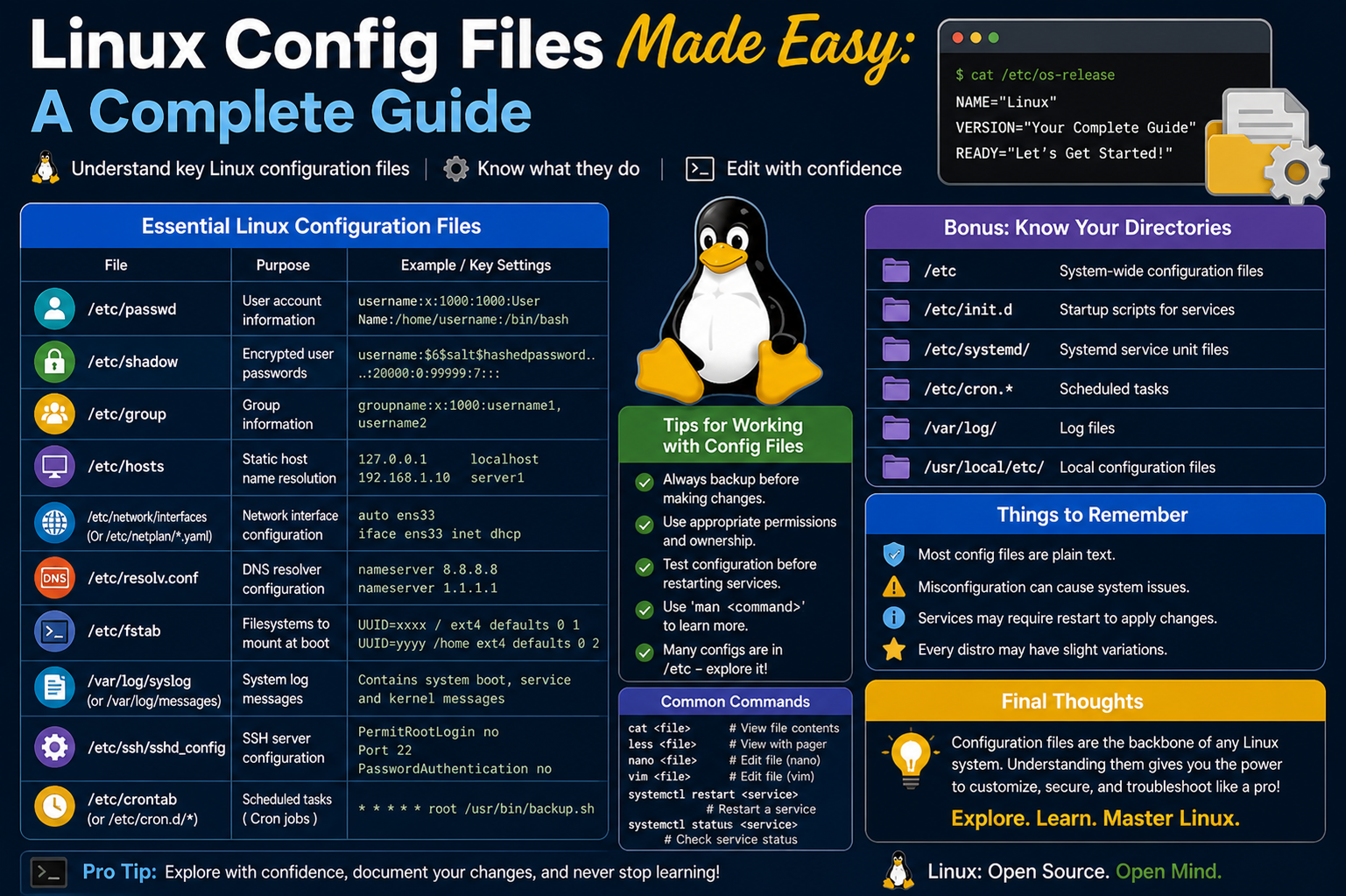
Linux configuration files form the backbone of how the operating system behaves. Unlike other operating systems that rely heavily on centralized configuration systems, Linux distributes its settings across individual files. These files define how services run, how applications behave, and how the system interacts with hardware and networks. This decentralized structure gives administrators remarkable flexibility, allowing them to fine-tune nearly every aspect of the system with precision. However, that same flexibility introduces complexity, especially for beginners who must learn where these files are located and how they interact.
Why Linux Configuration Differs from Other Systems
One of the defining traits of Linux is its simplicity in design philosophy. Instead of relying on a monolithic database for storing system settings, Linux uses plain-text configuration files. Each application or service maintains its own configuration file, which makes it easier to isolate issues and transfer configurations between systems. This design encourages transparency, as administrators can directly inspect and modify system behavior without needing specialized tools. At the same time, managing many separate files can become tedious, especially in large environments where documentation and consistency are critical.
The Role of Configuration Files in System Behavior
Configuration files in Linux control everything from networking to user authentication. They define parameters such as IP addresses, DNS settings, system limits, and service behavior. Most of these files are written in plain text, which makes them easy to edit using simple text editors. Each line typically consists of a variable followed by a value or instruction. This straightforward structure allows administrators to quickly understand what a setting does and how to modify it.
Plain-Text Simplicity and Its Advantages
The use of plain-text files is one of Linux’s greatest strengths. It allows administrators to use any text editor to make changes, whether through a graphical interface or the command line. This simplicity also makes it easier to automate configurations using scripts, which is essential in modern environments where systems are often deployed at scale. Additionally, plain-text files can be version-controlled, enabling teams to track changes and roll back configurations if needed.
Editing Configuration Files Safely
Editing configuration files is a routine task for Linux administrators, but it requires caution. Since these files directly control system behavior, even a small mistake can lead to service disruptions. Before making any changes, it is considered best practice to create a backup of the original file. This ensures that if something goes wrong, the system can be restored to its previous state without much effort.
Using Command-Line Editors
Most Linux configuration files are edited through command-line text editors such as Nano or Vim. These tools provide a lightweight and efficient way to modify files without needing a graphical interface. Since many Linux systems, especially servers, operate without a GUI, becoming comfortable with command-line editing is essential. Administrators often use elevated privileges when editing these files, as they are typically protected from regular users.
File Locations and Organization
The majority of Linux configuration files are stored in the /etc directory or its subdirectories. This central location helps keep system settings organized and easy to locate. Each subdirectory usually corresponds to a specific service or component, such as networking or system initialization. Understanding this directory structure is key to navigating and managing Linux systems effectively.
How Changes Take Effect
When a configuration file is modified, the changes are usually not applied immediately. Most services need to be restarted to recognize the new settings. For example, if a network configuration file is updated, the networking service must be restarted for the changes to take effect. This behavior ensures stability, as services continue running with their existing configuration until explicitly instructed to reload.
Introduction to Network Configuration
Networking is one of the most important aspects of system configuration in Linux. Proper network setup ensures that systems can communicate with each other and access external resources. Linux uses a variety of configuration files to manage network interfaces, each tailored to specific distributions and tools. Understanding these files is essential for managing connectivity in both desktop and server environments.
Network Interface Configuration Basics
Each network interface in a Linux system has its own configuration. An interface can represent a physical network card, a wireless adapter, or even a virtual connection. Configuration files define how these interfaces behave, including whether they use automatic addressing or static IPs, and whether certain protocols are enabled. These settings determine how the system connects to networks and communicates with other devices.
Graphical vs Command-Line Configuration
Linux provides both graphical and command-line methods for configuring network interfaces. Graphical tools offer a user-friendly way to manage settings, making them suitable for desktop environments. However, in server and cloud environments, command-line configuration is more common. This approach provides greater control and is often the only option available when working remotely.
Understanding Network-Scripts Configuration
In some Linux distributions, network interfaces are configured using individual files stored in a dedicated directory. Each file corresponds to a specific interface and contains parameters that define its behavior. These parameters include the type of interface, whether it uses dynamic or static addressing, and whether it should start automatically during system boot.
Common Network Configuration Parameters
Network configuration files include a range of settings that control how interfaces operate. These settings define aspects such as IP addresses, gateways, DNS servers, and protocol support. By adjusting these parameters, administrators can tailor network behavior to meet specific requirements. This flexibility is especially useful in environments where precise control over connectivity is needed.
Locating Network Configuration Files
The location of network configuration files varies depending on the Linux distribution. Some systems store them in directories dedicated to network scripts, while others use centralized files. Regardless of the location, the purpose remains the same: to define how each network interface behaves. Understanding where these files are stored is the first step in managing network configurations effectively.
Viewing Current Network Settings
Before making changes, it is important to understand the current network configuration. Linux provides command-line tools that display information about active interfaces, including their IP addresses and status. This information helps administrators identify which interfaces need to be modified and ensures that changes are applied correctly.
Oracle Linux Network Configuration Overview
In environments where graphical tools are not available, such as servers or cloud systems, network configuration is handled entirely through files. Oracle Linux, for example, uses a combination of system-wide and interface-specific configuration files. These files work together to define both general network settings and individual interface behavior.
System-Wide Network Settings
System-wide configuration files control overarching network settings, such as whether networking is enabled and what hostname the system uses. They may also define the default gateway, which determines how the system routes traffic to external networks. These settings provide a foundation for the system’s overall network behavior.
Interface-Specific Configuration in Oracle Linux
In addition to system-wide settings, each network interface has its own configuration file. These files define properties such as IP addresses, netmasks, and DNS servers. By separating system-wide and interface-specific settings, Linux allows for a more modular approach to network configuration.
Static vs Dynamic Addressing
One of the key decisions in network configuration is whether to use static or dynamic IP addressing. Static addressing assigns a fixed IP to an interface, ensuring consistent connectivity. Dynamic addressing, on the other hand, uses protocols that automatically assign IP addresses. Each approach has its advantages, and the choice depends on the specific needs of the environment.
Server Environments and Minimal Installations
Linux is widely used in server environments due to its stability and efficiency. In these environments, it is common to install only the necessary components, avoiding unnecessary features such as graphical interfaces. This approach reduces resource usage and improves performance, making Linux an ideal choice for servers.
Why Command-Line Skills Matter
Since many servers operate without graphical interfaces, command-line skills are essential for managing Linux systems. Administrators must be comfortable navigating directories, editing files, and restarting services using terminal commands. These skills enable efficient management of systems, even in remote or resource-constrained environments.
Debian Network Configuration Approach
Different Linux distributions handle network configuration in different ways. Debian, for example, uses a centralized file to manage all network interfaces. This approach simplifies management by consolidating configuration into a single location, making it easier to review and modify settings.
Centralized Interface Configuration
In Debian-based systems, all network interface settings are stored in one file. This file includes entries for each interface, specifying how they should behave. By keeping everything in one place, administrators can quickly see the entire network configuration and make changes as needed.
Interface Management Tools
Debian also provides tools for managing network interfaces. These tools allow administrators to enable or disable interfaces and apply configuration changes. They work in conjunction with the configuration file, ensuring that settings are applied consistently across the system.
Dynamic Host Configuration and Its Importance
Dynamic Host Configuration Protocol plays a crucial role in modern networking. It automates the process of assigning IP addresses, reducing the need for manual configuration. This automation is especially valuable in environments with many devices, where managing IP addresses manually would be impractical.
Purpose of DHCP Configuration Files
DHCP configuration files allow administrators to customize how devices interact with DHCP servers. These files define parameters such as timeouts and retry intervals, ensuring reliable communication between clients and servers. While default settings are often sufficient, customization can improve performance in certain scenarios.
Balancing Automation and Control
One of the strengths of Linux networking is the balance between automation and manual control. Administrators can rely on automated systems like DHCP for convenience, while still having the option to fine-tune settings through configuration files. This flexibility makes Linux suitable for a wide range of use cases.
Practical Considerations When Editing Files
When working with configuration files, attention to detail is critical. Even minor syntax errors can cause issues, so it is important to review changes carefully before applying them. Testing configurations in a controlled environment can help prevent disruptions in production systems.
Building Confidence with Practice
Mastering Linux configuration files takes time and practice. By experimenting with different settings and observing their effects, administrators can develop a deeper understanding of how the system works. Over time, this knowledge becomes an invaluable asset, enabling efficient and effective system management.
Understanding the Hosts Configuration File
The hosts configuration file is one of the simplest yet most powerful tools available in Linux networking. It acts as a local mapping system that connects human-readable hostnames to numerical IP addresses. Before a system queries external services for name resolution, it first checks this file. Because of this priority, the hosts file can override external name resolution mechanisms and directly control how specific addresses are interpreted on a machine.
How the Hosts File Works Internally
When a user or application attempts to access a hostname, the operating system follows a sequence to resolve it into an IP address. The hosts file is typically the first stop in that process. If a matching entry is found, the system immediately uses that IP address without consulting any external servers. This behavior makes the hosts file extremely fast and reliable for local overrides.
Structure of the Hosts File
The structure of the hosts file is straightforward. Each line represents a mapping between an IP address and one or more hostnames. The first element is always the IP address, followed by the primary hostname, and optionally additional aliases. This simple format allows administrators to quickly define custom mappings without complex syntax.
Using Comments in Hosts Configuration
Comments play an important role in maintaining clarity within configuration files. In the hosts file, any line beginning with a hash symbol is treated as a comment and ignored by the system. Administrators often use comments to document changes, explain mappings, or temporarily disable entries without removing them entirely.
Practical Uses of the Hosts File
The hosts file is commonly used for testing and development purposes. For example, administrators can map a domain name to a local server to test a website before it goes live. It is also useful for redirecting traffic, blocking unwanted domains, or creating shortcuts for frequently accessed systems within a network.
Blocking Content Using Hosts Entries
One popular use of the hosts file is content filtering. By mapping unwanted domains to a loopback address, administrators can effectively block access to those domains. Since the system resolves the hostname locally, the request never reaches the actual destination, preventing the content from loading.
Location of the Hosts File
In Linux systems, the hosts file is typically located in the /etc directory. This consistent location makes it easy to find and edit. Because it is a system-level file, modifying it requires administrative privileges. Once changes are made, they may require a restart of networking services or the system itself to take full effect.
Understanding Domain Name Resolution
To fully appreciate the role of the hosts file, it is important to understand domain name resolution. Systems need a way to translate human-friendly names into machine-readable IP addresses. This translation process ensures that users can access resources without memorizing numerical addresses.
The Role of DNS in Networking
Domain Name System is a global infrastructure that handles name resolution across networks. It acts as a distributed database, mapping hostnames to IP addresses. When the hosts file does not contain a mapping, the system queries DNS servers to find the correct address.
Interaction Between Hosts File and DNS
The hosts file and DNS work together to resolve hostnames. The system checks the hosts file first, and if no match is found, it proceeds to DNS queries. This layered approach ensures both flexibility and efficiency, allowing local overrides while maintaining access to global resources.
Introduction to Name Service Switch Configuration
The Name Service Switch configuration file plays a crucial role in determining how a system resolves various types of information. It defines the order in which different data sources are consulted for services such as hostname resolution, user authentication, and group information.
Purpose of the Name Service Switch File
The Name Service Switch file acts as a guide for the system, directing it to the appropriate sources for different types of data. It specifies whether the system should check local files, network services, or other resources when looking up information. This flexibility allows administrators to customize how the system behaves in different environments.
Structure of the Name Service Switch File
The configuration is organized into entries, each representing a specific service. Each entry lists the sources that should be consulted, in order of priority. This ordered approach ensures that the system checks the most relevant sources first, improving efficiency and performance.
Customizing Lookup Behavior
Administrators can modify the Name Service Switch configuration to change how data is retrieved. For example, they can prioritize local files over network services or combine multiple sources. This customization is particularly useful in complex environments where multiple data sources are available.
Handling Multiple Data Sources
In some cases, it is necessary to combine data from multiple sources. The Name Service Switch file supports this by allowing special directives that control how results are merged. This capability ensures that systems can access comprehensive information without sacrificing flexibility.
When to Modify Name Service Switch Settings
Most systems come with a default configuration that works well for typical use cases. However, in specialized environments, administrators may need to adjust these settings. Changes might be required to integrate with directory services, improve performance, or resolve conflicts between data sources.
Introduction to Resolver Configuration
The resolver configuration file is another important component of Linux networking. It defines how the system interacts with DNS servers, specifying which servers to use and how queries should be handled. This file ensures that the system can resolve domain names efficiently.
Purpose of the Resolver File
The resolver file provides the system with the addresses of DNS servers. These servers are responsible for translating hostnames into IP addresses. By configuring this file, administrators can control which DNS servers the system uses and in what order.
Structure of Resolver Configuration
Each entry in the resolver file typically specifies a nameserver or a search domain. Nameserver entries define the IP addresses of DNS servers, while search domains determine how unqualified hostnames are resolved. This structure allows for flexible and efficient name resolution.
Order of Nameserver Queries
The system queries nameservers in the order they are listed. If the first server does not respond, the system moves on to the next one. This sequential approach provides redundancy, ensuring that name resolution continues even if one server is unavailable.
Search Domains and Their Use
Search domains simplify the process of resolving hostnames. Instead of requiring fully qualified domain names, the system can append search domains to incomplete names. This feature is particularly useful in internal networks where common domain suffixes are used.
Automatic vs Manual Configuration
In many Linux distributions, the resolver file is managed automatically by networking services. Changes made manually may be overwritten by the system. Understanding this behavior is important, as it helps administrators choose the correct method for making persistent changes.
When to Adjust Resolver Settings
Manual configuration of the resolver file is typically required in specialized scenarios. For example, administrators may need to use custom DNS servers, troubleshoot resolution issues, or configure systems in isolated environments. In such cases, careful editing ensures reliable operation.
Introduction to Kernel Parameter Configuration
The sysctl configuration file provides a way to adjust kernel parameters without recompiling the kernel. These parameters control various aspects of system behavior, including networking, memory management, and security. By modifying this file, administrators can fine-tune system performance.
Role of the Kernel in Linux
The kernel is the core component of the Linux operating system. It manages hardware resources, handles system calls, and ensures that applications run smoothly. Because of its central role, changes to kernel parameters can have a significant impact on system behavior.
Purpose of Sysctl Configuration
The sysctl file allows administrators to modify kernel parameters at runtime or during system startup. This flexibility makes it easier to optimize systems for specific workloads without making permanent changes to the kernel itself.
Structure of Sysctl Entries
Each entry in the sysctl file consists of a parameter name followed by a value. These entries define how the kernel should behave in different situations. The format is simple, but the impact of these settings can be profound.
Using Comments and Organization
Like other configuration files, the sysctl file supports comments. Administrators often use comments to document changes and explain the purpose of specific settings. Organizing entries clearly helps maintain readability and simplifies troubleshooting.
Locations of Sysctl Configuration Files
Depending on the system, sysctl configurations may be stored in multiple locations. The system reads these files in a specific order, applying settings as it encounters them. Understanding this hierarchy is important for ensuring that the correct settings are applied.
Caution When Modifying Kernel Settings
Changing kernel parameters requires careful consideration. Incorrect settings can lead to performance issues or system instability. Administrators should test changes thoroughly and understand their impact before applying them in production environments.
Applying Sysctl Changes
After modifying sysctl settings, changes can be applied without rebooting the system. This immediate feedback allows administrators to test configurations quickly. However, persistent changes require updating the configuration files so they are applied at startup.
Balancing Performance and Stability
The ability to tune kernel parameters provides significant advantages, but it also introduces risk. Administrators must balance performance improvements with system stability, ensuring that changes do not negatively impact reliability.
Introduction to Advanced Network Configuration Management
As Linux systems grow in complexity, managing network configurations becomes more structured and tool-driven. While traditional configuration files still play a major role, modern distributions introduce utilities that simplify and standardize how networking is handled. These tools do not replace configuration files but instead act as layers that organize and apply settings more efficiently.
Understanding Modern Configuration Utilities
Modern Linux environments often include utilities designed to manage network configurations dynamically. These utilities read structured configuration files and translate them into commands that the system understands. This abstraction reduces manual effort and helps maintain consistency across systems, especially in environments with multiple interfaces or complex networking requirements.
What Makes Network Configuration Evolve
The evolution of Linux networking tools reflects the need for scalability and automation. Earlier methods required direct editing of multiple files, which could become error-prone. Newer approaches aim to centralize configuration logic while still allowing detailed customization. This balance ensures that both beginners and advanced administrators can manage networking effectively.
Introduction to Netplan Configuration
Netplan is one of the modern tools used in certain Linux distributions to manage networking. It acts as a configuration utility that reads structured files and generates the necessary backend configurations. Instead of directly controlling network interfaces, it prepares instructions for underlying services that handle the actual networking tasks.
Purpose of Netplan in Linux Systems
The main goal of Netplan is to simplify network configuration while maintaining flexibility. By using a structured format, it allows administrators to define network settings in a clear and organized way. This approach reduces the chances of misconfiguration and makes it easier to understand complex setups.
Location of Netplan Configuration Files
Netplan configuration files are typically stored in a dedicated directory within the system. Each file corresponds to one or more network interfaces and follows a naming convention that determines the order in which configurations are applied. This structured storage ensures that configurations are processed consistently during system startup.
Understanding YAML-Based Configuration
Netplan uses a structured format that relies on indentation and hierarchy. This format emphasizes readability and organization, but it also requires careful attention to spacing. Even minor indentation errors can cause configurations to fail, making precision essential when editing these files.
Identifying Network Interfaces
Before configuring a network interface, it is important to identify its name. Linux systems provide commands that list all available interfaces along with their current status. This information helps administrators select the correct interface when applying configuration changes.
Configuring Automatic Address Assignment
One of the simplest configurations in modern networking is enabling automatic address assignment. This method allows the system to obtain network settings dynamically from a server. It is widely used in environments where manual configuration is unnecessary or impractical.
Defining Static Network Settings
In contrast to automatic configuration, static settings provide fixed values for network parameters. This approach is commonly used for servers or devices that require consistent addressing. Static configuration involves specifying details such as IP address, gateway, and DNS servers within the configuration file.
Applying Configuration Changes Safely
After modifying network configuration files, it is important to test and apply the changes carefully. Modern tools often provide mechanisms to validate configurations before they are fully applied. This reduces the risk of losing connectivity due to errors in the configuration.
Restarting Network Services
For configuration changes to take effect, the relevant network services must be restarted. This step ensures that the system reloads the updated settings and applies them to the network interfaces. In some cases, a full system reboot may also achieve the same result.
Interaction Between Configuration Tools and Services
Configuration utilities like Netplan work in conjunction with underlying services. They generate the necessary instructions, which are then executed by system services responsible for managing network interfaces. This layered approach separates configuration from execution, improving maintainability.
Consistency Across Different Environments
One of the advantages of structured configuration tools is consistency. Whether the system is a desktop, server, or virtual machine, the same configuration approach can be used. This consistency simplifies administration and reduces the learning curve for managing different systems.
Handling Multiple Network Interfaces
Modern systems often include multiple network interfaces, each serving a different purpose. Configuration tools allow administrators to define settings for each interface independently while maintaining an organized structure. This capability is essential in environments with complex networking requirements.
Troubleshooting Network Configuration Issues
Even with modern tools, network configuration issues can occur. Common problems include incorrect interface names, syntax errors, or conflicting settings. Troubleshooting involves reviewing configuration files, checking system logs, and verifying that services are running correctly.
Understanding Configuration File Hierarchies
Linux systems often use multiple configuration files that are processed in a specific order. Understanding this hierarchy is important for predicting how settings will be applied. Later configurations may override earlier ones, allowing administrators to refine settings without modifying original files.
Automation and Scripting in Configuration Management
Automation plays a significant role in managing Linux systems. Configuration files can be generated or modified using scripts, enabling rapid deployment of consistent settings across multiple machines. This approach is widely used in large-scale environments where manual configuration would be inefficient.
Security Considerations in Network Configuration
Network configuration directly impacts system security. Misconfigured settings can expose systems to unauthorized access or disrupt communication. Administrators must ensure that configurations follow best practices, such as limiting unnecessary services and using secure protocols.
Maintaining Documentation for Configurations
Proper documentation is essential for managing configuration files. Keeping records of changes, including the purpose and date of modifications, helps maintain clarity and accountability. Documentation also aids in troubleshooting and ensures that configurations can be replicated when needed.
Balancing Flexibility and Simplicity
Linux provides a wide range of options for configuring systems, which can be both an advantage and a challenge. Administrators must strike a balance between flexibility and simplicity, choosing configurations that meet requirements without adding unnecessary complexity.
Evolving Best Practices in Linux Configuration
As Linux continues to evolve, best practices for configuration management also change. Staying informed about new tools and methods helps administrators maintain efficient and secure systems. Continuous learning is essential for adapting to these changes.
Preparing for Advanced Configuration Topics
Understanding modern configuration tools lays the groundwork for more advanced topics. As systems grow in scale and complexity, administrators will encounter scenarios that require deeper knowledge and more sophisticated approaches. Building a strong foundation ensures readiness for these challenges.
Integrating Configuration Knowledge Across Linux Systems
As Linux environments expand, the ability to connect knowledge from different configuration files becomes essential. Each file does not exist in isolation; instead, they work together to define the complete behavior of the system. Networking, system performance, name resolution, and application behavior are all interconnected. Understanding how these elements interact allows administrators to diagnose issues more effectively and design more reliable systems.
How Configuration Layers Work Together
Linux configuration operates in layers. At the lowest level, the kernel handles hardware interaction and system resources. Above that, system services interpret configuration files and manage operations like networking and logging. Finally, user applications rely on these services to function correctly. Changes in one layer can influence others, which is why administrators must consider the broader impact of every configuration adjustment.
Interdependency Between Network Configuration Files
Network-related configuration files often depend on one another. For example, interface configuration determines how a system connects to a network, while resolver settings define how it communicates with external services. Similarly, name resolution behavior is influenced by multiple files working together. Recognizing these relationships is key to maintaining consistent and functional networking.
Managing Consistency Across Different Distributions
Linux distributions vary in how they implement configuration management. While the underlying concepts remain the same, file locations, formats, and tools may differ. Administrators who understand the core principles can adapt to these variations بسهولة. This adaptability is one of the strengths of Linux expertise, allowing professionals to work across different systems with confidence.
Adapting to Distribution-Specific Tools
Modern Linux distributions often introduce their own tools for managing configurations. These tools aim to simplify complex tasks while maintaining compatibility with traditional methods. Learning how these tools interact with existing configuration files helps administrators avoid conflicts and ensures that changes are applied correctly.
Importance of Testing Configuration Changes
Before applying configuration changes in a production environment, testing is crucial. Even small modifications can have unintended consequences. By testing changes in a controlled environment, administrators can identify potential issues and refine their configurations before deploying them widely.
Rollback Strategies and Backup Practices
Maintaining backups of configuration files is a fundamental practice. If a change causes problems, having a backup allows for quick recovery. Many administrators create backup copies before editing files, ensuring that they can revert to a previous state if needed. This approach minimizes downtime and reduces risk.
Monitoring System Behavior After Changes
After applying configuration updates, monitoring the system is essential. Observing how services behave helps confirm that changes were successful. Monitoring tools and logs provide valuable insights into system performance and can reveal issues that may not be immediately apparent.
Common Challenges in Configuration Management
Managing configuration files comes with challenges. These include syntax errors, conflicting settings, and lack of documentation. Additionally, differences between environments can lead to inconsistencies. Addressing these challenges requires attention to detail, thorough testing, and clear documentation.
Improving Efficiency Through Standardization
Standardizing configuration practices helps improve efficiency and reduce errors. By following consistent naming conventions, file structures, and documentation methods, administrators can streamline their workflows. Standardization also makes it easier for teams to collaborate and maintain systems over time.
Role of Automation in Modern Linux Environments
Automation has become a key component of configuration management. Tools and scripts can be used to apply consistent settings across multiple systems, reducing manual effort. Automation also helps ensure that configurations remain consistent, even as systems scale.
Security Implications of Configuration Files
Configuration files often contain sensitive information and control critical system behavior. Misconfigured settings can expose vulnerabilities or disrupt services. Administrators must ensure that files are properly secured and that only authorized users can modify them. Regular audits of configuration files help maintain security.
Understanding Permissions and Access Control
Linux uses a robust permission system to control access to files. Configuration files are typically restricted to administrative users, preventing unauthorized changes. Understanding and managing these permissions is essential for maintaining system integrity and security.
Documentation as a Long-Term Asset
Well-maintained documentation is invaluable for configuration management. It provides a reference for understanding system setups and helps new administrators get up to speed quickly. Documentation should include explanations of key settings, reasons for changes, and any dependencies between configurations.
Scaling Configuration Management for Large Systems
In large environments, managing configuration files manually becomes impractical. Administrators often rely on centralized tools and automation frameworks to handle configurations at scale. These tools ensure consistency and make it easier to manage hundreds or thousands of systems.
Continuous Learning in Linux Administration
Linux is constantly evolving, with new tools and practices emerging regularly. Staying updated with these developments is important for maintaining effective systems. Continuous learning allows administrators to adopt new techniques and improve their workflows.
Developing Troubleshooting Skills
Troubleshooting is a critical skill in Linux administration. When issues arise, administrators must analyze configuration files, system logs, and service behavior to identify the root cause. A systematic approach to troubleshooting helps resolve problems efficiently and prevents recurrence.
Balancing Flexibility and Control
One of the defining characteristics of Linux is its flexibility. Administrators have the freedom to configure systems in many different ways. However, this flexibility must be balanced with control to ensure stability and reliability. Choosing the right configuration approach depends on the specific needs of the environment.
Future Trends in Configuration Management
The future of Linux configuration management is likely to focus on greater automation, improved usability, and enhanced integration with cloud technologies. As systems become more complex, tools will continue to evolve to simplify management while maintaining the power and flexibility that Linux is known for.
Final Thoughts
Mastering Linux configuration files is a gradual process that requires patience and practice. By understanding how different files interact, maintaining disciplined practices, and continuously improving skills, administrators can unlock the full potential of Linux systems. The knowledge gained from working with configuration files not only improves system management but also builds a strong foundation for advanced topics in Linux administration.