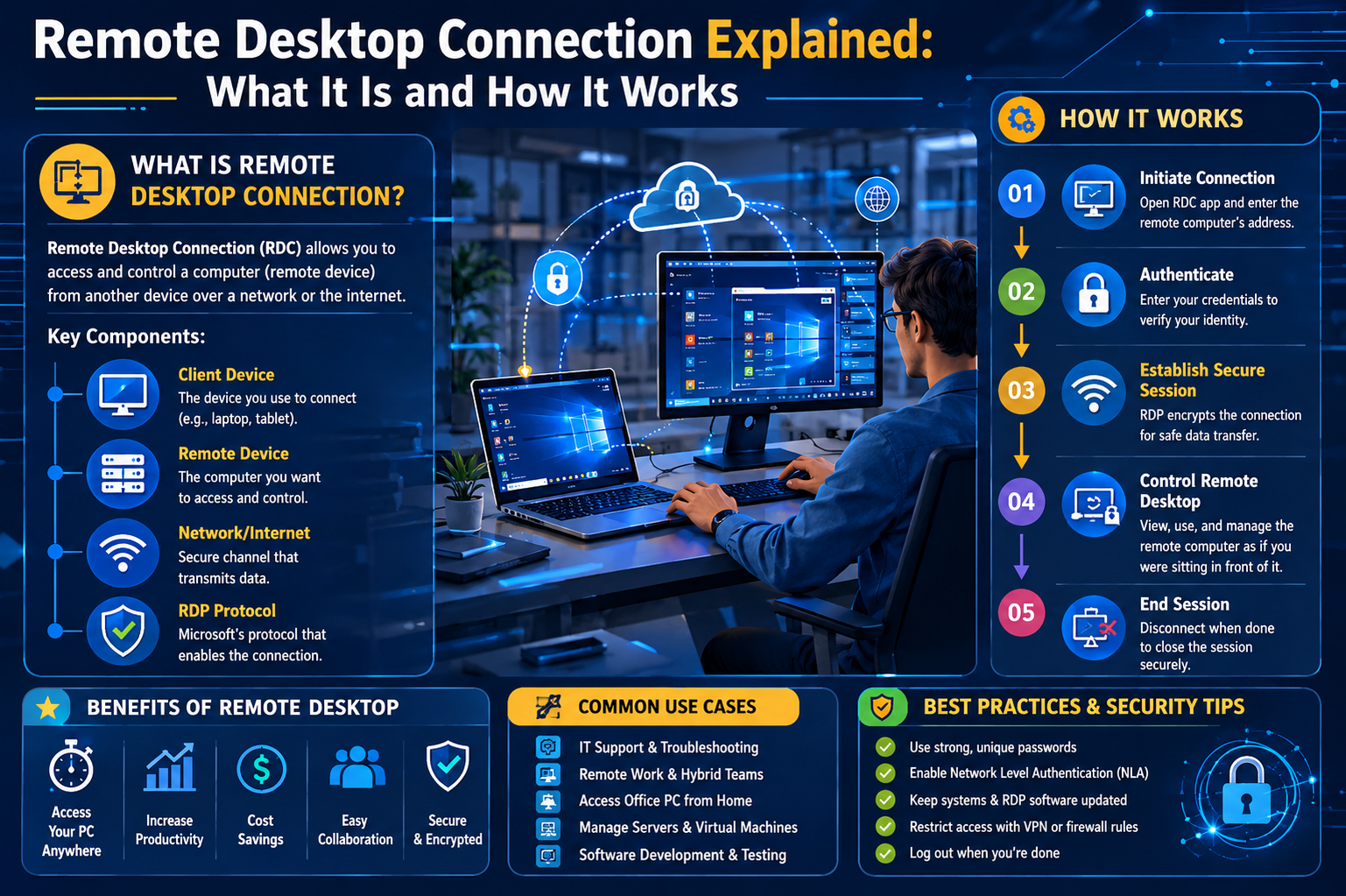
Remote Desktop Connection is a technology that allows a user to access and control another computer from a different physical location. In simple terms, it enables you to operate a remote system as if you were sitting directly in front of it. This includes viewing the screen, using applications, managing files, and performing system tasks without being physically present at the machine. It is widely used in modern digital environments where mobility, flexibility, and remote access are essential for productivity.
The concept behind this technology is to bridge distance barriers by creating a virtual link between two systems. One device acts as the controller, while the other functions as the host being accessed. This setup is especially useful for professionals who need to work remotely, IT teams who provide technical assistance, and organizations that manage distributed systems across different locations.
Core Purpose of Remote Desktop Access
The primary purpose of remote desktop access is to provide uninterrupted access to computing resources regardless of location. Instead of transferring files or physically traveling to a system, users can directly log into their workplace computer or server environment through a secure connection. This helps maintain continuity in work processes and reduces dependency on physical infrastructure.
It also plays an important role in centralized system management. Organizations often use it to manage multiple computers from a single location, making it easier to update software, fix technical issues, and monitor system performance without needing physical intervention.
How Remote Desktop Connection Works
Remote Desktop Connection works through a structured communication process between two systems. One system is the client, which initiates the connection, and the other is the host, which receives and responds to that connection request. Once a secure link is established, the client device can view and control the host system’s desktop environment.
The process begins when the user enters login credentials and connects through a network. After authentication, the remote system shares its screen output with the user’s device. Every action performed by the user, such as moving the mouse or typing on the keyboard, is transmitted back to the host machine in real time. This creates an interactive experience that closely resembles working directly on the remote system.
Key Components Involved in RDC
Several components work together to make remote desktop functionality possible. The host computer must have remote access enabled, allowing it to accept incoming connections. The client device requires compatible software or built-in tools to initiate and maintain the connection. A stable network connection is also essential to ensure smooth communication between both systems.
Security protocols are another critical component. They help encrypt data transferred between devices, ensuring that sensitive information remains protected during transmission. Without these protective layers, remote connections would be vulnerable to interception and misuse.
User Experience in Remote Desktop Sessions
When a remote desktop session begins, users are presented with a visual interface that mirrors the remote system’s desktop. This includes icons, taskbars, open applications, and system settings. The experience is designed to feel seamless, allowing users to interact with the remote environment as if they were physically present.
Performance can depend on network speed and system resources. A strong and stable connection ensures smooth navigation, while weaker connections may result in delays or reduced image quality. Despite these limitations, modern remote desktop technologies are optimized to provide efficient and responsive user experiences.
Common Use Cases in Modern Computing
Remote Desktop Connection is used in a wide range of scenarios. One of the most common uses is remote work, where employees access their office computers from home or while traveling. This allows them to continue their tasks without disruption.
It is also heavily used in technical support environments. IT professionals can remotely access user systems to diagnose and resolve issues without needing physical presence. This reduces response time and improves service efficiency.
Another important use case is server management. System administrators often manage data centers and cloud-based servers remotely, ensuring systems remain operational and updated at all times.
Benefits of Using Remote Desktop Connection
One of the biggest advantages of remote desktop technology is accessibility. Users can connect to their systems from virtually anywhere, provided they have an internet connection. This flexibility supports modern work environments where mobility is increasingly important.
Another benefit is increased productivity. Since users do not need to physically transfer data or switch devices, they can continue working seamlessly across locations. This reduces downtime and improves workflow efficiency.
Cost efficiency is also a major advantage. Organizations can reduce hardware dependency and streamline IT infrastructure by centralizing system access. This leads to lower maintenance and operational costs over time.
Role of Remote Access in Modern Work Environments
Remote access technology has become an essential part of modern digital workplaces. It supports hybrid work models where employees split time between office and remote locations. This flexibility allows organizations to maintain productivity while offering employees greater freedom in how and where they work.
It also supports global collaboration. Teams located in different parts of the world can access shared systems and work on the same environment without needing physical proximity. This improves coordination and speeds up project completion.
Security Foundations of Remote Desktop Connections
Security is a critical aspect of remote desktop technology. Since remote access involves transmitting data over networks, protective measures are necessary to prevent unauthorized access. Authentication mechanisms ensure that only verified users can log in to a system.
Encryption is used to protect data during transmission. This ensures that any information sent between devices cannot be easily intercepted or read by external parties. Secure protocols are implemented to maintain data integrity throughout the session.
Authentication and Access Control
Authentication is the first layer of security in remote desktop systems. It typically involves usernames and passwords that verify user identity before granting access. However, stronger systems often include additional verification steps.
Multi-factor authentication adds another layer of protection by requiring users to confirm their identity through secondary methods such as verification codes or authentication apps. This significantly reduces the risk of unauthorized access even if login credentials are compromised.
Access control also plays an important role by restricting system entry based on user roles and permissions. This ensures that users can only access the resources they are authorized to use.
Data Transmission and Encryption Methods
When using remote desktop connections, data continuously travels between client and host systems. This includes screen updates, keyboard inputs, and file transfers. To protect this information, encryption is applied during transmission.
Encryption transforms readable data into secure coded formats that cannot be easily interpreted by unauthorized users. Only the intended recipient system can decode and process this information. This helps maintain confidentiality and prevents data breaches during remote sessions.
Common Risks Associated with Remote Access
Despite its advantages, remote desktop technology is not without risks. One of the most common threats is unauthorized access through weak or stolen credentials. Attackers may attempt to gain entry by guessing passwords or using automated tools.
Another risk involves interception of data during transmission if security protocols are not properly implemented. This can lead to exposure of sensitive information. Additionally, poorly configured systems may leave access points open to exploitation.
Importance of Secure Configuration Practices
Proper configuration is essential for maintaining secure remote desktop environments. Systems should be set up with strong authentication methods and restricted access controls. This reduces the chances of unauthorized entry.
Regular updates are also important because they fix known vulnerabilities that could be exploited by attackers. Monitoring access logs helps detect unusual activity and allows administrators to respond quickly to potential threats.
Limiting remote access to trusted networks or secure connections further strengthens overall protection.
Why Remote Desktop Technology Continues to Grow
The demand for remote desktop solutions continues to increase due to changes in how people work and interact with technology. Remote access supports flexibility, allowing individuals and organizations to operate without geographical limitations.
It also enhances business continuity by ensuring systems remain accessible during unexpected disruptions. Whether for personal use, enterprise environments, or technical support, remote desktop technology remains a foundational tool in modern computing infrastructure.
Conclusion
Remote Desktop Connection has become an essential part of modern computing by enabling users to access and control systems from virtually any location. It removes physical barriers and allows seamless interaction with remote machines, making it highly valuable for remote work, IT support, system administration, and everyday productivity tasks. By providing full access to applications, files, and system functions, it creates a flexible working environment that adapts to today’s fast-moving digital needs.
At the same time, its effectiveness depends heavily on proper configuration and security practices. Strong authentication methods, encryption, regular updates, and careful access control are necessary to protect systems from unauthorized access and cyber threats. When these safeguards are in place, Remote Desktop Connection becomes not only a convenient tool but also a reliable and secure solution for managing digital operations.
Overall, Remote Desktop Connection plays a critical role in supporting modern workflows by combining accessibility, efficiency, and centralized control. As remote and hybrid work continue to expand, its importance will only grow, making it a core technology for both individuals and organizations seeking flexible and secure computing access.