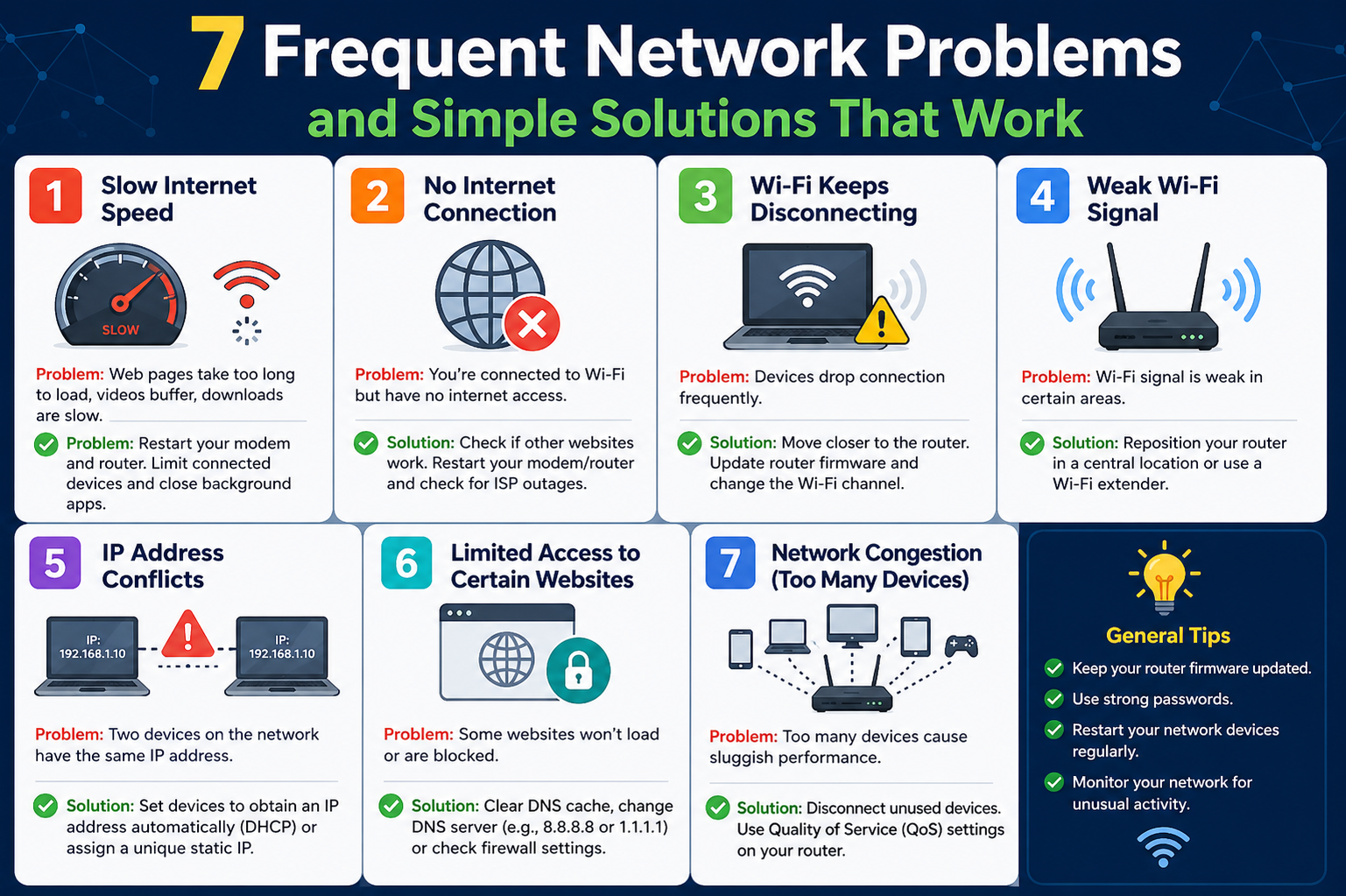
Networks rarely fail without a reason, but the way those failures appear can feel sudden and confusing. One moment everything operates smoothly, and the next you’re dealing with connection errors, slow performance, or devices that simply refuse to communicate. These disruptions are often the result of small configuration conflicts, resource limitations, or overlooked settings rather than major system breakdowns. Understanding this is important because it shifts your mindset from panic to problem-solving. Most network issues follow patterns, and once you recognize those patterns, troubleshooting becomes faster and more effective. Instead of guessing, you begin to approach each issue methodically, identifying root causes and applying targeted fixes that restore connectivity without unnecessary downtime.
Duplicate IP Addresses and the Conflicts They Create
A duplicate IP address issue occurs when two devices on the same network attempt to use the same unique identifier. Since every device must have its own IP address to communicate properly, this duplication causes immediate disruption. Users often encounter error messages indicating that an address is already in use, and the affected devices lose network access entirely. This problem is more common than it might seem, especially in environments where both dynamic and static IP assignments coexist. When a router’s DHCP service automatically assigns an address that has already been manually configured on another device, a conflict arises that prevents proper communication across the network.
Resolving this issue begins with identifying the source of the duplication. In many cases, a newly added device such as a server or router may have its own DHCP service enabled by default, which conflicts with the primary router. Disabling the secondary DHCP service usually restores normal operation immediately. Another approach is to release and renew the IP address on the affected device, forcing the network to assign a different address. This quick adjustment often resolves the conflict without further intervention.
Preventing duplicate IP issues requires thoughtful network planning. One effective strategy is to separate dynamic and static IP ranges. By configuring the router to assign dynamic addresses from a higher range within the subnet, you leave the lower range available for manually assigned static IPs. This reduces the likelihood of overlap and keeps the network organized. Consistency in configuration plays a key role here, as even a single misconfigured device can trigger repeated conflicts.
IP Address Exhaustion and Why Devices Fail to Connect
IP address exhaustion happens when a network runs out of available addresses to assign to new devices. When this occurs, devices attempting to connect will often assign themselves a fallback address, typically in the 169.x.x.x range, indicating that they could not obtain a valid IP from the DHCP server. This situation is particularly frustrating because it prevents devices from accessing both local network resources and the internet.
The root cause of IP exhaustion is usually a limited DHCP pool. Smaller networks or default router configurations often allocate only a narrow range of IP addresses, which can quickly become insufficient as more devices are added. This is increasingly common in modern environments where smartphones, laptops, smart TVs, and IoT devices all compete for network access. In some cases, networks that rely directly on an internet service provider for IP assignments may hit external limits, especially when multiple devices are connected without a local router managing internal addressing.
Fixing this issue involves expanding the available address pool. Accessing the router’s DHCP settings allows you to increase the range of assignable IP addresses, ensuring that more devices can connect simultaneously. If the network lacks a dedicated router, introducing one can solve the problem entirely by creating a private internal network with its own pool of addresses. This not only resolves exhaustion but also improves security and control over network traffic.
Prevention focuses on proper infrastructure design. A well-configured router using network address translation ensures that all internal devices share a single external IP while maintaining unique internal addresses. This setup eliminates the risk of running out of addresses and provides a scalable solution as the network grows. Regular monitoring of connected devices also helps identify when adjustments are needed before exhaustion becomes a problem.
DNS Misconfigurations and Their Impact on Connectivity
Domain Name System issues can be particularly confusing because they often appear as general connectivity problems. Users may see errors indicating that a network path cannot be found or that a domain name does not exist, even though the network itself is functioning correctly. DNS acts as the translator between human-readable domain names and numerical IP addresses, so when it fails, the entire browsing experience breaks down.
These problems typically arise from incorrect DNS server settings. Devices can be manually configured to use specific DNS servers, and if those settings are outdated or incorrect, they override the automatic configuration provided by the network. This leads to failed lookups and an inability to reach websites or services. In some cases, routers configured to handle DNS requests internally may become overwhelmed, especially in busy environments, resulting in slow or failed resolutions.
The quickest way to resolve DNS issues is to verify the device’s network settings. Ensuring that DNS addresses are obtained automatically allows the system to use the correct servers provided by the network. If manual settings are required, they should be carefully checked for accuracy. Restarting the device or flushing the DNS cache can also help clear outdated records that may be causing conflicts.
Preventing DNS-related disruptions involves optimizing how DNS requests are handled across the network. Instead of relying on a single device to process all queries, configuring the network to use reliable external DNS servers directly can improve performance and reduce the risk of overload. Consistency in configuration across all devices ensures that DNS resolution remains stable and efficient, even as network demands increase.
When a Single Device Refuses to Connect While Others Work Fine
One of the most common and puzzling scenarios occurs when only a single workstation cannot connect to the network while all other devices function normally. This situation immediately narrows the scope of the problem, indicating that the issue is isolated to that specific device rather than the network as a whole. Despite this, identifying the exact cause can still require careful investigation.
The problem often stems from hardware faults or misconfigured settings. A damaged Ethernet cable, weak wireless signal, or failing network adapter can disrupt connectivity at the physical level. On the software side, incorrect IP configurations, outdated drivers, or conflicting settings can prevent the device from communicating properly with the network. Firewall settings may also block essential traffic, effectively isolating the device even though it appears connected.
Troubleshooting begins with checking the simplest possibilities. Replacing cables, reconnecting to the wireless network, or restarting the device can sometimes resolve the issue immediately. Verifying that the network adapter is functioning correctly and has the proper drivers installed is another important step. Reviewing IP, subnet, and DNS settings ensures that the device is configured consistently with the rest of the network. If firewall software is present, confirming that it allows necessary traffic can restore access without further changes.
Preventing these issues involves maintaining uniform configuration across all devices. Allowing network settings to be assigned automatically through a centralized system ensures consistency and reduces the risk of misconfiguration. When static settings are required, they should be carefully documented and applied to avoid conflicts. Regular updates to drivers and system software also help maintain compatibility and reliability over time.
Why Shared Resources Like Files and Printers Suddenly Stop Working
Accessing shared folders or printers should feel seamless, but in reality, it’s one of the most fragile areas of any network. When sharing stops working, it often feels unpredictable because multiple systems, permissions, and services must align perfectly. A minor inconsistency in any one of these components can disrupt access entirely. Users may see errors when attempting to open shared drives, fail to detect printers, or experience intermittent connectivity to shared resources. These issues are rarely caused by a single fault; instead, they are usually the result of layered configuration mismatches that require systematic troubleshooting.
The first step in resolving sharing issues is verifying that all necessary services are running on the systems involved. On many operating systems, background services handle file sharing, network discovery, and communication protocols. If any of these services are stopped or malfunctioning, sharing will fail regardless of other settings. Restarting these services or rebooting the system can often restore functionality, especially after updates or configuration changes.
Firewalls are another common source of disruption. Many security tools are designed to block incoming and outgoing traffic by default, which can inadvertently prevent file and printer sharing. This becomes particularly noticeable after installing new antivirus software that includes its own firewall. Ensuring that sharing-related traffic is allowed through both software and hardware firewalls is essential. Routers and managed switches must also be configured to permit communication within the same subnet, as restrictions at this level can silently block internal traffic.
Subnet configuration plays a surprisingly important role in sharing. Devices must be on the same network segment to communicate directly. If a device has an incorrect subnet mask or is assigned to a different network range, it may still access the internet but fail to connect to local resources. This creates confusion because external connectivity appears normal while internal communication breaks down. Verifying that all devices share the same subnet ensures that local traffic flows correctly.
Another layer of complexity comes from compatibility differences between systems. Even devices running similar operating systems can use slightly different security models, particularly across versions. This can lead to authentication failures or restricted access when trying to share resources. Ensuring that all systems are configured with compatible sharing protocols and settings helps eliminate these conflicts.
Permissions are often the final hurdle in resolving sharing issues. Access to shared resources depends on multiple permission layers, including user accounts, network settings, and file system rules. A user may have permission at one level but be blocked at another, resulting in denied access. Carefully reviewing and aligning these permissions ensures that users can access the resources they need without compromising security.
Preventing sharing problems requires a structured approach to network configuration. Standardizing settings across all devices, maintaining consistent security policies, and regularly reviewing permissions can significantly reduce the likelihood of issues. When everything is aligned, sharing becomes reliable and predictable rather than a constant troubleshooting challenge.
When the Entire Network Can’t Reach the Internet
A network that suddenly loses internet access can bring productivity to a halt. Unlike issues affecting a single device, this problem impacts all users and often creates urgency to restore connectivity as quickly as possible. The challenge lies in determining whether the issue originates within the local network or from an external provider. Without a clear approach, troubleshooting can become time-consuming and frustrating.
The first and simplest step in resolving this issue is restarting the network’s core devices, such as the router and modem. These devices manage the connection between the internal network and the internet, and temporary glitches can disrupt communication. A reboot clears cached data, resets connections, and often restores normal operation within minutes. While this may seem basic, it resolves a significant percentage of connectivity problems.
If restarting devices does not work, the next step is to trace the path of the network connection. Tools that map the route between the local network and external servers can help identify where communication breaks down. When the connection fails at a specific point along the route, it indicates the location of the problem, whether it’s within the local network infrastructure or further upstream. This information is invaluable when contacting a service provider, as it provides clear evidence of where the issue lies.
External connectivity problems are often complicated by the involvement of multiple service providers. In some cases, the company providing internet access may rely on infrastructure owned by another provider. This layered arrangement can lead to delays in resolving issues, as responsibility may be unclear. Understanding this dynamic helps explain why some outages take longer to fix than others.
Preventing widespread connectivity issues involves careful selection of service providers and network design. Choosing a provider with direct control over its infrastructure reduces dependency on third parties and simplifies troubleshooting. Additionally, implementing redundancy—such as backup connections—can ensure continued access even if the primary link fails. While this may not be necessary for all environments, it is critical for networks where downtime has significant consequences.
Monitoring tools also play a key role in prevention. By continuously tracking network performance and connectivity, administrators can detect issues early and respond before they escalate. This proactive approach transforms network management from reactive problem-solving to strategic maintenance, improving reliability and user satisfaction.
Understanding Slow Internet Speeds and Performance Drops
Slow internet performance is one of the most common complaints in any network environment. Unlike complete outages, slow speeds can be intermittent and difficult to diagnose, making them particularly frustrating. Users may experience delays when loading websites, buffering during streaming, or sluggish performance in online applications. These symptoms often point to underlying issues that affect how data moves through the network.
One of the primary causes of slow performance is congestion. When too many devices or applications compete for limited bandwidth, the network becomes overloaded, resulting in reduced speeds for everyone. This can occur during peak usage times or when bandwidth-intensive tasks such as downloads or video streaming are in progress. However, congestion is not always about total bandwidth; even a single overloaded port on a network device can create a bottleneck that affects overall performance.
Connection quality also plays a significant role. Poor signal strength in wireless networks, damaged cables, or aging hardware can degrade performance even when bandwidth is sufficient. These issues often go unnoticed because the network remains functional, but data transmission becomes inefficient. Identifying and addressing these physical factors is essential for restoring optimal performance.
Testing network speed using external servers can provide valuable insights into where slowdowns occur. By comparing results from different locations, it becomes possible to determine whether the issue lies within the local network or with the service provider. Consistently low speeds across multiple tests may indicate a broader problem that requires attention from the provider.
DNS configuration can also influence performance in subtle ways. If DNS servers are slow or overloaded, they can delay the process of resolving domain names, making websites appear sluggish even when the connection itself is fast. Adjusting DNS settings to use more efficient servers can improve responsiveness and reduce latency.
Preventing performance issues requires a combination of proper planning and ongoing management. Ensuring that the network has sufficient bandwidth for its needs is fundamental, but it is equally important to optimize how that bandwidth is used. Implementing quality-of-service settings can prioritize critical applications, while regular maintenance of hardware and software keeps the network running efficiently.
Investing in reliable infrastructure is another key factor. While lower-cost options may seem attractive, they can lead to inconsistent performance and frequent complaints. More robust solutions provide stability and handle higher loads without degradation. Over time, this reliability translates into a smoother user experience and fewer disruptions.
Building a Strong Foundation for Faster Troubleshooting
Effective troubleshooting is not just about fixing problems as they arise; it’s about creating an environment where issues can be identified and resolved quickly. This requires a solid understanding of how the network is structured and how its components interact. Without this knowledge, even simple problems can become difficult to diagnose.
A strong foundation begins with familiarity with basic diagnostic tools. Utilities that test connectivity, display network configurations, and trace communication paths are essential for identifying issues. These tools provide real-time insights into what is happening within the network, allowing for precise and efficient troubleshooting. Knowing when and how to use them can significantly reduce the time required to resolve problems.
Advanced tools offer deeper visibility into network activity. Packet analysis software, for example, can reveal detailed information about how data flows through the network, highlighting inefficiencies or errors that may not be visible through basic testing. Wireless analysis tools can identify interference, signal strength issues, and channel conflicts that affect performance. These insights are particularly valuable in complex environments where multiple factors contribute to network behavior.
Documentation is another critical element of effective troubleshooting. Keeping records of network configurations, device settings, and previous issues creates a reference point for future problem-solving. When a similar issue arises, having this information readily available allows for quicker identification and resolution. It also helps maintain consistency across the network, reducing the likelihood of configuration errors.
Training users to handle basic troubleshooting tasks can further improve efficiency. Simple actions such as restarting devices, checking connections, or verifying settings can resolve many common issues without requiring technical intervention. Empowering users with this knowledge reduces the workload on network administrators and speeds up problem resolution.
Ultimately, building a strong troubleshooting foundation transforms how network issues are managed. Instead of reacting to problems with uncertainty, you approach them with confidence and clarity. This not only improves response times but also enhances the overall reliability of the network, ensuring that it continues to support the needs of its users effectively.
How Network Design Choices Influence Stability and Performance
The way a network is designed has a direct impact on how often issues occur and how severe they become. Many common problems are not caused by sudden failures but by underlying design limitations that only reveal themselves under stress. A network that works perfectly for a small number of users may begin to struggle as more devices are added, more applications are used, and more data flows through the system. Without proper planning, even minor inefficiencies can compound into significant disruptions.
One of the most important design considerations is how traffic flows between devices. Networks that rely heavily on a single piece of hardware, such as one router or switch, are more vulnerable to bottlenecks. When too many requests pass through a single point, performance can degrade rapidly. Distributing network load across multiple devices or upgrading to higher-capacity equipment can alleviate these issues and provide a smoother experience for users.
Segmentation is another powerful design strategy. By dividing a network into smaller sections, you can isolate traffic and reduce congestion. For example, separating guest devices from internal systems prevents unnecessary traffic from interfering with critical operations. This approach also improves security by limiting access between different parts of the network. When problems occur, segmentation makes them easier to identify and contain, reducing the overall impact.
Scalability must also be considered from the beginning. Networks should be built with future growth in mind, allowing for additional devices and increased usage without requiring a complete redesign. This includes selecting hardware that can handle higher loads, configuring flexible IP address schemes, and ensuring that infrastructure can expand as needed. A scalable network adapts to change rather than breaking under pressure.
Reliability is closely tied to redundancy. Networks that rely on a single connection or device are more likely to experience downtime when something goes wrong. Introducing backup systems, such as secondary internet connections or redundant hardware, ensures that operations can continue even during failures. While redundancy may increase initial costs, it significantly reduces the risk of prolonged outages.
Thoughtful design transforms a network from a fragile system into a resilient one. By addressing potential weaknesses early and planning for growth, you create an environment where common issues are less likely to occur and easier to resolve when they do.
The Hidden Role of Hardware Health in Network Problems
Hardware is often overlooked during troubleshooting because it is assumed to either work or fail completely. In reality, many network issues stem from hardware that is partially degraded rather than entirely broken. These subtle failures can cause intermittent connectivity, slow performance, or unpredictable behavior that is difficult to trace.
Cables are a common source of hidden problems. Over time, physical wear, bending, or environmental factors can damage cables, leading to signal loss or interference. Even a small defect can disrupt data transmission, especially at higher speeds. Replacing suspect cables is a simple yet effective step that can resolve many unexplained issues.
Network interface cards and wireless adapters can also degrade over time. Drivers may become outdated, firmware may develop bugs, or the hardware itself may begin to fail. These issues often manifest as inconsistent connectivity or reduced performance rather than complete disconnection. Keeping drivers updated and monitoring device performance helps identify problems before they escalate.
Routers and switches are central to network operation, and their health directly affects performance. Overheating, outdated firmware, or hardware limitations can cause these devices to struggle under load. Symptoms may include dropped connections, slow speeds, or the need for frequent reboots. Regular maintenance, including firmware updates and proper ventilation, helps ensure that these devices operate reliably.
Wireless networks introduce additional challenges related to signal quality. Interference from other devices, physical obstacles, or crowded channels can degrade performance significantly. Adjusting channel settings, repositioning access points, or upgrading equipment can improve signal strength and stability. Understanding the environment in which a wireless network operates is essential for maintaining consistent performance.
Preventing hardware-related issues requires proactive maintenance. Regularly inspecting equipment, replacing aging components, and monitoring performance trends can identify potential problems early. This approach reduces unexpected failures and keeps the network running smoothly over time.
Why Configuration Consistency Matters Across All Devices
In any network, consistency is key to stability. When devices are configured differently without a clear reason, it creates opportunities for conflicts and errors. These inconsistencies can lead to issues that are difficult to diagnose because they do not affect all devices equally. Instead, problems appear sporadically, making it challenging to identify a common cause.
One of the most common areas where inconsistency arises is in IP addressing. Mixing static and dynamic configurations without proper planning can result in conflicts, connectivity issues, or devices being placed on incorrect subnets. Ensuring that all devices follow a defined addressing scheme reduces these risks and simplifies troubleshooting.
DNS settings are another critical area. When some devices use automatic DNS configuration while others rely on manual settings, discrepancies can occur. This can lead to differences in how devices resolve domain names, causing inconsistent access to resources. Standardizing DNS settings across the network ensures that all devices behave predictably.
Security settings also play a role in consistency. Firewalls, access controls, and authentication methods must be aligned to allow proper communication while maintaining protection. If one device blocks traffic that others allow, it can create confusion and disrupt connectivity. Establishing clear security policies and applying them uniformly helps prevent these issues.
Software versions and updates can introduce further inconsistencies. Different operating system versions or firmware levels may handle network protocols differently, leading to compatibility problems. Keeping systems updated and aligned minimizes these differences and improves overall stability.
Maintaining consistency requires clear documentation and regular audits. By tracking how devices are configured and ensuring that changes follow established guidelines, you reduce the likelihood of errors. This structured approach makes the network easier to manage and more reliable for users.
The Importance of Monitoring and Early Detection
Many network issues do not appear suddenly; they develop gradually over time. Small inefficiencies, increasing load, or minor configuration errors can accumulate until they reach a tipping point. Without proper monitoring, these warning signs go unnoticed, leading to unexpected disruptions.
Monitoring tools provide visibility into network performance and behavior. They track metrics such as bandwidth usage, latency, packet loss, and device status, offering a real-time view of how the network is functioning. By analyzing this data, you can identify trends that indicate potential problems before they impact users.
Alerts are a key feature of effective monitoring. When a metric exceeds a defined threshold, the system can notify administrators तुरंत, allowing them to investigate and resolve the issue quickly. This proactive approach reduces downtime and prevents minor issues from becoming major disruptions.
Log analysis is another valuable technique. Network devices generate logs that record events, errors, and activity. Reviewing these logs can reveal patterns or recurring issues that might otherwise go unnoticed. This information is particularly useful for diagnosing intermittent problems that are difficult to reproduce.
Capacity planning is closely tied to monitoring. By understanding how the network is used over time, you can anticipate future needs and make informed decisions about upgrades or changes. This prevents situations where the network becomes overloaded due to unexpected growth.
Early detection transforms network management from reactive to proactive. Instead of waiting for users to report problems, you identify and address issues before they affect performance. This not only improves reliability but also builds confidence in the network’s ability to support daily operations.
How Bandwidth Management Shapes User Experience
Bandwidth is often seen as the ultimate measure of network performance, but simply having more of it does not guarantee a smooth experience. What truly matters is how that bandwidth is distributed and used. In many networks, a small number of devices or applications can consume a disproportionate share of available capacity, leaving others struggling with slow speeds and delays. This imbalance creates the impression that the entire network is underperforming, even when total bandwidth is sufficient.
Effective bandwidth management focuses on prioritization. Critical applications such as communication tools, cloud services, and business systems should receive priority over less important traffic like large downloads or streaming. Without this prioritization, essential tasks may compete equally with non-essential ones, leading to noticeable slowdowns during peak usage. Implementing traffic control policies ensures that important data flows smoothly even when the network is busy.
Another factor to consider is the timing of network activity. Many performance issues arise during predictable peak hours when multiple users are active simultaneously. Scheduling bandwidth-intensive tasks outside these periods can significantly improve overall performance. For example, system updates or backups can be configured to run during off-peak hours, reducing their impact on daily operations.
User behavior also plays a role in bandwidth consumption. Educating users about how their activities affect the network can lead to more efficient usage. Simple changes, such as limiting unnecessary downloads or closing unused applications, can free up resources for others. When users understand the impact of their actions, they become active participants in maintaining network performance.
Preventing bandwidth-related issues requires a combination of technical controls and awareness. Monitoring usage patterns, adjusting priorities, and planning for peak demand all contribute to a more balanced and efficient network. When bandwidth is managed effectively, users experience consistent performance rather than unpredictable slowdowns.
The Role of Security in Network Reliability
Security is often viewed as a separate concern from performance, but the two are closely connected. A network that is not properly secured is more vulnerable to disruptions, whether from malicious activity or unintended misconfigurations. Security measures, when implemented correctly, not only protect data but also contribute to overall stability and reliability.
One of the most common security-related issues is misconfigured firewalls. While firewalls are essential for protecting the network, overly restrictive settings can block legitimate traffic and create connectivity problems. Striking the right balance between protection and accessibility is crucial. Rules should be carefully designed to allow necessary communication while preventing unauthorized access.
Malware and unauthorized devices can also impact network performance. Infected systems may generate excessive traffic, consume bandwidth, or attempt to spread across the network, causing slowdowns and instability. Regular security scans and strict access controls help prevent these issues. Ensuring that only trusted devices can connect to the network reduces the risk of unwanted activity.
Authentication and access management are equally important. Weak or inconsistent authentication methods can lead to unauthorized access, which may result in configuration changes or resource misuse. Implementing strong authentication practices and regularly reviewing access permissions ensures that only authorized users can interact with critical systems.
Updates and patch management play a vital role in maintaining security. Outdated software often contains vulnerabilities that can be exploited, leading to disruptions or data breaches. Keeping systems up to date ensures that known issues are addressed and reduces the likelihood of security-related problems affecting the network.
A secure network is inherently more stable. By addressing potential threats and maintaining strong security practices, you reduce the risk of unexpected disruptions and create a safer environment for all users.
Adapting to Growth and Changing Network Demands
Networks are not static systems; they evolve over time as new devices, applications, and users are introduced. What works well today may become insufficient tomorrow if the network is not designed to adapt. Growth can strain resources, introduce new complexities, and expose weaknesses that were not apparent in smaller environments.
Planning for growth involves more than simply adding capacity. It requires a holistic approach that considers how new elements will integrate with existing infrastructure. This includes evaluating hardware capabilities, updating configurations, and ensuring that the network can handle increased traffic without degradation. Ignoring these factors can lead to performance issues and frequent disruptions as demand increases.
Scalability is a key aspect of adaptation. Networks should be designed with flexibility in mind, allowing for easy expansion without major restructuring. This might involve using modular hardware, adopting scalable addressing schemes, or implementing technologies that support dynamic configuration. A scalable network grows smoothly rather than requiring constant redesign.
Cloud services and remote access have introduced additional considerations. As more resources move outside the traditional network boundary, maintaining performance and security becomes more complex. Ensuring reliable connections to external services and managing remote access effectively are essential for modern network environments.
Regular assessments help ensure that the network continues to meet current needs. By reviewing performance metrics, user requirements, and emerging technologies, you can make informed decisions about upgrades and improvements. This proactive approach prevents the network from falling behind and ensures that it remains capable of supporting future demands.
Final Thoughts on Maintaining a Reliable and Efficient Network
Network issues are an inevitable part of any connected environment, but they do not have to be overwhelming. With a clear understanding of common problems and their underlying causes, troubleshooting becomes a structured and manageable process. Instead of reacting to issues with uncertainty, you can approach them with confidence, applying proven methods to restore functionality quickly.
Consistency, planning, and proactive management are the foundations of a reliable network. From addressing IP conflicts and DNS misconfigurations to optimizing performance and ensuring security, each aspect plays a role in overall stability. Small improvements in configuration and maintenance can have a significant impact on how the network performs under real-world conditions.
Equally important is the ability to adapt. As networks grow and technology evolves, new challenges will emerge. Staying informed, monitoring performance, and continuously refining your approach ensures that the network remains resilient in the face of change. This adaptability is what separates a fragile system from one that can support long-term success.
By combining technical knowledge with practical strategies, you create a network environment that is not only functional but dependable. Problems may still occur, but they can be resolved efficiently, minimizing disruption and maintaining productivity. In the end, a well-managed network becomes an asset rather than a source of frustration, supporting users and systems with consistency and reliability.