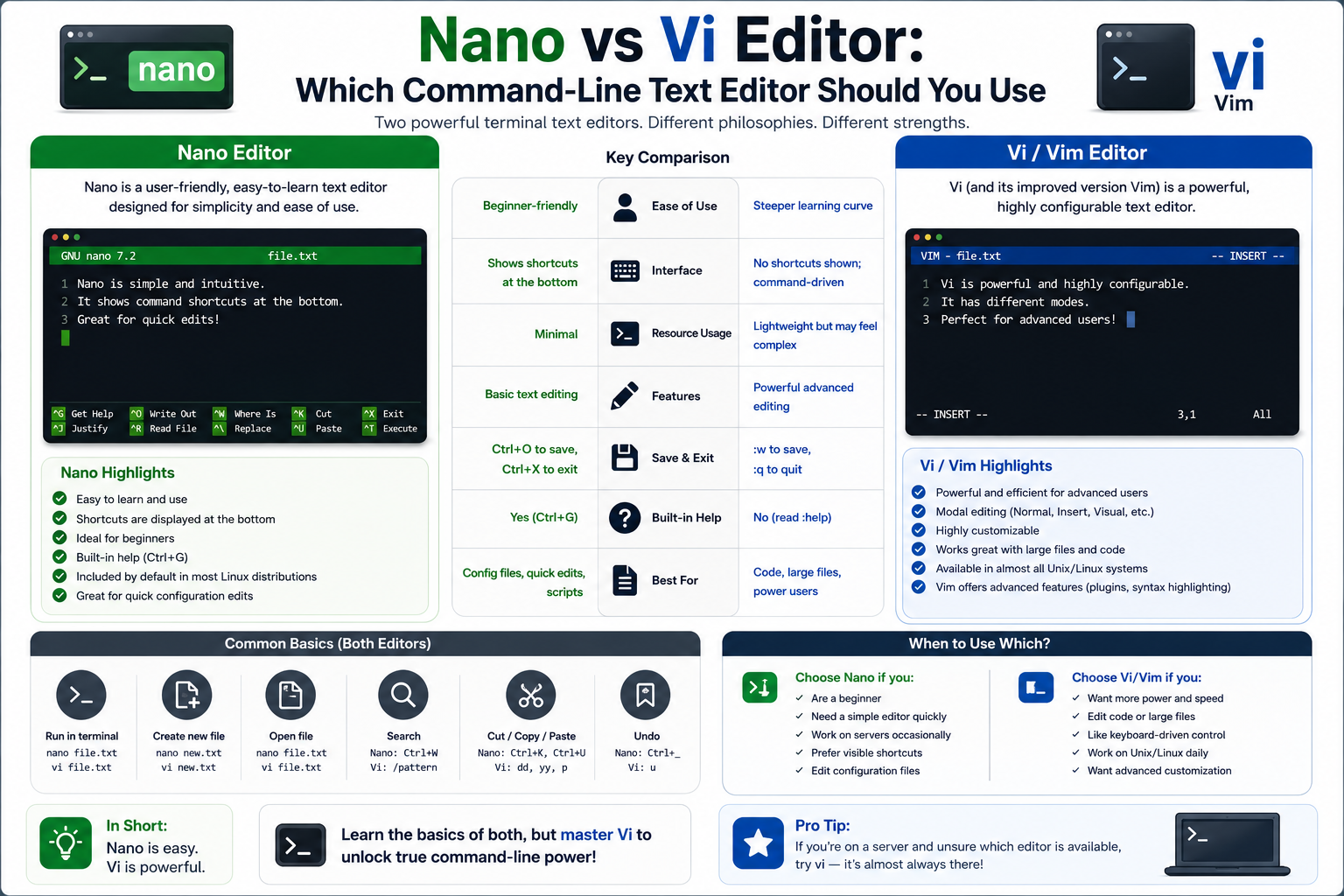
Linux has always been known for its flexibility, control, and the wide range of tools it offers to its users. Among these tools, text editors play a surprisingly important role. Whether someone is managing a server, writing scripts, configuring services, or simply editing system files, a text editor becomes one of the most frequently used utilities in the entire ecosystem.
Unlike many modern operating systems that rely heavily on graphical interfaces, Linux often requires interaction through the command line. In such environments, text editors are not just writing tools—they are essential system utilities. This is why discussions around Vi and Nano are so common in Linux communities. They are not just editors; they represent two completely different philosophies of interacting with a system.
On one side, there is Vi, a powerful, modal editor built for speed, efficiency, and deep control. On the other side, there is Nano, a lightweight and straightforward editor designed for simplicity and ease of use. Both are widely available on almost every Linux distribution, which makes the comparison even more relevant for users of all experience levels.
Understanding the difference between these two tools is not just about choosing an editor. It is about understanding how different design approaches affect productivity, learning curve, and user experience in a command-line environment.
Why Command-Line Text Editors Still Matter Today
Even in a world dominated by graphical applications, command-line text editors remain essential in Linux environments. Many servers do not even have a graphical interface installed, especially in enterprise environments where performance, security, and stability are top priorities. In such cases, administrators rely entirely on terminal-based tools.
Another reason command-line editors are important is remote access. When managing systems over SSH or similar secure connections, graphical tools are often impractical or unavailable. A lightweight editor that runs directly in the terminal becomes the most reliable option for making quick changes.
Command-line editors also consume minimal system resources. This makes them especially valuable on low-power machines, embedded systems, or recovery environments where system resources are limited. Even on powerful machines, administrators often prefer terminal tools because they are faster to launch and more predictable in behavior.
Within this context, Vi and Nano stand out as two of the most commonly used options. While they serve the same fundamental purpose, their design philosophies lead to very different user experiences.
The Philosophy Behind Vi: Efficiency and Control
Vi is not just a text editor; it is a system of interaction built around efficiency. Its design dates back to the early days of Unix, when computing resources were extremely limited, and every keystroke mattered. This historical context deeply influenced its structure and behavior.
The core idea behind Vi is that users should minimize hand movement and maximize editing speed once they become familiar with its commands. Instead of relying on menus or mouse input, Vi focuses entirely on keyboard-driven operations. This approach may seem unusual at first, but it is highly efficient once mastered.
Vi is built around the concept of modes, where each mode serves a specific purpose. Instead of having all actions available at all times, Vi separates tasks into different states. This reduces complexity in each mode and allows users to perform operations more precisely.
This philosophy reflects a broader Unix principle: tools should be small, powerful, and focused on doing one job extremely well. Vi embodies this principle by providing a highly efficient editing environment that prioritizes speed and precision over simplicity.
The Historical Evolution of Vi
The origins of Vi trace back to early Unix systems, where text editing was initially handled by very basic tools. As computing needs grew, there was a demand for a more capable editor that could handle complex editing tasks without overwhelming system resources.
Vi emerged as an evolution of earlier tools, gradually becoming more refined and capable. Over time, it became a standard component of Unix and later Linux systems. Its longevity is partly due to its adaptability and the fact that it is deeply embedded in system administration workflows.
Different versions of Vi exist across various systems. Some are closely tied to the original implementations, while others are modern re-implementations designed to maintain compatibility while improving performance and usability. Despite these variations, the core behavior remains consistent across most implementations, which is why learning Vi in one environment usually translates well to others.
Its widespread availability has made it a default tool for many system administrators, especially in environments where installing additional software is not always possible or practical.
Understanding Vi’s Modal Editing System
One of the most defining characteristics of Vi is its modal structure. Unlike most modern editors where typing to insert text directly, Vi operates in distinct modes that control how input is interpreted.
In its basic structure, Vi separates interaction into editing mode and command mode. In editing mode, users can insert and modify text directly. In command mode, keystrokes are interpreted as instructions rather than characters.
This separation allows Vi to avoid relying on menus or graphical interfaces. Instead, every action is performed through keyboard commands. This may initially feel unintuitive, but it provides a high degree of control once the user becomes familiar with the system.
The strength of this approach lies in efficiency. Experienced users can navigate, edit, and manipulate text extremely quickly without ever lifting their hands from the keyboard. This is particularly useful in programming or system administration tasks where speed and precision are important.
However, the same structure that makes Vi powerful can also make it challenging for beginners. The need to switch between modes and memorize commands creates a learning curve that is steeper than most modern editors.
The Command-Based Nature of Vi
Vi relies heavily on commands rather than graphical controls. Instead of clicking buttons or navigating menus, users type specific key sequences to perform actions. These commands control everything from saving files to navigating through large documents.
This design allows Vi to remain extremely lightweight while still offering powerful functionality. It also enables users to perform complex editing tasks without leaving the keyboard.
Because commands are directly tied to keystrokes, Vi can respond quickly to user input. This responsiveness is one of the reasons it remains popular among experienced developers and system administrators.
Over time, users often develop muscle memory for common commands, which significantly increases productivity. However, this requires practice and familiarity with the system.
The Philosophy Behind Nano: Simplicity and Accessibility
Nano takes a very different approach to text editing. Instead of focusing on efficiency through complexity, it prioritizes simplicity and accessibility. It was designed to provide an easy-to-use editing experience for users who may not be familiar with more advanced tools.
Unlike Vi, Nano does not use modes. Everything happens in a single, unified interface where typing always results in text input unless a shortcut is used. This eliminates the need to switch between different states, making it more intuitive for new users.
Nano’s design reflects a more modern philosophy of user interaction. Instead of requiring users to learn a complex system, it presents available actions directly within the interface. This reduces the learning curve significantly.
Its goal is not to replace advanced editors but to provide a reliable and straightforward tool for quick edits and basic file management.
The Origin and Development of Nano
Nano was developed as an alternative to earlier simple editors used in Unix-like systems. Its purpose was to improve usability while maintaining lightweight performance. It was designed to emulate the behavior of simpler editors while adding helpful features that made editing more comfortable.
As computing environments evolved, Nano became increasingly popular in situations where users needed a fast and easy way to edit files without learning complex commands. Its inclusion in many Linux distributions helped solidify its role as a default beginner-friendly editor.
Over time, Nano has remained consistent in its design philosophy. It has not attempted to compete with advanced editors in terms of features or extensibility. Instead, it focuses on doing a small number of tasks very well.
Nano’s User-Friendly Design Approach
One of Nano’s most noticeable features is its built-in guidance system. Instead of requiring users to memorize commands, it displays available shortcuts directly within the interface. This makes it significantly easier for beginners to understand what actions are possible.
Because Nano avoids modal editing, users do not need to worry about switching between different modes. Every keystroke behaves consistently, which reduces confusion and makes the editing process more predictable.
This simplicity makes Nano especially useful for quick edits, configuration changes, and situations where users do not want to invest time learning a complex tool.
Its design encourages immediate productivity. Even users with no prior experience can begin editing files almost instantly.
Comparing Editing Experiences Between Vi and Nano
The difference in user experience between Vi and Nano is significant. Vi requires an initial investment in learning before it becomes efficient, while Nano provides immediate usability with minimal learning required.
Vi offers a highly efficient workflow once mastered, but it demands familiarity with its system of commands and modes. Nano, on the other hand, offers a more straightforward experience but lacks the advanced control mechanisms that make Vi powerful.
In practical terms, Vi is often favored by users who spend a large amount of time editing text in the terminal. Nano is preferred by those who only need occasional edits and want a tool that behaves predictably without additional complexity.
These differences highlight the broader contrast between power-oriented and simplicity-oriented design philosophies.
Learning Curve and Skill Development
The learning curve is one of the most important factors when comparing Vi and Nano. Vi requires users to invest time in understanding its structure, commands, and navigation system. This initial effort can be challenging, but it often leads to long-term efficiency gains.
Nano requires almost no learning curve. Users can start editing immediately and rely on on-screen prompts for guidance. This makes it ideal for beginners or users who do not frequently work in the terminal.
The choice between the two often depends on how deeply a user engages with Linux systems. Those who work extensively with servers or development environments may find Vi more rewarding in the long run. Those who only occasionally edit files may prefer Nano’s simplicity.
Performance and System Resource Usage
Both Vi and Nano are extremely lightweight compared to modern graphical editors. However, Vi tends to be even more minimal in terms of resource usage due to its highly optimized design.
Nano is also efficient, but its additional usability features slightly increase its footprint. In practice, this difference is negligible on modern systems, but it can matter in extremely constrained environments.
In terms of startup speed, both editors are fast, but Vi often feels slightly more immediate due to its minimal interface and direct interaction model.
Extensibility and Customization Differences
Vi is highly extensible and can be customized through plugins and configuration files. This allows advanced users to tailor the editor to their specific needs, whether for programming, system administration, or specialized workflows.
This extensibility is one of Vi’s strongest advantages, but it also adds complexity. Managing plugins and configurations requires additional knowledge and maintenance.
Nano, by contrast, is intentionally simple and does not focus on extensibility. Its goal is consistency and ease of use rather than customization. While this limits flexibility, it also ensures stability and predictability.
Workflow Philosophy and User Mindset
Choosing between Vi and Nano is often less about features and more about mindset. Vi encourages users to think in terms of efficiency, commands, and structured interaction. It rewards those who invest time in mastering its system.
Nano encourages a more direct approach where users focus on the task rather than the tool. It removes barriers and allows immediate interaction without requiring prior knowledge.
These differences reflect two distinct philosophies in software design: one prioritizing mastery and efficiency, and the other prioritizing simplicity and accessibility.
Practical Contexts Where Each Editor Fits Naturally
In real-world usage, Vi is commonly found in system administration, development environments, and server management tasks where advanced control is beneficial. It is often the default editor in many Linux systems for this reason.
Nano is frequently used in quick configuration edits, beginner environments, and situations where speed of use is more important than advanced functionality. It is especially common in educational settings and lightweight system maintenance tasks.
Both tools coexist because they serve different needs within the Linux ecosystem, and neither fully replaces the other in all scenarios.
Vi vs Nano in Real-World Linux Workflows
While understanding the philosophy and background of Vi and Nano is useful, the real difference between them becomes much clearer when they are used in actual day-to-day Linux workflows. In practical environments such as system administration, server maintenance, development environments, and recovery situations, these editors behave very differently in terms of speed, comfort, and efficiency.
In Linux systems, editing files is rarely an isolated activity. It is usually part of a larger workflow that includes navigating directories, checking logs, modifying configurations, and restarting services. Because of this, the choice of text editor is closely tied to how efficiently a user can move through these tasks.
Vi tends to fit naturally into workflows where users are constantly interacting with the terminal and performing many small, frequent edits across different files. Nano, on the other hand, fits workflows where editing is occasional, focused, and straightforward.
These differences are not just about features, but about how each tool shapes the user’s interaction with the system.
System Administration and Configuration File Editing
One of the most common use cases for both Vi and Nano is editing system configuration files. In Linux, almost everything is controlled through text-based configuration files, from network settings to service behavior and user permissions.
System administrators often find themselves editing files located in restricted or sensitive directories. In these environments, speed and reliability matter more than advanced editing features.
Vi is often the default tool in these situations because it is almost guaranteed to be available on any Linux system. This makes it especially useful in minimal installations or rescue environments where no additional software is installed.
The advantage of Vi in system administration comes from its efficiency once mastered. Administrators who are familiar with it can open files, navigate to specific sections, make changes, and save updates extremely quickly. This becomes valuable when managing multiple systems or performing time-sensitive fixes.
Nano, however, is frequently preferred in situations where clarity and simplicity are more important than speed. For administrators who only occasionally edit configuration files, Nano reduces the risk of mistakes caused by unfamiliar commands or modes.
In practice, many professionals switch between both editors depending on the situation and urgency of the task.
Working in Remote Environments and SSH Sessions
Remote system management through SSH is one of the most important aspects of Linux administration. In these environments, graphical tools are usually unavailable or impractical due to bandwidth, latency, or security constraints.
Both Vi and Nano are commonly used in SSH sessions, but they offer different experiences.
Vi is particularly well-suited for remote work because it minimizes dependency on external help or visual guidance. Once a user is familiar with its command structure, they can perform complex edits without needing menus or documentation. This independence is valuable when working on remote servers where efficiency is critical.
Another advantage of Vi in remote environments is its responsiveness. Since it operates entirely in the terminal with minimal overhead, it remains stable even on slow or unstable connections.
Nano, on the other hand, provides a more forgiving experience for remote users who may not be deeply familiar with Linux systems. Its on-screen shortcuts help reduce confusion, especially in situations where users are under pressure to make quick changes.
However, Nano can feel slightly slower in complex editing tasks, particularly when navigating large files or making repeated changes across different sections.
Editing Large Files and Navigating Complex Content
One of the key differences between Vi and Nano becomes apparent when working with large files. In system administration, log files, configuration dumps, and script files can sometimes grow significantly in size.
Vi is designed with navigation efficiency in mind. Its command-based movement system allows users to jump quickly between sections, search for patterns, and move across large documents with minimal effort. This makes it especially useful when analyzing logs or editing large configuration structures.
Nano, while capable of handling large files, relies on simpler navigation mechanisms. Movement through the file is more linear and less optimized for rapid jumps between distant sections. This can make it less efficient for deep editing tasks involving large datasets or complex file structures.
In practice, users who frequently work with large files tend to prefer Vi because it reduces the time spent scrolling and searching manually. Nano remains more suitable for smaller or medium-sized files where simplicity outweighs advanced navigation needs.
Error Recovery and Safe Editing Practices
When working in a terminal environment, mistakes can have serious consequences, especially when editing system files. Because of this, the ability to recover from errors or avoid accidental changes is an important factor in choosing a text editor.
Vi provides a structured environment where actions are deliberate and mode-based. This reduces the likelihood of accidental text insertion or unintended modifications. Since users must explicitly switch modes to edit or execute commands, there is a built-in layer of control that helps prevent errors.
However, this structure can also make Vi feel unforgiving to beginners. A user who is unfamiliar with the modes may accidentally perform unwanted actions simply because they are not aware of the current state of the editor.
Nano reduces this complexity by removing modes entirely. Everything happens in a single editing context, which makes the behavior more predictable. This reduces confusion but also means there is less separation between editing actions and command execution.
In terms of safe editing, Nano is often considered more approachable, while Vi is considered more precise but requires greater discipline.
Search, Navigation, and File Manipulation Behavior
Searching within files is a fundamental part of text editing in Linux. Whether reviewing logs or modifying configuration files, users frequently need to locate specific patterns or lines of text.
Vi provides a highly efficient search system that integrates seamlessly into its command structure. Users can quickly move between matches and combine search with navigation commands, allowing for rapid traversal of large files. This makes it particularly powerful when working with complex data or repetitive structures.
Nano offers a simpler search experience that is easier to understand but less flexible. It is designed for straightforward use cases where users need to find specific words or phrases without complex navigation patterns.
File manipulation, such as copying, pasting, or deleting sections of text, also differs significantly between the two editors. Vi treats these operations as part of its command system, allowing for precise and repeatable actions. Nano uses simpler keyboard shortcuts that are easier to remember but less powerful in advanced scenarios.
User Experience and Cognitive Load Differences
One of the most important differences between Vi and Nano is the cognitive load they impose on the user.
Vi requires users to maintain awareness of multiple concepts at once, including modes, commands, and navigation logic. This increases cognitive load during the learning phase but can reduce mental effort once the system becomes familiar. Experienced users often report that Vi becomes almost automatic after extended use.
Nano reduces cognitive load by keeping all actions within a single consistent interface. Users do not need to track modes or complex command structures. This makes it easier for beginners and reduces mental strain during short editing sessions.
However, this simplicity comes at the cost of scalability. As tasks become more complex, Nano does not provide the same level of structured control as Vi, which can lead to slower workflows in advanced use cases.
Portability Across Linux Distributions and Systems
One of the strengths of both Vi and Nano is their availability across nearly all Linux distributions. This makes them highly portable tools that users can rely on regardless of the system they are working on.
Vi, or a compatible variant, is almost always installed by default. This makes it a dependable choice in minimal environments, containers, and recovery systems where software availability is limited.
Nano is also widely available, especially in user-friendly distributions where accessibility is prioritized. However, in extremely minimal systems, Vi is more likely to be present by default.
This difference makes Vi slightly more reliable in emergency or low-resource environments, while Nano is more commonly found in general-purpose desktop distributions.
Default Editor Behavior and System Preferences
In many Linux systems, a default text editor is defined at the system level. This default is often set to Vi or a compatible version due to its historical presence and reliability.
However, users are free to change this preference based on their workflow needs. Some users prefer Nano as their default editor because of its simplicity and ease of use, especially in environments where frequent editing is not required.
The choice of default editor often reflects the user’s familiarity with the system and their comfort level with command-line tools.
System administrators, developers, and advanced users are more likely to retain Vi as their default due to its efficiency and ubiquity, while casual users often prefer Nano for convenience.
Learning Patterns and Skill Progression Over Time
The way users learn Vi and Nano differs significantly and influences long-term productivity.
Vi requires a structured learning process. Users typically start with basic navigation and editing, gradually learning more advanced commands and techniques. Over time, this leads to a high level of proficiency that can significantly improve productivity in terminal-based environments.
Nano, on the other hand, requires almost no formal learning process. Users typically learn it by simply using it, relying on on-screen guidance. This makes it ideal for users who do not plan to invest time in mastering a complex tool.
Interestingly, many users begin their Linux journey with Nano and later transition to Vi as their experience grows and their workflow becomes more advanced.
Editing Speed and Interaction Flow
Speed of editing is often cited as one of the biggest advantages of Vi. Once users are familiar with its command structure, they can perform complex editing operations with very few keystrokes. This creates a highly efficient workflow where interaction becomes almost instantaneous.
Nano prioritizes clarity over speed. While it is still reasonably fast for simple tasks, it does not offer the same level of optimization for repetitive or complex editing actions.
The difference in speed becomes most noticeable in professional environments where users spend large amounts of time editing files. In such cases, Vi’s efficiency advantage becomes more significant over time.
However, for occasional use, Nano’s speed is often more than sufficient and feels more intuitive for users who do not rely heavily on terminal editing.
Reliability in Minimal and Recovery Environments
Linux systems often include recovery modes or minimal environments used for troubleshooting and system repair. In these environments, only essential tools are available.
Vi is almost always included in such environments, making it a critical tool for system recovery. Its ability to function without additional dependencies makes it highly reliable in emergencies.
Nano may not always be available in extremely minimal setups, although it is commonly included in more complete recovery environments.
This reliability factor is one of the reasons Vi remains deeply embedded in Linux systems even as newer tools emerge.
Cultural and Community Influence in Linux Usage
Beyond technical differences, Vi and Nano also represent different cultural approaches within the Linux community.
Vi is often associated with traditional Unix philosophy and experienced users who value efficiency, control, and minimalism in design. It has a strong presence in professional environments and is frequently seen as a tool for advanced users.
Nano is associated with accessibility and ease of entry into Linux environments. It is often recommended to newcomers due to its simplicity and lack of complexity.
These cultural associations influence how users perceive and adopt each tool, even when their practical differences may be relatively small in certain contexts.
Interoperability with Other Command-Line Tools
In Linux workflows, text editors are often used alongside other command-line tools such as file managers, log viewers, and system utilities. The ability of an editor to integrate smoothly into these workflows is an important factor in its usefulness.
Vi integrates tightly into command-line workflows due to its keyboard-driven nature and fast execution model. Users can quickly switch between tools and return to editing without breaking their workflow rhythm.
Nano also integrates well into command-line environments, but does not offer the same level of interaction depth. It is typically used as a standalone editing tool rather than part of a complex command chain.
Both editors remain highly compatible with Linux workflows, but their roles differ depending on the complexity of the tasks involved.
Practical Decision Patterns Among Linux Users
In real-world usage, many Linux users do not strictly choose one editor over the other. Instead, they use both depending on context.
Vi is often used for advanced editing tasks, system administration, and environments where efficiency is critical. Nano is used for quick edits, temporary changes, or situations where ease of use is more important.
This dual usage pattern reflects the complementary nature of the two tools rather than direct competition between them.
The Future of Command-Line Text Editors in Linux
As Linux continues to evolve, the role of command-line text editors remains surprisingly stable. Despite the rise of modern graphical applications, web-based development platforms, and integrated development environments, terminal-based editors still hold a central place in Linux administration and development workflows.
Part of the reason for this endurance is that command-line tools solve problems differently from graphical applications. They are lightweight, dependable, and universally accessible. In environments where system resources are limited or remote administration is necessary, terminal editors continue to outperform many modern alternatives in terms of practicality.
Vi and Nano have survived multiple generations of technological change because they address fundamental needs. Linux systems still rely heavily on text-based configuration files, scripts, and command-line management. As long as those requirements exist, lightweight terminal editors will remain relevant.
Although newer editors and terminal-based applications continue to appear, Vi and Nano remain deeply integrated into Linux culture and workflows. Their staying power demonstrates that efficient tools do not necessarily become obsolete simply because technology evolves around them.
Modern Linux Users and Changing Expectations
The expectations of Linux users have changed significantly over the years. Early Linux and Unix environments required users to be comfortable working entirely from the command line. Today, many Linux distributions are designed with user-friendly graphical interfaces that resemble commercial desktop operating systems.
As Linux adoption expanded beyond server administrators and programmers, the demand for simpler tools also increased. Many users entering Linux environments today expect software to behave intuitively and provide immediate usability without extensive training.
This shift in expectations has strengthened the appeal of Nano. Its straightforward interface aligns well with modern usability principles. New users can edit files without learning complicated commands or understanding modal editing systems.
At the same time, professional users continue to value efficiency and precision. For experienced administrators and developers, Vi still provides advantages that are difficult to replicate in simpler editors. This creates an interesting balance where both editors remain useful because they address different user expectations.
Why Vi Continues to Remain Popular
Despite its age and steep learning curve, Vi continues to maintain a strong following. One reason is that its design rewards long-term use. Users who spend significant time learning Vi often develop workflows that are extremely fast and efficient.
The editor also benefits from consistency. Many aspects of Vi have remained stable for decades, which means knowledge gained years ago still applies today. This reliability makes it an attractive tool for professionals who work across multiple systems and environments.
Another reason for Vi’s popularity is its adaptability. While the core editor remains lightweight, many implementations support customization and advanced functionality. Users can shape the editor around their specific workflows rather than adapting themselves entirely to the software.
Vi also carries cultural significance within the Linux and Unix communities. For many users, learning Vi is considered part of becoming comfortable with Linux systems. Its reputation as a powerful tool continues to attract users who want deeper control over their workflows.
Why Nano Continues to Attract New Users
Nano’s continued popularity comes from its simplicity and accessibility. Not every Linux user wants to invest time learning advanced editing commands. Many people simply need a reliable tool for occasional configuration changes or file editing tasks.
Nano reduces the intimidation factor often associated with terminal environments. Displaying shortcuts directly within the interface and avoiding complex interaction models, it creates a more welcoming experience for beginners.
Its design also reflects modern usability principles. Most users are accustomed to applications where typing immediately inserts text and commands are triggered through keyboard shortcuts. Nano follows this familiar pattern, making it easier for new Linux users to adapt.
Another reason Nano remains popular is its practicality. In many situations, advanced editing features are unnecessary. Users often just need to open a file, make a small change, save it, and exit quickly. Nano performs these tasks efficiently without requiring additional knowledge.
Productivity Versus Accessibility
The comparison between Vi and Nano often comes down to a trade-off between productivity and accessibility.
Vi emphasizes long-term efficiency. The editor may feel slow and confusing during the learning phase, but experienced users can perform complex tasks very rapidly once they internalize its command structure. This makes it particularly appealing for people who spend large portions of their day working in terminal environments.
Nano emphasizes immediate accessibility. Users can become productive almost instantly without studying commands or modes. This reduces frustration and makes the editor more approachable for casual users.
Neither approach is universally better. The right choice depends heavily on how often the editor will be used and what types of tasks need to be performed. Someone who edits files only occasionally may gain little benefit from learning Vi’s advanced workflow system. Conversely, someone managing servers or writing scripts daily may eventually find Nano limiting.
The Psychological Aspect of Editor Preference
Interestingly, text editor preferences often become deeply personal among Linux users. People tend to develop strong opinions based on the workflows they are accustomed to and the environments where they learned Linux.
Users who started with Vi often appreciate the discipline and structure it introduces. They may view modal editing as an efficient way to separate commands from text manipulation. Over time, this workflow becomes natural and deeply integrated into their habits.
Users who prefer Nano often value clarity and simplicity. They may see Vi’s complexity as unnecessary for the tasks they perform regularly. To them, Nano represents a practical solution that avoids overcomplicating straightforward editing tasks.
These psychological factors help explain why discussions about text editors can become surprisingly passionate within technical communities. The preference is rarely just about features—it reflects how users think about productivity, efficiency, and interaction with technology.
Text Editors and Linux Learning Curves
For many people, a command-line text editor is one of the first challenges encountered when learning Linux. Editing configuration files, modifying scripts, or updating system settings often requires familiarity with at least one terminal editor.
Nano is commonly recommended to beginners because it lowers the barrier to entry. Users can focus on learning Linux itself rather than struggling with complex editor commands. This makes the early learning process less frustrating.
Vi, however, is often introduced later as users become more comfortable with Linux environments. Learning Vi can feel difficult initially, but many users eventually appreciate the speed and flexibility it offers.
This progression reflects a broader pattern in technical learning. Simpler tools help users build confidence early on, while more advanced tools become attractive as workflows grow more demanding.
The Role of Muscle Memory in Editing Efficiency
One reason experienced Vi users are so dedicated to the editor is muscle memory. After extended use, commands become automatic, allowing users to edit text without consciously thinking about individual actions.
This creates a workflow that feels fluid and efficient. Users can navigate, delete, copy, and manipulate text rapidly because the commands become deeply ingrained habits.
Nano also benefits from familiarity, but its shortcut-based system does not create the same level of command-driven interaction. The editing process remains more direct and explicit rather than becoming a highly optimized sequence of actions.
The difference becomes more noticeable during repetitive tasks or long editing sessions. Vi’s structure is designed to minimize unnecessary movement and maximize editing efficiency over time.
Terminal Editing in the Age of Modern IDEs
Modern development environments provide advanced features such as graphical debugging, integrated terminals, syntax highlighting, and intelligent code suggestions. These tools are extremely powerful and have become standard in software development.
Despite this, terminal editors remain important because they solve different problems. Graphical applications are not always available, especially on remote servers or lightweight systems. In these environments, command-line editors remain essential.
Vi is often favored by developers who want consistency between local and remote workflows. Being able to use the same editing principles everywhere creates continuity across environments.
Nano remains valuable for quick edits and maintenance tasks where launching a full graphical environment would be unnecessary or inefficient.
Rather than replacing command-line editors, modern IDEs coexist with them. Many professionals use graphical tools for large projects while still relying on Vi or Nano for terminal-based tasks.
Minimalism and the Linux Philosophy
The continued popularity of both Vi and Nano also reflects the broader Linux philosophy of modular, efficient tools.
Linux environments traditionally favor software that performs specific tasks well without unnecessary overhead. Both editors embody this principle in different ways.
Vi emphasizes efficiency through structured interaction and command-driven editing. Nano emphasizes simplicity through minimal design and intuitive controls. Both avoid excessive resource consumption and remain highly portable across systems.
This minimalist philosophy continues to resonate with Linux users who value control, transparency, and efficiency in their tools.
Choosing Between Vi and Nano in Modern Linux Systems
For modern Linux users, choosing between Vi and Nano is less about determining which editor is objectively better and more about understanding which one fits their workflow.
Users who prioritize speed, advanced navigation, and long-term efficiency may find Vi more rewarding despite its learning curve. Those who prioritize ease of use, quick editing, and straightforward interaction may feel more comfortable with Nano.
The good news is that Linux allows users to choose freely. Unlike more restrictive operating systems, Linux encourages experimentation and personalization. Users can try both editors, develop familiarity with each, and decide which one feels most natural for their needs.
In many cases, experienced users eventually become comfortable with both tools. They may rely on Vi for complex editing tasks while using Nano for quick modifications and simple maintenance work. This flexibility reflects one of Linux’s greatest strengths: the ability to adapt tools and workflows to individual preferences rather than forcing everyone into a single approach.
Conclusion
The debate between Vi and Nano has existed for years within the Linux community, and it continues because both editors serve valuable but very different purposes. Neither tool is universally better than the other. Instead, each one reflects a unique philosophy about how users should interact with the command line and manage text within Linux systems.
Vi stands out for its power, efficiency, and flexibility. Its command-based structure and modal editing system allow experienced users to work quickly and perform advanced editing tasks with precision. Although it requires time and patience to learn, many users find that the investment pays off through faster workflows and greater control over their environment. For developers, system administrators, and users who spend significant time in the terminal, Vi remains an incredibly capable tool.
Nano, by contrast, focuses on simplicity and accessibility. Its intuitive design, visible shortcuts, and straightforward editing experience make it ideal for beginners and users who want to make quick changes without memorizing commands. Nano proves that command-line tools do not have to be complicated to be effective.
Ultimately, the best text editor depends on the user’s goals, experience level, and workflow preferences. Some users may prefer the speed and depth of Vi, while others may appreciate the convenience and clarity of Nano. In many cases, Linux users benefit from learning both, allowing them to choose the right tool for different situations and tasks.