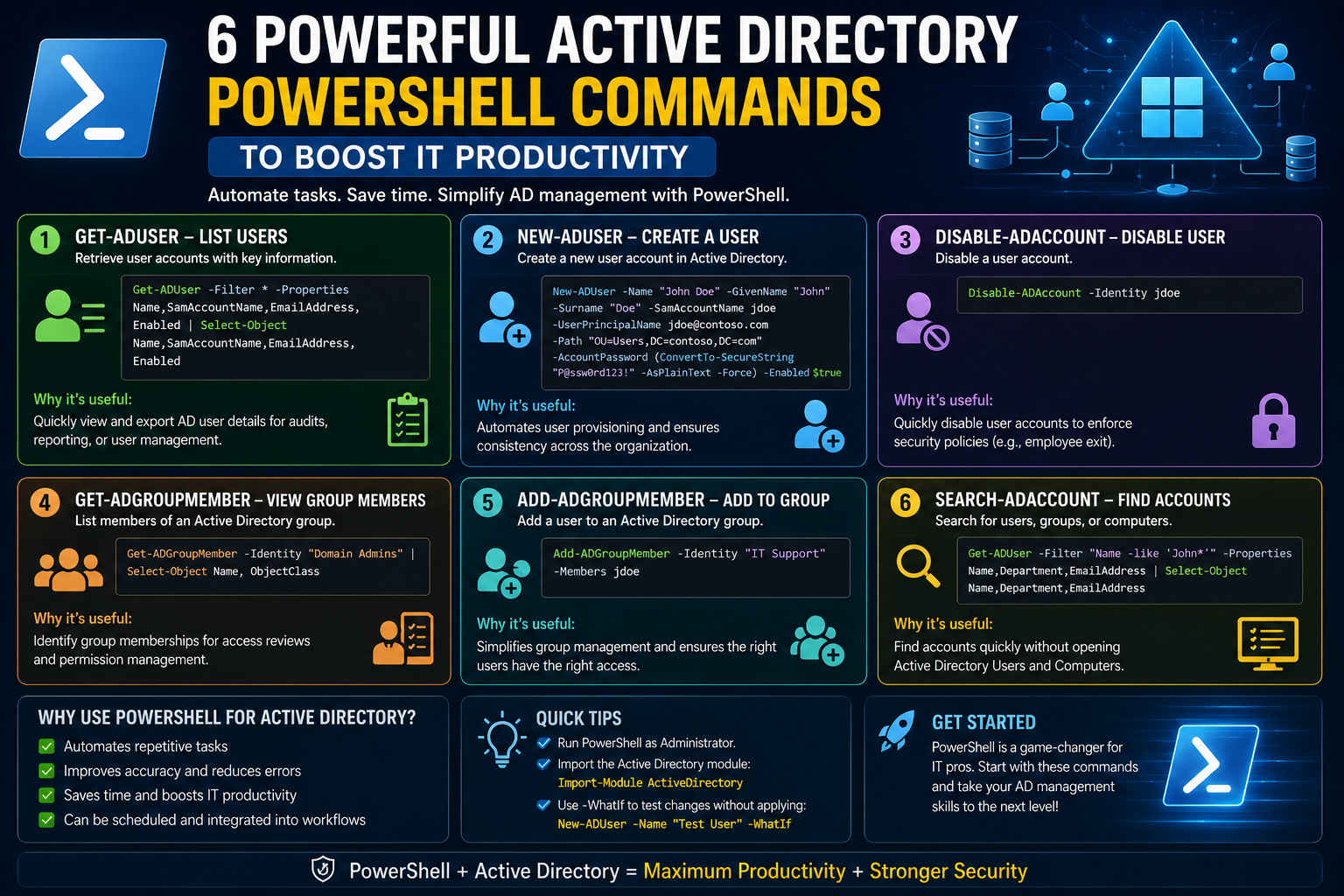
Active Directory plays a central role in managing users, devices, permissions, and resources across an organization’s IT infrastructure. It acts as a structured directory service that helps administrators maintain order in environments where hundreds or even thousands of users and computers need to be controlled efficiently. In small environments, this structure may seem simple because the number of objects is limited and changes are infrequent. However, as organizations expand, the complexity grows rapidly, making manual management not only time-consuming but also highly error-prone.
In large enterprises, administrators often deal with frequent onboarding and offboarding of users, device lifecycle management, permission adjustments, security policy enforcement, and compliance reporting. Without automation, each of these tasks would require repetitive manual effort across multiple systems and organizational units. This is where automation becomes essential, and PowerShell emerges as one of the most powerful tools for managing Active Directory at scale.
PowerShell enables administrators to interact with Active Directory in a structured and programmable way. Instead of clicking through graphical interfaces, they can retrieve data, modify attributes, and enforce policies across the entire directory environment using consistent commands. This capability becomes especially valuable when dealing with large datasets, where manual navigation would be impractical.
Another important aspect of Active Directory management is visibility. Organizations often need to understand the state of users, computers, and security groups at any given time. Whether it is auditing user activity, checking inactive devices, or verifying group memberships, having quick access to accurate information is critical. PowerShell helps streamline this visibility by allowing administrators to extract structured information efficiently.
Automation also introduces consistency. When tasks are performed manually, there is always a risk of inconsistency due to human error or oversight. Automated processes ensure that rules and procedures are applied uniformly across the entire directory. This improves both operational reliability and security posture.
The Role of PowerShell in Active Directory Automation
PowerShell is more than just a command-line interface; it is a scripting environment designed to manage and automate administrative tasks. In the context of Active Directory, it provides a bridge between administrators and directory services, enabling them to perform complex operations with precision and speed.
One of the primary strengths of PowerShell is its ability to work with objects rather than plain text output. In Active Directory, everything is treated as an object—users, computers, groups, and organizational units all have attributes that can be queried or modified. PowerShell allows administrators to interact with these objects directly, making it easier to filter, sort, and manipulate data.
Another key advantage is scalability. Whether managing ten users or ten thousand, PowerShell commands behave consistently. This makes it suitable for both small and large environments. It also supports automation workflows, meaning repetitive tasks can be executed on schedules without manual intervention.
PowerShell also supports integration with other administrative tools and services. This allows administrators to build comprehensive automation workflows that span multiple systems. For example, user provisioning in Active Directory can be linked with email systems, file servers, and access control systems.
In addition to operational efficiency, PowerShell enhances auditing and reporting capabilities. Administrators can generate detailed reports about user activity, group membership changes, and system health. These reports are essential for compliance, security audits, and internal governance.
Working with User Objects in Active Directory
User accounts are one of the most important components in Active Directory. They represent individuals within an organization and define their access to systems and resources. Managing user accounts effectively is essential for maintaining security and operational efficiency.
When administrators need to retrieve information about users, they typically rely on commands designed to access user objects and their attributes. These attributes can include usernames, department details, login information, account status, and profile configurations. By accessing this information centrally, administrators can gain a clear understanding of user distribution and behavior across the organization.
One of the key benefits of working with user objects through automation is the ability to extract large datasets quickly. Instead of checking individual accounts manually, administrators can retrieve information for all users or specific groups based on defined criteria. This is especially useful for auditing purposes or when preparing organizational reports.
User attributes also play an important role in policy enforcement. For example, organizations may require users in specific departments to follow certain security rules or access restrictions. By analyzing user attributes, administrators can ensure compliance with these policies.
Another important use case is user lifecycle management. When employees join, change roles, or leave the organization, their Active Directory accounts must be updated accordingly. Automation helps ensure that these changes are applied consistently and without delay, reducing security risks associated with outdated accounts.
Managing Computer Accounts and Device Information
In addition to user accounts, Active Directory also manages computer accounts. These represent devices that are connected to the domain and are part of the organization’s network infrastructure. Proper management of these accounts is essential for maintaining network hygiene and security.
Computer accounts store information such as device names, operating system details, last login times, and password update history. By analyzing this information, administrators can identify inactive or obsolete devices that may no longer be in use.
One common administrative task is identifying stale computer accounts. These are accounts associated with devices that have not connected to the domain for a long period. Keeping such accounts in Active Directory can introduce security risks and clutter the directory structure. By analyzing activity patterns, administrators can safely determine which accounts should be removed or disabled.
Computer account management also plays a role in troubleshooting network issues. If a device is experiencing connectivity problems or authentication failures, administrators can quickly check its status in Active Directory to identify potential causes.
In larger environments, device management becomes even more critical. Organizations may have thousands of computers spread across multiple locations. Without automation, tracking and maintaining these devices would be extremely difficult. PowerShell helps streamline this process by allowing administrators to query and analyze computer data efficiently.
Exploring Active Directory Objects Beyond Users and Computers
Active Directory is not limited to users and computers. It also contains a wide variety of other objects that represent different components of the network environment. These include groups, organizational units, contacts, and configuration objects.
Working with these objects requires a flexible approach because they often contain different attributes and serve different purposes. For example, groups are used to manage permissions and access control, while organizational units are used to structure the directory logically.
Being able to query all types of objects provides administrators with a comprehensive view of the directory. This is particularly useful when performing audits or troubleshooting complex issues that involve multiple object types.
Another advantage of working with general directory objects is the ability to track changes over time. Administrators can identify when objects were modified, what changes were made, and how those changes impact the overall environment. This level of visibility is essential for maintaining control over large-scale directory systems.
Understanding Group Membership and Access Control
Groups are one of the most powerful features in Active Directory because they simplify access management. Instead of assigning permissions to individual users, administrators can assign them to groups and manage access collectively.
Group membership determines what resources a user can access within the organization. This may include file shares, applications, network resources, and administrative privileges. Proper group management ensures that users have appropriate access without exposing sensitive systems unnecessarily.
Understanding group membership is also important for security auditing. Organizations need to ensure that only authorized users are part of privileged groups. Regularly reviewing group membership helps prevent unauthorized access and reduces security risks.
Group structures can become complex in large organizations, especially when nested groups are involved. Automation helps simplify this complexity by allowing administrators to extract and analyze group relationships efficiently.
Modifying Active Directory Attributes and Configurations
In addition to retrieving information, administrators often need to modify Active Directory objects. This includes updating user details, changing group memberships, or adjusting computer configurations.
Attribute modification is a critical part of directory management because it reflects changes in the real-world organization. For example, when an employee changes departments, their account attributes and group memberships must be updated accordingly.
Automating these modifications ensures that changes are applied consistently across the system. It also reduces the risk of human error, which can lead to misconfigured permissions or outdated information.
Configuration changes can also be applied at scale. For example, administrators may need to update settings for multiple users or devices simultaneously. Automation makes this process efficient and reliable.
Automating Health Monitoring in Active Directory Environments
Health monitoring is a crucial aspect of Active Directory administration. It ensures that domain controllers, authentication services, and directory replication processes are functioning correctly.
Without proper monitoring, issues such as replication failures, service downtime, or authentication errors may go unnoticed until they impact users. Automation helps detect these problems early by continuously checking system status and service availability.
Domain controllers are the backbone of Active Directory, and their health directly affects the entire network. Monitoring their connectivity, service status, and replication consistency is essential for maintaining stability.
Health checks typically involve verifying network connectivity, checking essential services, and analyzing diagnostic outputs. These checks can be automated to run at regular intervals, providing administrators with continuous visibility into system performance.
Automated monitoring also enables proactive maintenance. Instead of reacting to failures, administrators can identify and resolve issues before they escalate into major disruptions.
Importance of Scheduled Automation in Directory Management
Scheduling plays a key role in Active Directory automation. Many administrative tasks need to be performed regularly, such as user audits, device cleanup, and health monitoring.
By scheduling automation tasks, organizations ensure that critical operations are executed consistently without manual intervention. This improves efficiency and reduces the likelihood of missed tasks.
Scheduled automation also supports long-term system stability. Regular checks and updates help maintain directory integrity and prevent issues from accumulating over time.
In large environments, scheduling becomes even more important because manual execution of repetitive tasks is not feasible. Automation ensures that operations continue running smoothly regardless of the administrative workload.
Advanced Active Directory Data Retrieval and Filtering Techniques
As organizations scale, simply retrieving basic information from Active Directory is no longer sufficient. Administrators often need highly specific datasets that reflect real-time operational conditions. This is where advanced filtering and structured querying become essential in PowerShell-based administration.
Active Directory contains a large number of attributes for each object, and not all of them are relevant in every situation. The ability to selectively retrieve only the necessary information helps reduce processing overhead and improves clarity when analyzing results. Instead of viewing entire object profiles, administrators can focus on attributes that directly support decision-making, such as account status, last logon activity, department affiliation, or security group membership.
Filtering also plays a key role in performance optimization. In large environments with thousands or even millions of objects, retrieving unfiltered data can slow down operations significantly. By narrowing search conditions, administrators ensure that only relevant objects are processed, making automation scripts faster and more efficient.
Another important aspect is conditional retrieval. Administrators often need to identify objects that meet specific criteria, such as inactive accounts, disabled users, or systems that have not communicated with the domain for a defined period. This type of filtering allows for proactive management, where issues can be addressed before they become operational risks.
Advanced querying also supports compliance requirements. Many organizations must demonstrate control over user access and system configurations. Being able to extract precise datasets quickly helps produce audit-ready reports that reflect the current state of the environment.
Deep Dive into Active Directory Reporting and Data Structuring
Reporting is one of the most valuable outcomes of Active Directory automation. Raw data alone is not useful unless it is structured in a way that supports analysis and decision-making. PowerShell enables administrators to transform directory data into meaningful reports that can be shared with management, security teams, or auditors.
One of the key advantages of automated reporting is consistency. Manual reports often vary in format and accuracy depending on who prepares them. Automated reporting ensures that every output follows the same structure and includes the same fields, reducing ambiguity and improving reliability.
Reports can be designed to focus on different aspects of the directory environment. Some may highlight user activity trends, while others may focus on device inventory or security group distribution. The flexibility of PowerShell allows administrators to tailor reports based on organizational needs.
Data structuring also involves selecting the right attributes for analysis. Not all directory attributes are equally important in every context. For example, security audits may prioritize login history and group membership, while operational reports may focus on department assignment and account status.
Another important aspect is data normalization. In large environments, inconsistent data entry can lead to irregularities in reporting. Automation helps standardize outputs, ensuring that all records follow consistent formatting rules. This improves readability and simplifies downstream analysis.
Lifecycle Management of Active Directory Objects
Active Directory object lifecycle management refers to the process of creating, maintaining, updating, and eventually decommissioning directory objects. This lifecycle is especially important for user accounts, computer accounts, and security groups.
When a new user joins an organization, their account must be created with appropriate attributes, permissions, and group memberships. This process must be accurate and timely to ensure that the user can begin working without delays. Automation helps streamline onboarding by ensuring that all required configurations are applied consistently.
During the active phase of an account, changes are common. Employees may change departments, receive new roles, or require different access levels. Managing these changes manually can lead to inconsistencies, especially in large organizations. Automated updates ensure that changes are reflected immediately across the directory.
Eventually, accounts may become inactive or obsolete. When employees leave the organization or devices are retired, their associated directory objects must be properly decommissioned. Leaving unused accounts active can introduce security risks and clutter the directory environment.
Lifecycle management also extends to group objects. Groups may be created for temporary projects or specific business functions and later become unnecessary. Regular evaluation of group relevance helps maintain a clean and organized directory structure.
Security-Centric Active Directory Automation Practices
Security is one of the most critical aspects of Active Directory management. Since the directory controls authentication and authorization across the entire network, any misconfiguration can have serious consequences.
Automation plays a major role in strengthening security by ensuring that policies are consistently enforced. For example, password policies, account lockout rules, and access restrictions can be applied uniformly across all users without manual intervention.
Another important security practice is monitoring privileged accounts. These accounts have elevated access and must be carefully managed to prevent unauthorized use. Automation helps track changes to privileged groups and alerts administrators when unexpected modifications occur.
Security auditing is also enhanced through automation. Instead of manually reviewing logs and configurations, administrators can generate structured summaries that highlight potential risks. These may include inactive administrative accounts, unusual login patterns, or excessive permissions assigned to standard users.
Conditional logic in automation workflows can also enforce security rules dynamically. For example, accounts that do not meet certain criteria can be automatically disabled or flagged for review. This reduces the likelihood of human oversight and strengthens the overall security posture.
Organizational Unit Management and Structural Design
Organizational Units, often referred to as OUs, form the structural backbone of Active Directory. They provide a logical framework for grouping users, computers, and other objects based on organizational hierarchy or functional roles.
Proper design of organizational units is essential for maintaining clarity and control within the directory. A well-structured OU design simplifies policy application, delegation, and reporting. Conversely, poor design can lead to confusion and administrative inefficiency.
Automation supports OU management by enabling administrators to move objects between units based on predefined rules. For example, users can be automatically placed into specific OUs based on department or location attributes. This ensures consistency and reduces manual workload.
OU structure also plays a significant role in policy enforcement. Group policies are often linked to organizational units, meaning that the structure directly influences how configurations are applied across the environment.
In large organizations, OU management becomes increasingly complex. Automation helps maintain structure by ensuring that objects are placed correctly and consistently according to organizational standards.
Delegation of Administrative Control in Active Directory
Delegation refers to the process of assigning specific administrative responsibilities to different users or teams without granting full control over the entire directory. This is an important principle in large environments where centralized administration is not practical.
Through delegation, organizations can distribute administrative tasks while maintaining security boundaries. For example, a helpdesk team may be granted permission to reset user passwords, while another team may manage computer accounts.
Automation supports delegation by ensuring that permissions are applied consistently and accurately. Instead of manually configuring access rights, administrators can define rules that automatically assign appropriate privileges based on roles or responsibilities.
Delegation also improves operational efficiency. By distributing tasks across multiple teams, organizations reduce the burden on central administrators and allow faster response times for routine operations.
However, delegation must be carefully managed to avoid privilege escalation risks. Automation helps enforce boundaries by continuously verifying that permissions remain aligned with organizational policies.
Monitoring Active Directory Replication and Consistency
Active Directory relies on replication to ensure that changes made on one domain controller are reflected across all others. This replication process is essential for maintaining consistency in distributed environments.
If replication fails or becomes delayed, inconsistencies can occur, leading to authentication issues or outdated information being used across the network. Monitoring replication health is therefore a critical administrative responsibility.
Automation enables continuous monitoring of replication status across all domain controllers. By regularly checking synchronization status, administrators can quickly identify and resolve issues before they impact users.
Consistency checks also help ensure that directory data remains accurate. Differences between domain controllers can indicate underlying problems such as network issues or service failures.
In large environments with multiple sites, replication monitoring becomes even more important due to the complexity of network topology. Automated checks provide visibility into these distributed systems and help maintain overall stability.
Managing Active Directory Groups at Scale
Group management is one of the most dynamic aspects of Active Directory administration. Groups are used to control access to resources, define roles, and simplify permission management.
As organizations grow, group structures can become increasingly complex. Groups may be nested, dynamically assigned, or tied to specific business functions. Managing this complexity manually is difficult and error-prone.
Automation simplifies group management by enabling bulk operations such as adding or removing members based on defined conditions. This ensures that group memberships remain accurate and aligned with organizational policies.
Another important aspect is group lifecycle management. Just like user accounts, groups must be reviewed periodically to ensure they remain relevant. Redundant or unused groups can introduce confusion and security risks.
Automation also supports dynamic group analysis. Administrators can evaluate group relationships and identify dependencies that may not be immediately visible. This helps in understanding access hierarchies and potential security implications.
Performance Optimization in Large Directory Environments
As Active Directory environments grow, performance becomes an important consideration. Large-scale operations involving thousands of objects can place a significant load on domain controllers if not managed properly.
PowerShell automation helps optimize performance by reducing unnecessary queries and limiting the scope of operations. Instead of scanning entire directories, targeted queries ensure that only relevant data is processed.
Efficient scripting practices also contribute to performance improvements. Structured workflows reduce redundant operations and ensure that system resources are used effectively.
Another important factor is timing. Scheduling resource-intensive operations during off-peak hours helps minimize impact on users and improves overall system responsiveness.
Performance optimization is not only about speed but also about reliability. Well-structured automation ensures that directory operations complete successfully without overloading system resources.
Strengthening Active Directory Security Through Continuous Monitoring
As Active Directory environments grow in size and complexity, security becomes less about isolated configurations and more about continuous oversight. Organizations can no longer rely on periodic manual checks to ensure that accounts, permissions, and systems remain secure. Instead, they must adopt a continuous monitoring mindset where directory activity is observed, analyzed, and acted upon in near real time.
One of the most important areas of security monitoring involves tracking changes within the directory itself. Every modification—whether it involves a user attribute update, group membership adjustment, or computer account change—can potentially impact the security posture of the organization. Automation allows administrators to observe these changes systematically and detect unusual patterns that may indicate misuse or misconfiguration.
Another critical dimension is behavioral analysis. Rather than only checking static configurations, modern Active Directory environments benefit from analyzing how objects are being used. For example, repeated failed login attempts, unusual access times, or unexpected privilege escalations can all signal potential security incidents. By continuously evaluating these behaviors, organizations can identify threats earlier in their lifecycle.
Security monitoring also extends to dormant accounts. In many environments, inactive user or computer accounts are overlooked, creating hidden vulnerabilities. These accounts may still possess access rights that can be exploited if compromised. Continuous monitoring ensures that inactive objects are identified, reviewed, and either disabled or removed according to organizational policy.
In addition, privileged accounts require heightened scrutiny. These accounts often have administrative control over large portions of the environment, making them prime targets for attackers. Monitoring their usage patterns, access frequency, and group memberships helps ensure that elevated privileges are not being misused or left exposed.
Identity Lifecycle Governance and Controlled Access Management
Identity lifecycle governance refers to the structured management of digital identities from creation to deletion. In Active Directory environments, this lifecycle includes onboarding, role transitions, and offboarding processes, each of which must be carefully controlled to maintain security and operational consistency.
During onboarding, identity creation must follow predefined organizational rules. These rules determine which attributes are assigned, what groups the user belongs to, and what access permissions are granted. Automation ensures that these steps are executed consistently, reducing the likelihood of errors or missing configurations that could delay productivity.
Role transitions introduce another layer of complexity. Employees frequently change departments, responsibilities, or job functions, and each change may require updates to their directory attributes and access rights. Without automation, these updates can become inconsistent, leading to privilege accumulation or unnecessary access retention.
Offboarding is arguably the most critical stage in identity lifecycle management. When users leave an organization, their accounts must be promptly disabled or removed to prevent unauthorized access. Delays or oversights during this process can expose systems to significant risk. Automated workflows ensure that offboarding procedures are executed immediately and thoroughly.
Controlled access management ties directly into lifecycle governance. It ensures that users only have access to resources required for their current role. This principle of least privilege reduces exposure and limits the potential impact of compromised accounts.
Designing Scalable Active Directory Automation Frameworks
As organizations expand, their Active Directory environments must scale accordingly. Scalability is not just about handling more users or devices; it is about maintaining performance, consistency, and security as complexity increases.
A scalable automation framework is built on modular design principles. Instead of creating large, monolithic scripts or processes, administrators design smaller, reusable components that handle specific tasks. These components can then be combined to form larger workflows that address complex administrative needs.
Scalability also depends heavily on standardization. When directory objects follow consistent naming conventions, attribute structures, and organizational patterns, automation becomes significantly easier to implement and maintain. Without standardization, scripts become fragile and difficult to adapt as the environment changes.
Another key factor in scalability is resource efficiency. Large directory environments can place heavy demands on domain controllers and network infrastructure. Automation must therefore be optimized to minimize unnecessary queries and reduce processing overhead.
Distributed execution is also important in large-scale environments. Instead of running all automation tasks from a single location, workloads can be distributed across multiple systems or scheduled at different intervals to balance system load.
Scalable frameworks also incorporate monitoring and feedback mechanisms. These systems evaluate whether automation tasks are completing successfully and adjust behavior accordingly. This ensures that as the environment grows, automation continues to function reliably.
Active Directory Automation in Hybrid Identity Environments
Modern enterprise environments often extend beyond traditional on-premises Active Directory setups. Many organizations now operate hybrid identity systems where on-premises directories are integrated with cloud-based identity platforms. This introduces new levels of complexity and opportunity.
In hybrid environments, identity synchronization becomes a central concern. User accounts and attributes must remain consistent across both on-premises and cloud systems. Automation helps ensure that changes made in one environment are accurately reflected in the other.
Authentication consistency is another important factor. Users expect seamless access to resources regardless of whether they are hosted locally or in the cloud. Automation plays a key role in maintaining this seamless experience by ensuring that identity data remains synchronized and up to date.
Hybrid environments also introduce additional security considerations. Identity propagation delays or mismatches between systems can create vulnerabilities if not properly managed. Continuous automation helps reduce these risks by ensuring that identity states remain aligned across all platforms.
Another important aspect is conditional access management. In hybrid systems, access decisions may depend on multiple factors such as device compliance, user location, or risk level. Automation helps enforce these conditions consistently across both environments.
Advanced Troubleshooting Using Directory Diagnostics
Troubleshooting Active Directory issues requires a deep understanding of both the logical structure of the directory and the underlying infrastructure that supports it. Problems can arise in many areas, including authentication failures, replication delays, and service interruptions.
One of the most common troubleshooting scenarios involves authentication issues. When users are unable to log in, administrators must determine whether the problem is related to account status, password issues, or domain controller availability. Automated diagnostic processes help narrow down the root cause more quickly.
Replication issues between domain controllers are another frequent source of problems. When changes are not properly synchronized, users may experience inconsistent access or outdated information. Diagnostics help identify where replication is failing and why.
Service health monitoring is also critical in troubleshooting scenarios. Active Directory depends on multiple services working together, and failure in any one of them can disrupt operations. Continuous monitoring ensures that service disruptions are detected early.
Another important troubleshooting area involves DNS resolution. Since Active Directory relies heavily on DNS for locating domain controllers and services, misconfigurations can lead to widespread connectivity issues. Automated checks help ensure that DNS records remain accurate and functional.
Troubleshooting is most effective when combined with historical analysis. By reviewing past events and system behavior, administrators can identify patterns that indicate recurring issues or underlying infrastructure weaknesses.
Policy Enforcement and Compliance Automation
Organizations must adhere to various internal and external compliance requirements. These may include security standards, data protection regulations, or industry-specific guidelines. Active Directory plays a central role in enforcing many of these policies.
Policy enforcement ensures that directory configurations align with organizational standards. This includes password complexity rules, account lockout thresholds, and access restrictions. Automation helps apply these policies consistently across all users and systems.
Compliance reporting is another critical aspect. Organizations must often demonstrate that their systems are configured correctly and that access is properly controlled. Automated reporting simplifies this process by generating structured summaries of directory configurations.
Another important area is policy drift detection. Over time, configurations may deviate from established standards due to manual changes or system updates. Automation helps detect these deviations and restore compliance.
Role-based access control is also closely tied to compliance. By ensuring that users only have access to resources appropriate for their roles, organizations reduce the risk of unauthorized access and improve regulatory alignment.
Error Handling and Reliability in Automation Workflows
In any automated system, errors are inevitable. The key difference between robust and fragile automation lies in how these errors are handled. Active Directory automation must be designed to anticipate potential failures and respond gracefully.
One common source of errors is connectivity issues. Domain controllers or network services may become temporarily unavailable, causing automation tasks to fail. Reliable workflows include mechanisms to detect these issues and retry operations when appropriate.
Data inconsistencies can also lead to errors. If directory objects contain missing or unexpected attributes, automation scripts may encounter problems when processing them. Proper validation helps prevent these issues before they occur.
Another important aspect is logging. Detailed logs provide insight into what actions were performed, when they occurred, and whether they succeeded or failed. This information is essential for diagnosing issues and improving future automation processes.
Graceful degradation is another important concept. Instead of failing when a single component encounters an issue, well-designed automation workflows continue operating where possible and isolate problematic areas for review.
Enhancing Operational Efficiency Through Automation Standardization
Standardization is one of the most powerful enablers of efficient Active Directory automation. When processes follow consistent rules and structures, they become easier to automate, maintain, and scale.
Naming conventions are a key part of standardization. When users, groups, and devices follow predictable naming patterns, automation scripts can easily identify and process them without ambiguity.
Attribute standardization is equally important. Consistent use of directory attributes ensures that data can be reliably interpreted across different systems and workflows.
Operational procedures also benefit from standardization. When tasks such as onboarding, offboarding, and access provisioning follow consistent steps, automation becomes more reliable and easier to manage.
Standardization also improves collaboration between teams. When all administrators follow the same rules and structures, it reduces confusion and ensures that systems remain consistent even when multiple people are involved in management.
Incident Response and Rapid Recovery in Directory Environments
Incident response in Active Directory environments focuses on quickly identifying, isolating, and resolving issues that impact system availability or security. These incidents may include account compromises, service outages, or misconfigurations.
Rapid detection is the first step in effective incident response. Automation helps by continuously monitoring directory activity and alerting administrators when anomalies are detected.
Once an incident is identified, containment becomes the priority. This may involve disabling compromised accounts, isolating affected systems, or blocking unauthorized access paths.
Recovery involves restoring normal operations while ensuring that the underlying issue has been resolved. This may require restoring directory configurations, reapplying policies, or rebuilding affected components.
Post-incident analysis is also essential. Understanding how and why an incident occurred helps prevent similar issues in the future. Automated logs and reports provide valuable insights during this phase.
Long-Term Governance and Evolution of Active Directory Environments
Active Directory environments are not static; they evolve continuously as organizations grow, restructure, and adopt new technologies. Long-term governance ensures that this evolution remains controlled and aligned with organizational objectives.
Governance involves defining rules, policies, and standards that guide how the directory is managed. These guidelines help ensure consistency, security, and efficiency over time.
As environments evolve, legacy configurations may become outdated. Regular reviews help identify and update these configurations to align with current requirements.
Automation plays a central role in governance by enforcing rules consistently and providing visibility into directory operations. It ensures that changes are not only implemented but also tracked and validated over time.
Sustainable directory management depends on balancing flexibility with control. While systems must adapt to changing business needs, they must also remain structured and secure.
Continuous Optimization of Directory Performance and Query Efficiency
As Active Directory environments expand and accumulate years of operational data, performance tuning becomes an ongoing necessity rather than a one-time task. Even well-designed directory structures can gradually experience slowdowns due to increased object volume, complex group nesting, and frequent authentication requests. Continuous optimization ensures that the system remains responsive and efficient under growing workloads.
One of the key factors influencing performance is how directory queries are executed. Inefficient queries that scan large portions of the directory can place unnecessary strain on domain controllers. Over time, this can lead to delayed responses during authentication, slower administrative operations, and reduced system responsiveness. Optimized querying focuses on narrowing search scopes, targeting specific organizational units, and retrieving only required attributes.
Another important consideration is indexing and attribute selection. Not all attributes in Active Directory are equally efficient to query. Frequently accessed attributes should be prioritized in design decisions, while rarely used attributes should be queried selectively. This approach reduces overhead and improves response times during large-scale operations.
Replication efficiency also plays a role in overall performance. In multi-site environments, excessive or unnecessary replication traffic can slow down synchronization between domain controllers. Careful scheduling and controlled replication scopes help maintain a balance between consistency and performance.
Finally, long-term performance optimization involves periodic review of the directory design itself. As organizations evolve, outdated structures may remain in place, creating inefficiencies. Regular assessment ensures that Active Directory continues to align with operational needs, maintaining both speed and reliability across the entire environment.
Proactive Auditing and Change Tracking in Directory Environments
Proactive auditing in Active Directory focuses on identifying and recording changes before they escalate into operational or security issues. Instead of reacting to incidents after they occur, organizations benefit from continuously tracking modifications across users, groups, and system objects. This includes monitoring privilege changes, attribute updates, and structural adjustments within the directory.
Change tracking provides visibility into who made a modification, what was changed, and when it occurred. This level of detail is essential for maintaining accountability and ensuring that unauthorized or unexpected changes can be quickly investigated. It also supports internal governance by ensuring that administrative actions align with established policies.
Another important aspect of proactive auditing is trend analysis. By reviewing historical change data, administrators can identify patterns such as repeated permission escalations, frequent group modifications, or unusual account activity. These patterns often reveal underlying issues that may not be visible through isolated observations.
Proactive auditing also strengthens security posture by enabling early detection of suspicious behavior. When combined with automated alerting, it allows organizations to respond quickly to potential threats and maintain tighter control over their Active Directory environment.
Conclusion
Active Directory remains one of the most critical components in modern IT infrastructure, serving as the central system for identity management, authentication, and access control. As organizations continue to grow in size and complexity, the challenges associated with managing directory environments also increase significantly. What may begin as a simple user and device directory in smaller environments quickly evolves into a large, interconnected system that requires structured administration, consistency, and strong governance.
Throughout the discussion, it becomes clear that manual management alone is no longer sufficient for maintaining efficiency or security in enterprise-scale environments. The sheer volume of objects, frequent changes in user roles, and the need for strict compliance make automation an essential requirement rather than a luxury. PowerShell plays a vital role in addressing these challenges by enabling administrators to interact with Active Directory in a more intelligent, scalable, and efficient manner.
By leveraging automation, organizations gain the ability to manage users, computers, groups, and policies with greater accuracy and speed. Tasks that once required repetitive manual effort can now be executed consistently across the entire environment, reducing the risk of human error and improving operational reliability. This consistency is especially important in large enterprises where even small configuration mistakes can have widespread consequences.
Another important takeaway is the value of visibility. Active Directory automation provides administrators with deeper insight into system behavior, user activity, and overall directory health. This visibility supports better decision-making and helps identify potential issues before they escalate into critical problems. Whether it involves monitoring inactive accounts, reviewing group memberships, or tracking system changes, automated processes ensure that essential information is always available.
Security also benefits significantly from structured automation. Continuous monitoring, policy enforcement, and controlled access management all contribute to a stronger security posture. In an environment where cyber threats are constantly evolving, maintaining tight control over identity and access is essential for protecting organizational assets.
At the same time, scalability and long-term sustainability are achieved through well-designed automation frameworks. As environments grow, automated processes ensure that management remains efficient without overwhelming administrators. This balance between control and flexibility is key to maintaining a healthy directory ecosystem.
Ultimately, Active Directory management is no longer just about maintaining a directory service; it is about building a resilient, automated, and secure identity infrastructure that supports the entire organization. Through careful design, consistent automation, and ongoing monitoring, organizations can ensure that their directory environment remains stable, efficient, and prepared for future growth.