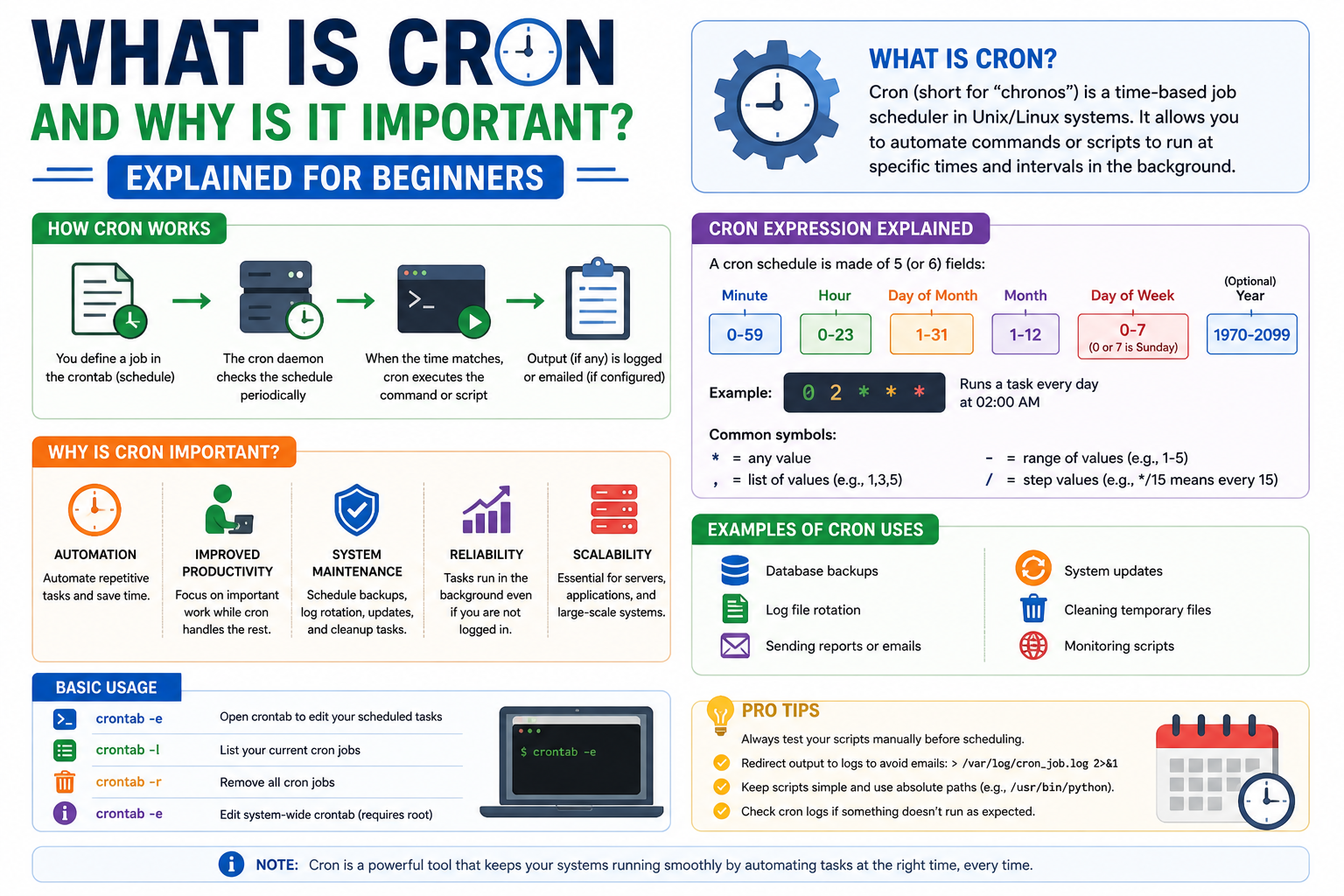
In modern computing environments, automation plays a central role in reducing repetitive manual effort and ensuring systems run smoothly without constant human supervision. One of the most established mechanisms for achieving this automation in Unix-like systems is a scheduling tool designed to execute tasks at predefined times or intervals. This concept allows users and administrators to delegate routine operations to the system itself, improving efficiency and reliability across applications and infrastructure.
What Cron Means in Modern Linux Systems
Cron is a background service used in Linux and other Unix-based operating systems that is responsible for executing scheduled commands or scripts. It operates continuously in the system background, checking defined schedules and triggering tasks when their specified time conditions are met. Instead of requiring users to manually run commands, cron ensures that operations occur automatically based on a configured timetable. This makes it a fundamental utility in system administration and server management.
Core Idea Behind Time-Based Task Scheduling
The central purpose of cron is to provide time-driven execution for system tasks. Time in this context is highly flexible and can be defined in many patterns, such as every minute, every hour, specific days of the week, or even precise combinations of date and time conditions. This flexibility allows users to design extremely specific execution schedules that match real operational needs. Whether a task needs to run frequently or only under rare conditions, cron can accommodate it with precision.
What a Cron Job Represents in Practical Use
A cron job is essentially a command or script that is scheduled to run automatically at a specified time. These jobs can include a wide range of system or application-level operations, such as cleaning temporary files, generating reports, backing up databases, sending notifications, or updating datasets. Instead of relying on manual execution, a cron job ensures that these tasks happen consistently without human involvement, reducing the risk of delays or missed operations.
Why Organizations Depend on Scheduled Tasks
In real-world IT environments, organizations handle large volumes of repetitive tasks that must be performed regularly to maintain system health and business continuity. Manual execution of these tasks can lead to inconsistencies, human error, or missed deadlines. Scheduled automation provides a structured and dependable method for ensuring that critical operations occur exactly when required. This is especially important in environments where uptime, data integrity, and operational accuracy are essential.
Real-World Scenario of Automated Data Maintenance
Consider a system where user-generated data is stored continuously over time, such as customer requests or transaction logs. Over time, this data may need to be archived or removed according to retention policies. Instead of requiring an administrator to manually perform cleanup operations, a scheduled task can be configured to automatically remove outdated records at a specific time. This ensures compliance with storage policies while reducing manual workload and eliminating the risk of forgetting important maintenance tasks.
Why Manual Execution Becomes Inefficient
Relying on manual execution for repetitive system tasks becomes impractical as system complexity increases. Administrators would need to constantly monitor schedules and remember execution times, which is neither scalable nor reliable. Human dependency introduces delays and inconsistencies, especially in large systems where multiple tasks must run simultaneously. Automated scheduling eliminates these issues by delegating responsibility directly to the operating system.
How Cron Solves Repetitive Operational Problems
Cron addresses these challenges by acting as a dependable scheduler that operates independently of user intervention. Once a task is defined, it continues to execute according to its schedule without requiring further input. This allows system administrators and developers to focus on more critical responsibilities while routine tasks are handled automatically in the background. The result is improved productivity, better resource management, and reduced operational risk.
Stability and Reliability of Cron-Based Automation
One of the key strengths of cron is its long-standing reliability in system environments. It has been widely adopted because of its simplicity, stability, and predictable behavior. Once configured correctly, cron jobs consistently execute as expected, making them suitable for both small-scale systems and enterprise-level infrastructure. Its lightweight design ensures minimal system overhead while maintaining high efficiency in task execution.
Importance of Learning Cron for System Administration
For anyone working in Linux environments or pursuing a career in system administration, understanding cron is essential. It forms the foundation of automated task management and is frequently used in real-world server operations. Knowledge of how to define schedules, configure jobs, and troubleshoot timing issues is a valuable skill that enhances both system control and operational efficiency. Mastering this tool provides a strong advantage in managing modern computing environments effectively.
Cron Syntax: How Scheduling Rules Are Structured
Understanding how cron works requires learning its scheduling format, which is based on a structured pattern of time fields. Each scheduled entry follows a consistent format that defines when a task should run. These fields represent minutes, hours, day of the month, month, and day of the week. By combining these fields, users can define extremely precise execution rules. This structure is what makes cron both powerful and flexible, allowing simple schedules as well as highly specific timing conditions.
The Five Core Time Fields in a Cron Expression
A cron expression is made up of five primary time fields, each controlling a different part of the schedule. The first field represents minutes, the second represents hours, the third defines the day of the month, the fourth indicates the month, and the fifth represents the day of the week. Each field accepts numeric values or special symbols that define execution patterns. When all fields are combined, they form a complete instruction that tells the system exactly when a task should be executed.
Understanding the Role of the Minute and Hour Fields
The minute and hour fields are the most frequently adjusted parts of a cron schedule because they control how often and at what time a task runs within a day. The minute field allows execution at specific minute intervals, while the hour field defines which hour of the day the task should run. Together, they allow precise control over daily scheduling, such as running a task every hour, every few minutes, or at a specific time each day.
Day, Month, and Weekday Scheduling Logic
The remaining fields in a cron expression define broader time conditions. The day of the month field allows scheduling on specific calendar dates, while the month field restricts execution to certain months. The day of the week field provides control over which weekday a task should run. These fields can work independently or together, depending on how the schedule is designed. This flexibility allows users to create both simple and highly conditional execution patterns.
Wildcard Symbol and Its Meaning in Scheduling
One of the most important symbols in cron syntax is the wildcard, represented by an asterisk. This symbol means “every possible value” for a given field. For example, placing a wildcard in the minute field means the task will run every minute. Using wildcards across all fields results in continuous execution at every possible time interval. This concept is essential for understanding how frequently a cron job will run based on its configuration.
Creating Fixed Interval Execution Patterns
Cron also supports repeating execution at fixed intervals using step values. This allows users to define patterns such as every few minutes or every few hours. Instead of manually listing each time value, step syntax provides a compact way to define repetition. This feature is especially useful for system monitoring tasks, periodic cleanup operations, and recurring background processes that need consistent execution.
Combining Multiple Conditions in One Schedule
One of the strengths of cron is its ability to combine multiple conditions into a single schedule. For example, a task can be restricted to run only on specific days while also being limited to certain hours. This combination of constraints makes cron highly adaptable to complex operational requirements. It allows precise control over when tasks should execute, ensuring they only run under the exact conditions defined by the user.
Special Characters Used in Cron Expressions
Beyond basic numbers and wildcards, cron supports additional special characters that enhance scheduling flexibility. These include commas for listing multiple values, hyphens for defining ranges, and slashes for step intervals. Each of these characters modifies how time values are interpreted. Together, they allow users to build highly customized scheduling rules without needing multiple separate entries.
What the Crontab File Represents
The crontab file is the central configuration location where all cron jobs for a user are stored. Each user can have their own crontab file, allowing personalized scheduling without affecting others. This file contains all defined cron expressions along with the commands they trigger. The system reads this file and automatically executes tasks according to the schedules defined within it.
Managing Cron Jobs Through Command Interface
Cron jobs are typically managed using simple command-line instructions. Users can view existing scheduled tasks, edit them, or remove them entirely using standard system commands. These commands provide direct access to the scheduling system, making it easy to maintain and update automation rules. This interface ensures that users can modify schedules without manually editing system files.
Editing and Updating Scheduled Tasks Safely
When modifying cron jobs, accuracy is extremely important because even small mistakes in scheduling syntax can lead to unexpected behavior. Editing tools allow users to update schedules in a controlled environment, reducing the risk of configuration errors. Once changes are saved, the system immediately applies the updated schedule. Proper validation before saving ensures that tasks run correctly without disrupting system operations.
Background Process Responsible for Execution
Cron operates as a background service that continuously runs on the system. This service is responsible for checking scheduled tasks and triggering them at the correct time. It runs independently of user sessions, meaning it continues working even when no one is actively logged in. This background execution model ensures that scheduled tasks are never missed due to user inactivity.
How Cron Continuously Monitors Time Conditions
The cron service regularly checks the system clock against scheduled entries in the crontab file. When a match is found, it immediately executes the corresponding command. This continuous monitoring process is lightweight and efficient, allowing the system to handle scheduling without consuming significant resources. It ensures timely execution of all configured tasks.
Environment Behavior During Task Execution
When a cron job runs, it operates in a minimal environment, meaning it does not always inherit the full user environment settings. This can affect how commands behave if they rely on specific paths or configurations. Because of this, it is important to define commands carefully and ensure they work correctly in a limited execution environment. This helps prevent unexpected failures during automated runs.
Common Use Cases for Scheduled Automation Tasks
Cron is widely used for system maintenance, application updates, data backups, log rotation, and report generation. These tasks are essential for keeping systems running smoothly and efficiently. By automating them, administrators reduce manual workload and ensure consistent execution. This makes cron an essential tool in both development and production environments.
Importance of Precision in Scheduling Configuration
Accuracy in defining cron schedules is critical because incorrect configurations can lead to unintended execution frequency. A misconfigured schedule may cause a task to run too often or not at all, potentially affecting system performance. Careful planning and validation are necessary to ensure that tasks behave exactly as intended. Proper understanding of each time field helps avoid these issues and ensures reliable automation behavior.
Cron Job Execution Process: How Scheduled Tasks Are Actually Run
When a cron job reaches its scheduled time, the cron service automatically triggers the associated command or script without requiring any user interaction. This execution happens in the background, meaning the user does not need to be logged in for the task to run. The system continuously monitors scheduled entries and compares them with the current time. As soon as a match is detected, the task is launched immediately, ensuring precise timing and automation consistency.
Role of the Cron Daemon in Task Management
The cron system operates through a background service commonly referred to as a daemon. This daemon is responsible for continuously running in the system memory and checking scheduled instructions. It does not rely on user sessions or active terminal usage. Instead, it functions independently at the operating system level, ensuring that all scheduled tasks are executed even when no one is actively working on the machine.
How the System Reads Scheduled Instructions
The cron daemon reads scheduling instructions from configuration files that store all defined tasks. These instructions are organized in a structured format, allowing the system to interpret when and how each job should run. At regular intervals, the daemon reviews these configurations and compares them with the current system time. This continuous checking process ensures that no scheduled task is missed.
Execution Environment for Cron Jobs
When a cron job is executed, it runs in a limited environment compared to a standard user session. This means that certain system variables, configurations, or paths may not be automatically available. Because of this restricted environment, scripts must be written carefully to ensure they execute correctly. Many execution issues arise when commands depend on settings that are not loaded by default in cron environments.
Importance of Defining Absolute Paths in Commands
One of the most common requirements when working with cron jobs is the use of absolute paths. Since the execution environment may not include standard user configurations, relative paths can fail to locate files or scripts. By specifying full paths to commands and resources, users ensure that the system can always locate and execute the required components without ambiguity or errors.
Understanding User-Specific Scheduling Contexts
Each user on a system can maintain their own set of scheduled tasks. These user-specific schedules are stored separately and executed under the permissions of that user. This separation ensures that one user’s tasks do not interfere with another’s. It also provides a controlled environment where each user can automate their own processes without affecting system-wide operations.
System-Level Scheduling vs User-Level Scheduling
In addition to individual user schedules, there are system-level scheduling configurations that apply to administrative or background tasks. These system-level schedules are typically used for critical maintenance operations that must run regardless of user activity. The distinction between user-level and system-level scheduling allows for better organization and control of automated processes across the entire system.
Handling Output Generated by Scheduled Tasks
When a cron job runs, it often produces output such as logs, status messages, or error reports. By default, this output may be sent to a system mail service or discarded if not configured properly. To ensure proper tracking, output is often redirected to log files. This allows administrators to review execution results, identify issues, and verify that tasks completed successfully.
Logging Mechanisms for Monitoring Execution
Logging plays a crucial role in tracking the behavior of scheduled tasks. Each execution can be recorded in log files, which store information such as execution time, success status, and error messages. These logs provide valuable insight into system performance and help diagnose problems when tasks do not behave as expected. Without proper logging, troubleshooting becomes significantly more difficult.
Common Issues in Scheduled Task Execution
Several issues can arise when working with cron jobs. These include incorrect scheduling syntax, missing file permissions, incorrect environment variables, and misconfigured paths. Another common issue is unintended frequent execution caused by incorrect time settings. Understanding these potential problems is essential for ensuring reliable automation and preventing system disruptions.
Permission Requirements for Running Tasks
Permissions play an important role in determining whether a scheduled task can execute successfully. If a script or command does not have the correct execution permissions, the cron service will not be able to run it. Similarly, access restrictions on files or directories can prevent proper execution. Ensuring correct permissions is a key step in configuring reliable scheduled operations.
Debugging Failed Cron Jobs Effectively
When a scheduled task fails, debugging becomes necessary to identify the root cause. This typically involves checking logs, verifying command syntax, and testing the script manually outside of the scheduler. Running the command directly in a terminal helps confirm whether the issue is related to the script itself or the scheduling environment. This step-by-step approach simplifies troubleshooting.
Testing Scheduled Tasks Before Deployment
Before deploying a cron job into a production environment, it is important to test it thoroughly. Testing ensures that the command behaves correctly under scheduled conditions and does not produce unexpected results. Running the task manually first and then simulating scheduled execution helps verify reliability. This reduces the risk of system errors after deployment.
Frequency Control and System Performance Impact
The frequency at which cron jobs are scheduled can significantly impact system performance. Tasks that run too frequently may consume unnecessary system resources and affect overall efficiency. On the other hand, tasks that run too infrequently may fail to meet operational requirements. Balancing execution frequency is essential for maintaining optimal system performance.
Managing Multiple Scheduled Tasks Efficiently
In many systems, multiple cron jobs run simultaneously or at overlapping intervals. Proper management is required to ensure that these tasks do not conflict with each other. Organizing schedules carefully helps prevent resource contention and improves execution stability. Prioritizing tasks based on importance and system load is a common strategy in larger environments.
Security Considerations in Automated Execution
Security is an important aspect of scheduled task management. Since cron jobs run automatically, any misconfiguration can potentially introduce vulnerabilities. Ensuring that only authorized users can create or modify scheduled tasks helps maintain system security. Additionally, scripts should be reviewed carefully to avoid executing unintended or harmful operations.
Dependency Management in Scheduled Scripts
Many scripts executed by cron jobs depend on external tools, libraries, or services. If these dependencies are not properly configured, the scheduled task may fail. It is important to ensure that all required components are available in the execution environment. Proper dependency management helps ensure smooth and consistent execution of automated processes.
Environment Variables and Execution Behavior
Environment variables define how applications and scripts behave during execution. In a cron environment, these variables may not be fully loaded as they would be in a normal user session. This can affect script behavior if they rely on specific configurations. Explicitly defining required variables within the script helps avoid unexpected issues during execution.
Automation Consistency Across System Operations
One of the key advantages of cron-based scheduling is consistency. Once a task is defined correctly, it runs repeatedly according to its schedule without variation. This ensures predictable behavior across system operations, which is essential for tasks that require regular execution. Consistency also reduces the risk of human error in repetitive processes.
Maintaining Reliability in Long-Term Scheduling
Over time, systems may evolve, and scheduled tasks may need updates or adjustments. Maintaining reliability involves regularly reviewing and updating cron configurations to ensure they still meet operational requirements. As systems scale, careful management of scheduled tasks becomes increasingly important to avoid conflicts and inefficiencies.
Understanding Why Cron Jobs Fail Unexpectedly
Even though cron is designed to be reliable, scheduled tasks can sometimes fail without obvious reasons. These failures usually occur due to misconfigurations in the schedule, incorrect command paths, missing permissions, or environment limitations. Since cron runs silently in the background, failures may go unnoticed unless proper logging or monitoring is in place. Understanding the root causes is essential for maintaining a stable automation system.
Checking Syntax Errors in Scheduling Expressions
One of the most common reasons for cron job failure is incorrect syntax in the scheduling expression. Each field must follow strict formatting rules, and even a small mistake can prevent execution. Missing spaces, invalid numbers, or incorrect special characters can lead to the scheduler ignoring the job entirely. Careful review of each field is necessary to ensure the schedule is valid and correctly interpreted by the system.
Verifying Command Execution Outside Cron
Before assuming a scheduling issue, it is important to test the command manually in the terminal. If the command fails outside of cron, it will also fail when scheduled. This step helps isolate whether the issue lies in the script itself or in the scheduling environment. Testing manually ensures that the logic of the task is correct before it is automated.
Handling Missing Environment Configurations
Cron runs in a minimal environment, which means many environment variables that exist in a normal session are not available. This can lead to unexpected failures, especially for scripts that rely on system paths or configuration variables. Defining required variables directly within the script or using full environment paths helps ensure consistent execution regardless of context.
Fixing Issues Caused by Relative Paths
Relative paths often cause cron jobs to fail because the scheduler does not always execute commands in the expected working directory. Instead, it is safer to use absolute paths when referencing files or scripts. This ensures that the system can locate resources correctly regardless of where the job is triggered from.
Permission-Related Execution Failures
Another common issue occurs when scripts or files do not have proper execution permissions. If a file is not marked as executable, cron will not be able to run it. Similarly, restricted directory permissions can block access to required resources. Ensuring correct permission settings is essential for successful execution of scheduled tasks.
Diagnosing Output Redirection Problems
Sometimes cron jobs appear to fail simply because their output is not visible. By default, output may be sent to system mail or discarded entirely. Redirecting output to log files helps capture execution details and makes it easier to diagnose issues. Without proper output handling, debugging becomes significantly more difficult.
Using Logs to Track Execution Behavior
Logs provide detailed insight into how and when a cron job runs. They can show successful executions, error messages, and timing information. Reviewing logs regularly helps identify patterns of failure or performance issues. This makes logs one of the most important tools for maintaining reliable scheduled automation.
Preventing Overlapping Task Execution
When multiple cron jobs run at similar times, there is a risk of overlap, especially if tasks are resource-intensive. Overlapping execution can lead to performance degradation or system instability. Proper scheduling design ensures that tasks are spaced appropriately to avoid conflicts and resource contention.
Resource Consumption and System Performance Issues
Improperly configured cron jobs can consume excessive system resources if they run too frequently or perform heavy operations. This can slow down the system or affect other processes. Monitoring resource usage and adjusting schedules accordingly helps maintain system stability and performance efficiency.
Debugging Techniques for Complex Scheduling Issues
When problems are not immediately obvious, advanced debugging techniques are required. This may include manually simulating the cron environment, checking system logs, and isolating individual components of the script. A structured debugging approach helps identify subtle issues that are not visible through basic testing.
Ensuring Script Compatibility with Cron Environment
Not all scripts behave the same way inside cron as they do in a normal terminal session. Differences in environment settings, paths, and permissions can affect execution. Ensuring that scripts are designed to work in minimal environments improves reliability and reduces execution errors.
Managing Multiple Users and Shared Systems
In shared systems, multiple users may configure their own cron jobs. This requires careful management to avoid conflicts or resource competition. Each user’s scheduled tasks run independently, but system administrators must ensure that overall system performance is not negatively impacted by combined workloads.
Security Risks in Automated Task Execution
Automated execution introduces potential security risks if not properly controlled. Unauthorized access to cron configuration can allow malicious scheduling of tasks. Ensuring restricted access and proper user permissions helps protect the system from unintended or harmful automation.
Best Practices for Reliable Scheduling Setup
Reliable scheduling depends on proper planning and configuration. This includes using absolute paths, validating syntax, testing scripts before deployment, and monitoring execution logs. Following structured practices reduces the likelihood of failures and ensures consistent task performance over time.
Monitoring and Maintenance of Scheduled Tasks
Cron jobs should not be configured once and ignored permanently. Regular monitoring is necessary to ensure that tasks continue to function correctly as system environments change. Updates to software, file locations, or permissions may require adjustments to existing schedules.
Automation Stability in Long-Term System Operations
Over time, systems evolve, and scheduled tasks must adapt accordingly. Maintaining stability requires periodic review of all cron jobs to ensure they still align with current system needs. This helps prevent outdated tasks from causing inefficiencies or errors in long-term operations.
System Maintenance and Background Cleanup Tasks
Cron is widely used for routine system maintenance where repetitive cleanup operations must be performed without manual intervention. These tasks include removing temporary files, clearing caches, and managing log rotation. By scheduling these operations automatically, systems remain optimized and free from unnecessary data buildup, which helps maintain performance stability over time.
Automated Backup and Data Protection Workflows
One of the most critical uses of cron is automating backup processes. Organizations rely on scheduled backups to protect important data from accidental loss or system failures. Cron ensures that these backups run consistently at defined intervals, reducing the risk of missing important recovery points. This automation strengthens data reliability and disaster recovery strategies.
Scheduled Reporting and Data Processing Tasks
Many systems generate reports based on accumulated data, such as usage statistics, performance metrics, or business analytics. Instead of manually generating these reports, cron can automate the process at fixed times. This ensures that reports are always up to date and available when needed, improving decision-making efficiency.
Automating Software Updates and System Checks
Cron can also be used to schedule system updates, security checks, and software maintenance routines. These tasks are essential for keeping systems secure and functioning properly. By automating updates, administrators reduce the risk of outdated software vulnerabilities while maintaining system consistency without constant manual monitoring.
Email Notifications and Communication Automation
Scheduled tasks are often used to send automated emails, alerts, or system notifications. For example, cron can trigger reminders, status updates, or error alerts at specific times. This improves communication flow within systems and ensures that users or administrators are informed about important events without delay.
Web Application Background Processing
In web-based systems, cron plays an important role in handling background operations that are not user-facing. These include processing queued tasks, updating databases, synchronizing external data, and clearing expired sessions. By offloading these tasks to scheduled execution, web applications remain responsive and efficient.
Log Management and System Monitoring Tasks
System logs grow continuously and can consume significant storage space if not managed properly. Cron is commonly used to rotate, archive, or delete old logs automatically. This ensures that logging systems remain organized and do not overwhelm storage resources. It also helps maintain system transparency for troubleshooting and auditing purposes.
Scheduled Database Optimization Operations
Databases require regular optimization to maintain performance, such as indexing, cleanup, or integrity checks. Cron allows these operations to run at off-peak hours, minimizing disruption to users. This ensures that database systems remain fast, stable, and efficient without requiring manual intervention.
Designing Clear and Predictable Scheduling Patterns
Creating effective cron schedules requires clear planning and predictable timing structures. Avoid overly complex schedules that are difficult to understand or maintain. Simple and well-documented patterns reduce confusion and make future updates easier to manage.
Avoiding Overly Frequent Task Execution
Running tasks too frequently can overload system resources and reduce performance. It is important to balance automation needs with system capacity. Scheduling should be designed to avoid unnecessary repetition while still meeting operational requirements effectively.
Using Absolute Paths for All Commands and Files
To ensure consistent execution, all commands and file references should use absolute paths. This prevents failures caused by missing environment variables or incorrect working directories. Absolute paths improve reliability and reduce dependency on external system configurations.
Proper Logging for Monitoring and Debugging
Every scheduled task should include proper logging mechanisms. Capturing output and errors allows administrators to monitor execution behavior and diagnose issues quickly. Without logging, identifying the cause of failures becomes significantly more difficult.
Testing Before Deploying in Production Environments
Before implementing cron jobs in live systems, thorough testing is essential. This includes verifying script behavior, execution timing, and system impact. Testing helps identify potential issues early and ensures that automation performs correctly in real-world conditions.
Documenting All Scheduled Tasks Clearly
Maintaining documentation of all cron jobs helps with system transparency and long-term maintenance. Clear descriptions of what each task does, when it runs, and why it exists make system management easier, especially in larger environments with multiple administrators.
Restricting Access to Cron Configuration Files
Cron configuration files should only be accessible to authorized users. Unauthorized modifications can lead to security vulnerabilities or system disruptions. Proper access control ensures that only trusted individuals can create or modify scheduled tasks.
Preventing Unauthorized or Malicious Task Scheduling
Systems must be protected from unauthorized scheduling attempts that could execute harmful commands. This includes monitoring user permissions and ensuring that only approved scripts are allowed to run automatically. Security policies play a key role in preventing misuse.
Running Tasks with Limited Privileges When Possible
To reduce security risks, scheduled tasks should run with the minimum required privileges. Avoid running all tasks as high-level system users unless absolutely necessary. This principle helps limit potential damage in case of misconfiguration or exploitation.
Monitoring Scheduled Activity for Suspicious Behavior
Regular monitoring of cron activity helps detect unusual or unexpected behavior. This includes reviewing logs, checking execution frequency, and validating scheduled commands. Early detection of anomalies improves system security and stability.
Balancing System Load Through Smart Scheduling
Efficient scheduling ensures that system resources are not overloaded. Tasks should be distributed across time intervals to avoid simultaneous execution of heavy processes. This helps maintain smooth system performance even under multiple automation workloads.
Reducing Resource-Intensive Operations During Peak Hours
Heavy tasks such as backups or data processing should be scheduled during low-usage periods. This minimizes the impact on system performance and ensures that user-facing applications remain responsive during peak hours.
Monitoring Resource Usage of Scheduled Tasks
Tracking CPU, memory, and disk usage of cron jobs helps identify performance bottlenecks. If a task consumes excessive resources, its schedule or implementation may need optimization. Continuous monitoring ensures long-term efficiency.
Cron as a Foundation of System-Level Automation
Cron serves as a fundamental component of automation in Unix-like systems. It provides a reliable and efficient way to execute repetitive tasks without manual intervention. Its long-standing presence in system architecture demonstrates its importance in computing environments.
Why Mastering Cron Remains Essential in Technical Fields
Understanding cron is essential for anyone working in system administration, backend development, or infrastructure management. It enables professionals to automate critical operations, improve efficiency, and maintain system reliability with minimal effort.
The Balance Between Simplicity and Powerful Functionality
One of cron’s greatest strengths is its simplicity combined with powerful scheduling capabilities. Despite its straightforward structure, it can handle highly complex automation requirements. This balance makes it suitable for both beginners and advanced system administrators.
Long-Term Impact on System Reliability and Efficiency
When properly configured and maintained, cron significantly improves system reliability. It ensures that essential tasks are performed consistently, reducing human dependency and operational risk. Over time, this leads to more stable and efficient computing environments.
Final Conclusion
Cron remains a timeless tool in system automation due to its stability, flexibility, and efficiency. It continues to play a vital role in maintaining modern infrastructure, proving that even long-established tools can remain highly relevant in evolving technological landscapes.