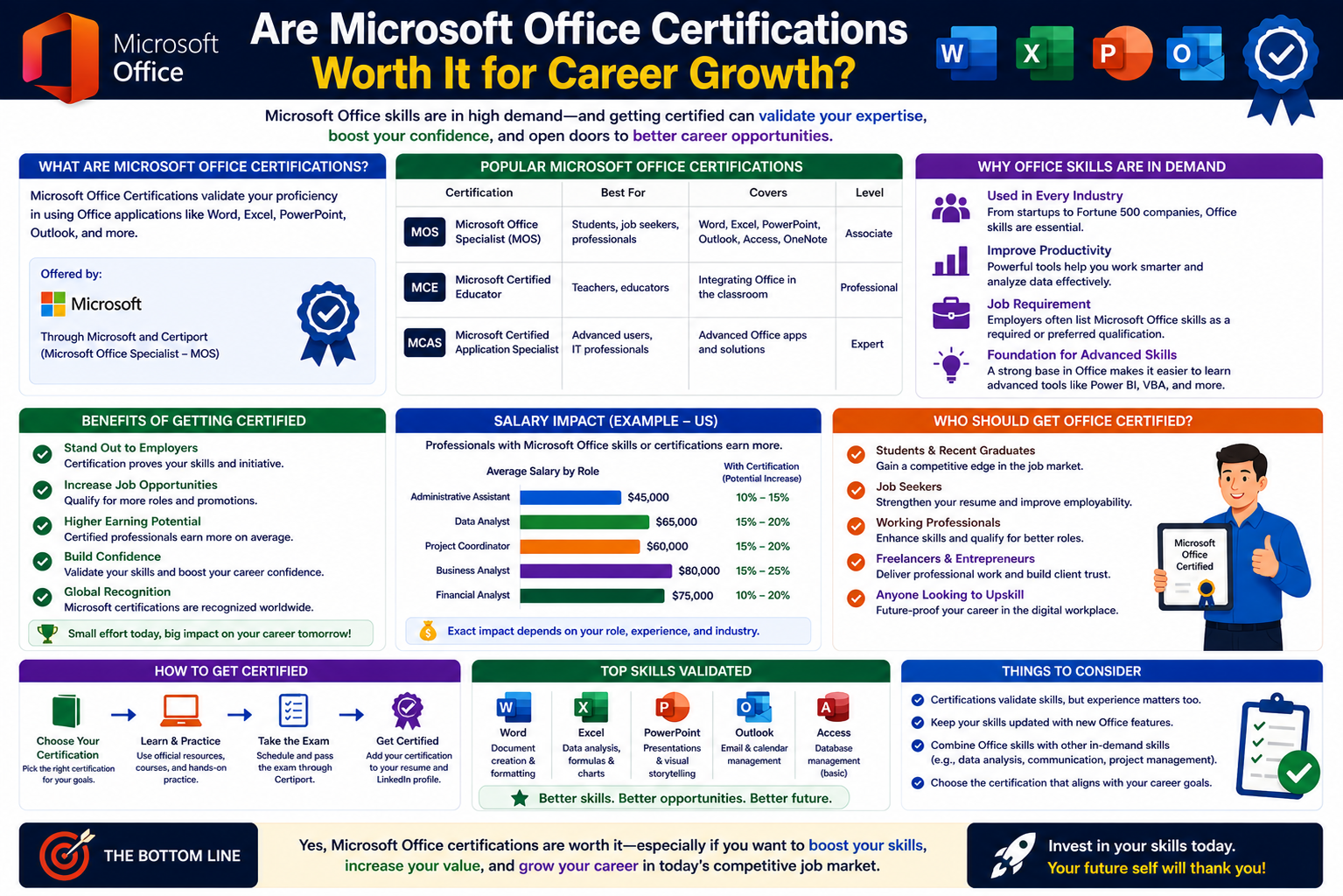
Microsoft Office certifications are professional credentials designed to validate a person’s ability to use widely adopted productivity tools such as Word, Excel, PowerPoint, Outlook, and Access. These applications are used across industries, from education and healthcare to finance and administration, making them some of the most recognized software tools in the world. Despite their popularity, the idea of getting formally certified in Office tools often raises questions because many users already interact with these applications daily. The certification process aims to move beyond casual familiarity and test structured, task-based proficiency. It focuses on how efficiently a person can perform real-world office tasks using the full capabilities of the software rather than just basic usage. This distinction is important because many professionals assume they are skilled in Office tools simply because they use them regularly, but certification assessments often reveal gaps in advanced functionality, shortcuts, and productivity features that are commonly overlooked in day-to-day work environments.
Why Microsoft Office Skills Are Considered Essential Everywhere
Microsoft Office skills are often treated as a baseline requirement in most job environments. Employers expect candidates to already be comfortable with document creation, spreadsheets, presentations, and email communication. These tools are deeply embedded in daily workflows, making them essential rather than optional. However, being “familiar” with Office applications is not the same as being highly efficient in them. Many users rely on only basic functions, such as typing documents, entering simple data, or creating basic slides. In reality, these applications include advanced features like automation, data analysis tools, complex formatting systems, collaboration functions, and integration with cloud services. Certifications aim to bridge this gap by encouraging users to explore deeper functionality. The importance of these skills becomes even more noticeable in roles that involve reporting, financial analysis, project management, or administrative coordination, where efficiency and accuracy directly impact productivity and decision-making outcomes.
How Microsoft Office Certifications Are Structured
Microsoft Office certifications are organized into different levels to reflect varying degrees of expertise. The structure typically begins with foundational-level assessments that focus on core application usage and gradually progresses toward more advanced proficiency levels. At the foundational stage, candidates are evaluated on their ability to perform essential tasks such as formatting documents, creating spreadsheets, managing emails, and designing presentations. As the level increases, the exams begin to test more complex skills such as data manipulation, advanced formulas, automation tools, and document management strategies. Higher-level certifications often require a combination of multiple exams covering different applications, ensuring that candidates are well-rounded in their Office capabilities. This layered structure allows individuals to build their skills step by step, rather than attempting to master everything at once, making the certification path more accessible to learners with different levels of experience.
Core Applications Covered in Certification Exams
The certification pathway focuses primarily on the most widely used Office applications. Word is tested for document formatting, professional writing layouts, and advanced editing features. Excel is one of the most important components and includes data organization, formulas, functions, charts, and analysis tools that are widely used in business environments. PowerPoint focuses on presentation design, visual communication, and slide structuring for professional audiences. Outlook evaluates email management, scheduling, and communication organization, while Access is included in more advanced pathways and deals with database creation and management. Each application plays a distinct role in workplace productivity, and certifications ensure that candidates can use them not just individually, but also in combination when required. This integrated approach reflects real workplace scenarios where professionals often switch between different tools to complete a single task or project efficiently.
Skill Depth Versus Everyday Usage of Office Tools
One of the key reasons Microsoft Office certifications generate debate is the difference between everyday usage and certified-level expertise. Most users interact with Office tools at a surface level, performing simple tasks without exploring advanced features. For example, Excel users may enter data and perform basic calculations without learning pivot tables or advanced formulas. Similarly, Word users may format documents manually instead of using styles, templates, or automation features. Certification exams, however, require a much deeper understanding of these tools, often testing time-saving techniques and advanced problem-solving methods. This creates a gap between perceived and actual proficiency. The certification process exposes this gap by challenging users to complete structured tasks efficiently, often under time constraints. As a result, individuals who complete certification exams often discover new ways to improve productivity that they were previously unaware of.
Relevance of Certifications in Hiring and Career Growth
The relevance of Microsoft Office certifications in hiring processes depends largely on the type of role and industry. In many entry-level positions, employers already assume candidates possess basic Office skills, so certification may not significantly influence hiring decisions. However, in more specialized roles such as data analysis, administrative coordination, financial reporting, or executive support, certifications can provide an advantage by demonstrating verified competence. They serve as proof that an individual not only understands the tools but can also apply them efficiently in structured scenarios. In competitive job markets, this validation can help candidates stand out, especially when multiple applicants have similar educational backgrounds and experience levels. While certifications alone may not guarantee employment, they can enhance a professional profile by showing commitment to skill development and attention to detail in workplace tools.
Limitations of Traditional Office Certification Pathways
Despite their usefulness, traditional Microsoft Office certifications have certain limitations that reduce their overall impact in modern workplaces. One major limitation is that they are often tied to specific versions of the software, which may not fully reflect current cloud-based working environments. As workplaces increasingly shift toward integrated digital ecosystems, standalone Office skills are becoming part of a broader set of competencies that include collaboration platforms, cloud storage systems, and remote communication tools. Another limitation is that certification exams tend to focus on structured tasks rather than open-ended problem-solving scenarios. In real work environments, tasks are rarely as predictable as exam questions, meaning that certified skills may not always translate directly into practical efficiency. Additionally, many employers prioritize adaptability and analytical thinking over tool-specific certifications, especially when Office usage is already considered a basic requirement.
The Role of Microsoft 365 in Modern Skill Validation
Microsoft 365 introduces a broader approach to productivity certification by focusing not only on individual applications but also on the entire digital ecosystem. Unlike traditional Office-focused certifications, this pathway emphasizes cloud services, collaboration tools, data security, and workflow integration. It reflects the modern workplace, where employees are expected to work across multiple platforms and devices while maintaining seamless communication and document sharing. This certification approach highlights how tools interact with each other rather than treating them as separate systems. It also introduces concepts such as cloud-based collaboration, automated processes, and secure data handling, which are increasingly important in digital work environments. For individuals seeking to demonstrate broader technical awareness rather than just application-specific skills, this pathway offers a more relevant representation of modern workplace requirements.
Understanding the Value of Practical Experience Versus Certification
Practical experience often plays a more significant role than certification when it comes to mastering Microsoft Office tools. Many professionals develop strong skills simply by using these applications regularly in real work situations. Over time, they learn shortcuts, efficiency techniques, and problem-solving strategies that may not be covered in formal certification exams. However, certification can still add structure to this experience by filling knowledge gaps and introducing standardized methods. It helps users understand features they might not encounter in routine tasks and provides a benchmark for measuring skill levels. In some cases, certification also encourages users to explore underutilized features that can significantly improve productivity. While experience builds intuition, certification adds formal recognition and structured learning, creating a more balanced skill set when both are combined effectively.
Industry Perception of Microsoft Office Credentials
The perception of Microsoft Office certifications varies across industries and job roles. In administrative and support roles, these certifications are often viewed as helpful but not essential, since basic Office proficiency is assumed. In contrast, industries that rely heavily on data analysis, reporting, and documentation may place slightly higher value on demonstrated expertise. However, most employers today prioritize practical ability over formal credentials when it comes to Office tools. They expect candidates to perform tasks efficiently rather than simply hold a certificate. This has led to a shift in how these certifications are perceived, moving them from mandatory qualifications to supplementary proof of skill. In competitive environments, they can still enhance credibility, but they are rarely the sole deciding factor in hiring or promotion decisions.
Common Misconceptions About Office Certifications
There are several misconceptions surrounding Microsoft Office certifications that influence how people perceive their value. One common misunderstanding is that certification guarantees advanced expertise in real-world tasks. In reality, certification confirms structured knowledge and tested skills, but practical efficiency still depends on experience. Another misconception is that these certifications are outdated or irrelevant. While their format may evolve, the skills they assess remain widely used in workplaces. Some people also assume that Office tools are too simple to require certification, overlooking the advanced features that many users never fully explore. These misunderstandings often lead individuals to underestimate the potential benefits of structured learning, even though certifications can reveal hidden productivity improvements and more efficient ways of working with familiar tools.
Balancing Certification Goals With Career Objectives
Choosing whether to pursue Microsoft Office certifications depends largely on individual career goals and professional needs. For some, especially those entering administrative or data-focused roles, certification can provide a helpful foundation and increase confidence in using essential tools. For others, particularly those already experienced in Office applications, the value may lie more in refining skills rather than formal validation. It is important to consider how these certifications align with long-term career development rather than viewing them as standalone achievements. In many cases, they work best as part of a broader learning strategy that includes technical skills, communication abilities, and industry-specific knowledge. This balanced approach ensures that certification contributes meaningfully to professional growth rather than serving as an isolated credential without practical application.
Understanding the Structure of Microsoft Office Certification Exams
Microsoft Office certification exams are designed in a way that evaluates practical, task-based skills rather than theoretical knowledge. Instead of focusing on memorization, candidates are required to complete real-world assignments within the software environment. These tasks may include formatting complex documents, analyzing datasets, building structured presentations, or managing communication workflows. The structure is intended to reflect workplace scenarios, where users are expected to perform efficiently under time constraints. Each exam is divided into objective-based sections that test specific capabilities within an application. For example, Excel assessments may include data organization, formula usage, and visualization tasks, while Word exams focus on document formatting and content structuring. This structured evaluation ensures that candidates are not just familiar with features but can actually apply them effectively in practical situations that mirror office environments.
How Exam Difficulty Reflects Real Workplace Expectations
The difficulty level of Microsoft Office certification exams is calibrated to reflect common workplace expectations, but with a higher emphasis on efficiency and accuracy. While many users are comfortable performing basic tasks, the exams often introduce scenarios that require deeper understanding of software functionality. For instance, instead of simply creating a spreadsheet, candidates may need to apply nested formulas, analyze trends, or automate calculations. Similarly, document-related tasks may require advanced formatting techniques that improve readability and professional presentation. This elevated difficulty ensures that certified individuals are capable of handling more than routine tasks. However, it also creates a learning curve for those who have only used Office tools casually. The gap between everyday usage and exam requirements is intentional, as it pushes users to explore advanced features they might otherwise never encounter in regular work environments.
The Learning Curve Behind Certification Preparation
Preparing for Microsoft Office certifications often involves more structured learning than most users expect. While many assume their daily use of Office tools is sufficient, exam preparation typically reveals gaps in knowledge and efficiency. Candidates often need to revisit core concepts such as data structuring, formatting consistency, and formula logic. In Excel, for example, users may discover advanced functions that significantly reduce manual work. In Word, they may learn how to automate formatting using styles rather than applying manual changes. This learning curve is not necessarily difficult in a traditional academic sense, but it does require consistency and practice. Many learners find that certification preparation improves their overall productivity even before they attempt the exam. The process itself becomes a form of skill enhancement, helping users transition from basic familiarity to more structured and efficient usage of Office applications.
Practical Benefits of Microsoft Office Certification in Work Environments
One of the most noticeable benefits of Microsoft Office certification is improved efficiency in workplace tasks. Certified individuals often develop a better understanding of shortcuts, automation tools, and advanced features that streamline daily responsibilities. This can lead to faster document creation, more accurate data analysis, and improved presentation quality. In team environments, these skills can also contribute to better collaboration, especially when multiple users are working on shared documents or spreadsheets. Certified users are often more confident in exploring software capabilities, which can lead to innovative approaches to common tasks. While certification alone does not guarantee job performance excellence, it provides a structured foundation that supports productivity improvements over time. This practical benefit is often more valuable than the certificate itself, as it translates directly into improved workflow efficiency.
Employer Expectations Versus Certification Value
In many workplaces, employers expect candidates to already possess basic Microsoft Office skills, which reduces the perceived necessity of formal certification. Job descriptions often list requirements such as proficiency in Word, Excel, PowerPoint, and Outlook without specifying certification as mandatory. However, certifications can still serve as supporting evidence of skill, especially when candidates have limited professional experience. Employers may view certification as a signal of initiative and willingness to learn, even if it is not a deciding factor in hiring. In more competitive roles, especially those involving data analysis or administrative responsibilities, certification may help differentiate candidates with similar backgrounds. Despite this, most employers prioritize actual performance during interviews or probation periods over certification credentials alone, making practical ability the most important factor in hiring decisions.
Comparing Certification Value Across Different Career Paths
The value of Microsoft Office certifications varies significantly depending on the career path. In administrative roles, where document management and communication are central, certification can provide a useful advantage by demonstrating structured skill proficiency. In data-focused roles such as business analysis or finance, Excel-related certifications may carry more weight due to the importance of data manipulation and reporting. However, in technical or engineering roles, Office certifications are often considered secondary skills compared to specialized technical expertise. This variation highlights that certification value is not universal but context-dependent. It is most beneficial when aligned with job responsibilities that heavily rely on Office applications. Understanding this distinction helps individuals make better decisions about whether certification will contribute meaningfully to their career development or serve as a supplementary credential.
Limitations of Certification in Real-World Problem Solving
While Microsoft Office certifications validate technical proficiency, they do not always reflect real-world problem-solving abilities. Workplace tasks are often unstructured, requiring adaptability and critical thinking rather than following predefined steps. Certification exams, on the other hand, are structured and predictable, focusing on specific outcomes. This creates a limitation where certified individuals may know how to complete tasks in controlled environments but still need experience to handle unpredictable challenges. For example, managing incomplete datasets or resolving document inconsistencies requires judgment that goes beyond exam-based learning. As a result, certification should be viewed as a foundation rather than a complete measure of capability. Real-world experience remains essential for developing the flexibility needed to handle complex office tasks effectively.
The Role of Microsoft Office in Digital Transformation
Microsoft Office tools continue to play a significant role in digital transformation across industries. As organizations shift toward cloud-based systems and remote collaboration, Office applications have evolved to integrate with broader digital ecosystems. This includes real-time document sharing, cloud storage integration, and collaborative editing features that support distributed teams. Certification programs reflect this evolution by gradually incorporating skills related to cloud usage and collaborative workflows. Understanding how Office tools fit into larger digital systems is becoming increasingly important for professionals. Rather than functioning as standalone applications, they now operate as part of interconnected productivity platforms. This shift increases the relevance of learning how to use Office tools effectively within modern digital environments, even if traditional certification structures have not fully caught up with all aspects of this transformation.
Skill Retention After Certification Completion
One often overlooked aspect of Microsoft Office certification is skill retention after the exam is completed. Many users gain a strong understanding of advanced features during preparation, but without regular use, these skills may gradually diminish. Office applications require consistent practice to maintain efficiency, especially for complex functions such as advanced formulas, automation tools, and structured formatting systems. In professional environments where these tools are used daily, skill retention is naturally reinforced. However, for individuals who do not use advanced features regularly, there is a risk of reverting to basic usage over time. This highlights the importance of applying learned skills in real tasks rather than treating certification as a one-time achievement. Continuous practice ensures that the benefits of certification remain relevant and practically useful in long-term professional settings.
Perception of Certification Versus Actual Competence
There is often a difference between perceived competence and actual ability when it comes to Microsoft Office certifications. Holding a certification may create the impression of advanced expertise, but true competence is demonstrated through consistent performance in real tasks. Some individuals may perform well in exams due to preparation but struggle in practical environments where conditions are less structured. Conversely, experienced users may not hold certification but still perform tasks efficiently due to years of hands-on practice. This contrast shows that certification is only one measure of ability and should not be interpreted as the sole indicator of skill level. Employers and professionals alike benefit from recognizing this distinction, ensuring that certification is used as a supportive credential rather than an absolute measure of capability.
Training Pathways Leading to Certification Success
Successful completion of Microsoft Office certification often depends on structured training pathways. Many learners begin with basic familiarity and gradually move toward more advanced practice sessions that simulate exam conditions. These training pathways typically include guided exercises, scenario-based tasks, and repeated practice of core functions. The goal is to build both accuracy and speed, which are essential for passing certification exams. Over time, learners develop a deeper understanding of application behavior and feature interactions. This structured approach helps reduce exam anxiety and improves confidence when handling complex tasks. Training pathways also allow learners to identify weak areas and focus on improving specific skills before attempting certification exams, making the overall process more efficient and effective.
Evolving Role of Office Skills in Modern Work Culture
The role of Microsoft Office skills in modern work culture has evolved significantly over time. While they were once considered specialized skills, they are now viewed as essential baseline competencies in most professional environments. This shift has changed how certifications are perceived, moving them from essential qualifications to optional enhancements. Despite this, the importance of Office proficiency remains strong, especially in roles involving communication, data handling, and documentation. As work environments continue to evolve toward digital-first operations, the ability to use productivity tools efficiently remains a valuable asset. Even if certification is not always required, the underlying skills continue to be a core part of professional competence across industries.
The Role of Microsoft Excel in Certification Importance
Microsoft Excel is often considered the most influential application within Microsoft Office certifications because of its widespread use in data handling and analysis. Many organizations rely heavily on Excel for financial reporting, budgeting, forecasting, and operational tracking. Certification exams test a wide range of Excel skills, from basic spreadsheet formatting to advanced functions such as logical formulas, data visualization, and conditional analysis. This makes Excel a core focus for individuals seeking to prove technical competency in office environments. However, what makes Excel particularly challenging is not just the number of features it offers, but the ability to apply them correctly in real scenarios. Many users are comfortable entering data and performing simple calculations, but certification-level tasks require structured thinking and precision. This difference is what often separates casual users from those who can confidently manage complex datasets and produce meaningful insights.
Advanced Excel Skills That Define Certification Mastery
At higher levels of Microsoft Office certification, Excel becomes significantly more advanced, focusing on skills that go far beyond basic spreadsheet use. Candidates are expected to work with complex formulas, nested functions, and data relationships that require logical reasoning. Tasks may involve analyzing trends, summarizing large datasets, or building structured reports that support decision-making processes. Features such as pivot tables, conditional formatting, and lookup functions are commonly tested because they represent real-world business requirements. Mastering these skills requires both practice and understanding of how data behaves within spreadsheets. Many learners find that advanced Excel concepts initially seem complex, but with structured training, they become powerful tools for increasing efficiency. This level of proficiency is what certification aims to validate, ensuring that users can handle demanding data tasks without relying on trial-and-error methods.
Microsoft Word and Its Professional Relevance in Certification
Microsoft Word plays a central role in certification programs because it is widely used for professional documentation across industries. Certification exams for Word focus on the ability to create, format, and structure documents in a way that meets professional standards. This includes tasks such as applying consistent formatting, using styles effectively, managing references, and designing structured layouts. While many users are familiar with typing and basic formatting, certification-level skills emphasize efficiency and consistency in document creation. For example, using automated styles instead of manual formatting helps maintain uniformity across large documents. Word certification also evaluates the ability to manage long documents with tables, headers, footers, and sections. These skills are especially important in environments where documentation quality directly affects communication clarity and professional presentation.
PowerPoint Skills and the Value of Visual Communication
Microsoft PowerPoint certification focuses on the ability to create clear, engaging, and structured presentations. In professional environments, presentations are often used to communicate ideas, report progress, or support decision-making. Certification tasks typically include slide design, visual structuring, animation control, and content organization. While many users are familiar with basic slide creation, certification-level skills emphasize storytelling and visual communication. This includes using design principles to ensure that presentations are not only visually appealing but also easy to understand. Effective use of PowerPoint involves balancing text, visuals, and layout to maintain audience engagement. Certification helps users develop a more structured approach to presentation design, ensuring that information is delivered in a professional and impactful way rather than relying on cluttered or unorganized slides.
Outlook and Its Role in Workplace Communication Efficiency
Microsoft Outlook certification focuses on managing communication, scheduling, and organizational tasks within professional environments. Email management is a core component of most workplaces, and Outlook provides tools that go beyond basic messaging. Certification tasks may include organizing inboxes, managing calendars, scheduling meetings, and using productivity features such as task tracking and automated responses. These skills are essential in roles that require constant communication and coordination. While many users are familiar with sending and receiving emails, certification-level knowledge ensures that communication is structured and efficient. Proper use of folders, filters, and scheduling tools can significantly reduce time spent managing emails. Outlook certification highlights the importance of communication efficiency, which is often overlooked but critical in maintaining workplace productivity.
Integration of Office Applications in Real Work Scenarios
One of the most important aspects of Microsoft Office certification is understanding how different applications work together in real-world scenarios. In professional environments, tasks rarely involve a single tool in isolation. For example, data analyzed in Excel may be presented in PowerPoint, while supporting documentation is prepared in Word and communication is managed through Outlook. Certification programs encourage users to think in terms of workflow integration rather than isolated application usage. This approach reflects actual workplace behavior, where productivity depends on how efficiently tools are combined. Understanding integration improves overall efficiency and reduces duplication of effort. It also allows professionals to handle complex tasks that require coordination between multiple types of content, from data analysis to presentation and communication.
Challenges Faced During Certification Preparation
Preparing for Microsoft Office certification often presents several challenges, especially for users who rely on basic features in their daily work. One common difficulty is adapting to advanced functions that are not frequently used in everyday tasks. For example, Excel formulas or Word automation tools may feel unfamiliar at first. Another challenge is managing time effectively during practice sessions, as certification exams require both speed and accuracy. Many learners also struggle with remembering complex sequences of steps required to complete certain tasks. However, these challenges are typically overcome through consistent practice and structured learning. Over time, users become more comfortable with advanced features and develop a more logical approach to solving tasks. The preparation process itself becomes a valuable learning experience that improves both confidence and technical ability.
The Difference Between Basic Proficiency and Certification-Level Skill
There is a clear distinction between basic proficiency in Microsoft Office tools and certification-level skill. Basic users are typically comfortable performing everyday tasks such as writing documents, creating simple spreadsheets, or preparing presentations. Certification-level users, however, are expected to complete these tasks more efficiently and with a deeper understanding of available features. This includes using shortcuts, automating repetitive tasks, and applying advanced formatting techniques. The difference is not just in knowledge but in efficiency and precision. Certification-level skill focuses on optimizing workflows and reducing manual effort. This distinction is important because it highlights why certification exams exist in the first place: to validate not just familiarity, but structured and efficient use of tools in professional environments.
How Certification Influences Productivity in Professional Tasks
Microsoft Office certification often leads to improved productivity because it encourages users to explore features that simplify complex tasks. For example, learning advanced Excel functions can significantly reduce the time required for data analysis. Similarly, using Word styles instead of manual formatting can streamline document creation. These improvements may seem small individually, but they add up to significant time savings in professional environments. Certified users are also more likely to adopt efficient workflows, reducing repetitive tasks and minimizing errors. This increased productivity benefits not only individuals but also teams and organizations as a whole. While certification does not automatically make someone more productive, it provides the knowledge and structure needed to work more efficiently when applied consistently in real-world tasks.
Misalignment Between Certification Content and Modern Tools
One limitation of traditional Microsoft Office certification is that some content may not fully reflect the latest workplace technologies and cloud-based tools. As organizations increasingly move toward integrated digital ecosystems, the way Office tools are used has changed significantly. Cloud collaboration, real-time editing, and remote workflows are now common in many industries. However, certification content may still focus heavily on traditional desktop-based tasks. This creates a gap between exam scenarios and real-world usage in modern environments. Despite this, the core skills tested in certification remain relevant because they form the foundation of productivity tools. Understanding this limitation helps learners interpret certification as a foundational skill set rather than a complete representation of modern workplace technology.
Developing Confidence Through Structured Learning
One of the indirect benefits of preparing for Microsoft Office certification is the development of confidence in using productivity tools. As learners progress through structured training, they gradually become more comfortable with advanced features and workflows. This confidence often translates into better performance in workplace tasks, as users are less hesitant to explore new functions or try different approaches. Structured learning also helps reduce uncertainty when working with unfamiliar features, as users gain a clearer understanding of how tools behave. Over time, this leads to more independent problem-solving and reduced reliance on trial-and-error methods. Confidence gained through certification preparation often has long-term benefits that extend beyond the exam itself, influencing overall work performance and efficiency.
Practical Application of Certification Knowledge in Work Environments
The true value of Microsoft Office certification becomes more apparent when knowledge is applied in real work environments. Tasks such as managing reports, analyzing data, or creating presentations become more efficient when users apply structured techniques learned during certification preparation. For example, using Excel functions correctly can reduce errors in financial reporting, while applying consistent formatting in Word can improve document readability. In team environments, these skills contribute to smoother collaboration and clearer communication. However, practical application requires consistent use of learned skills, as knowledge that is not applied tends to fade over time. This highlights the importance of integrating certification-based learning into daily work activities rather than treating it as a separate achievement.
Microsoft Office Certification and Long-Term Career Impact
Microsoft Office certifications can influence long-term career development, but their impact depends on how they are used within a broader skill set. In many industries, Office tools are considered foundational rather than advanced skills, meaning certification alone may not define career progression. However, when combined with practical experience, these certifications can strengthen a professional profile. Over time, individuals who consistently apply their Office skills in real-world scenarios often develop stronger analytical thinking, better organizational habits, and improved communication efficiency. These improvements contribute indirectly to career growth, especially in roles that rely heavily on documentation, reporting, and data handling. While certifications may not guarantee promotions or job advancement on their own, they can support career development by demonstrating structured learning and commitment to improving technical efficiency.
Evolving Workplace Expectations for Office Skills
Workplace expectations for Microsoft Office skills have evolved significantly over time. Earlier, basic familiarity with Word, Excel, and PowerPoint was considered a valuable advantage. Today, however, these tools are expected to be part of a standard skill set in most professional environments. Employers now assume that candidates already understand fundamental Office functions, shifting the focus toward efficiency and advanced usage. This change means that certifications must demonstrate more than basic knowledge; they must reflect the ability to handle complex tasks effectively. Modern workplaces also emphasize speed, accuracy, and adaptability, which require deeper understanding of software features. As a result, Office certifications are increasingly viewed as supplementary rather than essential qualifications, especially in roles where digital tools are used extensively.
The Shift Toward Cloud-Based Productivity Environments
One of the most significant changes affecting Microsoft Office certifications is the shift toward cloud-based productivity environments. Many organizations now rely on integrated platforms that allow real-time collaboration, remote access, and synchronized document management. This shift has changed how Office tools are used on a daily basis. Instead of working on isolated files, users now collaborate simultaneously across shared documents and cloud storage systems. Certification programs have gradually adapted to include some aspects of this environment, but traditional Office exams still focus heavily on desktop-based skills. This creates a gap between certification content and modern workplace practices. Despite this, understanding core Office functions remains important because cloud-based tools are built on the same foundational principles of document creation, data management, and communication workflows.
Microsoft Office Certification Versus Modern Skill Requirements
Modern skill requirements in many industries now extend beyond traditional Office proficiency. Employers often look for candidates who can combine Office skills with broader digital competencies such as data interpretation, cloud collaboration, and workflow automation. While Microsoft Office certifications validate technical ability within specific applications, they may not fully cover these expanded expectations. For example, understanding Excel formulas is useful, but interpreting data insights or integrating them into business decisions requires additional analytical skills. Similarly, creating PowerPoint presentations is valuable, but effective communication also depends on storytelling and audience understanding. This distinction highlights that certification is only one part of a larger skill ecosystem, where adaptability and critical thinking are equally important.
Why Some Professionals Still Pursue Certification
Despite debates about their relevance, many professionals still choose to pursue Microsoft Office certifications for specific reasons. One of the most common motivations is structured skill improvement. Certification preparation encourages learners to explore features they may not use regularly, leading to increased efficiency. Another reason is confidence building, as certification provides a sense of validation for existing skills. Some individuals also pursue certification to strengthen their resumes, especially when applying for roles where Office proficiency is important. In competitive job markets, even small advantages can make a difference. Additionally, certification can serve as a learning milestone, helping individuals track their progress in mastering productivity tools. These motivations demonstrate that certification still holds value for personal development, even if its professional impact varies.
Limitations in Measuring Real Workplace Performance
Microsoft Office certifications are designed to assess technical skills in a controlled environment, which means they may not fully measure real workplace performance. In actual job scenarios, tasks are often unpredictable and require problem-solving beyond predefined steps. Certification exams, however, follow structured formats with specific outcomes. This creates a limitation where certified individuals may perform well in exams but still need experience to handle complex or unstructured tasks effectively. Workplace performance also depends on soft skills such as communication, time management, and collaboration, which are not directly evaluated in certification exams. As a result, certification should be viewed as one component of overall competency rather than a complete measure of professional ability.
The Importance of Continuous Learning After Certification
Achieving Microsoft Office certification should not be seen as the end of the learning process. Instead, it serves as a foundation for continuous skill development. Office applications are regularly updated, and new features are introduced over time, especially in cloud-based environments. Without ongoing practice, even certified users may find their skills becoming outdated. Continuous learning helps professionals stay updated with new tools, features, and workflows that improve productivity. It also ensures that skills remain relevant in evolving workplace environments. Regular use of advanced features helps reinforce knowledge gained during certification preparation and prevents skill decline. This ongoing development is essential for maintaining efficiency and adapting to changing digital work requirements.
Balancing Certification With Practical Experience
A balanced approach between certification and practical experience is often the most effective way to develop strong Microsoft Office skills. Certification provides structured knowledge and formal validation, while practical experience builds adaptability and real-world problem-solving ability. Together, they create a more complete skill set. For example, learning Excel formulas through certification is valuable, but applying those formulas in real financial or data analysis tasks builds deeper understanding. Similarly, practicing document formatting in Word becomes more meaningful when used in actual reports or professional documents. This balance ensures that skills are not only learned but also retained and refined through consistent use. Professionals who combine both approaches often develop higher efficiency and confidence in their work.
Future Direction of Microsoft Office Skill Development
The future of Microsoft Office skill development is likely to focus more on integration, automation, and cloud collaboration. As workplaces continue to evolve, the emphasis is shifting from individual application mastery to understanding how tools work together within broader systems. This includes automation of repetitive tasks, real-time collaboration, and seamless data sharing across platforms. Certification pathways may gradually adapt to reflect these changes, incorporating more scenario-based learning and integrated workflows. The goal of future skill development is not just to use Office tools effectively, but to apply them in ways that improve overall productivity and decision-making. This evolution reflects the growing importance of digital literacy in modern professional environments.
Final Thoughts
The value of Microsoft Office certifications ultimately depends on how they are used and in what context they are applied. For beginners or individuals looking to build structured knowledge, these certifications can provide a strong foundation and improve confidence in using essential tools. For experienced professionals, they may serve more as a formal validation of existing skills rather than a requirement. In modern workplaces, practical ability and adaptability often carry more weight than certification alone. However, the learning process involved in earning certification can still lead to meaningful improvements in efficiency and productivity. When combined with real-world experience and continuous learning, Microsoft Office certifications can contribute positively to both personal and professional development, even if they are no longer considered essential in every career path.