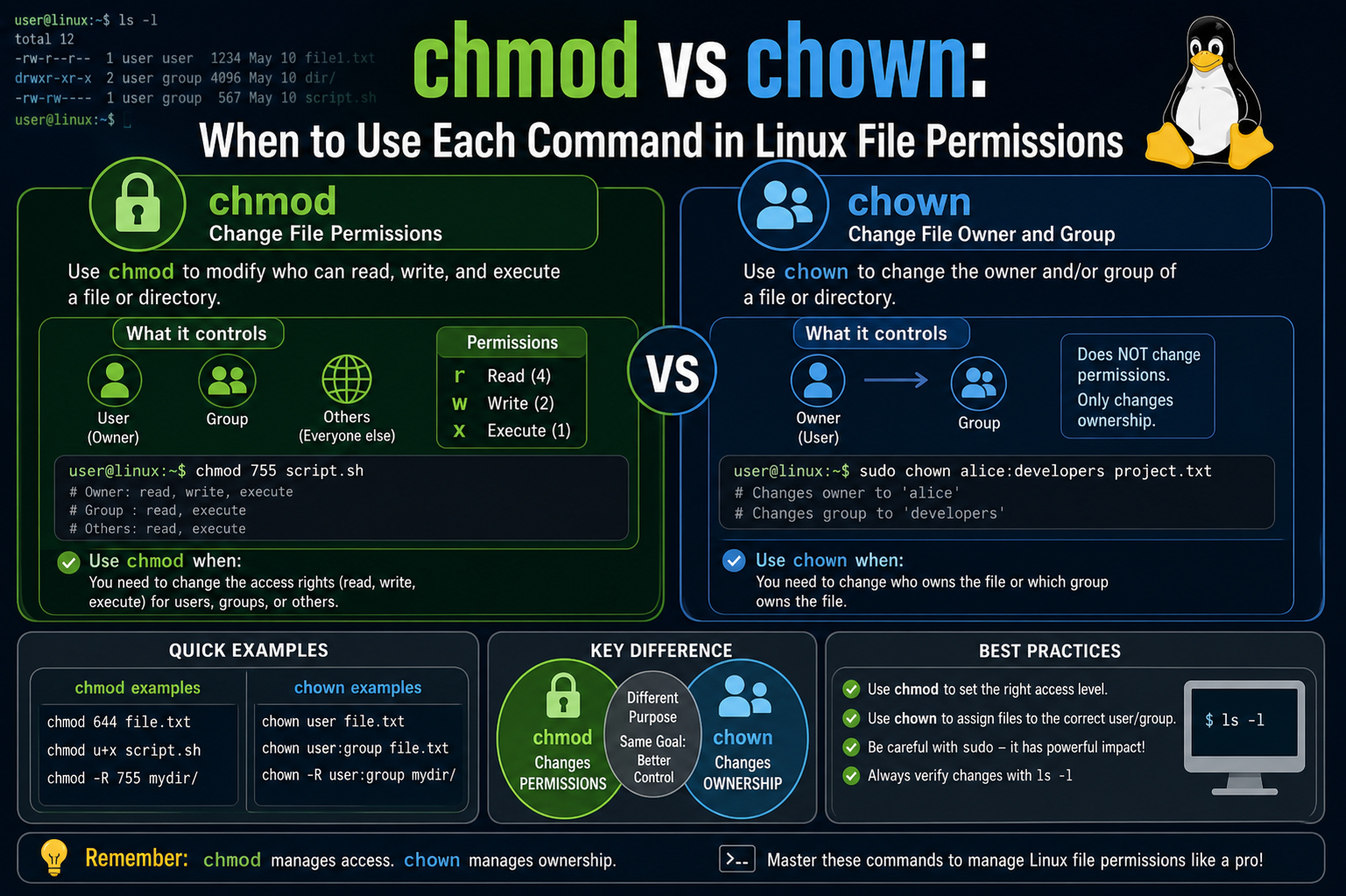
Linux and Unix systems rely heavily on a permission model that controls how files are accessed and modified. Two of the most important commands in this system are chmod and chown. These commands are essential for system administration, cybersecurity, and IT certification knowledge. Understanding when to use each one is key to managing files correctly and securely. While both commands deal with file control, they operate in completely different ways and solve different problems within the system.
What chmod and chown Actually Mean
The command chmod stands for “change mode,” and it is used to control what actions users can perform on a file. These actions include reading, writing, and executing. On the other hand, chown stands for “change owner,” and it is used to change who owns a file or which group has ownership over it. In simple terms, chmod changes what can be done with a file, while chown changes who the file belongs to.
Basic Difference Between chmod and chown
The main difference between these two commands lies in their purpose. chmod focuses on permissions, determining whether a file can be read, edited, or executed by a user, group, or others. chown focuses on ownership, deciding which user or group has control over the file. If the goal is to adjust access rights, chmod is used. If the goal is to transfer ownership, chown is the correct choice. This distinction is fundamental when working with Linux systems.
Understanding File Listing and Permissions Structure
When listing files using the command ls -l, Linux displays detailed information about each file, including permissions, ownership, size, and modification time. A typical output includes a permission string like rw-rw-r– followed by the user and group names. This structure shows how access is divided into three categories: owner, group, and others. Each category has its own set of permissions that define what actions are allowed.
Breaking Down Permission Symbols (r, w, x)
File permissions are represented using three characters: r for read, w for write, and x for execute. Read allows viewing a file’s contents, write allows modifying the file, and execute allows running the file as a program. These permissions are assigned separately to the file owner, the group, and all other users. Understanding these symbols is essential before using chmod because they form the basis of permission control in Linux.
How File Permission Structure Works
Each file in Linux has a structured permission layout divided into three parts. The first part represents the owner’s permissions, the second part represents the group’s permissions, and the third part represents permissions for all other users. For example, a permission string like rw-rw-r– means the owner and group can read and write the file, while others can only read it. This structure ensures controlled access across multiple users.
Numeric Representation of Permissions
Linux permissions can also be expressed using numbers instead of symbols. This system uses binary values where read equals 4, write equals 2, and execute equals 1. These values are added together to create a single number representing a permission set. For example, 7 means read, write, and execute combined, while 6 means read and write only. This numeric system is widely used with chmod for quick permission changes.
Understanding What chmod Controls
The chmod command directly modifies file permissions without changing ownership. It allows system administrators to define exactly who can read, modify, or execute a file. For example, setting permissions to 600 allows only the owner to read and write the file, while others have no access. This makes chmod a powerful tool for securing files and controlling access levels in a system.
How chmod Uses Numeric Values
When using chmod with numbers, each digit represents permissions for the owner, group, and others in that order. For instance, chmod 600 sets full control for the owner and no access for anyone else. chmod 664 allows read and write access for the owner and group while giving read-only access to others. This numeric approach simplifies complex permission settings into a single command.
Real Meaning of chmod Permission Changes
When permissions are changed using chmod, the ownership of the file remains the same. Only the access rights are modified. This means the file still belongs to the same user and group, but their ability to interact with the file may change. This separation of ownership and permissions is what makes Linux file management flexible and secure.
Symbolic Method of Using chmod
Apart from numeric values, chmod also supports symbolic notation. This method uses letters like u for user, g for group, and o for others, combined with symbols like +, -, and = to add, remove, or set permissions. For example, adding execute permission to a file can be done using a symbolic command. This method is often easier to read and understand, especially for beginners.
Practical Usage of chmod in Systems
chmod is commonly used when setting up applications, scripts, or shared directories. For example, executable scripts must be given execute permission before they can run. Similarly, sensitive configuration files are often restricted so that only specific users can modify them. This ensures both functionality and security within the system environment.
Introduction to chown and Its Role
Unlike chmod, which deals with permissions, chown is responsible for ownership control. It changes which user or group owns a file. This is important in multi-user environments where different users need control over different files. Ownership determines who has the authority to manage permissions and access levels for that file.
How chown Changes File Ownership
When chown is used, it can change the user owner, the group owner, or both. For example, a file can be transferred from one user to another while keeping the same group. Alternatively, both user and group ownership can be changed together. This flexibility is useful in system administration and file management tasks.
Why chown Often Requires Elevated Permissions
Changing file ownership is a sensitive operation, which is why chown usually requires administrative privileges. Only users with elevated permissions can assign ownership to different users or groups. This prevents unauthorized users from taking control of system-critical files and ensures proper security management in Linux systems.
How Ownership Affects File Access
Ownership plays a key role in determining how chmod permissions apply. The owner of a file has a separate set of permissions compared to group members and other users. When ownership changes using chown, the effective access to the file may also change depending on existing permissions. This makes ownership an important layer of file security.
Combining chmod and chown in Real Systems
In real-world environments, chmod and chown are often used together. First, chown assigns the correct owner and group for a file, ensuring the right users control it. Then chmod is used to define how that file can be accessed or modified. This combination is common in web servers, application deployment, and system configuration.
Why Understanding Both Commands is Essential
Understanding the difference between chmod and chown is crucial for anyone working with Linux systems. Misusing either command can lead to security issues, restricted access, or system errors. Proper knowledge ensures files are both secure and accessible to the right users. These commands form the foundation of Linux file management and are widely used in professional environments.
Understanding the Basic Permission Structure
When working with Linux systems, file permissions are shown in a structured format that defines exactly how a file can be accessed. This information becomes visible when using ls -l, which displays detailed file data. One of the most important parts of this output is the permission string made up of r, w, and x. These represent read, write, and execute permissions. Understanding this structure is necessary before properly using chmod and chown.
How Permission Sections Are Divided
The permission string is divided into three main sections that represent different user categories. The first section shows permissions for the file owner, the second section shows permissions for the group, and the third section represents all other users. Each section contains three characters that define whether read, write, or execute access is allowed. This division allows Linux systems to control access in a very organized way.
Meaning of a Typical Permission String
A common permission string like rw-rw-r– shows how access is distributed. The owner has read and write permissions, the group also has read and write permissions, while all other users only have read access. This structure ensures that sensitive files can be controlled while still allowing limited access when needed. It is one of the core security features in Linux systems.
File Type Indicator in Permissions
The first character in the ls -l output represents the file type. A dash (-) indicates a normal file, while other symbols like d represent directories and l represents symbolic links. After this first character, the next nine characters define the permissions of the file. These nine characters are always grouped into sets of three, showing access levels for owner, group, and others.
Meaning of Read, Write, and Execute
Read permission allows a user to view the contents of a file. Write permission allows modification or editing of the file content. Execute permission allows a file to be run as a program or script. Each permission plays a different role in how users interact with files. Without the correct permission, certain actions will be blocked by the system.
Permissions in Directories vs Files
Permissions behave differently when applied to directories. Read permission allows listing files inside a directory. Write permission allows creating, deleting, or renaming files within it. Execute permission allows entering the directory and accessing its contents. This difference makes directory permissions especially important for system organization and security.
Numeric Representation of Permissions
Each permission type also has a numeric value. Read is assigned 4, write is assigned 2, and execute is assigned 1. These values are added together to form a single number representing a full permission set. For example, read and write combined equal 6, while full permissions equal 7. This numeric system is commonly used in chmod commands.
How User, Group, and Others Are Defined
In Linux systems, users are divided into three categories for permission control. The owner is the user who owns the file. The group consists of multiple users who share access rights. Others include all remaining users on the system. Each category has its own permission set, allowing fine-grained control over file access.
Importance of Permission Control in Security
File permissions play a major role in system security. They prevent unauthorized users from modifying or accessing important files. For example, system configuration files are often restricted so that only administrators can edit them. This ensures stability and reduces the risk of accidental or malicious changes.
Foundation for chmod and chown Usage
Understanding rwx permissions is essential before using chmod and chown effectively. These permissions define how access works, while chmod changes the permissions and chown changes ownership. Without understanding this structure, managing Linux files becomes difficult and error-prone. This knowledge forms the base for all file management operations in Linux.
Understanding What chmod Actually Does
The chmod command stands for “change mode” and is used to modify file permissions in Linux systems. It does not change who owns a file but instead controls what actions users can perform on it. These actions include reading, writing, and executing files. chmod is one of the most commonly used commands in system administration because it directly affects file security and accessibility.
How chmod Affects Permissions Only
When chmod is used, it only changes permissions and does not affect ownership. This means the file owner and group remain the same, but their ability to interact with the file can change. For example, a file may still belong to the same user, but that user might lose write access depending on the permission settings applied through chmod. This separation keeps ownership and access control independent.
Understanding Octal Permission System
chmod often uses a numeric or octal system to define permissions. In this system, each permission has a value: read is 4, write is 2, and execute is 1. These values are added together to form a single digit for each user category. This makes permission management faster and more efficient. For example, a value of 7 means full permissions, while 5 means read and execute only.
How Permission Groups Work in chmod
Permissions in chmod are divided into three groups: owner, group, and others. Each group gets its own numeric value when using the octal system. The first digit represents the owner, the second represents the group, and the third represents others. This structure allows precise control over how different users interact with the same file.
Example of chmod Permission Changes
If a file is set to 600 using chmod, it means the owner has read and write permissions while everyone else has no access. If it is set to 644, the owner can read and write, while others can only read. These simple numeric combinations allow quick and powerful control over file access without needing complex commands.
Why chmod is Important in Security
chmod plays a major role in system security by controlling who can access or modify files. Sensitive files like configuration files or scripts must be protected to avoid unauthorized changes. By using chmod properly, administrators can ensure that only trusted users have access to critical system data.
Symbolic Method of chmod
Apart from numeric values, chmod also supports symbolic notation. This method uses letters such as u for user, g for group, and o for others. It also uses symbols like + to add permissions, – to remove them, and = to set exact permissions. This method is more readable and helps beginners understand permission changes more clearly.
How Symbolic chmod Works in Practice
In symbolic mode, commands are written in a structured way. For example, adding execute permission to a file is done by specifying the target and the permission type. This method is useful when only specific permissions need to be modified instead of changing the entire permission set. It gives more flexibility compared to numeric mode.
Common Use Cases of chmod
chmod is widely used in real-world scenarios such as making scripts executable, restricting access to sensitive files, and setting permissions for shared directories. For example, a script must have execute permission before it can run. Similarly, shared folders may need specific read and write restrictions depending on user roles.
Role of chmod in System Management
In system administration, chmod ensures that files behave correctly based on their purpose. Without proper permissions, applications may fail to run or users may access files they should not. This makes chmod an essential tool for maintaining both functionality and security in Linux environments.
Understanding What chown Actually Does
The chown command stands for “change owner” and is used to change the ownership of files and directories in Linux systems. Unlike chmod, which only changes permissions, chown changes who controls the file. This includes the user owner and the group owner. Ownership is an important part of file management because it defines responsibility and control over system resources.
Difference Between Ownership and Permissions
Ownership and permissions are two separate concepts in Linux. Permissions define what can be done with a file, while ownership defines who has control over it. Even if permissions remain the same, changing ownership can completely shift control of a file from one user to another. This separation allows Linux systems to manage security and access in a structured way.
How chown Changes User Ownership
chown can be used to change the user who owns a file. When this change is made, the file is transferred from one user account to another. The new owner then becomes responsible for managing the file’s access permissions. This is useful in shared systems where files need to be reassigned between users or administrators.
How chown Changes Group Ownership
Apart from changing the user owner, chown can also modify group ownership. A file can belong to a specific group that includes multiple users. Changing the group ownership allows different sets of users to access the file based on group permissions. This is commonly used in team-based environments where multiple users work on shared resources.
Changing Both User and Group Together
chown also allows both user and group ownership to be changed at the same time. This gives full control over file reassignment in a single command. It ensures that both the main owner and the associated group are correctly assigned, which is important for maintaining proper access control in complex systems.
Why chown Requires Special Permissions
Changing file ownership is a sensitive action, so it usually requires administrative privileges. Regular users are not allowed to change ownership of files they do not control. This restriction helps protect system integrity and prevents unauthorized users from taking over important system files or directories.
Impact of Ownership on File Access
Ownership directly affects how permissions apply to a file. The owner has a specific set of permissions that may differ from group members and others. When ownership changes, the way permissions are interpreted can also change depending on the new owner. This makes chown a critical command for managing access relationships.
Common Use Cases of chown
chown is commonly used in system administration, especially when transferring project files between users, setting up web servers, or managing shared directories. For example, web server files are often assigned to a specific system user so that the server can access them properly. This ensures smooth application performance and correct access behavior.
How chown Works with System Security
chown plays an important role in maintaining system security by ensuring that files are owned by the correct users. Incorrect ownership can lead to security risks or system errors. By properly assigning ownership, administrators ensure that only authorized users can control important files and directories.
Understanding of chmod vs chown Relationship
chmod and chown work together to manage Linux file systems effectively. chown defines who owns a file, while chmod defines what that owner and others can do with it. Both commands are essential for controlling access, maintaining security, and ensuring proper system organization in multi-user environments.
Combining chmod and chown in Real Systems
In real Linux environments, chmod and chown are almost never used in isolation because file management requires both ownership control and permission control at the same time. chown is usually applied first to ensure the correct user and group are assigned to a file or directory. Once ownership is properly set, chmod is used to define how that owner, group, and others can interact with the file. This layered approach ensures that both responsibility and access rules are correctly aligned.
For example, when setting up a web application, files are often assigned to a specific system user that runs the web server. This is done using chown so that the server process has proper ownership of the files. After that, chmod is used to restrict or allow actions such as reading configuration files, executing scripts, or writing logs. Without combining both commands, a system can easily become insecure or non-functional.
Why Proper Ownership Matters Before Permissions
Ownership is the foundation of file control because permissions only make sense when applied to a specific owner and group. If a file is owned by the wrong user, even correct permissions may not work as expected. For instance, a file might have full permissions set, but if the wrong user owns it, the intended application may not be able to access it. This is why chown is often considered the first step in system configuration.
In multi-user environments, ownership determines responsibility. Each file should clearly belong to a user or service account that is expected to manage it. Once ownership is correctly assigned, permissions can be safely adjusted without creating confusion or security risks.
Real-World Example of File Setup Workflow
In practical system administration, a common workflow starts with creating or receiving files, then assigning ownership using chown, and finally setting permissions using chmod. For example, a directory used by a database system may first be assigned to a database user. After that, permissions are restricted so that only that user and necessary system processes can access it.
This process ensures that no unnecessary users can interfere with important system files. It also helps maintain performance stability by preventing accidental modifications from unauthorized accounts.
Security Importance of chmod and chown Together
Security in Linux systems depends heavily on correct file ownership and permission configuration. If chown is misused, sensitive files can end up under the control of the wrong user. If chmod is misconfigured, even correct ownership can still expose files to unauthorized access. This combination of risks makes it essential to understand both commands together rather than separately.
For example, a configuration file with sensitive credentials must be owned by a trusted system user and must have restricted permissions so that no other users can read or modify it. This dual-layer protection is what makes Linux security strong and reliable.
Common Mistakes When Using chmod and chown
One of the most common mistakes is changing permissions without checking ownership first. This can lead to confusion where a file appears accessible but still does not work correctly due to ownership mismatch. Another common mistake is using overly broad permissions, which can expose sensitive files to all users on the system.
Another serious issue is recursive application of both commands without verifying the target path. If used incorrectly, entire system directories can be affected, leading to broken services or locked-out users. Because of this, administrators always double-check commands before applying them on critical directories.
How Web Servers Depend on chmod and chown
Web servers heavily rely on correct usage of chmod and chown. Files served by web applications must be readable by the server process but should not be writable by everyone. Typically, chown is used to assign ownership to a dedicated web server user, while chmod is used to restrict unnecessary write or execute access.
This ensures that web content is delivered correctly while preventing unauthorized modification. Incorrect configuration can lead to website downtime, security breaches, or data corruption.
System Stability Through Proper File Control
Proper use of chmod and chown directly impacts system stability. When files are owned and permissioned correctly, applications run smoothly without access errors. Misconfigured files, on the other hand, can cause services to fail to start or behave unexpectedly.
System administrators rely on these commands not just for security but also for ensuring that applications function consistently across different environments. This is especially important in production systems where downtime can be costly.
Advanced Considerations in File Management
In more advanced Linux environments, file management goes beyond basic chmod and chown usage. Concepts like recursive permission changes, inherited permissions, and group-based access control become important. Administrators must carefully plan how ownership and permissions are structured across entire directories rather than individual files.
Large systems often involve multiple users, services, and applications interacting with shared resources. In such cases, consistent use of chmod and chown ensures predictable behavior and reduces configuration errors.
Importance in Multi-User Environments
Linux is designed as a multi-user operating system, and chmod and chown are essential tools for managing that environment. Each user must have clearly defined boundaries for what they can access and modify. Ownership defines responsibility, while permissions define access rights.
Without these controls, multiple users could accidentally overwrite each other’s work or access sensitive data. Proper configuration ensures collaboration without compromising security or system integrity.
Understanding of System-Wide File Control
At a system level, chmod and chown work together as the backbone of file security and management. chown ensures files belong to the correct user and group, while chmod ensures those users can only perform allowed actions. Together, they create a structured and secure environment where files are protected, applications run correctly, and users operate within defined boundaries.
Final Understanding of chmod vs chown in Real Environments
In real Linux and Unix systems, understanding chmod and chown together is not just about learning commands, it is about understanding how entire systems control access, responsibility, and security. These two commands form the foundation of file management and are used continuously by system administrators, developers, and security engineers. Every file in a system is governed by both ownership and permissions, and these two concepts must always work in balance for a stable environment.
How System Design Depends on Ownership and Permissions
Every operating system is designed around the idea that different users need different levels of access. Some users need full control over files, while others only need limited access. chown defines who has control over a file, while chmod defines what level of control is allowed. This separation allows system designers to build secure environments where access is carefully controlled instead of being random or open.
Without proper ownership, even correctly set permissions can fail because the system may not recognize which user should manage the file. Without proper permissions, ownership alone cannot prevent unwanted actions. This is why both commands are always considered together in system design.
Real System Scenarios Where Both Commands Work Together
In real-world environments like web hosting, database servers, and application deployment, chmod and chown are used as part of setup processes. For example, when deploying a web application, files are first assigned to a specific system user using chown. This ensures that only the web service can manage those files.
After that, chmod is used to restrict or allow access based on system needs. Configuration files may be set to read-only for security, while log directories may allow writing so that the system can record activity. This combination ensures both functionality and protection.
Security Layering Through chmod and chown
Security in Linux systems is built in layers, and chmod and chown form two of the most important layers. chown ensures that only trusted users own sensitive files, while chmod ensures that even those users can only perform allowed actions. This layered approach reduces risk because breaking one layer is not enough to compromise the system.
For example, even if a file is readable, it may still be safe if it is owned by a trusted user and not writable by others. Similarly, even if ownership is correct, restrictive permissions can still prevent unauthorized modifications.
Importance in Shared Systems and Servers
In shared systems where multiple users work on the same machine, chmod and chown become even more important. Each user must have their own files and controlled access to shared resources. chown ensures files are assigned correctly to users or groups, while chmod ensures that only required actions are allowed.
In server environments, this becomes critical because multiple services often run on the same system. Each service needs its own files and must not interfere with others. Proper use of these commands ensures smooth operation without conflicts.
Preventing System Misconfigurations
One of the biggest risks in Linux administration is incorrect file configuration. If chown is used incorrectly, files may become inaccessible or controlled by the wrong user. If chmod is misused, files may become too open or too restricted, breaking applications.
For example, setting overly open permissions can expose sensitive data, while overly strict permissions can stop services from running. This balance is why administrators carefully plan before applying changes.
How Applications Rely on File Control
Modern applications depend heavily on correct file ownership and permissions. Databases need controlled access to storage files, web servers need access to public content, and system services need access to configuration files. chown ensures that the correct service owns these files, while chmod ensures that access rules are properly enforced.
If either command is misconfigured, applications may fail to start, crash during runtime, or behave unpredictably. This makes file control a critical part of application reliability.
System Administration Best Practices
Experienced administrators always follow a structured approach when using chmod and chown. They first identify the correct owner and group for a file, then assign ownership using chown. After that, they carefully apply permissions using chmod based on the file’s purpose.
They also avoid unnecessary wide permissions and regularly audit file ownership across systems. This helps maintain security and prevents unauthorized access or accidental modifications.
Role in Troubleshooting System Issues
Many system issues in Linux are related to incorrect permissions or ownership. Files not opening, services failing to start, or scripts not executing are often caused by misconfigured chmod or chown settings. Understanding these commands helps quickly identify and fix such problems.
By checking ownership first and then verifying permissions, administrators can efficiently diagnose most file-related issues without complex debugging.
Combined Understanding
At a complete system level, chmod and chown are inseparable tools that define how Linux systems operate securely and efficiently. chown assigns responsibility by defining ownership, while chmod defines boundaries by controlling actions. Together, they create a structured environment where files are protected, systems remain stable, and users operate within safe limits.
Understanding both commands deeply is essential for anyone working with Linux systems because they are used in almost every aspect of system configuration, security management, and application deployment.
Conclusion
chmod and chown are two core Linux commands that work together to control how files are managed, accessed, and secured in a system. While they are often learned together, they serve completely different purposes, and understanding that difference is what makes Linux file management clear and effective.
chmod focuses on permissions, deciding what actions are allowed on a file such as reading, writing, or executing. It defines the level of access for the owner, group, and other users, ensuring that files are not misused or exposed unnecessarily. chown, on the other hand, focuses on ownership, determining which user and group have control over a file. It sets responsibility and authority over that file, which directly impacts how permissions are applied and managed.
When used together, these commands create a complete security structure. chown assigns the correct owner and group, and chmod ensures that only the intended level of access is available. This combination is essential in real systems where multiple users, applications, and services share the same environment. Without proper use of both commands, systems can become either insecure or non-functional.
In practical environments like servers, development systems, and shared networks, chmod and chown are used constantly to maintain balance between accessibility and protection. They help ensure that files are not only usable by the right processes but also protected from unauthorized changes.
Mastering these two commands is a fundamental step in understanding Linux administration, system security, and real-world IT operations.