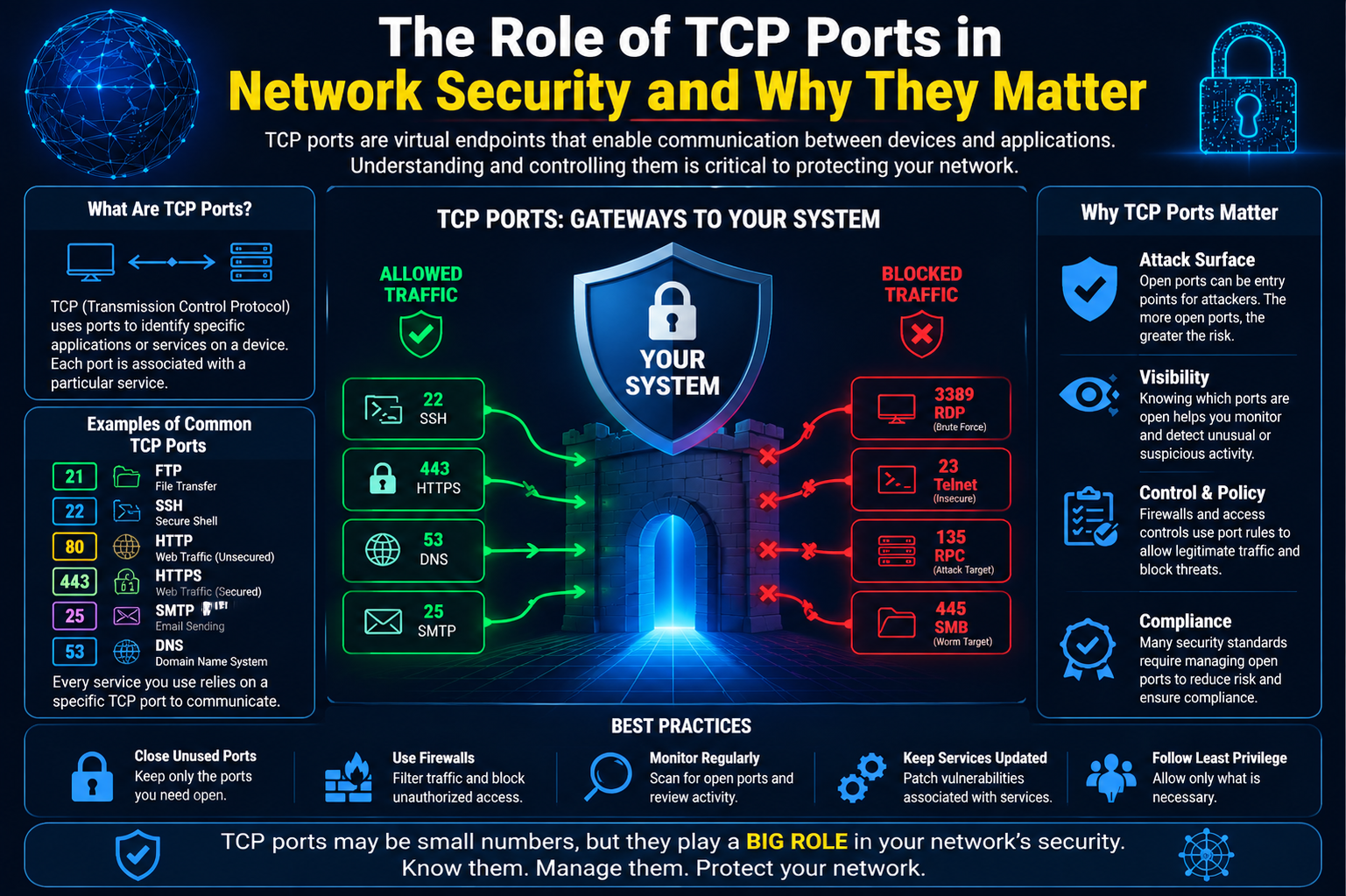
TCP (Transmission Control Protocol) ports are integral components in computer networking that help in directing data traffic to specific services or applications on a device. A port serves as a logical endpoint, much like a door, where data from different sources can enter or exit a system. Each port is assigned a specific number, which allows it to uniquely identify a service or application on a device. These numbers follow a globally recognized standard to ensure that the data reaches the right destination without interference from other services running on the same system.
To understand the concept of ports better, imagine a busy port city where containers are unloaded and shipped across various routes. Each container is tagged with a unique number so it can be directed to its correct destination. Similarly, in a computer network, ports help direct data traffic to specific programs or services. A device may simultaneously host several applications, each of which uses different ports to communicate. The ports essentially act as a traffic controller, making sure data reaches its correct destination.
In the context of networking, TCP ports play a vital role in ensuring that data is sent and received correctly by the intended applications. These ports ensure seamless communication by associating specific port numbers with distinct services, whether it’s a website, email service, or file transfer. Without the organization provided by ports, devices would be unable to properly route data, leading to inefficiencies and errors in communication.
TCP Ports and Their Connection to Networking
TCP ports are part of the larger TCP/IP suite, which is the set of protocols responsible for transmitting data across the internet. TCP, as the connection-oriented protocol, ensures that data is transferred reliably, without loss or corruption. The connection is established between the source and destination before any data is sent. This method of establishing a reliable connection helps ensure that data is accurately received, ordered correctly, and free from errors during transmission.
Each device connected to a network, whether it’s a computer, server, or router, has its own set of TCP ports that are used for different types of communication. For example, when you use a web browser to access a website, your computer communicates with the web server through a specific TCP port, usually port 80 (for HTTP) or port 443 (for HTTPS). These well-known ports are pre-established and standardized, so both the client and server know exactly which port to use for the connection.
In simple terms, a TCP port is like a door to a service on a device. Each port corresponds to a particular service, and the number associated with that port helps the network and devices know where to send or receive information. With a multitude of services running on a single device, ports ensure that all network traffic is accurately routed, and the correct service receives the necessary data.
The Role of Ports in Ensuring Proper Communication
The importance of TCP ports cannot be overstated, as they allow devices to handle multiple services simultaneously without any conflict. A single device can be running several services, each listening on a unique port number. For example, a device might run a web server on port 80, an email server on port 25, and a file transfer protocol (FTP) service on port 21. This division ensures that the right data goes to the right service.
Without TCP ports, these services would have no way of distinguishing between different types of incoming traffic. If there were no ports to direct data to the appropriate application, the system would quickly become overwhelmed, with all data being sent to a single, undifferentiated location. This would cause services to malfunction and prevent reliable communication between devices on a network.
Additionally, TCP ports help manage security in a network. Firewalls, for instance, monitor network traffic by analyzing the port numbers. By blocking or allowing traffic based on the port numbers, firewalls help prevent unauthorized access to sensitive services. A well-configured firewall will only allow certain types of traffic through specific ports, reducing the risk of malicious attacks.
Furthermore, ports play a key role in network troubleshooting. Network administrators use port numbers to identify and resolve issues with connectivity, diagnose traffic bottlenecks, or even detect suspicious activities such as unauthorized access attempts. By monitoring which ports are open and closed, administrators can effectively secure their networks and ensure smooth communication.
TCP and Its Connection to the Internet Protocol (IP)
To fully understand how TCP ports fit into networking, it’s essential to look at TCP’s relationship with the Internet Protocol (IP). Together, TCP and IP form the backbone of modern internet communication, commonly referred to as the TCP/IP protocol suite. TCP handles the reliable transmission of data, ensuring that packets of information are delivered correctly and in the correct order, while IP is responsible for addressing and routing data to its destination.
When data is transmitted across the internet, it is broken down into smaller packets. Each packet contains information such as the source and destination IP address, the sequence of the packet in relation to the others, and the destination port number. This enables the network to send the packet to the correct destination and reassemble the data in the right order.
For example, when you visit a website, your computer sends a request to the web server using TCP/IP. The request is routed based on the server’s IP address, and the specific port number (usually port 80 for HTTP or port 443 for HTTPS) ensures that the request is directed to the correct service. The server then responds by sending the appropriate data back to your device, also using the correct port to ensure the response is directed to the web browser.
TCP Ports and the Internet’s Addressing System
One of the most important aspects of TCP ports is how they interact with the internet’s addressing system. While IP addresses serve as the unique identifiers for devices on a network, TCP ports identify the specific service or application running on those devices. In this way, the IP address is like the street address of a house, while the port number is like the room or door where the service is located.
This dual-addressing system—IP address and port number—allows devices to host multiple services on the same network. For instance, a single web server can serve multiple websites, each listening on a different port. Similarly, a mail server can handle multiple email accounts and services, with each one bound to a specific port number.
The system of port numbers is also what allows devices to handle multiple simultaneous connections. A single server can be hosting hundreds or even thousands of connections at once, all on different ports. Each connection is isolated, so they do not interfere with each other, even though they are all using the same network infrastructure.
The Function of TCP in Data Transfer
Before diving deeper into how TCP ports specifically function in network communication, it’s important to understand the role of TCP itself. The Transmission Control Protocol (TCP) is a connection-oriented protocol, meaning that it establishes a reliable connection between two devices before any data is transferred. This feature sets TCP apart from other protocols, like User Datagram Protocol (UDP), which does not require such a connection and sends data without checking for errors or ensuring that the data is received in order.
The connection established by TCP is crucial for ensuring the integrity and reliability of the data being transmitted. For example, when you send an email or download a file, TCP makes sure that each packet of data arrives correctly, is reassembled in the right order, and that any errors in transmission are corrected before the data reaches its destination. This is done through a process called “handshaking,” where the client and server exchange control messages to set up the connection before any actual data is sent.
The TCP protocol uses sequence numbers to keep track of the data packets. Each packet is numbered, and when the packets arrive at the destination, the receiving system reorders them based on their sequence numbers. If a packet is lost or corrupted during transmission, TCP requests that the sender resend the missing or damaged packet, ensuring reliable and complete data transfer.
Once the data has been successfully transmitted, the connection is closed using another control message called the “TCP three-way handshake.” This process ensures that both devices agree that the data transfer is complete, and the connection is then safely terminated.
How TCP Ports Enable Communication Between Applications
TCP ports are the means by which data is routed to specific services or applications running on a device. Each service on a network, such as a web server, email server, or file transfer service, listens on a particular port for incoming requests. This allows multiple services to coexist on the same device without interfering with each other.
When a device on a network wants to communicate with a specific service, it must send data to the appropriate port number associated with that service. For example, when you access a website in your browser, your computer sends an HTTP request to the web server. The web server listens for incoming requests on port 80 (the default port for HTTP), and once the request arrives at the correct port, it is processed and the requested web page is sent back to the client.
The use of TCP ports ensures that data is directed to the right application. Think of it as directing a phone call to a specific extension in a large office building. Without the right port number, the request would have nowhere to go, and the communication would fail.
TCP ports make it possible for devices to simultaneously host multiple services, with each service dedicated to a different port. For example, a single server could run a web service on port 80 (HTTP), an email service on port 25 (SMTP), and a file transfer service on port 21 (FTP). Each of these services listens for incoming data on their respective ports, and by using the correct port number, devices can direct traffic to the right service without confusion.
How Ports Enable Secure and Controlled Communication
Ports also play a vital role in network security. Firewalls, which are used to protect networks from unauthorized access, monitor traffic on specific ports. By controlling which ports are open or closed, firewalls can block malicious traffic while allowing legitimate data to pass through.
For instance, an organization’s firewall may be configured to block all incoming traffic on ports that are not essential for business operations, thus preventing hackers from exploiting unused or unmonitored ports to gain unauthorized access. At the same time, the firewall will allow traffic on the ports that are necessary for communication with trusted services, such as web servers, email servers, or remote access tools.
A well-maintained firewall can provide robust protection against network threats by ensuring that only traffic on authorized ports is allowed to enter or leave the network. This helps prevent unauthorized access attempts and mitigates the risk of malware spreading through insecure ports.
Types of TCP Ports: Well-Known, Registered, and Dynamic Ports
There are different categories of TCP ports, each serving a specific purpose in network communication. These categories are based on the port number range, and each range has its own significance:
- Well-Known Ports: These ports are reserved for standard services and are used by most applications to establish communication. Well-known ports range from 0 to 1,023. These are globally recognized and assigned by the Internet Assigned Numbers Authority (IANA). For example, HTTP traffic uses port 80, HTTPS uses port 443, and FTP uses port 21. These ports are commonly used for widely recognized services and ensure that devices can communicate using standard protocols.
- Registered Ports: Registered ports range from 1,024 to 49,151 and are used by applications that are not as universally standardized as the services using well-known ports. Organizations can register specific port numbers for their services with the IANA to avoid conflicts. For example, many enterprise applications, such as database services, use registered ports to avoid interference with common services.
- Dynamic or Private Ports: These ports range from 49,152 to 65,535 and are typically used by client applications for temporary connections. When a client application, such as a web browser or email client, connects to a server, it is often assigned a dynamic port number for the duration of that session. Once the session ends, the port is released for future use. Dynamic ports are often used for outbound connections, where the client is not providing a service but simply requesting data from a server.
Each type of port serves a distinct role in network communication, and understanding these categories is crucial for managing and troubleshooting network services.
The Significance of TCP Ports in Multi-Connection Systems
TCP ports also play a key role in enabling devices to handle multiple simultaneous connections. For example, a server hosting a website might be receiving hundreds or even thousands of requests at once. Each of these requests comes from a different client device and may be directed to the same port (e.g., port 80 for HTTP). However, thanks to the use of different source ports for each request, the server can handle each connection independently.
This feature allows servers to handle multiple requests from different users at the same time, ensuring that data is sent to the correct client. Additionally, it ensures that responses are directed back to the right client by matching the incoming request with the appropriate source port.
For example, when you visit a website, your browser sends a request to the web server on port 80. The server processes the request and sends back the requested data. However, your browser uses a dynamic, randomly assigned port for the request (often in the range of 49,152 to 65,535), and the server uses this port to send the response back to your browser. This allows the server to manage multiple connections simultaneously, even though all requests are routed through the same port.
Understanding Socket Programming and Its Role in TCP Communication
In network communication, the term “socket” refers to a combination of an IP address and a port number, which together allow for a connection between two systems. A socket serves as the interface between an application and the network, facilitating communication by providing the means to connect, send, and receive data. It essentially defines the endpoint for the communication between two devices.
Socket programming is a fundamental concept when working with network services, as it enables the creation of applications that can both send and receive data over a network. A socket is often used in client-server architecture, where the server listens on a specific port, waiting for client requests. Once a client connects to that port, data is exchanged through the socket, and the connection can remain open for continuous communication.
Sockets allow systems to handle multiple instances of the same service by using different port numbers. For example, a single server might run multiple web applications, each on its own port, allowing clients to interact with different services at the same time. A web server could listen on the default HTTP port (80) for standard web traffic and another port, such as 8080, for an alternative service or application running on the same machine.
In terms of TCP communication, socket programming also plays a role in connection management. Sockets are used to create, maintain, and terminate TCP connections, ensuring that the connection between the client and server is reliable, properly established, and securely closed once the data transfer is complete.
Common TCP Ports and Their Uses
TCP ports are used by a wide variety of services and protocols, each having its designated port number. Some of these ports are standardized and reserved for specific services, while others can be assigned dynamically by network administrators. Here’s an overview of some of the most commonly used TCP ports and their functions:
- Port 80 (HTTP): This is the default port for Hypertext Transfer Protocol (HTTP), the protocol used for accessing web pages. Web browsers, such as Chrome, Firefox, or Safari, use port 80 to request and receive data from web servers.
- Port 443 (HTTPS): This is the secure version of HTTP, where data is encrypted using SSL/TLS protocols. Port 443 is used for secure web traffic, ensuring that sensitive data, such as login credentials or credit card information, is transmitted safely between the client and server.
- Port 21 (FTP): File Transfer Protocol (FTP) is used to transfer files between a client and a server over a network. FTP typically uses port 21 for establishing a control connection, though it may use different ports for transferring data.
- Port 22 (SSH): Secure Shell (SSH) is a protocol used for secure remote login to servers or other networked devices. Port 22 is used for SSH connections, allowing users to securely access systems and execute commands remotely.
- Port 25 (SMTP): Simple Mail Transfer Protocol (SMTP) is used to send email messages from one server to another. Port 25 is the default port used for outgoing mail and is typically used by email servers to send messages.
- Port 110 (POP3): Post Office Protocol (POP3) is used for retrieving email from a server. Port 110 is the default port for POP3, allowing email clients to download messages from an email server.
- Port 143 (IMAP): Internet Message Access Protocol (IMAP) is another protocol used for retrieving email from a server. IMAP allows for more advanced functionality, such as keeping email messages synchronized across multiple devices. Port 143 is the default port for IMAP.
- Port 53 (DNS): Domain Name System (DNS) is responsible for translating domain names (e.g., www.example.com) into IP addresses. Port 53 is used by DNS servers to handle these requests, allowing clients to access websites using human-readable addresses.
These are just a few examples of the many TCP ports used in networking. Each of these ports corresponds to a specific service or protocol, and they are critical in enabling communication between devices and applications over a network.
Port Scanning and Network Security
One of the most common methods used in network security to assess the health and vulnerabilities of a system is port scanning. A port scan is a technique used by network administrators, security professionals, and sometimes attackers to discover which ports are open or closed on a target system. This information can reveal which services are running on the system, potentially exposing vulnerabilities or points of entry for attackers.
Port scanning tools like Nmap (Network Mapper) are used to send requests to a range of ports on a target system and analyze the responses to determine the status of each port. A successful scan can identify open ports and the services associated with them, providing valuable insight into the system’s security posture.
While port scanning is a useful tool for security assessments, it can also be used by attackers to gather information for malicious purposes. Unauthorized port scans can help hackers identify systems running vulnerable services or outdated software, which they can then exploit to gain unauthorized access to the system. For this reason, many organizations use firewalls and intrusion detection systems (IDS) to block or alert administrators to unauthorized port scans.
Network Address Translation (NAT) and Port Forwarding
In many networks, especially in home or small office environments, devices often share a single public IP address to access the internet. This is where Network Address Translation (NAT) comes into play. NAT is a method used by routers to allow multiple devices on a local network (LAN) to share a single public IP address for internet communication.
NAT works by modifying the source or destination IP address of packets as they pass through the router. This allows the router to keep track of which internal device sent the request and redirect the response back to the correct device on the network. NAT also modifies the port numbers used for the internal devices, ensuring that each device has a unique mapping between its private IP address and a port number on the public IP address.
Port forwarding is a technique often used in conjunction with NAT to allow external devices to connect to specific services on internal devices. For example, if you want to run a web server on a device within your local network, you can configure port forwarding on your router to forward incoming HTTP requests on port 80 to the internal IP address of the web server. This allows external users to access your website using your public IP address, while the router ensures the traffic is forwarded to the correct device on your internal network.
While port forwarding is useful for hosting services like web servers or gaming servers, it can also introduce security risks. Exposing internal services to the public internet increases the potential attack surface, making it crucial to properly secure these services with strong authentication and encryption.
Port Numbers and Dynamic Connections
One of the most interesting aspects of TCP ports is the way they handle dynamic connections. In many cases, clients don’t have a fixed port number when connecting to a server. Instead, the operating system dynamically assigns a port number from the range of available dynamic ports (49,152–65,535). This allows clients to make outgoing connections to servers without requiring a fixed port number.
When a client wants to establish a connection to a server, it typically uses an ephemeral port from the dynamic range. This port is used for the duration of the session and is released once the connection is closed. When a response is sent back to the client, it is directed to the dynamic port, ensuring that the communication reaches the correct client.
This dynamic approach to port assignment is essential for handling multiple concurrent connections from clients to servers. Since the client’s port number is assigned dynamically, the server can track multiple clients simultaneously by associating each one with a unique combination of source IP address and source port number.
Troubleshooting Network Issues Using TCP Ports
Understanding TCP ports is essential for diagnosing and troubleshooting network issues. Since many network problems arise from misconfigured services or improperly open/closed ports, being able to identify which ports are being used and by which applications can help pinpoint the source of the problem. Here are some of the common methods and tools used for troubleshooting network connectivity using TCP ports:
- Using Netstat to View Open Ports
Netstat (Network Statistics) is a command-line tool used to display active TCP connections and their corresponding port numbers. It’s available on most operating systems, including Windows, Linux, and macOS. Netstat provides a wealth of information, including the local and remote addresses, the status of each connection, and the associated process ID (PID) that is using the port.
On Windows, the command netstat -aon shows all active connections, along with the associated PID. This can be particularly useful when trying to identify which application is using a specific port. For example, if you notice a suspicious or unexpected connection on port 8080, you can trace the PID and investigate the application responsible.
On Linux and macOS, the netstat -tuln command provides a similar function, showing all active listening ports and the associated process. This is especially helpful when diagnosing service availability or unauthorized processes consuming network resources.
- Port Scanning Tools (Nmap, TCPView)
Nmap (Network Mapper) is a widely used tool for scanning networks and identifying open ports and services running on remote devices. Nmap can perform detailed scans of specific IP addresses or entire subnets to detect vulnerabilities and misconfigurations. Administrators use Nmap to ensure that only the necessary ports are open and that services are running as expected.
Another useful tool for Windows users is TCPView. This tool provides a graphical user interface for monitoring and managing TCP connections. It lists all open TCP and UDP ports on the system, the local and remote addresses, and the status of each connection. TCPView allows users to easily identify rogue processes or troubleshoot network connectivity issues by displaying real-time connection data.
By combining Netstat, Nmap, and TCPView, network administrators can effectively troubleshoot port-related issues, track down misconfigured services, and identify suspicious or unauthorized network traffic.
Firewalls and Port Management
Firewalls play a critical role in securing networks by controlling which ports can receive inbound or outbound traffic. Firewalls act as a barrier between trusted internal networks and untrusted external networks, such as the internet. They inspect the traffic passing through them and apply rules to decide whether the traffic should be allowed or blocked based on criteria like source IP address, destination port, and protocol.
- How Firewalls Use Ports for Security
A well-configured firewall filters traffic based on the port numbers and services. For example, firewalls are typically configured to block unsolicited incoming traffic on certain ports, such as port 25 (SMTP) or port 23 (Telnet), to prevent attackers from exploiting vulnerable services. Firewalls can also be configured to block traffic from untrusted IP addresses or geographical regions, further enhancing the security of the network.
While firewalls can block malicious traffic, they also help maintain service availability by ensuring that only authorized users or devices can access specific ports. For example, if a company runs a web server that should only be accessible by authorized employees, the firewall can be configured to block all inbound traffic on port 80 (HTTP) except from a specific range of trusted IP addresses.
- Port Forwarding for External Access
Port forwarding is commonly used in home or small office networks, where devices behind a router need to be accessible from external networks. For example, if you want to host a game server or web server at home, you would configure your router to forward traffic on a specific port (e.g., port 8080 for a web server) to the internal IP address of the device running the server.
While port forwarding can enable external access to internal services, it also introduces security risks, as it exposes internal systems to the public internet. To mitigate these risks, network administrators often employ additional security measures such as VPNs (Virtual Private Networks), secure tunneling protocols, and strong authentication methods to ensure that only authorized users can access the forwarded ports.
Port Security Best Practices
To maintain the integrity and security of your network, there are several best practices you should follow regarding port management and security:
- Limit Open Ports
One of the simplest and most effective ways to secure your network is to minimize the number of open ports. If a port is not actively in use by an application or service, close it. This reduces the attack surface and makes it more difficult for attackers to exploit unused services. Network administrators should regularly audit open ports and close any that are unnecessary. - Use Strong Authentication
For services that rely on specific ports, such as SSH (port 22), ensure that strong authentication methods are used. Passwords should be complex and unique, and two-factor authentication (2FA) should be implemented wherever possible. This helps prevent unauthorized access, even if an attacker manages to identify an open port. - Monitor Port Activity
Constant monitoring of port activity can help detect suspicious behavior, such as attempts to access unauthorized services. Tools like TCPView, Wireshark, and intrusion detection systems (IDS) can monitor network traffic and alert administrators to unusual activity, such as repeated connection attempts on ports that should be closed or inaccessible. - Implement Firewalls and Intrusion Detection Systems
Firewalls should be configured to block all unnecessary ports and allow only essential services. Intrusion detection systems can also help identify and respond to suspicious activity by analyzing traffic patterns and identifying potential security threats.
The Future of TCP Ports: IPv6 and Expanding Port Ranges
As the internet continues to grow, so does the need for more available ports. The transition from IPv4 to IPv6 is one of the major changes that will affect port management in the future. IPv4, the current version of the Internet Protocol, uses 32-bit addresses, which provide approximately 4.3 billion unique IP addresses. This limited number of addresses has led to address exhaustion, especially with the increasing number of internet-connected devices.
IPv6, the next-generation IP protocol, uses 128-bit addresses, which vastly expands the number of available IP addresses. With IPv6, the internet will have a virtually unlimited number of unique addresses, eliminating the need for techniques like Network Address Translation (NAT). This shift to IPv6 will also allow for an expanded range of TCP ports, providing more flexibility for network services and applications.
However, while IPv6 resolves many of the issues related to IP address scarcity, it also brings challenges, such as the need for new protocols and security measures. As IPv6 adoption continues to increase, it will require network professionals to understand the differences in port addressing and management between IPv4 and IPv6.
Conclusion
TCP ports are a fundamental aspect of modern networking, ensuring that data reaches the correct application or service. Whether you’re browsing the web, sending an email, or transferring files, TCP ports enable reliable communication between devices on a network. Understanding how TCP ports work is crucial for network management, troubleshooting, and security.
From managing dynamic connections and ensuring secure communication to troubleshooting with tools like Netstat and Nmap, a solid understanding of TCP ports is essential for network administrators and security professionals. As the world moves toward IPv6, the number of available ports will expand, providing greater flexibility and opportunities for innovation in networking.
By following best practices for port security, such as limiting open ports, using strong authentication, and monitoring port activity, organizations can better protect their networks from unauthorized access and attacks. As the internet of things (IoT) and other connected technologies continue to evolve, the role of TCP ports in networking will remain as crucial as ever.