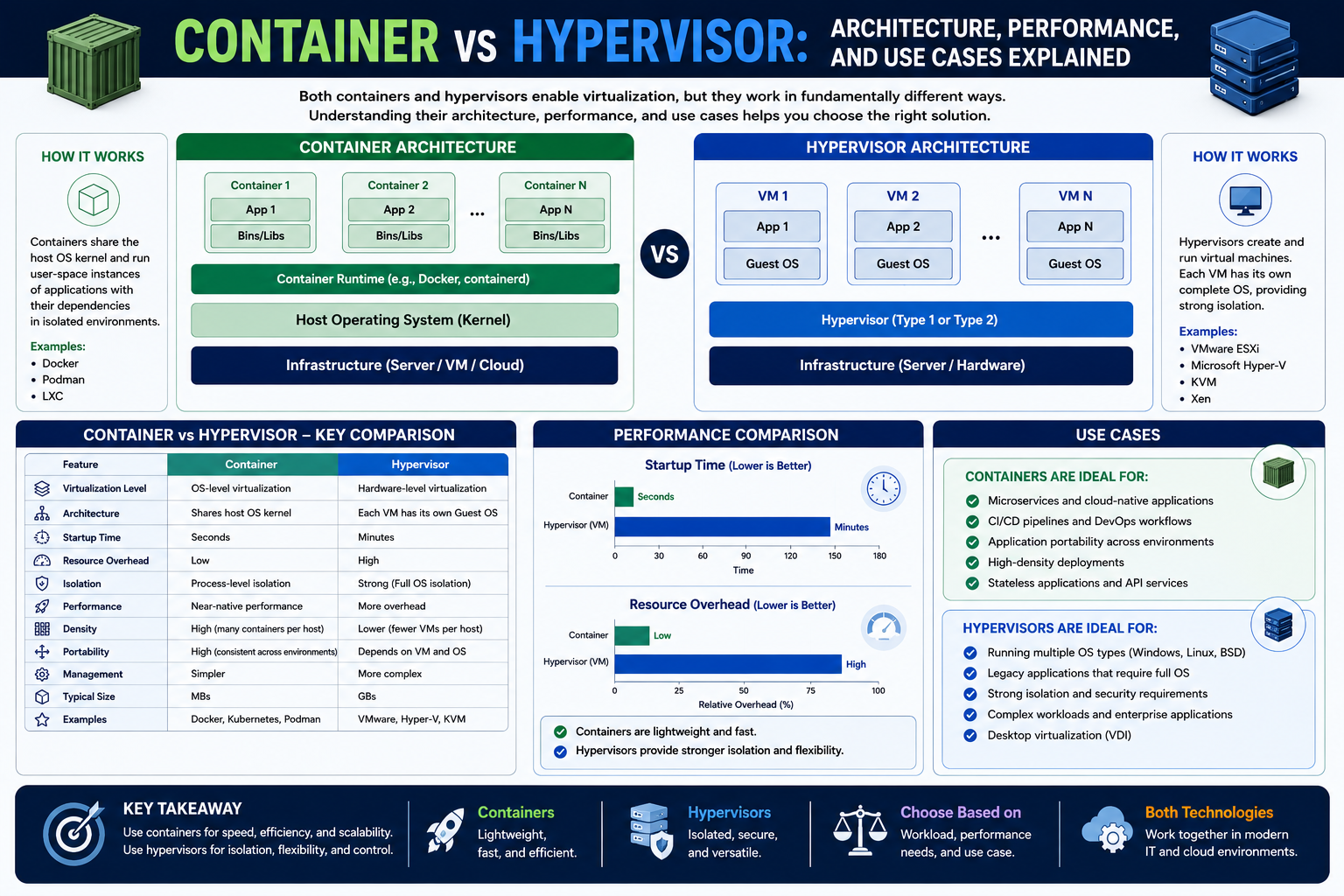
Modern computing is built on layers of abstraction that hide complexity while giving users and applications a simpler way to interact with underlying systems. This idea is not limited to virtualization alone; it appears throughout computer science. From the way operating systems manage hardware to how programming languages hide machine-level instructions, abstraction is the core principle that allows technology to scale and remain usable.
At its core, abstraction means “hiding unnecessary detail.” Instead of forcing every application or user to understand how physical hardware works, systems present a simplified interface. For example, when you save a file, you do not interact directly with disk sectors or memory addresses. Instead, the operating system provides a file system abstraction. This pattern repeats at many levels, including networking, storage, and application design.
In the context of virtualization, abstraction becomes even more powerful. Virtual machines and containers are both built on the idea of separating “what you see” from “what actually exists underneath.” A virtual machine abstracts hardware, while a container abstracts the operating system. This distinction is subtle but extremely important in understanding how modern infrastructure works.
To better appreciate this, it helps to think in layers. At the bottom is physical hardware: CPU, memory, storage devices, and network interfaces. Above that sits a layer that interprets and manages these resources. On top of that, operating systems and applications run. Virtualization technologies insert additional abstraction layers that reshape how these components interact.
By introducing these layers, computing environments gain flexibility. A single physical machine can behave like many independent systems, each running different workloads. This is especially important in cloud computing, where efficiency, scalability, and isolation are essential requirements.
Understanding abstraction is, therefore, the first step toward understanding virtualization. Without it, concepts like virtual machines and containers seem unnecessarily complex. With it, they become logical extensions of the same idea: simplifying interaction with complex systems by adding controlled layers of separation.
Foundations of Virtualization Technology
Virtualization is the process of creating a virtual version of something that traditionally exists in physical form. In computing, this usually refers to creating virtual hardware environments that behave like real machines. These virtual environments allow multiple operating systems to run on a single physical system without interfering with one another.
The concept of virtualization is not new. It originated in mainframe computing, where expensive hardware needed to be shared efficiently among multiple users. Over time, this idea evolved and became widely adopted in enterprise computing and later in cloud infrastructure.
At a fundamental level, virtualization solves three major problems. First, it improves hardware utilization. Instead of dedicating one physical machine to one workload, multiple workloads can share the same system. Second, it improves isolation. Each virtual environment operates independently, reducing the risk of one system affecting another. Third, it improves flexibility. Systems can be created, modified, or destroyed quickly without physical hardware changes.
Virtualization relies on a specialized software layer that manages this separation. This layer is responsible for allocating resources such as CPU time, memory space, and storage access to different virtual environments. It ensures that each environment believes it has full control over its allocated resources, even though they are shared at the physical level.
One of the most important outcomes of virtualization is the ability to simulate entire computers. These simulated machines behave exactly like physical computers from the perspective of the operating system running inside them. This means they can run standard operating systems, applications, and services without modification.
However, virtualization is not just about simulation. It is about controlled management. The virtualization layer ensures that workloads remain isolated while still efficiently sharing underlying resources. This balance between isolation and efficiency is what makes virtualization so powerful in modern infrastructure.
As systems have grown more complex, virtualization has evolved to include different models, each optimized for specific use cases. Among these models, virtual machines and hypervisors form the foundation of traditional virtualization, while containers represent a newer, more lightweight approach built on a different abstraction principle.
Architecture of Virtual Machines
A virtual machine is essentially a complete software-based computer. It behaves like a physical machine but exists entirely in software. Each virtual machine includes virtual hardware components such as a CPU, memory, storage, and network interfaces. On top of this virtual hardware, an operating system is installed just as it would be on a physical machine.
The key idea behind a virtual machine is isolation. Each VM operates independently, with its own operating system kernel and user space. This means that processes running inside one VM are completely separate from those running in another, even if they share the same physical host.
The architecture of a virtual machine can be visualized in layers. At the bottom is the physical hardware. Above that is the virtualization layer, which manages resource allocation and hardware emulation. On top of this layer, multiple virtual machines run, each containing its own operating system and applications.
This design provides strong isolation because each VM has its own kernel. The kernel is the core component of an operating system responsible for managing hardware resources. By giving each VM its own kernel, the system ensures that one VM cannot directly interfere with another.
Inside each virtual machine, everything behaves as if it were running on a real computer. Applications do not need to know that they are running in a virtualized environment. This transparency is one of the strengths of virtual machines, as it allows existing software to run without modification.
However, this level of abstraction comes at a cost. Because each VM includes a full operating system, they consume significant system resources. Memory usage, storage requirements, and CPU overhead are all higher compared to more lightweight alternatives.
Despite this, virtual machines remain widely used because of their compatibility and strong isolation. They are particularly valuable in environments where different operating systems need to coexist or where security boundaries must be strictly enforced.
Another important aspect of virtual machine architecture is hardware emulation. Since physical hardware cannot be directly shared between multiple operating systems, the virtualization layer must simulate hardware devices. This includes virtual disks, network adapters, and memory management units.
This simulation allows each VM to function independently, but it also introduces overhead. The virtualization layer must translate virtual hardware requests into real hardware operations, which can impact performance.
Even with these limitations, virtual machines provide a stable and predictable computing environment. This makes them ideal for enterprise systems, legacy applications, and environments where consistency is more important than raw efficiency.
Hypervisors and Their Role in Virtualization
At the core of virtual machine technology is a component known as the hypervisor. The hypervisor is responsible for creating, managing, and running virtual machines. It acts as a mediator between physical hardware and virtual environments, ensuring that resources are distributed efficiently and securely.
There are two primary types of hypervisors, each with a different architecture and use case. These are commonly referred to as Type 1 and Type 2 hypervisors.
Type 1 hypervisors run directly on physical hardware. They do not require a host operating system. Instead, they are installed directly on the machine and take full control of system resources. Because they operate at this low level, they are often referred to as bare-metal hypervisors.
This architecture allows Type 1 hypervisors to deliver high performance and strong isolation. Since there is no intermediate operating system layer, resource management is more efficient. This makes them ideal for enterprise data centers and cloud infrastructure.
Type 2 hypervisors, on the other hand, run on top of an existing operating system. They behave like applications rather than system-level software. This means they rely on the host operating system to manage hardware resources.
While this introduces additional overhead, it also makes Type 2 hypervisors easier to use and more flexible for personal or development environments. They are commonly used for testing, learning, and running multiple operating systems on a single desktop machine.
The hypervisor’s main responsibility is resource allocation. It decides how CPU cycles, memory, and input/output operations are distributed among virtual machines. It also ensures that each VM remains isolated from others, preventing unauthorized access or interference.
Another important function of the hypervisor is scheduling. Since multiple virtual machines may compete for the same physical resources, the hypervisor must manage execution timing to ensure fair and efficient usage.
In addition to resource management, hypervisors handle hardware abstraction. They present virtualized versions of physical devices to each VM, allowing operating systems to interact with consistent interfaces regardless of the underlying hardware.
This combination of resource control, scheduling, and abstraction makes the hypervisor the foundation of traditional virtualization systems. Without it, virtual machines would not be able to function as independent computing environments.
Resource Management and Isolation in Virtual Machines
One of the most critical functions of virtualization is managing system resources effectively. Since multiple virtual machines share the same physical hardware, careful allocation is necessary to prevent conflicts and ensure stable performance.
CPU resources are divided among virtual machines using scheduling algorithms. Each VM is assigned a portion of processing time, which is managed by the hypervisor. This allows multiple operating systems to run simultaneously without directly competing for CPU access.
Memory management is another key area. Each virtual machine is allocated a specific amount of RAM, which is isolated from other VMs. This prevents one system from accessing or corrupting the memory of another. Techniques such as memory ballooning and dynamic allocation help optimize usage in more advanced systems.
Storage is virtualized through the use of virtual disks. These disks behave like physical storage devices but are actually files or logical volumes managed by the hypervisor. This allows virtual machines to be easily copied, backed up, or moved between physical systems.
Network resources are also virtualized. Each VM can have its own virtual network interface, allowing it to communicate with other systems as if it were a physical machine. Network isolation ensures that traffic remains controlled and secure.
Isolation is one of the most important benefits of virtual machines. Because each VM operates independently with its own operating system, failures or security issues in one environment do not directly affect others. This makes virtual machines ideal for environments where reliability and security are critical.
However, achieving this level of isolation requires significant overhead. Each virtual machine must maintain its own operating system kernel, system processes, and drivers. This duplication increases resource consumption but provides strong separation between workloads.
Resource management in virtualized environments is,, therefore, a balancing act. The system must maximize hardware utilization while maintaining performance and isolation. The hypervisor plays a central role in achieving this balance by dynamically adjusting allocations based on demand.
Real-World Applications of Virtual Machines
Virtual machines are widely used across different industries due to their flexibility and reliability. One of the most common use cases is server consolidation. Organizations often run multiple virtual machines on a single physical server to reduce hardware costs and improve efficiency.
Another major application is testing and development. Developers can create isolated environments that mimic production systems without risking disruption to live services. This allows for safe experimentation and debugging.
Virtual machines are also essential in cloud computing environments. Cloud providers rely heavily on virtualization to offer scalable infrastructure services. Customers can deploy virtual machines on demand, scaling resources up or down as needed.
In enterprise environments, virtual machines are used to run legacy applications that may not be compatible with modern hardware or operating systems. By encapsulating these applications within virtual machines, organizations can extend their usability without modifying them.
Security testing is another important use case. Virtual machines provide isolated environments where potentially dangerous software can be analyzed without affecting the host system.
Despite their advantages, virtual machines are not always the most efficient solution. Their heavy resource requirements can limit scalability in certain scenarios, especially when large numbers of lightweight applications need to be deployed. This limitation has led to the development of alternative technologies that focus on reducing overhead while maintaining isolation principles.
Limitations of Traditional Virtual Machine Models
While virtual machines offer strong isolation and compatibility, they are not without drawbacks. One of the most significant limitations is performance overhead. Because each VM runs a full operating system, system resources are heavily consumed even when workloads are minimal.
Another limitation is startup time. Booting a virtual machine requires initializing an entire operating system, which can take significant time compared to more lightweight alternatives. This makes virtual machines less suitable for rapidly scaling environments.
Storage requirements are also higher. Each VM requires its own operating system installation, system files, and applications. This leads to increased storage usage, especially in environments with many virtual machines.
Management complexity can also increase as systems scale. Although virtualization simplifies hardware management, coordinating large numbers of virtual machines can become challenging without advanced orchestration tools.
Despite these limitations, virtual machines remain a foundational technology in computing. Their ability to provide strong isolation, compatibility, and flexibility ensures their continued relevance in modern infrastructure.
The Evolution Toward Containers in Modern Computing
As computing systems evolved, the limitations of traditional virtual machines became more visible in large-scale, fast-moving environments. Organizations were no longer just running a few isolated workloads on dedicated servers; they were deploying hundreds or thousands of services that needed to scale quickly, update frequently, and remain highly efficient.
Virtual machines solved many foundational problems, such as isolation and compatibility, but they also introduced overhead. Each virtual machine required a full operating system, which meant slower startup times, higher memory usage, and increased storage consumption. As cloud computing and web-based applications expanded, these costs began to matter more.
This is where containers emerged as a new abstraction layer. Instead of virtualizing hardware, containers focus on virtualizing the operating system environment. The key idea is not to simulate an entire machine, but to isolate processes within a shared operating system kernel.
This shift represents an important change in thinking. Rather than asking “how can we run multiple operating systems on one machine,” containers ask “how can we run multiple applications efficiently on one operating system while keeping them isolated?”
This change makes containers fundamentally lighter than virtual machines. Instead of duplicating entire operating systems, containers reuse the host operating system kernel while packaging only the application and its dependencies.
As a result, containers are faster to start, easier to move between environments, and more efficient in terms of resource usage. These properties make them especially suitable for modern application development practices such as microservices and continuous deployment pipelines.
The evolution toward containers is not about replacing virtual machines entirely. Instead, it is about introducing a different abstraction layer that solves a different set of problems. Both technologies coexist in modern infrastructure, each serving specific roles depending on requirements.
Understanding the Core Architecture of Containers
To understand containers properly, it is important to break down their internal architecture. Unlike virtual machines, which simulate entire hardware environments, containers operate at the operating system level.
At the foundation of container technology is the host operating system. This system provides the kernel, which is the core component responsible for managing processes, memory, and hardware communication. All containers running on a system share this kernel.
Above the kernel, containers use isolated user spaces. These user spaces contain everything an application needs to run, including libraries, binaries, configuration files, and runtime dependencies. Each container behaves as if it has its own independent environment, even though it shares the underlying kernel with other containers.
This structure creates a unique balance between isolation and efficiency. Containers are isolated from one another at the process level, but they are not fully independent operating systems. Instead, they are isolated views of the same operating system.
A container does not include a full operating system kernel. This is one of the most important distinctions between containers and virtual machines. By removing the need for multiple kernels, containers significantly reduce overhead.
The container model also introduces the concept of immutable application environments. Once a container is built, it remains consistent regardless of where it is deployed. This ensures that applications behave the same way across development, testing, and production environments.
Another key aspect of container architecture is the use of layered images. Containers are built from images, which are read-only templates that define what the container environment should look like. These images are constructed in layers, with each layer representing a change or addition to the base system.
This layered structure improves efficiency because common components can be reused across multiple containers. For example, multiple applications may share the same base operating system layer, reducing duplication and saving storage space.
When a container runs, it creates a writable layer on top of the image. This layer stores any changes made during execution, while the underlying image remains unchanged. This design supports rapid deployment and easy rollback, as containers can be recreated from their original images at any time.
Container Engines and Runtime Systems
Containers do not run directly on the operating system without assistance. They rely on specialized software known as container engines or container runtimes. These systems are responsible for creating, managing, and executing containers.
A container engine acts as an interface between the operating system and containerized applications. It handles tasks such as pulling container images, starting and stopping containers, managing resources, and ensuring isolation between processes.
One of the most well-known container engines is Docker. Docker popularized container technology by making it accessible and easy to use for developers. It introduced a standardized way to package applications and their dependencies into portable units.
However, modern container ecosystems have evolved beyond Docker alone. Today, many systems use lightweight runtimes such as containerd or CRI-O. These runtimes are often integrated into larger orchestration platforms and are optimized for performance and scalability.
The role of a container runtime is to manage the container lifecycle. This includes creating container instances, allocating resources, enforcing isolation rules, and cleaning up resources when containers are stopped.
Container engines also interact with the operating system kernel to implement isolation mechanisms. This is done using features built into Linux and other modern operating systems. These features allow containers to behave as isolated environments even though they share the same kernel.
The container runtime ensures that each container only sees its own processes, file system, and network interfaces. This illusion of independence is what makes containers powerful, even though they are technically running on a shared system.
In large-scale environments, container runtimes are often managed by orchestration systems. These systems coordinate multiple container engines across clusters of machines, ensuring that workloads are distributed efficiently.
Operating System-Level Virtualization and Kernel Sharing
One of the most important differences between containers and virtual machines lies in how they interact with the operating system kernel. In virtual machines, each instance includes its own kernel. In containers, all instances share a single host kernel.
This approach is known as operating system-level virtualization. Instead of virtualizing hardware, it virtualizes user spaces within the operating system.
Kernel sharing is what makes containers extremely lightweight. Since there is no need to run multiple kernels, containers consume fewer resources and start much faster than virtual machines.
However, this shared kernel model also introduces certain constraints. All containers must be compatible with the host operating system kernel. For example, Linux containers require a Linux kernel to run, while Windows containers require a Windows kernel.
This dependency on the host kernel is a key design consideration when choosing container environments. It also influences how container platforms are deployed in mixed operating system environments.
To maintain isolation within a shared kernel, containers rely on several operating system features. These include process isolation, file system isolation, and network isolation. Each of these mechanisms ensures that containers remain independent from one another even though they share underlying resources.
This model represents a trade-off. While containers are more efficient, they do not provide the same level of isolation as virtual machines. Instead, they rely on the security and stability of the shared kernel.
Namespaces and Control Groups in Container Isolation
Container isolation is achieved using two fundamental operating system technologies: namespaces and control groups.
Namespaces are responsible for providing isolation between different containers. They ensure that each container has its own view of system resources such as process IDs, network interfaces, and file systems. From the perspective of a container, it appears as though it has exclusive access to these resources.
For example, process isolation ensures that a container can only see its own processes. It cannot directly view or interfere with processes running in other containers or on the host system.
Network namespaces provide each container with its own network stack. This allows containers to have separate IP addresses, routing tables, and network configurations.
File system namespaces ensure that containers have isolated views of the file system. This prevents containers from accessing files that belong to other containers or the host system.
While namespaces handle isolation, control groups (often called cgroups) manage resource allocation. Cgroups control how much CPU, memory, and disk I/O a container is allowed to use.
This ensures that no single container can consume all system resources and negatively impact others. It also allows administrators to enforce resource limits, improving overall system stability.
Together, namespaces and cgroups form the foundation of container isolation. They allow multiple containers to safely coexist on a single operating system while maintaining separation and fairness in resource usage.
Container Images and Layered File Systems
Container images are the blueprint for containers. They define everything needed to run an application, including the operating system environment, libraries, dependencies, and application code.
One of the most important features of container images is their layered structure. Instead of being a single monolithic file system, images are composed of multiple layers stacked on top of each other.
Each layer represents a set of changes, such as installing software, adding configuration files, or modifying system settings. These layers are read-only, which means they cannot be modified once created.
When a container is launched from an image, a new writable layer is added on top. This allows the container to make changes during runtime without affecting the original image.
This layered approach provides several advantages. It reduces storage requirements because shared layers can be reused across multiple containers. It also improves efficiency when distributing images, as only changed layers need to be transferred.
Another benefit is version control. Since each layer represents a specific change, container images can be versioned and tracked more easily than traditional software deployments.
This structure also supports caching. If multiple containers use the same base image layer, that layer does not need to be downloaded or recreated multiple times. This significantly improves performance in large-scale environments.
Portability and Environmental Consistency in Containers
One of the most powerful features of containers is portability. A containerized application can run consistently across different environments without modification.
This is possible because container packages not just the application, but also its dependencies and runtime environment. As long as the target system supports a compatible container engine, the container will behave the same way.
This solves one of the most common problems in software development: environment inconsistency. In traditional setups, applications often behave differently in development, testing, and production environments due to differences in configuration or dependencies.
Containers eliminate this issue by standardizing the runtime environment. The same container image used in development is deployed directly into production without modification.
This consistency improves reliability and reduces deployment errors. It also simplifies collaboration between development and operations teams, as both work with the same container definitions.
Portability also enables flexibility in infrastructure. Containers can be moved between physical machines, virtual machines, and cloud environments with minimal effort.
This makes containers especially useful in hybrid cloud and multi-cloud strategies, where applications need to run across different infrastructure providers.
Containers and Modern Application Design
The rise of containers has significantly influenced how applications are designed and built. One of the most important changes is the shift toward microservices architecture.
In a microservices model, applications are broken down into smaller, independent services. Each service performs a specific function and communicates with other services through APIs or messaging systems.
Containers are well-suited for this model because they provide isolation and portability for each service. Each microservice can run in its own container, allowing it to be developed, deployed, and scaled independently.
This modular approach improves flexibility. Instead of updating an entire application, individual services can be updated without affecting others.
It also improves scalability. Services that experience high demand can be scaled independently by running more container instances.
Containers also integrate well with continuous integration and continuous deployment pipelines. Because container images are consistent and portable, they can be automatically built, tested, and deployed across environments.
This automation reduces manual effort and speeds up the software delivery process.
Container Security and Isolation Considerations
While containers provide isolation, their security model is different from that of virtual machines. Since containers share the host operating system kernel, a vulnerability in the kernel can potentially affect all containers.
This makes kernel security extremely important in containerized environments. Regular updates and patches are essential to maintaining system integrity.
Containers also rely on user-space isolation, which is generally less strict than hardware-level isolation used in virtual machines. This means additional security measures are often required in sensitive environments.
Common security practices include limiting container privileges, scanning images for vulnerabilities, and using runtime monitoring tools to detect unusual behavior.
Another important aspect is image trust. Since container images can be shared and reused, ensuring that images come from trusted sources is critical to preventing security risks.
Despite these challenges, containers include many built-in security mechanisms that make them suitable for production use when properly configured.
Container Lifecycle and Runtime Behavior
The lifecycle of a container is relatively simple compared to virtual machines. It typically begins with image creation, followed by container instantiation, execution, and termination.
When a container is launched, the container engine retrieves the required image and creates a new instance based on that image. The container then enters a running state, executing the application defined within it.
During runtime, the container operates in isolation, using allocated system resources and interacting with the host kernel through controlled interfaces.
Once the container completes its task or is stopped, it enters a terminated state. At this point, any changes made during execution are discarded unless explicitly saved.
This ephemeral nature is one of the defining characteristics of containers. They are designed to be temporary, disposable units that can be recreated easily.
This lifecycle model supports scalability and resilience. Instead of maintaining long-lived instances, systems can continuously create and destroy containers as needed.
Container Usage Patterns in Real Systems
In real-world environments, containers are used in a variety of patterns depending on application needs.
One common pattern is stateless application deployment. In this model, applications do not store persistent data locally. Instead, they rely on external storage systems. This makes it easy to scale containers horizontally.
Another pattern is service decomposition, where large applications are broken into smaller services running in separate containers. This improves modularity and fault isolation.
Containers are also widely used in batch processing systems, where tasks are executed in isolated environments and then discarded after completion.
In development workflows, containers provide consistent environments for testing and debugging. Developers can replicate production-like environments locally without complex setup procedures.
In production environments, containers are often managed at scale using orchestration systems that handle scheduling, scaling, and fault recovery automatically.
Comparing Virtual Machines and Containers in Practical Environments
When you move from theory to real-world infrastructure, the differences between virtual machines and containers become much clearer. Both technologies solve the problem of running multiple workloads on shared hardware, but they do so at different layers of the system and with different trade-offs in mind.
Virtual machines focus on simulating complete hardware environments. Containers focus on isolating applications within a shared operating system. This difference influences performance, scalability, security, and operational complexity in meaningful ways.
In practical environments, the choice between the two is rarely absolute. Instead, organizations often use both technologies together. Virtual machines provide strong boundaries at the infrastructure level, while containers provide lightweight isolation at the application level.
Understanding when to use each approach depends on workload requirements, security needs, and operational goals.
Performance Differences and Resource Efficiency
One of the most noticeable differences between virtual machines and containers is performance overhead.
Virtual machines include full operating systems, each with its own kernel and system processes. This means that even idle virtual machines consume a significant amount of memory and CPU resources. The hypervisor must also manage hardware emulation and resource scheduling across multiple operating systems, which introduces additional overhead.
Containers, on the other hand, share the host operating system kernel. They do not require separate operating system instances, which drastically reduces resource usage. Because of this, containers can run more instances on the same hardware compared to virtual machines.
Startup time is another key performance factor. Virtual machines often take minutes to boot because they must initialize an entire operating system. Containers typically start in seconds because they only need to launch the application process within an already running operating system environment.
This difference becomes critical in environments where rapid scaling is required. For example, web services experiencing sudden spikes in traffic benefit greatly from container-based architectures due to their ability to spin up quickly.
However, virtual machines still maintain advantages in workloads that require consistent, long-running environments with heavy resource isolation. In such cases, performance overhead is less of a concern compared to stability and separation.
Security Models and Isolation Strength
Security is one of the most important factors when comparing virtual machines and containers. Both provide isolation, but they achieve it in fundamentally different ways.
Virtual machines offer hardware-level isolation. Each VM runs its own operating system, completely separate from the others. The hypervisor enforces strict boundaries between VMs, making it extremely difficult for one VM to access or interfere with another.
This strong isolation makes virtual machines highly suitable for environments where security is critical, such as multi-tenant systems, sensitive data processing, or compliance-driven industries.
Containers, however, share the same operating system kernel. While they are isolated at the process level using mechanisms like namespaces and control groups, they still rely on a shared kernel. This introduces a broader attack surface compared to virtual machines.
If the host kernel is compromised, all containers running on it may be affected. Because of this, container security depends heavily on kernel hardening, proper configuration, and runtime protection mechanisms.
Despite this, containers are still widely used in production environments because modern security tools significantly reduce risk. Image scanning, runtime monitoring, and strict access controls help ensure that containerized applications remain secure when properly managed.
In practice, many organizations combine both technologies to strengthen security. Sensitive workloads may run in virtual machines, while application services run in containers inside those virtual machines.
Scalability and Deployment Flexibility
Scalability is another area where containers and virtual machines differ significantly.
Virtual machines scale by replicating entire operating system environments. This makes scaling more resource-intensive and slower. Each new VM requires booting an operating system, allocating memory, and initializing system services.
Containers scale at the application level. Since they do not require full operating systems, they can be created and destroyed rapidly. This makes them ideal for environments that require dynamic scaling, such as web applications or microservices architectures.
In cloud computing environments, this difference is especially important. Containers allow infrastructure to respond quickly to changing demand. Virtual machines are better suited for stable workloads that do not require frequent scaling adjustments.
Deployment flexibility also differs between the two technologies. Virtual machines are typically heavier to move and replicate due to their size. Containers, being lightweight, can be easily transferred across systems and environments.
This portability allows containers to support modern deployment strategies such as continuous integration and continuous delivery pipelines. Applications can be built, tested, and deployed consistently across different environments without modification.
Operational Complexity and Management Overhead
Managing virtual machines and containers requires different levels of operational effort.
Virtual machine management involves handling operating systems, patching, resource allocation, and hypervisor configuration. Each VM must be maintained individually, including updates and security patches.
This can become complex in large environments where hundreds or thousands of VMs are deployed. Although automation tools exist, the underlying complexity remains higher due to full operating system dependencies.
Containers simplify many aspects of management by abstracting away the operating system layer. Instead of managing entire operating systems, administrators focus on container images and orchestration systems.
However, container environments introduce their own complexity. While individual containers are simple, large-scale container systems require orchestration platforms to manage scheduling, networking, scaling, and health monitoring.
This means that while containers reduce some forms of complexity, they shift operational responsibility toward platform management and automation systems.
In practice, organizations often adopt orchestration frameworks to manage this complexity effectively, allowing containers to be deployed at scale without manual intervention.
Use Cases for Virtual Machines
Virtual machines remain essential in many computing environments due to their strong isolation and compatibility.
One of their most common use cases is running multiple operating systems on the same hardware. This is especially useful in environments where different systems or legacy applications must coexist.
Virtual machines are also widely used in enterprise infrastructure. They provide stable environments for business-critical applications that require predictable performance and strong isolation.
Another important use case is security-sensitive workloads. Virtual machines are often preferred when strict separation between systems is required, such as in financial systems or regulated industries.
They are also useful for running legacy software that cannot be easily containerized. Because virtual machines emulate complete hardware environments, they can support older operating systems and applications without modification.
Development and testing environments also benefit from virtual machines, particularly when full system simulation is required.
Use Cases for Containers
Containers are designed for efficiency, speed, and scalability, making them ideal for modern application development.
One of their primary use cases is microservices architecture. Each service in a microservices system can run in its own container, allowing independent deployment and scaling.
Containers are also widely used in cloud-native applications. Their portability allows applications to run consistently across different environments, including development, testing, and production.
They are particularly useful in continuous integration and deployment pipelines. Because containers provide consistent environments, they reduce deployment errors and simplify automation.
Web applications benefit significantly from containers due to their ability to scale quickly in response to traffic changes.
Containers are also used in data processing workflows, where tasks are executed in isolated environments and discarded after completion.
Hybrid Environments: Using Both Technologies Together
In modern infrastructure, it is common to use both virtual machines and containers together rather than choosing one exclusively.
A typical setup involves running containers inside virtual machines. In this model, virtual machines provide infrastructure-level isolation, while containers provide application-level flexibility.
This hybrid approach combines the strengths of both technologies. Virtual machines ensure strong separation between different tenants or environments, while containers enable fast deployment and scaling of applications.
Cloud providers often use this model internally to balance security, performance, and resource efficiency.
Another emerging approach is the use of lightweight virtual machines designed specifically for container workloads. These systems aim to combine the isolation of virtual machines with the speed of containers.
This layered approach reflects the broader trend in computing: rather than replacing one technology with another, systems evolve by combining multiple abstraction layers to solve different problems.
Conclusion
Virtual machines and containers represent two important approaches to solving the same fundamental problem: how to run multiple workloads efficiently on shared infrastructure. Both rely on abstraction, but they operate at different layers of the computing stack. Virtual machines abstract hardware, allowing multiple operating systems to run independently on a single physical machine. This provides strong isolation and broad compatibility, making VMs well-suited for legacy systems, secure environments, and workloads that require full operating system control.
Containers, on the other hand, abstract the operating system itself. By sharing the host kernel and packaging only applications with their dependencies, containers deliver lightweight, fast, and highly portable environments. This makes them ideal for modern development practices such as microservices, continuous deployment, and cloud-native applications where speed and scalability are essential.
Rather than competing technologies, virtual machines and containers are often used together to complement each other’s strengths. Virtual machines provide structural isolation, while containers enhance efficiency and agility within those environments. Understanding both technologies allows better architectural decisions based on performance needs, security requirements, and operational goals. In modern IT systems, mastering this balance is key to building scalable, resilient, and efficient infrastructure.