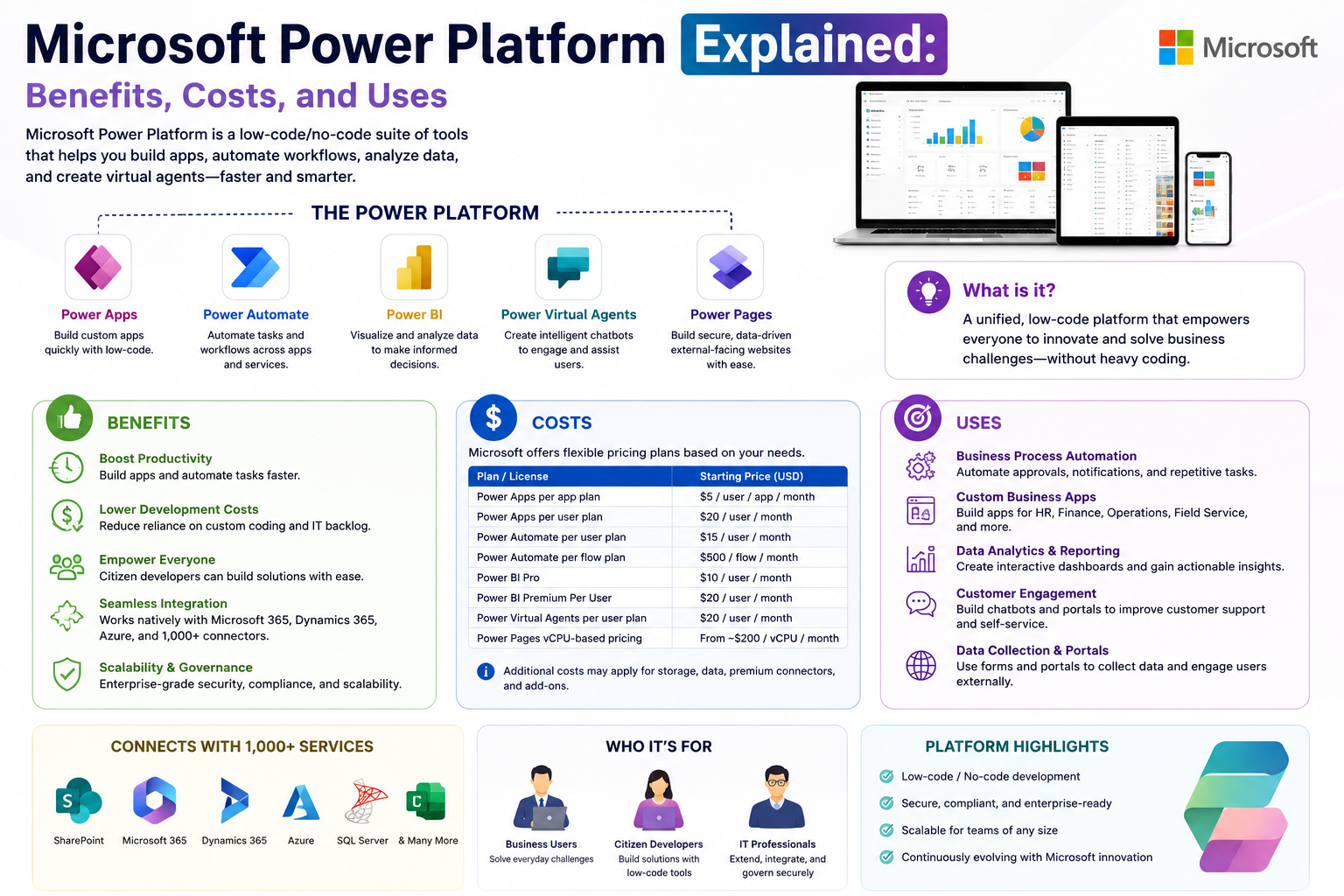
Microsoft Power Platform is a collection of integrated tools designed to help organizations analyze data, build applications, automate business processes, and create intelligent virtual assistants. It is built to support both technical developers and non-technical users, making digital transformation accessible across all levels of a business. Instead of relying heavily on traditional coding, it provides a low-code and no-code environment where solutions can be created faster and with less complexity.
Overview of Microsoft Power Platform
Microsoft Power Platform brings together several powerful services into one unified ecosystem. These services work together to help businesses improve productivity, make informed decisions, and reduce manual effort. The platform is widely used by organizations of all sizes because it connects easily with existing Microsoft services and external systems. It supports innovation by allowing users to turn ideas into working digital solutions without needing advanced programming knowledge.
Core Idea Behind the Platform
The main idea behind Microsoft Power Platform is simplification of digital development. Instead of requiring full-scale software engineering for every solution, it enables users to build apps, automate workflows, and visualize data using intuitive interfaces. This reduces dependency on IT departments for small or medium tasks and empowers employees to solve problems independently. The result is faster execution, improved efficiency, and better use of organizational data.
What Microsoft Power Platform is Used For
Microsoft Power Platform is used in a wide range of business scenarios. Companies use it to track performance metrics, automate repetitive administrative tasks, manage customer interactions, and create customized business applications. It also plays a major role in data analysis, helping organizations convert raw information into meaningful insights. By integrating different business processes, it reduces complexity and improves overall workflow efficiency.
Components of Microsoft Power Platform
Microsoft Power Platform is made up of four major components that work together seamlessly. These include Power BI, Power Apps, Power Automate, and Microsoft Copilot Studio. Each tool has a specific purpose, but together they create a complete digital solution ecosystem. This integration is what makes the platform highly effective for business transformation.
Power BI for Data Analysis and Visualization
Power BI is a business intelligence tool that helps users analyze data and create visual reports. It transforms complex datasets into easy-to-understand charts, graphs, and dashboards. This makes it easier for decision-makers to identify trends, monitor performance, and understand business conditions in real time.
Power BI allows users to connect multiple data sources and combine them into a single dashboard. This includes spreadsheets, databases, cloud services, and business applications. The ability to merge data from different systems ensures that organizations have a complete view of their operations.
Another important feature of Power BI is real-time data analysis. Businesses can monitor live updates and make quick decisions based on current information. This is especially useful in fast-moving industries where timing is critical.
Power Apps for Custom Application Development
Power Apps is a tool that allows users to create custom business applications without needing deep programming knowledge. It uses a drag-and-drop interface that makes app development simple and accessible. This helps organizations quickly build solutions tailored to their specific needs.
There are different types of applications that can be created using Power Apps. Canvas-based applications allow full design flexibility, while model-driven applications are structured around data and business processes. There is also a feature that enables external users such as customers or partners to interact with applications securely.
Power Apps significantly reduces development time. Instead of waiting weeks or months for traditional software development, businesses can create functional applications in a much shorter time. This helps organizations respond quickly to changing requirements.
Power Automate for Workflow Automation
Power Automate is designed to automate repetitive tasks and business processes. It connects different applications and systems so that tasks can be completed automatically without manual intervention. This improves efficiency and reduces human error.
One of the key features of Power Automate is the trigger-action system. A specific event, such as receiving an email or updating a file, can trigger a series of automated actions. This allows workflows to run smoothly without constant supervision.
Power Automate also provides pre-built templates that make it easy to set up automation processes quickly. In addition, robotic process automation capabilities allow users to record manual tasks and convert them into automated workflows. This is particularly useful for tasks that involve repetitive data entry or system updates.
By automating routine work, employees can focus on more important tasks that require creativity and decision-making. This leads to improved productivity and better resource utilization across the organization.
Microsoft Copilot Studio for AI Chatbots
Microsoft Copilot Studio is a tool used to create intelligent virtual assistants known as copilots. These AI-powered assistants can communicate with users, answer questions, and perform tasks automatically. It includes capabilities that allow businesses to design chatbots without coding experience.
These chatbots use natural language processing, which allows them to understand user queries in a conversational way. This makes interactions feel more natural and user-friendly. Businesses can use chatbots to provide customer support, handle inquiries, and guide users through processes.
Copilot Studio also integrates with other systems, allowing chatbots to retrieve information from databases or perform actions like updating records. This enhances their functionality and makes them more useful in real business environments.
Another important aspect is performance tracking. Businesses can monitor chatbot interactions and improve responses over time based on user behavior and feedback. This ensures continuous improvement in customer service quality.
Core Uses of Microsoft Power Platform in Business
Microsoft Power Platform is widely used across industries for different purposes. One of its main uses is building custom applications that solve specific business problems. These applications help organizations streamline operations and reduce manual effort.
It is also used for data analysis and reporting. Businesses rely on Power BI to turn large amounts of data into meaningful insights that support decision-making. This helps leaders understand performance trends and plan effectively.
Automation is another major use case. Power Automate helps organizations eliminate repetitive tasks and improve efficiency. This ensures that workflows run smoothly without unnecessary delays.
Customer engagement is also enhanced through AI-powered chatbots created with Copilot Studio. These chatbots provide instant responses to customer queries and improve overall service experience.
Benefits of Microsoft Power Platform
One of the key benefits of Microsoft Power Platform is ease of use. Even users without technical backgrounds can create applications, automate processes, and analyze data. This makes technology more accessible across organizations.
Another major advantage is cost efficiency. By reducing the need for traditional software development and manual processes, businesses can save both time and money. It also helps reduce operational complexity.
The platform integrates seamlessly with other Microsoft tools, allowing smooth data flow between systems. This ensures better collaboration across departments and improves overall productivity.
Real-time insights are another important benefit. Organizations can access updated information instantly, which supports faster and more accurate decision-making.
Customization is also a strong feature. Businesses can design solutions that fit their specific needs rather than relying on generic software. This flexibility helps improve operational efficiency.
Automation of repetitive tasks reduces workload and minimizes errors. Employees can focus on higher-value activities that contribute more to business growth.
Cost Considerations of Microsoft Power Platform
The cost of using Microsoft Power Platform depends on the tools and features required by an organization. Pricing varies based on usage, scale, and selected services. Some tools offer basic free access, while advanced features require subscription plans.
Power BI offers different pricing options depending on reporting and sharing needs. Organizations that require advanced analytics and collaboration features typically opt for paid versions.
Power Apps pricing is based on usage and user requirements. Businesses can choose plans depending on the number of users and level of application complexity. Additional features may involve extra costs.
Power Automate also offers flexible pricing models. Costs depend on automation volume and the type of workflows being implemented. Organizations with complex automation needs may require higher-tier plans.
Copilot Studio pricing depends on chatbot usage and integration requirements. Businesses using AI-powered customer support at scale may need more advanced configurations.
While subscription costs exist, many organizations find that the platform reduces overall expenses by minimizing manual labor, improving efficiency, and reducing the need for custom-built software systems.
Business Uses Across Industries
Microsoft Power Platform is used across many industries including finance, healthcare, retail, education, and manufacturing. In finance, it helps with reporting, fraud detection, and process automation. In healthcare, it supports patient management and data tracking.
Retail businesses use it for inventory management, customer engagement, and sales analysis. Educational institutions use it to manage student data and automate administrative processes. Manufacturing companies rely on it for production tracking and operational efficiency.
The flexibility of the platform makes it suitable for almost any business environment. It can adapt to different workflows and requirements, making it a valuable tool for digital transformation initiatives.
Final conclusion
Microsoft Power Platform continues to evolve as a powerful ecosystem for building applications, analyzing data, automating workflows, and enhancing customer interactions. Its ability to bring together multiple tools into one integrated system makes it an essential solution for modern businesses aiming to improve efficiency and innovation.